
基于防火墙的VRRP技术--华为防火墙双机热备--VGMP
目录
为了解决多个VRRP备份组状态不一致的问题,华为防火墙引入VGMP(VRRP Group Management Protocol)来实现对VRRP备份组的统一管理,保证多个VRRP备份组状态的一致性。我们将防火墙上的所有VRRP备份组都加入到一个VGMP组中,由VGMP组来集中监控并管理所有的VRRP备份组状态。如果VGMP组检测到其中一个VRRP备份组的状态变化,则VGMP组会控制组中的所有VRRP备份组统一进行状态切换,保证各VRRP备份组状态的一致性。双机热备协议HRP(Huawei Redundancy Protocol)协议是承载在VGMP(Vrrp Group Management Protocol)报文上进行传输的,在Master和Backup防火墙设备之间备份关键配置命令和会话表状态信息,是双机热备协议。VGMP、HRP是华为私有协议
主备备份双机热备配置
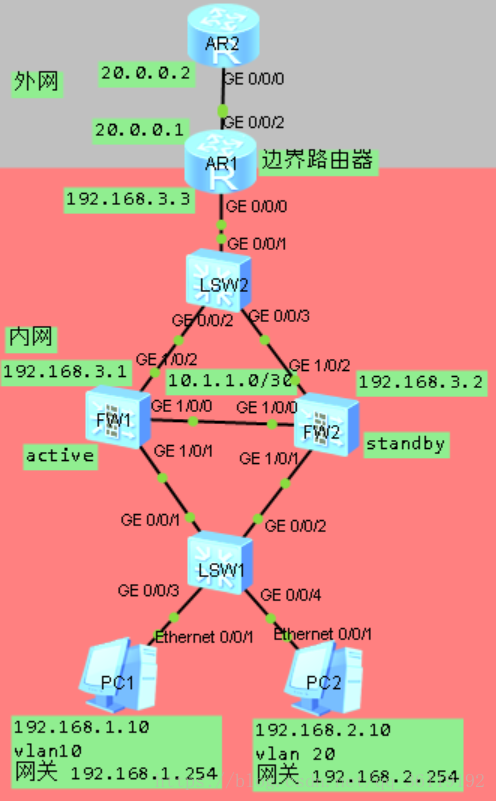
在主备备份双机热备模式下,FW1既是PC1的网关也是PC2的网关,也是AR1回去的路由的默认下一跳。在主备备份双机热备模式下,假如FW1宕机了,FW2会立刻切换到Active状态,从而不影响主机与外界通信。
如图,PC1和PC2是企业内网的主机,属于不同的VLAN。AR1是边界路由器。FW1和FW2是企业内部防火墙,他们之间形成双机热备,FW1是active状态,FW2是standby状态。企业内网通过AR1的出端口通过NAT方式访问外网。在防火墙FW1上还配置链路追踪功能,追踪AR2的g0/0/0口,如果到达不了,则切换状态。AR1下面的配置
PC1
PC>ipconfig

IPv4 address......................: 192.168.1.10

Subnet mask.......................: 255.255.255.0

Gateway...........................: 192.168.1.254

Physical address..................: 54-89-98-30-73-39

Vlan .............................: 10
PC2
PC>ipconfig

IPv4 address......................: 192.168.2.10

Subnet mask.......................: 255.255.255.0

Gateway...........................: 192.168.2.254

Physical address..................: 54-89-98-AF-62-C9

Vlan..............................: 20
LSW1
#

vlan batch 10 20

#

interface GigabitEthernet0/0/1

 port link-type trunk

 port trunk allow-pass vlan 10 20

#

interface GigabitEthernet0/0/2

 port link-type trunk

 port trunk allow-pass vlan 10 20

#

interface GigabitEthernet0/0/3

 port link-type access

 port default vlan 10

#

interface GigabitEthernet0/0/4

 port link-type access

 port default vlan 20

#
FW1
#

 hrp enable

 hrp interface GigabitEthernet1/0/0 remote 10.1.1.2

 hrp preempt delay 10

 hrp track ip-link track

#

ip-link check enable

ip-link name track

 destination 20.0.0.2 mode icmp

#

interface GigabitEthernet1/0/0

 undo shutdown

 ip address 10.1.1.1 255.255.255.252

#

interface GigabitEthernet1/0/1.10

 vlan-type dot1q 10

 ip address 192.168.1.1 255.255.255.0

 vrrp vrid 10 virtual-ip 192.168.1.254 active

#

interface GigabitEthernet1/0/1.20

 vlan-type dot1q 20

 ip address 192.168.2.1 255.255.255.0

 vrrp vrid 20 virtual-ip 192.168.2.254 active

#

interface GigabitEthernet1/0/2

 undo shutdown

 ip address 192.168.3.1 255.255.255.0

 vrrp vrid 30 virtual-ip 192.168.3.254 active

#

firewall zone trust

 set priority 85

 add interface GigabitEthernet0/0/0

 add interface GigabitEthernet1/0/1.10

 add interface GigabitEthernet1/0/1.20

#

firewall zone untrust

 set priority 5

 add interface GigabitEthernet1/0/2

#

firewall zone name heartbeat id 4

 set priority 80

 add interface GigabitEthernet1/0/0

#

ip route-static 0.0.0.0 0.0.0.0 192.168.3.3

#

#

security-policy

 rule name TRUST_UN_TRUST

  source-zone trust

  destination-zone untrust

  service icmp

  action permit

#
FW2
#

 hrp enable

 hrp interface GigabitEthernet1/0/0 remote 10.1.1.1

 hrp preempt delay 10

#

interface GigabitEthernet1/0/1

 undo shutdown

#

interface GigabitEthernet1/0/1.10

 vlan-type dot1q 10

 ip address 192.168.1.2 255.255.255.0

 vrrp vrid 10 virtual-ip 192.168.1.254 standby

#

interface GigabitEthernet1/0/1.20

 vlan-type dot1q 20

 ip address 192.168.2.2 255.255.255.0

 vrrp vrid 20 virtual-ip 192.168.2.254 standby

#

interface GigabitEthernet1/0/2

 undo shutdown

 ip address 192.168.3.2 255.255.255.0

 vrrp vrid 30 virtual-ip 192.168.3.254 standby

#

firewall zone trust

 set priority 85

 add interface GigabitEthernet0/0/0

 add interface GigabitEthernet1/0/1.10

 add interface GigabitEthernet1/0/1.20

#

firewall zone untrust

 set priority 5

 add interface GigabitEthernet1/0/2

#

firewall zone name heartbeat id 4

 set priority 80

 add interface GigabitEthernet1/0/0

#

ip route-static 0.0.0.0 0.0.0.0 192.168.3.3

#

security-policy

 rule name TRUST_UN_TRUST

  source-zone trust

  destination-zone untrust

  service icmp

  action permit

#
AR1
#

acl number 2000

 rule 5 permit source 192.168.2.0 0.0.0.255

 rule 10 permit source 192.168.1.0 0.0.0.255

#

interface GigabitEthernet0/0/0

 ip address 192.168.3.3 255.255.255.0

#

interface GigabitEthernet0/0/2

 ip address 20.0.0.1 255.255.255.0

 nat outbound 2000

#

ip route-static 192.168.1.0 255.255.255.0 192.168.3.254

ip route-static 192.168.2.0 255.255.255.0 192.168.3.254

#
AR2
#

interface GigabitEthernet0/0/0

 ip address 20.0.0.2 255.255.255.0

#
负载分担双机热备配置
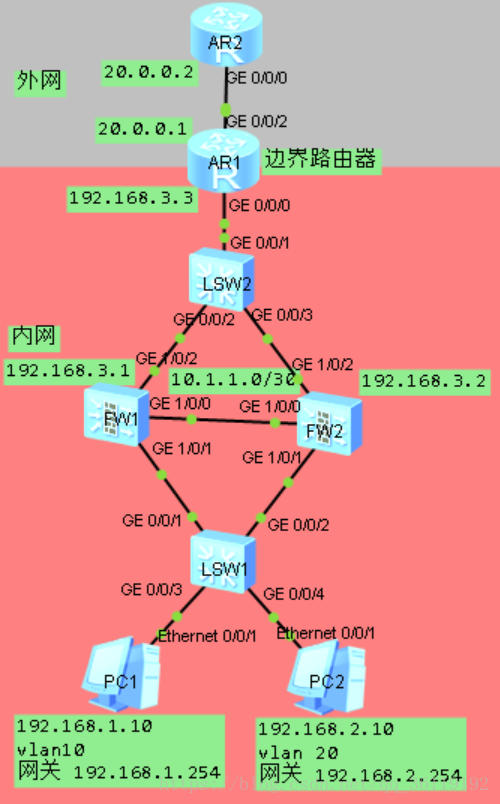
在负载分担双机热备模式下,FW1是PC1的网关,FW2是PC2的网关。AR1回往PC1的下一跳是PC1,AR2回往PC2的下一跳是PC2。FW1和FW2之间形成负载分担双机热备关系,其实任何一个防火墙的接口down了,都不影响主机和外接通信。
如图,PC1和PC2是企业内网的主机,属于不同的VLAN。AR1是边界路由器。FW1和FW2是企业内部防火墙,他们之间形成双机热备,FW1既有active状态也有standby状态,FW2既有active状态也有standby状态。企业内网通过AR1的出端口通过NAT方式访问外网。
PC1
PC>ipconfig

IPv4 address......................: 192.168.1.10

Subnet mask.......................: 255.255.255.0

Gateway...........................: 192.168.1.254

Physical address..................: 54-89-98-30-73-39

Vlan..............................: 10
PC2
PC>ipconfig

IPv4 address......................: 192.168.2.10

Subnet mask.......................: 255.255.255.0

Gateway...........................: 192.168.2.254

Physical address..................: 54-89-98-AF-62-C9

Vlan..............................: 20
LSW1
[SW1]display current-configuration

#

vlan batch 10 20

#

interface GigabitEthernet0/0/1

 port link-type trunk

 port trunk allow-pass vlan 10 20

#

interface GigabitEthernet0/0/2

 port link-type trunk

 port trunk allow-pass vlan 10 20

#

interface GigabitEthernet0/0/3

 port link-type access

 port default vlan 10

 stp edged-port enable

#

interface GigabitEthernet0/0/4

 port link-type access

 port default vlan 20

 stp edged-port enable

#
FW1
HRP_M[FW1]display current-configuration

#

 hrp enable

 hrp interface GigabitEthernet1/0/0 remote 10.1.1.2

#

interface GigabitEthernet1/0/1.10

 vlan-type dot1q 10

 ip address 192.168.1.1 255.255.255.0

 vrrp vrid 10 virtual-ip 192.168.1.254 active

#

interface GigabitEthernet1/0/1.20

 vlan-type dot1q 20

 ip address 192.168.2.1 255.255.255.0

 vrrp vrid 20 virtual-ip 192.168.2.254 standby

#

interface GigabitEthernet1/0/2

 undo shutdown

 ip address 192.168.3.1 255.255.255.0

 vrrp vrid 30 virtual-ip 192.168.3.253 active

 vrrp vrid 40 virtual-ip 192.168.3.254 standby

#

firewall zone trust

 set priority 85

 add interface GigabitEthernet0/0/0

 add interface GigabitEthernet1/0/1.10

 add interface GigabitEthernet1/0/1.20

 add interface GigabitEthernet1/0/1

#

firewall zone untrust

 set priority 5

 add interface GigabitEthernet1/0/2

#

firewall zone name heartbeat id 4

 set priority 80

 add interface GigabitEthernet1/0/0

#

ip route-static 0.0.0.0 0.0.0.0 192.168.3.3

#

security-policy

 rule name TRUST_TO_UNTRUST

  source-zone trust

  destination-zone untrust

  service icmp

  action permit

#
FW2
HRP_S[FW2]display current-configuration

#

 hrp enable

 hrp interface GigabitEthernet1/0/0 remote 10.1.1.1

#

interface GigabitEthernet1/0/0

 undo shutdown

 ip address 10.1.1.2 255.255.255.252

#

interface GigabitEthernet1/0/1.10

 vlan-type dot1q 10

 ip address 192.168.1.2 255.255.255.0

 vrrp vrid 10 virtual-ip 192.168.1.254 standby

#

interface GigabitEthernet1/0/1.20

 vlan-type dot1q 20

 ip address 192.168.2.2 255.255.255.0

 vrrp vrid 20 virtual-ip 192.168.2.254 active

#

interface GigabitEthernet1/0/2

 undo shutdown

 ip address 192.168.3.2 255.255.255.0

 vrrp vrid 30 virtual-ip 192.168.3.253 standby

 vrrp vrid 40 virtual-ip 192.168.3.254 active

#

firewall zone trust

 set priority 85

 add interface GigabitEthernet0/0/0

 add interface GigabitEthernet1/0/1

 add interface GigabitEthernet1/0/1.10

 add interface GigabitEthernet1/0/1.20

#

firewall zone untrust

 set priority 5

 add interface GigabitEthernet1/0/2

#

firewall zone name heartbeat id 4

 set priority 80

 add interface GigabitEthernet1/0/0

#

ip route-static 0.0.0.0 0.0.0.0 192.168.3.3

#

security-policy

 rule name TRUST_TO_UNTRUST

  source-zone trust

  destination-zone untrust

  service icmp

  action permit

#
AR1
[AR1]display current-configuration

#

acl number 2000

 rule 5 permit source 192.168.1.0 0.0.0.255

 rule 10 permit source 192.168.2.0 0.0.0.255

#

interface GigabitEthernet0/0/0

 ip address 192.168.3.3 255.255.255.0

#

interface GigabitEthernet0/0/2

 ip address 20.0.0.1 255.255.255.0

 nat outbound 2000

#

ip route-static 192.168.1.0 255.255.255.0 192.168.3.253

ip route-static 192.168.2.0 255.255.255.0 192.168.3.254

#
AR2
[AR2]display current-configuration

#

interface GigabitEthernet0/0/0

 ip address 20.0.0.2 255.255.255.0

#
VRRP和VGMP官方参考:https://forum.huawei.com/enterprise/zh/thread-282263.html
附上负载分担模式下的ensp源文件:链接: https://pan.baidu.com/s/1S5xzALnyg8cmn_lTB_jd_w 密码: yez5
基于路由器的 VRRP ------------>基于路由器的VRRP技术--VRRP的应用
基于三层交换机的VRRP-------->基于三层交换机的VRRP--MSTP、VRRP的综合运用
基于防火墙的VRRP技术--华为防火墙双机热备--VGMP的更多相关文章
- 基于三层交换机的VRRP技术--MSTP、VRRP的综合运用
MSTP (多生成树) 每个VLAN或者几个VLAN拥有一颗生成树,基于实例的生成树.instance 1.instance 2 每个实例拥有一颗生成树.MSTP可以实现多VLAN 的负载分担,可以实 ...
- 基于路由器的VRRP技术--VRRP的应用
目录 无Vlan的VRRP 有Vlan的VRRP 今天要讲的VRRP都是基于路由器的VRRP. 一:无Vlan的VRRP 如图,PC1和PC2是企业内网主机,AR1和AR2是企业访问外网的路由器,有一 ...
- 【Nginx】如何基于主从模式搭建Nginx+Keepalived双机热备环境?这是最全的一篇了!!
写在前面 最近出版了<海量数据处理与大数据技术实战>,详情可以关注 冰河技术 微信公众号,查看<我的<海量数据处理与大数据技术实战>出版啦!>一文. 也有不少小伙伴 ...
- Java技术中如何使用keepalived实现双机热备
Keepalived简介 Keepalived是Linux下一个轻量级别的高可用解决方案.高可用(High Avalilability,HA),其实两种不同的含义:广义来讲,是指整个系统的高可用行,狭 ...
- SqlServer双机热备技术实践笔记
SqlServer双机热备,大体上可以通过发布订阅,日志传送,数据库镜像来实现. 1,发布--订阅 是最早最简单的方案,但需要注意发布的时候,发布进程必须对快照目录有访问权限,这个问题可以从“查看快照 ...
- 基于RHCS的web双机热备集群搭建
基于RHCS的web双机热备集群搭建 RHCS集群执行原理及功能介绍 1. 分布式集群管理器(CMAN) Cluster Manager.简称CMAN.是一个分布式集群管理工具.它执行在集群的各个节 ...
- 基于主主复制的mysql双机热备+keepalived实现高可用性
- 基于nginx实现web服务器的双机热备
1.适用场景 对于部署重要的服务,会使用两台服务器,互相备份,共同执行同一服务.当一台服务器出现故障时,可以由另一台服务器承担服务任务,从而在不需要人工干预的情况下,自动保证系统能持续提供服务.双机热 ...
- Nginx+Keeplived双机热备(主从模式)
Nginx+Keeplived双机热备(主从模式) 参考资料: http://www.cnblogs.com/kevingrace/p/6138185.html 双机高可用一般是通过虚拟IP(漂移IP ...
随机推荐
- 146. LRU 缓存机制 + 哈希表 + 自定义双向链表
146. LRU 缓存机制 LeetCode-146 题目描述 题解分析 java代码 package com.walegarrett.interview; /** * @Author WaleGar ...
- HDOJ-1686(KMP算法)
Oulipo HDOJ-1686 本题的思路就是KMP,和HDOJ-1711思路一样,不再赘述详情可以看链接:1711题解 #include<iostream> #include<c ...
- Java 学习阶段性感想
阶段性感想·操千曲而后晓声 回顾 从2月17日 到 今天 4月19日,我算是暂时完成了Java入门的学习了. 从基本语法到面向对象,从常见API到字符串集合,从文件处理到多线程,我学到了很多,很多很多 ...
- Spring的IOC常用注解(含源码)
一.容器中注入组件 1,包扫描 + 组件标注注解 源码:Demo01_ComponentScan a)组件标注 @Controller @Service @Repository @Component ...
- 使用代码生成工具快速开发ABP框架项目
在一般系统开发中,我们一般要借助于高度定制化的代码生成工具,用于统一代码风,节省开发时间,提高开发效率.不同的项目,它的项目不同分层的基类定义不同,我们需要在框架基类的基础上扩展我们的业务类代码,尽量 ...
- ajax轮询原理及其实现方式
ajax轮询原理及其实现方式 ajax轮询的两种方式 方式1:设定一个定时器,无论有无结果返回,时间一到就会继续发起请求,这种轮询耗费资源,也不一定能得到想要的数据,这样的轮询是不推荐的. 方式2: ...
- P1048_采药(JAVA语言)
思路:动态规划的背包问题.把时间看作重量,转换为01背包问题求解. 题目描述 辰辰是个天资聪颖的孩子,他的梦想是成为世界上最伟大的医师.为此,他想拜附近最有威望的医师为师.医师为了判断他的资质,给他出 ...
- 分子量(JAVA语言)
package 第三章习题; /* * 给出一种物质的分子式(不带括号)求分子量. * 本题分子只包含4种原子,分别为C,H,O,N * 分子量为分别为12.01,1.008,16.00,14 ...
- 根据数据渲染DOM树形菜单——中途感想
根据数据渲染DOM树形菜单,这个需求做了几天了.一开始觉得用while也可以实现一层一层查找数据,但后来发现while还是做不到,因为我查找这个动作必须有进入有出来然后进入下一个条目,但while只能 ...
- 实践解析丨Rust 内置 trait:PartialEq 和 Eq
摘要:Rust 在很多地方使用了 traits, 从非常浅显的操作符重载, 到 Send, Sync 这种非常微妙的特性. Rust 在很多地方使用了 traits, 从非常浅显的操作符重载, 到 S ...