
spring使用Email邮件系统
1.提供邮件信息发送接收,附件绑定功能.
1.配置spring-email.xml文件
  <context:property-placeholder location="classpath:email.properties" ignore-unresolvable="true"/>

    <bean id="webEmailSender" class="org.springframework.mail.javamail.JavaMailSenderImpl">

        <property name="host" value="${demo-web.host}"/>

        <property name="port" value="${demo-web.port}"/>

        <property name="username" value="${bus-web.username}"/>

        <property name="password" value="${demo-web.password}"/>

        <property name="javaMailProperties">

            <props>

                <!--设置是否需要身份验证-->

                <prop key="mail.smtp.auth">true</prop>

            </props>

        </property>

    </bean>

    <bean id="smg" class="org.springframework.mail.SimpleMailMessage">

        <property name="from" value="${demo-web.from}"/>

        <property name="to" value="${demo-web.to}"/>

    </bean>

    <bean id="emailBean" class="com.demo.service.email.WebEmail"/>
定义Email消息类
import com.alibaba.dubbo.common.logger.Logger;

import com.alibaba.dubbo.common.logger.LoggerFactory;

import javax.annotation.Resource;

import javax.mail.internet.MimeMessage;

import org.springframework.mail.SimpleMailMessage;

import org.springframework.mail.javamail.JavaMailSenderImpl;

import org.springframework.mail.javamail.MimeMessageHelper;

import org.springframework.stereotype.Component;

/**

 * *********************************************************

 * <p/>

 * Author:     XiJun.Gong

 * Date:       2016-08-19 15:04

 * Version:    default 1.0.0

 * Class description:

 * <p/>

 * *********************************************************

 */

@Component(value = "emailBean")

public class WebEmail {

    private static Logger logger = LoggerFactory.getLogger(WebEmail.class);

    @Resource(name = "webEmailSender")

    private JavaMailSenderImpl mailSender;

    @Resource(name = "smg")

    private SimpleMailMessage MailMessage;

    public void send(String subject, String content) {

        try {

            MimeMessage mimeMessage = mailSender.createMimeMessage();

            MimeMessageHelper messageHelper = new MimeMessageHelper(mimeMessage, true);

            messageHelper.setFrom(MailMessage.getFrom());

            messageHelper.setSubject(subject); //主题

            messageHelper.setText(content);   //内容

            messageHelper.setTo(MailMessage.getTo()); //发送给

            /*

            ClassPathResource file = new ClassPathResource("new file(path)");

            messageHelper.addAttachment(file.getFilename(), file); //添加附件

            */

            mailSender.send(mimeMessage);    //发送邮件

        } catch (Exception e) {

            logger.error("the email send error ! {}", e);

        }

    }

}
3. email.properties配置文件
 bus-web.subject=123

 bus-web.content=123

 bus-web.from=vipgxjun@163.com

 bus-web.to=8888888@qq.com

 bus-web.host=smtp.163.com

 bus-web.port=25

 bus-web.username=xijun.gong

 bus-web.password=*******
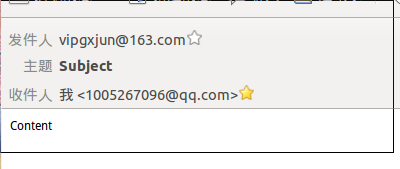
4.运行即可
spring使用Email邮件系统的更多相关文章
- 利用Velocity结合Spring发email
在spring中发mail是一件容易的事,如果利用Velocity做mail的模板来发送就更得心应手了. 首先,还是简单描述sping中的配置,发mail需要一个mail的engin: <bea ...
- 第19章-使用Spring发送Email
1 配置Spring发送邮件 Spring Email抽象的核心是MailSender接口.顾名思义,MailSender的实现能够通过连接Email服务器实现邮件发送的功能,如图19.1所示. 图1 ...
- Spring 发送 Email
本文转自:http://zl198751.iteye.com/blog/757617 看到了本文,收获颇丰,感谢之至! 首先介绍下Email的发送流程: 需要选中smtp邮件服务器,Yahoo不提供免 ...
- Spring – Sending E-Mail Via Gmail SMTP Server With MailSender--reference
Spring comes with a useful ‘org.springframework.mail.javamail.JavaMailSenderImpl‘ class to simplify ...
- 使用Spring发送Email
配置Spring发送邮件 Spring发送邮件底层还是使用JavaMail,我在http://www.cnblogs.com/lz2017/p/6882925.html 中记录过关于JavaMail的 ...
- 使用Spring 发送 Email !!!!
邮件服务器: 邮件服务器提供了邮件系统的基本结构,包括邮件传输,邮件分发,邮件存储等功能,以确保邮件能够发送到互联网中的任意地方. 邮件服务器就像我们生活中的邮局,为人们提供邮件服务.要保证邮件被正确 ...
- 使用spring 并加载模板发送Email 发邮件 java 模板
以下例子是使用spring发送email,然后加载到固定的模板,挺好的,大家可以试试 需要使用到spring-context 包 和 com.springsource.org.apache.veloc ...
- Spring 4 使用Freemarker模板发送邮件&添加附件
前言 Spring对Java的邮件发送提供了很好的支持,提供了超级简单的API,大大简化了Java邮件发送功能的开发. Spring对Email的支持是基于JavaMail API开发的,所以,我们在 ...
- Spring 4 官方文档学习 Spring与Java EE技术的集成
本部分覆盖了以下内容: Chapter 28, Remoting and web services using Spring -- 使用Spring进行远程和web服务 Chapter 29, Ent ...
随机推荐
- JavaScript中const、var和let区别浅析
在JavaScript中有三种声明变量的方式:var.let.const.下文给大家介绍js中三种定义变量的方式const, var, let的区别. 1.const定义的变量不可以修改,而且必须初始 ...
- Error:Failed to create directory 'C:\Users\Administrator\.gradle\caches\2.8\scripts\ijinit7_5jx13p26
在导入别人库的时候同步工程时出现此错误. 解决方式:File-->>Invalidate Caches/Restart,弹出一个框,点击Invalidate and Restart按钮,等 ...
- API Monitor v2.0 Alpha-r13 (32+64) 汉化版
API Monitor v2.0 Alpha-r13 (32+64) 汉化版: 链接: https://pan.baidu.com/s/1jIx5znC 密码: 4538 本软件已最大化汉化,已经趋于 ...
- CentOS安装cacti
1.安装软件包 yum install -y httpd php php-mysql \ php-snmp mysql mysql-server \ perl-DBD-MySQL php-pdo ne ...
- 阅读笔记 1 火球 UML大战需求分析
伴随着七天国庆的结束,紧张的学习生活也开始了,首先声明,阅读笔记随着我不断地阅读进度会慢慢更新,而不是一次性的写完,所以会重复的编辑.对于我选的这本 <火球 UML大战需求分析>,首先 ...
- 基于Apache+php+mysql的许愿墙网站的搭建create database xyq; //创建xyq数据库
1.准备CentOS7与CentOS5的基础配置 2.在两台虚拟机中配置yum. 3.在CentOS7中安装httpd与php与php-mysql PS:截图时已安装 CentOS7 关闭防火墙与se ...
- UVA 11384 正序数排列
https://uva.onlinejudge.org/index.php?option=com_onlinejudge&Itemid=8&page=show_problem& ...
- 新版微信h5视频自动播放
微信最近升级了新版本,直播视频不能自动播放,经过了一番探索,发现下列方法可以实现自动播放. if (typeof WeixinJSBridge == "undefined") { ...
- Javascript学习笔记:闭包题解(1)
代码: function createFunctions(){ var result=[]; for(var i=0;i<10;i++){ result[i]=function(){ retur ...
- BZOJ 4517: [Sdoi2016]排列计数
4517: [Sdoi2016]排列计数 Time Limit: 60 Sec Memory Limit: 128 MBSubmit: 911 Solved: 566[Submit][Status ...