
c# winform vlcPlayer播放器
vlcPlayer是一款免费开源的播放器项目,可以播放几乎所有的视频格式。
第一步:获取dll
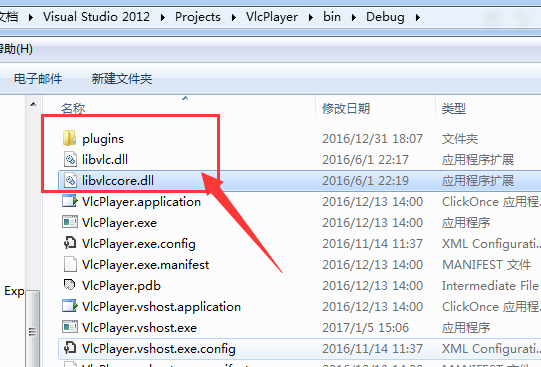
安装vlcplayer视频播放器,在安装目录下面获取所需的dll。
dll文件夹:plugins
还有2个dll:libvlc.dll,libvlccore.dll
第二步:获取播放器对象基类VlcPlayerBase
using System;

using System.Runtime.InteropServices;

using System.Security;

using System.Text;

namespace VlcPlayer

{

    public class VlcPlayerBase

    {

        private IntPtr libvlc_instance_;

        private IntPtr libvlc_media_player_;

        /// <summary>

        /// 视频时长

        /// </summary>

        private double duration_;

        /// <summary>

        /// VLC 播放器。

        /// </summary>

        /// <param name="pluginPath"></param>

        public VlcPlayerBase(string pluginPath)

        {

            //string pluginPath = Environment.CurrentDirectory + "\\vlc\\plugins\\";  //插件目录

            string plugin_arg = "--plugin-path=" + pluginPath;

            string[] arguments = { "-I", "dummy", "--ignore-config", "--no-video-title", plugin_arg };

            libvlc_instance_ = LibVlcAPI.libvlc_new(arguments);

            libvlc_media_player_ = LibVlcAPI.libvlc_media_player_new(libvlc_instance_);  //创建 libvlc_media_player 播放核心

        }

        /// <summary>

        /// 设置播放容器

        /// </summary>

        /// <param name="wndHandle">播放容器句柄</param>

        public void SetRenderWindow(int wndHandle)

        {

            if (libvlc_instance_ != IntPtr.Zero && wndHandle != )

            {

                LibVlcAPI.libvlc_media_player_set_hwnd(libvlc_media_player_, wndHandle);  //设置播放容器

            }

        }

        /// <summary>

        /// 播放指定媒体文件

        /// </summary>

        /// <param name="filePath"></param>

        public void LoadFile(string filePath)

        {

            IntPtr libvlc_media = LibVlcAPI.libvlc_media_new_path(libvlc_instance_, filePath);  //创建 libvlc_media_player 播放核心

            if (libvlc_media != IntPtr.Zero)

            {

                LibVlcAPI.libvlc_media_parse(libvlc_media);

                duration_ = LibVlcAPI.libvlc_media_get_duration(libvlc_media) / 1000.0;  //获取视频时长

                LibVlcAPI.libvlc_media_player_set_media(libvlc_media_player_, libvlc_media);  //将视频绑定到播放器去

                LibVlcAPI.libvlc_media_release(libvlc_media);

                //LibVlcAPI.libvlc_media_player_play(libvlc_media_player_);  //播放

            }

        }

        /// <summary>

        /// 播放

        /// </summary>

        public void Play()

        {

            if (libvlc_media_player_ != IntPtr.Zero)

            {

                LibVlcAPI.libvlc_media_player_play(libvlc_media_player_);

            }

        }

        /// <summary>

        /// 暂停播放

        /// </summary>

        public void Pause()

        {

            if (libvlc_media_player_ != IntPtr.Zero)

            {

                LibVlcAPI.libvlc_media_player_pause(libvlc_media_player_);

            }

        }

        /// <summary>

        /// 停止播放

        /// </summary>

        public void Stop()

        {

            if (libvlc_media_player_ != IntPtr.Zero)

            {

                LibVlcAPI.libvlc_media_player_stop(libvlc_media_player_);

            }

        }

        public void Release()

        {

            if (libvlc_media_player_ != IntPtr.Zero)

            {

                LibVlcAPI.libvlc_media_release(libvlc_media_player_);

            }

        }

        /// <summary>

        /// 获取播放时间进度

        /// </summary>

        /// <returns></returns>

        public double GetPlayTime()

        {

            return LibVlcAPI.libvlc_media_player_get_time(libvlc_media_player_) / 1000.0;

        }

        /// <summary>

        /// 设置播放时间

        /// </summary>

        /// <param name="seekTime"></param>

        public void SetPlayTime(double seekTime)

        {

            LibVlcAPI.libvlc_media_player_set_time(libvlc_media_player_, (Int64)(seekTime * ));

        }

        /// <summary>

        /// 获取音量

        /// </summary>

        /// <returns></returns>

        public int GetVolume()

        {

            return LibVlcAPI.libvlc_audio_get_volume(libvlc_media_player_);

        }

        /// <summary>

        /// 设置音量

        /// </summary>

        /// <param name="volume"></param>

        public void SetVolume(int volume)

        {

            LibVlcAPI.libvlc_audio_set_volume(libvlc_media_player_, volume);

        }

        /// <summary>

        /// 设置是否全屏

        /// </summary>

        /// <param name="istrue"></param>

        public void SetFullScreen(bool istrue)

        {

            LibVlcAPI.libvlc_set_fullscreen(libvlc_media_player_, istrue ?  : );

        }

        /// <summary>

        /// 视频时长

        /// </summary>

        /// <returns></returns>

        public double Duration { get { return duration_; } }

        /// <summary>

        /// 是否正在播放

        /// </summary>

        public bool IsPlaying

        {

            get

            {

                if (Duration >  && (int)GetPlayTime() == (int)Duration) this.Stop();  //如果播放完,关闭视频

                return (int)GetPlayTime() < (int)Duration /* 播放时间进度小于视频时长 */

                    && Duration >  /* 播放时间进度大于0 */

                    && GetPlayTime() > ; /* 视频时长大于0 */

            }

        }

        /// <summary>

        /// 获取版本(VS2015 调试模式程序会直接崩掉)

        /// </summary>

        /// <returns></returns>

        public string Version { get { return LibVlcAPI.libvlc_get_version(); } }

    }

    #region vlclib.dll

    internal static class LibVlcAPI

    {

        internal struct PointerToArrayOfPointerHelper

        {

            [MarshalAs(UnmanagedType.ByValArray, SizeConst = )]

            public IntPtr[] pointers;

        }

        /// <summary>

        /// 传入播放参数

        /// </summary>

        /// <param name="arguments"></param>

        /// <returns></returns>

        public static IntPtr libvlc_new(string[] arguments)

        {

            PointerToArrayOfPointerHelper argv = new PointerToArrayOfPointerHelper();

            argv.pointers = new IntPtr[];

            for (int i = ; i < arguments.Length; i++)

            {

                argv.pointers[i] = Marshal.StringToHGlobalAnsi(arguments[i]);  //将托管 System.String 中的内容复制到非托管内存,并在复制时转换为 ANSI 格式。

            }

            IntPtr argvPtr = IntPtr.Zero;

            try

            {

                int size = Marshal.SizeOf(typeof(PointerToArrayOfPointerHelper));  //返回非托管类型的大小(以字节为单位)。

                argvPtr = Marshal.AllocHGlobal(size);  //从进程的非托管内存中分配内存。

                Marshal.StructureToPtr(argv, argvPtr, false);  //将数据从托管对象封送到非托管内存块。

                return libvlc_new(arguments.Length, argvPtr);  //创建一个libvlc实例,它是引用计数的

            }

            finally

            {

                for (int i = ; i < arguments.Length + ; i++)

                {

                    if (argv.pointers[i] != IntPtr.Zero)

                    {

                        Marshal.FreeHGlobal(argv.pointers[i]);  //释放以前使用 System.Runtime.InteropServices.Marshal.AllocHGlobal(System.IntPtr) 从进程的非托管内存中分配的内存。

                    }

                }

                if (argvPtr != IntPtr.Zero) { Marshal.FreeHGlobal(argvPtr);/* 释放以前使用 System.Runtime.InteropServices.Marshal.AllocHGlobal(System.IntPtr) 从进程的非托管内存中分配的内存。 */ }

            }

        }

        /// <summary>

        /// 从本地文件系统路径新建,其他参照上一条

        /// </summary>

        /// <param name="libvlc_instance"></param>

        /// <param name="path"></param>

        /// <returns></returns>

        public static IntPtr libvlc_media_new_path(IntPtr libvlc_instance, string path)

        {

            IntPtr pMrl = IntPtr.Zero;

            try

            {

                byte[] bytes = Encoding.UTF8.GetBytes(path);

                pMrl = Marshal.AllocHGlobal(bytes.Length + );

                Marshal.Copy(bytes, , pMrl, bytes.Length);

                Marshal.WriteByte(pMrl, bytes.Length, );

                return libvlc_media_new_path(libvlc_instance, pMrl);  // 从本地文件路径构建一个libvlc_media

            }

            finally

            {

                if (pMrl != IntPtr.Zero) { Marshal.FreeHGlobal(pMrl);/* 释放以前使用 System.Runtime.InteropServices.Marshal.AllocHGlobal(System.IntPtr) 从进程的非托管内存中分配的内存。 */                }

            }

        }

        /// <summary>

        /// 使用一个给定的媒体资源路径来建立一个libvlc_media对象.参数psz_mrl为要读取的MRL(Media Resource Location).此函数返回新建的对象或NULL.

        /// </summary>

        /// <param name="libvlc_instance"></param>

        /// <param name="path"></param>

        /// <returns></returns>

        public static IntPtr libvlc_media_new_location(IntPtr libvlc_instance, string path)

        {

            IntPtr pMrl = IntPtr.Zero;

            try

            {

                byte[] bytes = Encoding.UTF8.GetBytes(path);

                pMrl = Marshal.AllocHGlobal(bytes.Length + );

                Marshal.Copy(bytes, , pMrl, bytes.Length);

                Marshal.WriteByte(pMrl, bytes.Length, );

                return libvlc_media_new_path(libvlc_instance, pMrl);  // 从本地文件路径构建一个libvlc_media

            }

            finally

            {

                if (pMrl != IntPtr.Zero) { Marshal.FreeHGlobal(pMrl);/* 释放以前使用 System.Runtime.InteropServices.Marshal.AllocHGlobal(System.IntPtr) 从进程的非托管内存中分配的内存。 */                }

            }

        }

        // ----------------------------------------------------------------------------------------

        // 以下是libvlc.dll导出函数

        /// <summary>

        /// 创建一个libvlc实例,它是引用计数的

        /// </summary>

        /// <param name="argc"></param>

        /// <param name="argv"></param>

        /// <returns></returns>

        [DllImport("libvlc", CallingConvention = CallingConvention.Cdecl, ExactSpelling = true)]

        [SuppressUnmanagedCodeSecurity]

        private static extern IntPtr libvlc_new(int argc, IntPtr argv);

        /// <summary>

        /// 释放libvlc实例

        /// </summary>

        /// <param name="libvlc_instance"></param>

        [DllImport("libvlc", CallingConvention = CallingConvention.Cdecl, ExactSpelling = true)]

        [SuppressUnmanagedCodeSecurity]

        public static extern void libvlc_release(IntPtr libvlc_instance);

        /// <summary>

        /// 获取版本

        /// </summary>

        /// <returns></returns>

        [DllImport("libvlc", CallingConvention = CallingConvention.Cdecl, ExactSpelling = true)]

        [SuppressUnmanagedCodeSecurity]

        public static extern String libvlc_get_version();

        /// <summary>

        /// 从视频来源(例如Url)构建一个libvlc_meida

        /// </summary>

        /// <param name="libvlc_instance"></param>

        /// <param name="path"></param>

        /// <returns></returns>

        [DllImport("libvlc", CallingConvention = CallingConvention.Cdecl, ExactSpelling = true)]

        [SuppressUnmanagedCodeSecurity]

        private static extern IntPtr libvlc_media_new_location(IntPtr libvlc_instance, IntPtr path);

        /// <summary>

        /// 从本地文件路径构建一个libvlc_media

        /// </summary>

        /// <param name="libvlc_instance"></param>

        /// <param name="path"></param>

        /// <returns></returns>

        [DllImport("libvlc", CallingConvention = CallingConvention.Cdecl, ExactSpelling = true)]

        [SuppressUnmanagedCodeSecurity]

        private static extern IntPtr libvlc_media_new_path(IntPtr libvlc_instance, IntPtr path);

        /// <summary>

        ///

        /// </summary>

        /// <param name="libvlc_media_inst"></param>

        [DllImport("libvlc", CallingConvention = CallingConvention.Cdecl, ExactSpelling = true)]

        [SuppressUnmanagedCodeSecurity]

        public static extern void libvlc_media_release(IntPtr libvlc_media_inst);

        /// <summary>

        /// 创建libvlc_media_player(播放核心)

        /// </summary>

        /// <param name="libvlc_instance"></param>

        /// <returns></returns>

        [DllImport("libvlc", CallingConvention = CallingConvention.Cdecl, ExactSpelling = true)]

        [SuppressUnmanagedCodeSecurity]

        public static extern IntPtr libvlc_media_player_new(IntPtr libvlc_instance);

        /// <summary>

        /// 将视频(libvlc_media)绑定到播放器上

        /// </summary>

        /// <param name="libvlc_media_player"></param>

        /// <param name="libvlc_media"></param>

        [DllImport("libvlc", CallingConvention = CallingConvention.Cdecl, ExactSpelling = true)]

        [SuppressUnmanagedCodeSecurity]

        public static extern void libvlc_media_player_set_media(IntPtr libvlc_media_player, IntPtr libvlc_media);

        /// <summary>

        /// 设置图像输出的窗口

        /// </summary>

        /// <param name="libvlc_mediaplayer"></param>

        /// <param name="drawable"></param>

        [DllImport("libvlc", CallingConvention = CallingConvention.Cdecl, ExactSpelling = true)]

        [SuppressUnmanagedCodeSecurity]

        public static extern void libvlc_media_player_set_hwnd(IntPtr libvlc_mediaplayer, Int32 drawable);

        #region 播放控制

        /// <summary>

        /// 播放

        /// </summary>

        /// <param name="libvlc_mediaplayer"></param>

        [DllImport("libvlc", CallingConvention = CallingConvention.Cdecl, ExactSpelling = true)]

        [SuppressUnmanagedCodeSecurity]

        public static extern void libvlc_media_player_play(IntPtr libvlc_mediaplayer);

        /// <summary>

        /// 暂停

        /// </summary>

        /// <param name="libvlc_mediaplayer"></param>

        [DllImport("libvlc", CallingConvention = CallingConvention.Cdecl, ExactSpelling = true)]

        [SuppressUnmanagedCodeSecurity]

        public static extern void libvlc_media_player_pause(IntPtr libvlc_mediaplayer);

        /// <summary>

        /// 停止

        /// </summary>

        /// <param name="libvlc_mediaplayer"></param>

        [DllImport("libvlc", CallingConvention = CallingConvention.Cdecl, ExactSpelling = true)]

        [SuppressUnmanagedCodeSecurity]

        public static extern void libvlc_media_player_stop(IntPtr libvlc_mediaplayer);

        #endregion

        /// <summary>

        /// 释放播放文件

        /// </summary>

        /// <param name="libvlc_mediaplayer"></param>

        [DllImport("libvlc", CallingConvention = CallingConvention.Cdecl, ExactSpelling = true)]

        [SuppressUnmanagedCodeSecurity]

        public static extern void libvlc_media_player_release(IntPtr libvlc_mediaplayer);

        /// <summary>

        /// 解析视频资源的媒体信息(如时长等)

        /// </summary>

        /// <param name="libvlc_media"></param>

        [DllImport("libvlc", CallingConvention = CallingConvention.Cdecl, ExactSpelling = true)]

        [SuppressUnmanagedCodeSecurity]

        public static extern void libvlc_media_parse(IntPtr libvlc_media);

        /// <summary>

        /// 返回视频的时长(必须先调用libvlc_media_parse之后,该函数才会生效)

        /// </summary>

        /// <param name="libvlc_media"></param>

        /// <returns></returns>

        [DllImport("libvlc", CallingConvention = CallingConvention.Cdecl, ExactSpelling = true)]

        [SuppressUnmanagedCodeSecurity]

        public static extern Int64 libvlc_media_get_duration(IntPtr libvlc_media);

        #region 播放时间进度

        /// <summary>

        /// 当前播放的时间进度

        /// </summary>

        /// <param name="libvlc_mediaplayer"></param>

        /// <returns></returns>

        [DllImport("libvlc", CallingConvention = CallingConvention.Cdecl, ExactSpelling = true)]

        [SuppressUnmanagedCodeSecurity]

        public static extern Int64 libvlc_media_player_get_time(IntPtr libvlc_mediaplayer);

        /// <summary>

        /// 设置播放位置(拖动)

        /// </summary>

        /// <param name="libvlc_mediaplayer"></param>

        /// <param name="time"></param>

        [DllImport("libvlc", CallingConvention = CallingConvention.Cdecl, ExactSpelling = true)]

        [SuppressUnmanagedCodeSecurity]

        public static extern void libvlc_media_player_set_time(IntPtr libvlc_mediaplayer, Int64 time);

        #endregion

        #region 音量

        /// <summary>

        /// 获取音量

        /// </summary>

        /// <param name="libvlc_media_player"></param>

        /// <returns></returns>

        [DllImport("libvlc", CallingConvention = CallingConvention.Cdecl, ExactSpelling = true)]

        [SuppressUnmanagedCodeSecurity]

        public static extern int libvlc_audio_get_volume(IntPtr libvlc_media_player);

        /// <summary>

        /// 设置音量

        /// </summary>

        /// <param name="libvlc_media_player"></param>

        /// <param name="volume"></param>

        [DllImport("libvlc", CallingConvention = CallingConvention.Cdecl, ExactSpelling = true)]

        [SuppressUnmanagedCodeSecurity]

        public static extern void libvlc_audio_set_volume(IntPtr libvlc_media_player, int volume);

        #endregion

        /// <summary>

        /// 设置全屏

        /// </summary>

        /// <param name="libvlc_media_player"></param>

        /// <param name="isFullScreen"></param>

        [DllImport("libvlc", CallingConvention = CallingConvention.Cdecl, ExactSpelling = true)]

        [SuppressUnmanagedCodeSecurity]

        public static extern void libvlc_set_fullscreen(IntPtr libvlc_media_player, int isFullScreen);

        /// <summary>

        /// 获取播放状态。(Win10 不支持)

        /// </summary>

        /// <param name="libvlc_mediaplayer"></param>

        /// <returns></returns>

        //[DllImport("libvlc", CallingConvention = CallingConvention.Cdecl, ExactSpelling = true)]

        //[SuppressUnmanagedCodeSecurity]

        //public static extern Int64 libvlc_media_player_get_state(IntPtr libvlc_mediaplayer);

    }

    #endregion

}
第三步:写代码实现
string pluginPath = Environment.CurrentDirectory + "\\plugins\\";  //插件目录

            player = new VlcPlayerBase(pluginPath);

            player.SetRenderWindow((int)pnlVideo.Handle);//panel

            player.LoadFile(videoName[]);//视频文件路径
设置音量:
int volume = this.player.GetVolume();
volume--;
if (volume <0) volume = 0;
this.player.SetVolume(volume);
还有播放状态设置:
this.player.Play();
this.player.Pause();
this.player.Stop();
其他设置:
int durationSecond = (int)this.player.Duration;
int playTimeSecond = (int)this.player.GetPlayTime();
this.player.SetPlayTime(this.tkbProgress.Value);
c# winform vlcPlayer播放器的更多相关文章
- WinForm媒体播放器
媒体播放控件(Windows Media Player )的常用属性和方法,并且利用它设计一个简单的媒体应用程序——媒体播放器.该媒体播放器可以播放 wav.avi.mid 和 mp3 等格式的文件. ...
- c# winform DirectX播放器 可以任意设置宽高比 屏幕拉伸
第一步:dll引用 Microsoft.DirectX.dll Microsoft.DirectX.AudioVideoPlayback.dll 如果没有的话,可能需要安装微软的DRECTX JDK ...
- winform音频播放器(有声小说[凡人修仙传])
该程序采用多线程的技术及DataGridView单元格扩展的技术 1.获取下载列表 private void GetDownList() { //System.Web.HttpUtility.UrlD ...
- 小菜学习Winform(二)WMPLib实现音乐播放器
前言 现在网上有很多的音乐播放器,但好像都不是.net平台做的,在.net中实现音乐文件的播放功能很简单,下面就简单实现下. SoundPlayer类 在.net提供了音乐文件的类:SoundPlay ...
- winform下的简易播放器
编写这个播放器,遇到很多问题,比如目前只实现了wav音频文件的播放,而对于这个图中中间所标注的按钮 不能实现让其暂停的功能,同时当点击的时候,让其文本变为"▷",对于这部分功能不知 ...
- C# VLCPlayer视频播放器(附源码)
VLCPlayer视频播放器. 支持本地播放,支持网络URL.支持全屏,截图. 基于VLCPlayer. 附带基本代码. 下载地址:http://pan.baidu.com/s/1nvjNvID
- .NET中使用APlayer组件自制播放器
目录 说明 APlayer介绍 APlayer具备功能 APlayer使用 自制播放器Demo 未完成工作 源码下载 说明 由于需求原因,需要在项目中(桌面程序)集成一个在线播放视频的功能.大概要具备 ...
- AR播放器
一.项目需求 AR播放器:将一系列带透明通道的图片以一定的帧率连续显示,叠加载摄像头采集的画面之上,并播放声音. 此为最初级的AR技术,因为画面是事先渲染好的,固定不变的,所以实际上并不能实现“互动” ...
- 在Winform中播放视频等【DotNet,C#】
在项目中遇到过这样的问题,就是如何在Winform中播放视频.当时考察了几种方式,第一种是直接使用Windows Media Player组件,这种最简单:第二种是利用DirectX直接在窗体或者控件 ...
随机推荐
- Invoke-Command和-ComputerName 效率比较
看到网上有文章说Invoke-Command的方式相较其他方式的效率要高,特地试验了一下,但是这个实验不是很好: 机器只有2台 0. 用Get-WinEvent,日志数=200,Invoke方式快 1 ...
- Java POI导入导出Excel
1.异常java.lang.NoClassDefFoundError: org/apache/poi/UnsupportedFileFormatException 解决方法: 使用的poi的相关jar ...
- Spring IoC容器初始化过程学习
IoC容器是什么?IoC文英全称Inversion of Control,即控制反转,我么可以这么理解IoC容器: 把某些业务对象的的控制权交给一个平台或者框架来同一管理,这个同一管理的平台可以称为I ...
- 移动端rem 适配
在 index.html 中添加如下代码 <script> let html = document.documentElement; window.rem = html.getBoundi ...
- Python之路【第十九章】:Django 数据库对象关系映射
Django ORM基本配置 到目前为止,当我们的程序涉及到数据库相关操作时,我们一般都会这么搞: 创建数据库,设计表结构和字段 使用 MySQLdb 来连接数据库,并编写数据访问层代码 业务逻辑层去 ...
- shell计算小问题
1.shell处理两数相加时报错: req_all=$(($hits+$misses)) error: invalid arithmetic operator (error token is &quo ...
- MyEclipse 及Tomcate 安装 配置
使用的工具为myeclipse-pro-2014-GA-offline-installer-windows(需安装).apache-tomcat-6.0.37.jdk1.6.0.14. 1.MyEcl ...
- VSCode+Ionic+Apache Ripple开发环境搭建
vscode作为一个轻量级编辑器,有其独特的魅力. 安装Ionic:npm install -g ionic 安装Apache Ripple模拟器: npm install -g ripple-emu ...
- dubbo源码分析6-telnet方式的管理实现
dubbo源码分析1-reference bean创建 dubbo源码分析2-reference bean发起服务方法调用 dubbo源码分析3-service bean的创建与发布 dubbo源码分 ...
- c语言简易版文法
文法 <程序>→<外部声明>|<程序><外部声明> <外部声明>→<函数定义>|<声明> <函数定义>→ ...