
Bootstrap学习-排版
1、标题
<h1>~<h6>,所有标题的行高都是1.1(也就是font-size的1.1倍)。
2、副标题
<small>,行高都是1,灰色(#999)
<h1>主标题
<small>副标题</small>
</h1>
3、Body样式
body {

font-family: "Helvetica Neue", Helvetica, Arial, sans-serif;

font-size: 14px;

line-height: 1.42857143;

color: #333;

background-color: #fff;

}
4、<p>,段落样式
p { margin: 0 0 10px; }
5、强调样式 .lend
.lead {

margin-bottom: 20px;

font-size: 16px;

font-weight: 200;

line-height: 1.4;

}
6、粗体<b><strong>
b,strong {

  font-weight: bold; /*文本加粗*/

}
7、斜体<i><em>
<em> <strong> 一般是展现给爬虫看的(偏重语义),<i><b>是展现给用户的(偏重视觉效果)。
8、字体颜色
- .text-muted:提示,使用浅灰色(#999)
- .text-primary:主要,使用蓝色(#428bca)
- .text-success:成功,使用浅绿色(#3c763d)
- .text-info:通知信息,使用浅蓝色(#31708f)
- .text-warning:警告,使用黄色(#8a6d3b)
- .text-danger:危险,使用褐色(#a94442)
9、文字对齐方式
.text-left {

text-align: left;

}

.text-right {

text-align: right;

}

.text-center {

text-align: center;

}

.text-justify {

text-align: justify;

}
10、列表去点 .list-unstyled
.list-unstyled {

padding-left: 0;

list-style: none;

}
11、水平导航.list-inline
<ul class="list-inline">
<li>1</li>
<li>2</li>
<li>3</li>
<li>4</li>
</ul>
.list-inline {

padding-left: 0;

margin-left: -5px;

list-style: none;

}

.list-inline > li {

display: inline-block;

padding-right: 5px;

padding-left: 5px;

}
12、定义列表
<dl>
<dt>主题一</dt>
<dd>内容一</dd>
<dt>主题二</dt>
<dd>内容二</dd>
</dl>
水平定义列表.dl-horizontal
13、输入代码样式
(1)<code>:一般是针对于单个单词或单个句子的代码
(2)<pre>:一般是针对于多行代码(也就是成块的代码)
(3)<kbd>:一般是表示用户要通过键盘输入的内容
14、表格样式
.table:基础表格-不可缺少
.table-striped:斑马线表格
.table-bordered:带边框的表格
.table-hover:鼠标悬停高亮的表格-可以与其他表格样式叠加使用
.table-condensed:紧凑型表格
.table-responsive:响应式表格-小屏添加滚动条
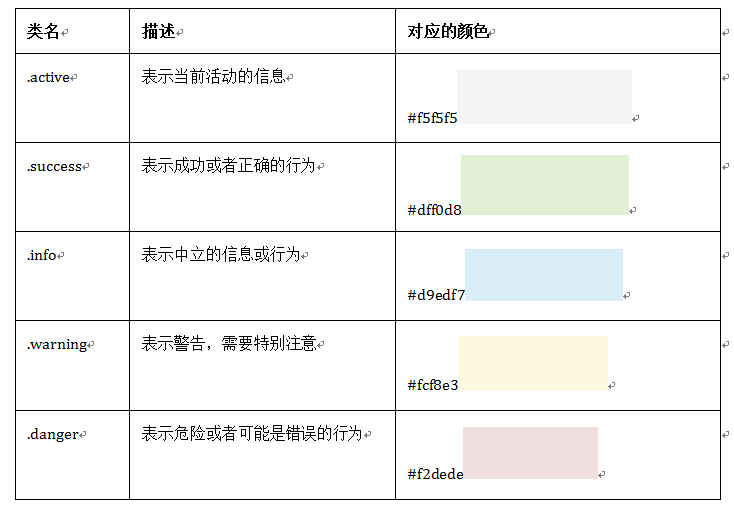
表格背景颜色
15、基础表单
role是一个html5的属性,role="form"告诉辅助设备(如屏幕阅读器)这个元素所扮演的角色是个表单
16、水平表单
.form-horizontal
17、内联表单
<div class="form-group">

  <label >QQQ</label>

  <input type="">

</div>
18、输入框input
输入类型 - email
email 输入类型用于应该包含电邮地址的输入字段。
当提交表单时,会自动地对 email 字段的值进行验证。
19、复选框checkbox和单选择按钮radio
.checkbox
<div class="checkbox">
<label>
<input type="checkbox" value="">
QQQ
</label>
</div>
.radio
<div class="radio">
<label>
<input type="radio" value="love" checked>
CCC
</label>
</div>
水平显示
<div class="form-group">
<label class="radio-inline">
<input type="radio" value="mazey" name="mazey">男性
</label>
<label class="radio-inline">
<input type="radio" value="mazey" name="mazey">中性
</label>
<label class="radio-inline">
<input type="radio" value="mazey" name="mazey">女性
</label>
</div>
1、如果checkbox需要水平排列,只需要在label标签上添加类名“checkbox-inline”
2、如果radio需要水平排列,只需要在label标签上添加类名“radio-inline”
20、表单控件大小-仅改变高度
1、input-sm:让控件比正常大小更小
2、input-lg:让控件比正常大小更大
21、表单验证状态
1、.has-warning:警告状态(黄色)
2、.has-error:错误状态(红色)
3、.has-success:成功状态(绿色)
显示勾号叉号要加.has-feedback
<div class="form-group has-success has-feedback">
<label class="control-label" for="qqq">E-Mail地址</label>
<input type="text" class="form-control" id="qqq" placeholder="qqq">
<span class="glyphicon glyphicon-remove form-control-feedback"></span>
</div>
表单提示文字.help-block
<div class="form-group has-error has-feedback">
<label class="control-label" for="inputError1">错误状态</label>
<input type="text" class="form-control" id="inputError1" placeholder="错误状态">
<span class="help-block">你输入的信息是错误的</span>
<span class="glyphicon glyphicon-remove form-control-feedback"></span>
</div>
22、按钮样式
.btn
.btn-default
可以用在a,span,div等标签中。
<button class="btn" type="button">基础按钮.btn</button>
<button class="btn btn-default" type="button">默认按钮.btn-default</button>
<button class="btn btn-primary" type="button">主要按钮.btn-primary</button>
<button class="btn btn-success" type="button">成功按钮.btn-success</button>
<button class="btn btn-info" type="button">信息按钮.btn-info</button>
<button class="btn btn-warning" type="button">警告按钮.btn-warning</button>
<button class="btn btn-danger" type="button">危险按钮.btn-danger</button>
<button class="btn btn-link" type="button">链接按钮.btn-link</button>
HTML <button> 标签的 type 属性
值 描述
submit 该按钮是提交按钮(除了 Internet Explorer,该值是其他浏览器的默认值)。
button 该按钮是可点击的按钮(Internet Explorer 的默认值)。
reset 该按钮是重置按钮(清除表单数据)
23、按钮大小
<button class="btn btn-primary btn-lg" type="button">大型按钮.btn-lg</button>

<button class="btn btn-primary" type="button">正常按钮</button>

<button class="btn btn-primary btn-sm" type="button">小型按钮.btn-sm</button>

<button class="btn btn-primary btn-xs" type="button">超小型按钮.btn-xs</button>
24、块状按钮
.btn-block 使按钮充满整个容器(父级元素)。
25、按钮状态
当按钮处理正在点击状态(也就是鼠标按下的未松开的状态),对于<button>元素是通过“:active”伪类实现,而对于<a>这样的标签元素则是通过添加类名“.active”来实现。
禁用状态.disabled
disabled="disabled" 用类禁用可能有禁用样式,但没有禁用效果,依然可以点。
26、图像
1、img-responsive:响应式图片,主要针对于响应式设计
2、img-rounded:圆角图片
3、img-circle:圆形图片
4、img-thumbnail:缩略图片
由于样式没有对图片做大小上的样式限制,所以在实际使用的时候,需要通过其他的方式来处理图片大小。比如说控制图片容器大小。(注意不可以通过css样式直接修改img图片的大小,这样操作就不响应了)对于圆角图片和圆形图片效果,因为是使用了CSS3的圆角样式来实现的,所以注意对于IE8以及其以下版本不支持,是没有圆角效果的。
27、图标
这里说的图标就是Web制作中常看到的小icon图标,可以说这些小icon图标是一个优秀Web中不可缺少的一部分,起到画龙点睛的效果。在Bootstrap框架中也为大家提供了近200个不同的icon图片,而这些图标都是使用CSS3的@font-face属性配合字体来实现的icon效果。
<span class="glyphicon glyphicon-search"></span>
<span class="glyphicon glyphicon-asterisk"></span>
<span class="glyphicon glyphicon-plus"></span>
<span class="glyphicon glyphicon-cloud"></span>
还有Font Awesome字体。
定制图标网站:Link
Bootstrap学习-排版的更多相关文章
- Bootstrap学习-排版-表单
1.标题 <h1>~<h6>,所有标题的行高都是1.1(也就是font-size的1.1倍). 2.副标题 <small>,行高都是1,灰色(#999) <h ...
- Bootstrap学习笔记(一) 排版
Bootsrap是一款优秀的前端开发框架,我从慕课网上开始学习Bootstrap,以下我学习过程中的一些笔记及代码. 首先学习排版: 从Bootstrap网站下载Bootstrap3中文文档(V3.3 ...
- bootstrap学习笔记--bootstrap排版类的使用
标题 Bootstrap 中定义了所有的 HTML 标题(h1 到 h6)的样式,这个和一般的html没啥区别.请看下面的实例: <h1>测试1 h1</h1> <h2& ...
- Bootstrap学习笔记(二) 表单
在Bootstrap学习笔记(一) 排版的基础上继续学习Bootstrap的表单,编辑器及head内代码不变. 3-1 基础表单 单中常见的元素主要包括:文本输入框.下拉选择框.单选按钮.复选按钮.文 ...
- python 全栈开发,Day57(响应式页面-@media介绍,jQuery补充,移动端单位介绍,Bootstrap学习)
昨日内容回顾 ajax //get post 两种方式 做 请求 get 主要是获取数据 post 提交数据 同一个路由地址 既可以是get请求也可以是post请求 一个路由对应一个函数 get请求 ...
- bootstrap学习大纲
bootstrap 学习分三部分,分别是 css样式,css组件,js插件. 下面介绍三部分分别要学习的内容: 1.css样式:栅格系统,排版,代码,表格,表单,按钮,图片,辅助类,响应式工具. 2. ...
- bootstrap之排版类
bootstrap之排版类
- Bootstrap~学习笔记索引
回到占占推荐博客索引 bootstrap已经用了有段时间了,感觉在使用上还是比较容易接受的,在开发人员用起来上,也还好,不用考虑它的兼容性,手机,平台,PC都可以有效的兼容. bootstrap官方a ...
- Bootstrap学习(3)
Bootstrap 图片 Bootstrap 对图片的支持.Bootstrap 提供了三个可对图片应用简单样式的 class: .img-rounded:添加 border-radius:6px 来 ...
随机推荐
- Linux CentOS 安装 httpd
1.查看并安装服务器是否安装编译器 make gcc gcc-c++ 查看:rpm -q gcc-c++ 2.查看SELinux 和 iptables 的状态 3.在根目录新建文件夹 lamp 4.使 ...
- AnsiIO
1.文件数据内容,元数据内容 i节点ls -l err.txt-rw-rw-r-- 1 csgec csgec 50 Jun 23 11:19 err.txt-:普通文件(文件类型)rw-:属主用户拥 ...
- 实现微信浏览器自动播放MP3音乐
<!DOCTYPE html> <html> <head> <meta charset="utf-8"> <title> ...
- 关于Cookie中不过滤“=”号的方法
近来做关于Cookie的加解密工作时遇到一个问题:当用cookie.getValue()方法获取Cookie的值时,结果遇到"="号时就会自动截断,后面的值就取不到了.这是因为Ja ...
- swift 使用pod管理
在oc 中使用pod 管理第三方库还是很方便的 今天来在swift中使用pod 来管理第三方库 其实还是很简单的 和oc 区别不大 下面来说说我遇到的一些问题及解决方法 当然使用pod 你要先安装p ...
- 安装Pomelo
安装pomelo的过程中会使用到C++编译器. 请确保你的Windows系统满足以下两个条件: python(2.5<version<3.0). VC++ 编译器,包含在Visual St ...
- cookie、session、sessionid的区别
我们都知道银行,银行的收柜台每天要接待客户存款/取款业务,可以有几种方案: 1.凭借柜台职员的记忆,由收柜台职员来为每位顾客办理存款/取款业务,单凭职员的记忆力,要记到每位顾客的相貌,并迅速这个顾客当 ...
- 转:Spring FactoryBean源码浅析
http://blog.csdn.net/java2000_wl/article/details/7410714 在Spring BeanFactory容器中管理两种bean 1.标准Java Bea ...
- 使用 visualstudio code 编辑器调试执行在 homestead 环境中的 laravel 程序
由于之前做 .net 开发比较熟悉 visualstudio,所以自 visualstudio code 发布后就一直在不同场合使用 vscode ,比如前端.node等等.最近在做 laravel ...
- input _文本框回车或者失去光标触发事件
IE下,当一个HTML元素的属性改变的时候,都能通过 onpropertychange来即时捕获. onchange在属性值改变时还必须使得当前元素失去焦点(onblur)才可以激活该事件. 了解这一 ...