
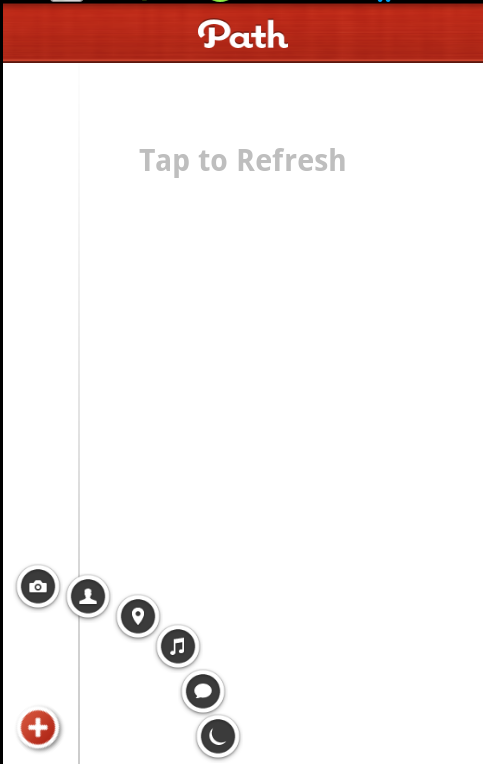
超炫的Button按钮展开弧形动画效果
----------------------收藏备用 -------------------------------
代码下载:http://download.csdn.net/detail/qq263229365/5622693

今天从网上看到一个这样的效果,感觉很有创意,自己也搜集了一些资料,仿照着实现了一下。
下面就直接上源码:
首先看一下布局文件:
- <?xml version="1.0" encoding="utf-8"?>
- <RelativeLayout android:layout_width="fill_parent"
- android:layout_height="fill_parent" xmlns:android="http://schemas.android.com/apk/res/android"
- android:background="#ffffff">
- <ImageView android:layout_width="wrap_content"
- android:layout_height="fill_parent" android:background="@drawable/splash_shadow"
- android:layout_marginLeft="50dip" />
- <RelativeLayout android:id="@+id/relativeLayout_top_bar"
- android:layout_width="fill_parent" android:layout_height="40dip"
- android:background="@drawable/qa_bar">
- <ImageView android:layout_width="60dip"
- android:layout_height="20dip" android:background="@drawable/qa_logo"
- android:layout_centerInParent="true" />
- </RelativeLayout>
- <TextView android:layout_below="@id/relativeLayout_top_bar"
- android:layout_width="wrap_content" android:layout_height="wrap_content"
- android:textSize="20sp" android:text="Tap to Refresh"
- android:layout_centerHorizontal="true" android:layout_marginTop="50dip" android:textStyle="bold"/>
- <Button android:id="@+id/button_composer_sleep"
- android:layout_width="wrap_content" android:layout_height="wrap_content"
- android:background="@drawable/composer_sleep"
- android:layout_marginBottom="10dip" android:layout_marginLeft="10dip"
- android:layout_alignParentBottom="true">
- </Button>
- <Button android:id="@+id/button_composer_thought"
- android:layout_width="wrap_content" android:layout_height="wrap_content"
- android:background="@drawable/composer_thought"
- android:layout_marginBottom="10dip" android:layout_marginLeft="10dip"
- android:layout_alignParentBottom="true" android:layout_above="@id/button_composer_sleep">
- </Button>
- <Button android:id="@+id/button_composer_music"
- android:layout_width="wrap_content" android:layout_height="wrap_content"
- android:background="@drawable/composer_music"
- android:layout_marginBottom="10dip" android:layout_marginLeft="10dip"
- android:layout_alignParentBottom="true">
- </Button>
- <Button android:id="@+id/button_composer_place"
- android:layout_width="wrap_content" android:layout_height="wrap_content"
- android:background="@drawable/composer_place"
- android:layout_marginBottom="10dip" android:layout_marginLeft="10dip"
- android:layout_alignParentBottom="true" android:layout_above="@id/button_composer_music">
- </Button>
- <Button android:id="@+id/button_composer_with"
- android:layout_width="wrap_content" android:layout_height="wrap_content"
- android:background="@drawable/composer_with"
- android:layout_marginBottom="10dip" android:layout_marginLeft="10dip"
- android:layout_alignParentBottom="true" android:layout_above="@id/button_composer_place">
- </Button>
- <Button android:id="@+id/button_composer_camera"
- android:layout_width="wrap_content" android:layout_height="wrap_content"
- android:background="@drawable/composer_camera"
- android:layout_marginBottom="10dip" android:layout_marginLeft="10dip"
- android:layout_alignParentBottom="true" android:layout_above="@id/button_composer_with">
- </Button>
- <Button android:id="@+id/button_friends_delete"
- android:layout_width="wrap_content" android:layout_height="wrap_content"
- android:background="@drawable/friends_delete"
- android:layout_marginBottom="10dip" android:layout_marginLeft="10dip"
- android:layout_alignParentBottom="true" android:layout_above="@id/button_composer_camera">
- </Button>
- </RelativeLayout>
实现button按钮动画效果的核心类:
- package cn.com.kar.test;
- import android.R.anim;
- import android.app.Activity;
- import android.os.Bundle;
- import android.util.Log;
- import android.view.Display;
- import android.view.View;
- import android.view.View.OnClickListener;
- import android.view.animation.Animation;
- import android.view.animation.RotateAnimation;
- import android.view.animation.ScaleAnimation;
- import android.view.animation.TranslateAnimation;
- import android.view.animation.Animation.AnimationListener;
- import android.widget.Button;
- import android.widget.RelativeLayout.LayoutParams;
- public class PathButtonActivity extends Activity
- {
- private Button buttonCamera, buttonDelete, buttonWith, buttonPlace, buttonMusic, buttonThought, buttonSleep;
- private Animation animationTranslate, animationRotate, animationScale;
- private static int width, height;
- private LayoutParams params = new LayoutParams(0, 0);
- private static Boolean isClick = false;
- /** Called when the activity is first created. */
- @Override
- public void onCreate(Bundle savedInstanceState)
- {
- super.onCreate(savedInstanceState);
- setContentView(R.layout.path_button);
- initialButton();
- }
- private void initialButton()
- {
- // TODO Auto-generated method stub
- Display display = getWindowManager().getDefaultDisplay();
- height = display.getHeight();
- width = display.getWidth();
- Log.v("width & height is:", String.valueOf(width) + ", " + String.valueOf(height));
- params.height = 50;
- params.width = 50;
- //设置边距 (int left, int top, int right, int bottom)
- params.setMargins(10, height - 98, 0, 0);
- buttonSleep = (Button) findViewById(R.id.button_composer_sleep);
- buttonSleep.setLayoutParams(params);
- buttonThought = (Button) findViewById(R.id.button_composer_thought);
- buttonThought.setLayoutParams(params);
- buttonMusic = (Button) findViewById(R.id.button_composer_music);
- buttonMusic.setLayoutParams(params);
- buttonPlace = (Button) findViewById(R.id.button_composer_place);
- buttonPlace.setLayoutParams(params);
- buttonWith = (Button) findViewById(R.id.button_composer_with);
- buttonWith.setLayoutParams(params);
- buttonCamera = (Button) findViewById(R.id.button_composer_camera);
- buttonCamera.setLayoutParams(params);
- buttonDelete = (Button) findViewById(R.id.button_friends_delete);
- buttonDelete.setLayoutParams(params);
- buttonDelete.setOnClickListener(new OnClickListener()
- {
- @Override
- public void onClick(View v)
- {
- // TODO Auto-generated method stub
- if(isClick == false)
- {
- isClick = true;
- buttonDelete.startAnimation(animRotate(-45.0f, 0.5f, 0.45f));
- buttonCamera.startAnimation(animTranslate(0.0f, -180.0f, 10, height - 240, buttonCamera, 80));
- buttonWith.startAnimation(animTranslate(30.0f, -150.0f, 60, height - 230, buttonWith, 100));
- buttonPlace.startAnimation(animTranslate(70.0f, -120.0f, 110, height - 210, buttonPlace, 120));
- buttonMusic.startAnimation(animTranslate(80.0f, -110.0f, 150, height - 180, buttonMusic, 140));
- buttonThought.startAnimation(animTranslate(90.0f, -60.0f, 175, height - 135, buttonThought, 160));
- buttonSleep.startAnimation(animTranslate(170.0f, -30.0f, 190, height - 90, buttonSleep, 180));
- }
- else
- {
- isClick = false;
- buttonDelete.startAnimation(animRotate(90.0f, 0.5f, 0.45f));
- buttonCamera.startAnimation(animTranslate(0.0f, 140.0f, 10, height - 98, buttonCamera, 180));
- buttonWith.startAnimation(animTranslate(-50.0f, 130.0f, 10, height - 98, buttonWith, 160));
- buttonPlace.startAnimation(animTranslate(-100.0f, 110.0f, 10, height - 98, buttonPlace, 140));
- buttonMusic.startAnimation(animTranslate(-140.0f, 80.0f, 10, height - 98, buttonMusic, 120));
- buttonThought.startAnimation(animTranslate(-160.0f, 40.0f, 10, height - 98, buttonThought, 80));
- buttonSleep.startAnimation(animTranslate(-170.0f, 0.0f, 10, height - 98, buttonSleep, 50));
- }
- }
- });
- buttonCamera.setOnClickListener(new OnClickListener()
- {
- @Override
- public void onClick(View v)
- {
- // TODO Auto-generated method stub
- buttonCamera.startAnimation(setAnimScale(2.5f, 2.5f));
- buttonWith.startAnimation(setAnimScale(0.0f, 0.0f));
- buttonPlace.startAnimation(setAnimScale(0.0f, 0.0f));
- buttonMusic.startAnimation(setAnimScale(0.0f, 0.0f));
- buttonThought.startAnimation(setAnimScale(0.0f, 0.0f));
- buttonSleep.startAnimation(setAnimScale(0.0f, 0.0f));
- buttonDelete.startAnimation(setAnimScale(0.0f, 0.0f));
- }
- });
- buttonWith.setOnClickListener(new OnClickListener()
- {
- @Override
- public void onClick(View v)
- {
- // TODO Auto-generated method stub
- buttonWith.startAnimation(setAnimScale(2.5f, 2.5f));
- buttonCamera.startAnimation(setAnimScale(0.0f, 0.0f));
- buttonPlace.startAnimation(setAnimScale(0.0f, 0.0f));
- buttonMusic.startAnimation(setAnimScale(0.0f, 0.0f));
- buttonThought.startAnimation(setAnimScale(0.0f, 0.0f));
- buttonSleep.startAnimation(setAnimScale(0.0f, 0.0f));
- buttonDelete.startAnimation(setAnimScale(0.0f, 0.0f));
- }
- });
- buttonPlace.setOnClickListener(new OnClickListener()
- {
- @Override
- public void onClick(View v)
- {
- // TODO Auto-generated method stub
- buttonPlace.startAnimation(setAnimScale(2.5f, 2.5f));
- buttonWith.startAnimation(setAnimScale(0.0f, 0.0f));
- buttonCamera.startAnimation(setAnimScale(0.0f, 0.0f));
- buttonMusic.startAnimation(setAnimScale(0.0f, 0.0f));
- buttonThought.startAnimation(setAnimScale(0.0f, 0.0f));
- buttonSleep.startAnimation(setAnimScale(0.0f, 0.0f));
- buttonDelete.startAnimation(setAnimScale(0.0f, 0.0f));
- }
- });
- buttonMusic.setOnClickListener(new OnClickListener()
- {
- @Override
- public void onClick(View v)
- {
- // TODO Auto-generated method stub
- buttonMusic.startAnimation(setAnimScale(2.5f, 2.5f));
- buttonPlace.startAnimation(setAnimScale(0.0f, 0.0f));
- buttonWith.startAnimation(setAnimScale(0.0f, 0.0f));
- buttonCamera.startAnimation(setAnimScale(0.0f, 0.0f));
- buttonThought.startAnimation(setAnimScale(0.0f, 0.0f));
- buttonSleep.startAnimation(setAnimScale(0.0f, 0.0f));
- buttonDelete.startAnimation(setAnimScale(0.0f, 0.0f));
- }
- });
- buttonThought.setOnClickListener(new OnClickListener()
- {
- @Override
- public void onClick(View v)
- {
- // TODO Auto-generated method stub
- buttonThought.startAnimation(setAnimScale(2.5f, 2.5f));
- buttonPlace.startAnimation(setAnimScale(0.0f, 0.0f));
- buttonWith.startAnimation(setAnimScale(0.0f, 0.0f));
- buttonCamera.startAnimation(setAnimScale(0.0f, 0.0f));
- buttonMusic.startAnimation(setAnimScale(0.0f, 0.0f));
- buttonSleep.startAnimation(setAnimScale(0.0f, 0.0f));
- buttonDelete.startAnimation(setAnimScale(0.0f, 0.0f));
- }
- });
- buttonSleep.setOnClickListener(new OnClickListener()
- {
- @Override
- public void onClick(View v)
- {
- // TODO Auto-generated method stub
- buttonSleep.startAnimation(setAnimScale(2.5f, 2.5f));
- buttonPlace.startAnimation(setAnimScale(0.0f, 0.0f));
- buttonWith.startAnimation(setAnimScale(0.0f, 0.0f));
- buttonCamera.startAnimation(setAnimScale(0.0f, 0.0f));
- buttonMusic.startAnimation(setAnimScale(0.0f, 0.0f));
- buttonThought.startAnimation(setAnimScale(0.0f, 0.0f));
- buttonDelete.startAnimation(setAnimScale(0.0f, 0.0f));
- }
- });
- }
- protected Animation setAnimScale(float toX, float toY)
- {
- // TODO Auto-generated method stub
- animationScale = new ScaleAnimation(1f, toX, 1f, toY, Animation.RELATIVE_TO_SELF, 0.5f, Animation.RELATIVE_TO_SELF, 0.45f);
- animationScale.setInterpolator(PathButtonActivity.this, anim.accelerate_decelerate_interpolator);
- animationScale.setDuration(500);
- animationScale.setFillAfter(false);
- return animationScale;
- }
- protected Animation animRotate(float toDegrees, float pivotXValue, float pivotYValue)
- {
- // TODO Auto-generated method stub
- animationRotate = new RotateAnimation(0, toDegrees, Animation.RELATIVE_TO_SELF, pivotXValue, Animation.RELATIVE_TO_SELF, pivotYValue);
- animationRotate.setAnimationListener(new AnimationListener()
- {
- @Override
- public void onAnimationStart(Animation animation)
- {
- // TODO Auto-generated method stub
- }
- @Override
- public void onAnimationRepeat(Animation animation)
- {
- // TODO Auto-generated method stub
- }
- @Override
- public void onAnimationEnd(Animation animation)
- {
- // TODO Auto-generated method stub
- animationRotate.setFillAfter(true);
- }
- });
- return animationRotate;
- }
- //移动的动画效果
- /*
- * TranslateAnimation(float fromXDelta, float toXDelta, float fromYDelta, float toYDelta)
- *
- * float fromXDelta:这个参数表示动画开始的点离当前View X坐标上的差值;
- *
- * float toXDelta, 这个参数表示动画结束的点离当前View X坐标上的差值;
- *
- * float fromYDelta, 这个参数表示动画开始的点离当前View Y坐标上的差值;
- *
- * float toYDelta)这个参数表示动画开始的点离当前View Y坐标上的差值;
- */
- protected Animation animTranslate(float toX, float toY, final int lastX, final int lastY,
- final Button button, long durationMillis)
- {
- // TODO Auto-generated method stub
- animationTranslate = new TranslateAnimation(0, toX, 0, toY);
- animationTranslate.setAnimationListener(new AnimationListener()
- {
- @Override
- public void onAnimationStart(Animation animation)
- {
- // TODO Auto-generated method stub
- }
- @Override
- public void onAnimationRepeat(Animation animation)
- {
- // TODO Auto-generated method stub
- }
- @Override
- public void onAnimationEnd(Animation animation)
- {
- // TODO Auto-generated method stub
- params = new LayoutParams(0, 0);
- params.height = 50;
- params.width = 50;
- params.setMargins(lastX, lastY, 0, 0);
- button.setLayoutParams(params);
- button.clearAnimation();
- }
- });
- animationTranslate.setDuration(durationMillis);
- return animationTranslate;
- }
- }
其实就是在button点击的时候播放Tween动画。
这样就基本完成,参照上面的代码 自己也可以自行修改成自己喜欢的样式。
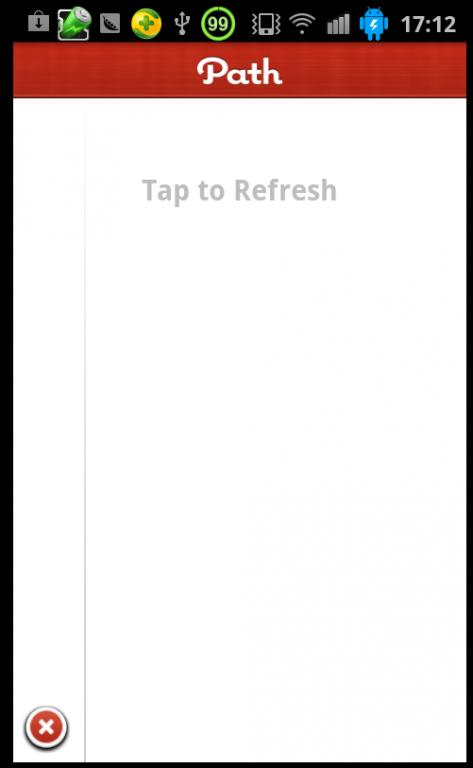
看一下在我手机上运行的效果:
代码下载:http://download.csdn.net/detail/qq263229365/5622693
超炫的Button按钮展开弧形动画效果的更多相关文章
- Waves – 赞!超炫交互体验的点击动画效果
Waves 点击效果的灵感来自于谷歌的材料设计,很容易使用.只需要引入 waves.min.css 和 waves.min.js 到 HTML 文件中可以使用了.采用 touchstart 与 tou ...
- WPF技术触屏上的应用系列(六): 视觉冲击、超炫系统主界面、系统入口效果实现
原文:WPF技术触屏上的应用系列(六): 视觉冲击.超炫系统主界面.系统入口效果实现 去年某客户单位要做个大屏触屏应用,要对档案资源进行展示之用.客户端是Window7操作系统,54寸大屏电脑电视一体 ...
- AnimCheckBox按钮点击动画效果《IT蓝豹》
AnimCheckBox按钮点击动画效果 AnimCheckBox按钮点击动画效果,点击选中后勾选框选择效果,很不错的动画功能.项目来源:https://github.com/lguipeng/Ani ...
- 右上角鼠标滑过展开收缩动画效果js代码的演示页面
http://files.cnblogs.com/files/tanlingdangan/top_right.rar.gz 右上角鼠标滑过展开收缩动画效果js代码的演示页面http://www.51x ...
- css点击按钮,依次动态展开面板动画效果
<a href="#one">按钮1</a> <a href="#two">按钮2</a> <a href ...
- 原生html,css+js写下载按钮有提示动画效果的落地页
<!DOCTYPE html> <html lang="en"> <head> <meta charset="UTF-8&q ...
- android imageview按钮按下动画效果
private ImageView today_eat: today_eat = (ImageView) view.findViewById(R.id.today_eat); today_eat.se ...
- 6个超炫酷的HTML5电子书翻页动画
相信大家一定遇到过一些电子书网站,我们可以通过像看书一样翻页来浏览电子书的内容.今天我们要分享的HTML5应用跟电子书翻页有关,我们精选出来的6个电子书翻页动画都非常炫酷,而且都提供源码下载,有需要的 ...
- 优秀前端开发教程:超炫的 Mobile App 3D 演示
今天,我们想与您分享一个实验性的3D效果.它涉及到一个3D移动设备和一些移动应用程序截图.点击切换按钮时,我们将让移动设备转动并移动每个画面,使我们能看到一个分层的视图.你可能之前没见过这种应用程序演 ...
随机推荐
- Python 2.7 学习笔记 条件与循环语句
本文介绍下python条件和循环语句的语法 一.if条件语句 语法格式如下: if 表达式: .... elif 表达式: .... elif 表达式: .... else: ..... 说明:与其它 ...
- 快捷键accesskey
<!DOCTYPE html> <html> <body> <a href="http://www.w3school.com.cn/html/&qu ...
- 【转】linux命令useradd添加用户详解
在linux中增加用户我们使用useradd命令而删除用户直接使用userdel即可了,下面小编来给各位同学介绍一下在linux中添加与删除用户方法吧. 1.作用 useradd或adduser命 ...
- js中exec、test、match、search、replace、split、indesOf()用法
exec:对string进行正则处理,并返回匹配结果.array[0]为原字符串,array[i]为匹配在整个被搜索字符串中的位置. test:测试string是否包含有匹配结果,包含返回true,不 ...
- 读取sd卡下图片,由图片路径转换为bitmap
public Bitmap convertToBitmap(String path, int w, int h) { BitmapFactory.Options opts = ...
- 基于visual Studio2013解决C语言竞赛题之1005整理队形
题目 解决代码及点评 /************************************************************************/ ...
- Oracle单表的简单查询
Oracle单表的简单查询 查看表结构 desc emp; 查询所有列 Select * from emp; 查找所以部门编号(查指定的列) select deptnofrom emp; 查找编号不同 ...
- Hadoop 源码分析(二四)FSNamesystem
以下轮到FSNamesystem 出场了. FSNamesystem.java 一共同拥有4573 行.而整个namenode 文件夹下全部的Java 程序总共也仅仅有16876 行,把FSNames ...
- .NET vs JAVA
一个同事写一个方案,让我补充下.NET和 JAVA语言的优缺点,以下是我的回复: 老X你好! 我觉得这个问题,本质上不是java和.net两个开发语言方面的比较,单纯从这两个开发语言来讲,部分伯仲,在 ...
- EL显示List里嵌套map(Spring MVC3)返回的model
<c:forEach items="${requestScope.courseList}" var="cMap" varStatus="stat ...