
html5 canvas+js实现ps钢笔抠图
html5 canvas+js实现ps钢笔抠图(速抠图 www.sukoutu.com)
根据html5 canvas+js实现ps钢笔抠图的实现,aiaito 开发者开发了一套在线抠图工具,速抠图sukoutu.com是一款公益性质的免费在线快速抠图工具,
支持支持8倍高清钢笔抠图、矩阵抠图、图片压缩、图片尺寸调整等,该工具旨在为用户提供更快捷高效的抠图服务。
1. 项目要求需要用js实现photoshop中钢笔抠图功能,就用了近三四天的时间去解决它,最终还是基本上把他实现了。
做的过程中走了不少弯路,最终一同事找到了canvans以比较核心的属性globalCompositeOperation = "destination-out",
属性可以实现通过由多个点构成的闭合区间设置成透明色穿透画布背景色或是背景图片,这样省了许多事。
2.实现效果:
鼠标点完之后会将所有的点连成闭合区间,并可自由拖拉任一点,当形成闭合区间后,可在任意两点之间添加新点进行拖拉。
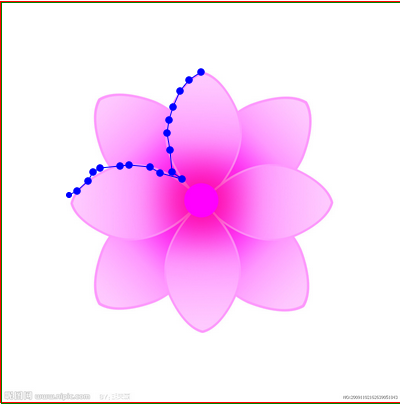
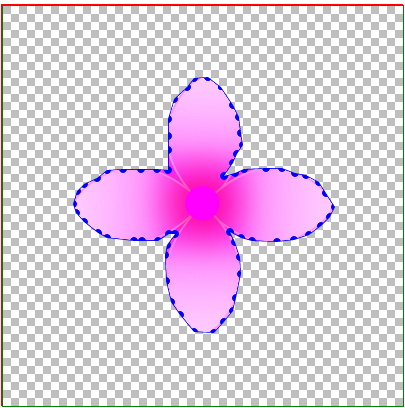
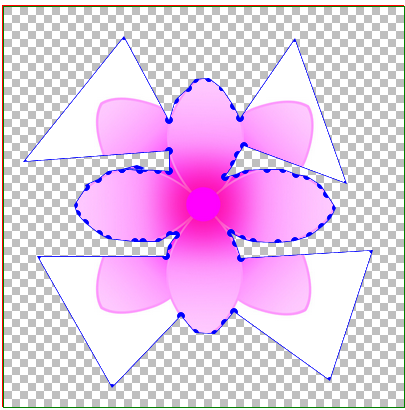
3.实现思路:
设置两层div,底层设置图片,顶层设置canvas画布(如果将图片渲染到画布上,抠图时会闪烁,所以至于底层),在画布上监视
鼠标事件反复渲染点及之间连线,形成闭合区间后将整体画布渲染小块背景图片,并将闭合区间渲染透明色。并把点的相对画布
坐标记录或更新到数组中去。截完图后,将点的坐标集合传回后台,由后台代码实现根据坐标点及图片宽度高度实现截图,并设
至背景色为透明色(canvas也可以实现截图,但需要处理像素点实现背景透明,暂时还没实现,计划用C#后台代码实现)。
4.js(写的不规范比较乱,大家就当参考吧)
<script type="text/javascript">
$(function () {
var a = new tailorImg();
a.iniData();
});
//
var tailorImg=function()
{
this.iniData = function () {
//画布
this.can.id = "canvas";
this.can.w = 400;
this.can.h = 400;
this.can.roundr = 7;
this.can.roundrr = 3;
this.can.curPointIndex = 0;
this.can.imgBack.src = "gzf.png";
this.can.canvas = document.getElementById(this.can.id).getContext("2d");
//图片
this.img.w = 400;
this.img.h = 400;
this.img.image.src = "flower.jpg";
//加载事件:
//初始化事件:
var a = this;
var p = a.can.pointList;
$("#" + a.can.id).mousemove(function (e) {
if (a.can.paint) {//是不是按下了鼠标
if (p.length > 0) {
a.equalStartPoint(p[p.length - 1].pointx, p[p.length - 1].pointy);
}
a.roundIn(e.offsetX, e.offsetY);
}
//判断是否在直线上
//光标移动到线的附近如果是闭合的需要重新划线,并画上新添加的点
a.AddNewNode(e.offsetX, e.offsetY);
});
$("#" + a.can.id).mousedown(function (e) {
a.can.paint = true;
//点击判断是否需要在线上插入新的节点:
if (a.can.tempPointList.length > 0) {
a.can.pointList.splice(a.can.tempPointList[1].pointx, 0, new a.point(a.can.tempPointList[0].pointx, a.can.tempPointList[0].pointy));
//清空临时数组
a.can.tempPointList.length = 0;
}
});
$("#" + a.can.id).mouseup(function (e) {
//拖动结束
a.can.paint = false;
//拖动结束;
if (a.can.juPull) {
a.can.juPull = false;
a.can.curPointIndex = 0;
//验证抠图是否闭合:闭合,让结束点=开始点;添加标记
a.equalStartPoint(p[p.length - 1].pointx, p[p.length - 1].pointy);
//判断是否闭合:
if (a.can.IsClose) { }
}
else {
//如果闭合:禁止添加新的点;
if (!a.can.IsClose) {//没有闭合
p.push(new a.point(e.offsetX, e.offsetY));
//验证抠图是否闭合:闭合,让结束点=开始点;添加标记
a.equalStartPoint(p[p.length - 1].pointx, p[p.length - 1].pointy);
//判断是否闭合:
//重新画;
if (p.length > 1) {
a.drawLine(p[p.length - 2].pointx, p[p.length - 2].pointy, p[p.length - 1].pointx, p[p.length - 1].pointy);
a.drawArc(p[p.length - 1].pointx, p[p.length - 1].pointy);
} else {
a.drawArc(p[p.length - 1].pointx, p[p.length - 1].pointy);
}
}
else {
//闭合
}
}
//验证是否填充背景:
if (a.can.IsClose) {
a.fillBackColor();
a.drawAllLine();
}
});
$("#" + a.can.id).mouseleave(function (e) {
a.can.paint = false;
});
//鼠标点击事件:
$("#" + a.can.id).click(function (e) {
//空
});
}
this.point = function (x, y) {
this.pointx = x;
this.pointy = y;
};
//图片
this.img = {
image:new Image(),
id: "",
w:0,
h:0
};
//画布;
this.can = {
canvas:new Object(),
id: "",
w: 0,
h: 0,
//坐标点集合
pointList: new Array(),
//临时存储坐标点
tempPointList: new Array(),
//圆点的触发半径:
roundr: 7,
//圆点的显示半径:
roundrr: 7,
//当前拖动点的索引值;
curPointIndex : 0,
//判断是否点击拖动
paint : false,
//判断是否点圆点拖动,并瞬间离开,是否拖动点;
juPull : false,
//判断是否闭合
IsClose: false,
imgBack: new Image() };
//函数:
//更新画线
this.drawAllLine=function () {
for (var i = 0; i < this.can.pointList.length - 1; i++) {
//画线
var p = this.can.pointList;
this.drawLine(p[i].pointx, p[i].pointy, p[i + 1].pointx, p[i + 1].pointy);
//画圈
this.drawArc(p[i].pointx, p[i].pointy);
if (i == this.can.pointList.length - 2) {
this.drawArc(p[i+1].pointx, p[i+1].pointy);
}
}
}
//画线
this.drawLine = function (startX, startY, endX, endY) {
//var grd = this.can.canvas.createLinearGradient(0, 0,2,0); //坐标,长宽
//grd.addColorStop(0, "black"); //起点颜色
//grd.addColorStop(1, "white");
//this.can.canvas.strokeStyle = grd;
this.can.canvas.strokeStyle = "blue"
this.can.canvas.lineWidth =1;
this.can.canvas.moveTo(startX, startY);
this.can.canvas.lineTo(endX, endY);
this.can.canvas.stroke();
}
//画圈:
this.drawArc=function(x, y) {
this.can.canvas.fillStyle = "blue";
this.can.canvas.beginPath();
this.can.canvas.arc(x, y,this.can.roundrr, 360, Math.PI * 2, true);
this.can.canvas.closePath();
this.can.canvas.fill();
}
//光标移到线上画大圈:
this.drawArcBig = function (x, y) {
this.can.canvas.fillStyle = "blue";
this.can.canvas.beginPath();
this.can.canvas.arc(x, y, this.can.roundr+2, 360, Math.PI * 2, true);
this.can.canvas.closePath();
this.can.canvas.fill();
}
//渲染图片往画布上
this.showImg=function() {
this.img.image.onload = function () {
this.can.canvas.drawImage(this.img.image, 0, 0, this.img.w,this.img.h);
};
}
//填充背景色
this.fillBackColor = function () {
for (var i = 0; i <this.img.w; i += 96) {
for (var j = 0; j <= this.img.h; j += 96) {
this.can.canvas.drawImage(this.can.imgBack, i, j, 96, 96);
}
}
this.can.canvas.globalCompositeOperation = "destination-out";
this.can.canvas.beginPath();
for (var i = 0; i <this.can.pointList.length; i++) {
this.can.canvas.lineTo(this.can.pointList[i].pointx,this.can.pointList[i].pointy);
}
this.can.canvas.closePath();
this.can.canvas.fill();
this.can.canvas.globalCompositeOperation = "destination-over";
this.drawAllLine();
}
//去掉pointlist最后一个坐标点:
this.clearLastPoint=function () {
this.can.pointList.pop();
//重画:
this.clearCan();
this.drawAllLine();
}
//判断结束点是否与起始点重合;
this.equalStartPoint = function (x,y) {
var p = this.can.pointList;
if (p.length > 1 && Math.abs((x - p[0].pointx) * (x - p[0].pointx)) + Math.abs((y - p[0].pointy) * (y - p[0].pointy)) <= this.can.roundr * this.can.roundr) {
//如果闭合
this.can.IsClose = true;
p[p.length - 1].pointx = p[0].pointx;
p[p.length - 1].pointy = p[0].pointy;
}
else {
this.can.IsClose = false;
}
}
//清空画布
this.clearCan=function (){
this.can.canvas.clearRect(0, 0, this.can.w, this.can.h);
}
//剪切区域
this.CreateClipArea=function () {
this.showImg();
this.can.canvas.beginPath();
for (var i = 0; i <this.can.pointList.length; i++) {
this.can.canvas.lineTo(this.can.pointList[i].pointx,this.can.pointList[i].pointy);
}
this.can.canvas.closePath();
this.can.canvas.clip();
}
//
this.CreateClipImg=function()
{ }
//判断鼠标点是不是在圆的内部:
this.roundIn = function (x, y) {
//刚开始拖动
var p = this.can.pointList;
if (!this.can.juPull) {
for (var i = 0; i < p.length; i++) { if (Math.abs((x - p[i].pointx) * (x - p[i].pointx)) + Math.abs((y - p[i].pointy) * (y - p[i].pointy)) <= this.can.roundr * this.can.roundr) {
//说明点击圆点拖动了;
this.can.juPull = true;//拖动
//
this.can.curPointIndex = i;
p[i].pointx = x;
p[i].pointy = y;
//重画:
this.clearCan();
//showImg();
if (this.can.IsClose) {
this.fillBackColor();
}
this.drawAllLine();
return;
}
}
}
else {//拖动中
p[this.can.curPointIndex].pointx = x;
p[this.can.curPointIndex].pointy = y;
//重画:
this.clearCan();
if (this.can.IsClose) {
this.fillBackColor();
}
this.drawAllLine();
}
}; //光标移到线上,临时数组添加新的节点:
this.AddNewNode=function(newx, newy) {
//如果闭合
var ii=0;
if (this.can.IsClose) {
//判断光标点是否在线上:
var p = this.can.pointList;
for (var i = 0; i < p.length - 1; i++) {
//计算a点和b点的斜率
var k = (p[i + 1].pointy - p[i].pointy) / (p[i + 1].pointx - p[i].pointx);
var b = p[i].pointy - k * p[i].pointx;
//if (parseInt((p[i + 1].pointy - p[i].pointy) / (p[i + 1].pointx - p[i].pointx)) ==parseInt((p[i + 1].pointy - newy) / (p[i + 1].pointx - newx)) && newx*2-p[i+1].pointx-p[i].pointx<0 && newy*2-p[i+1].pointy-p[i].pointy<0) {
// //如果在直线上
// alert("在直线上");
//}
$("#txtone").val(parseInt(k * newx + b));
$("#txttwo").val(parseInt(newy));
if (parseInt(k * newx + b) == parseInt(newy) && (newx - p[i + 1].pointx) * (newx - p[i].pointx) <= 2 && (newy - p[i + 1].pointy) * (newy - p[i].pointy) <= 2) {
//
//parseInt(k * newx + b) == parseInt(newy)
//添加临时点:
this.can.tempPointList[0] = new this.point(newx, newy);//新的坐标点
this.can.tempPointList[1] = new this.point(i+1, i+1);//需要往pointlist中插入新点的索引;
i++;
//alert();
//光标移动到线的附近如果是闭合的需要重新划线,并画上新添加的点;
if (this.can.tempPointList.length > 0) {
//重画:
this.clearCan();
//showImg();
if (this.can.IsClose) {
this.fillBackColor();
}
this.drawAllLine();
this.drawArcBig(this.can.tempPointList[0].pointx, this.can.tempPointList[0].pointy);
return;
}
return;
}
else {
// $("#Text1").val("");
}
}
if (ii == 0) {
if (this.can.tempPointList.length > 0) {
//清空临时数组;
this.can.tempPointList.length = 0;
//重画:
this.clearCan();
//showImg();
if (this.can.IsClose) {
this.fillBackColor();
}
this.drawAllLine();
//this.drawArc(this.can.tempPointList[0].pointx, this.can.tempPointList[0].pointy);
}
}
}
else {
//防止计算误差引起的添加点,当闭合后,瞬间移动起始点,可能会插入一个点到临时数组,当再次执行时,
//就会在非闭合情况下插入该点,所以,时刻监视:
if (this.can.tempPointList.length > 0) {
this.can.tempPointList.length = 0;
}
}
} }; </script>
  <style type="text/css">

         .canvasDiv {

             position: relative;

             border: 1px solid red;

             height: 400px;

             width: 400px;

             top: 50px;

             left: 100px;

             z-index:;

         }

         img {

             width: 400px;

             height: 400px;

             z-index:;

             position: absolute;

         }

         #canvas {

             position: absolute;

             border: 1px solid green;

             z-index:;

         }

         .btnCollection {

             margin-left: 100px;

         }

     </style>
  <div class="canvasDiv">

             <img src="flower.jpg" />

             <canvas id="canvas" width="400" height="400" style="border: 1px solid green;"></canvas>

         </div>
5.总结:
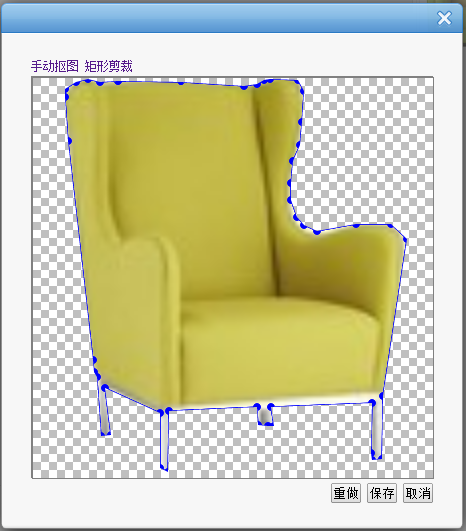
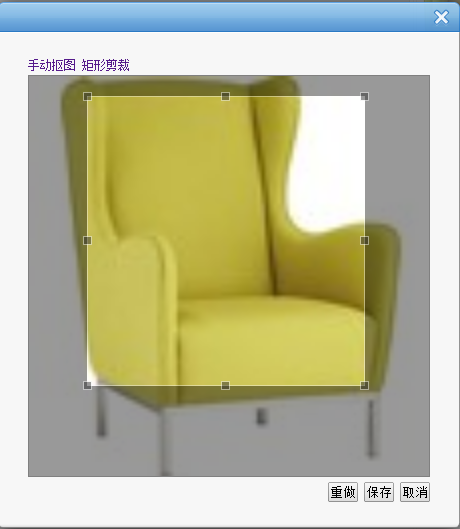
不足:当光标移动到线上时,判断一点是否在两点连成的直线上计算方法不正确,应该计算为一点是否在两点圆两条外切线所围成的矩形
内;钢笔点应为替换为小的div方格比较合理,像下面的矩形抠图;(思路:将存取的点坐标集合和动态添加的小div方格建立对应关系
当拖动小方格时,触发事件更新坐标点集合,并重新渲染)。
6.这只是js钢笔抠图的一种解决方案,项目中现在这块还在改进,如果大家有好的方法或是资料的话,希望能分享一下。谢谢
html5 canvas+js实现ps钢笔抠图的更多相关文章
- html5 canvas+js实现ps钢笔抠图(速抠图 www.sukoutu.com)
html5 canvas+js实现ps钢笔抠图(速抠图 www.sukoutu.com) 根据html5 canvas+js实现ps钢笔抠图的实现,aiaito 开发者开发了一套在线抠图工具,速抠 ...
- [ZZ+CH] Html5 canvas+js 时钟
总之新Blog入驻以后,又开始老习惯,到处折腾自定义的空间,放些东西. 想起以前大一的时候做过一个Javascript的时间显示器,现在想做一个时钟,当然现在老奸巨猾,会先去看一看有前辈写过没. 前辈 ...
- html5 canvas js(时钟)
<!doctype html> <html> <head> <title>canvas</title> </head> < ...
- html5 canvas js(数字时钟)
<!doctype html> <html> <head> <title>canvas dClock</title> </head ...
- HTML5 Canvas JavaScript库 Fabric.js 使用经验
首先,表明我的态度:采用 Flash 才是最优方案,不建议使用 HTML 5 的 Canvas 做一些生产/工业级的网页应用. Flash的优势一是浏览器支持好,二是代码成熟稳定.而HTML5 的 C ...
- 【微信小程序项目实践总结】30分钟从陌生到熟悉 web app 、native app、hybrid app比较 30分钟ES6从陌生到熟悉 【原创】浅谈内存泄露 HTML5 五子棋 - JS/Canvas 游戏 meta 详解,html5 meta 标签日常设置 C#中回滚TransactionScope的使用方法和原理
[微信小程序项目实践总结]30分钟从陌生到熟悉 前言 我们之前对小程序做了基本学习: 1. 微信小程序开发07-列表页面怎么做 2. 微信小程序开发06-一个业务页面的完成 3. 微信小程序开发05- ...
- 用html5 canvas和JS写个数独游戏
为啥要写这个游戏? 因为我儿子二年级数字下册最后一章讲到了数独.他想玩儿. 因为我也想玩有提示功能的数独. 因为我也正想决定要把HTML5和JS搞搞熟.熟悉一个编程平台,最好的办法,就是了解其原理与思 ...
- 超酷HTML5 Canvas图表应用Chart.js自定义提示折线图
超酷HTML5 Canvas图表应用Chart.js自定义提示折线图 效果预览 实例代码 <div class="htmleaf-container"> <div ...
- 基于html5 canvas和js实现的水果忍者网页版
今天爱编程小编给大家分享一款基于html5 canvas和js实现的水果忍者网页版. <水果忍者>是一款非常受喜欢的手机游戏,刚看到新闻说<水果忍者>四周年新版要上线了.网页版 ...
随机推荐
- CIC 抽取滤波器 Verilog Code
采用流水线结构的CIC 抽取滤波器结构如下: // 三级CIC抽取器实例:cic3_decimator.V module cic3_decimator(clk, x_in, y_out); param ...
- java jdk缓存-128~127的Long与Integer
先推断下以下代码的输出结果 Qa:---------------------------------------------- Long a = Long.valueOf(127) ...
- 如何将linux用在开发环境中的
如何将linux用在开发环境中的 1.我为什么要写这篇文章 一直想深入学习一下linux的使用,于是将家里的笔记本装了linux系统,但是要将自己的系统打造一个适合开发的环境确实是一件费心费力的事,而 ...
- Andriod Studio科普文章——3.大约gradle常见问题插头
1.andriod gradle插件版本号过低. 错误位置: dependencies{ classpath 'com.android.tools.build:gradle:0.10.2' } 提示信 ...
- 基于注释配置bean和装饰bean
1.组件扫描 Spring容器能够从classpath(类路径)下自动扫描.侦测和实例化具有特定注释的组件. 2.特定注释组件 –@Component: 基本注解, 标识了一个受 Spring 管理的 ...
- Oracle中使用Entity Framework 6.x Code-First
Oracle中使用Entity Framework 6.x Code-First方式开发 去年写过一篇EF的简单学习笔记,当时EF还不支持Oracle的Code-First开发模式,今天无意又看了下O ...
- HDU 4831 Scenic Popularity (段树)
Scenic Popularity Problem Description 临近节日,度度熊们近期计划到室外游玩公园.公园内部包含了非常多的旅游景点区和歇息区,因为旅游景点非常热门,导致景点区和歇息区 ...
- iWatch # 初始化工程
iWatch --利用swift,开发iWatch手表小应用! 远程仓库,团队开发: $ git init $ git add . $ git commit -m “ProjectName” // p ...
- CSDN专家吐槽实录
今天打开CSDN发现界面上的几个图标发生了变化,一个小小的变化,却引起了诸多CSDN专家对CSDN社区未来发展的思考,我特意从群里讲对话黏贴出来,希望各位能给予积极评价和建议. 你已经是群成员了,和大 ...
- mysql 数据库插入语句之insert into,replace into ,insert ignore
近期才发现mysql的插入语句竟然有如此多的使用方法,这里拿来分享一下. ①关于insert into : insert into table_name values(); insert into t ...