
Kmeans在MapReduce中的实现
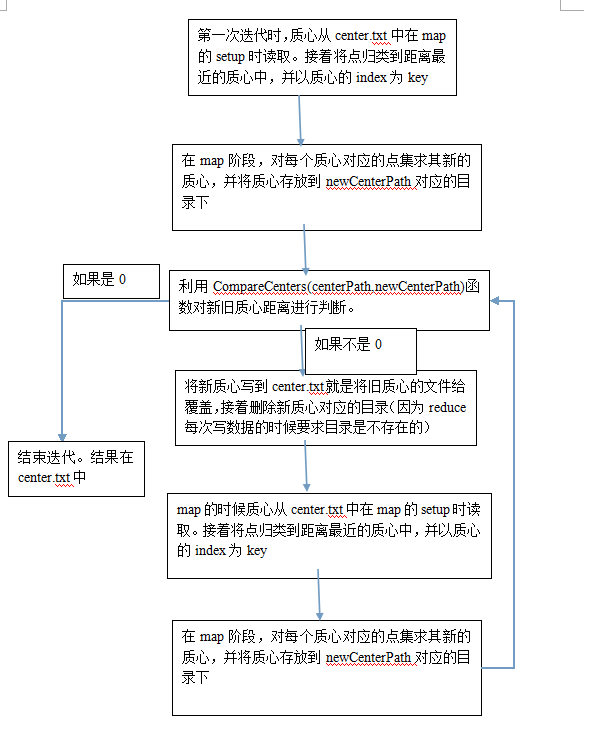
kmeans基本思想就是在一个点集中随机选取k个点作为初始的质心,然后在以这K个点求点集中其他点和这质心的距离,并且按照最近的原则,将这个点集分成k个类,接着在这k个类中求其质心,接着便是迭代,一直到质心不变或者SSE小于某个阈值或者达到指定的迭代次数。不过这样的Kmeans有几个缺点1 我们如何确定K值,2初始的质心选取很重要。基于此,可以用二分kmeans(似乎是叫这个),如果有时间可以写一下。
 while(true ){

                                                  run(centerPath,dataPath,newCenterPath,true);

                                                 System. out.println("                           " );

                                                 System. out.println("The " + ++count+"th time's compution is completed");

                                                 System. out.println("                           " );

                                                  if(Utils.CompareCenters(centerPath,newCenterPath)){

                                                                 Utils. deleteDir(newCenterPath);

                                                                  break;

                                                 }

                                 }
 package hadoop.MachineLearning.kmeans;

 import java.io.IOException;

 import org.apache.hadoop.conf.Configuration;

 import org.apache.hadoop.fs.Path;

 import org.apache.hadoop.io.IntWritable;

 import org.apache.hadoop.io.Text;

 import org.apache.hadoop.mapreduce.Job;

 import org.apache.hadoop.mapreduce.lib.input.FileInputFormat;

 import org.apache.hadoop.mapreduce.lib.output.FileOutputFormat;

 public class Kmeans {

     public static void run(String centerPath,String dataPath,String newCenterPath,boolean runReduce) throws IOException, ClassNotFoundException, InterruptedException{

         Configuration conf =new Configuration();

         conf.set("centerPath",centerPath);

         Job job=Job.getInstance(conf,"Kmeans");

         job.setJarByClass(hadoop.MachineLearning.kmeans.Kmeans.class);

         job.setMapperClass(MyMapper.class);

         job.setMapOutputKeyClass(IntWritable.class);

         job.setMapOutputValueClass(Text.class);

         if(runReduce){

             job.setReducerClass(MyReducer.class);

             job.setOutputKeyClass(Text.class);

             job.setOutputValueClass(Text.class);

         }

         FileInputFormat.addInputPath(job,new Path(dataPath));

         FileOutputFormat.setOutputPath(job,new Path(newCenterPath));

         System.out.println(job.waitForCompletion(true));

     }

     public static void main(String[] args) throws Exception {

         String centerPath="hdfs://10.107.8.110:9000/Kmeans_input/center_input/centers.txt";

         String dataPath="hdfs://10.107.8.110:9000/Kmeans_input/data_input/data.txt";

         String newCenterPath="hdfs://10.107.8.110:9000/Kmeans_output/newCenter";

         int count=0;

         while(true){

             run(centerPath,dataPath,newCenterPath,true);

             System.out.println("                           ");

             System.out.println("The "+ ++count+"th time's compution is completed");

             System.out.println("                           ");

             if(Utils.CompareCenters(centerPath,newCenterPath)){

                 Utils.deleteDir(newCenterPath);

                 break;

             }

         }

     }

 }
package hadoop.MachineLearning.kmeans;

import java.io.IOException;

import java.util.ArrayList;

import org.apache.hadoop.conf.Configuration;

import org.apache.hadoop.io.IntWritable;

import org.apache.hadoop.io.LongWritable;

import org.apache.hadoop.io.Text;

import org.apache.hadoop.mapreduce.Mapper;

public class MyMapper extends Mapper<LongWritable, Text, IntWritable, Text> {

    ArrayList<ArrayList<Double>> centerList=new ArrayList<ArrayList<Double>>();

    public void setup(Context context) throws IOException{

        Configuration conf=context.getConfiguration();

        String centerPath=conf.get("centerPath");

        centerList=Utils.GetCenterFromHDFS(centerPath,false);

    }

    public void map(LongWritable ikey, Text ivalue, Context context)

            throws IOException, InterruptedException {

        ArrayList<Double> point=Utils.TextToArray(ivalue);

//        int size=point.size();

        double distance=0.0;

        double mindis=9999.0;

        int index=-1;

        for(int i=0;i<centerList.size();i++){

            double currentDistance=0;

            for(int j=1;j<point.size();j++){//原文是j=0

                double centerPoint = Math.abs(centerList.get(i).get(j));

                double filed = Math.abs(point.get(j));

                currentDistance += Math.pow((centerPoint - filed) / (centerPoint + filed), 2);

            }

            if(currentDistance<mindis){

                mindis=currentDistance;

                index=i;

            }

        }

        /*

        for(int i=0;i<centerList.size();i++){

            distance=Utils.getDistance(centerList.get(i),point);

            if(distance<mindis){

                mindis=distance;

                index=i+1;

            }

        }

        */

//        String value="";

        context.write(new IntWritable(index+1),ivalue);

    }

}
package hadoop.MachineLearning.kmeans;

import java.io.IOException;

import java.util.ArrayList;

import java.util.Arrays;

import org.apache.hadoop.io.IntWritable;

import org.apache.hadoop.io.Text;

import org.apache.hadoop.mapreduce.Reducer;

public class MyReducer extends Reducer<IntWritable, Text, Text, Text> {

    public void reduce(IntWritable _key, Iterable<Text> values, Context context)

            throws IOException, InterruptedException {

        // process values

        ArrayList<ArrayList<Double>> pointList=new ArrayList<ArrayList<Double>>();

        for (Text val : values) {

            ArrayList<Double> point=Utils.TextToArray(val);

            pointList.add(point);

        }

        int row=pointList.size();

        int col=pointList.get(0).size();

        double[] avg=new double[col];

        for(int i=1;i<col;i++){//原文是i=0

            double sum=0;

            for(int j=0;j<row;j++){

                sum+=pointList.get(j).get(i);

            }

            avg[i]=sum/row;

        }

        context.write(new Text("") , new Text(Arrays.toString(avg).replace("[", "").replace("]", "")));

    }

}
package hadoop.MachineLearning.kmeans;

import java.io.IOException;

import java.util.ArrayList;

import org.apache.hadoop.conf.Configuration;

import org.apache.hadoop.fs.FSDataInputStream;

import org.apache.hadoop.fs.FSDataOutputStream;

import org.apache.hadoop.fs.FileStatus;

import org.apache.hadoop.fs.FileSystem;

import org.apache.hadoop.fs.Path;

import org.apache.hadoop.io.IOUtils;

import org.apache.hadoop.io.Text;

import org.apache.hadoop.util.LineReader;

public class Utils {

    /**

     * @param args

     * @throws IOException

     */

    public static ArrayList<Double> TextToArray(Text text){

        ArrayList<Double> centers=new ArrayList<Double>();

        String[] line=text.toString().split(",");

        for(int i=0;i<line.length;i++){

            double center=Double.parseDouble(line[i]);

            centers.add(center);

        }

        return centers;

    }

    public static ArrayList<ArrayList<Double>> GetCenterFromHDFS(String centerPath,boolean isDirectory) throws IOException{

        Configuration conf=new Configuration();

        Path path=new Path(centerPath);

        FileSystem fs=path.getFileSystem(conf);

        ArrayList<ArrayList<Double>> result=new ArrayList<ArrayList<Double>>();

        if(isDirectory){

            FileStatus[] fileStatus=fs.listStatus(path);

            for(int i=0;i<fileStatus.length;i++){

                if(fileStatus[i].isFile()){

                    result.addAll(GetCenterFromHDFS(fileStatus[i].getPath().toString(),false));

                }

            }

            return result;

        }

        FSDataInputStream infs=fs.open(path);

        LineReader reader=new LineReader(infs,conf);

        Text line=new Text();

        while(reader.readLine(line)>0){

            ArrayList<Double> center=TextToArray(line);

            result.add(center);

        }

        reader.close();

        return result;

    }

    public static void deleteDir(String deletepath) throws IOException{

        Configuration conf=new Configuration();

        Path path=new Path(deletepath);

        FileSystem fs=path.getFileSystem(conf);

        fs.delete(path,true);

    }

    public static boolean CompareCenters(String oldPath,String newPath) throws IOException{

        ArrayList<ArrayList<Double>> oldcenters=Utils.GetCenterFromHDFS(oldPath,false);

        ArrayList<ArrayList<Double>> newcenters=Utils.GetCenterFromHDFS(newPath,true);

//

//        System.out.println("                                      ");

//

//        System.out.println("oldcenters's size is "+oldcenters.size());

//        System.out.println("newcenters's size is "+newcenters.size());

//

//        System.out.println("                                      ");

        int row=oldcenters.size();

        int col=oldcenters.get(0).size();

        double distance=0.0;

        for(int i=0;i<row;i++){

            for(int j=1;j<col;j++){

                double oldpoint=Math.abs(oldcenters.get(i).get(j));

                double newpoint=Math.abs(newcenters.get(i).get(j));

                distance+=Math.pow((oldpoint-newpoint)/(oldpoint+newpoint),2);

            }

        }

        if(distance==0.0){

            Utils.deleteDir(newPath);

            return true;

        }else{

            Configuration conf = new Configuration();

            Path outPath = new Path(oldPath);

            FileSystem fs=outPath.getFileSystem(conf);

            FSDataOutputStream overWrite=fs.create(outPath,true);

            overWrite.writeChars("");

            overWrite.close();

            Path inPath=new  Path(newPath);

            FileStatus[] listFiles=fs.listStatus(inPath);

            for(int i=0;i<listFiles.length;i++){

                FSDataOutputStream out=fs.create(outPath);

                FSDataInputStream in=fs.open(listFiles[i].getPath());

                IOUtils.copyBytes(in,out,4096,true);

            }

            Utils.deleteDir(newPath);

        }

        return false;

    }

    public static double getDistance(ArrayList<Double> point1,ArrayList<Double> point2){

        double distance=0.0;

        if(point1.size()!=point2.size()){

            System.err.println("point size not match!!");

            System.exit(1);

        }else{

            for(int i=0;i<point1.size();i++){

                double t1=Math.abs(point1.get(i));

                double t2=Math.abs(point2.get(i));

                distance+=Math.pow((t1-t1)/(t1+t2),2);

            }

        }

        return distance;

    }

    public static void main(String[] args) throws IOException {

        // TODO Auto-generated method stub

        String oldpath="hdfs://10.107.8.110:9000/Kmeans_input/center_input/centers.txt";

        String newpath="hdfs://10.107.8.110:9000/Kmeans_input/test";

        if(Utils.CompareCenters(oldpath,newpath)){

            System.out.println("equals");

        }else{

            System.out.println("not equals");

        }

        /*

        ArrayList<ArrayList<Double>> centers=Utils.GetCenterFromHDFS(path,true);

        for(ArrayList<Double> center:centers){

            System.out.println("                  ");

            for(double point:center){

                System.out.println(point);

            }

        }

        */

        //String deletepath="hdfs://10.107.8.110:9000/output/";

        //Utils.deleteDir(deletepath);

    }

}
Kmeans在MapReduce中的实现的更多相关文章
- Hadoop学习笔记—11.MapReduce中的排序和分组
一.写在之前的 1.1 回顾Map阶段四大步骤 首先,我们回顾一下在MapReduce中,排序和分组在哪里被执行: 从上图中可以清楚地看出,在Step1.4也就是第四步中,需要对不同分区中的数据进行排 ...
- Hadoop学习笔记—12.MapReduce中的常见算法
一.MapReduce中有哪些常见算法 (1)经典之王:单词计数 这个是MapReduce的经典案例,经典的不能再经典了! (2)数据去重 "数据去重"主要是为了掌握和利用并行化思 ...
- MapReduce中作业调度机制
MapReduce中作业调度机制主要有3种: 1.先入先出FIFO Hadoop 中默认的调度器,它先按照作业的优先级高低,再按照到达时间的先后选择被执行的作业. 2.公平调度器(相当于时间 ...
- Mapreduce中的字符串编码
Mapreduce中的字符串编码 $$$ Shuffle的执行过程,需要经过多次比较排序.如果对每一个数据的比较都需要先反序列化,对性能影响极大. RawComparator的作用就不言而喻,能够直接 ...
- MapReduce中一次reduce方法的调用中key的值不断变化分析及源码解析
摘要:mapreduce中执行reduce(KEYIN key, Iterable<VALUEIN> values, Context context),调用一次reduce方法,迭代val ...
- Hadoop学习之路(二十三)MapReduce中的shuffle详解
概述 1.MapReduce 中,mapper 阶段处理的数据如何传递给 reducer 阶段,是 MapReduce 框架中 最关键的一个流程,这个流程就叫 Shuffle 2.Shuffle: 数 ...
- [MapReduce_5] MapReduce 中的 Combiner 组件应用
0. 说明 Combiner 介绍 && 在 MapReduce 中的应用 1. 介绍 Combiner: Map 端的 Reduce,有自己的使用场景 在相同 Key 过多的情况下 ...
- Hadoop案例(七)MapReduce中多表合并
MapReduce中多表合并案例 一.案例需求 订单数据表t_order: id pid amount 1001 01 1 1002 02 2 1003 03 3 订单数据order.txt 商品信息 ...
- MapReduce中的分布式缓存使用
MapReduce中的分布式缓存使用 @(Hadoop) 简介 DistributedCache是Hadoop为MapReduce框架提供的一种分布式缓存机制,它会将需要缓存的文件分发到各个执行任务的 ...
随机推荐
- dedecms 标签的基本用法
1.关键描述调用标签: <meta name="keywords" content="{:fieldname='keywords'/}"> < ...
- Java NIO Related
A file's status is 3-valued: The file is verified to exist; The file is verified to not exist; The f ...
- 自定义开关ToggleButton
package com.example.test;import android.os.Bundle;import android.app.Activity;import android.view.Me ...
- WiresShark 一站式学习
按照国际惯例,从最基本的说起. 抓取报文: 下载和安装好Wireshark之后,启动Wireshark并且在接口列表中选择接口名,然后开始在此接口上抓包.例如,如果想要在无线网络上抓取流量,点击无线接 ...
- windows 系统注册dll文件
使用管理员身份注册:命令提示符 管理员身份运行 32 位系统:regsvr32 %windir%\system32\jscript.dll 64 位系统:regsvr32 %windir%\SysWO ...
- 使用GDB调试Android NDK native(C/C++)程序-转
最 近写了些需要跨平台兼容的C++库,Android是其中需要兼容的平台之一.区别于Windows,Mac中功能强大的IDE环境,官方并没有为 Android ndk提供太多的支持.因此,尝试了下通过 ...
- vim的复制粘贴小结(转)
原文地址:http://lsong17.spaces.live.com/blog/cns!556C21919D77FB59!603.entry 内容: 用vim这么久 了,始终也不知道怎么在vim中使 ...
- 读取cc2530节点的设备类型、协调器、路由器、终端。
建立网络.加入网络流程分析 协调器节点:在1-10 实验8 网络通信实验2 组播通信中 while(MSGpkt) { switch(MSGpkt->hdr.event) { case ZDO ...
- Qt5:窗口背景色的设置
在Qt中,设置窗口背景色有多种方法,如通过setStyleSheet 和 调色板 setPalette 等 下面是setPalette 方法 QPalette pale = palette(); ...
- web开发后端开源库收集
1.Gregwar/Captcha 项目地址:https://github.com/Gregwar/Captcha