
【Machine Learning in Action --2】K-近邻算法构造手写识别系统
为了简单起见,这里构造的系统只能识别数字0到9,需要识别的数字已经使用图形处理软件,处理成具有相同的色彩和大小:宽高是32像素的黑白图像。尽管采用文本格式存储图像不能有效地利用内存空间,但是为了方便理解,我们还是将图像转换为文本格式。
---1.收集数据:提供文本文件
该数据集合修改自“手写数字数据集的光学识别”-一文中的数据集合,该文登载于2010年10月3日的UCI机器学习资料库中http://archive.ics.uci.edu/ml。
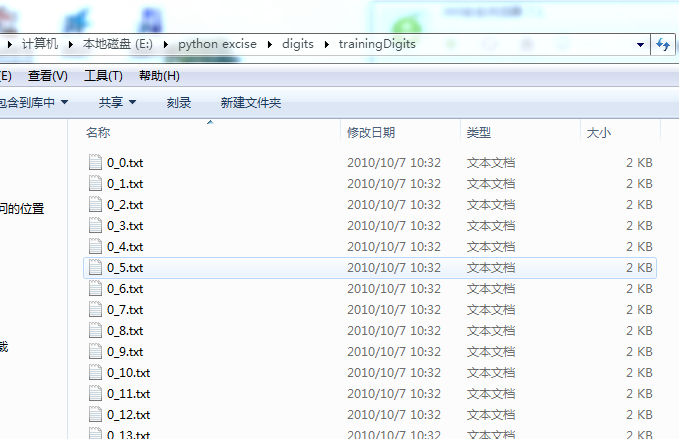
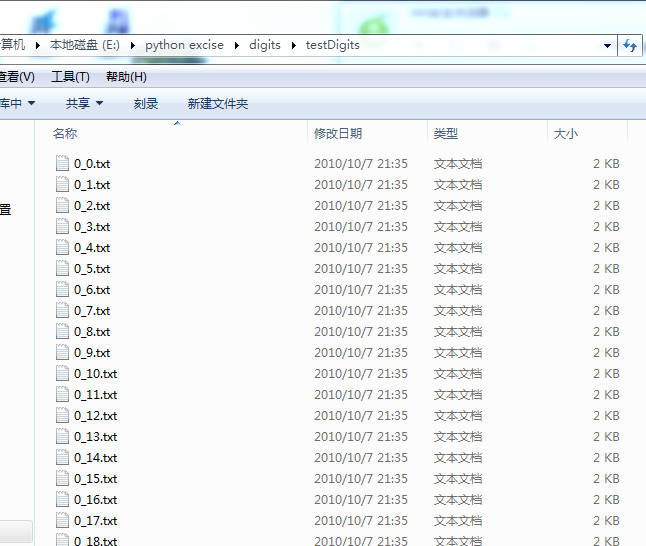
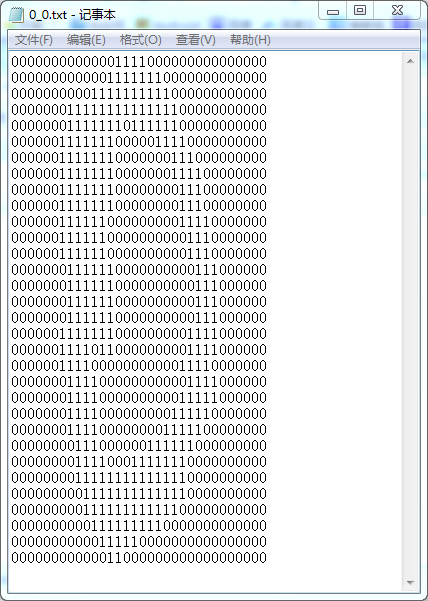
---2.准备数据:将图像转换为测试向量
trainingDigits中包含了大约2000个例子,每个数字大约有200个样本;testDigits中包含了大约900个测试数据。两组数据没有重叠。
我们先将图像格式化处理为一个向量。我们将一个32*32的二进制图像矩阵转换为1*1024的向量。
我们首先编写函数img2vector,将图像转换为向量:该函数创建1*1024的NumPy数组,然后打开指定的文件,循环读出文件的前32行,并将每行的前32个字符值存储在NumPy数组中,最后返回数组。
#!/usr/bin/python

# -*- coding: utf-8 -*-

from numpy import *     #引入科学计算包numpy

from os import listdir

import operator         #经典python函数库,运算符模块

#算法核心

#inX:用户分类的输入向量,即将对其进行分类

#dataSet:训练样本集

#labels:标签向量

def classifyO(inX,dataSet,labels,k):

    #距离计算

    dataSetSize=dataSet.shape[0] #得到数组的行数,即知道有几个训练数据

    diffMat=tile(inX,(dataSetSize,1))-dataSet  #tile是numpy中的函数,tile将原来的一个数组,扩充成了4个一样的数组;diffMat得到目标与训练数值之间的差值

    sqDiffMat=diffMat**2         #各个元素分别平方

    sqDistances=sqDiffMat.sum(axis=1)

    distances=sqDistances**0.5   #开方,得到距离

    sortedDistIndicies=distances.argsort()  #升序排列

    #选择距离最小的k个点

    classCount={}

    for i in range(k):

        voteIlabel=labels[sortedDistIndicies[i]]

        classCount[voteIlabel]=classCount.get(voteIlabel,0)+1

    #排序

    sortedClassCount=sorted(classCount.iteritems(),key=operator.itemgetter(1),reverse=True)

    return sortedClassCount[0][0]

def img2vector(filename):

    returnVect=zeros((1,1024))

    fr=open(filename)

    for i in range(32):

        lineStr=fr.readline()

        for j in range(32):

            returnVect[0,32*i+j]=int(lineStr[j])

    return returnVect
在python命令行中输入下列命令测试img2vector函数,然后与本文编辑器打开的文件进行比较:
>>> import kNN

>>> testVector=kNN.img2vector('digits/testDigits/0_13.txt') #根据自己的目录写

>>> testVector[0,0:31]

array([ 0.,  0.,  0.,  0.,  0.,  0.,  0.,  0.,  0.,  0.,  0.,  0.,  0.,

        0.,  1.,  1.,  1.,  1.,  0.,  0.,  0.,  0.,  0.,  0.,  0.,  0.,

        0.,  0.,  0.,  0.,  0.])

>>> testVector[0,32:63]

array([ 0.,  0.,  0.,  0.,  0.,  0.,  0.,  0.,  0.,  0.,  0.,  0.,  1.,

        1.,  1.,  1.,  1.,  1.,  1.,  0.,  0.,  0.,  0.,  0.,  0.,  0.,

        0.,  0.,  0.,  0.,  0.])
---3.测试算法:使用k-近邻算法识别手写数字
我们已经将数据处理成分类器可以识别的格式,现在要做的是将这些数据输入到分类器,检查分类器的执行结果。handwritingClassTest()是测试分类器的代码,将其写入kNN.py文件中。在写入之前,保证将from os import listdir写入文件的起始部分。这段代码主要功能是从os模块中导入函数listdir,它可以列出给定目录的文件名。
def handwritingClassTest():

    hwLabels=[]

    trainingFileList=listdir('E:\\python excise\\digits\\trainingDigits')

    m=len(trainingFileList)

    trainingMat=zeros((m,1024))

    for i in range(m):

        fileNameStr=trainingFileList[i]

        fileStr=fileNameStr.split('.')[0]

        classNumStr=int(fileStr.split('_')[0])

        hwLabels.append(classNumStr)

        trainingMat[i,:]=img2vector('digits/trainingDigits/%s' %fileNameStr)

    testFileList=listdir('E:/python excise/digits/testDigits')

    errorCount=0.0

    mTest=len(testFileList)

    for i in range(mTest):

        fileNameStr=testFileList[i]

        fileStr=fileNameStr.split('.')[0]

        classNumStr=int(fileStr.split('_')[0])

        vectorUnderTest=img2vector('digits/testDigits/%s'%fileNameStr)

        classifierResult=classifyO(vectorUnderTest,trainingMat,hwLabels,3)

        print "the classifier came back with:%d,the real answeris:%d" %(classifierResult,classNumStr)

        if(classifierResult !=classNumStr):errorCount+=1.0

    print "\nthe total number of error is:%d"%errorCount

    print "\nthe total error rate is:%f"%(errorCount/float(mTest))
解释:将E:\\python excise\\digits\\trainingDigits目录中的文件内容存储到列表trainingFileList中,然后可以得到文件中有有多少文件,并将其存储在变量m中。接着,代码创建一个m行1024列的训练矩阵,该矩阵的每行数据存储一个图像。我们可以从文件名中解析出分类数字,该目录下的文件按照规则命名,如文件9_45.txt的分类是9,它是数字9的第45个实例。然后我们可以将类代码存储到hwLabels向量中,使用前面的img2vector函数载入图像。
下一步中,对E:/python excise/digits/testDigits目录中文件执行相似的操作,不同的是我们并不将这个目录下的文件载入矩阵,而是使用classifyO()函数测试该目录下的每个文件。由于文件中的值已经在0和1之间,所以不用归一化。
在python命令提示符中输入kNN.handwritingClassTest(),测试该函数的输出结果。依赖于机器速度,夹在数据集可能需要话费很长时间,然后函数依次测试每个文件:
>>> kNN.handwritingClassTest()

the classifier came back with:0,the real answeris:0

the classifier came back with:0,the real answeris:0

the classifier came back with:0,the real answeris:0

the classifier came back with:0,the real answeris:0

the classifier came back with:0,the real answeris:0

the classifier came back with:0,the real answeris:0

the classifier came back with:0,the real answeris:0

the classifier came back with:0,the real answeris:0

the classifier came back with:0,the real answeris:0

the classifier came back with:0,the real answeris:0

the classifier came back with:0,the real answeris:0

the classifier came back with:0,the real answeris:0

the classifier came back with:0,the real answeris:0

the classifier came back with:0,the real answeris:0

the classifier came back with:0,the real answeris:0

the classifier came back with:0,the real answeris:0

the classifier came back with:0,the real answeris:0

the classifier came back with:0,the real answeris:0

the classifier came back with:0,the real answeris:0

the classifier came back with:0,the real answeris:0

the classifier came back with:0,the real answeris:0

the classifier came back with:0,the real answeris:0

the classifier came back with:0,the real answeris:0

the classifier came back with:0,the real answeris:0

the classifier came back with:0,the real answeris:0

the classifier came back with:0,the real answeris:0

the classifier came back with:0,the real answeris:0

the classifier came back with:0,the real answeris:0

the classifier came back with:0,the real answeris:0

the classifier came back with:0,the real answeris:0

the classifier came back with:0,the real answeris:0

the classifier came back with:0,the real answeris:0

the classifier came back with:0,the real answeris:0

the classifier came back with:0,the real answeris:0

the classifier came back with:0,the real answeris:0

the classifier came back with:0,the real answeris:0

the classifier came back with:0,the real answeris:0

the classifier came back with:0,the real answeris:0

the classifier came back with:0,the real answeris:0

the classifier came back with:0,the real answeris:0

the classifier came back with:0,the real answeris:0

the classifier came back with:0,the real answeris:0

the classifier came back with:0,the real answeris:0

the classifier came back with:0,the real answeris:0

the classifier came back with:0,the real answeris:0

the classifier came back with:0,the real answeris:0

the classifier came back with:0,the real answeris:0

the classifier came back with:0,the real answeris:0

the classifier came back with:0,the real answeris:0

the classifier came back with:0,the real answeris:0

the classifier came back with:0,the real answeris:0

the classifier came back with:0,the real answeris:0

the classifier came back with:0,the real answeris:0

the classifier came back with:0,the real answeris:0

the classifier came back with:0,the real answeris:0

the classifier came back with:0,the real answeris:0

the classifier came back with:0,the real answeris:0

the classifier came back with:0,the real answeris:0

the classifier came back with:0,the real answeris:0

the classifier came back with:0,the real answeris:0

the classifier came back with:0,the real answeris:0

the classifier came back with:0,the real answeris:0

the classifier came back with:0,the real answeris:0

the classifier came back with:0,the real answeris:0

the classifier came back with:0,the real answeris:0

the classifier came back with:0,the real answeris:0

the classifier came back with:0,the real answeris:0

the classifier came back with:0,the real answeris:0

the classifier came back with:0,the real answeris:0

the classifier came back with:0,the real answeris:0

the classifier came back with:0,the real answeris:0

the classifier came back with:0,the real answeris:0

the classifier came back with:0,the real answeris:0

the classifier came back with:0,the real answeris:0

the classifier came back with:0,the real answeris:0

the classifier came back with:0,the real answeris:0

the classifier came back with:0,the real answeris:0

the classifier came back with:0,the real answeris:0

the classifier came back with:0,the real answeris:0

the classifier came back with:0,the real answeris:0

the classifier came back with:0,the real answeris:0

the classifier came back with:0,the real answeris:0

the classifier came back with:0,the real answeris:0

the classifier came back with:0,the real answeris:0

the classifier came back with:0,the real answeris:0

the classifier came back with:0,the real answeris:0

the classifier came back with:0,the real answeris:0

the classifier came back with:1,the real answeris:1

the classifier came back with:1,the real answeris:1

the classifier came back with:1,the real answeris:1

the classifier came back with:1,the real answeris:1

...

the classifier came back with:9,the real answeris:9

the classifier came back with:9,the real answeris:9

the classifier came back with:9,the real answeris:9

the classifier came back with:9,the real answeris:9

the classifier came back with:9,the real answeris:9

the classifier came back with:9,the real answeris:9

the classifier came back with:9,the real answeris:9

the classifier came back with:9,the real answeris:9

the classifier came back with:9,the real answeris:9

the classifier came back with:9,the real answeris:9

the classifier came back with:9,the real answeris:9

the classifier came back with:9,the real answeris:9

the classifier came back with:9,the real answeris:9

the classifier came back with:9,the real answeris:9

the classifier came back with:9,the real answeris:9

the total number of error is:11

the total error rate is:0.011628
总结
k-近邻算法识别手写数字数据集,错误率为1.2%。改变变量k的值、修改函数handwritingClassTest随机选取训练样本、改变训练样本的数目,都会对k-近邻算法的错误率产生影响。
【Machine Learning in Action --2】K-近邻算法构造手写识别系统的更多相关文章
- 第三篇:基于K-近邻分类算法的手写识别系统
前言 本文将继续讲解K-近邻算法的项目实例 - 手写识别系统. 该系统在获取用户的手写输入后,判断用户写的是什么. 为了突出核心,简化细节,本示例系统中的输入为32x32矩阵,分类结果也均为数字.但对 ...
- 《机器学习实战》之k-近邻算法(手写识别系统)
这个玩意和改进约会网站的那个差不多,它是提前把所有数字转换成了32*32像素大小的黑白图,然后转换成字符图(用0,1表示),将所有1024个像素点用一维矩阵保存下来,这样就可以通过knn计算欧几里得距 ...
- k-近邻算法-手写识别系统
手写数字是32x32的黑白图像.为了能使用KNN分类器,我们需要把32x32的二进制图像转换为1x1024 1. 将图像转化为向量 from numpy import * # 导入科学计算包numpy ...
- K近邻 Python实现 机器学习实战(Machine Learning in Action)
算法原理 K近邻是机器学习中常见的分类方法之间,也是相对最简单的一种分类方法,属于监督学习范畴.其实K近邻并没有显式的学习过程,它的学习过程就是测试过程.K近邻思想很简单:先给你一个训练数据集D,包括 ...
- 《机器学习实战》-k近邻算法
目录 K-近邻算法 k-近邻算法概述 解析和导入数据 使用 Python 导入数据 实施 kNN 分类算法 测试分类器 使用 k-近邻算法改进约会网站的配对效果 收集数据 准备数据:使用 Python ...
- 机器学习实战 [Machine learning in action]
内容简介 机器学习是人工智能研究领域中一个极其重要的研究方向,在现今的大数据时代背景下,捕获数据并从中萃取有价值的信息或模式,成为各行业求生存.谋发展的决定性手段,这使得这一过去为分析师和数学家所专属 ...
- ###《Machine Learning in Action》 - KNN
初学Python:理解机器学习. 算法是需要实现的,纸上得来终觉浅. // @author: gr // @date: 2015-01-16 // @email: forgerui@gmail.com ...
- k近邻算法python实现 -- 《机器学习实战》
''' Created on Nov 06, 2017 kNN: k Nearest Neighbors Input: inX: vector to compare to existing datas ...
- 机器学习实战(Machine Learning in Action)学习笔记————08.使用FPgrowth算法来高效发现频繁项集
机器学习实战(Machine Learning in Action)学习笔记————08.使用FPgrowth算法来高效发现频繁项集 关键字:FPgrowth.频繁项集.条件FP树.非监督学习作者:米 ...
随机推荐
- Webstrom 连接svn报错怎么解决
Subversion: (Accessing URL: https://192.168.1.249:8443/svn/H5/seif ) Received fatal alert: handshak ...
- jquery 学习笔记 (2)--write less,do more
$(window).load(function(){ }) window.onload=function(){ } toggle()方法 toggle()方法的语法结构: ...
- 单词缩写(abbr.cpp)每日一题
题目描述:YXY 发现好多计算机中的单词都是缩写,如 GDB,它是全称 Gnu DeBug 的缩写.但是,有时缩写对应的全称并不固定,如缩写 LINUX,可以理解为:(1)LINus's UniX ( ...
- 转:apache 的mod-status
最近发现在apache的监控方面,apache 2开始自带的apache mod-status其实是个不错的工具,下面摘录并笔记之: 如果是linux的话,可以这样设置: 在httpd.conf中添加 ...
- 面向GC的Java编程(转)
转自:http://blog.hesey.net/2014/05/gc-oriented-java-programming.html Java程序员在编码过程中通常不需要考虑内存问题,JVM经过高度优 ...
- HDU 3127 WHUgirls
二维完全背包,理解似乎还不够全面,过几天回来再看看这题. #include<cstdio> #include<cstring> #include<cmath> #i ...
- Swift逃逸闭包之见解
Swift 逃匿闭包顾名思义,就是闭包想要逃跑.当闭包作为参数传给一个方法时,在这个方法被调用完后闭包却还没有被执行,而是等到方法执行完后才调用 基本都是跨线程的时候才会有逃逸闭包这个说法.因为异步 ...
- 一键批量ping任意ip段的存活主机
=======================by me===================================== @echo offecho.color FC for /f %%i ...
- mybatis 批量插入值的sql
<insert id="insertAwardPic" useGeneratedKeys="true" parameterType="java. ...
- 站在Java的角度看LinkedList
站在Java的角度看,玩队列不就是玩对象引用对象嘛! public class LinkedList<E> implements List<E>, Deque<E> ...