
WCF不用证书实现验证(messageheader)
上文WCF进阶:将消息正文Base64编码中介绍了实现自定义MessageInspector来记录消息和实现自定义Formatter来改写消息,本文介绍一下在WCF中使用SoapHeader进行验证的两种实现方法,同时再次复习自定义Inspector和自定义EndpointBehavior。
在Xml Web Service中能将用户的身份信息如用户名,密码添加到SoapHeader中,从而实现服务调用的身份验证,这种做法是沿用了Http中用户名,密码 身份验证,是我们最乐于接受的。而在WCF中因为提供了非常健壮的安全机制,但实现起来真是不够简单。对于多数应用情景来讲,有点大炮打蚊子的感觉。因此 好多人在网上询问在WCF中如何象XMl Web Service一样使用SoapHeader来完成用户名,密码身份验证。传统的办法是通过在服务的操作中从 OperationContext.Current.IncomingMessageHeaders来获取Header中的内容,而在客户端在 OperationContext.Current.OutgoingMessageHeaders中添加MessageHeader。下面的代码片段简 要的介绍了这种实现:
在服务端的一个Operation中
public string GetData(int value)
{
System.Text.Encoding encoding = System.Text.Encoding.GetEncoding("utf-8");
string username = "";
string pwd = "";
int index = OperationContext.Current.IncomingMessageHeaders.FindHeader("username", "http://tempuri.org");
if (index >= 0)
{
username = OperationContext.Current.IncomingMessageHeaders.GetHeader<string>(index).ToString();
}
index = OperationContext.Current.IncomingMessageHeaders.FindHeader("pwd", "http://tempuri.org");
if (index >= 0)
{
pwd = OperationContext.Current.IncomingMessageHeaders.GetHeader<string>(index).ToString();
}
return string.Format("You entered: {0}", value);
}
在客户端调代码如下:
Robin_Wcf_Formatter_Svc.Service1Client svc = new Robin_Wcf_Formatter_Svc.Service1Client();
using (OperationContextScope scope = new OperationContextScope(svc.InnerChannel))
{
MessageHeader header = MessageHeader.CreateHeader("username", "http://tempuri.org", "robinzhang");
OperationContext.Current.OutgoingMessageHeaders.Add(header);
header = MessageHeader.CreateHeader("pwd", "http://tempuri.org", "robinzhang");
OperationContext.Current.OutgoingMessageHeaders.Add(header);
string res = svc.GetData(10);
}
通过上边的代码实现,已经能在WCF中使用SoapHeader来传递身份信息了。但这种方式需要在每次客户端调用和每个服务操作中都增加类似代码 片断。比较麻烦。多数情况下,我们的服务开发好之后,往往只开放给固定的用户用于消费,如果我们的服务的实例模式为PerCall,也就是不保存会话,同 时我们又希望能验证调用者的身份信息,我们需要在每个Operation的消息中增加SoapHeader来附加身份信息。这样服务即可保证每一个操作都 不被非法调用。阅读完上篇文章,已经了解到通过MessageInspector能拦截消息用于记录或者修改,如果在拦截到消息之后,在消息中增加 MessageHeader便可以实现上述需求。为此我们实现了一个实现IClientMessageInspector, IDispatchMessageInspector, IEndpointBehavior三个接口的类,这样该类就承担了两种角色,自定义MessageInspector,自定义 EndpointBehavior。这个类的代码如下:
using System;
using System.Collections.Generic;
using System.Linq;
using System.Text;
using System.ServiceModel.Dispatcher;
using System.ServiceModel.Description;
using System.ServiceModel.Channels;
using System.ServiceModel;
namespace RobinLib
{
public class AttachUserNamePasswordBehavior : IClientMessageInspector, IDispatchMessageInspector, IEndpointBehavior
{
private static string UserName = System.Configuration.ConfigurationSettings.AppSettings["username"];
private static string Password = System.Configuration.ConfigurationSettings.AppSettings["pwd"];
public AttachUserNamePasswordBehavior()
{
}
#region IClientMessageInspector 成员
public void AfterReceiveReply(ref System.ServiceModel.Channels.Message reply, object correlationState)
{
}
public object BeforeSendRequest(ref System.ServiceModel.Channels.Message request, System.ServiceModel.IClientChannel channel)
{
MessageHeader userNameHeader = MessageHeader.CreateHeader("OperationUserName", "http://tempuri.org", UserName, false, "");
MessageHeader pwdNameHeader = MessageHeader.CreateHeader("OperationPwd", "http://tempuri.org", Password, false, "");
request.Headers.Add(userNameHeader);
request.Headers.Add(pwdNameHeader);
Console.WriteLine(request);
return null;
}
#endregion
#region IDispatchMessageInspector 成员
string GetHeaderValue(string key)
{
int index = OperationContext.Current.IncomingMessageHeaders.FindHeader(key, "http://tempuri.org");
if (index >= 0)
{
return OperationContext.Current.IncomingMessageHeaders.GetHeader<string>(index).ToString();
}
return null;
}
public object AfterReceiveRequest(ref System.ServiceModel.Channels.Message request, System.ServiceModel.IClientChannel channel, System.ServiceModel.InstanceContext instanceContext)
{
Console.WriteLine(request);
string username = GetHeaderValue("OperationUserName");
string pwd = GetHeaderValue("OperationPwd");
if (username == "robinzhang" && pwd == "111111")
{
}
else
{
throw new Exception("操作中的用户名,密码不正确!");
}
return null;
}
public void BeforeSendReply(ref System.ServiceModel.Channels.Message reply, object correlationState)
{
}
#endregion
#region IEndpointBehavior 成员
public void AddBindingParameters(ServiceEndpoint endpoint, System.ServiceModel.Channels.BindingParameterCollection bindingParameters)
{
}
public void ApplyClientBehavior(ServiceEndpoint endpoint, System.ServiceModel.Dispatcher.ClientRuntime clientRuntime)
{
clientRuntime.MessageInspectors.Add(new AttachUserNamePasswordBehavior());
}
public void ApplyDispatchBehavior(ServiceEndpoint endpoint, System.ServiceModel.Dispatcher.EndpointDispatcher endpointDispatcher)
{
endpointDispatcher.DispatchRuntime.MessageInspectors.Add(new AttachUserNamePasswordBehavior());
}
public void Validate(ServiceEndpoint endpoint)
{
}
#endregion
}
}
象上文一样,将自定义的EndpointBehavior通过代码方式应用到Host和Proxy中
服务宿主程序
using System;
using System.Collections.Generic;
using System.Linq;
using System.Text;
using System.ServiceModel;
namespace Robin_Wcf_OperationWithToken_Host
{
public class Program
{
static void Main(string[] args)
{
//服务地址
Uri baseAddress = new Uri("net.tcp://127.0.0.1:8081/Robin_Wcf_Formatter");
ServiceHost host = new ServiceHost(typeof(Robin_Wcf_OperationWithToken_SvcLib.Service1), new Uri[] { baseAddress });
//服务绑定
NetTcpBinding bind = new NetTcpBinding();
host.AddServiceEndpoint(typeof(Robin_Wcf_OperationWithToken_SvcLib.IService1), bind, "");
if (host.Description.Behaviors.Find<System.ServiceModel.Description.ServiceMetadataBehavior>() == null)
{
System.ServiceModel.Description.ServiceMetadataBehavior svcMetaBehavior = new System.ServiceModel.Description.ServiceMetadataBehavior();
svcMetaBehavior.HttpGetEnabled = true;
svcMetaBehavior.HttpGetUrl = new Uri("http://127.0.0.1:8001/Mex");
host.Description.Behaviors.Add(svcMetaBehavior);
}
host.Opened += new EventHandler(delegate(object obj, EventArgs e)
{
Console.WriteLine("服务已经启动!");
});
foreach (var sep in host.Description.Endpoints)
{
sep.Behaviors.Add(new RobinLib.AttachUserNamePasswordBehavior());
}
host.Open();
Console.Read();
}
}
}
客户端代理
[System.Diagnostics.DebuggerStepThroughAttribute()]
[System.CodeDom.Compiler.GeneratedCodeAttribute("System.ServiceModel", "3.0.0.0")]
public partial class Service1Client : System.ServiceModel.ClientBase<Robin_Wcf_OperationWithToken_ClientApp.ServiceReference1.IService1>, Robin_Wcf_OperationWithToken_ClientApp.ServiceReference1.IService1
{
public Service1Client()
{
base.Endpoint.Behaviors.Add(new RobinLib.AttachUserNamePasswordBehavior());
}
public Service1Client(string endpointConfigurationName) :
base(endpointConfigurationName)
{
base.Endpoint.Behaviors.Add(new RobinLib.AttachUserNamePasswordBehavior());
}
public Service1Client(string endpointConfigurationName, string remoteAddress) :
base(endpointConfigurationName, remoteAddress)
{
base.Endpoint.Behaviors.Add(new RobinLib.AttachUserNamePasswordBehavior());
}
public Service1Client(string endpointConfigurationName, System.ServiceModel.EndpointAddress remoteAddress) :
base(endpointConfigurationName, remoteAddress)
{
base.Endpoint.Behaviors.Add(new RobinLib.AttachUserNamePasswordBehavior());
}
public Service1Client(System.ServiceModel.Channels.Binding binding, System.ServiceModel.EndpointAddress remoteAddress) :
base(binding, remoteAddress)
{
base.Endpoint.Behaviors.Add(new RobinLib.AttachUserNamePasswordBehavior());
}
public string GetData(int value)
{
return base.Channel.GetData(value);
}
public Robin_Wcf_OperationWithToken_ClientApp.ServiceReference1.CompositeType GetDataUsingDataContract(Robin_Wcf_OperationWithToken_ClientApp.ServiceReference1.CompositeType composite)
{
return base.Channel.GetDataUsingDataContract(composite);
}
到此,代码基本实现了,在正式应用的时候,我们只需要为每个客户端创建独立的用户名,密码对,然后将这个信息通过一些渠道告诉服务消费者,服务消费 者需要将用户名,密码放到Web.Config中的AppSettings中。而且在正式应用的时候,需要将放置到MessageHeader中的用户 名,密码进行加密,而不是明文传输。这样这套机制就能用于生产啦。
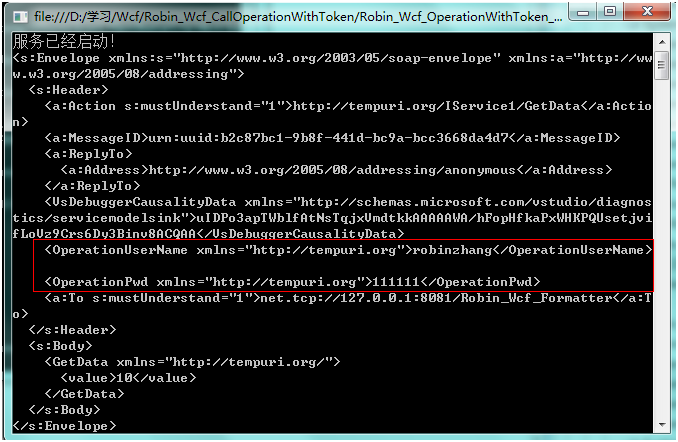
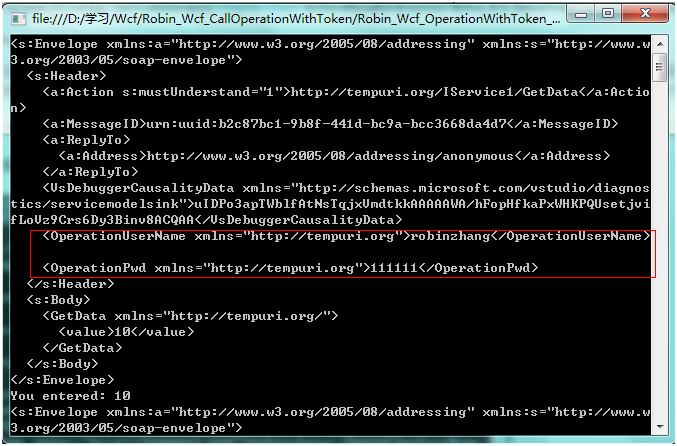
通过这种办法,我们能为每个操作都设定身份验证,同时不需要更改Operation函数内容和客户端调用方式,我们来看一下运行结果:
用户,密码正确情况下的调用
服务器端:
客户端:
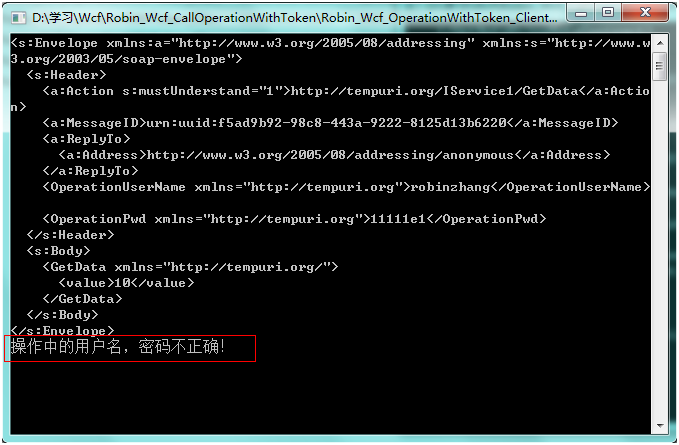
如果用户名,密码不匹配,服务能正常运行,但客户端会遇到异常
WCF不用证书实现验证(messageheader)的更多相关文章
- 关于WEB Service&WCF&WebApi实现身份验证之WCF篇(2)
因前段时间工作变动(换了新工作)及工作较忙暂时中断了该系列文章,今天难得有点空闲时间,就继续总结WCF身份验证的其它方法.前面总结了三种方法(详见:关于WEB Service&WCF& ...
- 关于WEB Service&WCF&WebApi实现身份验证之WebApi篇
之前先后总结并发表了关于WEB Service.WCF身份验证相关文章,如下: 关于WEB Service&WCF&WebApi实现身份验证之WEB Service篇. 关于WEB S ...
- WCF服务器证书配置说明-没有能够进行密钥交换的私钥,或者进程可能没有访问私钥的权限
WCF服务器证书配置说明 1.创建证书: makecert.exe -sr LocalMachine -ss My -a sha1 -n CN=XXX -sky exchange -pe 说明: -s ...
- 关闭Postman 证书的验证
1.问题背景 使用自己生成的SSL证书,用Postman访问失败.需要忽略SSL证书的验证 2.关闭Postman 证书的验证 在Settings-General中 关闭SSL certificate ...
- 【WCF安全】使用X509证书自定义验证
接触WCF时间比较短,在项目中要使用X509证书,纠结好几天终于有了结论,因此为了方便日后查阅和园友交流特意单独将部分代码提出,并做以记录. 1.准备工作 制作X509证书,此处用到三个证书名称 导入 ...
- 自定义实现wcf的用户名密码验证
目前wcf分为[传输层安全][消息层安全]两种,本身也自带的用户名密码验证的功能,但是ms为了防止用户名密码明文在网络上传输,所以,强制要求一旦使用[用户名密码]校验功能,则必须使用证书,按照常理讲, ...
- 关于WEB Service&WCF&WebApi实现身份验证之WCF篇(1)
WCF身份验证一般常见的方式有:自定义用户名及密码验证.X509证书验证.ASP.NET成员资格(membership)验证.SOAP Header验证.Windows集成验证.WCF身份验证服务(A ...
- 【WCF】Silverlight+wcf+自定义用户名密码验证
本文摘自 http://www.cnblogs.com/virusswb/archive/2010/01/26/1656543.html 在昨天的博文Silverlight3+wcf+在不使用证书的情 ...
- 关于WEB Service&WCF&WebApi实现身份验证之WEB Service篇
在这个WEB API横行的时代,讲WEB Service技术却实显得有些过时了,过时的技术并不代表无用武之地,有些地方也还是可以继续用他的,我之所以会讲解WEB Service,源于我最近面试时被问到 ...
随机推荐
- android 图片拍照图片旋转的处理方式
第一种:String str=path; /** * 读取图片属性:旋转的角度 * * @param path * 图片绝对路径 * @return degree旋转的角度 */ private vo ...
- Git 使用初体验
http://my.oschina.net/moooofly/blog/228608 很久之前在 http://git.oschina.net/ 上创建了一个私有项目 modb ,目的主要是用来学习如 ...
- 移动WEB开发资源
很多移动开发的资源 http://www.cnblogs.com/PeunZhang/p/3407453.html
- 尝试在数据库 5 中提取逻辑页 (1:1640) 失败。该逻辑页属于分配单元XXX ,而非 XXX。
此信息表明数据库或表 已经部分损坏可以通过以下步骤尝试修复: 1. DBCC CHECKDB 重启服务器后,在没有进行任何操作的情况下,在SQL查询分析器中执行以下SQL进行数据库的修复,修复数据库存 ...
- Android Audio Focus的应用(requestAudioFocus)
网址:http://blog.csdn.net/dadoneo/article/details/8252933 FROM: http://www.linuxidc.com/Linux/2012-04/ ...
- linux proxy
ALL_PROXY=socks://192.168.2.1:3128/ HTTPS_PROXY=https://192.168.2.1:3128/HTTP_PROXY=http://192.168.2 ...
- A Game
A Game 时间限制:10000ms 单点时限:1000ms 内存限制:256MB 描述 Little Hi and Little Ho are playing a game. There is a ...
- SDAU课程练习--problemG(1006)
题目描述 Problem Description The highest building in our city has only one elevator. A request list is m ...
- Codeforces Round #369 (Div. 2) D. Directed Roads (DFS)
D. Directed Roads time limit per test 2 seconds memory limit per test 256 megabytes input standard i ...
- JQuery收集