
ionic2项目创建回顾 及 react-native 报错处理
ionic2:
1.创建项目:
ionic start MyIonic2Project tutorial --v2 (下载 tutorial 模板来初始化项目)

ionic start MyIonic2Project --v2 (默认会使用 tabs 模板)
2.在浏览器中运行
cd MyIonic2Project

ionic serve
3.将Ionic项目部署到模拟器或仿真器上
ionic emulate
4.添加模块(cd到指定文件夹下)
ionic g page login
5.列出用户的Ionic运行环境信息
ionic info
6.为编译Ionic应用添加一个目标平台
ionic platform add android

ionic platform add ios
7.在连接的设备上运行Ionic项目
ionic run android

ionic run ios
8.将Ionic项目针对指定的平台进行编译
ionic build android

ionic build ios
9.配置环境检测

常见问题:
Error: D:\adt\sdk\platform-tools\adb.exe: Command failed with exit code 1 Error output:
error: could not install *smartsocket* listener: cannot bind to 127.0.0.1:5037: 通常每个套接字地址(协议/网络地址/端口)只允许使用一次。 (10048)
could not read ok from ADB Server
* failed to start daemon *
error: cannot connect to daemon

解析原因:
5037端口被占用
解决方案:
方案一:
1.运行->cmd 打开命令行窗口输入:netstat -aon|findstr "5037"

2.找到占用端口号的pid:3600

如:

C:\Users\Administrator>netstat -aon|findstr "5037"

TCP 127.0.0.1:5037 0.0.0.0:0 LISTENING 3600

3.打开资源管理器结束pid=3600的进程(ctrl+shift+esc)
react-native
常见问题:
1.项目创建过程中没有问题,但执行 $ react-native run-android 报错
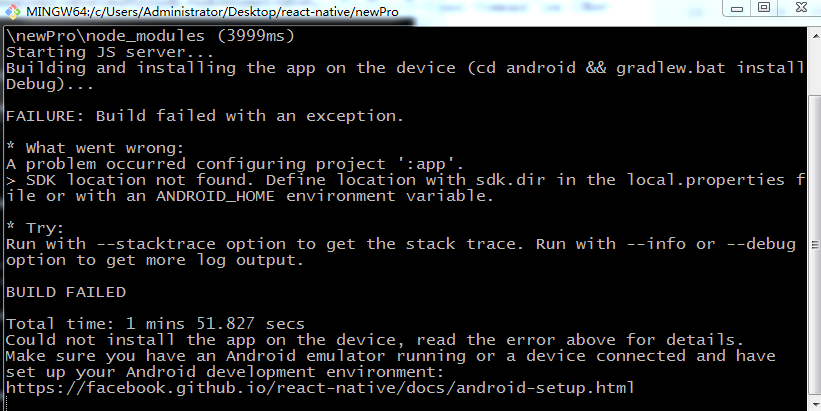
$ react-native run-android
Scanning 554 folders for symlinks in C:\Users\Administrator\Desktop\react-
native\newPro\node_modules (73ms)
Starting JS server...
Building and installing the app on the device (cd android && gradlew.bat
installDebug)...
FAILURE: Build failed with an exception.
* What went wrong:
A problem occurred configuring project ':app'.
> SDK location not found. Define location with sdk.dir in the local.properties
file or with an ANDROID_HOME environment variable.
* Try:
Run with --stacktrace option to get the stack trace. Run with --info or --debug
option to get more log output.
BUILD FAILED
Total time: 2 mins 31.924 secs
Could not install the app on the device, read the error above for details.
Make sure you have an Android emulator running or a device connected and have
set up your Android development environment:
https://facebook.github.io/react-native/docs/android-setup.html
原因解析:
无法找到SDK路径
解决方案:
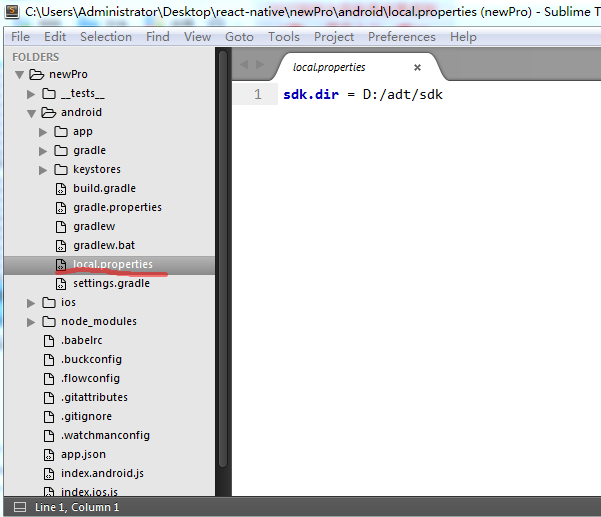
在android文件夹下,新建 local.properties,添加路径
例:
sdk.dir = /Users/hema/Library/Android/sdk
sdk.dir = D:/adt/sdk
2.没有接受SDK组件的许可协议

Warning: License for package Android Support Repository not accepted.
FAILURE: Build failed with an exception.
* What went wrong:
A problem occurred configuring project ':app'.
> You have not accepted the license agreements of the following SDK components:
[Android Support Repository].
Before building your project, you need to accept the license agreements and
complete the installation of the missing components using the Android Studio SDK
Manager.
Alternatively, to learn how to transfer the license agreements from one
workstation to another, go to http://d.android.com/r/studio-ui/export-
licenses.html
* Try:
Run with --stacktrace option to get the stack trace. Run with --info or --debug
option to get more log output.
BUILD FAILED
Total time: 1 mins 44.091 secs
Could not install the app on the device, read the error above for details.
Make sure you have an Android emulator running or a device connected and have
set up your Android development environment:
https://facebook.github.io/react-native/docs/android-setup.html
原因解析:
没有接受SDK组件的许可协议
解决方案:

打开 SDK Manager.exe,在Extras下面找到 Android Support Repository 并 install
3.navigator 被 react-native 移除
Navigator is deprecated and has been removed from this package. It can now be installed and import from ‘react-native-deprecated-custom-components’ instead of ‘react-native’.
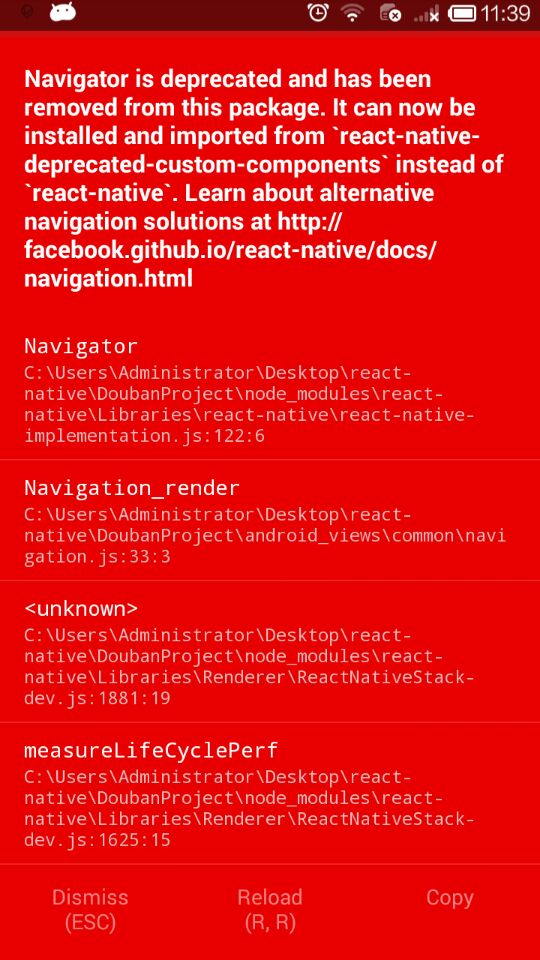
原因解析:
根据信息,react-native这个包中的Navigator已经被移除,而需要导入react-native-deprecated-custom-components这个包来使用Navigator。
解决方案:
1. 通过npm安装相应的库

  在项目根目录下输入npm install react-native-deprecated-custom-components --save 回车。

2. 在使用的JS文件中将Navigator引入进来,就是import

  import {Navigator} from ‘react-native-deprecated-custom-components’;
然后就可以在项目中正确使用Navigator了。
ionic2项目创建回顾 及 react-native 报错处理的更多相关文章
- 【问题与解决】Mac OS通过 npm 安装 React Native 报错(checkPermissions Missing write access to /usr/local/lib/node_modules)
报错情况: 当Mac OS通过 npm 安装 React Native 报错,警告文字为:checkPermissions Missing write access to /usr/local/lib ...
- 使用Visual Studio Code调试React Native报错
报错信息: [Error] Error: Unknown error: not all success patterns were matched. It means that "react ...
- react native报错处理com.android.build.api.transform.TransformException: com.android.builder.dexing.DexArchiveBuilderException: com.android.builder.dexing.DexArchiveBuilderException: Failed to process
背景:最近准备在使用react-native开发的app中接入友盟,来进行用户行为统计,分享,授权登录等操作. 在使用的过程中,遇到了一些错误信息,在此记录一下. 在修改android目录下的buil ...
- react native 报错日常 if (_total > 0) { ~~~~~~ ^ ~ 1 error generated.
node_modules/react-native/React/Base/RCTJavaScriptLoader.mm::: error: ordered comparison between poi ...
- 新maven项目创建JSP出现小红叉报错 javax.servlet.http.HttpServlet not found
展示: 右击项目----build path -----Configure Build Path 进入到窗口 libraries -------add libraries ------ server ...
- React Native 报错 Error: spawn EACCES 权限
权限不足,运行命令修改权限 chmod android/gradlew
- maven工程根项目运行ok但是子项目就报错的解决办法
正常启动没错 项目出现问题 maven工程根项目运行ok但是子项目就报错 报错信息是xxxx没有创建 解决办法 原来是子项目的依赖少了 没有配置1.8 所以会出现莫明其妙的bug
- maven项目引用时,导入类报错,选择两个项目同时执行Maven update
maven项目引用时,导入类报错,选择两个项目同时执行Maven update springboot引入第三方jar,需要扫描时加@ComponentScan("第三方的包名") ...
- vue项目初始化时npm run dev报错webpack-dev-server解决方法
vue项目初始化时npm run dev报错webpack-dev-server解决方法 原因:这是新版webpack存在的BUG,卸载现有的新版本webpack,装老版本就好webpack-dev- ...
随机推荐
- 行为型设计模式之模板方法(Template Method)
结构 意图 定义一个操作中的算法的骨架,而将一些步骤延迟到子类中.Te m p l a t e M e t h o d 使得子类可以不改变一个算法的结构即可重定义该算法的某些特定步骤. 适用性 一次性 ...
- DOS版PE工具制作
// PE.cpp : 定义控制台应用程序的入口点. //DOS版PE工具制作 #include "stdafx.h" #include <windows.h> #in ...
- C#读取JSON字符串
下面这个是一段JSON字符串宏观图 下面我们通过C#读取JSON字符串里的任何一个数值 string jsonString="上面JSON字符串"; //需要引用Newtonsof ...
- Table is marked as crashed and should be repaire (
https://www.cnblogs.com/cxchanpin/p/6894747.html
- Codeforces 954H Path Counting(DP)
题目链接 Path Counting 题意 给定一棵高度为$n$的树,给出每一层的每个点的儿子个数(某一层的所有点儿子个数相同). 令$f_{k}$为长度为$k$的路径条数,求$f_{1}, ...
- centos 部署web项目
Linux下安装Tomcat服务器和部署Web应用 一.上传Tomcat服务器
- MySQL-python install
Redhat 7.6 yum install python-devel mysql-devel gcc -y pip install MySQL-python==1.2.5
- SpringBoot动态数据源
1.原理图 2.创建枚举类 /** * 存数据源key值 */ public enum DataSourceKey { master,salve,migration } 3.创建自定义注解类 /** ...
- Servlet 工作原理
Servlet运行在Servlet容器中,由容器负责Servlet实例的查找及创建工作,并按照Servlet规范的规定调用Servlet的一组方法,这些方法也叫生命周期的方法.具体调用过程如下图所示: ...
- hdu 1425 Happy 2004
题目链接 hdu 1425 Happy 2004 题解 题目大意: 求 \[\sum_{d|2004^{x}}d\ mod\ 29\] 记为\(s(2004^x)\) \(sum(2004^{x})= ...