
iOS-QQ好友列表实现
0、QQ好友列表实现
0、首先说说实现思路
- 自定义
UITableView,每一个分组都是一个UITableViewHeaderFooterView,然后自定义cell,这里分组的实现主要是自定义UITableViewHeaderFooterView,这个折叠效果主要靠这个header的响应
- 自定义
1、实现数据源方法
#pragma mark - UITableViewDataSource

- (NSInteger)numberOfSectionsInTableView:(UITableView *)tableView

{

    // 返回分组个数

    return 10;

}

- (NSInteger)tableView:(UITableView *)tableView numberOfRowsInSection:(NSInteger)section

{

    // 取出具体的组数,然后再取出每组的内容

    SLQFriendGroup *group = self.friendList[section];

    // 根据分组是否打开情况确定如何显示分组,默认关闭

    return group.friends.count;

}

/**

 *  返回自定义cell

 */

- (UITableViewCell *)tableView:(UITableView *)tableView cellForRowAtIndexPath:(NSIndexPath *)indexPath

{

    // 1、生成cell

    SLQFriendCell *cell = [SLQFriendCell cellWithTableView:tableView];

    // 3、返回cell

    return cell;

}
2、模型定义
- 2.0、在控制器定义个数组,存放解析的plist数据
/**朋友数组*/ @property (nonatomic, copy) NSArray *friendList;
- 2.1、自定义分组模型
@class SLQFriend;

@interface SLQFriendGroup : NSObject

/**分组名称*/

@property (nonatomic, copy) NSString *name;

/**在线人数*/

@property (nonatomic, assign) int online;

/**分组中用户数量*/

@property (nonatomic, copy) NSArray *friends;

/**分组是隐藏还是展开*/

@property (nonatomic, assign,getter=isOpened) BOOL opened;

- (instancetype)initWithDictionary:(NSDictionary *)dict;

+ (instancetype)FriendGroupWithDictionary:(NSDictionary *)dict;

@end

// 实现文件

#import "SLQFriendGroup.h"

#import "SLQFriend.h"

@implementation SLQFriendGroup

- (instancetype)initWithDictionary:(NSDictionary *)dict

{

    if (self = [super init]) {

        // 1、KVC字典转模型

        [self setValuesForKeysWithDictionary:dict];

        // 2、然后再转换数组中信息

        NSMutableArray *groupFriends = [NSMutableArray array];

        for (NSDictionary *dict in self.friends) {

            // 3、字典转模型

            SLQFriend *friend = [SLQFriend friendWithDict:dict];

            [groupFriends addObject:friend];

        }

        self.friends = groupFriends;

    }

    return self;

}

+ (instancetype)FriendGroupWithDictionary:(NSDictionary *)dict

{

    return [[self alloc] initWithDictionary:dict];

}

@end
- 2.2、朋友模型
#import <Foundation/Foundation.h>

@interface SLQFriend : NSObject

/**头像*/

@property (nonatomic, copy) NSString *icon;

/**昵称*/

@property (nonatomic, copy) NSString *name;

/**好友签名*/

@property (nonatomic, copy) NSString *intro;

/**是否是vip*/

@property (nonatomic, assign, getter=isVip) BOOL vip;

- (instancetype)initFriendWithDict:(NSDictionary *)dict;

+ (instancetype)friendWithDict:(NSDictionary *)dict;

@end

// 实现文件

@implementation SLQFriend

- (instancetype)initFriendWithDict:(NSDictionary *)dict

{

    if (self = [super init]) {

        // kvc字典转模型

        [self setValuesForKeysWithDictionary:dict];

    }

    return self;

}

+ (instancetype)friendWithDict:(NSDictionary *)dict

{

    return [[self alloc] initFriendWithDict:dict];

}

@end
3、字典转模型
- 在控制器里加载字典数据并转换成模型
#pragma mark - 懒加载

- (NSArray *)friendList

{

    if (!_friendList) {

        _friendList = [NSArray array];

        // 从plist读取用户信息

        NSString *path = [[NSBundle mainBundle] pathForResource:@"friends.plist" ofType:nil];

        NSArray *friends = [NSArray arrayWithContentsOfFile:path];

         /**

         *  字典转模型

         */

        NSMutableArray *mutableFriends = [NSMutableArray array];

        for (NSDictionary *dict in friends) {

            SLQFriendGroup *group = [SLQFriendGroup FriendGroupWithDictionary:dict];

            [mutableFriends addObject:group];

        }

        _friendList = mutableFriends;

    }

    return  _friendList;

}
- 3.1、修改数据源方法
- (NSInteger)numberOfSectionsInTableView:(UITableView *)tableView

{

    // 返回分组个数

    return self.friendList.count;

}

- (NSInteger)tableView:(UITableView *)tableView numberOfRowsInSection:(NSInteger)section

{

    // 取出具体的组数,然后再取出每组的内容

    SLQFriendGroup *group = self.friendList[section];

    // 根据分组是否打开情况确定如何显示分组,默认关闭

    return group.isOpened ? group.friends.count : 0;

}

/**

 *  返回自定义cell

 */

- (UITableViewCell *)tableView:(UITableView *)tableView cellForRowAtIndexPath:(NSIndexPath *)indexPath

{

    // 1、生成cell

    SLQFriendCell *cell = [SLQFriendCell cellWithTableView:tableView];

    // 2、传递SLQFriend模型

    SLQFriendGroup *group = self.friendList[indexPath.section];

    cell.Friend = group.friends[indexPath.row];

    // 3、返回cell

    return cell;

}
4、自定义cell
- 这个自定义cell就不多说了
#import <UIKit/UIKit.h>

@class SLQFriend;

@interface SLQFriendCell : UITableViewCell

/**模型数组*/

@property (nonatomic, strong) SLQFriend *Friend;

+ (SLQFriendCell *)cellWithTableView:(UITableView *)tableView;

@end

#import "SLQFriendCell.H"

#import "SLQFriendGroup.h"

#import "SLQFriend.h"

@implementation SLQFriendCell

/**

 *  setter方法

 */

- (void)setFriend:(SLQFriend *)Friend

{

    _Friend = Friend;

    // 更新数据到控件上

    self.textLabel.text = Friend.name;

    self.detailTextLabel.text = Friend.intro;

    self.imageView.image = [UIImage imageNamed:Friend.icon];

    self.textLabel.textColor = Friend.isVip ? [UIColor redColor] : [UIColor blackColor];

}

/**

 *  返回cell

 */

+ (SLQFriendCell *)cellWithTableView:(UITableView *)tableView

{

    static NSString *ID = @"Cell";

    SLQFriendCell *cell = [tableView dequeueReusableCellWithIdentifier:ID];

    if (cell == nil) {

        cell = [[SLQFriendCell alloc] initWithStyle:UITableViewCellStyleSubtitle reuseIdentifier:ID];

    }

    return cell;

}
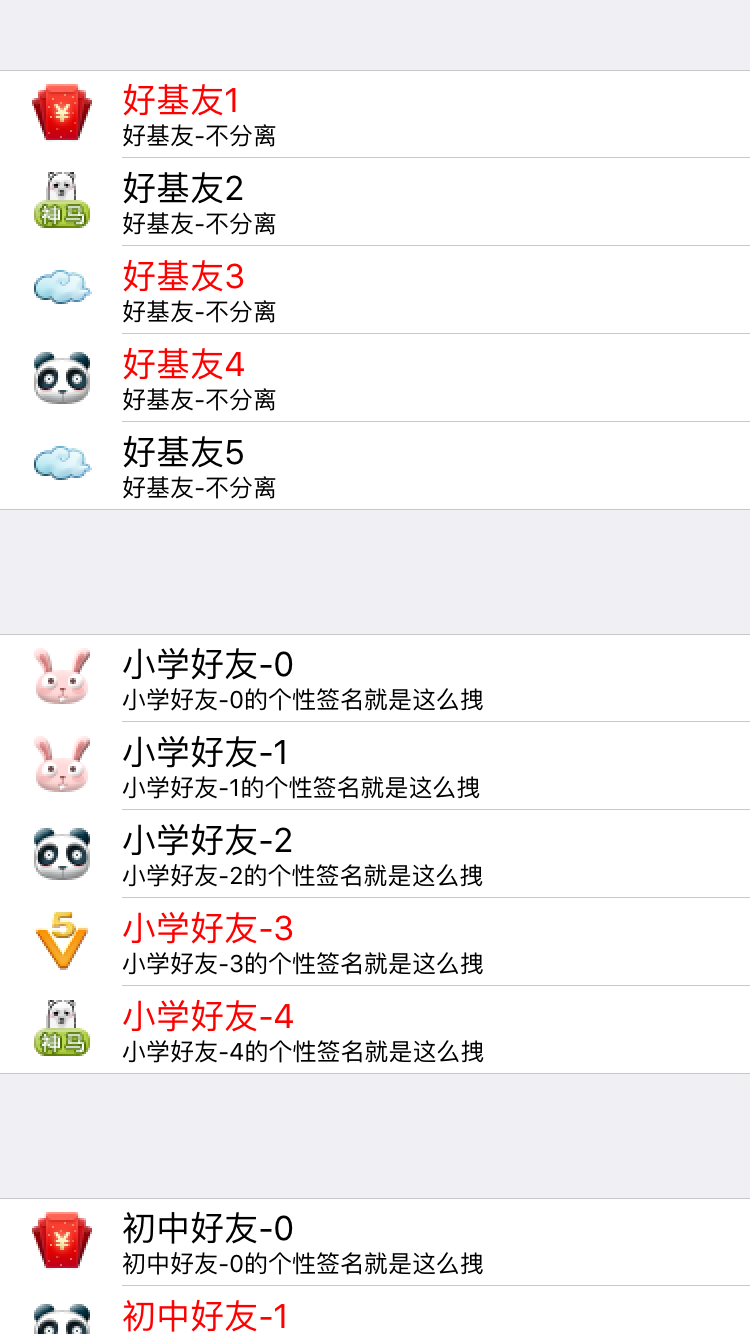
5、自定义HeaderFooterView
- 这个才是弹出列表的关键所在
#import <UIKit/UIKit.h>

@class SLQFriendGroup;

@interface SLQHeader : UITableViewHeaderFooterView

/**用户分组*/

@property (nonatomic, strong) SLQFriendGroup *friendGroup;

/** 按钮*/

@property (nonatomic, weak) UIButton *contentButton;

/** 标签*/

@property (nonatomic, weak) UILabel *onlineLabel;

+ (instancetype)headerWithTableView:(UITableView *)tableView;

@end
- 5.0、重写setter方法,设置数据
- (void)setFriendGroup:(SLQFriendGroup *)friendGroup

{

    _friendGroup = friendGroup;

    // 加空格,让图片和文字产生一个间隔

    NSString *name = [NSString stringWithFormat:@" %@",friendGroup.name];

    [self.contentButton setTitle:name forState:UIControlStateNormal];

    [self.contentButton setTitleColor:[UIColor darkGrayColor] forState:UIControlStateNormal];

    self.onlineLabel.text = [NSString stringWithFormat:@"%zd/%zd",friendGroup.online,friendGroup.friends.count];

}
- 5.1、封装header生成操作,返回header
// 返回生成好的header

+ (instancetype)headerWithTableView:(UITableView *)tableView

{

    static NSString *ID = @"header";

    SLQHeader *header = [tableView dequeueReusableHeaderFooterViewWithIdentifier:ID];

    if (header == nil) {

        header = [[SLQHeader alloc] initWithReuseIdentifier:ID];

    }

    return header;

}
- 5.2、布局子控件
- (void)layoutSubviews

{

    [super layoutSubviews];

    // 布局添加的子控件

    // 1、背景

    self.contentButton.frame = self.bounds;

    // 稍微向右偏移一点

    self.contentButton.contentEdgeInsets = UIEdgeInsetsMake(0, 10, 0, 0);

    // 2、标签:在线人数/组内总人数

    NSInteger countWidth = 150;

    NSInteger countHeight = self.bounds.size.height;

    NSInteger countX = self.bounds.size.width - 10 - countWidth;

    NSInteger countY = 0;

    self.onlineLabel.frame = CGRectMake(countX, countY, countWidth, countHeight);

    // 3、改变小箭头的方向

    // 由于tableView刷新数据后,所有header会被重新创建,所以要在这里对箭头朝向做出修改

    // 改变箭头朝向,顺时针旋转90度

    CGFloat rotation = self.friendGroup.isOpened? M_PI_2 : 0;

    self.contentButton.imageView.transform = CGAffineTransformMakeRotation(rotation);

}
- 5.3、自定义
initWithReuseIdentifier:ID方法,添加自定义控件
/** 重写初始化方法, 给header加上图标、组名、在线人数等子控件 */

- (instancetype)initWithReuseIdentifier:(NSString *)reuseIdentifier

{

   if (self = [super initWithReuseIdentifier:reuseIdentifier])

   {

       // 1、添加按钮

       UIButton *contentButton = [[UIButton alloc] init];

       [self.contentView addSubview:contentButton];

       // 1.0 添加背景图片

       [contentButton setImage:[UIImage imageNamed:@"buddy_header_arrow"] forState:UIControlStateNormal];

       [contentButton setBackgroundImage:[UIImage imageNamed:@"buddy_header_bg"] forState:UIControlStateNormal];

       [contentButton setBackgroundImage:[UIImage imageNamed:@"buddy_header_bg_highlighted"] forState:UIControlStateHighlighted];

       // 设置对齐方式

       contentButton.contentHorizontalAlignment = UIControlContentHorizontalAlignmentLeft;

       // 1.1 添加点击事件

       [contentButton addTarget:self action:@selector(contentButtonClick:) forControlEvents:UIControlEventTouchUpInside];

       _contentButton = contentButton;

       // 2、最右边标签

       UILabel *onlineLabel = [[UILabel alloc] init];

       [self.contentView addSubview:onlineLabel];

       [onlineLabel setTextAlignment:NSTextAlignmentRight];

       _onlineLabel = onlineLabel;

   }

    return self;

}
- 5.4、响应header点击事件,点击过后展开或者收缩内部cell,这个牵涉到tableView的数据更新,那么可以将这个事件传递出去(使用代理)
- (void)contentButtonClick:(UIButton *)btn

{

    // 隐藏\显示 好友

    self.friendGroup.opened = !self.friendGroup.isOpened;

    // 调用代理方法传递按钮点击消息

    if ([self.delegate respondsToSelector:@selector(headerDidClicked:)]) {

        [self.delegate headerDidClicked:self];

    }

}
- 5.5、代理实现,只需实现一个方法就行,而且是可选的
@class SLQHeader;

@protocol SLQHeaderDelegate <NSObject>

@optional

- (void)headerDidClicked:(SLQHeader *)header;

@end

@interface SLQHeader : UITableViewHeaderFooterView

/**用户分组*/

@property (nonatomic, strong) SLQFriendGroup *friendGroup;

/** 按钮*/

@property (nonatomic, weak) UIButton *contentButton;

/** 标签*/

@property (nonatomic, weak) UILabel *onlineLabel;

/**delegate*/

@property (nonatomic, weak) id<SLQHeaderDelegate> delegate;

+ (instancetype)headerWithTableView:(UITableView *)tableView;

@end
- 5.6、在控制器里设置代理监听按钮点击即可
#pragma mark - UITableViewDelegate

- (UIView *)tableView:(UITableView *)tableView viewForHeaderInSection:(NSInteger)section

{

    // 1、自定义header

    SLQHeader *header = [SLQHeader headerWithTableView:tableView];

    // 2、传递模型

    SLQFriendGroup *group = self.friendList[section];

    header.friendGroup = group;

    header.delegate = self;

    // 3、返回头部

    return header;

}

- (void)headerDidClicked:(SLQHeader *)header

{

    // 刷新表格

    [self.tableView reloadData];

}
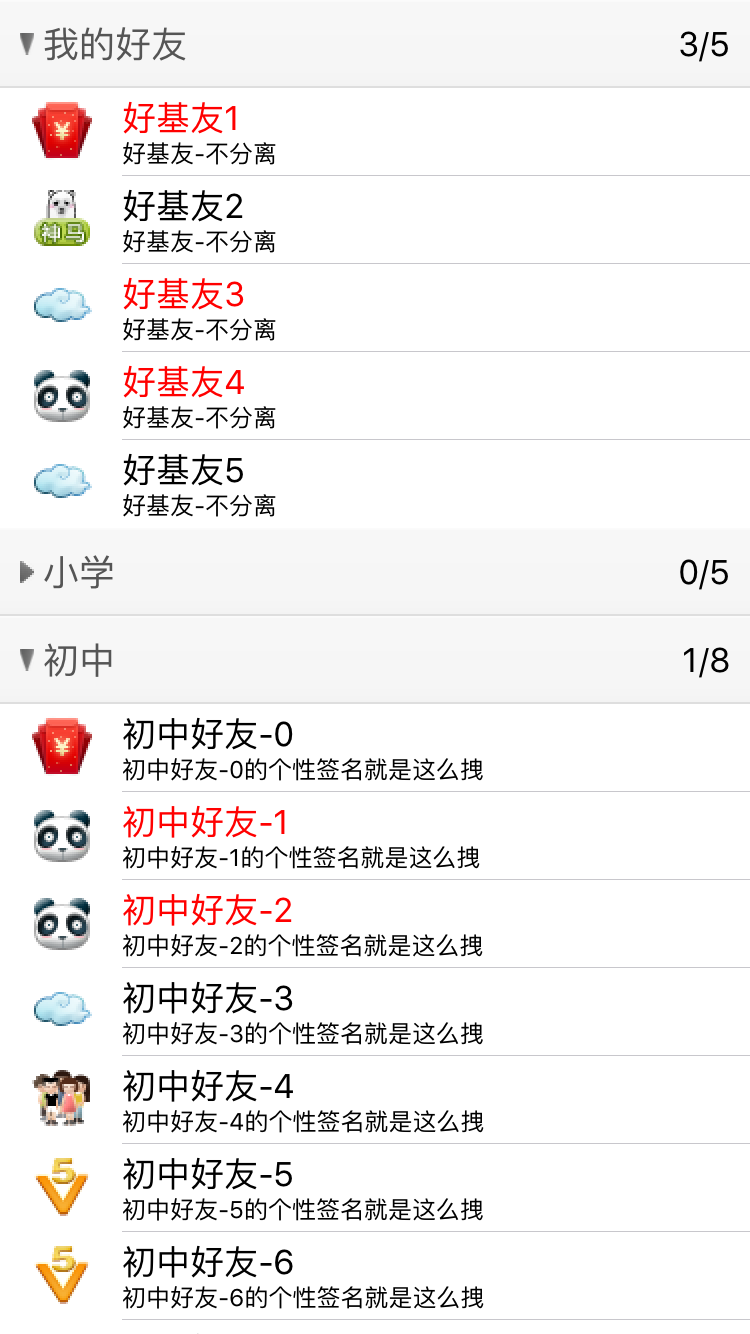
- 这是俺的github
https://github.com/slq0378/05-QQ- - 还有一点就是原作者的那个工程有点问题,就是那个按钮图片的旋转不起作用,我这里直接把旋转代码放到
layoutSubviews,这样只要布局改变就会旋转箭头
iOS-QQ好友列表实现的更多相关文章
- iOS开发UI篇—使用UItableview完成一个简单的QQ好友列表(一)
iOS开发UI篇—使用UItableview完成一个简单的QQ好友列表(一) 一.项目结构和plist文件 二.实现代码 1.说明: 主控制器直接继承UITableViewController // ...
- [iOS基础控件 - 6.9.3] QQ好友列表Demo TableView
A.需求 1.使用plist数据,展示类似QQ好友列表的分组.组内成员显示缩进功能 2.组名使用Header,展示箭头图标.组名.组内人数和上线人数 3.点击组名,伸展.缩回好友组 code so ...
- 仿QQ好友列表界面的实现
TableView有2种style:UITableViewStylePlain 和 UITableViewStyleGrouped. 但是QQ好友列表的tableView给人的感觉似乎是2个style ...
- ExpandableListView仿QQ好友列表
本例中,对ExpandableListView中的数据进行了封装,分为两个JavaBean,一个为Group类表示组信息,一个Child类表示该组下子列表信息: Group: public class ...
- (二十七)QQ好友列表的实现
QQ好友列表通过plist读取,plist的结构为一组字典,每个字典内有本组的信息和另外一组字典代表好友. 要读取plist,选择合适的数据结构,例如NSArray,然后调用initWithConte ...
- android 实现QQ好友列表
在某些Android开发群里,看到有些新手问怎么实现QQ好友列表,其实网上一搜挺多的.接触Android,也才一年的时间,大部分时间花在工作上(解bug...),界面上开发很少参与.自己维护的系统应用 ...
- 基于Qt的相似QQ好友列表抽屉效果的实现
版权声明:本文为博主原创文章.未经博主同意不得转载. https://blog.csdn.net/shuideyidi/article/details/30619167 前段时间在忙毕业设计, ...
- swift 实现QQ好友列表功能
最近项目中有类似QQ好友列表功能,整理了一下,话不多说,直接上代码 import UIKit class QQFriend: NSObject { var name: String? var intr ...
- Windows UIA自动化测试框架学习--获取qq好友列表
前段时间应公司要求开发一款针对现有WPF程序的自动化测试工具,在网上查资料找了一段时间,发现用来做自动化测试的框架还是比较多的,比如python的两个模块pywinauto和uiautomation, ...
- iOS开发UI篇—使用UItableview完成一个简单的QQ好友列表(二)
一.实现效果 二.实现代码 1.数据模型部分 YYQQGroupModel.h文件 // // YYQQGroupModel.h // 02-QQ好友列表(基本数据的加载) / ...
随机推荐
- Uva 11997 多路归并
题目链接:https://uva.onlinejudge.org/external/119/11997.pdf 题意: k*k的矩阵,从每一行中选一个元素加起来,可以得到 kk个和,求前 k 个最小值 ...
- 如何将Win7做为NTP服务器
1. 修改注册表项 HKEY_LOCAL_MACHINE\SYSTEM\CurrentControlSet\Services\W32Time\TimeProviders\NtpServer ...
- Spring boot 异常处理配置
1. 新建Maven项目 exception 2. pom.xml <project xmlns="http://maven.apache.org/POM/4.0.0&quo ...
- Spring常用配置 Scope
Bean的Scope Scope描述的是Spring容器如何新建Bean的实例的.Spring的Scope有以下几种,通过@Scope注解来实现. 1.Singleton:一个Spring容器中 ...
- HttpHandler(处理程序) 和 HttpModule(托管模块)
本文参见:http://www.tracefact.net/Asp-Net/Introduction-to-Http-Handler.aspx 前言:前几天看到一个DTcms网站,里面有个伪静态技术, ...
- JavaScript正则(一)
1.字符组: ^ $ 说的是开始位置和结束位置,在JS中,既表示字符串的起始位置和结束位置,也表示行的起始位置和结束位置 console.log(/^\d$/.test('2')); // true ...
- postgresql 免安装版使用
免安装版 postgresql 使用 1.首先使用 initdb 初始化数据目录 initdb --pgdata=data --encoding=UTF8 --locale=C 2.启动 postgr ...
- java异常处理 throw RuntimeException时不需要同时方法中声明抛出throws 异常等待调用者catch进行捕获 子父类异常问题
package com.swift.exception1; public class Demo_Exception { public static void main(String[] args) { ...
- lintcode_114_不同的路径
不同的路径 描述 笔记 数据 评测 有一个机器人的位于一个 m × n 个网格左上角. 机器人每一时刻只能向下或者向右移动一步.机器人试图达到网格的右下角. 问有多少条不同的路径? 注意事项 n和 ...
- 深入理解java虚拟机学习笔记(二)垃圾回收策略
上篇文章介绍了JVM内存模型的相关知识,其实还有些内容可以更深入的介绍下,比如运行时常量池的动态插入,直接内存等,后期抽空再完善下上篇博客,今天来介绍下JVM中的一些垃圾回收策略. 一. ...