
Request库基本使用
基本实例
import  requests

url= 'https://www.baidu.com/'

response = requests.get(url)

print(type(response))

print(response.status_code)#状态码

print(type(response.text))

print(response.text)#打开网页源代码

print(response.cookies)#获取cookies
各种请求方式
import  requests

url= 'https://www.baidu.com/'

requests.get(url)

requests.put(url)

requests.delete(url)

requests.head(url)

requests.options(url)
带参数的GET请求
import  requests

data={

}

reponse = requests.get(url,params=data)
解析JSON
import  requests

import json

reponse = requests.get(url)

print(requests.json())

print(json.loads(reponse.text))
获取二进制数据和保存
import  requests

import json

reponse = requests.get(url)

print(reponse.text)

print(reponse.content)
import  requests

import json

reponse = requests.get(url)

with open(' ',' ') as f:

    f.write(reponse.content)

    f.close()
添加headers
import  requests

import json

headers = {

}

response = requests.get(url,headers=headers)
基本POST请求
mport requests

import json

data = {

}

headers={

}

response = requests.post(url,data=data,headers=headers)
Reponse属性
import  requests

url= 'https://www.baidu.com/'

response = requests.get(url)

print(type(response))

print(response.status_code)#状态码

print(type(response.text))

print(response.text)#打开网页源代码

print(response.cookies)#获取cookies

print(response.history)

print(response.url)
文件上传
import  requests

files = {'file':open('','rb')}

reponse = requests.post(url,files=files)
维持会话
import  requests

s = requests.session()

s.get(url_1)

response = s.get(url_2)
证书认证
import  requests

from requests.packages import urllib3

urllib3.disable_warnings()#消除警告

response = requests.get(url,verify=False)
代理
import  requests

proxies = {

    "http":

    "https":

}

requests.get(url,proxies=proxies)

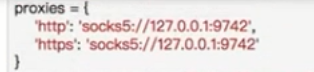
pip3 install 'requests[socks]' 使用socks代理
import  requests

from  requests.exceptions import ReadTimeout

try:

    response = requests.get(url,timeout= )

except ReadTimeout:

    print("time out")
认证设置
import  requests

from  requests.auth import HTTPBasicAuth

response = requests.get(url,auth=HTTPBasicAuth('',''))
import  requests

response = requests.get(url,auth=('',''))
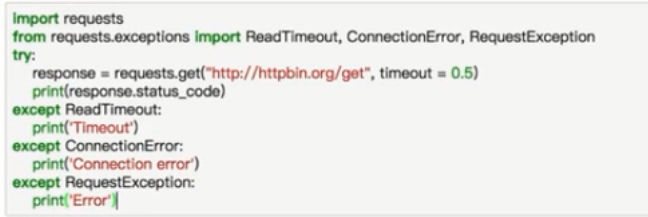
异常处理
Request库基本使用的更多相关文章
- Python3 urllib.request库的基本使用
Python3 urllib.request库的基本使用 所谓网页抓取,就是把URL地址中指定的网络资源从网络流中读取出来,保存到本地. 在Python中有很多库可以用来抓取网页,我们先学习urlli ...
- Python request库与爬虫框架
Requests库的7个主要方法 requests.request():构造一个请求,支持以下各方法的基础方法 requests.get():获取HTML网页的主要方法,对应于HTTP的GET ...
- Request库使用response.text返回乱码问题
我们日常使用Request库获取response.text,这种调用方式返回的text通常会有乱码显示: import requests res = requests.get("https: ...
- 爬虫——urllib.request库的基本使用
所谓网页抓取,就是把URL地址中指定的网络资源从网络流中读取出来,保存到本地.在Python中有很多库可以用来抓取网页,我们先学习urllib.request.(在python2.x中为urllib2 ...
- 爬虫request库规则与实例
Request库的7个主要方法: requests.request(method,url,**kwargs) method:请求方式,对应get/put/post等7种: r = reques ...
- Python网络爬虫与信息提取[request库的应用](单元一)
---恢复内容开始--- 注:学习中国大学mooc 嵩天课程 的学习笔记 request的七个主要方法 request.request() 构造一个请求用以支撑其他基本方法 request.get(u ...
- Request库的安装与使用
Request库的安装与使用 安装 pip install reqeusts Requests库的7个主要使用方法 requests.request() 构造一个请求,支撑以下各方法的基础方法 req ...
- python网络爬虫学习笔记(一)Request库
一.Requests库的基本说明 引入Rquests库的代码如下 import requests 库中支持REQUEST, GET, HEAD, POST, PUT, PATCH, DELETE共7个 ...
- Request库学习
0x00前言 这库让我爱上了python 碉堡! 开心去学了一些python,然后就来学这个时候神库~~ 资料来源:http://cn.python-requests.org/en/latest/u ...
- 爬虫入门【1】urllib.request库用法简介
urlopen方法 打开指定的URL urllib.request.urlopen(url, data=None, [timeout, ]*, cafile=None, capath=None, ca ...
随机推荐
- TCP/IP 笔记 1.2 链 路 层
都是包含三种类型.根据类型字段的值来进行区分 2.4 SLIP:串行线路IPS L I P的全称是Serial Line IP.它是一种在串行线路上对 I P数据报进行封装的简单形式,在RFC 105 ...
- filter(函数,可以迭代的对象)
#!/usr/bin/env python #filter(函数,可以迭代的对象) def f1(x): if x > 22: return True else: return False re ...
- centos7虚拟机桥接上网(DHCP)
centos设置成自动获取ip地址方式(DHCP) 1.打开终端查看网卡信息 #ifconfigifcfg-enp0s3lovirbro 2.编辑文件#vim /etc/sysconfig/netwo ...
- Codeforces 56D Changing a String (DP)
题意:你可以对字符串s进行3种操作: 1,在pos位置插入字符ch. 2,删除pos位置的字符. 3,替换pos位置的字符为ch. 问最少需要多少次操作可以把字符s变成字符s1? 思路: 设dp[i] ...
- c语言学习笔记 const变量
在c语言的编程过程中经常会遇到有常数参加运算的运算,比如这种. int a=100*b; 这个100我们叫常数或者叫常量,但是程序中我们不推荐这种直接写常数的方法,有两个缺点. 第一是程序可读性差. ...
- Luogu 3479 [POI2009]GAS-Fire Extinguishers
补上了这一道原题,感觉弱化版的要简单好多. 神贪心: 我们设$cov_{x, i}$表示在$x$的子树中与$x$距离为$i$的还没有被覆盖到的结点个数,设$rem_{x, i}$表示在$x$的子树中与 ...
- Luogu 2470 [SCOI2007]压缩
和Luogu 4302 [SCOI2003]字符串折叠 差不多的想法,区间dp 为了计算方便,我们可以假设区间[l, r]的前面放了一个M,设$f_{i, j, 0/1}$表示区间$[i, j]$中是 ...
- 导入project后lib文件夹一直没有jar包
原因: 导入project,倒错了项目,只因为后面新建的项目名称有和前面的差不多,导致自己选择了原来的项目,因此,项目的注解一直报错.
- 《Maven实战》笔记-4-生命周期和插件
除了坐标.依赖以及仓库外,Maven另外两个核心概念是生命周期和插件. 一.生命周期 Maven的生命周期是抽象的,其本身不做任务实际的工作,实际的任务(如编译源代码)都交由插件来完成. 三套生命周期 ...
- matlab任务:FCM分类
一个朋友让帮忙做图像分类,用FCM聚类算法,网上查了一下,FCM基本都是对一幅图像进行像素的分类,跟他说的任务不太一样,所要做的是将一个文件夹里的一千多幅图像进行分类.图像大概是这个样子的(是25*2 ...