
net core 的Generic Host 之Generic Host Builder
前言
通用Host(Generic Host) 与 web Host 不同的地方就是通用Host解耦了Http请求管道,使得通用Host拥有更广的应用场景。比如:消息收发、后台任务以及其他非http的工作负载。这些场景都可以通过使用通用Host拥有横切(Cross-cutting)的能力,比如:配置、依赖注入和日志记录。
Generic Host Builder
Asp net core 2.1版本推出了Generic Host Builder,但它仅仅用在了非http工作负载的场景,Generic Host Builder会在2019年发布的3.0版本中替换掉Web Host Builder。
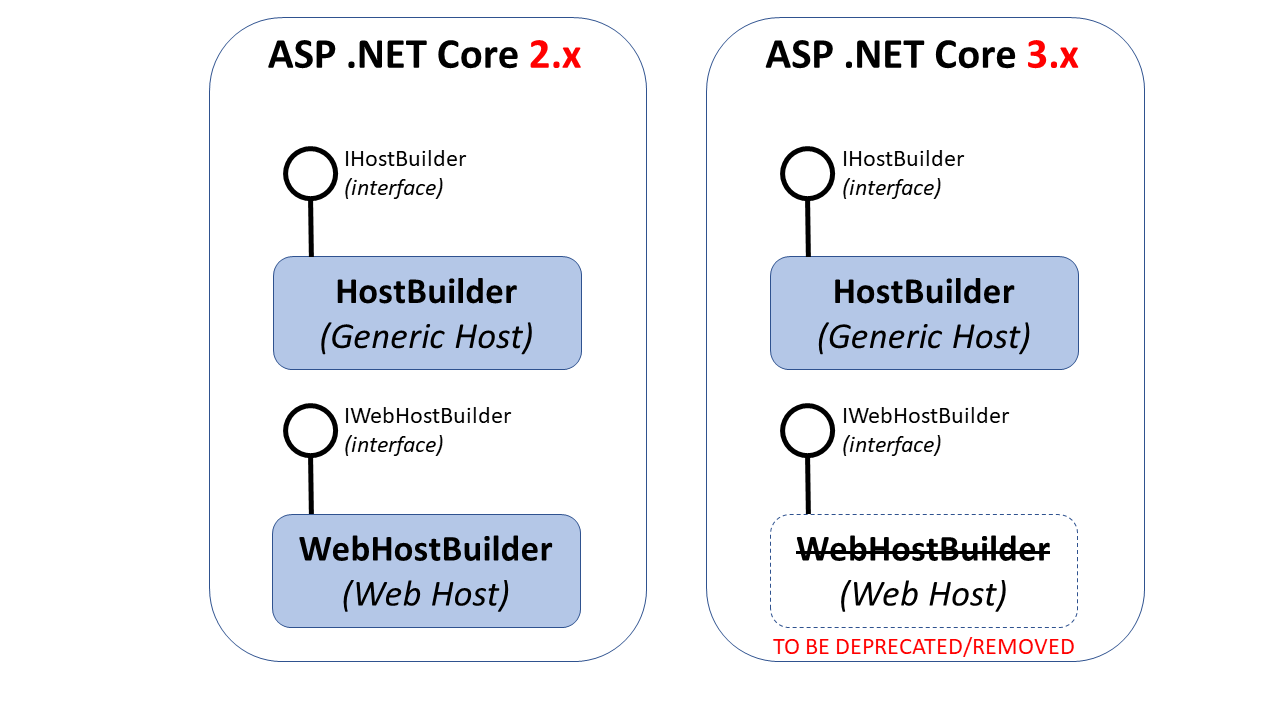
2.x中的Generic Host Builder
asp net core 2.1没有使用Generic Host Builder,那么它的使用场景是什么呢?Generic Host Builder的在非http负载的使用场景有消息收发、后台任务等。
HostBuilder位于 Microsoft.Extensions.Hosting 命名空间下,实现了IHostBUilder接口。Net core 应用在Main()中最简单的用法如下:
public static async Task Main(string[] args)

{

   var host = new HostBuilder()

      .Build();

   await host.RunAsync();

}
Build()方法是初始化host实例,它仅仅能被调用一次,在Build()方法执行前调用ConfigureServices()方法可以用来配置host。
var host = new HostBuilder()

   .ConfigureServices((hostContext, services) =>

   {

      services.Configure<HostOptions>(option =>

      {

         // option.SomeProperty = ...

      });

   })

   .Build();
ConfigureServices((hostContext, services) 方法有一个HostBuilderContext参数和一个依赖注入的IServiceCollection参数。你也可以通过调用Configure()设置Host的其他设置,当前HostOptions对象只有一个Shutdown Timeout 属性。
你可以在官方示例看到更多的配置,下面是一个其中的代码片段:
Host 配置部分
.ConfigureHostConfiguration(configHost =>

{

   configHost.SetBasePath(Directory.GetCurrentDirectory());

   configHost.AddJsonFile("hostsettings.json", optional: true);

   configHost.AddEnvironmentVariables(prefix: "PREFIX_");

   configHost.AddCommandLine(args);

})
应用配置部分
.ConfigureAppConfiguration((hostContext, configApp) =>

{

   configApp.AddJsonFile("appsettings.json", optional: true);

   configApp.AddJsonFile(

      $"appsettings.{hostContext.HostingEnvironment.EnvironmentName}.json",

      optional: true);

   configApp.AddEnvironmentVariables(prefix: "PREFIX_");

   configApp.AddCommandLine(args);

})
依赖注入代码
.ConfigureServices((hostContext, services) =>

{

   services.AddHostedService<LifetimeEventsHostedService>();

   services.AddHostedService<TimedHostedService>();

})
日志配置代码
.ConfigureLogging((hostContext, configLogging) =>

{

   configLogging.AddConsole();

   configLogging.AddDebug();

})
3.0web应用中的Generic Host Builder
Asp net core 3.0 中使用Generic Host Builder 替换 Web Host Builder,net core 3.0 web 应用在Main函数中简单的使用方式代码如下:
public static void Main(string[] args)

{

   CreateHostBuilder(args)

      .Build()

      .Run();

}

public static IHostBuilder CreateHostBuilder(string[] args) =>

   Host.CreateDefaultBuilder(args)

      ConfigureWebHostDefaults(webBuilder =>

      {

         webBuilder.UseStartup<Startup>();

      });
3.0版本中的CreateHostBuilder方法与2.x版本的 CreateWebHostBuilder() 方法很相似,二者最大的不同就是WebHost.CreateDefaultBuilder() 被替换成 Host.CreateDefaultBuilder(),
还有一个不同的地方就是 Host.CreateDefaultBuilder()方法,因为新版本的host builder是一个通用的host builder,这样就要通过嗲用 CreateDefaultBuilder()方法来构建一个web app host。
最后
未来我们需要知道:
- WebHostBuilder在未来将会被弃用
- IWebHostBuilder接口将会被保留
- 你不能在Startup类里面注入任何服务,IHostingEnvironment and IConfiguration除外
参考链接
官方文档
Generic Host Builder in ASP .NET Core
net core 的Generic Host 之Generic Host Builder的更多相关文章
- Asp.net Core 2.1新功能Generic Host(通用主机),了解一下
什么是Generic Host ? 这是在Asp.Net Core 2.1加入了一种新的Host,现在2.1版本的Asp.Net Core中,有了两种可用的Host. Web Host –适用于托管W ...
- net Core 2.1新功能Generic Host(通用主机)
net Core 2.1新功能Generic Host(通用主机) http://doc.okbase.net/CoderAyu/archive/301859.html 什么是Generic Host ...
- 翻译 - ASP.NET Core 基本知识 - 通用主机 (Generic Host)
翻译自 https://docs.microsoft.com/en-us/aspnet/core/fundamentals/host/generic-host?view=aspnetcore-5.0 ...
- 翻译 - ASP.NET Core 基本知识 - Web 主机 (Web Host)
翻译自 https://docs.microsoft.com/en-us/aspnet/core/fundamentals/host/web-host?view=aspnetcore-5.0 ASP. ...
- 4. [mmc subsystem] mmc core(第四章)——host模块说明
零.说明 对应代码drivers/mmc/core/host.c,drivers/mmc/core/host.h. 为底层host controller driver实现mmc host的申请以及注册 ...
- 报错:Failed on local exception: Host Details : local host is: "master/192.168.52.26"; dest
报错现象 Failed on local exception: com.google.protobuf.InvalidProtocolBufferException: Protocol message ...
- kafka配置项host.name advertised.host.name
遇到的问题: 在本机或者其他机器telnet IP 9092,通,使用域名也通,telnet 127.0.0.1 9092不通 host.name:按配置文件说明,是Kafka绑定的interface ...
- nginx proxy_set_header Host $host 和 proxy_set_header Host $http_host 的作用对比
转载自https://www.jianshu.com/p/7a8a7eb3707a 1.浏览器直接访问服务,获取到的 Host 包含浏览器请求的 IP 和端口 测试服务器,centos 7 sudo ...
- linux设置允许和禁止访问的IP host.allow 和 host.deny
对于能过xinetd程序启动的网络服务,比如ftp telnet,我们就可以修改/etc/hosts.allow和/etc/hosts.deny的配制,来许可或者拒绝哪些IP.主机.用户可以访问. 比 ...
随机推荐
- css3 tranform perspective属性
perspective 属性用于规定观察点距离元素的距离, 1 观察点距离元素越近,元素变形就越大,灭点距离越近. 2 观察点距离元素越远,元素变形越小,灭点距离也就越远. 比如设置perspecti ...
- 第 1 课 Go 简介
(课程地址: http://study.163.com/course/courseLearn.htm?courseId=306002&from=study#/learn/video?lesso ...
- 安装mariadb并修改配置文件
实验环境:CentOS7 #安装mariadb-server包#修改mariadb配置文件/etc/my.cnf.d/server.cnf#添加 skip_name_resolve=ON #不执行将I ...
- shell入门-特殊符号
特殊符号:* 说明:通配符,多个字符.所有后缀为”.txt“的文件列出来 [root@wangshaojun 111]# ls *.txt11.txt 1.txt 22.txt 2.txt 33.tx ...
- centos6.5安装zookeeper教程(三)
阅读前建议先阅读: http://www.cnblogs.com/duenboa/articles/6665159.html 1. 下载安装文件zookeeper-3.4.6.tar.gz 镜像地 ...
- css 雪碧图
CSS Sprites在国内很多人叫css精灵,是一种网页图片应用处理方式.它允许你将一个页面涉及到的所有零星图片都包含到一张大图中去,这样一来,当访问 该页面时,载入的图片就不会像以前那样一幅一幅地 ...
- UGUI解决嵌套使用多个ScrollRect时的Drag拖动冲突问题
很简单,直接看代码: using UnityEngine.UI; using UnityEngine.EventSystems; using UnityEngine; /// <summary& ...
- “MVC+Nhibernate+Jquery-EasyUI” 信息发布系统 第五篇(用户管理之“用户权限分配”)
一.在做权限分配之前,首先先了解“ZTree”这个插件,我的这个系统没有用Jquery-EasyUI的Tree.用的是”ZTree“朋友们可以试试,也很强大.点击下载ZTree插件. 1. ...
- HTML5秘籍(第2版) 中文pdf扫描版
HTML5秘籍(第2版)共包括四个部分,共13章.第一部分介绍了HTML5的发展历程,用语义元素构造网页,编写更有意义的标记,以及构建更好的Web表单.第二部分介绍了HTML5中的音频与视频.CS ...
- 多个VSTO解决方案间传输变量
参照微软官方文档,为需要公开参数的解决方案添加公开接口.不过稍显遗憾的是,不能传输List泛型 https://docs.microsoft.com/zh-cn/visualstudio/vsto/c ...