
WCF技术解剖2-TcpTracer路由解析代码
TcpTrace路由解析,参考页面-http://www.cnblogs.com/artech/archive/2008/09/19/1294227.html。
TcpTrace工具下载地址:http://www.piaodown.com/soft/43538.htm
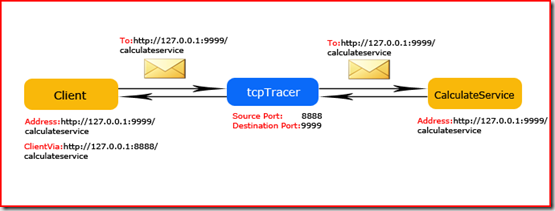
原理:模拟路由的方式进行客户端的消息转发,回复。如图:
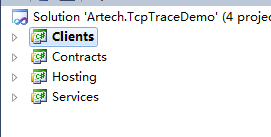
代码结构如下:
分别为ICalculator:
using System.Linq;

using System.Text;

using System.ServiceModel;

namespace Artech.TcpTraceDemo.Contracts

{

    [ServiceContract(Namespace = "http://www.artech.com/")]

    public interface ICalculator

    {

        [OperationContract]

        double Add(double x, double y);

    }

}
Service:
using System;

using System.Collections.Generic;

using System.Linq;

using System.Text;

using Artech.TcpTraceDemo.Contracts;

namespace Artech.TcpTraceDemo.Services

{

    public class CalculatorService:ICalculator

    {

        public double Add(double x, double y)

        {

            return x + y;

        }

    }

}
Hosting
using System;

using System.Collections.Generic;

using System.Linq;

using System.Text;

using System.ServiceModel;

using Artech.TcpTraceDemo.Services;

namespace Artech.TcpTraceDemo.Hosting

{

    class Program

    {

        static void Main(string[] args)

        {

            using (ServiceHost serviceHost = new ServiceHost(typeof(CalculatorService)))

            {

                serviceHost.Open();

                Console.Read();

            }

        }

    }

}
Hosting,Appconfig
<?xml version="1.0" encoding="utf-8" ?>

<configuration>

  <system.serviceModel>

    <bindings>

      <customBinding>

        <binding name="SimpleBinding">

          <textMessageEncoding />

          <httpTransport />

        </binding>

      </customBinding>

    </bindings>

    <services>

      <service name="Artech.TcpTraceDemo.Services.CalculatorService">

        <endpoint address="http://127.0.0.1:9999/CalculatorService" binding="customBinding"

                  bindingConfiguration="SimpleBinding" contract="Artech.TcpTraceDemo.Contracts.ICalculator" listenUri="http://127.0.0.1:8888/CalculatorService"></endpoint>

      </service>

    </services>

  </system.serviceModel>

</configuration>
Clients:
using System;

using System.Collections.Generic;

using System.Linq;

using System.Text;

using Artech.TcpTraceDemo.Contracts;

using System.ServiceModel;

namespace Artech.TcpTraceDemo.Clients

{

    class Program

    {

        static void Main(string[] args)

        {

            using (ChannelFactory<ICalculator> ChannelFactory = new ChannelFactory<ICalculator>("CalculatorService"))

            {

                ICalculator calculator = ChannelFactory.CreateChannel();

                using (calculator as IDisposable)

                {

                    Console.WriteLine("x+y={2} where x={0} and y={1}", , , calculator.Add(,));

                }

            }

            Console.ReadLine();

        }

    }

}
Clients,Appconfig
<?xml version="1.0" encoding="utf-8" ?>

<configuration>

  <system.serviceModel>

    <bindings>

      <customBinding>

        <binding name="SimpleBinding">

          <textMessageEncoding />

          <httpTransport />

        </binding>

      </customBinding>

    </bindings>

    <client>

        <endpoint address="http://127.0.0.1:9999/CalculatorService" binding="customBinding"

                  bindingConfiguration="SimpleBinding" contract="Artech.TcpTraceDemo.Contracts.ICalculator"

                  name="CalculatorService"></endpoint>

    </client>

  </system.serviceModel>

</configuration>
WCF技术解剖2-TcpTracer路由解析代码的更多相关文章
- 【朝夕技术专刊】RabbitMQ路由解析(上篇)
欢迎大家阅读<朝夕Net社区技术专刊> 我们致力于.NetCore的推广和落地,为更好的帮助大家学习,方便分享干货,特创此刊!很高兴你能成为忠实读者,文末福利不要错过哦! 上篇文章介绍了如 ...
- bottle.py中的路由解析代码
# Routing def compile_route(route): """ Compiles a route string and returns a precomp ...
- ASP.NET Web API路由解析
前言 本篇文章比较长,仔细思考阅读下来大约需要15分钟,涉及类图有可能在手机显示不完整,可以切换电脑版阅读. 做.Net有好几年时间了从ASP.NET WebForm到ASP.NET MVC再到ASP ...
- WCF技术剖析之三十:一个很有用的WCF调用编程技巧[下篇]
原文:WCF技术剖析之三十:一个很有用的WCF调用编程技巧[下篇] 在<上篇>中,我通过使用Delegate的方式解决了服务调用过程中的异常处理以及对服务代理的关闭.对于<WCF技术 ...
- WCF技术剖析之二十二: 深入剖析WCF底层异常处理框架实现原理[中篇]
原文:WCF技术剖析之二十二: 深入剖析WCF底层异常处理框架实现原理[中篇] 在[上篇]中,我们分别站在消息交换和编程的角度介绍了SOAP Fault和FaultException异常.在服务执行过 ...
- WCF技术剖析之四:基于IIS的WCF服务寄宿(Hosting)实现揭秘
原文:WCF技术剖析之四:基于IIS的WCF服务寄宿(Hosting)实现揭秘 通过<再谈IIS与ASP.NET管道>的介绍,相信读者已经对IIS和ASP.NET的请求处理管道有了一个大致 ...
- WCF技术剖析之一:通过一个ASP.NET程序模拟WCF基础架构
原文:WCF技术剖析之一:通过一个ASP.NET程序模拟WCF基础架构 细算起来,已经有好几个月没有真正的写过文章了.近半年以来,一直忙于我的第一本WCF专著<WCF技术剖析>的写作,一直 ...
- 《WCF技术剖析》博文系列汇总[持续更新中]
原文:<WCF技术剖析>博文系列汇总[持续更新中] 近半年以来,一直忙于我的第一本WCF专著<WCF技术剖析(卷1)>的写作,一直无暇管理自己的Blog.在<WCF技术剖 ...
- 利用WCF技术降低系统之间的耦合度
为了降低本系统各个组件之间的耦合度,本系统将BLL层采用WCF技术发布为Web Service,以供UI层调用. 前面我们已经介绍过,为什么UI层不直接调用BLL层,而是要经过UI->Servi ...
随机推荐
- 虚拟机桥接模式下多台Ubuntu16.04系统互相连接
1.首先新建一个虚拟机并在该虚拟机上安装Ubuntu16.04系统.为这台虚拟机起名为Ubuntu3. 2.对Ubuntu3进行克隆,为新克隆生成的虚拟机起名为Ubuntu2.(这时我们会发现Ubun ...
- POJ 2836 状压DP
Rectangular Covering Time Limit: 1000MS Memory Limit: 65536K Total Submissions: 2727 Accepted: 7 ...
- 输入cin对象的用法
#include<iostream> using namespace std; int main() { int carrots ; cout << "How man ...
- 使用dataframe解决spark TopN问题:分组、排序、取TopN和join相关问题
package com.profile.mainimport org.apache.spark.sql.expressions.Windowimport org.apache.spark.sql.fu ...
- 1 HTML + CSS
1.HTML的基础用法 2.标签的嵌套 3.常见的网页结构 header content footer
- DOS程序员手册(四)
5.4打印机功能 打印机是能够直接控制的输出设备之外的唯一的重要输出设备.它们的功能比屏幕 107页 功能要简单得多,因为它们只涉及字符输出,并最小程度地与打印机的输入有关. 输出给打印机的最简单的方 ...
- 【Adaptive Boosting】林轩田机器学习技法
首先用一个形象的例子来说明AdaBoost的过程: 1. 每次产生一个弱的分类器,把本轮错的样本增加权重丢入下一轮 2. 下一轮对上一轮分错的样本再加重学习,获得另一个弱分类器 经过T轮之后,学得了T ...
- 【Pascal's Triangle II 】cpp
题目: Given an index k, return the kth row of the Pascal's triangle. For example, given k = 3,Return [ ...
- 安装LoadRunner11报缺少vc2005_sp1_with_atl_fix_redist的错误
找到安装程序自带的lrunner\Chs\prerequisites\vc2005_sp1_redist,双击运行vcredist_x86.exe,再重新安装LoadRunner即可成功. 参考资料: ...
- Python 实现随机打乱字符串
from random import shuffle def shuffle_str(s): # 将字符串转换成列表 str_list = list(s) # 调用random模块的shuffle函数 ...