
Android源码中添加APP
参考罗升阳《Android系统源代码情景分析》
在Android源码中,我们通常把实验性质的Android APP放在packages/experimental目录下。对于一个简单的应用程序,他的目录结构如下
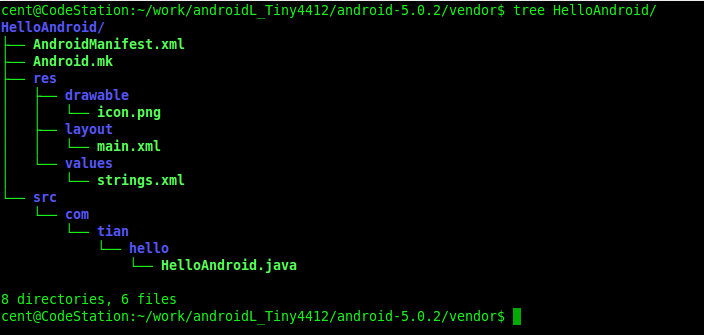
Android应用程序工程一般包含有一个源代码目录src、一个资源目录res、一个配置文件AndroidManifest.xml和一个编译脚本文件Android.mk
HelloAndroid.java
package com.tian.hello;

import android.app.Activity;

import android.os.Bundle;

import android.util.Log;

public class HelloAndroid extends Activity {

    private final static String LOG_TAG = "com.tian.hello.HelloAndroid";

    @Override

        public void onCreate(Bundle savedInstanceState) {

            super.onCreate(savedInstanceState);

            setContentView(R.layout.main);

            Log.i(LOG_TAG, "HelloAndroid Activity Created.");

        }

}
main.xml
<?xml version="1.0" encoding="utf-8"?>

<LinearLayout xmlns:android="http://schemas.android.com/apk/res/android"

    android:orientation="vertical"

    android:layout_width="fill_parent"

    android:layout_height="fill_parent"

    android:gravity="center">

        <TextView

            android:layout_width="wrap_content"

            android:layout_height="wrap_content"

            android:gravity="center"

            android:text="@string/hello_android" >

        </TextView>

</LinearLayout>
strings.xml
<?xml version="1.0" encoding="utf-8"?>

<resources>

    <string name="app_name">HelloAndroid</string>

    <string name="hello_android">Hello Android</string>

</resources>
AndroidManifest.xml
<?xml version="1.0" encoding="utf-8"?>

<manifest xmlns:android="http://schemas.android.com/apk/res/android"

      package="com.tian.hello"

      android:versionCode="1"

      android:versionName="1.0">

    <application android:icon="@drawable/icon"

                 android:label="@string/app_name">

        <activity android:name=".HelloAndroid"

                  android:label="@string/app_name">

            <intent-filter>

                <action android:name="android.intent.action.MAIN" />

                <category android:name="android.intent.category.LAUNCHER" />

            </intent-filter>

        </activity>

    </application>

</manifest>
Android.mk
LOCAL_PATH:= $(call my-dir)

include $(CLEAR_VARS)

LOCAL_MODULE_TAGS := optional

LOCAL_SRC_FILES := $(call all-subdir-java-files)

LOCAL_PACKAGE_NAME := HelloAndroid

include $(BUILD_PACKAGE)
源码中使用主题
android:theme="@android:style/Theme.Dialog
Android源码中添加APP的更多相关文章
- Android源码中添加C可执行程序
在Android源码中添加C/CPP可执行程序一般保存在external目录中 下面是每个文件的内容 ①add.c #include "add.h" int add (int a, ...
- 关于android源码中的APP编译时引用隐藏的API出现的问题
今天在编译android源码中的计算器APP时发现,竟然无法使用系统隐藏的API,比如android.os.ServiceManager中的API,引用这个类时提示错误,记忆中在android源码中的 ...
- 导入android源码中的APP源码到eclipse
导入android源码中的APP源码到eclipse 一般最简单的办法就是创建新的android工程,选择create project from existing source选项,直接导入源码就OK ...
- 在Android 源码中添加系统服务
Android系统本身提供了很多系统服务,如WindowManagerService,PowerManagerService等.下面描述一下添加一个系统服务的具体步骤. 1.定义自定义系统服务接口 撰 ...
- Eclipse与Android源码中ProGuard工具的使用
由于工作需要,这两天和同事在研究android下面的ProGuard工具的使用,通过查看android官网对该工具的介绍以及网络上其它相关资料,再加上自己的亲手实践,算是有了一个基本了解.下面将自己的 ...
- Eclipse与Android源码中ProGuard工具的使用(代码混淆)
由于工作需要,这两天和同事在研究android下面的ProGuard工具的使用,通过查看android官网对该工具的介绍以及网络上其它相关资料,再加上自己的亲手实践,算是有了一个基本了解.下面将自己的 ...
- 访何红辉:谈谈Android源码中的设计模式
最近Android 6.0版本的源代码开放下载,刚好分析Android源码的技术书籍<Android源码设计模式解析与实战>上市,我们邀请到它的作者何红辉,来谈谈Android源码中的设计 ...
- android studio应用修改到android源码中作为内置应用
1. 方法一:导入,编译(太麻烦,各种不兼容问题) android studio和eclipse的应用结构目录是不同的,但是在android源码中的应用基本上都是使用的eclipse目录结构(在/pa ...
- Android源码中的FLAG为何使用16进制
1.在阅读源码的时候经常发现有一些标志属性使用一些位操作来判断是否具有该标志,增加标志或者去除标志. 比如View.java中的 /** * This view does not want keyst ...
随机推荐
- 电脑Svchost.exe 进程占CPU100% 的解决办法
Windows Update诊断和修复修复工具 http://support.microsoft.com/mats/windows_update/zh-cn Svchost.exe占用CPU100%的 ...
- ppm图像相关
PPM图像格式介绍 直接拿具体的数据来说明是最直接的,使用ue打开ppm文件,采用的都是十六进制asc码表示的,这里要注意地址00000000h中的最后一个字母是始终不变的,这原来没注意晕了我好久,第 ...
- RLearning第2弹:创建数据集
任何一门语言,数据类型和数据结构是最基础,也是最重要的,必须要学好!1.产生向量 a<-c(1,2,5,3,6,-2,4) b<-c("one","two&q ...
- python2 生成验证码图片
使用pillow或者pil库编写 #coding:utf-8 #use pillow or pil try: from PIL import Image, ImageDraw, ImageFont, ...
- hid_info函数分析
昨天博文<linux下无线鼠标驱动执行流程>中有一行输出信息很让我迷惑,如下所示: [ :1D57: Mouse [HID Wireless Mouse HID Wireless Mous ...
- build-essential软件包
linux操作系统上面开发程序, 光有了gcc 是不行的 它还需要一个 build-essential软件包 作用是提供编译程序必须软件包的列表信息 也就是说 编译程序有了这个软件包 它才知道 头文件 ...
- 修改push动画的方向
CATransition *animation = [CATransition animation]; animation.duration = 0.4; animation.timingFuncti ...
- MySql-rules
1.mySql基础 USE day15; -- 创建表 CREATE TABLE teacher( id INT, NAME VARCHAR() ) -- 查看所有表 SHOW TABLES; DES ...
- python中字符串使用需要注意的地方
1. r''的使用 'r'是防止字符转义的 如果路径中出现'\t'的话 不加r的话\t就会被转义 而加了'r'之后'\t'就能保留原有的样子 2. u''的使用 引号之前加上字母u时,python会将 ...
- mysql的SQL_CALC_FOUND_ROWS 使用 类似count(*) 使用性能更高
mysql的SQL_CALC_FOUND_ROWS 使用 类似count(*) 使用性能更高 在很多分页的程序中都这样写: SELECT COUNT(*) from `table` WHERE ... ...