
Python学习-前台开发-JavaScript、Dom和jQuery
JavaScript
JavaScript是一门编程语言,浏览器内置了JavaScript语言的解释器,所以在浏览器上按照JavaScript语言的规则编写相应代码之,浏览器可以解释并做出相应的处理。
1、JavaScript代码存在形式
|
1
2
3
4
5
6
7
|
<!-- 方式一 --><script type"text/javascript" src="JS文件"></script><!-- 方式二 --><script type"text/javascript"> Js代码内容</script> |
2、JavaScript代码存在位置
- HTML的head中
- HTML的body代码块底部(推荐)
由于Html代码是从上到下执行,如果Head中的js代码耗时严重,就会导致用户长时间无法看到页面,如果放置在body代码块底部,那么即使js代码耗时严重,也不会影响用户看到页面效果,只是js实现特效慢而已。
|
1
2
3
4
5
6
|
如:<script src="https://www.gstatic.com/og/_/js/k=og.og2.en_US.iF4jnkQuaf0.O/rt=j/t=zcms/m=def/exm=in,fot/d=1/ed=1/rs=AA2YrTv5-POC4Ks9GtGRdY2ywUWisqz7-Q"></script><script> alert('123');</script> |
3、变量
- 全局变量
- 局部变量
JavaScript中变量的声明是一个非常容易出错的点,局部变量必须一个 var 开头,如果未使用var,则默认表示声明的是全局变量
|
1
2
|
var name = "seven" # 局部变量age = 18 # 全局变量 |
注:注释 // 或 /* */
4、基本数据类型
数字(Number)
|
1
2
3
4
5
|
var page = 111;var age = Number(18);var a1 = 1,a2 = 2, a3 = 3;parseInt("1.2");parseFloat("1.2"); |
字符串(String)
|
1
2
3
4
5
6
7
8
9
10
|
var name = "wupeiqi";var name = String("wupeiqi");var age_str = String(18);常用方法: obj.trim() obj.charAt(index) obj.substring(start,end) obj.indexOf(char) obj.length |
布尔(Boolean)
|
1
2
3
|
var status = true;var status = false;var status = Boolen(1==1) |
数组(Array)
|
1
2
3
4
5
6
7
8
9
10
11
12
13
14
15
16
17
18
19
20
21
22
23
24
25
26
27
28
|
var names = ['alex', 'tony', 'eric']var names = Array('alex', 'tony', 'eric')常用方法: 添加 obj.push(ele) 追加 obj.unshift(ele) 最前插入 obj.splice(index,0,'content') 指定索引插入 移除 obj.pop() 数组尾部获取 obj.shift() 数组头部获取 obj.splice(index,count) 数组指定位置后count个字符 切片 obj.slice(start,end) 合并 newArray = obj1.concat(obj2) 翻转 obj.reverse() 字符串化 obj.join('_') 长度 obj.length字典var items = {'k1': 123, 'k2': 'tony'} |
更多操作见:http://www.shouce.ren/api/javascript/main.html
undefined
|
1
2
|
undefined表示未定义值var name; |
null
|
1
|
null是一个特殊值 |
5、循环语句
|
1
2
3
4
5
6
7
8
9
10
11
12
13
14
15
16
17
18
19
20
21
22
23
24
25
26
27
28
29
30
31
|
var names = ["alex", "tony", "rain"];// 数组:方式一for(var i=0;i<names.length;i++){ console.log(i); console.log(names[i]);}// 数组:方式二for(var index in names){ console.log(index); console.log(names[index]);}var names = {"name": "alex", "age": 18};// 字典:方式一for(var index in names){ console.log(index); console.log(names[index]);}// while循环while(条件){ // break; // continue;} |
6、条件语句
|
1
2
3
4
5
6
7
8
9
10
11
12
13
14
15
16
17
18
19
20
21
22
23
24
|
//if条件语句 if(条件){ }else if(条件){ }else{ }var name = 'alex';var age = 1;// switch,case语句 switch(name){ case '1': age = 123; break; case '2': age = 456; break; default : age = 777; } |
7、异常处理
|
1
2
3
4
5
6
7
|
try{}catch(e) {}finally{} |
8、函数
|
1
2
3
4
5
6
7
8
9
10
11
12
13
14
|
函数的声明 function func(arg){ return true; } 匿名函数 var func = function(arg){ return "tony"; }自执行函数 (function(arg){ console.log(arg); })('123') |
9、面向对象
|
1
2
3
4
5
6
7
8
9
10
11
|
function Foo (name,age) { this.Name = name; this.Age = age; this.Func = function(arg){ return this.Name + arg; }}var obj = new Foo('alex', 18);var ret = obj.Func("sb");console.log(ret); |
Dom
文档对象模型(Document Object Model,DOM)是一种用于HTML和XML文档的编程接口。它给文档提供了一种结构化的表示方法,可以改变文档的内容和呈现方式。我们最为关心的是,DOM把网页和脚本以及其他的编程语言联系了起来。DOM属于浏览器,而不是JavaScript语言规范里的规定的核心内容。
注:一般说的JS让页面动起来泛指JavaScript和Dom
1、选择器
|
1
2
3
|
document.getElementById('id');document.getElementsByName('name');document.getElementsByTagName('tagname'); |
2、内容
|
1
2
3
4
5
6
7
8
9
10
11
12
13
14
15
16
|
innerTextinnerHTMLvar obj = document.getElementById('nid')obj.innerText # 获取文本内容obj.innerText = "hello" # 设置文本内容obj.innerHTML # 获取HTML内容obj.innerHTML = "<h1>asd</h1>" # 设置HTML内容特殊的: input系列 textarea标签 select标签 value属性操作用户输入和选择的值 |
3、创建标签
|
1
2
3
4
5
6
7
8
9
10
11
12
13
14
15
16
|
方式一: var obj = document.createElement('a'); obj.href = "http://www.etiantian.org"; obj.innerText = "老男孩"; var container = document.getElementById('container'); //container.appendChild(obj); //container.insertBefore(obj, container.firstChild); //container.insertBefore(obj, document.getElementById('hhh'));方式二: var container = document.getElementById('container'); var obj = "<input type='text' />"; container.innerHTML = obj; // 'beforeBegin', 'afterBegin', 'beforeEnd', 'afterEnd' //container.insertAdjacentHTML("beforeEnd",obj); |
4、标签属性
|
1
2
3
4
5
6
7
8
9
10
11
|
var obj = document.getElementById('container');固定属性 obj.id obj.id = "nid" obj.className obj.style.fontSize = "88px";自定义属性 obj.setAttribute(name,value) obj.getAttribute(name) obj.removeAttribute(name) |
5、提交表单
|
1
|
document.geElementById('form').submit() |
6、事件
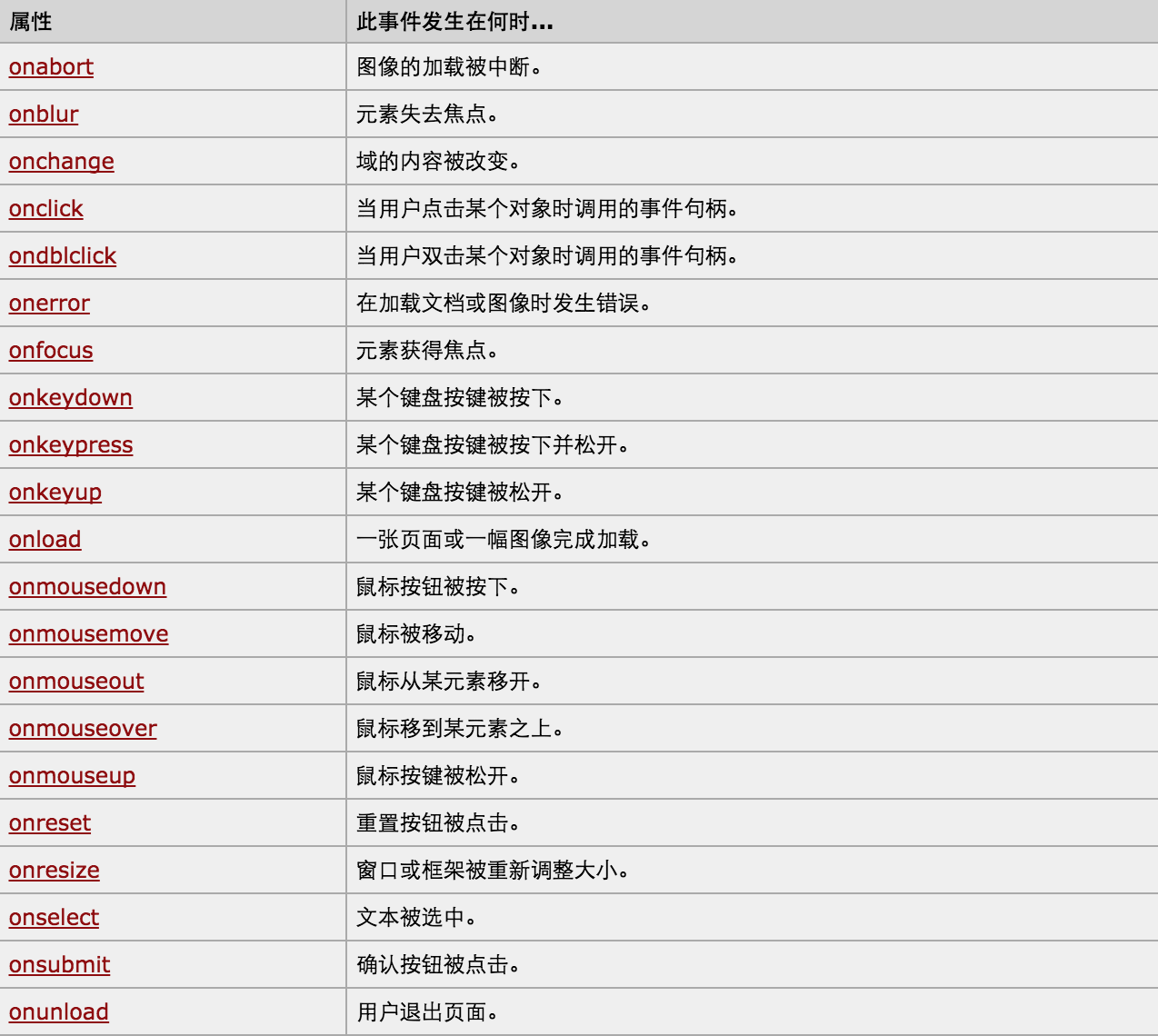
特殊的:
|
1
2
3
|
window.onload = function(){} //jQuery:$(document).ready(function(){}) //onload是所有DOM元素创建、图片加载完毕后才触发的。而ready则是DOM元素创建完毕后触发的,不等图片加载完毕。图片还么有渲染,就可以进行事件的执行。 |
特殊参数:this,event
7、其他功能
|
1
2
3
4
5
6
7
8
9
10
11
12
13
|
console.log()alert()confirm()// URL和刷新location.hreflocation.href = "url" window.location.reload()// 定时器setInterval("alert()",2000); clearInterval(obj)setTimeout(); clearTimeout(obj) |
实例:
<!DOCTYPE html>
<html>
<head>
<meta charset='utf-8' >
<title>欢迎blue shit莅临指导 </title>
<script type='text/javascript'>
function Go(){
var content = document.title;
var firstChar = content.charAt(0)
var sub = content.substring(1,content.length)
document.title = sub + firstChar;
}
setInterval('Go()',1000);
</script>
</head>
<body>
</body>
</html>
跑马灯
<!DOCTYPE html>

<html>

    <head>

        <meta charset='utf-8' />

        <title></title>

        <style>

            .gray{

                color:gray;

            }

            .black{

                color:black;

            }

        </style>

        <script type="text/javascript">

            function Enter(){

               var id= document.getElementById("tip")

               id.className = 'black';

               if(id.value=='请输入关键字'||id.value.trim()==''){

                    id.value = ''

               }

            }

            function Leave(){

                var id= document.getElementById("tip")

                var val = id.value;

                if(val.length==0||id.value.trim()==''){

                    id.value = '请输入关键字'

                    id.className = 'gray';

                }else{

                    id.className = 'black';

                }

            }

        </script>

    </head>

    <body>

        <input type='text' class='gray' id='tip' value='请输入关键字' onfocus='Enter();'  onblur='Leave();'/>

    </body>

</html>
搜索框
jQuery
jQuery是一个兼容多浏览器的javascript库,核心理念是write less,do more(写得更少,做得更多),对javascript进行了封装,是的更加便捷的开发,并且在兼容性方面十分优秀。
http://www.php100.com/manual/jquery/
1、选择器和筛选器
模态对话框
实例:模态对话框
<!DOCTYPE html>

<html>

    <head>

        <meta charset="utf-8">

        <title>Index</title>

        <style>

            a {

                color: #428bca;

                text-decoration: none;

                }

                .modal-backdrop {

                  position: fixed;

                  top: 0;

                  right: 0;

                  bottom: 0;

                  left: 0;

                  z-index: 1050;

                  background-color: #white;

                  opacity: 0.8;

                }

                .modal {

                  position: fixed;

                  top: 30%;

                  left: 50%;

                  z-index: 1030;

                }

                .hide {

                    display:none;

                }

        </style>

    </head>

    <body>

        <div>

            <input type="button" onclick="fadeIn();"  value="加载条"/>

        </div>

        <div id="shade" class="modal-backdrop hide">

            <div  class="modal">

                <img src="./images/loading_32.gif"/>

            </div>

        </div>

        <script >

            function fadeIn() {

                document.getElementById('shade').className = 'modal-backdrop';

            }

            function fadeOut() {

                document.getElementById('shade').className = 'modal-backdrop hide';

            }

        </script>

    </body>

</html>
实例:加载
<!DOCTYPE html>

<html>

    <head>

        <meta charset='utf-8' />

        <link rel="stylesheet" type="text/css" href="common.css" />

        <script type="text/javascript" src='jquery-1.8.2.js'></script>

        <style>

            .hide{

                display: none;

            }

            .container{

                width:300px;

                height: 600px;

                background-color: #ddd;

                border: 1px solid #999;

            }

            .container .title{

                height: 38px;

                font-size: 28px;

                line-height: 38px;

                background-color: orange;

                cursor: pointer;

            }

            .container .body{

                background-color:white;

            }

            .container .body a{

                display:block;

                padding: 10px;

            }

        </style>

    </head>

    <body>

        <div class='container'>

            <div>

                <div class='title'>Menu1</div>

                <div class='body'>

                    <a href="">content1</a>

                    <a href="">content2</a>

                    <a href="">content3</a>

                </div>

            </div>

            <div>

                <div class='title'>Menu1</div>

                <div class='body hide'>

                    <a href="">content1</a>

                    <a href="">content2</a>

                    <a href="">content3</a>

                </div>

            </div>

            <div>

                <div class='title'>Menu1</div>

                <div class='body hide'>

                    <a href="">content1</a>

                    <a href="">content2</a>

                    <a href="">content3</a>

                </div>

            </div>

            <div>

                <div class='title'>Menu1</div>

                <div class='body hide'>

                    <a href="">content1</a>

                    <a href="">content2</a>

                    <a href="">content3</a>

                </div>

            </div>

            <div>

                <div class='title'>Menu1</div>

                <div class='body hide'>

                    <a href="">content1</a>

                    <a href="">content2</a>

                    <a href="">content3</a>

                </div>

            </div>

        </div>

        <script type="text/javascript">

            $(function(){

                $('.title').click(function(){

                    $(this).parent().siblings().children('.body').addClass('hide');

                    $(this).next().removeClass('hide');

                });

            });

        </script>

    </body>

</html>
实例:左侧菜单
/*公共开始*/

body {

    margin: 0 auto;

    font-family: Arial;

    _font-family: 宋体,Arial;

    font-size: 12px;

}

body, dl, dt, dd, ul, ol, li, h1, h2, h3, h4, h5, h6, pre, code, form, fieldset, legend, input, button, textarea, p, blockquote, th, td, figure, div {

    margin: 0;

    padding: 0;

}

ol, ul, li {

    list-style: none;

}

a{

    cursor:pointer;

    text-decoration:none;

}

/*a:hover{

    color: #F60 !important;

    text-decoration: underline;

}*/

img{

    border:none;

    border-width:0px;

}

table{

    border-collapse: collapse;

    border-spacing: 0;

}

.red{

    color: #c00!important;

}

.m8{

    margin:8px;

}

.mt10{

    margin-top:10px;

}

.mt20{

    margin-top:20px;

}

.mr5{

    margin-right:5px;

}

.ml5{

    margin-left:5px;

}

.ml10{

    margin-left:10px;

}

.mb10{

    margin-bottom:10px;

}

.pt18{

    padding-top:18px;

}

.pt20{

    padding-top:20px;

}

.pb20{

    padding-bottom:20px;

}

.nbr{

    border-right:0px;

}

.font12{

    font-size:12px;

}

.font14{

    font-size:14px;

}

.font16{

    font-size:16px;

}

.bold{

    font-weight:bold;

}

.left{

    float:left;

}

.right{

    float:right;

}

.hide{

    display:none;

}

.show{

     display:table;

}

.clearfix{

    clear:both;

}

.clearfix:after {

    content: ".";

    display: block;

    height: 0;

    clear: both;

    visibility: hidden;

}

* html .clearfix {zoom: 1;}

.container{

    width:1190px;

    margin-left:auto;

    margin-right:auto;

}

.group-box-1 .title{

    height: 33px;

    line-height: 33px;

    border: 1px solid #DDD;

    background: #f5f5f5;

    padding-top: 0;

    padding-left: 0;

}

.group-box-1 .title .title-font{

    display: inline-block;

    font-size: 14px;

    font-family: 'Microsoft Yahei','SimHei';

    font-weight: bold;

    color: #333;

    padding-left: 10px;

}

.group-box-1 .body {

    border: 1px solid #e4e4e4;

    border-top: none;

}

.tab-menu-box1 {

    border: 1px solid #ddd;

    margin-bottom: 20px;

}

.tab-menu-box1 .menu {

    line-height: 33px;

    height: 33px;

    background-color: #f5f5f5;

}

.tab-menu-box1 .content {

    min-height: 100px;

    border-top: 1px solid #ddd;

    background-color: white;

}

.tab-menu-box1 .menu ul {

    padding: 0;

    margin: 0;

    list-style: none;

    /*position: absolute;*/

}

.tab-menu-box1 .menu ul li {

    position: relative;

    float: left;

    font-size: 14px;

    font-family: 'Microsoft Yahei','SimHei';

    text-align: center;

    font-size: 14px;

    font-weight: bold;

    border-right: 1px solid #ddd;

    padding: 0 18px;

    cursor: pointer;

}

.tab-menu-box1 .menu ul li:hover {

    color: #c9033b;

}

.tab-menu-box1 .menu .more {

    float: right;

    font-size: 12px;

    padding-right: 10px;

    font-family: "宋体";

    color: #666;

    text-decoration: none;

}

.tab-menu-box1 .menu a:hover {

    color: #f60 !important;

    text-decoration: underline;

}

.tab-menu-box1 .menu .current {

    margin-top: -1px;

    color: #c9033b;

    background: #fff;

    height: 33px;

    border-top: 2px solid #c9033b;

    z-index: 10;

}

.tab-menu-box-2 .float-title {

    display: none;

    top: 0px;

    position: fixed;

    z-index: 50;

}

.tab-menu-box-2 .title {

    width: 890px;

    border-bottom: 2px solid #b20101;

    border-left: 1px solid #e1e1e1;

    clear: both;

    height: 32px;

}

.tab-menu-box-2 .title a {

    float: left;

    width: 107px;

    height: 31px;

    line-height: 31px;

    font-size: 14px;

    font-weight: bold;

    text-align: center;

    border-top: 1px solid #e1e1e1;

    border-right: 1px solid #e1e1e1;

    background: url(/Content/images/bg4.png?3) 0 -308px repeat-x;

    text-decoration: none;

    color: #333;

    cursor: pointer;

}

.tab-menu-box-2 .title a:hover {

    background-position: -26px -271px;

    text-decoration: none;

    color: #fff;

}

.tab-menu-box-2 .content {

    min-height: 100px;

    background-color: white;

}

.tab-menu-box3 {

    border: 1px solid #ddd;

}

.tab-menu-box3 .menu {

    line-height: 33px;

    height: 33px;

    background-color: #f5f5f5;

}

.tab-menu-box3 .content {

    height: 214px;

    border-top: 1px solid #ddd;

    background-color: white;

}

.tab-menu-box3 .menu ul {

    padding: 0;

    margin: 0;

    list-style: none;

    /*position: absolute;*/

}

.tab-menu-box3 .menu ul li {

    position: relative;

    float: left;

    font-size: 14px;

    font-family: 'Microsoft Yahei','SimHei';

    text-align: center;

    font-size: 14px;

    width:50%;

    cursor: pointer;

}

.tab-menu-box3 .menu ul li:hover {

    color: #c9033b;

}

.tab-menu-box3 .menu .more {

    float: right;

    font-size: 12px;

    padding-right: 10px;

    font-family: "宋体";

    color: #666;

    text-decoration: none;

}

.tab-menu-box3 .menu a:hover {

    color: #f60 !important;

    text-decoration: underline;

    font-weight: bold;

}

.tab-menu-box3 .menu .current {

    margin-top: -1px;

    color: #c9033b;

    background: #fff;

    height: 33px;

    border-top: 2px solid #c9033b;

    z-index: 10;

    font-weight: bold;

}

/*公共结束*/
实例:Tab菜单-css
<!DOCTYPE html>

<html>

<head></head>

<link href="common.css" rel="stylesheet" />

<body>

    <div class='container'>

        <div class='tab-menu-box1'>

            <div class='menu'>

                <ul id='tab-menu-title'>

                    <li class='current' content-to='1'>价格趋势</li>

                    <li content-to='2'>市场分布</li>

                    <li content-to='3'>其他</li>

                </ul>

            </div>

            <div id='tab-menu-body' class='content'>

                <div content='1'>content1</div>

                <div content='2' class='hide'>content2</div>

                <div content='3' class='hide'>content3</div>

            </div>

        </div>

    </div>

    <script src="./jquery-1.8.2.js"></script>

    <script type='text/javascript'>

    $(function(){

        ChangeTab('#tab-menu-title', '#tab-menu-body');

    })

    function ChangeTab(title, body) {

            $(title).children().bind("click", function () {

                $menu = $(this);

                $content = $(body).find('div[content="' + $(this).attr("content-to") + '"]');

                $menu.addClass('current').siblings().removeClass('current');

                $content.removeClass('hide').siblings().addClass('hide');

            });

        }

    </script>

</body>

</html>
实例:Tab菜单-html
2、属性和css
<!DOCTYPE html>

<html lang="en">

<head>

    <meta charset="UTF-8">

    <title></title>

    <style>

        .back{

            position: fixed;

            bottom: 0px;

            right: 0px;

        }

        .hide{

            display: none;

        }

    </style>

</head>

<body>

<div style="height: 2000px;"></div>

<div onclick="GoTop()" class="back hide">返回顶部</div>

<script src="jquery-1.8.2.js"></script>

<script type="text/javascript">

    function GoTop(){

        //返回顶部

        $(window).scrollTop(0);

    }

    $(function(){

        $(window).scroll(function(){

            //当滚动滑轮时,执行函数体

            //获取当前滑轮滚动的高度

            var top = $(window).scrollTop();

            if(top>100){

                //展示“返回顶部”

                $('.back').removeClass('hide');

            }else{

                //隐藏“返回顶部”

                $('.back').addClass('hide');

            }

        });

    });

</script>

</body>

</html>
实例:返回顶部
<!DOCTYPE html>

<html>

    <head>

        <meta charset='utf-8' />

        <title></title>

        <script type="text/javascript" src='jquery-1.8.2.js'></script>

        <script type="text/javascript">

            $(function(){

                $('#selectAll').click(function(){

                    $('#checklist :checkbox').prop('checked',true);

                })

                $('#unselectAll').click(function(){

                    $('#checklist :checkbox').prop('checked',false);

                })

                $('#reverseAll').click(function(){

                    $('#checklist :checkbox').each(function(){

                        $(this).prop('checked',!$(this).prop('checked'))

                    })

                })

            })

        </script>

    </head>

    <body>

        <div id='checklist'>

            <input type='checkbox' value='1'/>篮球

            <input type='checkbox' value='2'/>足球

            <input type='checkbox' value='3'/>羽毛球

        </div>

        <input type='button' value='全选' id='selectAll' />

        <input type='button' value='不选' id='unselectAll' />

        <input type='button' value='反选' id='reverseAll' />

    </body>

</html>
实例:多选、反选和取消
<!DOCTYPE html>

<html>

<head lang="en">

    <meta charset="UTF-8">

    <title></title>

    <style>

        body{

            margin: 0px;

        }

        img {

            border: 0;

        }

        ul{

            padding: 0;

            margin: 0;

            list-style: none;

        }

        .clearfix:after {

            content: ".";

            display: block;

            height: 0;

            clear: both;

            visibility: hidden;

        }

        .wrap{

            width: 980px;

            margin: 0 auto;

        }

        .pg-header{

            background-color: #303a40;

            -webkit-box-shadow: 0 2px 5px rgba(0,0,0,.2);

            -moz-box-shadow: 0 2px 5px rgba(0,0,0,.2);

            box-shadow: 0 2px 5px rgba(0,0,0,.2);

        }

        .pg-header .logo{

            float: left;

            padding:5px 10px 5px 0px;

        }

        .pg-header .logo img{

            vertical-align: middle;

            width: 110px;

            height: 40px;

        }

        .pg-header .nav{

            line-height: 50px;

        }

        .pg-header .nav ul li{

            float: left;

        }

        .pg-header .nav ul li a{

            display: block;

            color: #ccc;

            padding: 0 20px;

            text-decoration: none;

            font-size: 14px;

        }

        .pg-header .nav ul li a:hover{

            color: #fff;

            background-color: #425a66;

        }

        .pg-body{

        }

        .pg-body .catalog{

            position: absolute;

            top:60px;

            width: 200px;

            background-color: #fafafa;

            bottom: 0px;

        }

        .pg-body .catalog.fixed{

            position: fixed;

            top:10px;

        }

        .pg-body .catalog .catalog-item.active{

            color: #fff;

            background-color: #425a66;

        }

        .pg-body .content{

            position: absolute;

            top:60px;

            width: 700px;

            margin-left: 210px;

            background-color: #fafafa;

            overflow: auto;

        }

        .pg-body .content .section{

            height: 500px;

        }

    </style>

</head>

<body>

    <div class="pg-header">

        <div class="wrap clearfix">

            <div class="logo">

                <a href="#">

                    <img src="http://core.pc.lietou-static.com/revs/images/common/logo_7012c4a4.pn">

                </a>

            </div>

            <div class="nav">

                <ul>

                    <li>

                        <a  href="#">首页</a>

                    </li>

                    <li>

                        <a  href="#">功能一</a>

                    </li>

                    <li>

                        <a  href="#">功能二</a>

                    </li>

                </ul>

            </div>

        </div>

    </div>

    <div class="pg-body">

        <div class="wrap">

            <div class="catalog">

                <div class="catalog-item" auto-to="function1"><a>第1张</a></div>

                <div class="catalog-item" auto-to="function2"><a>第2张</a></div>

                <div class="catalog-item" auto-to="function3"><a>第3张</a></div>

            </div>

            <div class="content">

                <div menu="function1" class="section">

                    <h1>第一章</h1>

                </div>

                <div menu="function2" class="section">

                    <h1>第二章</h1>

                </div>

                <div menu="function3" class="section">

                    <h1>第三章</h1>

                </div>

            </div>

        </div>

    </div>

    <script type="text/javascript" src="../js/jquery-1.8.2.min.js"></script>

    <script type="text/javascript">

        $(function(){

            Init();

        });

        function Init(){

            $(window).scroll(function() {

                var scrollTop = $(window).scrollTop();

                if(scrollTop > 50){

                    $('.catalog').addClass('fixed');

                }else{

                    $('.catalog').removeClass('fixed');

                }

                $('.content').children().each(function(){

                    var offSet = $(this).offset();

                    var offTop = offSet.top - scrollTop;

                    var height = $(this).height();

                    if(offTop<=0 && offTop> -height){

                        //去除其他

                        //添加自己

                        var docHeight = $(document).height();

                        var winHeight = $(window).height();

                        if(docHeight == winHeight+scrollTop)

                        {

                            $('.catalog').find('div:last-child').addClass('active').siblings().removeClass('active');

                        }else{

                            var target = $(this).attr('menu');

                            $('.catalog').find('div[auto-to="'+target+'"]').addClass('active').siblings().removeClass('active');

                        }

                    }

                });

            });

        }

    </script>

</body>

</html>
实例:滚动菜单
<!DOCTYPE html>

<html lang="en">

<head>

    <meta charset="UTF-8">

    <title></title>

</head>

<body>

    <div>

        <div id="currentPosition" style="position: fixed;top: 0px;right: 0px;"></div>

        <div>

            <div class="chapter" style="height: 500px;">

                <h1>第一张</h1>

            </div>

            <div class="chapter" style="height: 1500px;">

                <h1>第二张</h1>

            </div>

            <div class="chapter" style="height: 30px;">

                <h1>第三张</h1>

            </div>

        </div>

    </div>

    <script src="jquery-1.8.2.min.js" type="text/javascript"></script>

    <script type="text/javascript">

        $(function(){

            $(window).scroll(function(){

                var scroll_top = $(window).scrollTop();

                var list = [];

                $.each($('.chapter'), function(i){

                    var current_height = $($('.chapter')[i]).offset().top;

                    list.push(current_height);

                });

                $.each(list,function(i){

                    if (scroll_top+$(window).height() == $(document).height()){

                        $('#currentPosition').text($('.chapter').last().text());

                        return

                    }

                    if (scroll_top>list[i]){

                        $('#currentPosition').text($($('.chapter')[i]).text());

                        return

                    }

                })

            })

        });

    </script>

</body>

</html>
实例:滚动菜单
3、文档处理
4、事件
<!DOCTYPE html>

<html>

<head lang="en">

    <meta charset="UTF-8">

    <title></title>

</head>

<body>

    <div style="border: 1px solid #ddd;width: 600px;position: absolute;">

        <div id="title" style="height: 40px;"></div>

        <div style="height: 300px;"></div>

    </div>

<script type="text/javascript" src="../js/jquery-1.8.2.min.js"></script>

<script>

    $(function(){

        $('#title').mouseover(function(){

            $(this).css('cursor','move');

        }).mousedown(function(e){

            //console.log($(this).offset());

            var _event = e || window.event;

            var ord_x = _event.clientX;

            var ord_y = _event.clientY;

            var parent_left = $(this).parent().offset().left;

            var parent_top = $(this).parent().offset().top;

            $(this).bind('mousemove', function(e){

                var _new_event = e || window.event;

                var new_x = _new_event.clientX;

                var new_y = _new_event.clientY;

                var x = parent_left + (new_x - ord_x);

                var y = parent_top + (new_y - ord_y);

                $(this).parent().css('left',x+'px');

                $(this).parent().css('top',y+'px');

            })

        }).mouseup(function(){

            $(this).unbind('mousemove');

        });

    })

</script>

</body>

</html>
实例:移动面板
5、扩展
下载:http://files.cnblogs.com/files/wupeiqi/%E7%99%BB%E9%99%86%E6%B3%A8%E5%86%8C.zip
实例:表单验证
6、ajax和跨域
下载:http://files.cnblogs.com/files/wupeiqi/ajax_demo.zip
实例:ajax
<!DOCTYPE html>

<html lang="en">

<head>

    <meta charset="UTF-8">

    <title></title>

</head>

<body>

<input type="button" onclick="AjaxRequest()" value="跨域Ajax" />

<div id="container"></div>

<script src="jquery-1.8.2.min.js" type="text/javascript"></script>

    <script type="text/javascript">

        function AjaxRequest() {

            $.ajax({

                url: 'http://www.jxntv.cn/data/jmd-jxtv2.html?callback=list&_=1454376870403',

                type: 'GET',

                dataType: 'jsonp',

                jsonp: 'callback',

                jsonpCallback: 'list',

                success: function (data) {

                    $.each(data.data,function(i){

                        var item = data.data[i];

                        var str = "<p>"+ item.week +"</p>";

                        $('#container').append(str);

                        $.each(item.list,function(j){

                            var temp = "<a href='" + item.list[j].link +"'>" + item.list[j].name +" </a><br/>";

                            $('#container').append(temp);

                        });

                        $('#container').append("<hr/>");

                    })

                }

            });

        }

</script>

</body>

</html>
实例:Ajax跨域
Python学习-前台开发-JavaScript、Dom和jQuery的更多相关文章
- Python学习-前台开发-ajax操作
概述 对于WEB应用程序:用户浏览器发送请求,服务器接收并处理请求,然后返回结果,往往返回就是字符串(HTML),浏览器将字符串(HTML)渲染并显示浏览器上. 1.传统的Web应用 一个简单操作需要 ...
- 巨蟒python全栈开发数据库前端7:jQuery框架
每个人的标准不同,看法等等,认识,价值观有所不同,促成了这些矛盾. 1.select例子 <!DOCTYPE html> <html lang="en"> ...
- python学习之路前端-Dom
Dom简介 文档对象模型(Document Object Model,DOM)是一种用于HTML和XML文档的编程接口.它给文档提供了一种结构化的表示方法,可以改变文档的内容和呈现方式.我们最为 ...
- 巨蟒python全栈开发数据库前端8:jQuery框架2
数据可视化推荐网站(都是JavaScript写的): echart网站: https://echarts.baidu.com/ 聚宽网站: https://www.joinquant.com/ 我们要 ...
- python 之 前端开发( DOM操作)
11.47 DOM操作 查找节点: 11.471 直接查找 document.getElementById //根据ID获取唯一一个标签 document.getElementsByClassName ...
- Python全栈开发:DOM
文档对象模型(Document Object Model,DOM)是一种用于HTML和XML文档的编程接口.它给文档提供了一种结构化的表示方法,可以改变文档的内容和呈现方式.我们最为关心的是,DOM把 ...
- Python学习前端之JavaScript
JavaScript介绍 1992年Nombas开发出C-minus-minus(C--)的嵌入式脚本语言(最初绑定在CEnvi软件中),后将其改名ScriptEase(客户端执行的语言). Nets ...
- 浏览器环境下的javascript DOM对象继承模型
这张图是我直接在现代浏览器中通过prototype原型溯源绘制的一张浏览器宿主环境下的javascript DOM对象模型,对于有效学习和使用javascript DOM编程起到高屋建瓴的指导作用, ...
- Python学习笔记整理总结【web基础】【web/HTML/CSS/JavaScript/DOM/jQuery】
一.HTML HTML是英文Hyper Text Mark-up Language(超文本标记语言)的缩写,他是一种制作万维网页面标准语言(标记).相当于定义统一的一套规则,大家都来遵守他,这样就可以 ...
随机推荐
- 数长方形有多少个?POJ(1693)
题目链接:http://poj.org/problem?id=1693 解题报告: 随机选两根横的,再找一下与这两根横线相交的竖线有多少根,m,那么就有(m-1)*m/2个长方形. #include ...
- 问题 B: 投简历
题目描述 小华历经12寒窗苦读,又经历4年大学磨砺,终于毕业了,随着毕业季的到来,找工作也日益紧张起来.由于要面试不同的公司,因此小华需要准备不同的简历.当然最基本的信息是必不可少的,基本信息:姓名. ...
- Real VNC软件
RealVNC5.2.3+key http://yunpan.cn/cjchAkeIgEAPG (提取码:4092)
- Java8函数之旅 (一) 开始认识lambda
系列之前我想说的 最近有一段时间没写博客了,这几天回到学校,才闲下来,决定写一写最近学习到的知识,既是为了分享,也是为了巩固.之前看到过一篇调查,调查说的是学习新知识,光只是看的话,知识的获取率只 ...
- Mybatis异常:java.lang.NumberFormatException: For input string: "S"
MyBatis异常日志如下: Caused by: java.lang.NumberFormatException: For input string: "S" at sun.mi ...
- ASP.NET中无刷新分页
上次介绍了我们代码写的刷新分页,这次就来说说无刷新分页. 这次我们是在上次的基础上改动了一些,我们都知道想要无刷新,就需要Ajax,在我们的ASP.NET中AJax是和一般处理程序配合着用的. 无刷新 ...
- Eclipse编写JavaFX环境配置
配置eclipse用于写JavaFX:1.确定JRE中有jfxrt.jar---jdk82.选中项目-->属性-->Java Build Path3.Libraries-->jre包 ...
- JS - 简单的下载图片至本地
<iframe id="saveImg" src="图片路径" style="display:none;"></ifram ...
- matlab2018a安装后帮助文档打不开解决方法
安装matlab2018a破解版后,帮助文档提示需要许可证问题(破解版没有可用许可证): 解决方法是把文档设置为离线即可(预设---->帮助---->安装在本地---->小窗口)
- Salt-ssh 自动安装salt-minion
作用:为了不手动去安装一台一台去salt-minion,并进重复的配置 一.环境 系统环境: #cat /etc/redhat-release CentOS Linux release 7.4.170 ...