
Asp.net MVC 3 防止 Cross-Site Request Forgery (CSRF)原理及扩展 安全 注入
原理:http://blog.csdn.net/cpytiger/article/details/8781457
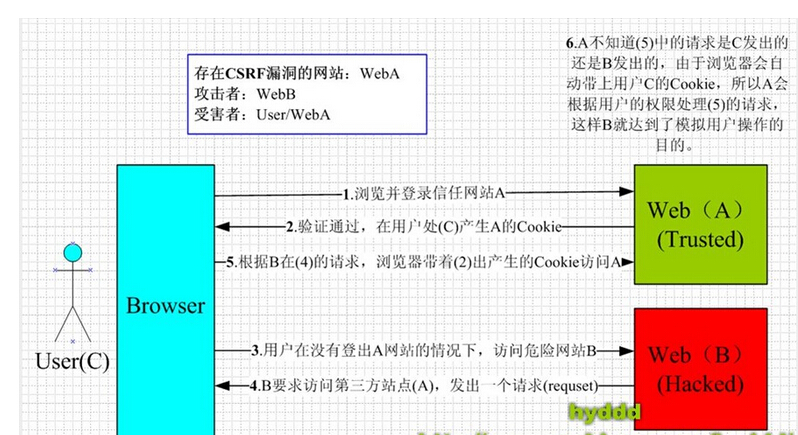
原文地址:http://www.cnblogs.com/wintersun/archive/2011/12/09/2282675.html
Cross-Site Request Forgery (CSRF) 是我们Web站点中常见的安全隐患。 下面我们在Asp.net MVC3 来演示一下。 例如我们有一个HomeContoller中一个Submit Action,我们标记了Http Post
[HttpPost]
public ActionResult Submit(FormCollection fc)
{
if (!string.IsNullOrEmpty(fc["Title"]))
{
ViewBag.Message = "Submit success!";
return View("Index");
}
return View("Error");
}
在View 使用Razor 简单提交是这样:
@using (Html.BeginForm("Submit", "Home"))
{
@Html.TextBox("Title","text");
<input type="submit" value="Submit" id="sb1" />
}
点击这个Button我们就提交表单了,接下来我们轻易使用Fiddler来伪造这个Http Post请求:
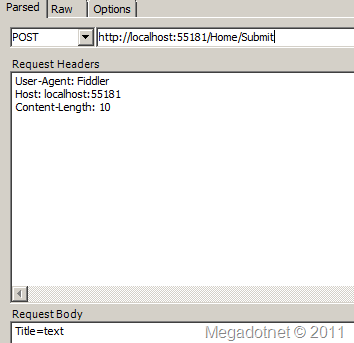
然后提交,成功了,返回 OK.
POST http://localhost:55181/Home/Submit HTTP/1.1
User-Agent: Fiddler
Host: localhost:55181
Content-Length: 10
Title=text
那在Asp.net MVC 3 Web Application中如何防止呢?在View中使用
@Html.AntiForgeryToken()
这时当Web应用程序运行时,查看生成HTML,你会看到form标签后有一个hidden input标签
<form action="/Home/Submit2" method="post">
<input name="__RequestVerificationToken" type="hidden"
value="WiB+H5TNp6V27ALYB3z/1nkD9BLaZIBbWQOBEllj2R/+MkGZqOjLbIof2MJeEoyUJV2ljujNR4etYV6idzji
G4+JL77P9qmeewc4Erh8LnMBHX6zLas2L67GDhvCom0dpiDZl0cH+PykIC/R+HYzEIUTK/thXuF8OUtLwIfKdly0650U
3I7MD6/cIc5aersJBMZ/p6gv76gc6nvKJDt2w0eMy3tkEfAcnNPTdeWr59Ns+48gsGpZ2GSh6G+Uh7rb" />
<input id="Title" name="Title" type="text" value="text" />
<br /> <input type="submit" value="Submit" id="sb1" />
看源代码是GetHtml方法序列化相应值生成的,
public HtmlString GetHtml(HttpContextBase httpContext, string salt, string domain, string path)
{
Debug.Assert(httpContext != null);
string formValue = GetAntiForgeryTokenAndSetCookie(httpContext, salt, domain, path);
string fieldName = AntiForgeryData.GetAntiForgeryTokenName(null);
TagBuilder builder = new TagBuilder("input");
builder.Attributes["type"] = "hidden";
builder.Attributes["name"] = fieldName;
builder.Attributes["value"] = formValue;
return new HtmlString(builder.ToString(TagRenderMode.SelfClosing));
}
同时还写Cookies
__RequestVerificationToken_Lw__=T37bfAdCkz0o1iXbAvH4v0bdpGQxfZP2PI5aTJgLL/Yhr3128FUY+fvUPApBqz7CGd2uxPiW+lsZ5tvRbeLSetARbHGxPRqiw4LZiPpWrpU9XY8NO4aZzNAdMe+l3q5EMw2iIFB/6UfriWxD7X7n/8P43LJ4tkGgv6BbrGWmKFo=
更多细节,请查询源代码。然后在Action上增加 [ValidateAntiForgeryToken] 就可以了,它是这样工作的:
1: public void Validate(HttpContextBase context, string salt) {
2: Debug.Assert(context != null);
3:
4: string fieldName = AntiForgeryData.GetAntiForgeryTokenName(null);
5: string cookieName = AntiForgeryData.GetAntiForgeryTokenName(context.Request.ApplicationPath);
6:
7: HttpCookie cookie = context.Request.Cookies[cookieName];
8: if (cookie == null || String.IsNullOrEmpty(cookie.Value)) {
9: // error: cookie token is missing
10: throw CreateValidationException();
11: }
12: AntiForgeryData cookieToken = Serializer.Deserialize(cookie.Value);
13:
14: string formValue = context.Request.Form[fieldName];
15: if (String.IsNullOrEmpty(formValue)) {
16: // error: form token is missing
17: throw CreateValidationException();
18: }
19: AntiForgeryData formToken = Serializer.Deserialize(formValue);
20:
21: if (!String.Equals(cookieToken.Value, formToken.Value, StringComparison.Ordinal)) {
22: // error: form token does not match cookie token
23: throw CreateValidationException();
24: }
25:
26: string currentUsername = AntiForgeryData.GetUsername(context.User);
27: if (!String.Equals(formToken.Username, currentUsername, StringComparison.OrdinalIgnoreCase)) {
28: // error: form token is not valid for this user
29: // (don't care about cookie token)
30: throw CreateValidationException();
31: }
32:
33: if (!String.Equals(salt ?? String.Empty, formToken.Salt, StringComparison.Ordinal)) {
34: // error: custom validation failed
35: throw CreateValidationException();
36: }
37: }
从Cookie中获得之前序列化存入的Token,然后反序列化与表单提交的Token进行对比。 接着,又对当前请求的用户认证进行确认。 最后看有没有设置Salt,有的话再进行比较。其中有一步验证没有通过,则throw异常。
有时的需求是这样的,我们需要使用Session验证用户,那么我们可在上面方法修改增加下面的代码块,意图是对比之前Session值是否与当前认证后Session值相等:
//verify session
if (!String.Equals(formToken.SessionId, AntiForgeryData.GetGUIDString(), StringComparison.Ordinal))
{
throw CreateValidationException();
}
在修改AntiForgeryDataSerializer类,它负责序列化,这里我们增加了SessionId属性:
1: internal class AntiForgeryDataSerializer
2: {
3: [SuppressMessage("Microsoft.Usage", "CA2202:Do not dispose objects multiple times", Justification = "MemoryStream is resilient to double-Dispose")]
4: public virtual AntiForgeryData Deserialize(string serializedToken)
5: {
6: if (String.IsNullOrEmpty(serializedToken))
7: {
8: throw new ArgumentException("Argument_Cannot_Be_Null_Or_Empty", "serializedToken");
9: }
10:
11: try
12: {
13: using (MemoryStream stream = new MemoryStream(Decoder(serializedToken)))
14: using (BinaryReader reader = new BinaryReader(stream))
15: {
16: return new AntiForgeryData
17: {
18: Salt = reader.ReadString(),
19: Value = reader.ReadString(),
20: CreationDate = new DateTime(reader.ReadInt64()),
21: Username = reader.ReadString(),
22: SessionId=reader.ReadString()
23: };
24: }
25: }
26: catch (Exception ex)
27: {
28: throw new System.Web.Mvc.HttpAntiForgeryException("AntiForgeryToken_ValidationFailed", ex);
29: }
30: }
31:
32: [SuppressMessage("Microsoft.Usage", "CA2202:Do not dispose objects multiple times", Justification = "MemoryStream is resilient to double-Dispose")]
33: public virtual string Serialize(AntiForgeryData token)
34: {
35: if (token == null)
36: {
37: throw new ArgumentNullException("token");
38: }
39:
40: using (MemoryStream stream = new MemoryStream())
41: using (BinaryWriter writer = new BinaryWriter(stream))
42: {
43: writer.Write(token.Salt);
44: writer.Write(token.Value);
45: writer.Write(token.CreationDate.Ticks);
46: writer.Write(token.Username);
47: writer.Write(token.SessionId);
48:
49: return Encoder(stream.ToArray());
50: }
51: }
52: }
在View这样使用,并引入Salt,这使得我们安全机制又提升了一点儿。
@using (Html.BeginForm("Submit2", "Home"))
{
@Html.AntiForgeryToken(DebugMvc.Controllers.Config.SALT);
@Html.TextBox("Title","text");
<br />
<input type="submit" value="Submit" id="sb1" />
}
Action的特性上,我们也配置对应的Salt字符串:
[HttpPost]
[ValidateAntiForgeryToken(Salt = Config.SALT)]
public ActionResult Submit2(FormCollection fc)
{
if (!string.IsNullOrEmpty(fc["Title"]))
{
ViewBag.Message = "Submit success!";
return View("Index");
}
return View("Error");
}
配置类:
public class Config
{
public const string SALT = "Why you are here";
}
这个实现一个简单的Session在HttpModule中,
public class MySessionModule:IHttpModule
{
#region IHttpModule Members
public void Dispose(){}
public void Init(HttpApplication context)
{
context.AcquireRequestState += new EventHandler(this.AcquireRequestState);
}
#endregion
protected void AcquireRequestState(object sender, EventArgs e)
{
HttpApplication httpApp = (HttpApplication)sender;
if (httpApp.Context.CurrentHandler is IRequiresSessionState)
{
if (httpApp.Session.IsNewSession)
{
httpApp.Session["GUID"] = Guid.NewGuid();
}
}
}
}
这时我们再使用Fiddler模拟请求POST到这个Action,后得到下面的结果,这个异常信息也是可以修改的:
AntiForgeryToken_ValidationFailed
Description: An unhandled exception occurred during the execution of the current web request. Please review the stack trace for more information about the error and where it originated in the code.
Exception Details: System.Web.Mvc.HttpAntiForgeryException: AntiForgeryToken_ValidationFailed
最后让我们来看单元测试的代码:
1: namespace DebugMvc.Ut
2: {
3: using System;
4: using System.Collections.Generic;
5: using System.Linq;
6: using System.Web;
7: using Microsoft.VisualStudio.TestTools.UnitTesting;
8: using DebugMvc.Controllers;
9: using System.Web.Mvc;
10: using Moq;
11: using System.Collections.Specialized;
12: using Match = System.Text.RegularExpressions.Match;
13: using System.Text.RegularExpressions;
14: using System.Globalization;
15:
16: [TestClass]
17: public class UnitTestForAll
18: {
19: private static string _antiForgeryTokenCookieName = AntiForgeryData.GetAntiForgeryTokenName("/SomeAppPath");
20: private const string _serializedValuePrefix = @"<input name=""__RequestVerificationToken"" type=""hidden"" value=""Creation: ";
21: private const string _someValueSuffix = @", Value: some value, Salt: some other salt, Username: username"" />";
22: private readonly Regex _randomFormValueSuffixRegex = new Regex(@", Value: (?<value>[A-Za-z0-9/\+=]{24}), Salt: some other salt, Username: username"" />$");
23: private readonly Regex _randomCookieValueSuffixRegex = new Regex(@", Value: (?<value>[A-Za-z0-9/\+=]{24}), Salt: ");
24:
25: [TestMethod]
26: public void TestValidateAntiForgeryToken2Attribute()
27: {
28: //arrange
29: var mockHttpContext = new Mock<HttpContextBase>();
30:
31: var context = mockHttpContext.Object;
32: var authorizationContextMock = new Mock<AuthorizationContext>();
33: authorizationContextMock.SetupGet(ac => ac.HttpContext).Returns(context);
34:
35: bool validateCalled = false;
36: Action<HttpContextBase, string> validateMethod = (c, s) =>
37: {
38: Assert.AreSame(context, c);
39: Assert.AreEqual("some salt", s);
40: validateCalled = true;
41: };
42: var attribute = new ValidateAntiForgeryToken2Attribute(validateMethod)
43: {
44: Salt = "some salt"
45: };
46:
47: // Act
48: attribute.OnAuthorization(authorizationContextMock.Object);
49:
50: // Assert
51: Assert.IsTrue(validateCalled);
52: }
53:
54: [TestMethod]
55: public void GetHtml_ReturnsFormFieldAndSetsCookieValueIfDoesNotExist()
56: {
57: // Arrange
58: AntiForgeryWorker worker = new AntiForgeryWorker()
59: {
60: Serializer = new DummyAntiForgeryTokenSerializer()
61: };
62: var context = CreateContext();
63:
64: // Act
65: string formValue = worker.GetHtml(context, "some other salt", null, null).ToHtmlString();
66:
67: // Assert
68: Assert.IsTrue(formValue.StartsWith(_serializedValuePrefix), "Form value prefix did not match.");
69:
70: Match formMatch = _randomFormValueSuffixRegex.Match(formValue);
71: string formTokenValue = formMatch.Groups["value"].Value;
72:
73: HttpCookie cookie = context.Response.Cookies[_antiForgeryTokenCookieName];
74: Assert.IsNotNull(cookie, "Cookie was not set correctly.");
75: Assert.IsTrue(cookie.HttpOnly, "Cookie should have HTTP-only flag set.");
76: Assert.IsTrue(String.IsNullOrEmpty(cookie.Domain), "Domain should not have been set.");
77: Assert.AreEqual("/", cookie.Path, "Path should have remained at '/' by default.");
78:
79: Match cookieMatch = _randomCookieValueSuffixRegex.Match(cookie.Value);
80: string cookieTokenValue = cookieMatch.Groups["value"].Value;
81:
82: Assert.AreEqual(formTokenValue, cookieTokenValue, "Form and cookie token values did not match.");
83: }
84:
85: private static HttpContextBase CreateContext(string cookieValue = null, string formValue = null, string username = "username")
86: {
87: HttpCookieCollection requestCookies = new HttpCookieCollection();
88: if (!String.IsNullOrEmpty(cookieValue))
89: {
90: requestCookies.Set(new HttpCookie(_antiForgeryTokenCookieName, cookieValue));
91: }
92: NameValueCollection formCollection = new NameValueCollection();
93: if (!String.IsNullOrEmpty(formValue))
94: {
95: formCollection.Set(AntiForgeryData.GetAntiForgeryTokenName(null), formValue);
96: }
97:
98: Mock<HttpContextBase> mockContext = new Mock<HttpContextBase>();
99: mockContext.Setup(c => c.Request.ApplicationPath).Returns("/SomeAppPath");
100: mockContext.Setup(c => c.Request.Cookies).Returns(requestCookies);
101: mockContext.Setup(c => c.Request.Form).Returns(formCollection);
102: mockContext.Setup(c => c.Response.Cookies).Returns(new HttpCookieCollection());
103: mockContext.Setup(c => c.User.Identity.IsAuthenticated).Returns(true);
104: mockContext.Setup(c => c.User.Identity.Name).Returns(username);
105:
106: var sessionmock = new Mock<HttpSessionStateBase>();
107: sessionmock.Setup(s => s["GUID"]).Returns(Guid.NewGuid().ToString());
108:
109: mockContext.Setup(c => c.Session).Returns(sessionmock.Object);
110:
111: return mockContext.Object;
112: }
113: }
114:
115: internal class DummyAntiForgeryTokenSerializer : AntiForgeryDataSerializer
116: {
117: public override string Serialize(AntiForgeryData token)
118: {
119: return String.Format(CultureInfo.InvariantCulture, "Creation: {0}, Value: {1}, Salt: {2}, Username: {3}",
120: token.CreationDate, token.Value, token.Salt, token.Username);
121: }
122: public override AntiForgeryData Deserialize(string serializedToken)
123: {
124: if (serializedToken == "invalid")
125: {
126: throw new HttpAntiForgeryException();
127: }
128: string[] parts = serializedToken.Split(':');
129: return new AntiForgeryData()
130: {
131: CreationDate = DateTime.Parse(parts[0], CultureInfo.InvariantCulture),
132: Value = parts[1],
133: Salt = parts[2],
134: Username = parts[3]
135: };
136: }
137: }
138: }
这里只是UnitTest的一部分,使用Moq来实现Mock HttpContext,从而实现对HttpContext的单元测试。
小结: Web站点的安全问题,不可轻视。特别现在Ajax大量应用,做好安全检测很重要。
希望对您Web开发有帮助。
Asp.net MVC 3 防止 Cross-Site Request Forgery (CSRF)原理及扩展 安全 注入的更多相关文章
- Cross Site Request Forgery (CSRF)--spring security -转
http://docs.spring.io/spring-security/site/docs/3.2.0.CI-SNAPSHOT/reference/html/csrf.html 13. Cross ...
- WebGoat学习——跨站请求伪造(Cross Site Request Forgery (CSRF))
跨站请求伪造(Cross Site Request Forgery (CSRF)) 跨站请求伪造(Cross Site Request Forgery (CSRF))也被称为:one click at ...
- 跨站请求伪造(Cross Site Request Forgery (CSRF))
跨站请求伪造(Cross Site Request Forgery (CSRF)) 跨站请求伪造(Cross Site Request Forgery (CSRF)) 跨站请求伪造(Cross Sit ...
- Vulnerability: Cross Site Request Forgery (CSRF)
CSRF跨站请求伪造 这是一种网络攻击方式,也被称为one-click attack或者session riding 攻击原理 CSRF攻击利用网站对于用户网页浏览器的信任,挟持用户当前已登陆的Web ...
- Healwire Online Pharmacy 3.0 Cross Site Request Forgery / Cross Site Scripting
Healwire Online Pharmacy version 3.0 suffers from cross site request forgery and cross site scriptin ...
- DVWA 黑客攻防演练(十四)CSRF 攻击 Cross Site Request Forgery
这么多攻击中,CSRF 攻击,全称是 Cross Site Request Forgery,翻译过来是跨站请求伪造可谓是最防不胜防之一.比如删除一篇文章,添加一笔钱之类,如果开发者是没有考虑到会被 C ...
- CSRF(Cross Site Request Forgery, 跨站域请求伪造)
CSRF(Cross Site Request Forgery, 跨站域请求伪造) CSRF 背景与介绍 CSRF(Cross Site Request Forgery, 跨站域请求伪造)是一种网络的 ...
- CSRF(Cross Site Request Forgery, 跨站请求伪造)
一.CSRF 背景与介绍 CSRF(Cross Site Request Forgery, 跨站域请求伪造)是一种网络的攻击方式,它在 2007 年曾被列为互联网 20 大安全隐患之一.其他安全隐患, ...
- 转: CSRF(Cross Site Request Forgery 跨站域请求伪造) 背景与介绍
from: https://www.ibm.com/developerworks/cn/web/1102_niugang_csrf/ 在 IBM Bluemix 云平台上开发并部署您的下一个应用 ...
随机推荐
- Delphi动态调用Java的WebService 转
Delphi动态调用Java的WebService —— 基于“Axis2发布WebService例子(HelloWorld)” uses ComObj; var WsObject: Variant; ...
- 15个提高编程技巧的JavaScript工具
原文地址:http://www.imooc.com/wenda/detail/243523 JavaScript脚本库是一个预先用JavaScript语言写好的库,它方便了我们开发基于JavaScri ...
- ZOJ2317-Nice Patterns Strike Back:矩阵快速幂,高精度
Nice Patterns Strike Back Time Limit: 20000/10000MS (Java/Others)Memory Limit: 128000/64000KB (Java/ ...
- Spring MVC + Spring MongoDB + Querydsl 通过maven整合实例
效果图 一共3个页面:注册页,欢迎页,用户列表页 很简单的例子,主要是为了把流程走通,没有各种验证. 注册页: 欢迎页: 用户列表页: 源码地址 https://github.com/lemonbar ...
- (转)Building MariaDB on Mac OS X using Homebrew
https://kb.askmonty.org/en/building-mariadb-on-mac-os-x-using-homebrew/ Work has been done to provid ...
- [Redux] Extracting Presentational Components -- TodoApp
Finally, I just noticed that the to-do app component doesn't actually have to be a class. I can turn ...
- 多路复用I/O select()
select(),poll(),epoll()的总结:http://www.cnblogs.com/Anker/p/3265058.html 在socket编程中,仅仅使用connect,accept ...
- TFS 用户与组管理(转)
作者:frank.liu kaka.zhou 安装 Team Foundation Server 后,会创建以下全局组.可以使用这些全局组来控制 Team Foundation 用户的权限. 组 权限 ...
- Geodatabase - 创建要素类.
在NET中,会遇到以“_2”结尾的属性,这些属性是可写的. 以下代码在已有工作空间下,创建一个新的点要素类: //例如,personalDBPath=@"G:\doc\gis\1.400\d ...
- ORACLE函数详解【weber出品】
一.什么是函数 一个函数: 1. 是命名的PL/SQL块,必须返回一个值 2. 可以存储到数据库中重复执行 3. 可以作为表达式的一部分或者提供一个参数值 二.创建函数的语法 必须至少有一个返回值,创 ...