
【asp.net】将GridView数据导出Excel
概要:
中午睡了一会,醒来的时候看到老师叫我去办公室,需求是这样的,把excel表中的每个同学,判断图片目录中是否有对应的照片(图片的名字用的学号或身份证号码)
没有对应图片的学生记录,存入自己的数据表中或直接输出,最后下载成Excel
于是回去后他把Excel和照片发给我
正文开始:
虽然没接触过Excel的数据导入和将GridView数据导出Excel,在网上查找了很多资料,最后汇总成功实现。
这是第一次写自己的博客并与大家分享。
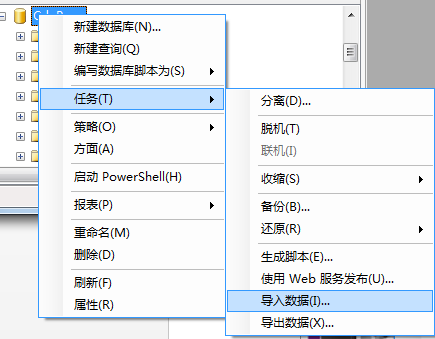
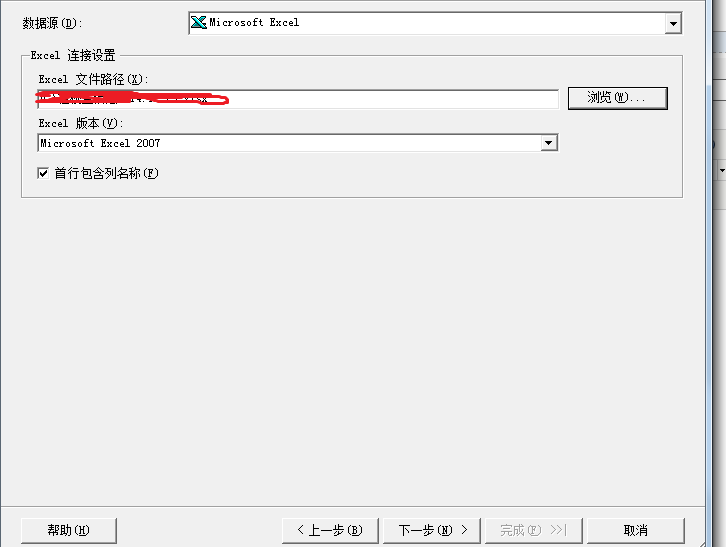

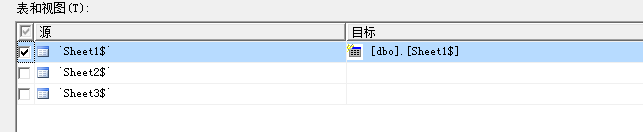
我也是查了百度学来的,详细地址:
http://jingyan.baidu.com/article/47a29f24003521c0142399dc.html
2.将图片目录所有图片对应的名称导入另外一张表(image表),图片有些多并且如何能达到高效遍历目录文件,于是又去查百度了!地址如下:
http://blog.csdn.net/love_rrr/article/details/7779403
http://www.cnblogs.com/xdesigner/archive/2006/12/08/586177.html
代码如下:
#region 声明WIN32API函数以及结构 **************************************

    [Serializable,

    System.Runtime.InteropServices.StructLayout

      (System.Runtime.InteropServices.LayoutKind.Sequential,

      CharSet = System.Runtime.InteropServices.CharSet.Auto

      ),

    System.Runtime.InteropServices.BestFitMapping(false)]

    private struct WIN32_FIND_DATA

    {

        public int dwFileAttributes;

        public int ftCreationTime_dwLowDateTime;

        public int ftCreationTime_dwHighDateTime;

        public int ftLastAccessTime_dwLowDateTime;

        public int ftLastAccessTime_dwHighDateTime;

        public int ftLastWriteTime_dwLowDateTime;

        public int ftLastWriteTime_dwHighDateTime;

        public int nFileSizeHigh;

        public int nFileSizeLow;

        public int dwReserved0;

        public int dwReserved1;

        [System.Runtime.InteropServices.MarshalAs

          (System.Runtime.InteropServices.UnmanagedType.ByValTStr,

          SizeConst = )]

        public string cFileName;

        [System.Runtime.InteropServices.MarshalAs

          (System.Runtime.InteropServices.UnmanagedType.ByValTStr,

          SizeConst = )]

        public string cAlternateFileName;

    }

    [System.Runtime.InteropServices.DllImport

      ("kernel32.dll",

      CharSet = System.Runtime.InteropServices.CharSet.Auto,

      SetLastError = true)]

    private static extern IntPtr FindFirstFile(string pFileName, ref WIN32_FIND_DATA pFindFileData);

    [System.Runtime.InteropServices.DllImport

      ("kernel32.dll",

      CharSet = System.Runtime.InteropServices.CharSet.Auto,

      SetLastError = true)]

    private static extern bool FindNextFile(IntPtr hndFindFile, ref WIN32_FIND_DATA lpFindFileData);

    [System.Runtime.InteropServices.DllImport("kernel32.dll", SetLastError = true)]

    private static extern bool FindClose(IntPtr hndFindFile);

    #endregion

    //具体方法函数

     Stack<string> m_scopes = new Stack<string>();

    private static readonly IntPtr INVALID_HANDLE_VALUE = new IntPtr(-);

    WIN32_FIND_DATA FindFileData;

    private System.IntPtr hFind = INVALID_HANDLE_VALUE;

    void FindFileInDir(string rootDir)

    {

        string path = rootDir;

        start:

        new FileIOPermission(FileIOPermissionAccess.PathDiscovery, Path.Combine(path, ".")).Demand();

        if (path[path.Length - ] != '\\')

        {

            path = path + "\\";

        }

        Response.Write("文件夹为:"+path+"<br>");

        hFind = FindFirstFile(Path.Combine(path,"*"), ref FindFileData);

        if(hFind!=INVALID_HANDLE_VALUE)

        {

            do

            {

                if (FindFileData.cFileName.Equals(@".") || FindFileData.cFileName.Equals(@".."))

                    continue;

                if ((FindFileData.dwFileAttributes & 0x10) != )

                {

                    m_scopes.Push(Path.Combine(path, FindFileData.cFileName));

                }

                else

                {

                    Response.Write(FindFileData.cFileName+"<br>");

                }

            }

            while (FindNextFile(hFind, ref FindFileData));

        }

        FindClose(hFind);

        if (m_scopes.Count > )

        {

            path = m_scopes.Pop();

            goto start;

        }

    }

//调用方法如下:

FindFileInDir(@"D:\images\images"); //绝对路径
3.(再次看了下需求)按照需求把Page2表中的每个同学,判断image表中是否有对应的照片
没有对应图片的学生记录,输出到GridView,最后下载成Excel
页面布局
代码如下:
<div style="width:100%">
查询条件:<asp:DropDownList ID="DropDownList1" runat="server">
<asp:ListItem Value="" Text="=查询所有="></asp:ListItem>
<asp:ListItem Value="" Text="=身份证ID查询="></asp:ListItem>
<asp:ListItem Value="" Text="=姓名查询="></asp:ListItem>
</asp:DropDownList>
<asp:TextBox ID="TextBox1" runat="server"></asp:TextBox>
<asp:Button ID="Button2" runat="server" Text="查询" OnClick="Button2_Click" style="height: 21px" /> <asp:Button ID="Button1" runat="server" Text="下载EXCEL" onclick="Button1_Click" />
<br />
<br />
<asp:GridView ID="GridView1" runat="server" AutoGenerateColumns="false" Width="100%" PageSize="">
<Columns>
<asp:TemplateField HeaderText="序号">
<ItemTemplate><%#Eval("RowNum") %></ItemTemplate>
</asp:TemplateField>
<asp:TemplateField HeaderText="用户ID">
<ItemTemplate><%#Eval("UserID") %></ItemTemplate>
</asp:TemplateField>
<asp:TemplateField HeaderText="用户姓名">
<ItemTemplate><%#Eval("Name") %></ItemTemplate>
</asp:TemplateField>
<asp:TemplateField HeaderText="身份证号">
<ItemTemplate><%#Eval("PassCardID") %></ItemTemplate>
</asp:TemplateField>
<asp:TemplateField HeaderText="性别">
<ItemTemplate><%#Eval("Sex") %></ItemTemplate>
</asp:TemplateField>
<asp:TemplateField HeaderText="学院">
<ItemTemplate><%#Eval("College") %></ItemTemplate>
</asp:TemplateField>
<asp:TemplateField HeaderText="班级名称">
<ItemTemplate><%#Eval("ClassName") %></ItemTemplate>
</asp:TemplateField>
<asp:TemplateField HeaderText="年级">
<ItemTemplate><%#Eval("ClassID") %></ItemTemplate>
</asp:TemplateField>
</Columns>
</asp:GridView>
<br />
<webdiyer:AspNetPager ID="AspNetPager1" runat="server" FirstPageText="首页"
LastPageText="尾页" NextPageText="下一页" PrevPageText="上一页" PageSize=""
onpagechanged="AspNetPager1_PageChanged">
</webdiyer:AspNetPager>
<div>
</div>
</div>
后台代码如下:
public void BindPagerPage(GridView gv, AspNetPager pager)

{

 string sql = "with  page as (select *,Row_number() OVER (ORDER BY UserID  desc)as RowNum from Page2 where not exists   (select imagename from dbo.[image] where  Page2.UserID=dbo.[image].imagename or Page2.PassCardID = dbo.[image].imagename) )select * from page where RowNum>{0} and RowNum<{1}";

sql = string.Format(sql, (pager.CurrentPageIndex - 1) * pager.PageSize, (pager.CurrentPageIndex - 1) * pager.PageSize + pager.PageSize);

pager.RecordCount = int.Parse(new DataBase().ExecuteValue("with page as(select Count(*) as RowNum from Page2 where not exists   (select imagename from dbo.[image] where  Page2.UserID=dbo.[image].imagename or Page2.PassCardID = dbo.[image].imagename) )select RowNum from page"));

gv.DataSource = new DataBase().GetDataTable(sql);

gv.DataBind();

}
因为用到了AspNetPager开源分页控件,想在GridView上展示良好的分页效果完成,开始编写的数据库语句数据出现重复,最后修改的时候数据库语句反复出现错误跟着提示,才使数据无重复效果,如果有比较好的语句可以教下我,谢谢!(这里因为数据重复花了不少时间)

数据确实有点多,剩下的图片由于太多了,在QQ上传文件接收又慢,最后拿了老师发了我30多张图片我做下测试。
数据得到了良好的展示!
4.最后一步是最关键:将GridView数据导出Excel,在这里我又用到了一个开源控件MyXls.SL2
protected void Button1_Click(object sender, EventArgs e)

    {

        string strsql = " with  page as (select *,Row_number() OVER (ORDER BY UserID  asc)as RowNum from Page2 where not exists   (select imagename from dbo.[image] where  Page2.UserID=dbo.[image].imagename or Page2.PassCardID = dbo.[image].imagename) )select * from page";

        Dal.DataBase db = new Dal.DataBase();

        ExcelDown exceldown = new ExcelDown();

        exceldown.downExcel(Response, db.GetDataTable(strsql), "page" + DateTime.Now.Year + "-" + DateTime.Now.Month + "-" + DateTime.Now.Day + "-" + DateTime.Now.Hour + "-" + DateTime.Now.Minute + "-" + DateTime.Now.Second + "-" + DateTime.Now.Millisecond, Server.MapPath("~/Excel"));

}
总结:这次任务完成,并且也学到了将GridView数据导出Excel,自己是从大一下学期开始接触C#学了一段时间后开始学习asp.net,当时什么都不懂,老师就给我一些小案例去做,开始百度找的学习视频都是很模糊,看的时候很少敲代码导致后来太久不用了就忘记了,学习效率非常低,,接下来的日子里每天都是看别人写的博客和看一些项目案例视频学习敲代码并且自己把做好的小模块、知识点整理起来等要用的时候就复制粘贴,也得到了老师和学长的帮助,很感谢他们,写博客就是想认识多一些人交流学习,保持学习的状态!
完整代码
ExcelDown.cs

namespace Dal

{

    public class ExcelDown

    {

        public void downExcel(HttpResponse response, DataTable dt, string fileName, string path)

        {

            XlsDocument xls = new XlsDocument();//新建一个

            xls.FileName = fileName + ".xls";

            Worksheet sheet = xls.Workbook.Worksheets.Add("Sheet1");

            //填充表头

            try

            {

                foreach (DataColumn col in dt.Columns)

                {

                    sheet.Cells.Add(1, col.Ordinal + 1, col.ColumnName);

                }

                //填充内容

                for (int i = 0; i < dt.Rows.Count; i++)

                {

                    for (int j = 0; j < dt.Columns.Count; j++)

                    {

                        sheet.Cells.Add(i + 2, j + 1, dt.Rows[i][j].ToString());

                    }

                }

                #region

                using (MemoryStream ms = new MemoryStream())

                {

                    xls.Save(ms);

                    ms.Flush();

                    ms.Position = 0;

                    sheet = null;

                    xls = null;

                    // HttpResponse response = System.Web.HttpContext.Current.Response;

                    response.Clear();

                    response.Charset = "UTF-8";

                    response.ContentType = "application/vnd-excel";//"application/vnd.ms-excel";

                    System.Web.HttpContext.Current.Response.AddHeader("Content-Disposition", string.Format("attachment; filename=" + fileName + ".xls"));

                    //System.Web.HttpContext.Current.Response.WriteFile(fi.FullName);

                    byte[] data = ms.ToArray();

                    System.Web.HttpContext.Current.Response.BinaryWrite(data);

                }

                #endregion

            }

            finally

            {

                sheet = null;

                xls = null;

            }

        }

    }

}

PageDal.cs

 public void BindPagerPage(GridView gv, AspNetPager pager)

        {
string sql = "with page as (select *,Row_number() OVER (ORDER BY UserID desc)as RowNum from Page2 where not exists (select imagename from dbo.[image] where Page2.UserID=dbo.[image].imagename or Page2.PassCardID = dbo.[image].imagename) )select * from page where RowNum>{0} and RowNum<{1}";
sql = string.Format(sql, (pager.CurrentPageIndex - 1) * pager.PageSize, (pager.CurrentPageIndex - 1) * pager.PageSize + pager.PageSize);
pager.RecordCount = int.Parse(new DataBase().ExecuteValue("with page as(select Count(*) as RowNum from Page2 where not exists (select imagename from dbo.[image] where Page2.UserID=dbo.[image].imagename or Page2.PassCardID = dbo.[image].imagename) )select RowNum from page"));
gv.DataSource = new DataBase().GetDataTable(sql);
gv.DataBind();
        }

page.aspx

public partial class Page : System.Web.UI.Page

{

    protected void Page_Load(object sender, EventArgs e)

    {

        if (!IsPostBack) { bind();

     //   FindFileInDir(@"D:\images\images"); //绝对路径 只用一次用完记得注释

        }

    }

    protected void AspNetPager1_PageChanged(object sender, EventArgs e)

    {

        bind();

    }

    public void bind()

    {

        new PageDal().BindPagerPage(GridView1, AspNetPager1);

    }

    protected void Button1_Click(object sender, EventArgs e)

    {

        string strsql = " with  page as (select *,Row_number() OVER (ORDER BY UserID  asc)as RowNum from Page2 where not exists   (select imagename from dbo.[image] where  Page2.UserID=dbo.[image].imagename or Page2.PassCardID = dbo.[image].imagename) )select * from page";

        Dal.DataBase db = new Dal.DataBase();

        ExcelDown exceldown = new ExcelDown();

        exceldown.downExcel(Response, db.GetDataTable(strsql), "Page" + DateTime.Now.Year + "-" + DateTime.Now.Month + "-" + DateTime.Now.Day + "-" + DateTime.Now.Hour + "-" + DateTime.Now.Minute + "-" + DateTime.Now.Second + "-" + DateTime.Now.Millisecond, Server.MapPath("~/Excel"));

    }

    protected void Button2_Click(object sender, EventArgs e)

    {

   //     bind();//点击查询

    }

    #region 声明WIN32API函数以及结构 **************************************

    [Serializable,

    System.Runtime.InteropServices.StructLayout

      (System.Runtime.InteropServices.LayoutKind.Sequential,

      CharSet = System.Runtime.InteropServices.CharSet.Auto

      ),

    System.Runtime.InteropServices.BestFitMapping(false)]

    private struct WIN32_FIND_DATA

    {

        public int dwFileAttributes;

        public int ftCreationTime_dwLowDateTime;

        public int ftCreationTime_dwHighDateTime;

        public int ftLastAccessTime_dwLowDateTime;

        public int ftLastAccessTime_dwHighDateTime;

        public int ftLastWriteTime_dwLowDateTime;

        public int ftLastWriteTime_dwHighDateTime;

        public int nFileSizeHigh;

        public int nFileSizeLow;

        public int dwReserved0;

        public int dwReserved1;

        [System.Runtime.InteropServices.MarshalAs

          (System.Runtime.InteropServices.UnmanagedType.ByValTStr,

          SizeConst = 260)]

        public string cFileName;

        [System.Runtime.InteropServices.MarshalAs

          (System.Runtime.InteropServices.UnmanagedType.ByValTStr,

          SizeConst = 14)]

        public string cAlternateFileName;

    }

    [System.Runtime.InteropServices.DllImport

      ("kernel32.dll",

      CharSet = System.Runtime.InteropServices.CharSet.Auto,

      SetLastError = true)]

    private static extern IntPtr FindFirstFile(string pFileName, ref WIN32_FIND_DATA pFindFileData);

    [System.Runtime.InteropServices.DllImport

      ("kernel32.dll",

      CharSet = System.Runtime.InteropServices.CharSet.Auto,

      SetLastError = true)]

    private static extern bool FindNextFile(IntPtr hndFindFile, ref WIN32_FIND_DATA lpFindFileData);

    [System.Runtime.InteropServices.DllImport("kernel32.dll", SetLastError = true)]

    private static extern bool FindClose(IntPtr hndFindFile);

    #endregion

    //具体方法函数

     Stack<string> m_scopes = new Stack<string>();

    private static readonly IntPtr INVALID_HANDLE_VALUE = new IntPtr(-1);

    WIN32_FIND_DATA FindFileData;

    private System.IntPtr hFind = INVALID_HANDLE_VALUE;

    void FindFileInDir(string rootDir)

    {

        string path = rootDir;

        start:

        new FileIOPermission(FileIOPermissionAccess.PathDiscovery, Path.Combine(path, ".")).Demand();

        if (path[path.Length - 1] != '\\')

        {

            path = path + "\\";

        }

        Response.Write("文件夹为:"+path+"<br>");

        hFind = FindFirstFile(Path.Combine(path,"*"), ref FindFileData);

        if(hFind!=INVALID_HANDLE_VALUE)

        {

            do

            {

                if (FindFileData.cFileName.Equals(@".") || FindFileData.cFileName.Equals(@".."))

                    continue;

                if ((FindFileData.dwFileAttributes & 0x10) != 0)

                {

                    m_scopes.Push(Path.Combine(path, FindFileData.cFileName));

                }

                else

                {

                    Response.Write(FindFileData.cFileName+"<br>");

                    string[] str =FindFileData.cFileName.Split('.');

                    DataBase db = new DataBase();

                    string comstr = "insert into Image(imageName) values(@ImageName)";

                    SqlParameter[] param = new SqlParameter[1];

                    param[0] = new SqlParameter("@ImageName", SqlDbType.VarChar, 256);

                    param[0].Value = str[0];

                    db.ExecuteSql(comstr, param);

                }

            }

            while (FindNextFile(hFind, ref FindFileData));

        }

        FindClose(hFind);

        if (m_scopes.Count > 0)

        {

            path = m_scopes.Pop();

            goto start;

        }

    }

}
【asp.net】将GridView数据导出Excel的更多相关文章
- 在ASP.NET中将GridView数据导出到Word、Excel
在ASP.NET中将GridView数据导出到Word.Excel asp.net,导出gridview数据到Word,Excel,PDF #region Export to Word, Exce ...
- ASP.NET中GridView数据导出到Excel
/// <summary> /// 导出按钮 /// </summary> /// <param name="sender"></para ...
- Gridview数据导出excel时身份证号码为科学计数法的解决方法
if (e.Row.RowType == DataControlRowType.DataRow) { string id = this.GridView1.DataKeys[e.Row.RowInde ...
- ASP.NET MVC5下载数据到Excel文件
项目中的一个功能是将数据导入到Excel文件中,这里使用NPOI操作Excel,代码如下: public class Excel : IDataTransfer { public Stream Exp ...
- C# DevExpress 的gridControl或gridView数据导出失败解决方法
来自:http://blog.csdn.net/lybwwp/article/details/8049464 谢谢 在使用DevExpress 的GridPanel控件的时候出现了一个莫名其妙的现象, ...
- Gridview数据导出到ExcelWord 防止出现乱码
1.页面中添加绿色字体代码<%@ Page Language="C#" CodeFile="111.aspx.cs" Inherits="111 ...
- 百度地图里面搜索到的公司商家电话导出表格?怎样将把百度地图里面搜索到的公司 电话 地址 等数据导出excel里?
好多人在问:如何将百度地图里面搜索到的公司商家电话导出表格?怎样将把百度地图里面搜索到的公司 电话 地址 等数据导出excel里? 现在,很多人都在网络上找商家,联系业务. 百度地图里有很多的商家联系 ...
- Java使用POI实现数据导出excel报表
Java使用POI实现数据导出excel报表 在上篇文章中,我们简单介绍了java读取word,excel和pdf文档内容 ,但在实际开发中,我们用到最多的是把数据库中数据导出excel报表形式.不仅 ...
- JavaScript 上万条数据 导出Excel文件(改装版)
最近项目要js实现将数据导出excel文件,网上很多插件实现~~那个开心呀,谁知道后面数据量达到上万条时出问题:浏览器不仅卡死,导出的excel文件一直提示网络失败.... debug调试发现var ...
随机推荐
- Javascript 排序数组或对象
分享一个用于数组或者对象的排序的函数.该函数可以以任意深度的数组或者对象的值作为排序基数对数组或的元素进行排序. 代码如下: /** * 排序数组或者对象 * by Jinko * date 2015 ...
- shell programs
find * -not -path "docs/*" -regex ".*\.\(rb\)" -type f -print0 | xargs -0 gr ...
- Win7下unetbootin-windows-585工具制作Ubuntu12.04 U盘启动盘
1.下载unetbootin-windows-585工具,网址如下: unetbootin-windows-585 2.unetbootin-windows-585制作U盘启动盘 准备好1个4G的U盘 ...
- 使用过渡场景在多个场景的切换COCOS2D(4)
CCNode有三个方法,使用CCDirector的replaceScene方法替换场景时,每个节点都会调用这三个方法: onEnter与onExit方法在改变场景过程中的特定时刻被调用,这取决于是否使 ...
- MySQL报错:ERROR 1045 (28000): Access denied for user 'root'@'localhost' (using password:NO)
1.关闭mysql # service mysqld stop2.屏蔽权限 # mysqld_safe --skip-grant-table 屏幕出现: Starting demo fro ...
- ORA-600[kcratr_scan_lastbwr]逻辑坏块解决
数据库版本: 11.2.0.3 问题现象: 今天在启动一台测试数据库的时候,发现db不能open,报错如下: ERROR at line 1: ORA-00600: internal error co ...
- typedef的用法总结
typedef的用法总结 不管实在C还是C++代码中,typedef这个词都不少见,当然出现频率较高的还是在C代码中.typedef与#define有些相似,但更多的是不同,特别是在一些复杂的用法上, ...
- JQuery使用on绑定动态生成元素时碰到的问题
今天在写界面时,希望对一些由JS代码动态添加的html标签进行事件绑定,使用了jquery 1.6+才提供的on函数.我的JQ版本是1.9.2. 以下这段代码是动态生成的. <div class ...
- C++设计模式之工厂模式
//产品父类声明#pragma once #include "iostream" using namespace std; class Product { public: virt ...
- RMA编码为必输
应用 Oracle Inventory 层 Level Function 函数名 Funcgtion Name RCV_RCVTXERE 表单名 Form Name RCVTXERE 说明 Descr ...