
WCF Service Configuration Editor的使用
原文:http://www.cnblogs.com/Ming8006/p/3772221.html
通过WCF Service Configuration Editor的配置
修改Client端
参考
在上篇文章创建一个简单的WCF程序中, 通过编码的方式进行终结点的添加和服务行为的定义,但在进行真正的WCF应用开发时,一般会直接是通过配置的方式进行。
对于初学者来说,WCF的配置显得过于复杂,直接对配置文件进行手工编辑不太现实。在这种情况下,可以直接使用VS提供的配置工具WCF Service Configuration Editor工具生成XML文件来进行WCF的配置。
通过WCF Service Configuration Editor的配置[1]
以下是使用WCF Service Configuration Editor的的操作步骤:
1.打开VS,在Hosting项目中右键,新建一个App.config文件。
2.点击菜单栏Tools选项,在下拉菜单中选择WCF Service Configuration Editor。
3.在弹出的工具窗口中选择“File->open->Config File”。找到刚才建的App.config文件,并打开。
4.新建一个服务,如下图所示,先点击“创建新的服务”链接,再找到Service项目中的WcfServices.Services.CalculatorService服务。
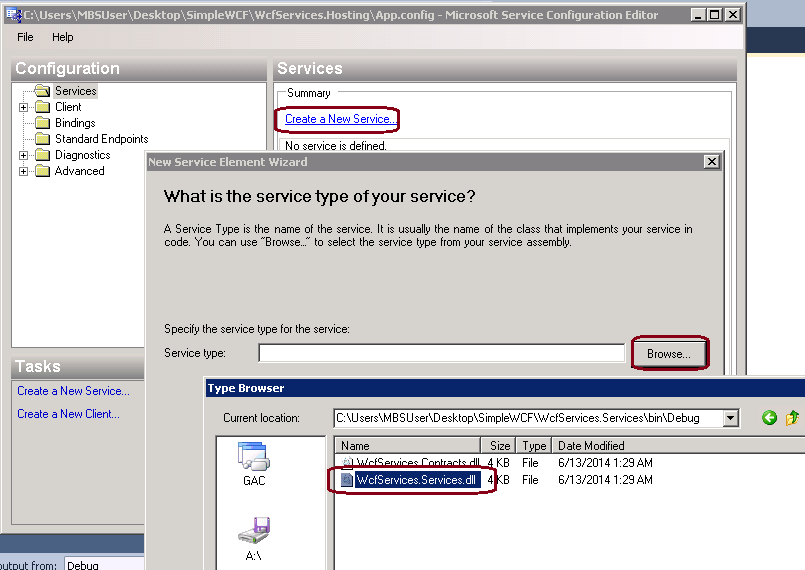
5.点击下一步,找到Contracts项目中的ICalculator契约。
6.下一步,选择Http的通信方式。
7.点击下一步,选择Basic Web Service Interoperability。
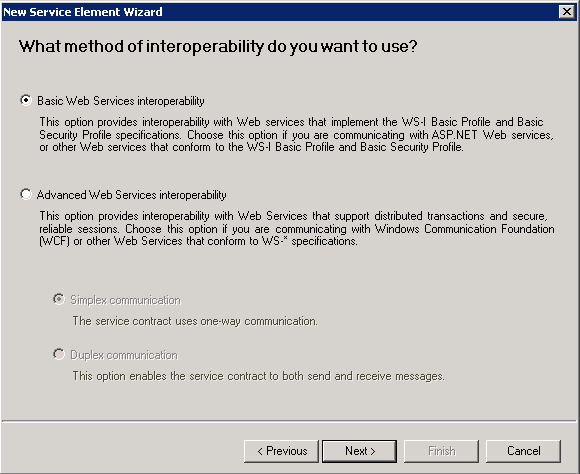
8.点击下一步,输入服务端Endpoint地址: http://localhost:8080/calculatorservice 。下一步Finish。
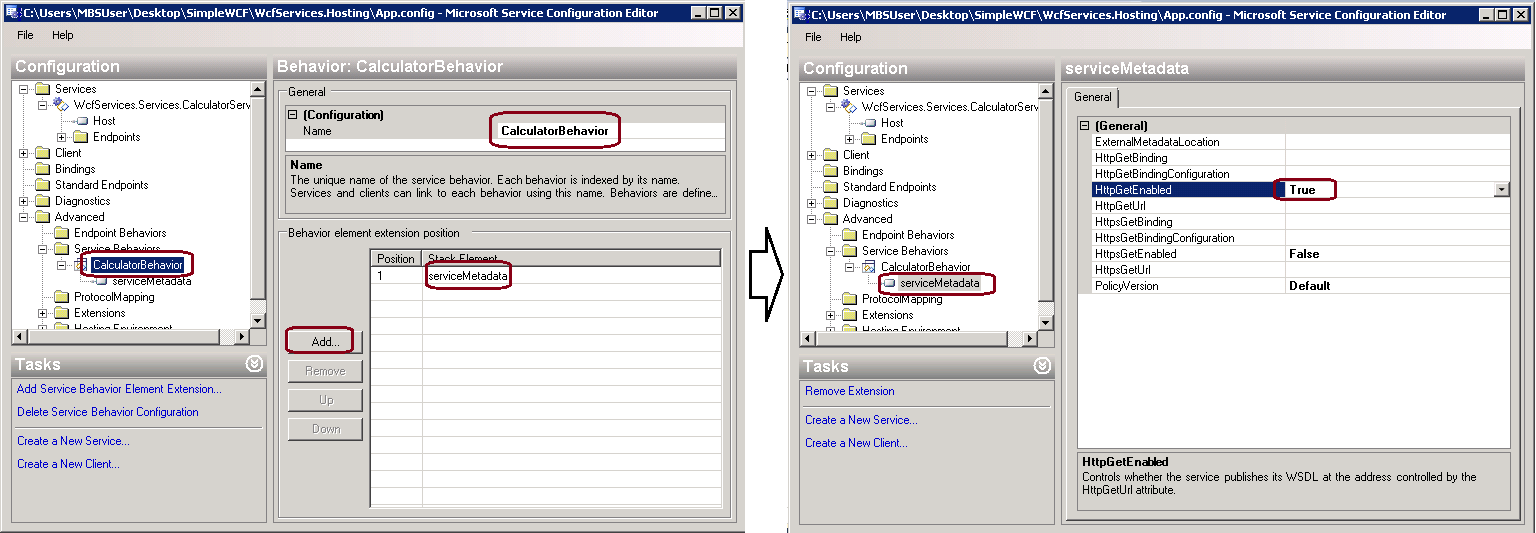
9.为服务添加行为(Behavior),这步很重要。在Advanced目录下,右键新建一个Service行为,New Service Behavior Configuraton,然后对行为重命名为CalculatorBehavior。新建一个Stack Element 'serviceMetadata', 并设置它的HttpGetEnabled为true。如下图所示:
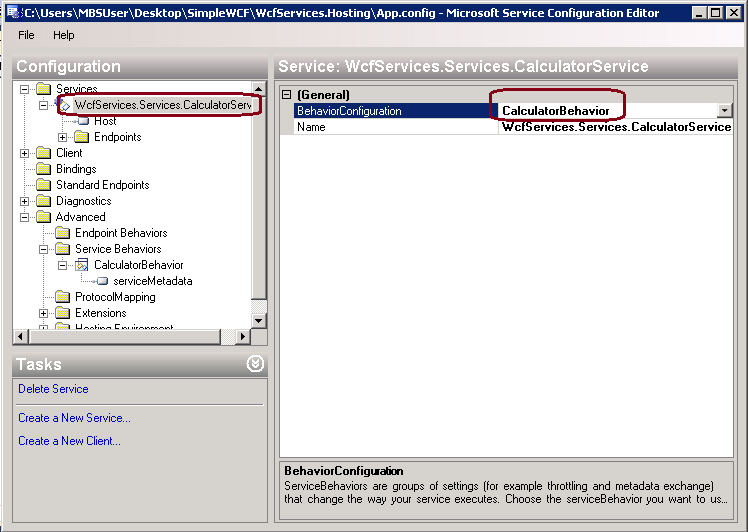
10.这些做好了之后,我们回到最上面的Service目录,为Calculator服务添加刚才配的CalculatorBehavior行为配置。如下图所示:
11.接着配置Host的地址,选中Host,然后点击右下方的New Base Address,输入: http://localhost:8080/calculatorservice
12.可以新添加一个服务端的Endpoint,用于配置WS-MetadataExchange,当然也可以不加。在Services目录下的Endpoint右键,新建一个Endpoint,名字和地址随意,保证Binding是mexHttpBinding。
13.Ctrl+S保存,这样App.config文件就自动写满了,如下:
 <?xml version="1.0" encoding="utf-8" ?>

 <configuration>

     <system.serviceModel>

         <behaviors>

             <serviceBehaviors>

                 <behavior name="CaclulaterBehavior">

                     <serviceMetadata httpGetEnabled="true" />

                 </behavior>

             </serviceBehaviors>

         </behaviors>

         <services>

             <service behaviorConfiguration="CaclulaterBehavior" name="WcfServices.Services.CalculatorService">

                 <endpoint address="http://localhost:8080/calculatorservice" binding="basicHttpBinding"

                     bindingConfiguration="" contract="WcfServices.Contracts.ICalculator" />

                 <host>

                     <baseAddresses>

                         <add baseAddress="http://localhost:8080/calculatorservice" />

                     </baseAddresses>

                 </host>

             </service>

         </services>

     </system.serviceModel>

 </configuration>
14。修改Hosting类的代码,删改后如下:
 using System;

 using System.ServiceModel;

 using WcfServices.Services;

 namespace WcfServices.Hosting

 {

     class Program

     {

         static void Main(string[] args)

         {

             using (ServiceHost host = new ServiceHost(typeof(CalculatorService)))

             {

                 host.Opened += delegate

                 {

                     Console.WriteLine("CalculaorService have started, press any key to stop it!");

                 };

                 host.Open();

                 Console.Read();

             }

         }

     }

 }
注意:
1 <endpoint address="" binding="basicHttpBinding" name="Calculator"   Contract="Contracts.ICalculator" >

2   <host>

3       <baseAddress>

4           <add baseAddress="http://localhost:8080/CalculatorService"/>

5       </baseAddress>

6   </host>
endpiont的地址为空,只是配了Host的基地址。当然也可以直接配Endpoint的地址,不配Host的基地址。但如果host了多个服务呢?有多了Endpoint挂在同一个host下,那么配基地址就显得很重要。
修改Client端
打开客户端的项目(服务端不要关闭),选择Client项目下的Service Reference,在你的服务命名空间上右键,点击Update Service Reference。会生成新的app.config文件。
然后Rebuild Client端项目即可,ClientApp的代码无须改变。
配置客户端[2]
在真正的WCF应用中,大都采用配置的方式进行终结点的定义。对于客户端,我们也可以通过下面的配置指定终结点的三要素,并为相应的终结点指定一个终结点配置名称(calculatorservice)。 在客户端项目添加Application Configuration file (App.config),内容如下:
<?xml version="1.0" encoding="utf-8" ?>

<configuration>

  <system.serviceModel>

    <client>

      <endpoint address="http://localhost:8080/calculatorservice" binding="basicHttpBinding" contract="WcfServices.Contracts.ICalculator" name="calculatorservice" />

    </client>

  </system.serviceModel>

</configuration>
对客户端项目,我们将添加的服务引用移除,并为Client项目添加对Contracts项目的引用。借助于这个服务契约,并通过ChannelFactory<ICalculator>创建服务代理对象,直接进行相应的服务调用。
using System;

using System.ServiceModel;

using WcfServices.Contracts;

namespace WcfServices.Client

{

    class Program

    {

        static void Main(string[] args)

        {

            using (ChannelFactory<ICalculator> channelFactory  = new ChannelFactory<ICalculator>("calculatorservice"))

            {

                ICalculator proxy = channelFactory.CreateChannel();

                using (proxy as IDisposable)

                {

                    Console.WriteLine("x + y = {2} when x = {0} and y = {1}", , , proxy.Add(, ));

                }

                Console.Read();

            }

        }

    }

}
参考:
[1] WCF Service Configuration Editor的使用 http://www.cnblogs.com/judastree/archive/2012/08/26/2657555.html
[2] 我的WCF之旅(1):创建一个简单的WCF程序 http://www.cnblogs.com/artech/archive/2007/06/14/782845.html
WCF Service Configuration Editor的使用的更多相关文章
- WCF中Service Configuration Editor的使用方法
1.在App.config文件上右击,选择Edit WCF Configuration.... 或者打开Program Files\Microsoft Visual Studio 8\Common7\ ...
- WCF Service 配置文件注释(转)
VS 2008 SP1(不确定是否不打SP1是否有)自带的一个编辑工具,可以更快的帮助定制配置文件, 以前看到过没有注意, 昨天正好一个同事提起, 这里记录一笔:打开VS 2008->Tools ...
- 如何创建一个RESTful WCF Service
原创地址:http://www.cnblogs.com/jfzhu/p/4044813.html 转载请注明出处 (一)web.config文件 要创建REST WCF Service,endpoin ...
- 如何创建一个AJAX-Enabled WCF Service
原创地址:http://www.cnblogs.com/jfzhu/p/4041638.html 转载请注明出处 前面的文章中介绍过<Step by Step 创建一个WCF Servi ...
- 用JavaScript调用WCF Service
原创地址:http://www.cnblogs.com/jfzhu/p/4039604.html 转载请注明出处 前面介绍过<Step by Step 创建一个WCF Service>和& ...
- Step by Step 创建一个WCF Service
原创地址:http://www.cnblogs.com/jfzhu/p/4025448.html 转载请注明出处 (一)创建WCF Service (1)创建WCF Service类库 创建一个Cla ...
- WCF - Consuming WCF Service
WCF services allow other applications to access or consume them. A WCF service can be consumed by ma ...
- WCF - Hosting WCF Service
After creating a WCF service, the next step is to host it so that the client applications can consum ...
- Fixing common issues when hosting a .NET 4.0 WCF service in IIS 7
http://sandrinodimattia.net/fixing-common-issues-when-hosting-a-net-4-0-wcf-service-in-iis-7/ Until ...
随机推荐
- ios常用的框架(源自知乎上的回答)
首先,学习这类开源项目的主要目的是为了实现产品汪需求,如果不是这个目的,完全可以看Explore GitHub,当前最火的开源项目都在这里,当然你需要过滤一下语言. 好了,介绍几个希望能帮助到你. 普 ...
- 分布式-在win7上安装linux操作系统
由于大多数的分布式计算框架.分布式存储系统.分布式平台都支持在unix类似的环境下.所以要做分布式的实验和学习的话,还是推荐装个linux系统.我这里安装的是ubuntu,由于之前装过这个. 一.下载 ...
- C#命名空间详解namespace
命名空间是一个域,这在个域中所有的类型名字必须是唯一的,不同的类型分组归入到层次化的命名空间, 命名空间的好处是:1.避免名字冲突,2.便于查找类型名字. 如:System.secruity.Cry ...
- self
self在对象方法中使用,指代调用当前对象方法的对象.可以利用self->属性名称的方法访问成员变量 self在类方法中使用,其指代的是当前类. 使用总结: self 谁调用当前方法,self就 ...
- leetcode Letter Combinations of a Phone Number python
class Solution(object): def letterCombinations(self, digits): """ :type digits: str : ...
- js设置元素readonly属性注意事项
注意大小写,应该为:obj.readOnly = true;
- inline-block代替浮动布局float:left列表布局最佳方案
基于各位前辈的辛勤劳动,下面得出使用inline-block替换float:left;的最佳方案. html代码 <div class="list"> <ul&g ...
- <a>标签中 href="/" 和 hideFocus="true"
一:href="/" 连接到根目录 这是相对路径的根目录表示方法 可以写为 http://class.qq.com/">腾讯精品课 (绝对路径写法) 也可以为 腾讯 ...
- GoF——职责链模式
职责链模式(chain of Responsibility):使多个对象都有机会处理请求,从而避免请求的发送者和接收者之间的耦合关系.将这个对象连成一条链,并沿着这条链传递该请求,直到有一个对象处理它 ...
- 13.java.lang.NoSuchFiledException
java.lang.NoSuchFiledException 方法不存在异常 当程序试图通过反射来创建对象,访问(修改或读取)某个filed,但是该filed不存在就会引发异常