
CSS常用操作-图片
index.html
 <!DOCTYPE html>

 <html>

 <head>

 <meta charset="UTF-8">

 <title>Insert title here</title>

      <link href="style9.css" type="text/css" rel="stylesheet">

 </head>

 <body>

     <div class="container">

         <div class="image">

       <a href="#" target="_self">

           <img src="img.jpg" alt="风景" width="360px" height="360px">

       </a>

       <div class="text">八月份的维多利亚</div>

     </div>

     <div class="image">

       <a href="#" target="_self">

           <img src="img.jpg" alt="风景" width="360px" height="360px">

       </a>

       <div class="text">八月份的维多利亚</div>

     </div>

     <div class="image">

       <a href="#" target="_self">

           <img src="img.jpg" alt="风景" width="360px" height="360px">

       </a>

       <div class="text">八月份的维多利亚</div>

     </div>

     <div class="image">

       <a href="#" target="_self">

           <img src="img.jpg" alt="风景" width="360px" height="360px">

       </a>

       <div class="text">八月份的维多利亚</div>

     </div>

     <div class="image">

       <a href="#" target="_self">

           <img src="img.jpg" alt="风景" width="360px" height="360px">

       </a>

       <div class="text">八月份的维多利亚</div>

     </div>

     <div class="image">

       <a href="#" target="_self">

           <img src="img.jpg" alt="风景" width="360px" height="360px">

       </a>

       <div class="text">八月份的维多利亚</div>

     </div>

     <div class="image">

       <a href="#" target="_self">

           <img src="img.jpg" alt="风景" width="360px" height="360px">

       </a>

       <div class="text">八月份的维多利亚</div>

     </div>

     <div class="image">

       <a href="#" target="_self">

           <img src="img.jpg" alt="风景" width="360px" height="360px">

       </a>

       <div class="text">八月份的维多利亚</div>

     </div>

     <div class="image">

       <a href="#" target="_self">

           <img src="img.jpg" alt="风景" width="360px" height="360px">

       </a>

       <div class="text">八月份的维多利亚</div>

     </div>

     <div class="image">

       <a href="#" target="_self">

           <img src="img.jpg" alt="风景" width="360px" height="360px">

       </a>

       <div class="text">八月份的维多利亚</div>

     </div>

     <div class="image">

       <a href="#" target="_self">

           <img src="img.jpg" alt="风景" width="360px" height="360px">

       </a>

       <div class="text">八月份的维多利亚</div>

     </div>

     <div class="image">

       <a href="#" target="_self">

           <img src="img.jpg" alt="风景" width="360px" height="360px">

       </a>

       <div class="text">八月份的维多利亚</div>

     </div>

     </div>

 </body>

 </html>
css:
 body{

     margin:10px auto;

     width:%;

     height:auto;

 }

 .image{

     border:2px solid darkgray;

     width:auto;

     height:auto;

     float:left;

     text-align: center;

     margin:5px;

 }

 img{

     margin:5px;

     opacity: 0.6; /*透明度操作0~1,1完全不透明,0完全透明*/

 }

 .text{

     font-size:12px;

     margin-bottom: 5px;

 }

 a:hover{ /*鼠标放上去更改颜色*/

     background-color: navy;

 }
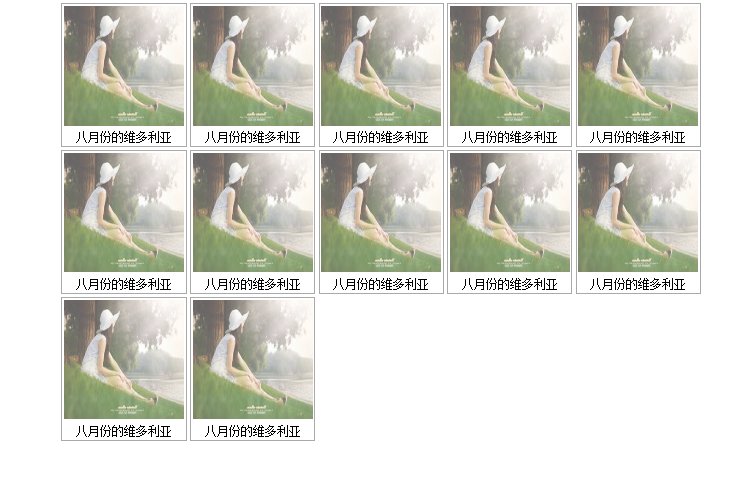
效果:
CSS常用操作-图片的更多相关文章
- web前端学习(三)css学习笔记部分(3)-- css常用操作
5. CSS常用操作 5.1 对齐 使用margin属性进行水平对齐 <!DOCTYPE html> <html lang="en"> <head ...
- CSS常用背景图片定位方法
CSS背景图片定位其实对于每一位学习前端的同学来说,都已经非常熟悉了.网上铺天盖地的最常见的一种方案就是在父元素中relative,然后子元素absolute.这种方案当然好,不过带来的一个缺点就是会 ...
- CSS常用操作-对齐
index.html <!DOCTYPE html> <html> <head> <meta charset="UTF-8"> &l ...
- HTML5学习笔记(十):CSS常用操作
对齐 在 CSS 中,可以使用多种属性来水平对齐元素. 水平对齐 使用 margin 属性来水平对齐,可通过将左和右外边距设置为 "auto",来对齐块元素. 把左和右外边距设置为 ...
- css常用操作
对齐操作 1.使用margin属性进行水平对齐 margin-left:auto; margin-right:auto; 2.使用position属性进行左右对齐 3.使用fl ...
- CSS 常用操作
1.对齐 <!DOCTYPE html> <html> <head> <meta charset="utf-8" /> <ti ...
- CSS常用操作-导航栏
1.垂直导航栏 index.html <!DOCTYPE html> <html> <head> <meta charset="UTF-8" ...
- CSS常用操作-分类
- 2017年10月21日 CSS常用样式&鼠标样式 以及 jQuery鼠标事件& jQuery图片轮播& jQuery图片自动轮播代码
css代码 背景与前景 background-color:#0000; //背景色,样式表优先级高 background-image:url(路径); //设置背景图片 background-atta ...
随机推荐
- java基本打印练习《我行我素购物系统》
public class ShoppingSystem{ public static void main(String[] args){ //System.out.println("**** ...
- Android(java)学习笔记252:ContentProvider使用之内容观察者01
1. 内容观察者 不属于四大组件,只是内容提供者ContentProvider对应的小功能. 如果发现数据库内容变化了,就会立刻观察到. 下面是逻辑图: 当A应用中银行内部的数据发生变化的 ...
- checkbox遍历操作, 提交所有选中项的值
<div class="content_list pad_10 hidden" > <h3>修改可配送地区</h3> <input typ ...
- python集合set,frozenset--笔记
<Python3程序开发指南>笔记. python提供了2种内置的集合类型:可变的set类型.固定的frozenset类型. 只有可哈希运算的对象可添加到集合中.可哈希的数据类型:floa ...
- AjaxManager的实现
在NeralJS思路整理一章中我们提到过实用ajax管理模块控制ajax请求,以减少ajax请求数量,优化加载,以下是ajax模块的实现,我已经确保经历简单. /** * Created by wil ...
- repeater 结合checkbox批量删除
项目中用到这个,从网上搜了搜相关内容,代码如下 <script type="text/javascript"> function checkAllThis(obj) { ...
- ORACLE的CONNECT和RESOURCE角色权限
最近在处理数据库的用户权限问题,之前惯性思维,觉得给用户授权RESOURCE权限之后,用户的一般权限都会有,等到发现用户有RESOURCE角色,却没有创建视图的权限之后,才发现这部分还是一知半解啊,所 ...
- 使用DML语句【weber出品必属精品】
DML语句包含以下语法: INSERT:往一个表中增加新行 DELETE:从一个表中删除掉现有的行 UPDATE:更改一个表中现有的行 INSERT语句语法:INSERT INTO TABLE(COL ...
- iOS用心学 UI基础之UIView
一.引入UI 在实际开发中,基本的流程大致如下图所示: UI(User Interface)作为最基本的要点,也是非常重要的一部分,UI界面的美观直接决定着着用户的体验,苹果官方给开发中提供了非常强大 ...
- JS+CSS+HTML简单计算器
<!doctype html> <html> <head> <title>计算器</title> <meta charset=&quo ...