
NET Core开发-读取配置文件Configuration
ASP.NET Core开发-读取配置文件Configuration
ASP.NET Core 是如何读取配置文件,今天我们来学习。
ASP.NET Core的配置系统已经和之前版本的ASP.NET有所不同了,之前是依赖于System.Configuration和XML配置文件web.config。
新的配置系统支持多种格式的配置文件。
下面我们来以json 格式的配置文件正式开始学习。
我们新建一个ASP.NET Core Web 应用程序,选择无身份验证。
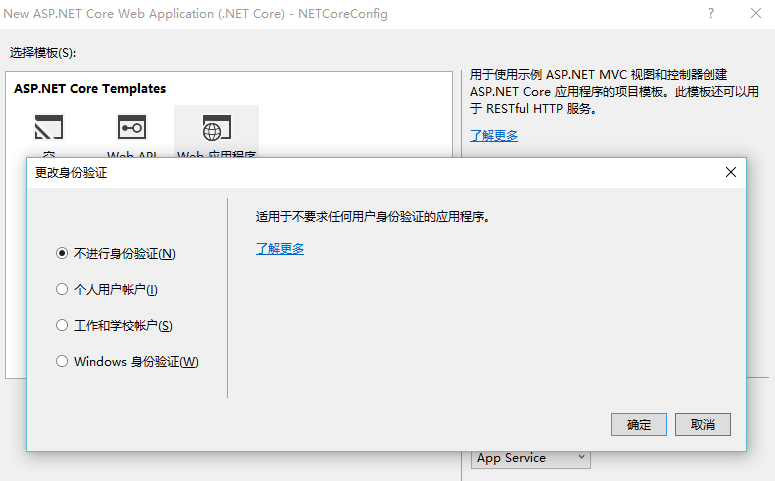
读取配置文件
在项目目录下有个 appsettings.json ,我们先来操作这个文件。
在appsettings.json 添加如下两个节点。

{

  "Data": "LineZero",

  "ConnectionStrings": {

    "DefaultConnection": "数据库1",

    "DevConnection": "数据库2"

  },

  "Logging": {

    "IncludeScopes": false,

    "LogLevel": {

      "Default": "Debug",

      "System": "Information",

      "Microsoft": "Information"

    }

  }

}
下面我们来读取。由于项目默认已经将该文件加入ConfigurationBuilder 之中,所以我们可以直接来读取。
在 Configure 方法中读取:
        public void Configure(IApplicationBuilder app, IHostingEnvironment env, ILoggerFactory loggerFactory)

        {

            var data = Configuration["Data"];

            //两种方式读取

            var defaultcon = Configuration.GetConnectionString("DefaultConnection");

            var devcon = Configuration["ConnectionStrings:DevConnection"];
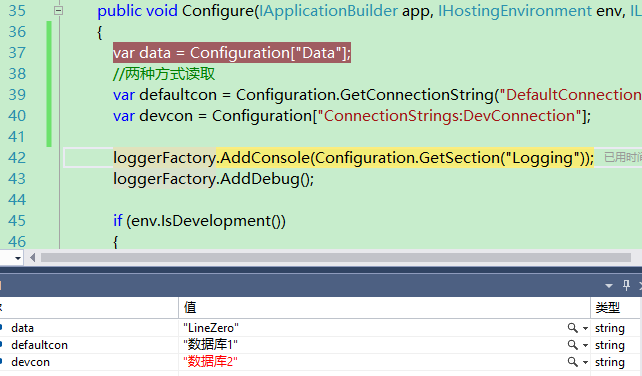
调试程序,可以看到数据成功取出。
多环境区分
我们复制一个appsettings.json 然后重命名为 appsettings.Development.json
更改appsettings.Development.json 如下:
{

  "Data": "LineZero Development",

  "ConnectionStrings": {

    "DefaultConnection": "开发数据库1",

    "DevConnection": "开发数据库2"

  },

  "Logging": {

    "IncludeScopes": false,

    "LogLevel": {

      "Default": "Debug",

      "System": "Information",

      "Microsoft": "Information"

    }

  }

}
然后我们调试程序,你会发现获取到的值变成了Development.json 里的值。
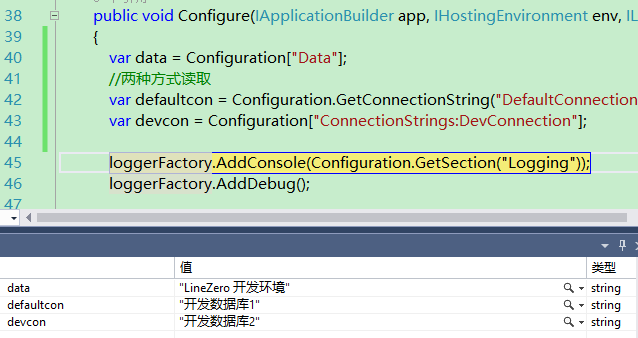
这里就是多环境配置。
        public Startup(IHostingEnvironment env)

        {

            var builder = new ConfigurationBuilder()

                .SetBasePath(env.ContentRootPath)

                .AddJsonFile("appsettings.json", optional: true, reloadOnChange: true)

                .AddJsonFile($"appsettings.{env.EnvironmentName}.json", optional: true)//增加环境配置文件,新建项目默认有

                .AddEnvironmentVariables();

            Configuration = builder.Build();

        }
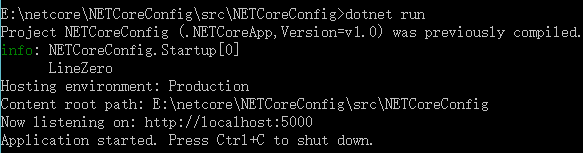
如果我们直接执行读取到的就是appsettings.json 的值,因为直接执行时是 Production 环境。
下面是输出图:
调试时:
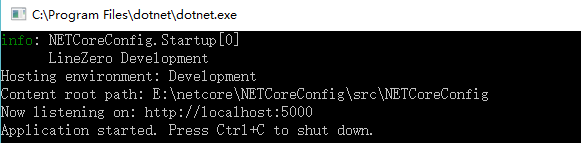
dotnet run 时:
对象读取
我们在appsettings.json 及 Development.json 都添加一个 SiteConfig 节点。
  "SiteConfig": {

    "Name": "LineZero's Blog",

    "Info": "ASP.NET Core 开发及跨平台,配置文件读取"

  },
然后新建一个SiteConfig 类。
    public class SiteConfig

    {

        public string Name { get; set; }

        public string Info { get; set; }

    }
首先在 ConfigureServices 中添加Options 及对应配置。
        public void ConfigureServices(IServiceCollection services)

        {

            // Add framework services.

            services.AddMvc();

            //添加options

            services.AddOptions();

            services.Configure<SiteConfig>(Configuration.GetSection("SiteConfig"));

        }
然后我们在 Controller 中读取。
    public class HomeController : Controller

    {

        public SiteConfig Config;

        public HomeController(IOptions<SiteConfig> option)

        {

            Config = option.Value;

        }

        public IActionResult Index()

        {

            return View(Config);

        }

    }
对应View Index.cshtml
@model SiteConfig

@{

    ViewData["Title"] = Model.Name;

}

<h1>@Model.Name</h1>

<h2>@Model.Info</h2>
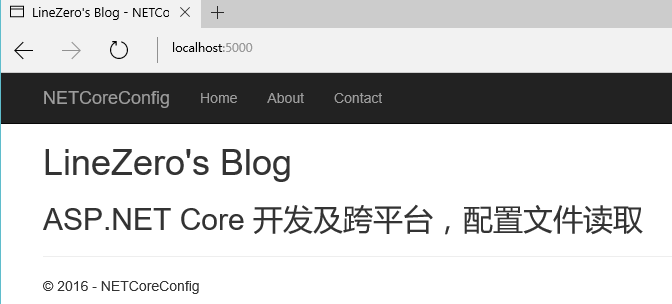
执行程序 http://localhost:5000/
NET Core开发-读取配置文件Configuration的更多相关文章
- ASP.NET Core开发-读取配置文件Configuration
ASP.NET Core 是如何读取配置文件,今天我们来学习. ASP.NET Core的配置系统已经和之前版本的ASP.NET有所不同了,之前是依赖于System.Configuration和XML ...
- ASP.NET Core开发-读取配置文件Configuration appsettings.json
https://www.cnblogs.com/linezero/p/Configuration.html ASP.NET Core 是如何读取配置文件,今天我们来学习. ASP.NET Core的配 ...
- .net core 学习 读取配置文件
在空项目中是没有配置文件的,首先要新建一个,配置文件内容如下,下面来读取各个内容 { "ConnectionStrings": { "DefaultConnection& ...
- .net core自定义读取配置文件
新建完成后项目目录下有个 appsettings.json { "Logging": { "LogLevel": { "Default": ...
- .net core 灵活读取配置文件
using Microsoft.Extensions.Configuration; using System; using System.Collections.Generic; using Syst ...
- asp.net core mvc 读取配置文件appsettings.json
上一篇我们将了读取自定义配置文件.这篇我们讲一下asp.net core mvc里读取自带的配置文件 appsettings.json 首先创建个asp.net core mvc项目,项目里有Prog ...
- .net core中读取配置文件
1)先看丑陋的方法 读取 appsettings.json 然后在 Startup 的 ConfigureServices() 方法中进行注入: public IConfigurationRoot ...
- Spring Boot读取配置文件的几种方式
Spring Boot获取文件总的来说有三种方式,分别是@Value注解,@ConfigurationProperties注解和Environment接口.这三种注解可以配合着@PropertySou ...
- .NET Core类库中读取配置文件
最近在开发基于.NET Core的NuGet包,遇到一个问题:.NET Core中已经没有ConfigurationManager类,在类库中无法像.NET Framework那样读取App.conf ...
随机推荐
- GYP构建系统总结
GYP,Generate Your Project,一个Google开源的构建系统,最开始用于Chromium项目,现在一些其他的开源项目也开始使用GYP,如v8和node-gyp.不管怎样,这仅仅是 ...
- Codeforces Round #194 (Div. 2) D. Chips
D. Chips time limit per test:1 second memory limit per test:256 megabytes input:standard input outpu ...
- SSO单点登录PHP简单版
前面做了一个新项目,需要用户资源可以需要共享.由于之前没有做过这样的东西,回家之后,立马网站百度"单点登录".帖子很多,甄别之后,这里列几篇认为比较有营养. http://blog ...
- NDK 的helloworld步奏
1. helloworld.c #include <string.h> #include <jni.h> /* * Class: com_example_ndk_NativeH ...
- ios显示手机信息
NSString *strname=[[UIDevice currentDevice] name]; NSLog(@"设备名:%@",strname); NSString *str ...
- android TextView 垂直滚动 用动画实现
项目中需要让TextView 滚动一会显示一行一会显示一行 想了下用移动动画实现.但是实际中在整这个动画时调了好久.主要用到的动画方式是移动动画:TranslateAnimation 代码: PS: ...
- docker文章
https://training.docker.com/self-paced-training http://special.csdncms.csdn.net/BeDocker/ http://clo ...
- 100个linux站点
(一) 文件下载 (二) 幽默娱乐 (三) 相关新闻 (四) 通用硬体 (五) 专用硬体 (六) 新手站点 (七) 图形/多媒体 (八) 游戏站点 (九) 网路杂志 (十) 入口(教育.链结) (十一 ...
- #include <bitset>
1 none();测试是否有越位 2 reset();全部清零 3 set(7, 0);把第7个字符改成0,操作二进制位 4 to_string();转换为字符串 5 to_ulong();转换为无符 ...
- 聚类算法初探(四)K-means
最近由于工作需要,对聚类算法做了一些相关的调研.现将搜集到的资料和自己对算法的一些理解整理如下,供大家参考. 另外在算法代码方面,我也做了一些实现(包括串行和并行),欢迎感兴趣的朋友探讨和交流. 第一 ...