
如何在Eclipse中开发并调试自己的插件(或者说如何将自己的代码插件化)
Setting up Eclipse to create and debug plugins for ImageJ
最近在做一个关于卫星遥感全链路仿真的项目,由于项目是基于ImageJ开发,而ImageJ提供了强大的插件机制,所以特来写一个东西说明如何将自己的代码转化为ImageJ的插件。
- Alt-File –> New
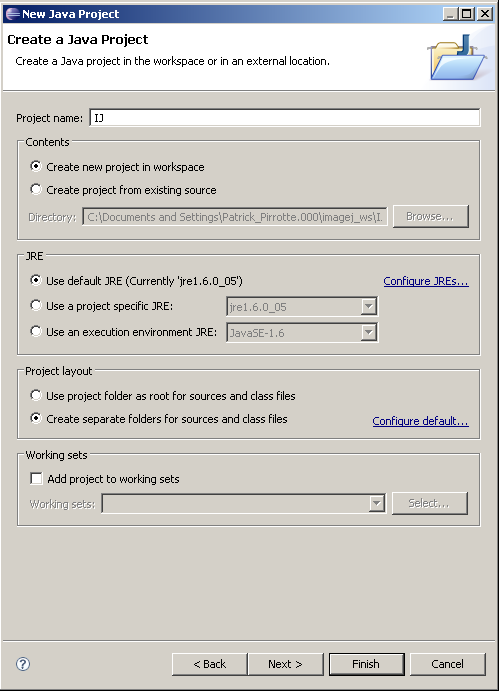
- Select the Java Project wizard and click Next

- Project name: IJ. Check Create separate folders for sources and class files. Click Next
- On the following panel, select Source tab and check if Default output folder is set to IJ/bin
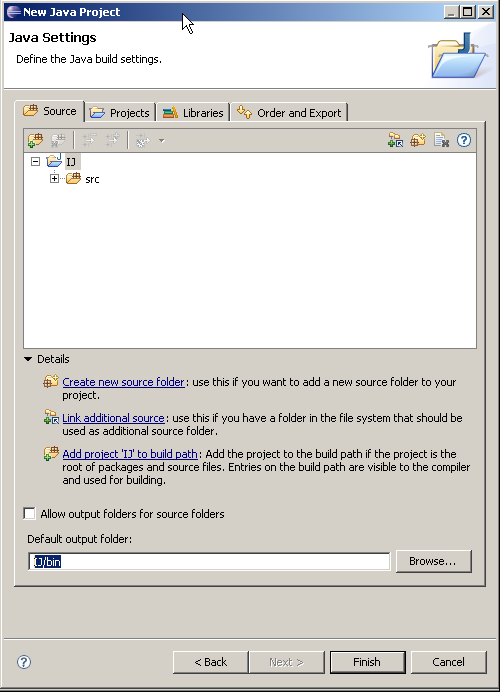
- On the Libraries tab click on Add external JARs, browse to your Java SDK library folder , select tools.jar, click Ok and click on Finish to create the project.
(on my computer the Java SDK library folder is located at C:\Program Files\Java\jdk1.6.0_02\lib)

- Finally, get the latest copy of ij here, extract the zip
- Copy the ij folder and its subfolders into the source folder
- Copy the images, macros and plugins folder and only IJ_Props.txt to the IJ project root.
- Click on F5 to tell Eclipse to refresh its Package list

Create a new plugin (or import your previously developed plugins).
- Alt-File –> New
- Select the Java Project wizard and click Next

- Give your plugin a name (don't forget to add an underscore if you want it to appear in the ImageJ menu!)

- On the Source tab, check that the output folder is set TestPlugin_/bin

- On the Project tab, click Add… and select your previously created IJ project containing the ImageJ source.
- Click Finish

- Create your Java plugin files. In our example, I created a sample TESTPlugin_.java with the following content:
import ij.IJ;
import ij.plugin.PlugIn;
public class TestPlugin_ implements PlugIn {
public void run(String arg) {
IJ.error("Hello world!");
}
}

- Create a file called build.xml in the project root folder. A sample build.xml file follows, which you should adapt to your needs.
<project name="TESTPlugin_" default="" basedir=".">
<description>
TESTPlugin_ build file
</description>
<property name="src" location="src" />
<property name="build" location="bin" />
<property name="dist" location="dist" />
<property name="pluginsDir" location="$basedir/../../IJ/plugins/" />
<property name="user.name" value="Patrick Pirrotte" />
<target name="main" depends="compress" description="Main target">
<echo>
Building the .jar file.
</echo>
</target>
<target name="compress" depends="" description="generate the distribution">
<jar jarfile="TESTPlugin_.jar">
<fileset dir="." includes="plugins.config" />
<fileset dir="${build}" includes="**/*.*" />
<manifest>
<attribute name="Built-By" value="${user.name}"/>
</manifest>
</jar>
<copy file="TESTPlugin_.jar" toDir="${pluginsDir}" />
</target>
</project>

- In the Package Explorer, right click on the TESTPlugin_ project, click on Properties, select Builders, click New… and select Ant Builder

- In the Main Tab, click Browse workspace and select the build.xml from your TESTPlugin_ project.

- In the Targets tab, click Set Targets for both After clean and Auto build targets, and select both main and compress.
- Click Ok twice to keep your changes.

- Goto Run→ Debug Configurations and create a new Java Application Debug Configuration. Fill in IJ In the field Project, and ij.ImageJ in the field Main class.

- Select the Source tab, then in the Source lookup path, Add→Add Java Project. Select the TestPlugin_ project. This step is crucial if you want to step into your plugin source during the debug phase. Apply the changes.

- If you select Debug, ImageJ will start and your TESTPlugin_ will show up in the Plugins menu…
- Set breakpoints in plugins or in the ImageJ source, the debugger should break accordingly.

后注:当然上文只是其中一种方法,也还有其他方法可以实现!!!
如何在Eclipse中开发并调试自己的插件(或者说如何将自己的代码插件化)的更多相关文章
- 老李分享:Eclipse中开发性能测试loadrunner脚本
老李分享:Eclipse中开发性能测试loadrunner脚本 前篇我分享了如何用loadrunner搭建javauser的性能测试脚本环境,本次我来告诉大家如何在eclipse开发loadrunne ...
- 如何在Eclipse中写Processing的sketch
有时候人们需要写更复杂的sketch,此时Processing提供的IDE就略显单薄,下面将介绍如何在eclipse中开发Processing. 一共分4步: 一.搭建环境:安装JRE.JDK.Ecl ...
- 在Eclipse中开发C/C++项目
摘要:通过本文你将获得如何在Eclipse平台上开发C/C++项目的总体认识.虽然Eclipse主要被用来开发Java项目,但它的框架使得它很容易实现对其他开发语言的支持.在这篇文章里,你将学会如何使 ...
- 【Eclipse】如何在Eclipse中使用命令行?
如何在Eclipse中使用命令行? 虽然我们已经有了像 Eclipse 这样高级的 IDE,但是我们有时候也是需要在开发的时候使用 Windows 的命令行,来运行一些独立的程序.在两个程序中切换来切 ...
- 如何在Eclipse中设置默认的JSP文件头部编码
如何在Eclipse中设置默认的JSP文件头部编码 一般,我们为了以后在导入和导出程序的时候(特别是项目较大,文件多)一般都默认文件编码格式为UTF-8 如果你通常都是通过Eclipse来编写程序,那 ...
- 如何在Eclipse中添加Tomcat的jar包
原文:如何在Eclipse中添加Tomcat的jar包 右键项目工程,点击Java Build Path 点击Add Library,选择Server Runtime 选择Tomcat版本 此时就看到 ...
- 如何在eclipse中安装Jess
如何在eclipse中安装Jess 浏览:49 | 更新:2014-05-12 16:39 这个文章帮了不少忙,感谢! 但经我实践,还要把插件那些文件向/dropins/sdk下也放一份,才能成功. ...
- 如何在Eclipse中配置Tomcat(免安装版)
如何在Eclipse中配置Tomcat(免安装版) 2013-10-09 23:19wgelgrsh | 分类:JAVA相关 | 浏览642次 分享到: 2013-10-10 17:10提问者采纳 ...
- 如何在Eclipse中添加Servlet-api.jar的方法
方法一: 点击窗口->首选项->java->构建路径->类路径变量->新建:将你的tomcat目录下的common/lib/servlet.jar加进来.如果你建立了一个 ...
随机推荐
- sso单点登录解决方案收集
本文来自:http://blog.csdn.net/huwei2003/article/details/6038017 我的想法是使用集中验证方式,多个站点集中Passport验证. 主站:Passp ...
- 2014:超越炒作,进入部署SDN的时代
2013 年,我们看到了非常多新的SDN 产品.体系结构.营销活动和各种会议,一些新的标准和开源组织也进入了这个领域.当时的SDN 刚刚从炒作周期的高点回归下来.转眼到了2014 年,这一年我们会看到 ...
- UVA 10131 Is Bigger Smarter?(DP)
Some people think that the bigger an elephant is, the smarter it is. To disprove this, you want to t ...
- Java基础:泛型
Java的泛型是什么呢, 就是类型的參数化,这得类型包含方法參数和返回值.也就是原本该是确定类型的地方换成了变量,把类型的确定时间向后延迟了. 在之前,学过"重载"的概念,重载是什 ...
- windows平台HTTP代理server搭建(CCproxy)
HTTP代理(CCproxy) 一.拓扑图 二.CCproxy的安装和配置 1.安装CCproxy (1)下载CCproxy无线破解版(没破解的都仅仅支持最多三个用户同一时候连接). (2)按说明安装 ...
- jQuery.innerWidth() 函数详解
innerWidth()函数用于设置或返回当前匹配元素的内宽度. 内宽度包括元素的内边距(padding),但不包括外边距(margin).边框(border)等部分的高度.如下图: 如果你要获取 ...
- NSURLSessionUploadTask 上传
-(void)uploadPhotoImageWithUrl:(NSString*)url userIMID:(NSString*)userIMID imageData:(NSData*)imageD ...
- WPF中timer的使用
Timer控件/ System.Timers.Timer 不能用于WPF中.在WPF中,定时器为 DispatcherTimer. 使用方法如下: private DispatcherTimer ti ...
- Web应用的部署
本文将介绍一些Web应用的部署: 部署规则 要成功地部署一个Web应用,必须遵循以下目录结构. 1.WEB-INF一定要直接放到应用上下文(Webapp)之下. 2.classes目录必须直接放在WE ...
- Android_使用getIdentifier()获取资源Id
Android 获取资源ID的另外一种方法,常规获取ID是在特定的文件夹下面的资源,如果在比较特殊的文件夹下面,就需要其他方法获取ID 了: 使用getIdentifier()方法可以方便的获各应用包 ...