
Android学习笔记--服务(Service)
1、服务概述
1、服务是Android四大组件之一,在使用上可以分为本地服务和远程服务,本地服务是指在不影响用户操作的情况下在后台默默的执行一个耗时操作,例如下载,音频播放等。远程服务是指可以供其他应用程序调用的服务。
2、每个服务类都需要在AndroidMainfest.xml中使用<service>标签声明。
3、服务的启动方式分为两种Context.startService()和Context.bindService(), 服务的关闭可以通过外部调用Context.stopService()或者服务自身调用stopself()方法。
4、服务即不是一个单独的进程也不是一个单独的线程,它和应用程序运行在同进程的同线程中。为了能够不影响用户操作该应用程序,通常需要在服务中新建线程处理耗时操作。
2、服务的声明周期
服务有自己的声明周期,常用的回调方法有四个,分别是onCreate()、onStartCommand()、onBind()和onDestroy();
当外界首次调用startService()启动服务的时候,会首先调用onCreate(),然后调用onStartCommand(),如果此时再次调用startService(),则只执行onStartCommand()方法。当调用stopService()或者服务本身调stopself()方法是,服务会调用onDestroy(),停止下来。
我们也可以通过bindService()方法启动服务,调用此方法会首先调用onCreate(),然后调用onBind(),然后会调用实现的Binder中的所有方法。如果此时再次调用bindService()方法,服务不做任何操作。服务停止方法同上
startService()和bindService()方法可同时使用,但onCreate()方法仅会执行一次,当停止服务时,需要调用stopService()和unbindService()。而onDestroy()也是仅调用一次。
3、本地服务的使用
服务使用很简单,新建服务类继承Service(),并在相应的方法中实现相关操作即可,流程如下
1、新建服务类,继承自Service类
public Myservice extends Service {

    @override
    public Ibinder onBind(Intent intent) {

        return null;

    }

}
可以看到,Service唯一需要实现的方法就是onBind(),该方法在活动与服务进行通信的时候使用,我们暂时返回null即可
2、实现主要的方法onCreate(), onStartCommand(), onDestroy()
public Myservice extends Service {

    @override public Ibinder onBind(Intent intent) {

        return null;

    }

    @override public onCreate() {

        super.onCreate();

    }

    @override public onStartCommand(Intent intent, int flags, int startId) {

        new Thread(new Runnable() {

             @Override public void run() {

                 /*do something*/

            }

        }).start();

        return super.onStartCommand(intent, flags, startId);

    }

    @override public onDestroy() {

        super .onDestroy();

    }

}
onCreate()会在服务创建的时候调用,onStartCommand()会在服务启动的时候调用,onDestroy()会在服务销毁的时候调用,我们通常将耗时操作防盗onStartCommand()方法中,但是由于服务是和主线程处再同一个线程中,如果我们直接进行耗时操作,则会阻塞用户的前台操作,常用的方法如上,在onStartCommand()中新建一个线程,在线程中执行耗时操作。
另外,Android还提供了另外一种Service机制,对上述新建线程的操作做了封装,它就是IntentService,代码如下
public class MyIntentService extends IntentService {

    public MyIntentService() {

        super("MyIntentService");

    }

    @Override
    protected void onHandleIntent(Intent intent) {

        /*do something*/

    }

    @Override

    public void onDestroy() {

        super .onDestroy();

    }

}
我们只需要将耗时操作放在onHandleIntent中即可,Android会自动建立新线程执行操作,需要注意的是需要实现无参的构造函数,在其中调用父类的构造方法。
3、在AndroidMainfest.xml中声明服务
<application

        android:allowBackup="true"

        android:icon="@drawable/ic_launcher"

        android:label="@string/app_name"

        android:theme="@style/AppTheme" >

        <activity

            android:name=".MainActivity"

            android:label="@string/app_name" >

            <intent-filter>

                <action android:name="android.intent.action.MAIN" />

                <category android:name="android.intent.category.LAUNCHER" />

            </intent-filter>

        </activity>

        <service android:name=".MyService" />

        <service android:name=".MyIntentService" />

    </application>
4、到此为止,服务类已经建立完成,在活动中启动服务即可
// Intent intent = new Intent(this, MyIntentService.class);

    Intent intent = new Intent(this,MyService.class );

    startService(intent);    stopService(intent);
4、服务与活动的通信
在活动不需要与服务进行通信的情况下,调用startService()方法启动Service,让Service在后台运行即可。但是大多数情况下,活动需要实时了解服务的状态,或者控制服务,就需要使用bindService()方法启动服务,使用Binder进行通信,其流程如下:
1、在服务中新建类继承自Binder,在新建的类中实现公共方法来设置或者获取服务的状态,代码如下
public class Myservice extends Service {

       ...

       class ServiceBinder extends Binder {

       public void setServiceStatus() {

            ...

        }

        public int  getServiceStatus() {

          ...

        }

        ...

    }

}
2、在服务中使用创建新建类的实例,在onBinder中返回
public class Myservice extends Service {
private ServiceBinder serviceBinder = new ServiceBinder();
@override
public IBinder onBind(Intent intent) {
return serviceBinder;
}
…
}
3、在活动中绑定服务,获取服务类中的Binder实例,与服务通信
public class MainActivity extends Activity {

    private MyService.ServiceBinder serviceBinder;

    private ServiceConnection connection = new ServiceConnection() {

        @Override public void onServiceDisconnected(ComponentName name) {

            ...

        }

        @Override public void onServiceConnected(ComponentName name, IBinder service) {

           serviceBinder = (MyService.serviceBinder)service;

           ...

        }

    };

    ...

}
当活动调用bindService()方法,与服务绑定成功后,会自动回调OnServiceConnected方法。当与服务解绑定后,会自动回调onServiceDisconnected;
可以看到在onServiceConnected方法中,我们获取了MyService中的Binder类实例ServiceBinder,这样的话我们就可以通过serviceBinder对服务进行设置或状态获取操作。
5、服务示例源码
activity_main.xml
<LinearLayout xmlns:android="http://schemas.android.com/apk/res/android"

    android:layout_width="match_parent"

    android:layout_height="match_parent"

    android:orientation="vertical"

    >

    <Button

        android:id="@+id/start_service"

        android:layout_width="match_parent"

        android:layout_height="wrap_content"

        android:text="Start Service" />

    <Button

        android:id="@+id/stop_service"

        android:layout_width="match_parent"

        android:layout_height="wrap_content"

        android:text="Stop Service" />

    <Button

        android:id="@+id/bind_service"

        android:layout_width="match_parent"

        android:layout_height="wrap_content"

        android:text="Bind Service" />

    <Button

        android:id="@+id/unbind_service"

        android:layout_width="match_parent"

        android:layout_height="wrap_content"

        android:text="Unbind Service" />

    <Button

        android:id="@+id/start_intent_service"

        android:layout_width="match_parent"

        android:layout_height="wrap_content"

        android:text="Start IntentService" />

</LinearLayout>
MainActivity.java
package com.example.servicetest;

import android.app.Activity;

import android.content.Intent;

import android.content.ServiceConnection;

import android.os.Bundle;

import android.util.Log;

import android.view.View;

import android.view.View.OnClickListener;

import android.widget.Button;

public class MainActivity extends Activity  implements OnClickListener {

    private Button startService;

    private Button stopService;

    private Button bindService;

    private Button unbindService;

    private Button intentService;

    private MyService.DownloadBinder downloadBiner;

    private ServiceConnection connection = new ServiceConnection() {

        public void onServiceDisconnected(android.content.ComponentName name) {

            …

        };

        public void onServiceConnected(android.content.ComponentName name, android.os.IBinder service) {

            downloadBiner = (MyService.DownloadBinder)service;

            downloadBiner.startDownload();

            downloadBiner.getProgress();

        };

    };

    @Override

    protected void onCreate(Bundle savedInstanceState){

        super.onCreate(savedInstanceState);

        setContentView(R.layout.activity_main);

        startService = (Button)findViewById(R.id.start_service);

        stopService = (Button)findViewById(R.id.stop_service);

        bindService = (Button)findViewById(R.id.bind_service);

        unbindService = (Button)findViewById(R.id.unbind_service);

        intentService = (Button)findViewById(R.id.start_intent_service);

        startService.setOnClickListener(this);

        stopService.setOnClickListener(this);

        bindService.setOnClickListener(this);

        unbindService.setOnClickListener(this);

        intentService.setOnClickListener(this);

    }

    @Override

    public void onClick(View v) {

        // TODO Auto-generated method stub

        switch (v.getId()) {

        case R.id.start_service:

            Intent startIntent = new Intent(this, MyService.class);

            startService(startIntent);

            break;

        case R.id.stop_service:

            Intent stopIntent = new Intent(this, MyService.class);

            stopService(stopIntent);

            break;

        case R.id.bind_service:

            Intent bindIntent = new Intent(this, MyService.class);

            bindService(bindIntent, connection, BIND_AUTO_CREATE);

            break;

        case R.id.unbind_service:

            unbindService(connection);

            break;
        case R.id.start_intent_service:

            Intent intentService = new Intent(this, MyIntentService.class);

            startService(intentService);

            break;
        default:

            break;

        }

    }

}
MyIntentService.java
package com.example.servicetest;

import android.app.IntentService;

import android.content.Intent;

import android.util.Log;

public class MyIntentService extends IntentService {

    public MyIntentService() {

        // TODO Auto-generated constructor stub

        super("MyIntentService");

    }

    @Override

    protected void onHandleIntent(Intent intent) {

        // TODO Auto-generated method stub

        Log.d("MyIntentService", "Thread id is " + Thread.currentThread().getId());

    }

    @Override

    public void onDestroy() {

        // TODO Auto-generated method stub

        super.onDestroy();

        Log.d("MyIntentService", "onDestroy executed");

    }

}
MyService.java
package com.example.servicetest;

import android.app.Notification;

import android.app.PendingIntent;

import android.app.Service;

import android.content.Intent;

import android.os.Binder;

import android.os.IBinder;

import android.util.Log;

public class MyService extends Service {

    private DownloadBinder mBinder = new DownloadBinder();

    class DownloadBinder extends Binder {

        public void startDownload() {

            // TODO Auto-generated method stub

            Log.d("Myservice", "startDownlaod executed");

        }

        public int getProgress() {

            Log.d("Myservice", "getProgress executed");

            return 0;

        }

    }

    @Override

    public IBinder onBind(Intent intent) {

        // TODO Auto-generated method stub

        Log.d("Myservice", "onBind");

        return mBinder;

    }

    @Override

    public void onCreate() {

        // TODO Auto-generated method stub

        Log.d("Myservice", "onCreate");

        super.onCreate();

    }

    @Override

    public int onStartCommand(Intent intent, int flags, int startId) {

        // TODO Auto-generated method stub

        Log.d("Myservice", "onStartCommand");

        return super.onStartCommand(intent, flags, startId);

    }

    @Override

    public void onDestroy() {

        // TODO Auto-generated method stub

        Log.d("Myservice", "onDestroy");

        super.onDestroy();

    }

}
效果图如下
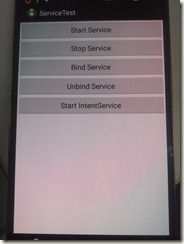
可点击各个按钮,查看logcat,了解服务的声明周期,startService()和onBind()的混合调用,IntentService和Binder的使用方法。
远程服务尚未学习,待续…
本文参考《Android第一行代码》中的第九章
Android学习笔记--服务(Service)的更多相关文章
- android学习笔记56——Service
Service四大组件之一,需要在AndroidMainfest.xml中添加相关配置,运行于后台,不与用户进行交换,没有UI... 配置时可通过<intent-filter.../>元素 ...
- Android学习笔记之Service
与服务通信 用bindservice 而startservice并无通信条件. service 为android为系统服务,所以程序员无法new出来,只能建立服务,共其他组件使用. package c ...
- 【转】 Pro Android学习笔记(七七):服务(2):Local Service
目录(?)[-] Local service代码 调用Local ServiceLocal Service client代码 AndroidManifestxml定义Serviceacitivty的l ...
- 【转】 Pro Android学习笔记(七八):服务(3):远程服务:AIDL文件
目录(?)[-] 在AIDL中定义服务接口 根据AIDL文件自动生成接口代码 文章转载只能用于非商业性质,且不能带有虚拟货币.积分.注册等附加条件.转载须注明出处:http://blog.csdn.n ...
- 【转】 Pro Android学习笔记(七六):服务(1):local和remote
文章转载只能用于非商业性质,且不能带有虚拟货币.积分.注册等附加条件.转载须注明出处:http://blog.csdn.net/flowingflying/ Android提供服务,服务是运行在后台的 ...
- 【转】 Pro Android学习笔记(七十):HTTP服务(4):SOAP/JSON/XML、异常
目录(?)[-] SOAP JSON和XMLPullParser Exception处理 文章转载只能用于非商业性质,且不能带有虚拟货币.积分.注册等附加条件,转载须注明出处:http://blog. ...
- 【转】 Pro Android学习笔记(六八):HTTP服务(2):HTTP POST
目录(?)[-] 找一个测试网站 HTTP POST小例子 上次学习了HTTP GET请求,这次学习一下HTTP POST. 找一个测试网站 小例子好写,但要找个测试网站就有些麻烦,一下子无从入手,都 ...
- 【转】 Pro Android学习笔记(七四):HTTP服务(8):使用后台线程AsyncTask
目录(?)[-] 5秒超时异常 AsyncTask 实现AsyncTask抽象类 对AsyncTask的调用 在哪里运行 其他重要method 文章转载只能用于非商业性质,且不能带有虚拟货币.积分.注 ...
- 【转】 Pro Android学习笔记(七五):HTTP服务(9):DownloadManager
目录(?)[-] 小例子 保存在哪里下载文件信息设置和读取 查看下载状态和取消下载 文章转载只能用于非商业性质,且不能带有虚拟货币.积分.注册等附加条件,转载须注明出处:http://blog.csd ...
随机推荐
- shell读取文件参数
环境 csh 说明 通常我们需要使用使用shell脚本处理一些事务,每次调用shell都需要添加参数. 如果重复调用多次这个shell脚本,我们可以将参数存入指定文件,循环得到参数. shell脚本( ...
- ASP.net获取当前页面的文件名,参数,域名等方法
ASP.net后台获取当前页面的文件名 System.IO.Path.GetFileName(Request.Path).ToString(); 获取当前页面文件名,参数,域名等方法 假设当前页完整地 ...
- ControlStyles(枚举)
指定控件的样式和行为. 此枚举有一个 FlagsAttribute 特性,通过该特性可使其成员值按位组合.属性: ContainerControl:如果为true,则控件是类似容器的控件. UserP ...
- Android学习之Activity之间的数据传递
Activity与Activity之间很多情况下都需要进行数据的传递,下面就用几个简单的例子来看一下. (一).一个Activity启动另一个Activity并将数据传递到这个Activity当中 思 ...
- 用pod导入ReactiveCocoa
用pod导入ReactiveCocoa [1] 第一种 platform:ios,'7.0' pod 'ReactiveCocoa' [2] 第二种 pod 'ReactiveCocoa','2 ...
- ios9API基础知识总结(二)
UIAlertView(警告框) UIAlertView *alert = [[UIAlertView alloc]initWithTitle:@"标题" message:@&qu ...
- 改造百度UMeditor(UEditor-min)富文本编辑器的图片上传功能
最近项目需要新增一个发布文章的模块,用的是百度的Ueditor富文本编辑器. 公司用的是阿里云的图片服务器,需要直接把文章中图片上传到服务器上,但是这个编辑器的上传图片是直接上传到Tomcat的根目录 ...
- 连接SQLite 创建ADO.net实体类
0.开发环境 win10,vs2013-x64 1.安装: sqlite-netFx451-setup-bundle-x86-2013-1.0.102.0.exe 注意事项:选在VisualStudi ...
- Java中,&&与&;||与|的区别
我们很多人在学习Java的时候,或者其他语言(如:C#,.Net等)都会遇到&和&&,|和||.然而,如果你没有真正理解他们的意思,这回给你的思路上带来很大的麻烦.在Java的 ...
- 百度UEditor编辑器关闭抓取远程图片功能(默认开启)
这个坑娘的功能,开始时居然不知道如何触发,以为有个按钮,点击一下触发,翻阅了文档,没有发现,然后再网络上看到原来是复制粘贴非白名单内的图片到编辑框时触发,坑娘啊............... 问题又来 ...