
利用RecyclerView CardView实现新闻卡片样式

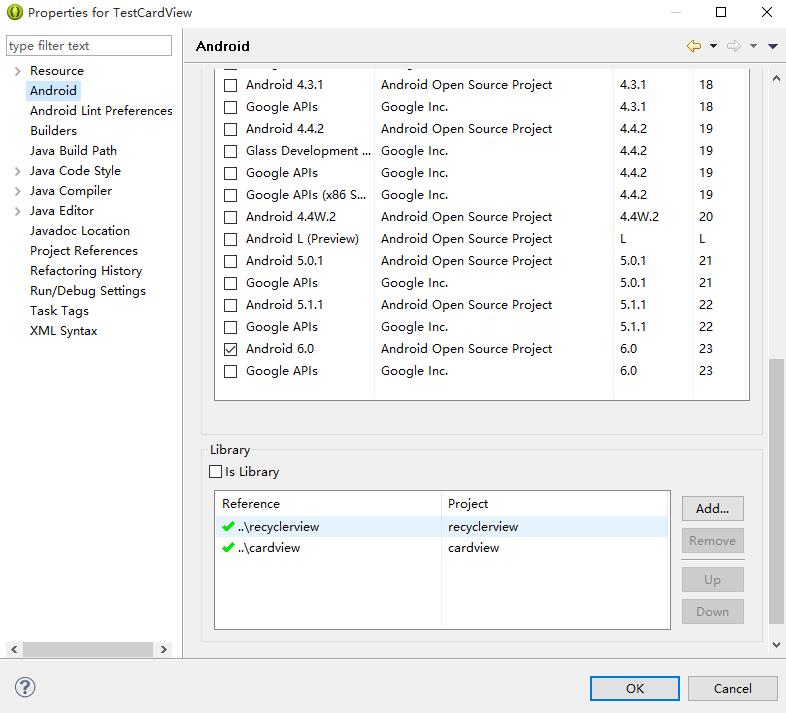
引入的包:
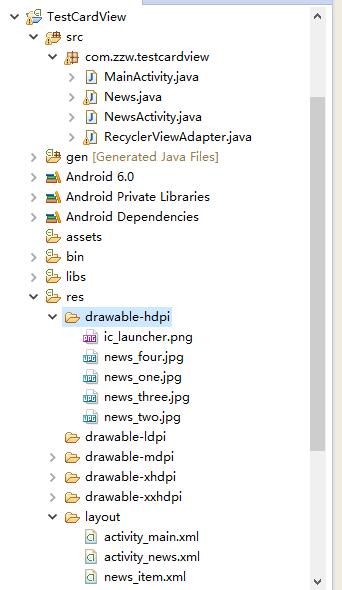
demo结构:
测试代码:
News.java:
package com.zzw.testcardview;

import java.io.Serializable;

public class News implements Serializable {

    // 新闻标题,内容,图片

    private String title;

    private String desc;

    private int photoId;

    public News(String title, String desc, int photoId) {

        super();

        this.title = title;

        this.desc = desc;

        this.photoId = photoId;

    }

    public String getTitle() {

        return title;

    }

    public void setTitle(String title) {

        this.title = title;

    }

    public String getDesc() {

        return desc;

    }

    public void setDesc(String desc) {

        this.desc = desc;

    }

    public int getPhotoId() {

        return photoId;

    }

    public void setPhotoId(int photoId) {

        this.photoId = photoId;

    }

}
MainActivity.java:
package com.zzw.testcardview;

import java.util.ArrayList;

import java.util.List;

import android.app.Activity;

import android.os.Bundle;

import android.support.v7.widget.LinearLayoutManager;

import android.support.v7.widget.RecyclerView;

public class MainActivity extends Activity {

    private RecyclerView recyclerView;

    private List<News> newsList;

    private RecyclerViewAdapter adapter;

    @Override

    protected void onCreate(Bundle savedInstanceState) {

        super.onCreate(savedInstanceState);

        setContentView(R.layout.activity_main);

        LinearLayoutManager layoutManager = new LinearLayoutManager(this);

        recyclerView = (RecyclerView) findViewById(R.id.recyclerView);

        initPersonData();

        adapter = new RecyclerViewAdapter(newsList, MainActivity.this);

        recyclerView.setHasFixedSize(true);

        recyclerView.setLayoutManager(layoutManager);

        recyclerView.setAdapter(adapter);

    }

    private void initPersonData() {

        newsList = new ArrayList<>();

        // 添加新闻

        newsList.add(new News(getString(R.string.news_one_title),

                getString(R.string.news_one_desc), R.drawable.news_one));

        newsList.add(new News(getString(R.string.news_two_title),

                getString(R.string.news_two_desc), R.drawable.news_two));

        newsList.add(new News(getString(R.string.news_three_title),

                getString(R.string.news_three_desc), R.drawable.news_three));

        newsList.add(new News(getString(R.string.news_four_title),

                getString(R.string.news_four_desc), R.drawable.news_four));

    }

}
RecyclerViewAdapter.java:
package com.zzw.testcardview;

import java.util.List;

import android.content.Context;

import android.content.Intent;

import android.graphics.Color;

import android.support.v7.widget.CardView;

import android.support.v7.widget.RecyclerView;

import android.support.v7.widget.RecyclerView.Adapter;

import android.view.LayoutInflater;

import android.view.View;

import android.view.ViewGroup;

import android.widget.Button;

import android.widget.ImageView;

import android.widget.TextView;

public class RecyclerViewAdapter extends

        Adapter<RecyclerViewAdapter.NewsViewHolder> {

    private List<News> newses;

    private Context context;

    public RecyclerViewAdapter(List<News> newses, Context context) {

        super();

        this.newses = newses;

        this.context = context;

    }

    // 自定义ViewHolder类

    static class NewsViewHolder extends RecyclerView.ViewHolder {

        CardView cardView;

        ImageView news_photo;

        TextView news_title;

        TextView news_desc;

        Button share;

        Button readMore;

        public NewsViewHolder(View itemView) {

            super(itemView);

            cardView = (CardView) itemView.findViewById(R.id.card_view);

            news_photo = (ImageView) itemView.findViewById(R.id.news_photo);

            news_title = (TextView) itemView.findViewById(R.id.news_title);

            news_desc = (TextView) itemView.findViewById(R.id.news_desc);

            share = (Button) itemView.findViewById(R.id.btn_share);

            readMore = (Button) itemView.findViewById(R.id.btn_more);

            // 设置TextView背景为半透明

            news_title.setBackgroundColor(Color.argb(20, 0, 0, 0));

        }

    }

    @Override

    public int getItemCount() {

        return newses == null ? 0 : newses.size();

    }

    @Override

    public void onBindViewHolder(

            RecyclerViewAdapter.NewsViewHolder personViewHolder, int position) {

        final int j = position;

        personViewHolder.news_photo.setImageResource(newses.get(position)

                .getPhotoId());

        personViewHolder.news_title.setText(newses.get(position).getTitle());

        personViewHolder.news_desc.setText(newses.get(position).getDesc());

        // 为btn_share btn_readMore cardView设置点击事件

        // 为btn_share btn_readMore cardView设置点击事件

        personViewHolder.cardView

                .setOnClickListener(new View.OnClickListener() {

                    @Override

                    public void onClick(View v) {

                        Intent intent = new Intent(context, NewsActivity.class);

                        intent.putExtra("News", newses.get(j));

                        context.startActivity(intent);

                    }

                });

        personViewHolder.share.setOnClickListener(new View.OnClickListener() {

            @Override

            public void onClick(View v) {

                Intent intent = new Intent(Intent.ACTION_SEND);

                intent.setType("text/plain");

                intent.putExtra(Intent.EXTRA_SUBJECT, "分享");

                intent.putExtra(Intent.EXTRA_TEXT, newses.get(j).getDesc());

                intent.setFlags(Intent.FLAG_ACTIVITY_NEW_TASK);

                context.startActivity(Intent.createChooser(intent, newses

                        .get(j).getTitle()));

            }

        });

        personViewHolder.readMore

                .setOnClickListener(new View.OnClickListener() {

                    @Override

                    public void onClick(View v) {

                        Intent intent = new Intent(context, NewsActivity.class);

                        intent.putExtra("News", newses.get(j));

                        context.startActivity(intent);

                    }

                });

    }

    @Override

    public RecyclerViewAdapter.NewsViewHolder onCreateViewHolder(

            ViewGroup viewGroup, int arg1) {

        View view = LayoutInflater.from(context).inflate(R.layout.news_item,

                null);

        NewsViewHolder nvh = new NewsViewHolder(view);

        return nvh;

    }

}
NewsActivity.java:
package com.zzw.testcardview;

import android.app.Activity;

import android.content.Intent;

import android.os.Bundle;

import android.widget.ImageView;

import android.widget.TextView;

public class NewsActivity extends Activity{

    private ImageView newsPhoto;

    private TextView newsTitle;

    private TextView newsDesc;

    @Override

    protected void onCreate(Bundle savedInstanceState) {

        super.onCreate(savedInstanceState);

        setContentView(R.layout.activity_news);

        newsPhoto= (ImageView) findViewById(R.id.news_info_photo);

        newsTitle= (TextView) findViewById(R.id.news_info_title);

        newsDesc= (TextView) findViewById(R.id.news_info_desc);

        Intent intent=getIntent();

        News item= (News) intent.getSerializableExtra("News");

        newsPhoto.setImageResource(item.getPhotoId());

        newsTitle.setText(item.getTitle());

        newsDesc.setText(item.getDesc());

    }

}
布局代码:
activity_main.xml:
<?xml version="1.0" encoding="utf-8"?>

<android.support.v7.widget.RecyclerView

        xmlns:android="http://schemas.android.com/apk/res/android"

        android:id="@+id/recyclerView"

        android:layout_width="match_parent"

        android:layout_height="match_parent">

</android.support.v7.widget.RecyclerView>
news_item.xml:
<?xml version="1.0" encoding="utf-8"?>

<RelativeLayout xmlns:android="http://schemas.android.com/apk/res/android"

    xmlns:app="http://schemas.android.com/apk/res-auto"

    android:layout_width="match_parent"

    android:layout_height="match_parent"

    android:padding="5dp" >

    <!-- android:clickable="true"  //cardView是否可点击,默认是不可点击的 -->

    <!-- app:cardCornerRadius="3dp" //圆角 -->

    <!-- app:cardElevation="8dp" //阴影 -->

    <android.support.v7.widget.CardView

        android:id="@+id/card_view"

        android:layout_width="match_parent"

        android:layout_height="wrap_content"

        android:clickable="true"

        android:foreground="?android:attr/selectableItemBackground"

        app:cardCornerRadius="3dp"

        app:cardElevation="8dp" >

        <RelativeLayout

            android:layout_width="match_parent"

            android:layout_height="wrap_content" >

            <RelativeLayout

                android:id="@+id/news_header"

                android:layout_width="match_parent"

                android:layout_height="wrap_content" >

                <ImageView

                    android:id="@+id/news_photo"

                    android:layout_width="match_parent"

                    android:layout_height="150dp"

                    android:layout_alignParentTop="true"

                    android:scaleType="centerCrop" />

                <TextView

                    android:id="@+id/news_title"

                    android:layout_width="match_parent"

                    android:layout_height="wrap_content"

                    android:layout_alignParentBottom="true"

                    android:layout_alignParentLeft="true"

                    android:gravity="center"

                    android:maxLines="1"

                    android:padding="5dp"

                    android:textColor="#ffffff"

                    android:textSize="20sp" />

            </RelativeLayout>

            <TextView

                android:id="@+id/news_desc"

                android:layout_width="wrap_content"

                android:layout_height="wrap_content"

                android:layout_below="@+id/news_header"

                android:layout_margin="15dp"

                android:maxLines="2" />

            <LinearLayout

                android:layout_width="match_parent"

                android:layout_height="wrap_content"

                android:layout_below="@+id/news_desc"

                android:orientation="horizontal" >

                <Button

                    android:id="@+id/btn_share"

                    android:layout_width="wrap_content"

                    android:layout_height="wrap_content"

                    android:layout_marginLeft="10dp"

                    android:layout_marginRight="20dp"

                    android:background="#00000000"

                    android:text="SHARE" />

                <Button

                    android:id="@+id/btn_more"

                    android:layout_width="wrap_content"

                    android:layout_height="wrap_content"

                    android:background="#00000000"

                    android:text="READ MORE"

                    android:textColor="#7AD3E0" />

            </LinearLayout>

        </RelativeLayout>

    </android.support.v7.widget.CardView>

</RelativeLayout>
activity_news.xml:
<?xml version="1.0" encoding="utf-8"?>

<RelativeLayout xmlns:android="http://schemas.android.com/apk/res/android"

    xmlns:app="http://schemas.android.com/apk/res-auto"

    android:layout_width="match_parent"

    android:layout_height="match_parent"

    android:padding="20dp">

    <android.support.v7.widget.CardView

        android:id="@+id/card_view"

        android:layout_width="match_parent"

        android:layout_height="wrap_content"

        android:foreground="?android:attr/selectableItemBackground"

        android:clickable="true"

        app:cardCornerRadius="3dp"

        app:cardElevation="8dp">

        <RelativeLayout

            android:layout_width="match_parent"

            android:layout_height="wrap_content">

            <RelativeLayout

                android:id="@+id/news_header"

                android:layout_width="match_parent"

                android:layout_height="wrap_content"

                android:layout_alignParentTop="true"

                android:layout_alignParentLeft="true"

                android:layout_alignParentStart="true">

                <ImageView

                    android:id="@+id/news_info_photo"

                    android:scaleType="centerCrop"

                    android:layout_alignParentTop="true"

                    android:layout_width="match_parent"

                    android:layout_height="180dp"/>

                <TextView

                    android:id="@+id/news_info_title"

                    android:layout_alignParentLeft="true"

                    android:layout_below="@+id/news_info_photo"

                    android:textSize="20sp"

                    android:padding="5dp"

                    android:layout_width="match_parent"

                    android:layout_height="wrap_content"/>

            </RelativeLayout>

            <TextView

                android:id="@+id/news_info_desc"

                android:lineSpacingExtra="5dp"

                android:layout_below="@+id/news_header"

                android:layout_margin="15dp"

                android:layout_width="wrap_content"

                android:layout_height="wrap_content"/>

        </RelativeLayout>

    </android.support.v7.widget.CardView>

</RelativeLayout>
利用RecyclerView CardView实现新闻卡片样式的更多相关文章
- RecyclerView,CardView导入和使用(Demo)
简介: 这篇文章是ANDROID L——Material Design详解(UI控件)的一个补充或者说是应用实例,如果有时间建议大家稍微浏览一下上篇文章. 本文主要介绍Android L新增加的两个U ...
- 利用RecyclerView实现无限轮播广告条
代码地址如下:http://www.demodashi.com/demo/14771.html 前言: 公司产品需要新增悬浮广告条的功能,要求是可以循环滚动,并且点击相应的浮条会跳转到相应的界面,在实 ...
- Material design之New Widgets(RecyclerView CardView)
New Widgets:提供了两个新的控件 RecyclerView CardView 这两个控件包含在了Android L的support library中, 他们可以用于显示复杂的布局而且都默认采 ...
- ANDROID L——RecyclerView,CardView进口和使用(Demo)
转载请注明本文出自大苞米的博客(http://blog.csdn.net/a396901990),谢谢支持! 简单介绍: 这篇文章是ANDROID L--Material Design具体解释(UI控 ...
- RecyclerView+CardView简单使用
RecyclerView取代Listview用来显示数据,除此之外还能实现瀑布流的布局.CardView让我们的界面更好看,此外还将使用官方的下拉刷新. 添加支持: compile 'com.andr ...
- RecyclerView+Cardview学习探索
1.概述 在support-V7包中引入了很多新的M 控件,其中RccyclerView也是其中一员,它的名字来源于它的工作方式:当一个Item被隐藏起来时候并没有被销毁,当建立新的item时候,组件 ...
- 利用jquery实现百度新闻导航菜单滑动动画
前言 前两天,群里有人问百度新闻导航是如何实现的,当时由于忙于工作,没有来得及细看,恰好今天有空闲时间,索性就实现一下这个效果吧: 思路与步骤 1.利用UL创建简单横向导航: <!DOCTYPE ...
- 【Web】利用jquery实现百度新闻导航菜单滑动动画
前言 前两天,群里有人问百度新闻导航是如何实现的,当时由于忙于工作,没有来得及细看,恰好今天有空闲时间,索性就实现一下这个效果吧: 思路与步骤 1.利用UL创建简单横向导航: <!DOCTYPE ...
- Android Wear开发 - 卡片通知 - 第二节 : 自定义Wear卡片样式
一.前言说明 在上一节添加Android Wear通知特性我们实现了简单的Android Wear卡片拓展,但是默认提供给我们的多张卡片只能实现简单的文字展示,如果想要自定义布局,添加图片等等,则需要 ...
随机推荐
- esriSRGeoCS2Type Constants
ArcGIS Developer Help (Geometry) esriSRGeoCS2Type Constants More geographic coordinate systems. ...
- esriSRProjCS4Type Constants
ArcGIS Developer Help (Geometry) esriSRProjCS4Type Constants See Also esriSRProjCSType Constants ...
- [SQL]SQL语言入门级教材_跟我学SQL(六)
跟我学SQL:(一)数据查询 且不说你是否正在从事编程方面的工作或者不打算学习SQL,可事实上几乎每一位开发者最终都会遭遇它.你多半还用不着负责创建和维持某个,但你怎么着也该知道以下的一些有关的SQL ...
- ContextLoaderListener与DispatcherServlet所加载的applicationContext的区别
spring通过在web.xml 中配置ContextLoaderListener 来加载context配置文件,在DispatcherServlet中也可以来加载spring context配置文件 ...
- SQL Server参数化查询中应用Like
一般情况下是SQL语句: Select * From Users Where UserName Like 'Lin%' Select * From Users Where UserName Like ...
- Android:Activity的跳转
// 实际开发中常用的方法 Intent intent = new Intent(); intent.setClass(MainActivity.this, LoginActivity.class); ...
- cocos2d-x中false,setSwallowTouches,stopPropagation的区别
研究到cocos2d-x触摸这一块了,3.0和2.0相比已经有了很大的不同,使用更加方便和容易理解了. 直接进入正题,解释下,标题中3个用法的区别 通常来说,应用程序中更多使用的是单点触摸,为了简化单 ...
- python学习(二):python基本语法
前言:python基本的语法与其他语言诸如C,JAVA等类似,但个中有些许不同. 一.常规语法 1.变量名与关键字 与其他语言类似,变量名由字母.数字.下划线组成,且必须由字母开头. 变量使用不需要提 ...
- Android GridView 指定行数,动态行宽,占满空间
有时间我们需要 使用GridViw 让它占满父控件,例: 特别是在适配的时间比较麻烦,在不同的机型上可能分出下,下面空的太多,或有滚动条问题,; 下面说一下实现思路: 首先,设置GridView 为三 ...
- zepto的clone方法于textarea和select的bug修复
(function($) { Zepto.fn.clone = function() { var result = $.fn.clone.apply(this, arguments), oldText ...