
pouchdb sync
PouchDB and CouchDB were designed for one main purpose: sync. Jason Smith has a great quote about this:
The way I like to think about CouchDB is this: CouchDB is bad at everything, except syncing. And it turns out that's the most important feature you could ever ask for, for many types of software."
When you first start using CouchDB, you may become frustrated because it doesn't work quite like other databases. Unlike most databases, CouchDB requires you to manage revisions (_rev), which can be tedious.
However, CouchDB was designed with sync in mind, and this is exactly what it excels at. Many of the rough edges of the API serve this larger purpose. For instance, managing your document revisions pays off in the future, when you eventually need to start dealing with conflicts.
CouchDB sync has a unique design. Rather than relying on a master/slave architecture, CouchDB supports a multi-master architecture. You can think of this as a system where any node can be written to or read from, and where you don't have to care which one is the "master" and which one is the "slave." In CouchDB's egalitarian world, every citizen is as worthy as another.
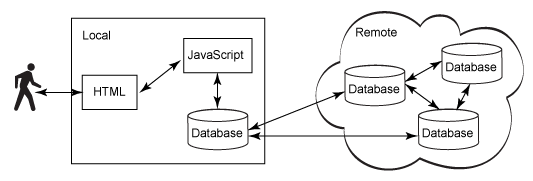
(Thanks to IBM for the image: http://www.ibm.com/developerworks/library/wa-couchdb/)
When you use PouchDB, CouchDB, and other members of the Couch family, you don't have to worry which database is the "single source of truth." They all are. According to the CAP theorem, CouchDB is an AP database, meaning that it's Partitioned, every node is Available, and it's only eventually Consistent.
To illustrate, imagine a multi-node architecture with CouchDB servers spread across several continents. As long as you're willing to wait, the data will eventually flow from Australia to Europe to North America to wherever. Users around the world running PouchDB in their browsers or Couchbase Lite/Cloudant Sync in their smartphones experience the same privileges. The data won't show up instantaneously, but depending on the Internet connection speed, it's usually close enough to real-time.
In cases of conflict, CouchDB will choose an arbitrary winner that every node can agree upon deterministically. However, conflicts are still stored in the revision tree (similar to a Git history tree), which means that app developers can either surface the conflicts to the user, or just ignore them.
In this way, CouchDB replication "just works."
As you already know, you can create either local PouchDBs:
var localDB = new PouchDB('mylocaldb')
or remote PouchDBs:
var remoteDB = new PouchDB('http://localhost:5984/myremotedb')
This pattern comes in handy when you want to share data between the two.
The simplest case is unidirectional replication, meaning you just want one database to mirror its changes to a second one. Writes to the second database, however, will not propagate back to the master database.
To perform unidirectional replication, you simply do:
localDB.replicate.to(remoteDB).on('complete', function () {

  // yay, we're done!

}).on('error', function (err) {

  // boo, something went wrong!

});
Congratulations, all changes from the localDB have been replicated to the remoteDB.
However, what if you want bidirectional replication? (Kinky!) You could do:
localDB.replicate.to(remoteDB);

localDB.replicate.from(remoteDB);
However, to make things easier for your poor tired fingers, PouchDB has a shortcut API:
localDB.sync(remoteDB);
These two code blocks above are equivalent. And the sync API supports all the same events as thereplicate API:
localDB.sync(remoteDB).on('complete', function () {

  // yay, we're in sync!

}).on('error', function (err) {

  // boo, we hit an error!

});
Live replication (or "continuous" replication) is a separate mode where changes are propagated between the two databases as the changes occur. In other words, normal replication happens once, whereas live replication happens in real time.
To enable live replication, you simply specify {live: true}:
localDB.sync(remoteDB, {

  live: true

}).on('change', function (change) {

  // yo, something changed!

}).on('error', function (err) {

  // yo, we got an error! (maybe the user went offline?)

});
However, there is one gotcha with live replication: what if the user goes offline? In those cases, an error will be thrown and replication will stop.
You can allow PouchDB to automatically handle this error, and retry until the connection is re-established, by using the retry option:
localDB.sync(remoteDB, {

  live: true,

  retry: true

}).on('change', function (change) {

  // yo, something changed!

}).on('paused', function (info) {

  // replication was paused, usually because of a lost connection

}).on('active', function (info) {

  // replication was resumed

}).on('error', function (err) {

  // totally unhandled error (shouldn't happen)

});
This is ideal for scenarios where the user may be flitting in and out of connectivity, such as on mobile devices.
Sometimes, you may want to manually cancel replication – for instance, because the user logged out. You can do so by calling cancel() and then waiting for the 'complete' event:
var syncHandler = localDB.sync(remoteDB, {

  live: true,

  retry: true

});

syncHandler.on('complete', function (info) {

  // replication was canceled!

});

syncHandler.cancel(); // <-- this cancels it
The replicate API also supports canceling:
var replicationHandler = localDB.replicate.to(remoteDB, {

  live: true,

  retry: true

});

replicationHandler.on('complete', function (info) {

  // replication was canceled!

});

replicationHandler.cancel(); // <-- this cancels it
One thing to note about replication is that it tracks the data within a database, not the database itself. If you destroy() a database that is being replicated to, the next time the replication starts it will transfer all of the data again, recreating the database to the state it was before it was destroyed. If you want the data within the database to be deleted you will need to delete via remove() or bulkDocs(). Thepouchdb-erase plugin can help you remove the entire contents of a database.
Any PouchDB object can replicate to any other PouchDB object. So for instance, you can replicate two remote databases, or two local databases. You can also replicate from multiple databases into a single one, or from a single database into many others.
This can be very powerful, because it enables lots of fancy scenarios. For example:
- You have an in-memory PouchDB that replicates with a local PouchDB, acting as a cache.
- You have many remote CouchDB databases that the user may access, and they are all replicated to the same local PouchDB.
- You have many local PouchDB databases, which are mirrored to a single remote CouchDB as a backup store.
The only limits are your imagination and your disk space.
POST directly to the CouchDB _replicate endpoint, as described in the CouchDB replication guide.pouchdb sync的更多相关文章
- 使用PouchDB来实现React离线应用
最近听到有同学在讨论关于数据上传遇到离线的问题,因此在这里介绍一下PouchDB. PouchDB 是一个开源的javascript数据库,他的设计借鉴于Apache CouchDB,我们可以使用他来 ...
- pouchdb Conflicts
Conflicts are an unavoidable reality when dealing with distributed systems. And make no mistake: cli ...
- PouchDB 基础
GUIDES http://pouchdb.com/guides/ 1.建立couchDB环境 下载并安装CouchDB: https://couchdb.apache.org/#download 测 ...
- pouchdb快速入门教程
a:focus { outline: thin dotted #333; outline: 5px auto -webkit-focus-ring-color; outline-offset: -2p ...
- Gradle project sync failed
在Android Studio中运行APP时出现了以下错误: gradle project sync failed. please fix your project and try again 解决的 ...
- svn sync主从同步学习
svn备份的方式有三种: 1svnadmin dump 2)svnadmin hotcopy 3)svnsync. 优缺点分析============== 第一种svnadmin dump是官方推荐 ...
- ASP.NET sync over async(异步中同步,什么鬼?)
async/await 是我们在 ASP.NET 应用程序中,写异步代码最常用的两个关键字,使用它俩,我们不需要考虑太多背后的东西,比如异步的原理等等,如果你的 ASP.NET 应用程序是异步到底的, ...
- publishing failed with multiple errors resource is out of sync with the file system--转
原文地址:http://blog.csdn.net/feng1603/article/details/7398266 今天用eclipse部署项目遇到"publishing failed w ...
- 解决:eclipse删除工程会弹出一个对话框提示“[project_name]”contains resources that are not in sync with"[workspace_name...\xx\..xx\..\xx]"
提示“[project_name]”contains resources that are not in sync with"[workspace_name...\xx\..xx\..\xx ...
随机推荐
- Ubuntu 升级VisualBox后无法启动 Kernel driver not installed (rc=-1908)
VisualBox之所以在Linux上比传统的VMware快得多,关键一点就是它和Linux内核的结合比较紧密,这也是开源的优点. 不过Linux内核更新很频繁,每次更新内核后启动VirtualBox ...
- BZOJ 2331 地板
妈妈我会写插头dp了!!!!!!.... 感动啊... #include<iostream> #include<cstdio> #include<cstring> ...
- 我与python3擦肩而过(三)—— 我去。。又是编码问题——urllib.parse.unquote
记得初学python时就学的爬虫,经常遇到编码问题(其实在python3里面编码问题已经很少了...),用requests库就挺方便解决这些问题的.近来有共同学习python的程序员写了个电子书网站, ...
- Java 集合深入理解(6):AbstractList
点击查看 Java 集合框架深入理解 系列, - ( ゜- ゜)つロ 乾杯~ 今天心情比天蓝,来学学 AbstractList 吧! 什么是 AbstractList AbstractList 继承自 ...
- Log4Cplus的介绍
Log4Cplus是一款很好的开源日志打印程序,该日志打印程序的配置文件为类似INI的文件,以下为该日志打印程序配置文件中的说明: 1.#—注释行的开头表示,即以该字符开头的行,改日志程序不解释改行内 ...
- 程序退出异常_DebugHeapDelete和std::numpunct
前几天程序新加一个功能之后,其中用到了boost的lexical_cast<float>,发现在关闭命令行窗口的时候,程序报错,是程序退出清理时候报的错误. 一开始以为是程序新增的功能有问 ...
- mysql保存中文乱码的原因和解决办法
当你遇到这个mysql保存中文乱码问题的时候,期待找到mysql保存中文乱码的原因和解决办法这样一篇能解决问题的文章是多么激动人心. 也许30%的程序员会选择自己百度,结果发现网友已经贴了很多类 ...
- lecture7-序列模型及递归神经网络RNN(转载)
Hinton 第七课 .这里先说下RNN有recurrent neural network 和 recursive neural network两种,是不一样的,前者指的是一种人工神经网络,后者指的是 ...
- Sprint第二个冲刺(第六天)
一.Sprint 计划会议: 因为这两天课程较多的原因,表面上进度可能可能没有太大的变化,其实组员们都有完善之前做的功能,正在做的功能也在抓紧时间完成.俗话说得好,慢工出细活 ,不能因为赶进度就随便做 ...
- 关于string的练习题目
/*Are they equal*/#include<iostream>#include<string>using namespace std;int n;string dea ...