
MessageBox详解
MessageBox.Show();可谓是winform开发中用的次数最多的东东啦。先贴一张msdn的图解

msdn好像没有更新哎,只提供了这几种方法,并且参数名称和最新的有差别,但实际上messagebox.show()有21种重载方法,用的时候再细细查看吧。基本上都有返回结果,返回结果的如下表,一般在if判断中使用,比如DialogResult.OK这样的。
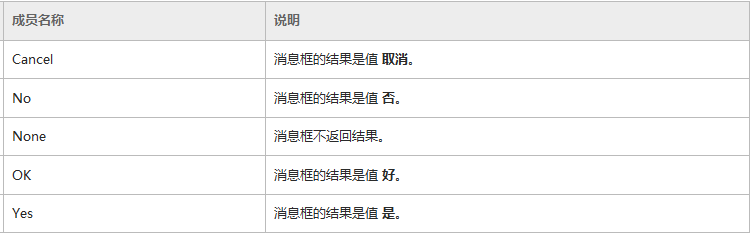 下面简单举几个例子。
1个参数。

.     1个参数。

                  MessageBox.Show(string text);

//     显示具有指定文本的消息框。

//

// 参数:

//   text:

//     要在消息框中显示的文本。

//

// 返回结果:

//     System.Windows.Forms.DialogResult 值之一。
2个参数。

.     2个参数。

               MessageBox.Show(string text, string caption);

//     显示具有指定文本和标题的消息框。

//

// 参数:

//   text:

//     要在消息框中显示的文本。

//

//   caption:

//     要在消息框的标题栏中显示的文本。

//

// 返回结果:

//     System.Windows.Forms.DialogResult 值之一。
3个参数

.     3个参数。

             MessageBox.Show(string text, string caption, MessageBoxButtons buttons);

//     显示具有指定文本、标题和按钮的消息框。

//

// 参数:

//   text:

//     要在消息框中显示的文本。

//

//   caption:

//     要在消息框的标题栏中显示的文本。

//

//   buttons:

//     System.Windows.Forms.MessageBoxButtons 值之一,可指定在消息框中显示哪些按钮。

//

// 返回结果:

//     System.Windows.Forms.DialogResult 值之一。

//

// 异常:

//   System.ComponentModel.InvalidEnumArgumentException:

//     指定的 buttons 参数不是 System.Windows.Forms.MessageBoxButtons 的成员。

//

//   System.InvalidOperationException:

//     试图在运行模式不是用户交互模式的进程中显示 System.Windows.Forms.MessageBox。这是由 System.Windows.Forms.SystemInformation.UserInteractive

//     属性指定的。
4个参数

.     4个参数。

                    MessageBox.Show(string text, string caption, MessageBoxButtons buttons, MessageBoxIcon icon);

//     显示具有指定文本、标题、按钮和图标的消息框。

//

// 参数:

//   text:

//     要在消息框中显示的文本。

//

//   caption:

//     要在消息框的标题栏中显示的文本。

//

//   buttons:

//     System.Windows.Forms.MessageBoxButtons 值之一,可指定在消息框中显示哪些按钮。

//

//   icon:

//     System.Windows.Forms.MessageBoxIcon 值之一,它指定在消息框中显示哪个图标。

//

// 返回结果:

//     System.Windows.Forms.DialogResult 值之一。

//

// 异常:

//   System.ComponentModel.InvalidEnumArgumentException:

//     指定的 buttons 参数不是 System.Windows.Forms.MessageBoxButtons 的成员。- 或 - 指定的 icon

//     参数不是 System.Windows.Forms.MessageBoxIcon 的成员。

//

//   System.InvalidOperationException:

//     试图在运行模式不是用户交互模式的进程中显示 System.Windows.Forms.MessageBox。这是由 System.Windows.Forms.SystemInformation.UserInteractive

//     属性指定的。
5个参数

.     5个参数。

                  MessageBox.Show(string text, string caption, MessageBoxButtons buttons,

                                          MessageBoxIcon icon, MessageBoxDefaultButton defaultButton);

//     显示具有指定文本、标题、按钮、图标和默认按钮的消息框。

//

// 参数:

//   text:

//     要在消息框中显示的文本。

//

//   caption:

//     要在消息框的标题栏中显示的文本。

//

//   buttons:

//     System.Windows.Forms.MessageBoxButtons 值之一,可指定在消息框中显示哪些按钮。

//

//   icon:

//     System.Windows.Forms.MessageBoxIcon 值之一,它指定在消息框中显示哪个图标。

//

//   default Button:

//     System.Windows.Forms.MessageBoxDefaultButton 值之一,可指定消息框中的默认按钮。

//

// 返回结果:

//     System.Windows.Forms.DialogResult 值之一。

//

// 异常:

//   System.ComponentModel.InvalidEnumArgumentException:

//     buttons 不是 System.Windows.Forms.MessageBoxButtons 的成员。- 或 - icon 不是 System.Windows.Forms.MessageBoxIcon

//     的成员。- 或 - defaultButton 不是 System.Windows.Forms.MessageBoxDefaultButton 的成员。

//

//   System.InvalidOperationException:

//     试图在运行模式不是用户交互模式的进程中显示 System.Windows.Forms.MessageBox。这是由 System.Windows.Forms.SystemInformation.UserInteractive

//     属性指定的。
6个参数

.     6个参数。

                 MessageBox.Show(string text, string caption, MessageBoxButtons buttons, MessageBoxIcon icon,

                                                       MessageBoxDefaultButton defaultButton, MessageBoxOptions options);

//     显示具有指定文本、标题、按钮、图标、默认按钮和选项的消息框。

//

// 参数:

//   text:

//     要在消息框中显示的文本。

//

//   caption:

//     要在消息框的标题栏中显示的文本。

//

//   buttons:

//     System.Windows.Forms.MessageBoxButtons 值之一,可指定在消息框中显示哪些按钮。

//

//   icon:

//     System.Windows.Forms.MessageBoxIcon 值之一,它指定在消息框中显示哪个图标。

//

//   defaultButton:

//     System.Windows.Forms.MessageBoxDefaultButton 值之一,可指定消息框中的默认按钮。

//

//   options:  //

//     System.Windows.Forms.MessageBoxOptions 值之一,可指定将对消息框使用哪些显示和关联选项。若要使用默认值,请传入

//     0。

//

// 返回结果:

//     System.Windows.Forms.DialogResult 值之一。

//

// 异常:

//   System.ComponentModel.InvalidEnumArgumentException:

//     buttons 不是 System.Windows.Forms.MessageBoxButtons 的成员。- 或 - icon 不是 System.Windows.Forms.MessageBoxIcon

//     的成员。- 或 - 指定的 defaultButton 不是 System.Windows.Forms.MessageBoxDefaultButton

//     的成员。

//

//   System.InvalidOperationException:

//     试图在运行模式不是用户交互模式的进程中显示 System.Windows.Forms.MessageBox。这是由 System.Windows.Forms.SystemInformation.UserInteractive

//     属性指定的。

//

//   System.ArgumentException:

//     options 同时指定了 System.Windows.Forms.MessageBoxOptions.DefaultDesktopOnly 和

//     System.Windows.Forms.MessageBoxOptions.ServiceNotification。- 或 - buttons

//     指定了无效的 System.Windows.Forms.MessageBoxButtons 组合。
7个参数

.     7个参数。

                MessageBox.Show(string text, string caption, MessageBoxButtons buttons, MessageBoxIcon icon,

                                        MessageBoxDefaultButton defaultButton, MessageBoxOptions options, bool displayHelpButton);

//     显示一个具有指定文本、标题、按钮、图标、默认按钮、选项和“帮助”按钮的消息框。

//

// 参数:

//   text:

//     要在消息框中显示的文本。

//

//   caption:

//     要在消息框的标题栏中显示的文本。

//

//   buttons:

//     System.Windows.Forms.MessageBoxButtons 值之一,可指定在消息框中显示哪些按钮。

//

//   icon:

//     System.Windows.Forms.MessageBoxIcon 值之一,它指定在消息框中显示哪个图标。

//

//   defaultButton:

//     System.Windows.Forms.MessageBoxDefaultButton 值之一,可指定消息框中的默认按钮。

//

//   options:

//     System.Windows.Forms.MessageBoxOptions 值之一,可指定将对消息框使用哪些显示和关联选项。若要使用默认值,请传入

//     0。

//

//   helpButton:

//     如果显示“帮助”按钮,则为 true;否则为 false。默认为 false。

//

// 返回结果:

//     System.Windows.Forms.DialogResult 值之一。

//

// 异常:

//   System.ComponentModel.InvalidEnumArgumentException:

//     buttons 不是 System.Windows.Forms.MessageBoxButtons 的成员。- 或 - icon 不是 System.Windows.Forms.MessageBoxIcon

//     的成员。- 或 - 指定的 defaultButton 不是 System.Windows.Forms.MessageBoxDefaultButton

//     的成员。

//

//   System.InvalidOperationException:

//     试图在运行模式不是用户交互模式的进程中显示 System.Windows.Forms.MessageBox。这是由 System.Windows.Forms.SystemInformation.UserInteractive

//     属性指定的。

//

//   System.ArgumentException:

//     options 同时指定了 System.Windows.Forms.MessageBoxOptions.DefaultDesktopOnly 和

//     System.Windows.Forms.MessageBoxOptions.ServiceNotification。- 或 - buttons

//     指定了无效的 System.Windows.Forms.MessageBoxButtons 组合。
也是  个参数

.  (也是  个参数)

                        MessageBox.Show(string text, string caption, MessageBoxButtons buttons,

                                                     MessageBoxIcon icon, MessageBoxDefaultButton defaultButton,

                                                                               MessageBoxOptions options, string helpFilePath);

//     使用指定的帮助文件显示一个具有指定文本、标题、按钮、图标、默认按钮、选项和“帮助”按钮的消息框。

//

// 参数:

//   text:

//     要在消息框中显示的文本。

//

//   caption:

//     要在消息框的标题栏中显示的文本。

//

//   buttons:

//     System.Windows.Forms.MessageBoxButtons 值之一,可指定在消息框中显示哪些按钮。

//

//   icon:

//     System.Windows.Forms.MessageBoxIcon 值之一,它指定在消息框中显示哪个图标。

//

//   defaultButton:

//     System.Windows.Forms.MessageBoxDefaultButton 值之一,可指定消息框中的默认按钮。

//

//   options:

//     System.Windows.Forms.MessageBoxOptions 值之一,可指定将对消息框使用哪些显示和关联选项。若要使用默认值,请传入

//     0。

//

//   helpFilePath:

//     用户单击“帮助”按钮时显示的“帮助”文件的路径和名称。

//

// 返回结果:

//     System.Windows.Forms.DialogResult 值之一。

//

// 异常:

//   System.ComponentModel.InvalidEnumArgumentException:

//     buttons 不是 System.Windows.Forms.MessageBoxButtons 的成员。- 或 - icon 不是 System.Windows.Forms.MessageBoxIcon

//     的成员。- 或 - 指定的 defaultButton 不是 System.Windows.Forms.MessageBoxDefaultButton

//     的成员。

//

//   System.InvalidOperationException:

//     试图在运行模式不是用户交互模式的进程中显示 System.Windows.Forms.MessageBox。这是由 System.Windows.Forms.SystemInformation.UserInteractive

//     属性指定的。

//

//   System.ArgumentException:

//     options 同时指定了 System.Windows.Forms.MessageBoxOptions.DefaultDesktopOnly 和

//     System.Windows.Forms.MessageBoxOptions.ServiceNotification。- 或 - buttons

//     指定了无效的 System.Windows.Forms.MessageBoxButtons 组合。
代码是借鉴http://www.cnblogs.com/music-liang/archive/2011/09/14/2176021.html这里的,在此致谢!
MessageBox详解的更多相关文章
- Delphi Application.MessageBox详解
引数:1. Text:要显示的讯息2. Caption:讯息视窗的标题列文字3. Flags:讯息旗标 3.1. 可指定讯息视窗上的图示 3.2. 可指定讯息视窗出现的按钮 3 ...
- Element-ui安装之MessageBox详解
1.首先根据官方文档进行Element-ui的安装,这个过程很简单(通过webpack-simple) 1) vue init webpack-simple element-ui 2) cd elem ...
- [转载]va_start和va_end使用详解
va_start和va_end使用详解 原文地址:http://www.cnblogs.com/hanyonglu/archive/2011/05/07/2039916.html 本文主要介绍va_s ...
- [转载]C/C++可变参数之va_start和va_end使用详解
本文主要介绍va_start和va_end的使用及原理. 在以前的一篇帖子Format MessageBox 详解中曾使用到va_start和va_end这两个宏,但对它们也只是泛泛的了解. 介绍这两 ...
- [转]va_start和va_end使用详解
转载地址:http://www.cnblogs.com/hanyonglu/archive/2011/05/07/2039916.html 本文主要介绍va_start和va_end的使用及原理. ...
- va_start和va_end使用详解(转载)
转自:http://www.cnblogs.com/hanyonglu/archive/2011/05/07/2039916.html 本文主要介绍va_start和va_end的使用及原理. 在以前 ...
- C# WinForm 中 MessageBox的使用详解
1.C# WinForm 中 MessageBox的使用详解:http://www.cnblogs.com/bq-blog/archive/2012/07/27/2611810.html
- delphi中Application.MessageBox函数用法详解
delphi中Application.MessageBox函数用法详解 Application.MessageBox是TApplication的成员函数,声明如下:functionTApplicati ...
- Swing中弹出对话框的几种方式_JOptionPane.showMessageDialog等详解
Swing中弹出对话框的几种方式_JOptionPane.showMessageDialog等详解 在swing中,基于业务的考量,会有对话框来限制用户的行为及对用户的动作进行提示. Swing中 ...
随机推荐
- 90、 Android UI模板设计
第一步:自定义xml属性 新建一个android项目,在values文件夹中新建一个atts.xml的文件,在这个xml文件中声明我们一会在使用自定义控件时候需要指明的属性.atts.xml < ...
- C++学习5
类是创建对象的模板,一个类可以创建多个对象,每个对象都是类类型的一个变量:创建对象的过程也叫类的实例化.每个对象都是类的一个具体实例(Instance),拥有类的成员变量和成员函数. 与结构体一样,类 ...
- 常用命令之ps
ps : process status ps 为我们提供了进程的一次性的查看,它所提供的查看结果并不动态连续的:如果想对进程时间监控,应该用 top 工具. kill 命令用于杀死进程. linux上 ...
- Quartz.net一个简要示例
下面描述了一个Quartz.net最常用的应用场景,按特定秒数触发执行特定任务. 1.任务要继承自:IJob,在Execute方法中填入自己需要执行的任务. public virtual void E ...
- matplotlib python高级绘图库 一周总结
matplotlib python高级绘图库 一周总结 官网 http://matplotlib.org/ 是一个python科学作图库,可以快速的生成很多非常专业的图表. 只要你掌握要领,画图将变得 ...
- (medium)LeetCode 240.Search a 2D Matrix II
Write an efficient algorithm that searches for a value in an m x n matrix. This matrix has the follo ...
- gnu c语言中的?:的作用
#include <stdio.h> #include <stdlib.h> char * test() { return "abc" ?: "f ...
- 【Unity Shaders】学习笔记——SurfaceShader(五)让纹理动起来
[Unity Shaders]学习笔记——SurfaceShader(五)让纹理动起来 转载请注明出处:http://www.cnblogs.com/-867259206/p/5611222.html ...
- opencv_协方差矩阵与协方差讲解
统计学的基本概念 学过概率统计的孩子都知道,统计里最基本的概念就是样本的均值,方差,或者再加个标准差.首先我们给你一个含有n个样本的集合,依次给出这些概念的公式描述,这些高中学过数学的孩子都应该知道吧 ...
- USACO Section 2.4 回家 Bessie Come Home
题目描述 现在是晚餐时间,而母牛们在外面分散的牧场中. 农民约翰按响了电铃,所以她们开始向谷仓走去. 你的工作是要指出哪只母牛会最先到达谷仓(在给出的测试数据中,总会有且只有一只最快的母牛). 在挤奶 ...