
脱离rails 使用Active Record
目录结构
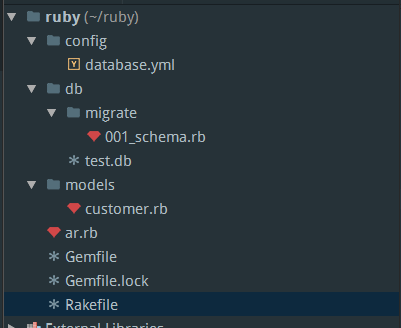
database.yml
 development:

   adapter: sqlite3

   database: db/test.db

   pool: 5

   timeout: 5000
001_schema.rb
 require 'active_record'

 class Schema <ActiveRecord::Migration

   def self.up

     create_table :customers, force: true do |t|

       t.string :name

       t.string :address

       t.timestamps

     end

   end

   def self.down

     drop_table :customers

   end

 end
customer.rb
 class Customer <ActiveRecord::Base

 end
ar.rb
 require 'rubygems'

 require 'active_record'

 require 'yaml'

 require 'logger'

 ActiveRecord::Base.logger = Logger.new(STDOUT)

 dbconfig = YAML::load(IO.read('config/database.yml'))

 ActiveRecord::Base.establish_connection(dbconfig['development'])

 load 'models/customer.rb'
Gemfile
 source 'https://gems.ruby-china.org'

 gem 'activerecord'

 gem 'sqlite3'

 gem 'rake'
Rakefile
 load 'ar.rb'

 require 'active_record'

 task :default => :migrate

 desc 'Run migrations'

 task :migrate do

   ActiveRecord::Migrator.migrate('db/migrate', ENV['VERSION'] ? ENV['VERSION'].to_i : nil)

 end
使用说明
在程序目录先执行 bundle install
1 在ruby目录执行 命令:
 rudy-Pc :: ~/ruby » rake

 D, [2016-06-15T14:36:24.712037 #6726] DEBUG -- :    (4.4ms)  CREATE TABLE "schema_migrations" ("version" varchar NOT NULL)

 D, [2016-06-15T14:36:24.712258 #6726] DEBUG -- :    (0.1ms)  select sqlite_version(*)

 D, [2016-06-15T14:36:24.716823 #6726] DEBUG -- :    (4.2ms)  CREATE UNIQUE INDEX "unique_schema_migrations" ON "schema_migrations" ("version")

 D, [2016-06-15T14:36:24.717531 #6726] DEBUG -- :   ActiveRecord::SchemaMigration Load (0.1ms)  SELECT "schema_migrations".* FROM "schema_migrations"

 I, [2016-06-15T14:36:24.720448 #6726]  INFO -- : Migrating to Schema (1)

 D, [2016-06-15T14:36:24.720794 #6726] DEBUG -- :    (0.0ms)  begin transaction

 == 1 Schema: migrating ========================================================

 -- create_table(:customers, {:force=>true})

 DEPRECATION WARNING: `#timestamps` was called without specifying an option for `null`. In Rails 5, this behavior will change to `null: false`. You should manually specify `null: true` to prevent the behavior of your existing migrations from changing. (called from block in up at /home/rudy/ruby/db/migrate/001_schema.rb:8)

 D, [2016-06-15T14:36:24.722126 #6726] DEBUG -- :    (0.2ms)  CREATE TABLE "customers" ("id" INTEGER PRIMARY KEY AUTOINCREMENT NOT NULL, "name" varchar, "address" varchar, "created_at" datetime, "updated_at" datetime)

    -> 0.0012s

 == 1 Schema: migrated (0.0013s) ===============================================

 D, [2016-06-15T14:36:24.726539 #6726] DEBUG -- :   SQL (0.1ms)  INSERT INTO "schema_migrations" ("version") VALUES (?)  [["version", "1"]]

 D, [2016-06-15T14:36:24.731421 #6726] DEBUG -- :    (4.7ms)  commit transaction
2 在ruby目录创建 active_record.rb
 load 'ar.rb'

 1.upto(10) do |x|

   customer = Customer.new

   customer.name ="fak#{x}"

   customer.address = 'beijing'

   customer.save

 end
我在rubymine中直接右键单击文件,选择 run active_record
/home/rudy/.rbenv/versions/2.2.3/bin/ruby -e $stdout.sync=true;$stderr.sync=true;load($0=ARGV.shift) /home/rudy/ruby/active_record.rb

D, [2016-06-15T15:03:22.677823 #7646] DEBUG -- :    (0.1ms)  begin transaction

D, [2016-06-15T15:03:22.684157 #7646] DEBUG -- :   SQL (0.2ms)  INSERT INTO "customers" ("name", "address", "created_at", "updated_at") VALUES (?, ?, ?, ?)  [["name", "fak1"], ["address", "beijing"], ["created_at", "2016-06-15 07:03:22.682053"], ["updated_at", "2016-06-15 07:03:22.682053"]]

D, [2016-06-15T15:03:22.691053 #7646] DEBUG -- :    (6.6ms)  commit transaction

D, [2016-06-15T15:03:22.691285 #7646] DEBUG -- :    (0.0ms)  begin transaction

D, [2016-06-15T15:03:22.691801 #7646] DEBUG -- :   SQL (0.1ms)  INSERT INTO "customers" ("name", "address", "created_at", "updated_at") VALUES (?, ?, ?, ?)  [["name", "fak2"], ["address", "beijing"], ["created_at", "2016-06-15 07:03:22.691356"], ["updated_at", "2016-06-15 07:03:22.691356"]]

D, [2016-06-15T15:03:22.698569 #7646] DEBUG -- :    (6.6ms)  commit transaction

D, [2016-06-15T15:03:22.698767 #7646] DEBUG -- :    (0.0ms)  begin transaction

D, [2016-06-15T15:03:22.699331 #7646] DEBUG -- :   SQL (0.1ms)  INSERT INTO "customers" ("name", "address", "created_at", "updated_at") VALUES (?, ?, ?, ?)  [["name", "fak3"], ["address", "beijing"], ["created_at", "2016-06-15 07:03:22.698849"], ["updated_at", "2016-06-15 07:03:22.698849"]]

D, [2016-06-15T15:03:22.702730 #7646] DEBUG -- :    (3.2ms)  commit transaction

D, [2016-06-15T15:03:22.702950 #7646] DEBUG -- :    (0.1ms)  begin transaction

D, [2016-06-15T15:03:22.703435 #7646] DEBUG -- :   SQL (0.1ms)  INSERT INTO "customers" ("name", "address", "created_at", "updated_at") VALUES (?, ?, ?, ?)  [["name", "fak4"], ["address", "beijing"], ["created_at", "2016-06-15 07:03:22.703015"], ["updated_at", "2016-06-15 07:03:22.703015"]]

D, [2016-06-15T15:03:22.706785 #7646] DEBUG -- :    (3.2ms)  commit transaction

D, [2016-06-15T15:03:22.706989 #7646] DEBUG -- :    (0.0ms)  begin transaction

D, [2016-06-15T15:03:22.707486 #7646] DEBUG -- :   SQL (0.1ms)  INSERT INTO "customers" ("name", "address", "created_at", "updated_at") VALUES (?, ?, ?, ?)  [["name", "fak5"], ["address", "beijing"], ["created_at", "2016-06-15 07:03:22.707050"], ["updated_at", "2016-06-15 07:03:22.707050"]]

D, [2016-06-15T15:03:22.710844 #7646] DEBUG -- :    (3.2ms)  commit transaction

D, [2016-06-15T15:03:22.711062 #7646] DEBUG -- :    (0.0ms)  begin transaction

D, [2016-06-15T15:03:22.711585 #7646] DEBUG -- :   SQL (0.1ms)  INSERT INTO "customers" ("name", "address", "created_at", "updated_at") VALUES (?, ?, ?, ?)  [["name", "fak6"], ["address", "beijing"], ["created_at", "2016-06-15 07:03:22.711146"], ["updated_at", "2016-06-15 07:03:22.711146"]]

D, [2016-06-15T15:03:22.714980 #7646] DEBUG -- :    (3.2ms)  commit transaction

D, [2016-06-15T15:03:22.715185 #7646] DEBUG -- :    (0.0ms)  begin transaction

D, [2016-06-15T15:03:22.715699 #7646] DEBUG -- :   SQL (0.1ms)  INSERT INTO "customers" ("name", "address", "created_at", "updated_at") VALUES (?, ?, ?, ?)  [["name", "fak7"], ["address", "beijing"], ["created_at", "2016-06-15 07:03:22.715263"], ["updated_at", "2016-06-15 07:03:22.715263"]]

D, [2016-06-15T15:03:22.718966 #7646] DEBUG -- :    (3.1ms)  commit transaction

D, [2016-06-15T15:03:22.719175 #7646] DEBUG -- :    (0.0ms)  begin transaction

D, [2016-06-15T15:03:22.719661 #7646] DEBUG -- :   SQL (0.1ms)  INSERT INTO "customers" ("name", "address", "created_at", "updated_at") VALUES (?, ?, ?, ?)  [["name", "fak8"], ["address", "beijing"], ["created_at", "2016-06-15 07:03:22.719240"], ["updated_at", "2016-06-15 07:03:22.719240"]]

D, [2016-06-15T15:03:22.722971 #7646] DEBUG -- :    (3.1ms)  commit transaction

D, [2016-06-15T15:03:22.723230 #7646] DEBUG -- :    (0.1ms)  begin transaction

D, [2016-06-15T15:03:22.723924 #7646] DEBUG -- :   SQL (0.2ms)  INSERT INTO "customers" ("name", "address", "created_at", "updated_at") VALUES (?, ?, ?, ?)  [["name", "fak9"], ["address", "beijing"], ["created_at", "2016-06-15 07:03:22.723325"], ["updated_at", "2016-06-15 07:03:22.723325"]]

D, [2016-06-15T15:03:22.727346 #7646] DEBUG -- :    (3.2ms)  commit transaction

D, [2016-06-15T15:03:22.727552 #7646] DEBUG -- :    (0.0ms)  begin transaction

D, [2016-06-15T15:03:22.728065 #7646] DEBUG -- :   SQL (0.1ms)  INSERT INTO "customers" ("name", "address", "created_at", "updated_at") VALUES (?, ?, ?, ?)  [["name", "fak10"], ["address", "beijing"], ["created_at", "2016-06-15 07:03:22.727617"], ["updated_at", "2016-06-15 07:03:22.727617"]]

D, [2016-06-15T15:03:22.731302 #7646] DEBUG -- :    (3.0ms)  commit transaction

Process finished with exit code 0
脱离rails 使用Active Record的更多相关文章
- Yii的学习(4)--Active Record
摘自Yii官网:http://www.yiiframework.com/doc/guide/1.1/zh_cn/database.ar 在官网原文的基础上添加了CDbCriteria的详细用法. 虽然 ...
- DAL、DAO、ORM、Active Record辨析
转自:http://blog.csdn.net/suiye/article/details/7824943 模型 Model 模型是MVC中的概念,指的是读取数据和改变数据的操作(业务逻辑).一开始我 ...
- Active Record: 資料庫遷移(Migration) (转)
Active Record: 資料庫遷移(Migration) Programming today is a race between software engineers striving to b ...
- Active Record快速入门指南
一.概述 Active Record(中文名:活动记录)是一种领域模型模式,特点是一个模型类对应关系型数据库中的一个表,而模型类的一个实例对应表中的一行记录.关系型数据库往往通过外键来表述实体关系,A ...
- Active Record Query Interface 数据查询接口(界面) 看到第8节。
http://guides.rubyonrails.org/active_record_querying.html ✅How to find records using a variety of me ...
- RoR - Introduction to Active Record
Active Record: ORM ( Object-relational Mapping)Bridges the gap between relational databases , which ...
- 根据现有表操作基于active record的model
指南上都是直接生成mode,然后db migrate来生成数据库,在现实场景中,很可能是反过来的 例如 测试表app_versions rails里面,建立model class AppVersion ...
- Yii的学习(5)--Active Record的关联
官网原文:http://www.yiiframework.com/doc/guide/1.1/zh_cn/database.arr 官网中后半段为英文,而且中文的内容比英文少一些,先放到这里,之后有时 ...
- Active Record 数据库模式-增删改查操作
选择数据 下面的函数帮助你构建 SQL SELECT语句. 备注:如果你正在使用 PHP5,你可以在复杂情况下使用链式语法.本页面底部有具体描述. $this->db->get(); 运行 ...
随机推荐
- Unable to determine the principal end of an association between the types '***. The principal end of this association must be explicitly configured using either the relationship fluent API or data annotations.
MVC中数据库表如果是一对一的主键关系时要加[Required]不然会出错Unable to determine the principal end of an association between ...
- div圆角和颜色渐变的设置
<!DOCTYPE html PUBLIC "-//W3C//DTD XHTML 1.0 Transitional//EN" "http://www.w3.org/ ...
- OpenJudge计算概论-错误探测
/*======================================================================== 错误探测 总时间限制: 1000ms 内存限制: ...
- Appium查找元素
记录一些需要记忆的查找元素的内容: 1. driver.findElement(By.name("DELETE"); //We can use the DELETE text ...
- Saiku操作界面的简化
在安装完毕Saiku后,由于是社区版本,所以界面上存在很多升级为商业版的文字.为了使得系统不那么碍眼,可通过如下方式更改来去除相应的内容: 1.去除查询页面的升级为商业版的提示 You are usi ...
- javascript 毫秒转日期 日期时间转毫秒
js毫秒时间转换成日期时间 var oldTime = (new Date("2011/11/11 20:10:10")).getTime(); //得到毫秒数 大多数是用毫秒数除 ...
- 内容模块PC标签调用说明
内容模块 模块名:content 模块提供的可用操作 操作名 说明 lists 内容数据列表 relation 内容相关文章 hits 内容数据点击排行榜 category 内容栏目列表 positi ...
- .NET,Cookie,写Cookie,取Cookie
Cookie是一段文本信息,在客户端存储 Cookie 是 ASP.NET 的会话状态将请求与会话关联的方法之一.Cookie 也可以直接用于在请求之间保持数据,但数据随后将存储在客户端并随每个请求一 ...
- android学习笔记42——图形图像处理2——绘图
绘图 android的绘图应该继承View组件,并重写onDraw(Canvas canvas)方法即可. 重写onDraw(Canvas canvas)方法时涉及一个绘图API:Canvas,Can ...
- erlang r19里面的mnesia_ext
r19据说支持了mnesia_ext,终于可以给那个恶心2gb limit的mnesia换存储引擎了 先下载r19源码,编译 ./otp_build all -a ~/dev/erlang/r19 . ...