
Openlayers 距离环绘制
思路:利用layer的StyleFunction 来使地图移动或者放缩的时候,使圆保持在地图中心
/**

 * 绘制距离环

 * @param {number} distance 每环间隔距离,单位:米

 * @param {array} texts 要显示的内容

 * @description 创建了个layer,然后在layer的styleFunction中做了配置,这里搞了6个环,每两个是一组;搞两个的原因是为了在左侧和右侧都显示当前环的尺寸

 */

export function drawDistanceRing(distance, texts) {

  const map = window.map

  const layer = new VectorLayer({

    source: new VectorSource(),

    zIndex: 999,

    projection: 'EPSG:4326',

    style: function (feature) {

      const center = map.getView().getCenter()

      const proj = map.getView().getProjection()

      const [offsetL1, offsetR1, offsetL2, offsetR2, offsetL3, offsetR3] = calcDistanceRingTextOffset(center, distance * 0.9) // 计算每个环标签像素偏移量

      return [

        new Style({ // 每个style都是一个环

          geometry: circular(center, distance * 1, 128),

          text: new Text({

            text: texts[0],

            font: '14px sans-serif',

            fill: new Fill({

              color: '#e72b19',

            }),

            offsetX: offsetL1[0],

            offsetY: offsetL1[1]

          }),

          stroke: new Stroke({

            color: '#e72b19',

            width: 3

          })

        }),

        new Style({

          geometry: circular(center, distance * 1, 128),

          text: new Text({

            text: texts[0],

            font: '14px sans-serif',

            fill: new Fill({

              color: '#e72b19',

            }),

            offsetX: offsetR1[0],

            offsetY: offsetR1[1]

          }),

          stroke: new Stroke({

            color: '#e72b19',

            width: 3

          })

        }),

        new Style({

          geometry: circular(center, distance * 2, 128),

          text: new Text({

            text: texts[1],

            font: '14px sans-serif',

            fill: new Fill({

              color: '#e72b19',

            }),

            offsetX: offsetL2[0],

            offsetY: offsetL2[1]

          }),

          stroke: new Stroke({

            color: '#e72b19',

            width: 3

          })

        }),

        new Style({

          geometry: circular(center, distance * 2, 128),

          text: new Text({

            text: texts[1],

            font: '14px sans-serif',

            fill: new Fill({

              color: '#e72b19',

            }),

            offsetX: offsetR2[0],

            offsetY: offsetR2[1]

          }),

          stroke: new Stroke({

            color: '#e72b19',

            width: 3

          })

        }),

        new Style({

          geometry: circular(center, distance * 3, 128),

          text: new Text({

            text: texts[2],

            font: '14px sans-serif',

            fill: new Fill({

              color: '#e72b19',

            }),

            offsetX: offsetL3[0],

            offsetY: offsetL3[1]

          }),

          stroke: new Stroke({

            color: '#e72b19',

            width: 3

          })

        }),

        new Style({

          geometry: circular(center, distance * 3, 128),

          text: new Text({

            text: texts[2],

            font: '14px sans-serif',

            fill: new Fill({

              color: '#e72b19',

            }),

            offsetX: offsetR3[0],

            offsetY: offsetR3[1]

          }),

          stroke: new Stroke({

            color: '#e72b19',

            width: 3

          })

        }),

      ]

    }

  })

  const feature = new Feature(fromExtent(map.getView().getProjection().getExtent())) // layer得有feature,不然不显示

  layer.getSource().addFeature(feature)

  map.addLayer(layer)

}

/**

 * 移除距离环

 */

export function removeDistanceRing(layer) {

  if (layer) {

    layer.getSource().clear()

    window.map.removeLayer(layer)

  }

}

/**

 * 计算距离环文字偏移量

 * @param {array} location 距离环圆心坐标

 * @param {number} distance 每个环间距

 * @returns 六个环偏移量

 */

function calcDistanceRingTextOffset(location, distance) {

  const point = turf.point(location) // 用到了turf这个库

  const destination1R = turf.destination(point, distance, 90, 'meters' ).geometry.coordinates

  const destination1L = turf.destination(point, distance, 270, 'meters' ).geometry.coordinates

  const destination2R = turf.destination(point, distance * 2, 90, 'meters' ).geometry.coordinates

  const destination2L = turf.destination(point, distance * 2, 270, 'meters' ).geometry.coordinates

  const destination3R = turf.destination(point, distance * 3, 90, 'meters' ).geometry.coordinates

  const destination3L = turf.destination(point, distance * 3, 270, 'meters').geometry.coordinates

  const pixelCenter = getPixelFromCoordinate(location)

  const pixel1R = getPixelFromCoordinate(destination1R)

  const pixel1L = getPixelFromCoordinate(destination1L)

  const pixel2R = getPixelFromCoordinate(destination2R)

  const pixel2L = getPixelFromCoordinate(destination2L)

  const pixel3R = getPixelFromCoordinate(destination3R)

  const pixel3L = getPixelFromCoordinate(destination3L)

  const offsetR1 = [pixel1R[0] - pixelCenter[0] - 5, pixel1R[1] - pixelCenter[1]]

  const offsetL1 = [pixel1L[0] - pixelCenter[0], pixel1L[1] - pixelCenter[1]]

  const offsetR2 = [pixel2R[0] - pixelCenter[0], pixel2R[1] - pixelCenter[1]]

  const offsetL2 = [pixel2L[0] - pixelCenter[0], pixel2L[1] - pixelCenter[1]]

  const offsetR3 = [pixel3R[0] - pixelCenter[0], pixel3R[1] - pixelCenter[1]]

  const offsetL3 = [pixel3L[0] - pixelCenter[0], pixel3L[1] - pixelCenter[1]]

  return [offsetL1, offsetR1, offsetL2, offsetR2, offsetL3, offsetR3]

}
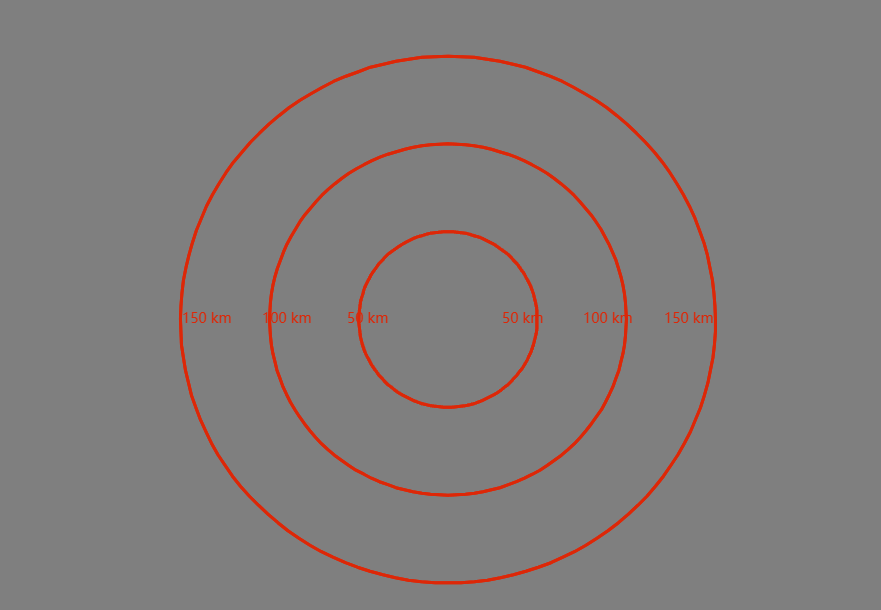
效果图:
感谢
Openlayers 距离环绘制的更多相关文章
- OpenLayers学习笔记(八)— 类似比例尺的距离环(二)
openlayers 3 地图上创建一个距离环,始终以地图中心为中心,每个环之间的距离类似比例尺,随地图缩放而变化. 添加具有覆盖整个范围的特征的虚拟层,其可以被设置为围绕地图中心的环. 这篇是上一篇 ...
- OpenLayers学习笔记(七)— 类似比例尺的距离环(一)
openlayers 3 地图上创建一个距离环,始终以地图中心为中心,每个环之间的距离类似比例尺,随地图缩放而变化. 添加具有覆盖整个范围的特征的虚拟层,其可以被设置为围绕地图中心的环.注意,根据地图 ...
- Floyd判圈算法(判断是否有环)
介意转吗博主~~http://blog.csdn.net/thestoryofsnow/article/details/6822576,我知道不介意啦~ 问题:如何检测一个链表是否有环,如果有,那么如 ...
- WebGL绘制有宽度的线
WebGL中有宽度的线一直都是初学者的一道门槛,因为在windows系统中底层的渲染接口都是D3D提供的,所以无论你的lineWidth设置为多少,最终绘制出来的只有一像素.即使在移动端可以设置有宽度 ...
- 通过openlayers加载dwg格式的CAD图并与互联网地图叠加
Openlayers介绍 Openlayers是一个基于Javacript开发,免费.开源的前端地图开发库,使用它,可以很容易的开发出WebGIS系统.目前Openlayers支持地图瓦片.矢量数 ...
- 【leetcode】Linked List Cycle II (middle)
Given a linked list, return the node where the cycle begins. If there is no cycle, return null. Foll ...
- Programming Assignment 5: Kd-Trees
用2d-tree数据结构实现在2维矩形区域内的高效的range search 和 nearest neighbor search.2d-tree有许多的应用,在天体分类.计算机动画.神经网络加速.数据 ...
- 学习记录 java 链表知识
01.import java.util.HashMap; 02.import java.util.Scanner; 03.import java.util.Stack; 04. 05./** 06. ...
- 一个完整openlayer的例子,包括marker,popup等
整理转自:http://www.blogjava.net/siriusfx/archive/2007/11/26/163104.html openlayers提供了几十个示例,虽然每个示例都很简单,但 ...
- 浅谈canvas绘画王者荣耀--雷达图
背景: 一日晚上下班的我静静的靠在角落上听着歌,这时"滴!滴!"手机上传来一阵qq消息.原来我人在问王者荣耀的雷达图在页面上如何做出来的,有人回答用canvas绘画.那么问题来了, ...
随机推荐
- 简化 ASP.NET Core 依赖注入(DI)注册-Scrutor
简化 ASP.NET Core 依赖注入(DI)注册-Scrutor Scrutor 是一个开源库,旨在简化 ASP.NET Core 应用程序中依赖注入(DI)的注册过程.通过自动扫描程序集中的类型 ...
- redis设置密码和开启远程访问
改密码 默认redis安装后,密码是默认的,通过查看安装目录的config文件,可以查到:requirepass 这个设置,默认是啥就是啥. 需要修改密码的话,把这个注释拿掉,将requirepass ...
- 技术实践|Redis基础知识及集群搭建(下)
Redis是一个开源的使用ANSI C语言编写.支持网络.可基于内存亦可持久化的日志型.Key-Value数据库,并提供多种语言的API.本篇文章围绕Redis基础知识及集群搭建相关内容进行了分享 ...
- 执行docker ps时提示"dial unix /var/run/docker.sock: connect: permission denied"
0. 创建docker用户组 sudo groupadd docker 1. 将当前用户加入docker组 # sudo gpasswd -a $USER docker $ sudo usermod ...
- [转]vue-router动态添加路由的方法,addRouter添加路由,提示:Duplicate named routes definition
问题描述:在做使用vue-router动态添加路由的方法,addRouter添加,使用 console.log(this.$router.options.routes) 打印对象,发现添加成功,但是一 ...
- AI实战营第二期 | 环境配置及安装
AI实战营第二期 | 环境配置及安装 强烈推荐使用 mim 来管理 OpenMMLab repo OpenMMLab repo 不要 mim 和 pip 混用 OpenMMLab 1.0 和 Open ...
- 前端(二)-CSS
1.样式 1.1 行内样式 <h1 style="color:red;">行内样式</h1> 1.2 内部样式 CSS代码写在 <head> 的 ...
- 前端(一)-Html
1.网页基本信息 <!DOCTYPE html> 浏览器使用的规范 <head> 网页头 <body> 主体部分 <meta> 元数据 meta的nam ...
- Mac安装MySQL详细教程
1.MySQL安装包下载 还没下载的话请前往官网下载 我们可以看到这里有两个不同架构的dmg的安装包,如果不知道自己电脑是ARM还是X86的话可以打开终端输入:uname -a 或者 uname -a ...
- 线上JVM性能优化详解
概述 jvm中除了程序计数器,其他的区域都有可能会发生内存溢出 内存溢出是什么? 当程序需要申请内存的时候,由于没有足够的内存,此时就会抛出OutOfMemoryError,这就是内存溢出 内存溢出和 ...