
Winform高级技巧-界面和代码分离的实践案例
办法总比困难多(不会或不想用WPF MVVM模式也可以搞工控自动化和上位机编程)...

正文
活到老就该学到老。但是难道我们不可以偷懒么,老技术指哪打哪,游刃有余,如果已经炉火纯青,那么解决问题又快又好它不香吗。本文拒绝讨论技术谁优秀谁该被鄙视。上图的流程是花2天时间搞好的,我不是得瑟有什么不得了的地方。我见很多人都在探讨MVVM,数据驱动业务多么的了不起,其实老技术Winform一样的能办到不信你问问DeepSeek让它给你一个示例代码。比如这样子的,点这里下载。如果只是这么简单的话,就没有写本文的必要了。
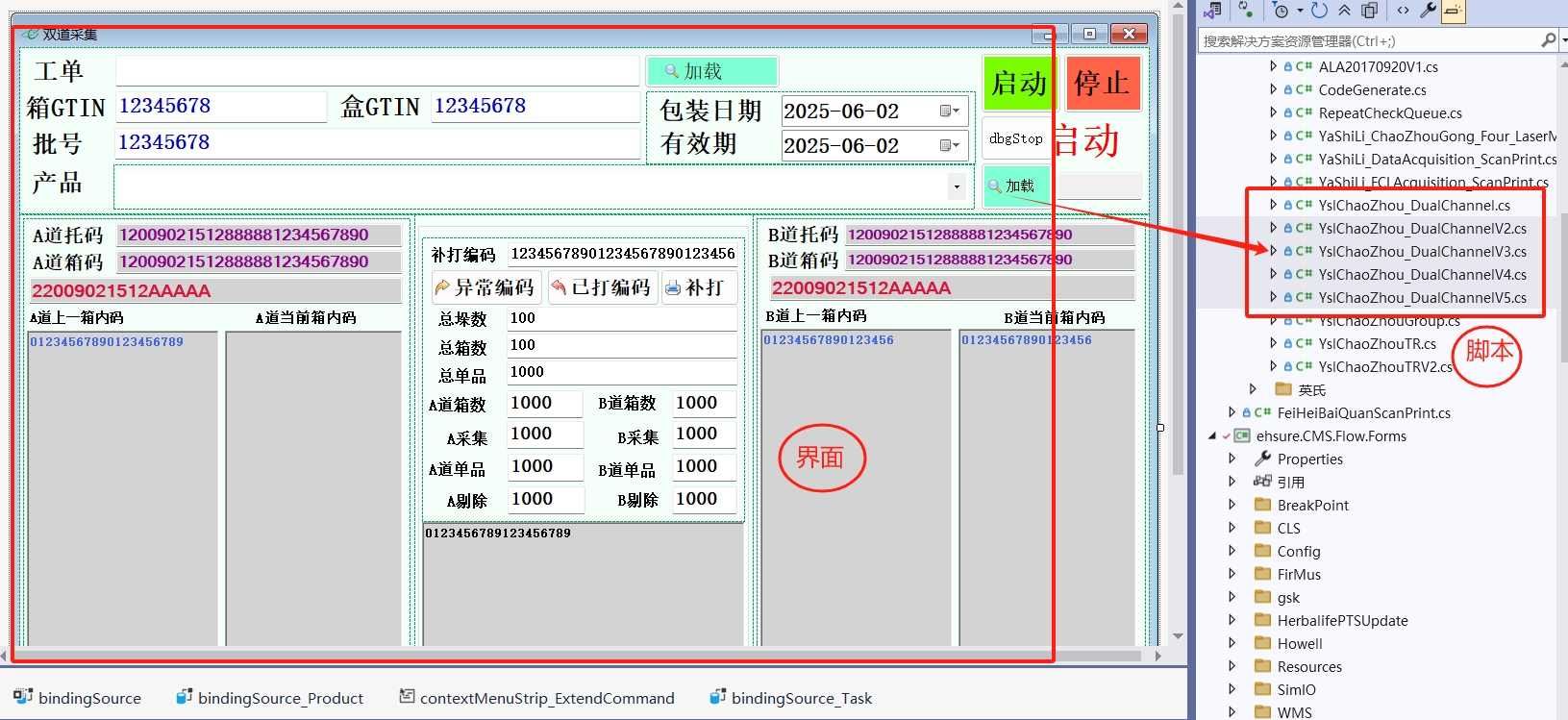
我们看看上图的场景,因为现场的实际方案没有最终确定,所以开发人员写了5个版本的代码来验证5种流程,但界面就1个,因为业务的数据是一样的。像这种情况我们这种解决方式是极好的。写代码的同事只需要初级程序员就可以担任。帮忙验证和测试是由高级程序员来担任。我贴一些源码来辅助说明一下是怎么实现的。
1.界面的基类:
using System;
using System.Collections.Generic;
using System.Threading;
using System.Windows.Forms;
using MES.Core;
using EES.Common;
using EES.Controls.Win;
using EES.Common.Data;
using System.ComponentModel;
using System.Runtime.InteropServices;
using System.Text;
using System.Linq;
using WinControls;
using DataCool_MES.framework;
using DataCool_MES.config;
using DataCool_MES.utils;
using System.Drawing; namespace DataCool_MES
{
public delegate void FeedInfoHandler(object sender, Exception ex, string message, MessageTipsLevel level);
/// <summary>
/// 业务窗体基类
/// </summary>
public partial class BaseModuleForm : DockBaseWorkForm
{
#region DllImport
[DllImport("kernel32")]
public static extern long WritePrivateProfileString(string section, string key, string val, string filepath);
[DllImport("kernel32")]
public static extern int GetPrivateProfileString(string section, string key, string def, StringBuilder retval, int size, string filePath); [DllImport("imm32.dll")]
public static extern IntPtr ImmGetContext(IntPtr hwnd);
[DllImport("imm32.dll")]
public static extern bool ImmGetOpenStatus(IntPtr himc);
[DllImport("imm32.dll")]
public static extern bool ImmSetOpenStatus(IntPtr himc, bool b);
[DllImport("imm32.dll")]
public static extern bool ImmGetConversionStatus(IntPtr himc, ref int lpdw, ref int lpdw2);
[DllImport("imm32.dll")]
#endregion
public static extern int ImmSimulateHotKey(IntPtr hwnd, int lngHotkey);
private const int IME_CMODE_FULLSHAPE = 0x8;
private const int IME_CHOTKEY_SHAPE_TOGGLE = 0x11;
private SynchronizationContext sc;
protected string onceScanData = string.Empty;
private BarCodeHooK hook;
IModuleFlow coreFlowObj;
// 获取屏幕分辨率
private Rectangle primaryScreen;
private float scaleX; // 基准分辨率宽度
private float scaleY;
[Browsable(false)]
public IModuleFlow CoreFlowObj
{
get { return coreFlowObj; }
}
[Browsable(false)]
/// <summary>
/// 日志记录处理异常信息显示处理对象
/// 此处用于各种日志和状态信息的记录,并进行对应的信息的显示
/// </summary>
internal virtual AlertLog Log
{
get
{
return null;
}
}
protected event Action CursorBegin;
protected event Action CursorEnd; /// <summary>
/// 实例化脚本对象
/// </summary>
/// <returns></returns>
protected virtual IModuleFlow CreateModuleFlow()
{
return null;
}
public BaseModuleForm()
{
DoubleBuffered = true;
ImeMode = ImeMode.Off;
AutoScaleMode = AutoScaleMode.None;
InitializeComponent();
#region Cursor
CursorBegin = () =>
{
Clear();
Cursor = Cursors.WaitCursor;
};
CursorEnd = () =>
{
Cursor = Cursors.Default;
};
#endregion
Load += BaseModuleForm_Load;
hook = new BarCodeHooK();
hook.BarCodeEvent += Hook_BarCodeEvent;
hook.Start();
FormClosed += BaseModuleForm_FormClosed;
}
private void BaseModuleForm_FormClosed(object sender, FormClosedEventArgs e)
{
try
{
hook.Stop();
hook.BarCodeEvent -= Hook_BarCodeEvent;
hook = null;
}
catch (Exception ex)
{
FrameAppContext.GetInstance().AppLogger.Error(ex);
}
} private void Hook_BarCodeEvent(BarCodeHooK.BarCodes barCode)
{
if (CoreFlowObj != null && FlowContext.Instance.WorkStatus == WorkStatus.Running && !string.IsNullOrEmpty(barCode.BarCode))
{
onceScanData = TrimSpecialChar(barCode.BarCode);
CoreFlowObj.OnExecScanReceiving(onceScanData);
}
}
private void BaseModuleForm_Load(object sender, EventArgs e)
{
sc = SynchronizationContext.Current;
if (!DesignMode)
{
Input = FlowContext.Instance;
FlowContext.Instance.FlowCustomEvent += OnRaiseFlowCustomEvent;
}
}
private void OnRaiseFlowCustomEvent(object sender, TEventArgs<EventClass> e)
{
sc.Post(new SendOrPostCallback(delegate (object obj)
{
OnFlowCustomEvent((EventClass)obj);
}), e.Data);
} protected virtual void OnFlowCustomEvent(EventClass ec)
{
if (ec.EventType == FlowViewCommand.ClearCurText)
{
Clear();
}
}
/// <summary>
/// 获取当前窗体绑定的上下文对象
/// </summary>
/// <returns></returns>
public virtual BindingType GetBindingType()
{
Type type;
if (bindingSource.DataSource is Type)
{
type = (Type)bindingSource.DataSource;
}
else
{
if (bindingSource.DataSource != null)
{
type = bindingSource.DataSource.GetType();
}
else
{
type = null;
}
}
if (type == null)
{
throw new Exception("界面输入的数据源为空");
}
BindingType bindingType = new BindingType();
Type type2;
if (type.GUID == typeof(DataCollection<>).GUID)
{
type2 = type.GetGenericArguments()[0];
bindingType.IsArray = true;
}
else
{
if (type.GUID == typeof(List<>).GUID)
{
type2 = type.GetGenericArguments()[0];
bindingType.IsArray = true;
}
else
{
type2 = type;
bindingType.IsArray = false;
}
}
bindingType.Type = Factory.getRawType(type2);
return bindingType;
} public virtual void Start()
{
if (coreFlowObj != null && FlowContext.Instance.WorkStatus == WorkStatus.Running)
return;
IModuleFlow core = null;
try
{
CursorBegin.Invoke();
if (CoreFlowObj != null)
throw new Exception("正在作业,不能启动!");
core = CreateModuleFlow();
if (core != null)
{
core.FeedInfo += OnFeedInfo;
core.ExecBeginWork();
coreFlowObj = core;
FlowContext.Instance.WorkStatus = WorkStatus.Running;
}
ImeMode = ImeMode.NoControl;
Log.SetLogFocus();
}
catch (Exception ex)
{
FlowContext.Instance.WorkStatus = WorkStatus.NoAction;
if (coreFlowObj != null)
{
coreFlowObj.FeedInfo -= OnFeedInfo;
coreFlowObj = null;
}
throw ex;
}
finally
{
if (FlowContext.Instance.WorkStatus == WorkStatus.Running)
{
onceScanData = string.Empty;
}
CursorEnd.Invoke();
}
} public virtual void Stop()
{
if (CoreFlowObj != null)
{
try
{
var configObj = SerializerHelper.LoadFromXML<AppContentConfig>(FrameAppContext.GetInstance().RunTimeConfigPath + "\\AppContentConfig.Config");
if (configObj != null && !string.IsNullOrEmpty(configObj.EntryModuleName) && configObj.EntryModuleName.Equals("成品装箱作业"))
{
using (var dlgFrm = new FlowStopCheckForm())
{
var dlg = dlgFrm.ShowDialog();
if (dlg == DialogResult.OK && !FlowContext.Instance.IsEndPacking)
{
CoreFlowObj.ExecEndWork();
coreFlowObj = null;
FlowContext.Instance.WorkStatus = WorkStatus.Stopped;
}
if (dlg == DialogResult.OK && FlowContext.Instance.IsEndPacking)
{
CoreFlowObj.StopWorkCheck();
}
}
}
else
{
CoreFlowObj.ExecEndWork();
coreFlowObj = null;
FlowContext.Instance.WorkStatus = WorkStatus.Stopped;
}
}
catch (Exception ex)
{
Exception error = new Exception("流程执行异常停止," + ex.InnerException == null ? ex.Message : ex.InnerException.Message);
FrameAppContext.GetInstance().AppLogger.Error(error);
}
finally
{
Clear();
if (FlowContext.Instance.WorkStatus != WorkStatus.Running)
{
Log.Write("作业已经停止!", "", MessageTipsLevel.Warning);
FrameAppContext.GetInstance().AppLogger.Info("作业已经停止!");
FlowContext.Instance.ResetContext();
}
Utility.GCFullCollect();
}
}
} public virtual void Pause()
{
coreFlowObj.ExecPauseWork();
coreFlowObj = null;
FlowContext.Instance.WorkStatus = WorkStatus.Pauseing;
Clear();
Log.Write("作业已经暂停!", "", MessageTipsLevel.Warning);
} /// <summary>
/// 界面UI控件的绑定数据清理
/// 此处为虚函数,用于UI派生界面的具体绑定调用处理
/// </summary>
protected virtual void Clear()
{
} /// <summary>
/// 异常信息消息处理队列的回调函数
/// 主要用于各种消息或异常信息的分类处理
/// </summary>
/// <param name="sender"></param>
/// <param name="ex">异常消息结构体</param>
/// <param name="message">异常消息</param>
/// <param name="level">异常消息级别</param>
protected void OnFeedInfo(object sender, Exception ex, string message, MessageTipsLevel level)
{
if (Log == null)
{
throw new Exception("AlertLog对象没有绑定或实例化!");
}
if (ex != null)
{
Log.Write(string.Format("{0}:->", DateTime.Now.ToString("MM/dd HH:mm:ss")), ex.Message, MessageTipsLevel.Error, true);
}
else
{
Log.Write(string.Format("{0}:->", DateTime.Now.ToString("MM/dd HH:mm:ss")), message, level, true);
}
}
/// <summary>
/// 响应扫描枪输入
/// </summary>
/// <param name="msg"></param>
/// <param name="keyData"></param>
/// <returns></returns>
protected override bool ProcessCmdKey(ref Message msg, Keys keyData)
{
#region 快捷键
if (msg.Msg == 0x0100 && ContextMenuStrip != null)
{
foreach (ToolStripMenuItem item in ContextMenuStrip.Items)
{
if (keyData == item.ShortcutKeys)
{
item.PerformClick();
}
}
}
#endregion
if (FlowContext.Instance.WorkStatus != WorkStatus.Running)
return base.ProcessCmdKey(ref msg, keyData);
else
return true;
}
/// <summary>
/// 截取特殊字符
/// </summary>
/// <param name="inputString"></param>
/// <returns></returns>
protected virtual string TrimSpecialChar(string inputString)
{
return inputString.Replace("\u0010", "");
} /// <summary>
/// 动态绑定DataGridView的列
/// </summary>
/// <param name="t"></param>
/// <param name="dgv"></param>
protected virtual void BingGridColumn(Type t, DataGridView dgv)
{
dgv.Columns.Clear();
var props = t.GetProperties().Where(prop => prop.GetCustomAttributes(typeof(DisplayNameAttribute), false).Any());
int col_width = dgv.Width / props.Count() - 8;
foreach (var prop in props)
{
DisplayNameAttribute attrib = (DisplayNameAttribute)prop.GetCustomAttributes(typeof(DisplayNameAttribute), false).FirstOrDefault();
if (prop.GetCustomAttributes(typeof(ProgressBarCellAttribute), false).Any())
{
DataGridViewProgressBarColumn dc = new DataGridViewProgressBarColumn();
dc.Name = "col" + prop.Name;
dc.HeaderText = attrib.DisplayName;
dc.DataPropertyName = prop.Name;
dc.Width = col_width;
dgv.Columns.Add(dc);
}
else
{
DataGridViewTextBoxColumn dc = new DataGridViewTextBoxColumn();
dc.Name = "col" + prop.Name;
dc.HeaderText = attrib.DisplayName;
dc.DataPropertyName = prop.Name;
dc.Width = col_width;
dgv.Columns.Add(dc);
}
}
}
/// <summary>
/// 窗体激活时设置输入法是半角
/// </summary>
/// <param name="e"></param>
protected override void OnActivated(EventArgs e)
{
base.OnActivated(e);
IntPtr HIme = ImmGetContext(this.Handle);
if (ImmGetOpenStatus(HIme)) //如果输入法处于打开状态
{
int iMode = 0;
int iSentence = 0;
bool bSuccess = ImmGetConversionStatus(HIme, ref iMode, ref iSentence); //检索输入法资讯
if (bSuccess)
{
if ((iMode & IME_CMODE_FULLSHAPE) > 0) //如果是全形
ImmSimulateHotKey(this.Handle, IME_CHOTKEY_SHAPE_TOGGLE); //转换成半形
}
}
} /// <summary>
/// 缩放控件
/// </summary>
/// <param name="control"></param>
protected void ScaleControl(Control control)
{
control.Left = (int)(control.Left * scaleX);
control.Top = (int)(control.Top * scaleY);
control.Width = (int)(control.Width * scaleX);
control.Height = (int)(control.Height * scaleY);
foreach (Control child in control.Controls)
{
ScaleControl(child);
}
}
}
}
2、代码的基类
using EES.Common;

using System;

using MES.Core;

namespace DataCool_MES

{

    /// <summary>

    /// 脚本的基类

    /// </summary>

    public abstract class ModuleBaseFlow : IModuleFlow

    {

        /// <summary>

        /// 传递消息的事件

        /// </summary>

        public event FeedInfoHandler FeedInfo;

        protected FlowContext flowContext = FlowContext.Instance;

        //是否是调试模式

        protected bool debugMode = false;

        //是否显示过程明细信息

        protected bool showDetail = false;

        /// <summary>

        /// 采集到数据后发生

        /// </summary>

        /// <param name="data"></param>

        public virtual void OnExecScanReceiving(string data)

        {

            FrameAppContext.GetInstance().AppLogger.Info(data);

        }

        /// <summary>

        /// 触发消息传递

        /// </summary>

        /// <param name="sender"></param>

        /// <param name="ex"></param>

        /// <param name="message"></param>

        /// <param name="level"></param>

        protected virtual void OnFeedInfo(object sender, Exception ex, string message, MessageTipsLevel level)

        {

            FeedInfo?.Invoke(sender, ex, message, level);

            if (ex != null)

                OnException(ex);

        }

        /// <summary>

        /// 手动处理脚本触发的异常

        /// </summary>

        /// <param name="ex"></param>

        protected virtual void OnException(Exception ex)

        {

        }

        /// <summary>

        /// 触发抛出异常

        /// </summary>

        /// <param name="sender"></param>

        /// <param name="message"></param>

        /// <param name="args"></param>

        protected virtual void RaiseException(object sender, string message, params object[] args)

        {

            OnFeedInfo(sender, new Exception(string.Format(message, args)), message, MessageTipsLevel.Error);

            if (!message.Contains("由于目标计算机积极拒绝"))

                throw new Exception(message);

        }

        /// <summary>

        /// 触发消息提示

        /// </summary>

        /// <param name="sender"></param>

        /// <param name="message"></param>

        protected void RaiseInfo(object sender, string message)

        {

            OnFeedInfo(sender, null, message, MessageTipsLevel.Information);

        }

        /// <summary>

        /// 触发警告信息

        /// </summary>

        /// <param name="sender"></param>

        /// <param name="message"></param>

        protected void RaiseWarning(object sender, string message)

        {

            OnFeedInfo(sender, null, message, MessageTipsLevel.Warning);

        }

        /// <summary>

        /// 脚本触发界面自定义事件响应

        /// </summary>

        /// <param name="eventType"></param>

        /// <param name="portKey"></param>

        /// <param name="portName"></param>

        /// <param name="data"></param>

        public virtual void RaiseCustomEvent(string eventType, string portKey, string portName, object data)

        {

            try

            {

                FlowContext.Instance.RaiseCustomEvent(this, eventType, portKey, portName, data);

            }

            catch (Exception ex)

            {

                RaiseException(this, ex.Message);

            }

        }

        /// <summary>

        /// 执行开始作业

        /// </summary>

        public virtual void ExecBeginWork()

        {

            try

            {

                BeforeWorkInit();

            }

            catch (Exception ex)

            {

                throw ex;

            }

        }

        /// <summary>

        /// 执行结束作业

        /// </summary>

        public virtual void ExecEndWork()

        {

        }

        /// <summary>

        /// 执行暂停作业

        /// </summary>

        public virtual void ExecPauseWork()

        {

            try

            {

                PauseWorkCache();

            }

            catch (Exception ex)

            {

                throw ex;

            }

            finally

            {

                FlowContext.Instance.ResetContext();

            }

        }

        /// <summary>

        /// 开始作业前初始化

        /// </summary>

        protected virtual void BeforeWorkInit()

        {

            RaiseInfo(this,"作业条件检查中...");

        }

        /// <summary>

        /// 结束作业时执行检查

        /// </summary>

        public virtual void StopWorkCheck()

        {

        }

        /// <summary>

        /// 暂停作业时缓存业务临时数据

        /// </summary>

        protected virtual void PauseWorkCache()

        {

        }

    }

}
3.业务窗体
using System;
using System.Collections.Generic;
using System.ComponentModel.Composition;
using System.ComponentModel.Composition.Hosting;
using System.Data;
using System.Linq;
using System.Reflection;
using System.Text;
using System.Threading;
using System.Windows.Forms;
using MES.Core;
using MES.Services;
using DataCool_MES.modules.dto;
using MES.Services.ModuleFlowServices;
using System.Net.Sockets;
using System.IO;
using WinControls; namespace DataCool_MES.modules
{
[FullScreenStyle(true)]
[View("批量扫描tray盘混料检测", EntryType.入口, "一次产品检验", "包装作业")]
public partial class BatchPackForm : BaseModuleForm
{
[Import]
protected IModuleFlowFormService ModuleFlowFormService { get; set; }
//已扫记录
private List<BatchScanLogDto> LogData = new List<BatchScanLogDto>();
private BatchScanLogDto currentBarcodeData = null;
private WorkStationConfig config;
private TcpClient cameraClient;
private TcpClient transmitDeviceClient;
private byte[] buffer = new byte[2048];
public BatchPackForm()
{
DoubleBuffered = true;
CheckForIllegalCrossThreadCalls = false;
InitializeComponent();
config = SerializerHelper.LoadFromXML<WorkStationConfig>(AppDomain.CurrentDomain.BaseDirectory + "Config\\" + "WorkStationConfig.xml");
if (config != null)
{
FlowContext.Instance.TraySpecifications = config.TraySpecifications;
}
Load += BatchPackForm_Load;
FormClosed += BatchPackForm_FormClosed;
}
private void BatchPackForm_FormClosed(object sender, FormClosedEventArgs e)
{
if (transmitDeviceClient != null)
{
try
{
transmitDeviceClient.Client?.Disconnect(false);
transmitDeviceClient.Client?.Close();
transmitDeviceClient?.Close();
transmitDeviceClient = null;
}
catch
{
}
}
Program.Quit();
} AlertLog log; internal override AlertLog Log
{
get
{
if (log == null)
{
Interlocked.CompareExchange(ref log, new AlertLog(richTextBox1), null);
}
return log;
}
} private void BatchPackForm_Load(object sender, EventArgs e)
{
var catalog = new AssemblyCatalog(Assembly.GetExecutingAssembly());
var container = new CompositionContainer(catalog);
container.ComposeParts(this, new FlowWorkService());
if (!System.Diagnostics.Debugger.IsAttached)
{
btnStart.DataBindings.Add(new Binding("Enabled", FlowContext.Instance, "IsStoped", false, DataSourceUpdateMode.OnPropertyChanged));
btnStop.DataBindings.Add(new Binding("Enabled", FlowContext.Instance, "IsRunning", false, DataSourceUpdateMode.OnPropertyChanged));
} if (config != null && !string.IsNullOrEmpty(config.TransmissionDeviceIP))
{
try
{
transmitDeviceClient = new TcpClient();
transmitDeviceClient.BeginConnect(config.TransmissionDeviceIP, config.TransmissionDevicePort, new AsyncCallback(ConnectCallback2), transmitDeviceClient); }
catch (Exception ex)
{
FrameAppContext.GetInstance().AppLogger.Error(ex);
}
}
} protected override IModuleFlow CreateModuleFlow()
{
return new BatchScanWorkFlow(ModuleFlowFormService);
}
protected override void Clear()
{
richTextBox1.Text = "";
}
private void btnStart_Click(object sender, EventArgs e)
{
try
{
Start();
if (FlowContext.Instance.WorkStatus == WorkStatus.Running)
{
cameraClient = new TcpClient();
cameraClient.BeginConnect(config.CameraIP, config.CameraPort, new AsyncCallback(ConnectCallback), cameraClient);
}
if (FlowContext.Instance.WorkStatus == WorkStatus.Running)
{
try
{
if (transmitDeviceClient != null)
{
var sm = transmitDeviceClient.GetStream();
SendCommandToDevice(sm, "OK");
}
else
{
Log.Write("", "没有和传动设备建立连接!!!", MessageTipsLevel.Error);
}
}
catch (Exception ex)
{
Log.Write("", "和传动设备通信失败!!!" + Environment.NewLine + ex.Message, MessageTipsLevel.Error);
}
}
}
catch (Exception ex)
{
FrameAppContext.GetInstance().AppLogger.Error($"{ex.Message}");
}
}
void ConnectCallback(IAsyncResult ar)
{
TcpClient client = (TcpClient)ar.AsyncState;
try
{
client.EndConnect(ar);
NetworkStream stream = client.GetStream();
if (stream != null)
{
buffer = new byte[2048];
stream.BeginRead(buffer, 0, buffer.Length, new AsyncCallback(ReadCallback), stream);
}
}
catch (Exception ex)
{
log.Write("", ex.Message, MessageTipsLevel.Error);
}
}
void ReadCallback(IAsyncResult ar)
{
NetworkStream stream = (NetworkStream)ar.AsyncState;
if (FlowContext.Instance.WorkStatus != WorkStatus.Running)
return;
int bytesRead = stream.EndRead(ar);
string responseData = Encoding.ASCII.GetString(buffer, 0, bytesRead);
log.Write("", $"Received: {Environment.NewLine}{responseData}", MessageTipsLevel.Information);
FrameAppContext.GetInstance().AppLogger.Info(Environment.NewLine + responseData);
if (!string.IsNullOrEmpty(responseData) && responseData.IndexOf("+") != -1)
{
ScanLog(responseData);
}
buffer = new byte[2048];
stream.BeginRead(buffer, 0, buffer.Length, new AsyncCallback(ReadCallback), stream);
}
private void BtnStop_Click(object sender, EventArgs e)
{
try
{
Stop();
var config = SerializerHelper.LoadFromXML<WorkStationConfig>(AppDomain.CurrentDomain.BaseDirectory + "Config\\" + "WorkStationConfig.xml");
FlowContext.Instance.TraySpecifications = config.TraySpecifications;
if (config != null && !string.IsNullOrEmpty(config.TraySpecifications) &&
config.TraySpecifications.IndexOf(",") == -1)
{
string[] cellData = config.TraySpecifications.Split('*');
if (cellData.Length > 0)
{
FlowContext.Instance.TrayRowCount = Convert.ToInt32(cellData[1]);
FlowContext.Instance.TrayCellCount = Convert.ToInt32(cellData[0]);
}
}
if (cameraClient != null && FlowContext.Instance.WorkStatus != WorkStatus.Running)
{
cameraClient.Client?.Disconnect(false);
cameraClient.Client?.Close();
cameraClient?.Close();
cameraClient = null;
}
SendCommandToDevice(transmitDeviceClient.GetStream(), "NG");
}
catch (Exception ex)
{
FrameAppContext.GetInstance().AppLogger.Error($"{ex.Message}");
}
}
protected override void OnFlowCustomEvent(EventClass ec)
{
if (ec.EventType.Equals("LoadData"))
{
DataAction(LoadData);
}
if (ec.EventType.Equals("ExportResultData"))
{
DataAction(ExportLogToExcelFile);
}
}
/// <summary>
/// 从临时xml文件读取扫描历史记录
/// </summary>
private void SaveData()
{
if (!System.IO.Directory.Exists(AppDomain.CurrentDomain.BaseDirectory + "LocalData"))
{
System.IO.Directory.CreateDirectory(AppDomain.CurrentDomain.BaseDirectory + "LocalData");
}
if (!System.IO.File.Exists(AppDomain.CurrentDomain.BaseDirectory + "LocalData\\" + DateTime.Now.ToString("yyyyMMdd") + ".xml"))
{
SerializerHelper.SerializerToXML(AppDomain.CurrentDomain.BaseDirectory + "LocalData\\" + DateTime.Now.ToString("yyyyMMdd") + ".xml", LogData);
}
else
{
System.IO.File.Delete(AppDomain.CurrentDomain.BaseDirectory + "LocalData\\" + DateTime.Now.ToString("yyyyMMdd") + ".xml");
SerializerHelper.SerializerToXML(AppDomain.CurrentDomain.BaseDirectory + "LocalData\\" + DateTime.Now.ToString("yyyyMMdd") + ".xml", LogData);
}
FlowContext.Instance.L1Count = LogData.Count;
if (LogData.Count > 0)
bindingSourceGrid.DataSource = LogData.OrderByDescending(t => t.ScanDatetime).ToList();
}
/// <summary>
/// 加载已有扫描记录
/// </summary>
private void LoadData()
{
if (!System.IO.Directory.Exists(AppDomain.CurrentDomain.BaseDirectory + "LocalData"))
{
System.IO.Directory.CreateDirectory(AppDomain.CurrentDomain.BaseDirectory + "LocalData");
}
if (System.IO.File.Exists(AppDomain.CurrentDomain.BaseDirectory + "LocalData\\" + DateTime.Now.ToString("yyyyMMdd") + ".xml"))
{
LogData = SerializerHelper.LoadFromXML<List<BatchScanLogDto>>(AppDomain.CurrentDomain.BaseDirectory + "LocalData\\" + DateTime.Now.ToString("yyyyMMdd") + ".xml");
FlowContext.Instance.L1Count = LogData.Count;
if (LogData.Count > 0)
bindingSourceGrid.DataSource = LogData.OrderByDescending(t => t.ScanDatetime).ToList(); }
}
/// <summary>
/// 扫描到一组条码
/// </summary>
/// <param name="barcodeData"></param>
private void ScanLog(string barcodeData)
{
if (LogData.Any(t => t.BarcodeData == barcodeData))
{
log.Write(DateTime.Now + "->:", "重复扫描!", MessageTipsLevel.Error);
}
else
{
#region 传递收到的数据
var entity = new BatchScanLogDto();
entity.BarcodeData = barcodeData;
entity.MaterialCode = FlowContext.Instance.MaterielCode;
entity.ScanDatetime = DateTime.Now.ToString();
entity.TraySpecifications = FlowContext.Instance.TraySpecifications;
entity.ResourceText = barcodeData;
currentBarcodeData = entity;
#endregion
//校验数据
ThreeColorled1_Click(threeColorled1, new EventArgs());
}
}
private void ThreeColorled1_Click(object sender, EventArgs e)
{
//必须是符合业务场景的扫描数据
if (FlowContext.Instance.WorkStatus != WorkStatus.Running ||
currentBarcodeData == null ||
currentBarcodeData.BarcodeData.IndexOf("+") == -1)
return;
#region 展示解析结果
BarcodeResultViewForm barcodeResultViewForm = new BarcodeResultViewForm(currentBarcodeData);
var diagResult = barcodeResultViewForm.ShowDialog();
if (diagResult == DialogResult.OK &&
!LogData.Any(r => r.ResourceText == currentBarcodeData.ResourceText))
{
threeColorled1.StatusCode = "1";
log.Write("", "校验通过!", MessageTipsLevel.Information);
LogData.Add(barcodeResultViewForm.BarcodeData);
DataAction(SaveData);
FlowContext.Instance.L1Count = LogData.Count;
SendCommandToDevice(transmitDeviceClient.GetStream(), "OK");
}
else if (diagResult != DialogResult.OK &&
!LogData.Any(r => r.ResourceText == currentBarcodeData.ResourceText))
{
threeColorled1.StatusCode = "2";
var sm = transmitDeviceClient.GetStream();
SendCommandToDevice(sm, "NG");
log.Write("", $"{Environment.NewLine}校验结果是有混料,不予通行!!!", MessageTipsLevel.Warning);
}
#endregion
}
/// <summary>
/// 和传动设备建立Socket连接回调
/// </summary>
/// <param name="ar"></param>
void ConnectCallback2(IAsyncResult ar)
{
TcpClient client = (TcpClient)ar.AsyncState;
try
{
client.EndConnect(ar);
Log.Write("", "传动设备已准备就绪...", MessageTipsLevel.Information);
}
catch (Exception ex)
{
Log.Write("", "传动设备连接失败!"+ex.Message, MessageTipsLevel.Error);
FrameAppContext.GetInstance().AppLogger.Error(ex);
}
}
/// <summary>
/// 给NetworkStream发送指令
/// </summary>
/// <param name="stream"></param>
/// <param name="cmd"></param>
private void SendCommandToDevice(NetworkStream stream, string cmd)
{
string command = cmd;
byte[] commandBuffer = ASCIIEncoding.ASCII.GetBytes(command);
stream.WriteAsync(commandBuffer, 0, commandBuffer.Length);
}
/// <summary>
/// 导出Excel文件(扫码原始记录)
/// </summary>
/// <param name="sender"></param>
/// <param name="e"></param>
private void BtnExport_Click(object sender, EventArgs e)
{
if (LogData.Count == 0)
{
MessageTip.ShowError("还没有通过检验的记录不能导出!");
}
else
{
ExportExcel exportExcel = new ExportExcel();
string fileName = $"{AppDomain.CurrentDomain.BaseDirectory + "LocalData"}\\{DateTime.Now.Date:yyyyMMdd}{FlowContext.Instance.MaterielCode}.xls";
exportExcel.GridToExcel(fileName, this.dataGridView1);
if (File.Exists(fileName))
{
MessageTip.ShowOk($"Excel文件导出成功!");
}
}
}
/// <summary>
/// 导出Excel文件(MES要求的格式)
/// </summary>
private void ExportLogToExcelFile()
{
if (LogData.Count == 0)
return;
#region 临时表
var dt = new DataTable();
dt.Columns.Add(new DataColumn("条码", typeof(string)));
foreach (var logItem in LogData)
{
string[] barcodeList = logItem.BarcodeData.Split(new char[] { ',' }, StringSplitOptions.RemoveEmptyEntries);
foreach (var barcode in barcodeList)
{
DataRow dr = dt.NewRow();
dr[0] = barcode;
dt.Rows.Add(dr);
}
}
#endregion
try
{
ExportExcel exportExcel = new ExportExcel();
string fileName = $"{AppDomain.CurrentDomain.BaseDirectory + "LocalData"}\\{DateTime.Now.Date:yyyyMMdd}{FlowContext.Instance.MaterielCode}(仅条码).xls";
if (File.Exists(fileName))
File.Delete(fileName);
exportExcel.DataTableToExcel(fileName, dt);
if (File.Exists(fileName))
{
MessageTip.ShowOk("生产过程的全部条码已保存!");
string logMessage = $"本次生产共计扫描条码{dt.Rows.Count}个,通过tray盘{LogData.Count}盘.";
log.Write("", logMessage, MessageTipsLevel.Information);
FrameAppContext.GetInstance().AppLogger.Info(logMessage);
}
}
catch (Exception ex)
{
log.Write("", ex.Message, MessageTipsLevel.Error);
}
finally
{
dt.Dispose();
}
} private void button1_Click(object sender, EventArgs e)
{
Program.Quit();
} private void richTextBox1_DoubleClick(object sender, EventArgs e)
{
Clear();
}
}
}
4.流程代码
using System;

using System.ComponentModel.Composition;

using System.IO;

using System.Net;

using System.Net.Sockets;

using System.Text;

using System.Windows.Forms;

using MES.Core;

using MES.Services;

namespace DataCool_MES.modules

{

    /// <summary>

    /// 批量扫描作业流程

    /// </summary>

    public class BatchScanWorkFlow : ModuleBaseFlow

    {

        private TcpClient cameraClient;

        protected IModuleFlowFormService ModuleFlowFormService { get; set; }

        /// <summary>

        /// 析构函数

        /// </summary>

        /// <param name="svr"></param>

        public BatchScanWorkFlow(IModuleFlowFormService svr)

        {

            ModuleFlowFormService = svr;

        }

        /// <summary>

        /// 和阅读器建立Socket连接回调

        /// </summary>

        /// <param name="ar"></param>

        void ConnectCallback(IAsyncResult ar)

        {

            try

            {

                TcpClient client = (TcpClient)ar.AsyncState;

                client?.EndConnect(ar);

                NetworkStream stream = client.GetStream();

                if (stream != null)

                {

                    RaiseInfo(this, "读码器已准备就绪...");

                    if (client != null)

                    {

                        stream.Close();

                        cameraClient?.Close();

                    }

                }

            }

            catch (Exception ex)

            {

                RaiseException(this, "读码器连接失败!!!错误码:"+ex.Message);

            }

        }

        /// <summary>

        /// 给NetworkStream发送指令

        /// </summary>

        /// <param name="stream"></param>

        /// <param name="cmd"></param>

        private void SendCommandToDevice(NetworkStream stream, string cmd)

        {

            string command = cmd;

            byte[] commandBuffer = ASCIIEncoding.ASCII.GetBytes(command);

            stream.WriteAsync(commandBuffer, 0, commandBuffer.Length);

        }

        /// <summary>

        /// 和传动设备建立Socket连接回调

        /// </summary>

        /// <param name="ar"></param>

        void ConnectCallback2(IAsyncResult ar)

        {

            try

            {

                TcpClient client = (TcpClient)ar.AsyncState;

                client?.EndConnect(ar);

                NetworkStream stream = client.GetStream();

                if (stream != null)

                {

                    //发消息让皮带开始转动

                    SendCommandToDevice(stream, "OK");

                }

            }

            catch (Exception ex)

            {

                RaiseException(this, "传动设备连接失败!!!错误码:" + ex.Message);

            }

        }

        /// <summary>

        /// 开始作业前准备工作

        /// </summary>

        protected override void BeforeWorkInit()

        {

            base.BeforeWorkInit();

            if (string.IsNullOrEmpty(FlowContext.Instance.TraySpecifications))

            {

                RaiseException($"{DateTime.Now}->:", $"必须设定容器的规格!");

            }

            if (string.IsNullOrEmpty(FlowContext.Instance.MaterielCodeHeader+FlowContext.Instance.MaterielCodeEnder))

            {

                RaiseException($"{DateTime.Now}->:", $"必须输入本次校验的物料代码!");

            }

            flowContext.L1Count = 0;

            RaiseCustomEvent("LoadData", "", "", "");

            var config = SerializerHelper.LoadFromXML<WorkStationConfig>(AppDomain.CurrentDomain.BaseDirectory + "Config\\" + "WorkStationConfig.xml");

            if (config != null && !string.IsNullOrEmpty(config.CameraIP))

            {

                try

                {

                    cameraClient = new TcpClient();

                    cameraClient.BeginConnect(config.CameraIP, config.CameraPort, new AsyncCallback(ConnectCallback), cameraClient);

 }

                catch (Exception ex)

                {

                    RaiseException(this,"",ex.Message);

                }

            }

            else

            {

                RaiseException($"{DateTime.Now}->:", $"必须设定阅读器的IP地址!");

            }

            if (config != null && !string.IsNullOrEmpty(config.TraySpecifications) && config.TraySpecifications.IndexOf(",") == -1)

            {

                string[] cellData = config.TraySpecifications.Split('*');

                if (cellData.Length > 0)

                {

                    flowContext.TrayRowCount = Convert.ToInt32(cellData[1]);

                    flowContext.TrayCellCount = Convert.ToInt32(cellData[0]);

                }

            }

            FlowContext.Instance.MaterielCode= FlowContext.Instance.MaterielCodeHeader+FlowContext.Instance.MaterielCodeEnder;

            RaiseInfo(this, "系统准备就绪...");

        }

        /// <summary>

        /// 扫描到一个条码

        /// </summary>

        /// <param name="data"></param>

        public override void OnExecScanReceiving(string data)

        {

            RaiseCustomEvent("ScanLog", "", "", data);

        }

        /// <summary>

        /// 结束本次作业

        /// </summary>

        public override void ExecEndWork()

        {

            base.ExecEndWork();

            //导出扫描记录

            RaiseCustomEvent("ExportResultData", "", "", "");

        }

    }

}
5.界面绑定代码
 protected override IModuleFlow CreateModuleFlow()

 {

     return new BatchScanWorkFlow(ModuleFlowFormService);

 }
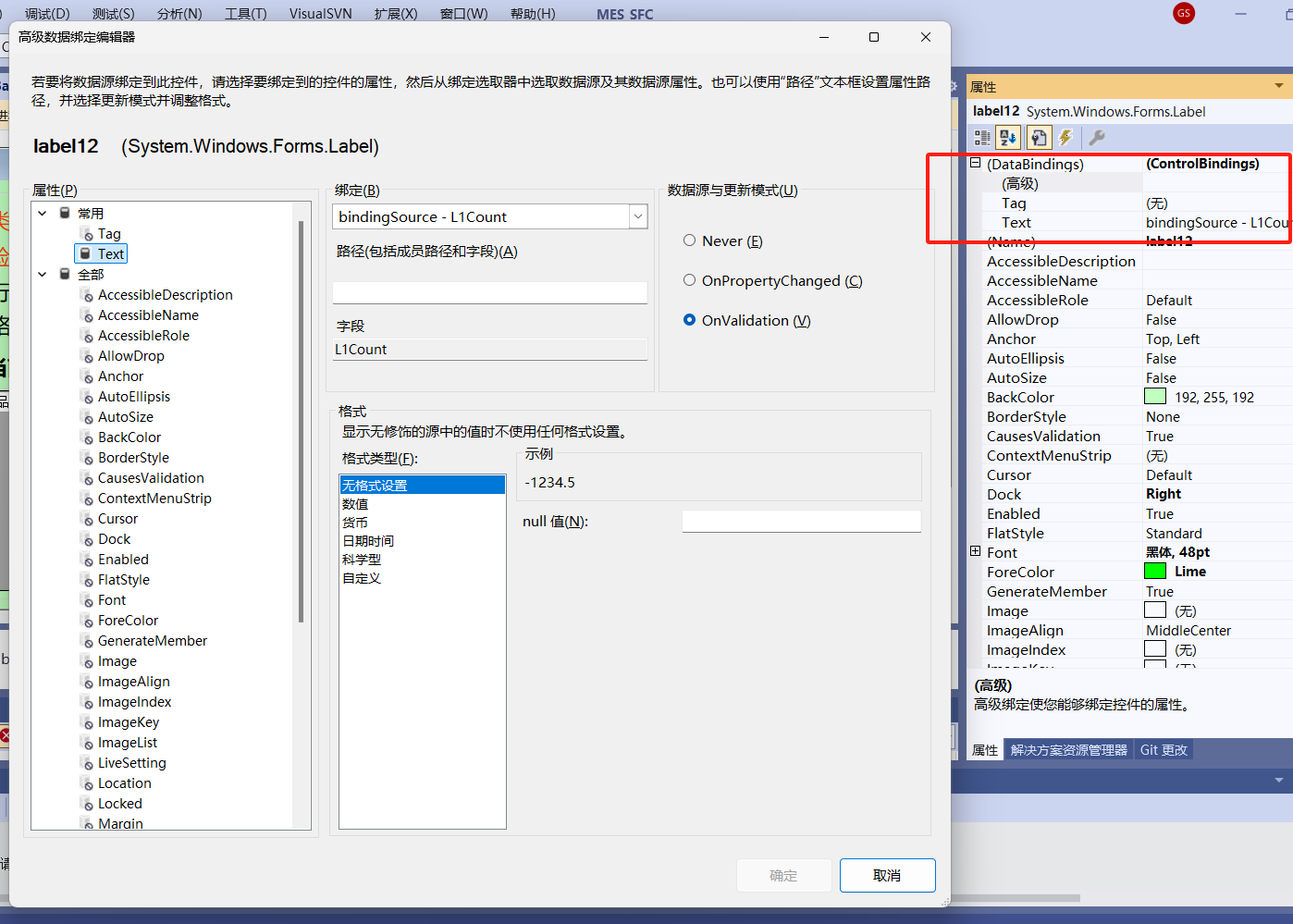
界面和代码中间还有个上下文对象,也就是一个单例,貌似这样子:
using EES.Common;

using MES.Core;

using System;

using System.ComponentModel;

namespace DataCool_MES

{

    /// <summary>

    /// 工作流程上下文对象

    /// </summary>

    [Serializable]

    public class FlowContext : SingletonProvider<FlowContext>, INotifyPropertyChanged

    {

        public System.Configuration.Configuration AppConfig { get; set; }

        public event EventHandler<TEventArgs<EventClass>> FlowCustomEvent;

        public event PropertyChangedEventHandler PropertyChanged;

        private void OnPropertyChanged(string propertyName)

        {

            PropertyChanged?.Invoke(this, new PropertyChangedEventArgs(propertyName));

        }

        private WorkStatus workStatus;

        /// <summary>

        /// 工作流程运行状态

        /// </summary>

        public WorkStatus WorkStatus

        {

            get { return workStatus; }

            set

            {

                workStatus = value;

                OnPropertyChanged("WorkStatus");

                switch (value)

                {

                    case WorkStatus.Running:

                        IsRunning = true;

                        IsStoped = false;

                        WorkStatusName = "运行中...";

                        break;

                    case WorkStatus.Pauseing:

                        IsRunning = false;

                        IsStoped = true;

                        WorkStatusName = "暂停中...";

                        break;

                    case WorkStatus.Stopped:

                        IsRunning = false;

                        IsStoped = true;

                        WorkStatusName = "已经停止...";

                        break;

                    default:

                        IsRunning = false;

                        IsStoped = true;

                        WorkStatusName = "未启动";

                        break;

                }

            }

        }

        private string workStation;

        /// <summary>

        /// 工位

        /// </summary>

        public string WorkStation

        {

            get { return workStation; }

            set

            {

                workStation = value;

                OnPropertyChanged("WorkStation");

            }

        }

        private string _operator;

        /// <summary>

        /// 工位操作员

        /// </summary>

        public string Operator

        {

            get { return _operator; }

            set { _operator = value; OnPropertyChanged("Operator"); }

        }

        private string lineNo;

        /// <summary>

        /// 线号

        /// </summary>

        public string LineNo

        {

            get { return lineNo; }

            set { lineNo = value; OnPropertyChanged("LineNo"); }

        }

        private string _L1Code;

        /// <summary>

        /// PCBA条码

        /// </summary>

        public string L1Code

        {

            get { return _L1Code; }

            set { _L1Code = value; OnPropertyChanged("L1Code"); }

        }

        private string _L2Code;

        /// <summary>

        /// 过程条码

        /// </summary>

        public string L2Code

        {

            get { return _L2Code; }

            set { _L2Code = value; OnPropertyChanged("L2Code"); }

        }

        private string workStatusName;

        /// <summary>

        /// 状态状态描述信息

        /// </summary>

        public string WorkStatusName

        {

            get { return workStatusName; }

            set { workStatusName = value; OnPropertyChanged("WorkStatusName"); }

        }

        private int _L1Count;

        /// <summary>

        /// 第一道工序计数

        /// </summary>

        public int L1Count

        {

            get { return _L1Count; }

            set

            {

                _L1Count = value;

                OnPropertyChanged("L1Count");

            }

        }

        private int _L1CountEx = 0;

        /// <summary>

        /// 制令计数,可清零

        /// </summary>

        public int L1CountEx

        {

            get { return _L1CountEx; }

            set

            {

                _L1CountEx = value;

                OnPropertyChanged("L1CountEx");

            }

        }

        private int _L2Count;

        /// <summary>

        /// 第二道工序计数

        /// </summary>

        public int L2Count

        {

            get { return _L2Count; }

            set { _L2Count = value; OnPropertyChanged("L2Count"); }

        }

        private string _TraySpecifications;

        /// <summary>

        ///Tray Specifications

        /// </summary>

        public string TraySpecifications

        {

            get { return _TraySpecifications; }

            set

            {

                _TraySpecifications = value;

                OnPropertyChanged("TraySpecifications");

            }

        }

        public int TrayCellCount

        {

            get;set;

        }

        public int TrayRowCount

        {

            get; set;

        }

        private string orderNo;

        /// <summary>

        /// 状态状态描述信息

        /// </summary>

        public string OrderNo

        {

            get { return orderNo; }

            set

            {

                orderNo = value;

                OnPropertyChanged("OrderNo");

            }

        }

        private string _MaterielCode;

        /// <summary>

        /// 物料编码

        /// </summary>

        public string MaterielCode

        {

            get { return _MaterielCode; }

            set { _MaterielCode = value; OnPropertyChanged("MaterielCode"); }

        }

        private string _MaterielCodeEnder;

        /// <summary>

        /// 物料编码

        /// </summary>

        public string MaterielCodeEnder

        {

            get { return _MaterielCodeEnder; }

            set { _MaterielCodeEnder = value; OnPropertyChanged("_MaterielCodeEnder"); }

        }

        private string _MaterielCodeHeader;

        /// <summary>

        /// 物料编码

        /// </summary>

        public string MaterielCodeHeader

        {

            get { return _MaterielCodeHeader; }

            set { _MaterielCodeHeader = value; OnPropertyChanged("MaterielCodeHeader"); }

        }

        private int progress;

        /// <summary>

        /// 本次扫描完成时的进度

        /// </summary>

        public int Progress

        {

            get { return progress; }

            set { progress = value; OnPropertyChanged("Progress"); }

        }

        private bool isStoped = true;

        /// <summary>

        /// WorkStatus是否已经停止

        /// </summary>

        public bool IsStoped

        {

            get { return isStoped; }

            set { isStoped = value; OnPropertyChanged("IsStoped"); }

        }

        private bool isRunning = false;

        /// <summary>

        /// WorkStatus是否正在运行

        /// </summary>

        public bool IsRunning

        {

            get { return isRunning; }

            set { isRunning = value; OnPropertyChanged("IsRunning"); }

        }

        private string _Parameter1;

        /// <summary>

        /// 公用参数1

        /// </summary>

        public string Parameter1

        {

            get { return _Parameter1; }

            set { _Parameter1 = value; OnPropertyChanged("Parameter1"); }

        }

        private string _Parameter2;

        /// <summary>

        /// 公用参数2

        /// </summary>

        public string Parameter2

        {

            get { return _Parameter2; }

            set { _Parameter2 = value; OnPropertyChanged("Parameter2"); }

        }

        private string _Parameter3;

        /// <summary>

        /// 公用参数3

        /// </summary>

        public string Parameter3

        {

            get { return _Parameter3; }

            set { _Parameter3 = value; OnPropertyChanged("Parameter3"); }

        }

        private string _Parameter4;

        /// <summary>

        /// 公用参数4

        /// </summary>

        public string Parameter4

        {

            get { return _Parameter4; }

            set { _Parameter4 = value; OnPropertyChanged("Parameter4"); }

        }

        private string _Parameter5;

        /// <summary>

        /// 公用参数5

        /// </summary>

        public string Parameter5

        {

            get { return _Parameter5; }

            set { _Parameter5 = value; OnPropertyChanged("Parameter5"); }

        }

        private string _Parameter6;

        /// <summary>

        /// 公用参数6

        /// </summary>

        public string Parameter6

        {

            get { return _Parameter6; }

            set { _Parameter6 = value; OnPropertyChanged("Parameter6"); }

        }

        private string _Parameter7;

        /// <summary>

        /// 公用参数7

        /// </summary>

        public string Parameter7

        {

            get { return _Parameter7; }

            set { _Parameter7 = value; OnPropertyChanged("Parameter7"); }

        }

        private string _Parameter8;

        /// <summary>

        /// 公用参数8

        /// </summary>

        public string Parameter8

        {

            get { return _Parameter8; }

            set { _Parameter8 = value; OnPropertyChanged("Parameter8"); }

        }

        private string _Parameter9;

        /// <summary>

        /// 公用参数9

        /// </summary>

        public string Parameter9

        {

            get { return _Parameter9; }

            set { _Parameter9 = value; OnPropertyChanged("Parameter9"); }

        }

        private int packagePCS;

        /// <summary>

        /// 二级包装,PCS数量

        /// </summary>

        public int PackagePCS_Count

        {

            get { return packagePCS; }

            set { packagePCS = value; OnPropertyChanged("PackagePCS_Count"); }

        }

        private bool isEndPacking=false;

        /// <summary>

        /// 是否是在装尾箱

        /// </summary>

        public bool IsEndPacking

        {

            get { return isEndPacking; }

            set { isEndPacking= value; OnPropertyChanged("IsEndPacking"); }

        }

        private int _WorkEndNumber;

        public int WorkEndNumber

        {

            get { return _WorkEndNumber; }

            set

            {

                _WorkEndNumber = value;

                OnPropertyChanged("WorkEndNumber");

            }

        }

        public void RaiseCustomEvent(object sender, string eventType, string portKey, string portName, object data)

        {

            RaiseCustomEvent(sender, eventType, portKey, portName, data, null);

        }

        public void RaiseCustomEvent(object sender, string eventType, string portKey, string portName, object data,

            object extend)

        {

            if (FlowCustomEvent != null)

            {

                EventClass ec = new EventClass(sender, eventType, portKey, portName, data, extend);

                FlowCustomEvent(this, new TEventArgs<EventClass>(ec));

            }

        }

        /// <summary>

        /// 重置上下文

        /// </summary>

        public void ResetContext()

        {

            OrderNo = string.Empty;

            MaterielCode = string.Empty;

            Progress = 0;

            L1Code = string.Empty;

            L1Count = 0;

            L2Code = "";

            L2Count = 0;

            L1CountEx = 0;

            TraySpecifications = "";

            Parameter1 = "";

            Parameter2 = "";

            Parameter3 = "";

            Parameter4 = "";

            Parameter5 = "";

            Parameter6 = "";

            Parameter7 = "";

            Parameter8 = "";

            Parameter9 = "";

            IsEndPacking = false;

        }

    }

}
好了,我的言传就是这样。我的表达能力就只能到这样了。
Winform高级技巧-界面和代码分离的实践案例的更多相关文章
- Python基础之实现界面和代码分离
第一步:用QT Designer画一个TreeWidget,存为treeview4.ui,这个处理前面TreeWidget那一节讲过,这里不细讲 treeview4.py # -*- coding: ...
- Python基础之用PyQt5界面代码分离以及自定义一个槽函数
最近开发一个项目,需要用到界面,遇到界面不能实时更新的问题,看到网上很多用槽函数,但是大多都是些button的,并不是我需要的,要么就是整数的,后来自己进行尝试,写了一个自定义的槽函数处理treewi ...
- 解析大型.NET ERP系统 界面与逻辑分离
Windows Forms程序实现界面与逻辑分离的关键是数据绑定技术(Data Binding),这与微软推出的ASP.NET MVC的原理相同,分离业务代码与界面层,提高系统的可维护性. 数据绑定 ...
- 如何快速开发树形列表和分页查询整合的WInform程序界面
我在做Winform界面的时候,一般都是统一化处理,界面顶部放置一些字段条件供查询,下面就是分页查询列表,展示相关的数据.但有时候碰到一些表字段内容分类比较多,有一些特别重要,如果放在一个树形列表来进 ...
- C#使用IrisSkin2.dll美化WinForm程序界面
一.添加控件IrisSkin2.dll. 方法: 1.右键“工具箱”.“添加选项卡”,取名“皮肤”. 2.右键“皮肤”,“选择项”弹出对话框 3.点击“浏 ...
- 浅谈前后端分离与实践 之 nodejs 中间层服务(二)
一.背景 书接上文,浅谈前后端分离与实践(一) 我们用mock服务器搭建起来了自己的前端数据模拟服务,前后端开发过程中只需定义好接口规范,便可以相互进行各自的开发任务.联调的时候,按照之前定义的开发规 ...
- webpack代码分离 ensure 看了还不懂,你打我(转)
webpack异步加载的原理 webpack ensure相信大家都听过.有人称它为异步加载,也有人说做代码切割,那这 个家伙到底是用来干嘛的?其实说白了,它就是把js模块给独立导出一个.js文件的, ...
- EntityFramework Core进行读写分离最佳实践方式,了解一下(二)?
前言 写过上一篇关于EF Core中读写分离最佳实践方式后,虽然在一定程度上改善了问题,但是在评论中有的指出更换到从数据库,那么接下来要进行插入此时又要切换到主数据库,同时有的指出是否可以进行底层无感 ...
- 《Spring Boot 入门及前后端分离项目实践》系列介绍
课程计划 课程地址点这里 本课程是一个 Spring Boot 技术栈的实战类课程,课程共分为 3 个部分,前面两个部分为基础环境准备和相关概念介绍,第三个部分是 Spring Boot 项目实践开发 ...
- tkinter的GUI设计:界面与逻辑分离(二)-- 菜单栏
由于要用到文件对话框和消息对话框,所以先给出下面的列表. py2 与 py3 中 tkinter 的变化: Tkinter → tkinter tkMessageBox → tkinter.messa ...
随机推荐
- 更新docker配置,重启docker进程,容器不重启
前言 想重启 dockerd ,重新加载配置文件,可又怕重启容器,影响线上业务. reload 重新加载配置 dockerd reload 配置,不会重启 dockerd kill -SIGHUP $ ...
- windows linux子系统(Ubuntu)ip地址
在Windows10安装好了的子系统(Ubuntu)上,安装了nginx 想去访问,使用ipconfig .ip add,查询来的ip地址都跟自己Windows10的ip完全一样,难道Linux子系统 ...
- OSPF协议报文
OSPF(Open Shortest Path First,开放最短路径优先)是一种内部网关协议(Interior Gateway Protocol,IGP),用于在同一个自治系统(Autonomou ...
- 【JVM之内存与垃圾回收篇】垃圾回收概述
垃圾回收概述 概念 这次我们主要关注的是黄色部分,内存的分配与回收 垃圾收集 垃圾收集,不是 Java 语言的伴生产物.早在 1960 年,第一门开始使用内存动态分配和垃圾收集技术的 Lisp 语言诞 ...
- 探秘Transformer系列之(22)--- LoRA
探秘Transformer系列之(22)--- LoRA 目录 探秘Transformer系列之(22)--- LoRA 0x00 概述 0x01 背景知识 1.1 微调 1.2 PEFT 1.3 秩 ...
- ADM3251E使用一段时间后损坏
使用ADM3251E导致CPU发热 - 参考链接: https://bbs.elecfans.com/jishu_1687010_1_1.html 笔者设计的电路板在解决RS232隔离通信的时采用了A ...
- volatile修饰全局变量,可以保证线程并发安全吗?
今天被人问到volatile能不能保证并发安全? 呵,这能难倒我? 直接上代码: public class ThreadTest { // 使用volatile修饰变量 private static ...
- Clean DDD 技术沙龙 2025 杭州站
整洁领域驱动设计(Clean DDD)第一次线下活动来了,这是: 一个软件设计的全新视角 一次复杂度掌控感的深度体验 一场软件工程效率的探索之旅 活动时间:2025年4月13日星期日 下午 13:00 ...
- AbstractAutoProxyCreator#postProcessBeforeInstantiation
一.定义 postProcessBeforeInstantiation 是 Spring AOP 动态代理的核心扩展点,通过提前创建代理对象优化性能,并支持丰富的自定义逻辑(如事务.安全) 二.代码分 ...
- 探秘Transformer系列之(30)--- 投机解码
探秘Transformer系列之(30)--- 投机解码 目录 探秘Transformer系列之(30)--- 投机解码 0x00 概述 0x01 背景 1.1 问题 1.2 自回归解码 0x02 定 ...