
before-request , after-request
1 . flask的中间件
1)@app.before_request # 请求进入视图函数之前,类似于django中间件的request_process
2)@app.after_request # 响应返回客户端之前,类似于django中间件的response_process
manage.py 代码如下 :
 from flask import Flask

  app = Flask(__name__)

  @app.before_request

  def be1():

    print('我是be1')

  @app.before_request

  def be2():

    print('我是be2')

  @app.before_request

  def be3():

    print('我是be3')

  @app.after_request

  def af1(response):

    print('我是af1')

    return response

  @app.after_request

  def af2(response):

    print('我是af2')

    return response

  @app.after_request

  def af3(response):

    print('我是af3')

    return response

  @app.route('/index')

  def index():

    print('我是视图函数')

    return 'ok'

  if __name__ == '__main__':

    app.run(debug=True)
启动项目, 访问 http://127.0.0.1:5000/index,打印结果如下 :
  我是be1

  我是be2

  我是be3

  我是视图函数

  我是af3

  我是af2

  我是af1
分析:@app.after_request自上而下依次执行,@app.after_request自下而上依次执行。与django的中间件类似,@app.after_request装饰的函数不写return或者returnNone表示放行,顺利通过,否则拦截请求,返回响应。@app.after_request装饰的函数一定要有返回值,且必须有参数接收response对象。
修改be1函数为如下代码:
  @app.before_request

  def be2():

    print('我是be2')

    return 'error'
执行结构如下 :
  我是be1

  我是af3

  我是af2

  我是af1
注意
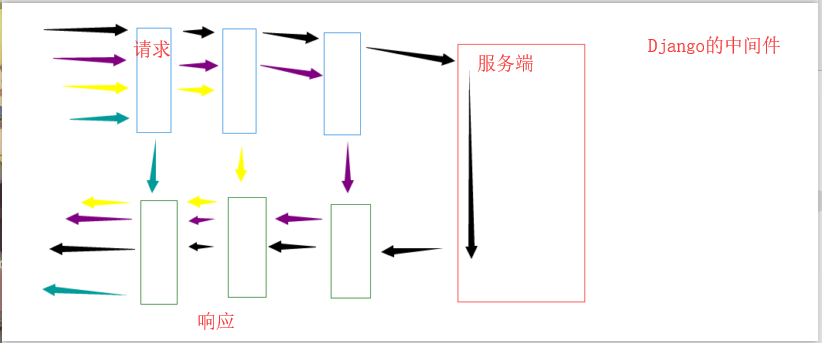
它与 Django的中间件还是有区别的,
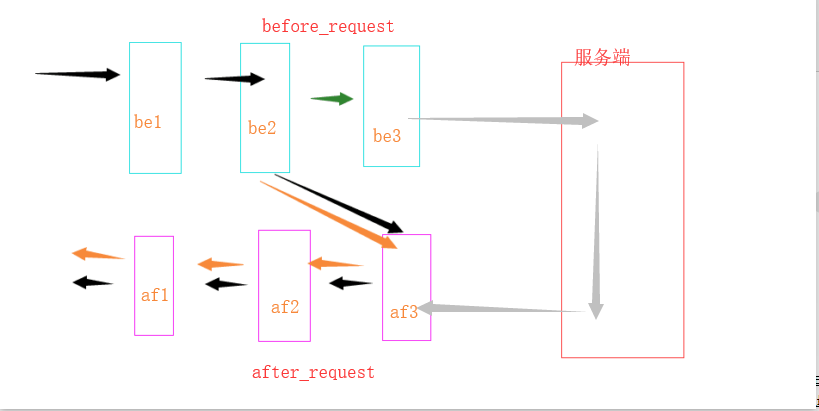
正常情况下 : be1 - be2 - be3 - af3 - af2 - af1
异常情况下 : be1 - be2- af3 - af2 - af1
在Flask的特殊装饰器 before_request 和 after_request 中,不管请求进入试图函数之前会走到哪一步,在响应的时候都要从做开始做响应.
2 . 重定义错误页面返回信息
  @app.errorhandler(404)# 参数是错误代码

  def error404(error_info):# 注意,一定要加参数接收错误信息

    print(error_info)

    # 404 Not Found: The requested URL was not found on the server.  If you entered the URL manually please check your spelling and try again.

    return '页面不存在'# 可以返回 三剑客 + 小儿子
当访问发生404错误时,会看到该函数的返回内容.
before-request , after-request的更多相关文章
- String path = request.getContextPath(); String basePath = request.getScheme() + "://" + request.getServerName() + ":" + request.getServerPort() + path + "/";作用!!!!!
<%String path = request.getContextPath();String basePath = request.getScheme()+"://"+re ...
- C#中 Request, Request.params , Request.querystring , Request.Form 区别 与联系用法
C#中 Request, Request.params , Request.querystring , Request.Form 区别 与联系用法? Request.params , Request ...
- basePath = request.getScheme()+"://"+request.getServerName()+":"+r
basePath = request.getScheme()+"://"+request.getServerName()+":"+r (2014-06-30 1 ...
- String basePath = request.getScheme()+"://"+request.getServerName()+":"+request.getServerPort()+pat----------<base>元素有关
String basePath = request.getScheme()+"://"+request.getServerName()+":"+request. ...
- request.get request.GET……
发现他们是不同的. 报错: AttributeError at /add/ 'WSGIRequest' object has no attribute 'get' Request Method: GE ...
- 客户端的数据来源:QueryString, Form, Cookie Request[]与Request.Params[]
在ASP.NET编程中,有三个比较常见的来自于客户端的数据来源:QueryString, Form, Cookie . 我们可以在HttpRequest中访问这三大对象. QueryString: 获 ...
- JSP之项目路径问题(${pageContext.request.contextPath},<%=request.getContextPath()%>以及绝对路径获取)
本随笔这是作为一个记录使用,以备后查.项目完成之后本地部署OK,本地Linux部署OK,都可以正常的访问,可是当我把它部署到服务器上面的时候,首页可以正常访问,可是当发出请求的时候却报错误了,说找不到 ...
- 安卓开发笔记(十六):'Request(okhttp3.Request.Builder)' has private access in 'okhttp3.Request
当出现了'Request(okhttp3.Request.Builder)' has private access in 'okhttp3.Request的错误的时候,实际上是我们在写代码的时候少打了 ...
- <% String path = request.getContextPath(); String basePath = request.getScheme()+"://"+request.getServerName()+":"+request.getServerPort()+path+"/"; %>
<%String path = request.getContextPath();String basePath = request.getScheme()+"://"+re ...
- [转载]Request、Request.Form和Request.QueryString的区别
Request.Request.Form和Request.QueryString的区别 request本身是一个系统的静态对象,本身也可以作为数组调用,比如request("abc" ...
随机推荐
- [置顶]
python字典和nametuple互相转换例子
如果tuple中的元素很多的时候操作起来就比较麻烦,有可能会由于索引错误导致出错. namedtuple对象给tuple命名. 下面的例子可以字典和nametuple互相转换 aa={'verbosi ...
- 【音乐App】—— Vue-music 项目学习笔记:歌曲列表组件开发
前言:以下内容均为学习慕课网高级实战课程的实践爬坑笔记. 项目github地址:https://github.com/66Web/ljq_vue_music,欢迎Star. 当前歌曲播放列表 添加歌曲 ...
- hdu 3392(滚动数组优化dp)
题目链接:http://acm.hdu.edu.cn/showproblem.php?pid=3392 Pie Time Limit: 6000/3000 MS (Java/Others) Me ...
- Oracle中group by 的扩展函数rollup、cube、grouping sets
Oracle的group by除了基本使用方法以外,还有3种扩展使用方法,各自是rollup.cube.grouping sets.分别介绍例如以下: 1.rollup 对数据库表emp.如果当中两个 ...
- JSF教程(8)——生命周期之Apply Request Values Phase
当一个组件树在一个postbacks请求中被恢复之后其中每一个组件从request的參数中取得各自的值,这里使用的是processDecodes方法. 这个值会保存在本地的每一个组件中,在源代码中此过 ...
- java 动态实现接口
package com.yhouse.modules.daos; public interface IUserDao { public String getUserName(); public Str ...
- python升级安装后的yum的修复
升级python版本号后,执行yum # yum -y install openssl 提演示样例如以下: There was a problem importing one of the Pytho ...
- Paxos算法学习
早在1990年,Leslie Lamport(即 LaTeX 中的"La",微软研究院科学家,获得2013年图灵奖)向ACM Transactions on Computer Sy ...
- VSTS跟Kubernetes整合进行CI/CD
利用VSTS跟Kubernetes整合进行CI/CD 为什么VSTS要搭配Kubernetes? 通常我们在开发管理软件项目的时候都会碰到一个很头痛的问题,就是开发.测试.生产环境不一致,导致开发 ...
- 018 nginx与第三模块整合[一致性哈希模块整合]
nginx第三方模块官网:http://wiki.nginx.org/HttpUpstreamConsistentHash nginx第三方模块下载地址:https://github.com/repl ...