
File "<stdin>" , line 1
写了一个hello.py,仅有一句,print 'hello world',
运行 Python hello.py 出错,提示:
File "<stdin>" , line 1
python hello.py
解释:
In the shell you can run shell commands, in the Python command line you can run Python code.
"python hello.py" is a shell command, not Python code, so you should run it in the shell, but not on the Python command line.
"print "hello"" is Python code, so you can run it on the Python command line, but not in the shell.
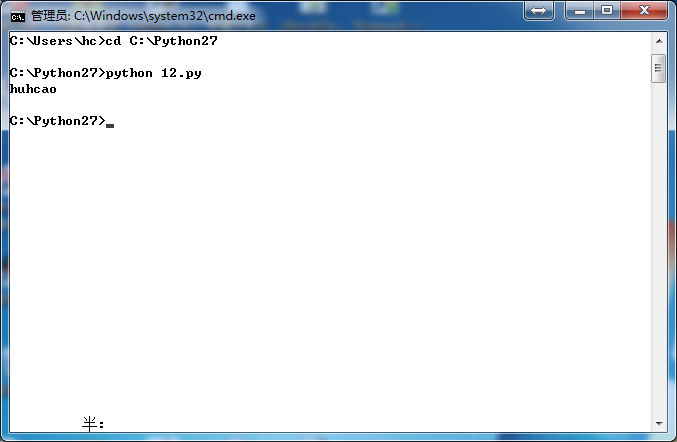
故,退出python命令行,直接cd到hello.py所在目录,运行python hello.py,成功。
File "<stdin>" , line 1的更多相关文章
- python d:\test.py File "<stdin>", line 1 python d:\test.py ^ SyntaxError: invalid syntax
pyhton出错: python d:\test.py File "<stdin>", line 1 python d:\test.py ^SyntaxError: i ...
- Python 运行 Python hello.py 出错,提示: File "<stdin>" , line 1
写了一个hello.py,仅有一句,print 'hello world', 运行 Python hello.py 出错,提示: File "<stdin>" , li ...
- 第一个Python程序hello.py提示出现File "<stdin>",line 1错误
写第一个Python程序hello.py,内容仅有一句,print 'hello world', 运行 Python hello.py 出错,提示: File "<stdin>& ...
- 使用python pip安装工具组件包:出现 requests File “<stdin>",line 1 pip install xxx ^ SyntaxError:invalid syntax
最近想要试试python ,软件安装完成了,但是,import 组件包时,出了问题,一直不得解:安装pycharm 工具感觉麻烦,不想安装那些,只想单纯使用python . 问题复现: 1.Windo ...
- python中执行py文件出错(提示File “<stdin>”,line 1,SyntaxError:invalid syntax)
解决办法: 上图中已通过输入python进入了python运行环境,出现>>>时候的不能再用python z.py 来运行hello.py文件: 应该通过exit()退出当前pyth ...
- Python使用eval强制转换字符串为字典时报错:File "<string>", line 1, in <module> NameError: name 'nan' is not defined
文本中保存的内容为: { 'QQQ': [0.067, 0.167, 0.2, 0.033, 0.233, 0.267, 0.1, 0.133], 'TTT': [0.5, 0.375, 0.25, ...
- Windows编译Nodejs时遇到 File "configure", line 313 SyntaxError: invalid syntax Failed to create vc project files. 时的解决方法
第一次编译的时候电脑上未安装python,遂下载了python最新版本3.3.3,但是报了下面这个错误. 把python降到2.7.*的版本即可. 我这里测试2.7.6和2.7.3版本可以正常编译.
- python3之File文件方法
1.读写文件 open()将会返回一个file对象,基本语法: open(filename,mode) filename:是一个包含了访问的文件名称的路径字符串 mode:决定了打开文件的模式:只读, ...
- caffe安装编译问题-ImportError: libopencv_core.so.3.4: cannot open shared object file: No such file or directory
问题描述 >>> import caffe Traceback (most recent call last): File , in <module> File , in ...
随机推荐
- 【概念】SVG(2)
Style <svg width="200" height="200" xmlns="http://www.w3.org/2000/svg&qu ...
- Floyd算法(弗洛伊德算法) 百度百科
核心代码 for(int k=1; k<=NODE; ++k)//对于每一个中转点 for(int i=0; i<=NODE; ++i)//枚举源点 for(int j=0; j<= ...
- codeforces 669A A. Little Artem and Presents(水题)
题目链接: A. Little Artem and Presents time limit per test 2 seconds memory limit per test 256 megabytes ...
- bzoj 5092 分割序列 —— 高维前缀和
题目:https://www.lydsy.com/JudgeOnline/problem.php?id=5092 首先,处理出异或前缀和 s[i],i 位置的答案就是 s[j] + s[j]^s[i] ...
- python optparse模块的简单用法
# coding = utf-8 from optparse import OptionParser from optparse import OptionGroup usage = 'Usage: ...
- Tyvj1052(树形DP)
P1052 没有上司的舞会 时间: 1000ms / 空间: 131072KiB / Java类名: Main 描述 Ural大学有N个职员,编号为1~N.他们有从属关系,也就是说他们的关系就像一棵以 ...
- Ubuntu下使用gcc编译c文件,未识别cos,sin
Ubuntu下使用gcc编译c文件,虽然我调用了math.h的头文件,但是未识别cos,sin 报错:( fft.c ) /tmp/ccwXjD8C.o: In function `fft': fft ...
- 深度技术Win7系统利用diskpart命令实现硬盘分区的技巧
转自:http://www.xitongcheng.com/jiaocheng/win7_article_2491.html 1. 深度技术Win7系统利用diskpart命令实现硬盘分区的技巧分享给 ...
- Linux Ctrl+Z的使用方法
假设你发现前台运行的一个程序需要很长的时间,但是需要干其他的事情,你就可以用 Ctrl-Z ,终止这个程序,然后可以看到系统提示: [1]+ Stopped /root/bin/rsync.sh 然后 ...
- Unity3D 开发ios时困扰多时游戏开始画面图片的分辨率