
Python-S9—Day86-ORM项目实战之会议室预定相关
01 会议室预定1
02 会议室预定2
03 会议室预定3
04 会议室预定4
05 会议室预定5
06 会议室预定6
01 会议室预定1
1.1 项目的架构目录;
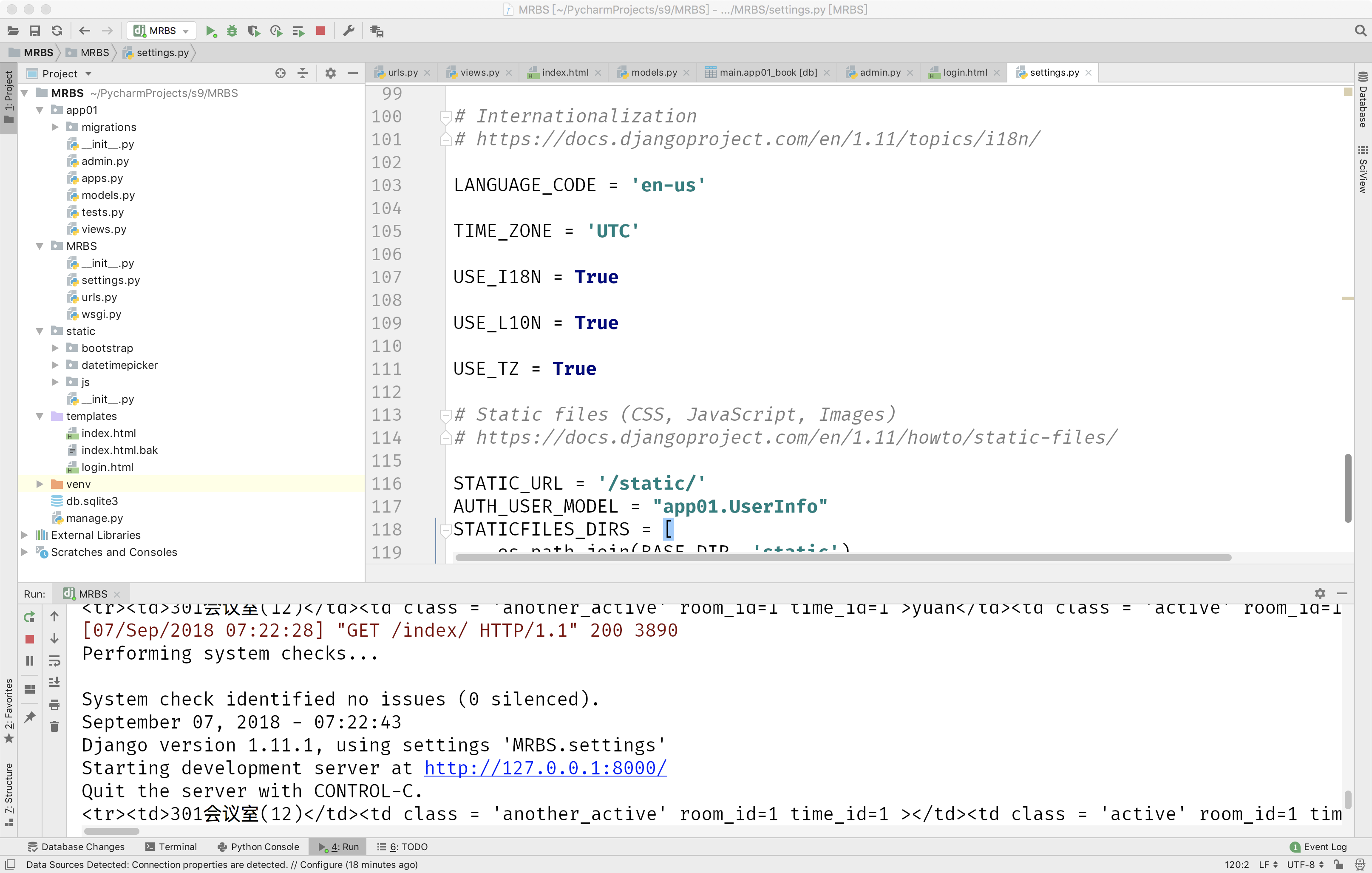
1.2 使用Pycharm创建Django项目:MRBS并建立引用app01(Django版本指向全局解释器,为Django =“1.11.1”)
1.3 settings.py中配置STATICFILES_DIRS以及AUTH_USER_DIRS
AUTH_USER_MODEL = "app01.UserInfo"

STATICFILES_DIRS = [

    os.path.join(BASE_DIR, 'static'),

]
1.4 models.py中配置ORM并在admin.py中进行注册;
from django.db import models

# Create your models here.

from django.db import models

from django.contrib.auth.models import AbstractUser

class UserInfo(AbstractUser):

    tel = models.CharField(max_length=32)

class Room(models.Model):

    """

    会议室表;

    """

    caption = models.CharField(max_length=32)

    num = models.IntegerField()  # 容纳的人数;

    def __str__(self):

        return self.caption

class Book(models.Model):

    """

    会议室预定信息;

    """

    user = models.ForeignKey("UserInfo", on_delete=models.CASCADE)  # 级联删除;

    room = models.ForeignKey("Room", on_delete=models.CASCADE)

    date = models.DateField()

    time_choices = (

        (1, "8:00"),

        (2, "9:00"),

        (3, "10:00"),

        (4, "11:00"),

        (5, "12:00"),

        (6, "13:00"),

        (7, "14:00"),

        (8, "15:00"),

        (9, "16:00"),

        (10, "17:00"),

        (11, "18:00"),

        (12, "19:00"),

        (13, "20:00"),

    )

    time_id = models.IntegerField(choices=time_choices)  #

    class Meta:

        unique_together = (

            ('room', 'date', 'time_id')

        )  # 联合唯一!

    def __str__(self):

        return str(self.user) + "预定了" + str(self.room)
1.5 配置urls.py;
"""MRBS URL Configuration

The `urlpatterns` list routes URLs to views. For more information please see:

    https://docs.djangoproject.com/en/1.11/topics/http/urls/

Examples:

Function views

    1. Add an import:  from my_app import views

    2. Add a URL to urlpatterns:  url(r'^$', views.home, name='home')

Class-based views

    1. Add an import:  from other_app.views import Home

    2. Add a URL to urlpatterns:  url(r'^$', Home.as_view(), name='home')

Including another URLconf

    1. Import the include() function: from django.conf.urls import url, include

    2. Add a URL to urlpatterns:  url(r'^blog/', include('blog.urls'))

"""

from django.conf.urls import url

from django.contrib import admin

from app01 import views

urlpatterns = [

    url(r'^admin/', admin.site.urls),

    url(r'^login/', views.login),

    url(r'^index/', views.index),

]
1.6 编写views.py视图函数;
from django.shortcuts import render, redirect

# Create your views here.

from django.contrib import auth

from .models import *

import datetime

def login(request):

    if request.method == "POST":

        user = request.POST.get('user')

        pwd = request.POST.get('pwd')

        user = auth.authenticate(username=user, password=pwd)

        if user:

            auth.login(request, user)  # request.user

            return redirect("/index/")

    return render(request, "login.html")

def index(request):

    date = datetime.datetime.now().date()

    book_date = request.GET.get("book_date", date)

    time_choices = Book.time_choices

    room_list = Room.objects.all()

    book_list = Book.objects.filter(date=book_date)

    htmls = ""

    for room in room_list:

        htmls += "<tr><td>{}({})</td>".format(room.caption, room.num)

        for time_choice in time_choices:

            flag = False

            for book in book_list:

                if book.room.pk == room.pk and book.time_id == time_choice[0]:

                    flag = True

                    break  # 意味着这个单元格已经被预定;

            if flag:

                if request.user.pk == book.user.pk:

                    htmls += "<td class = 'active' room_id={} time_id={} >{}</td>".format(room.pk, time_choice[0],

                                                                                          book.user)

                else:

                    htmls += "<td class = 'another_active' room_id={} time_id={} >{}</td>".format(room.pk,

                                                                                                  time_choice[0],

                                                                                                  book.user)

            else:

                htmls += "<td room_id={} time_id={} ></td>".format(room.pk, time_choice[0],

                                                                   )

        htmls += "</tr>"

    print(htmls)

    return render(request, "index.html", locals())
1.7 编写templates;
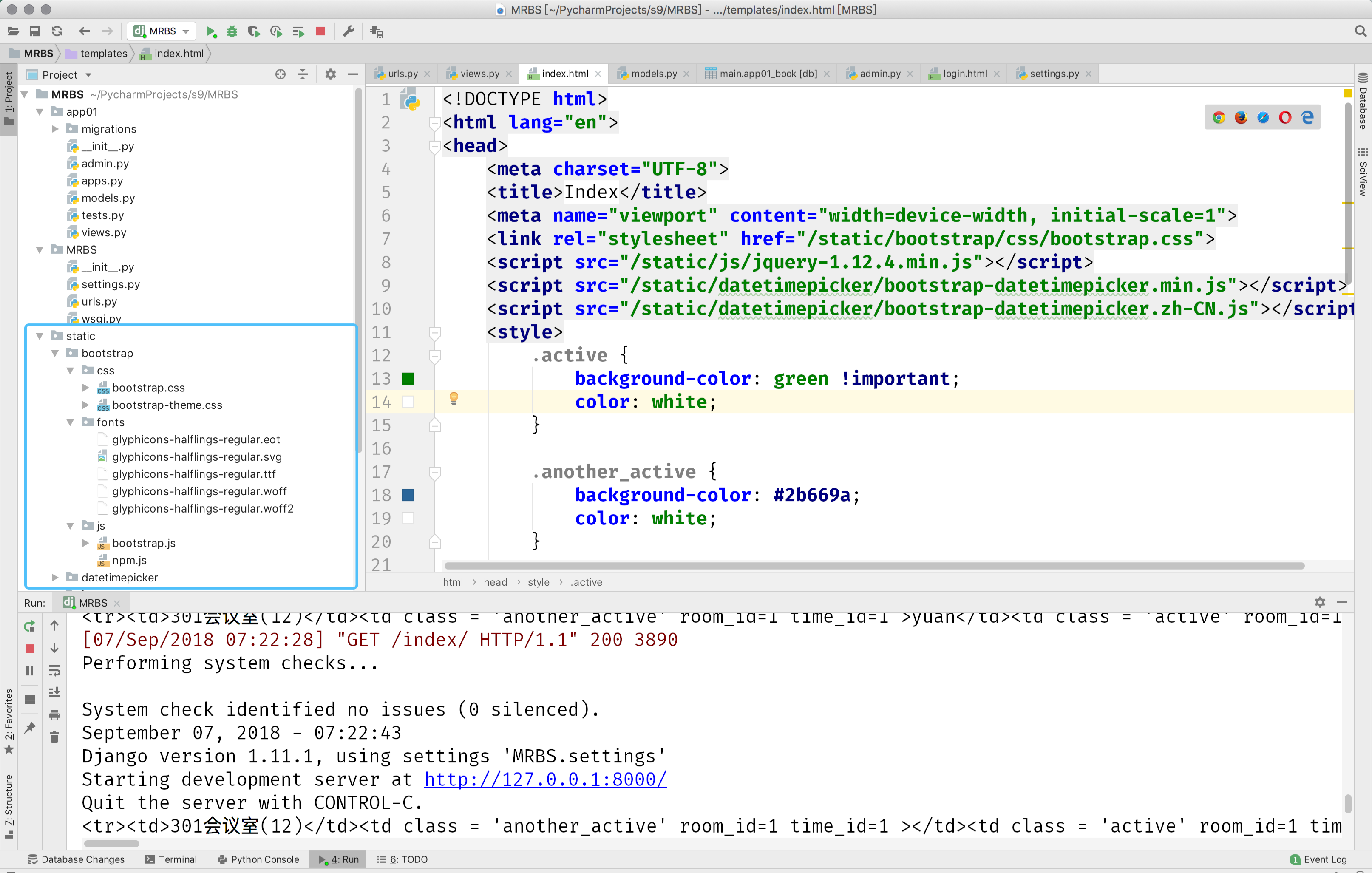
index.html
<!DOCTYPE html>

<html lang="en">

<head>

    <meta charset="UTF-8">

    <title>Index</title>

    <meta name="viewport" content="width=device-width, initial-scale=1">

    <link rel="stylesheet" href="/static/bootstrap/css/bootstrap.css">

    <script src="/static/js/jquery-1.12.4.min.js"></script>

    <script src="/static/datetimepicker/bootstrap-datetimepicker.min.js"></script>

    <script src="/static/datetimepicker/bootstrap-datetimepicker.zh-CN.js"></script>

    <style>

        .active {

            background-color: green !important;

            color: white;

        }

        .another_active {

            background-color: #2b669a;

            color: white;

        }

        .td_active {

            background-color: lightblue;

            color: white;

        }

    </style>

</head>

<body>

<h3>会议室预定</h3>

<table class="table table-bordered table-striped">

    <thead>

    <tr>

        <th>会议室/时间</th>

        {% for time_choice in time_choices %}

            <th>{{ time_choice.1 }}</th>

        {% endfor %}

    </tr>

    </thead>

    <tbody>

    {{ htmls|safe }}

    </tbody>

</table>

</body>

</html>
1.8 创建static目录并添加jquery、Bootstrap以及datetimerpicker;
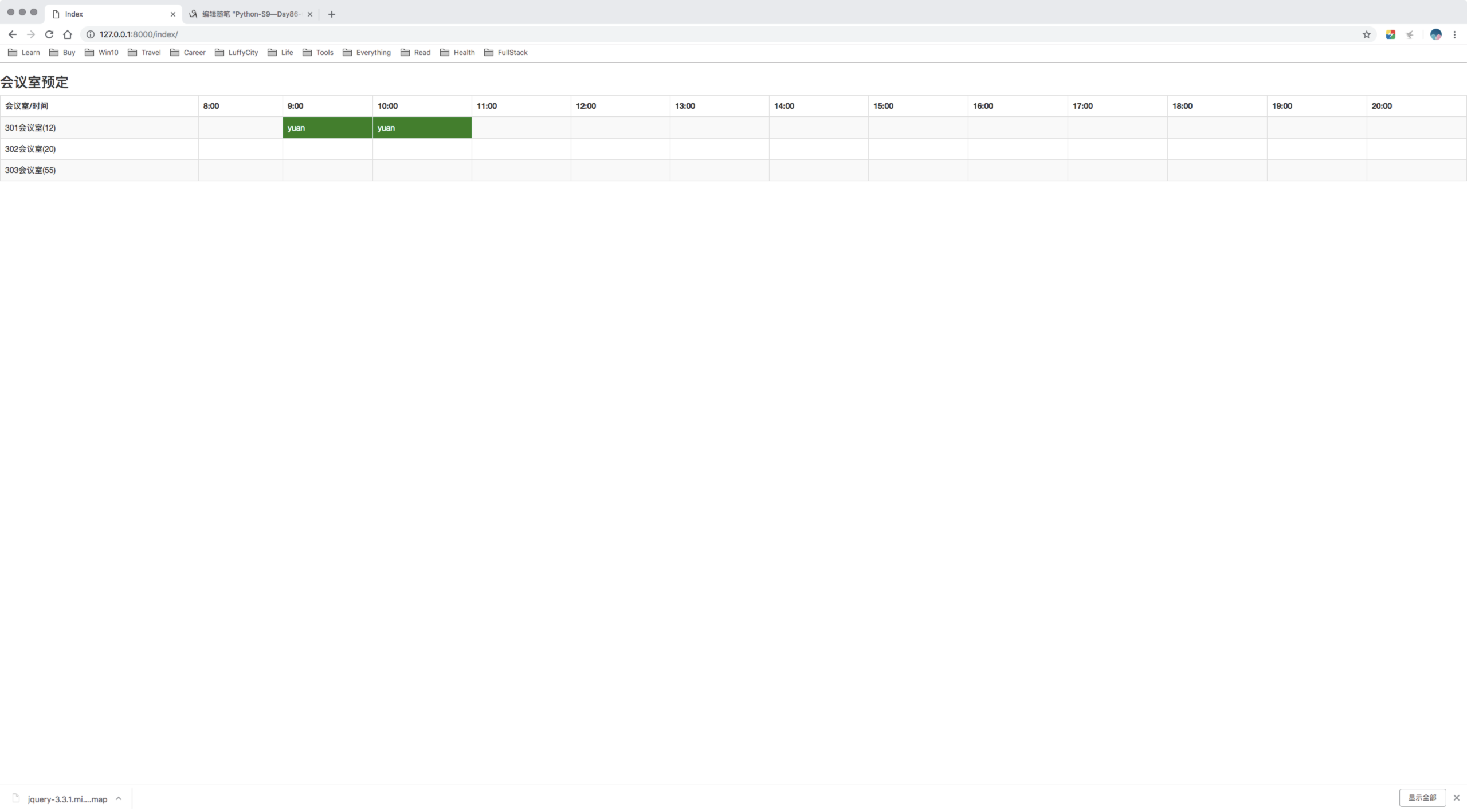
1.9 基本的页面展示如下:
02 会议室预定2
03 会议室预定3
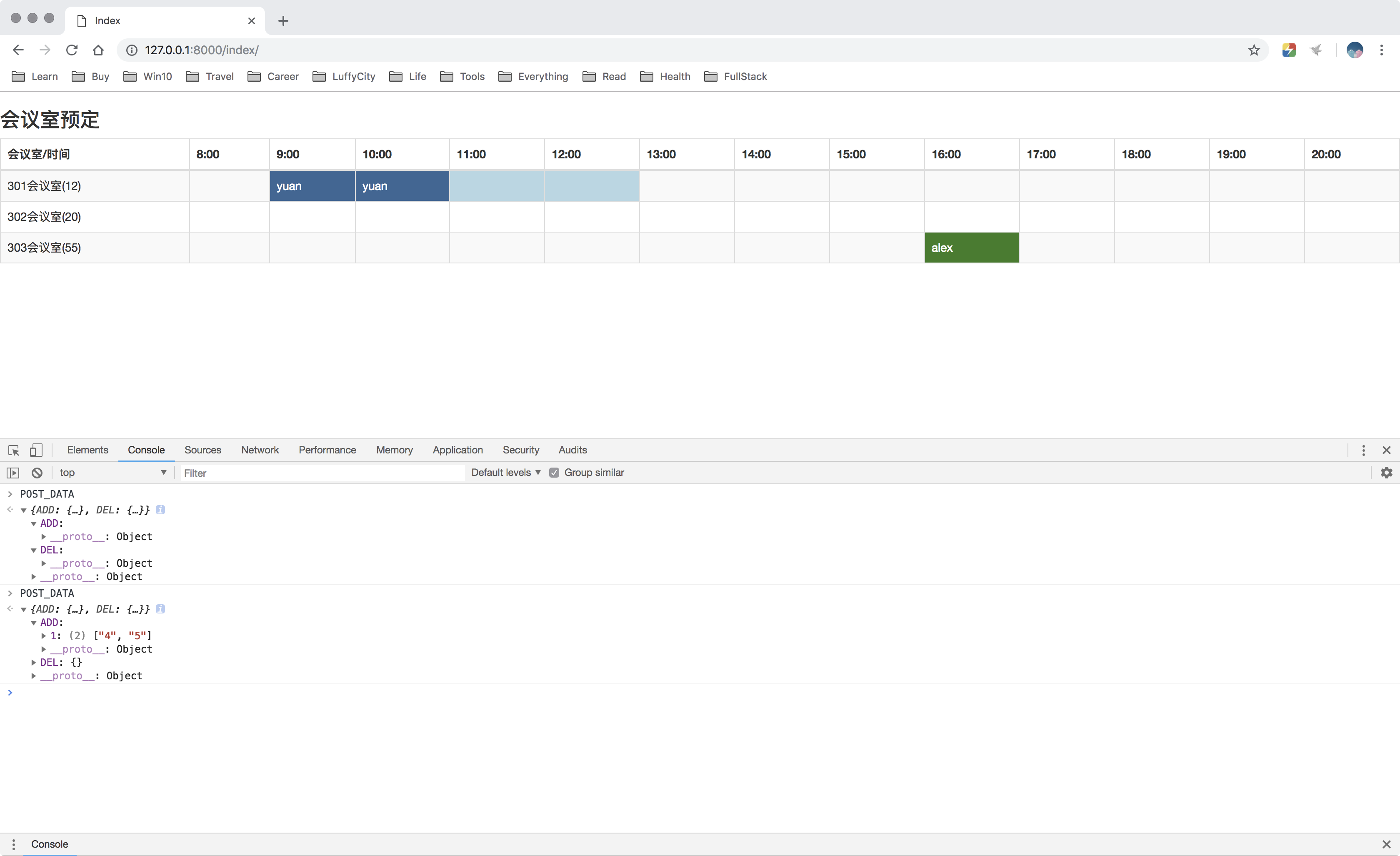
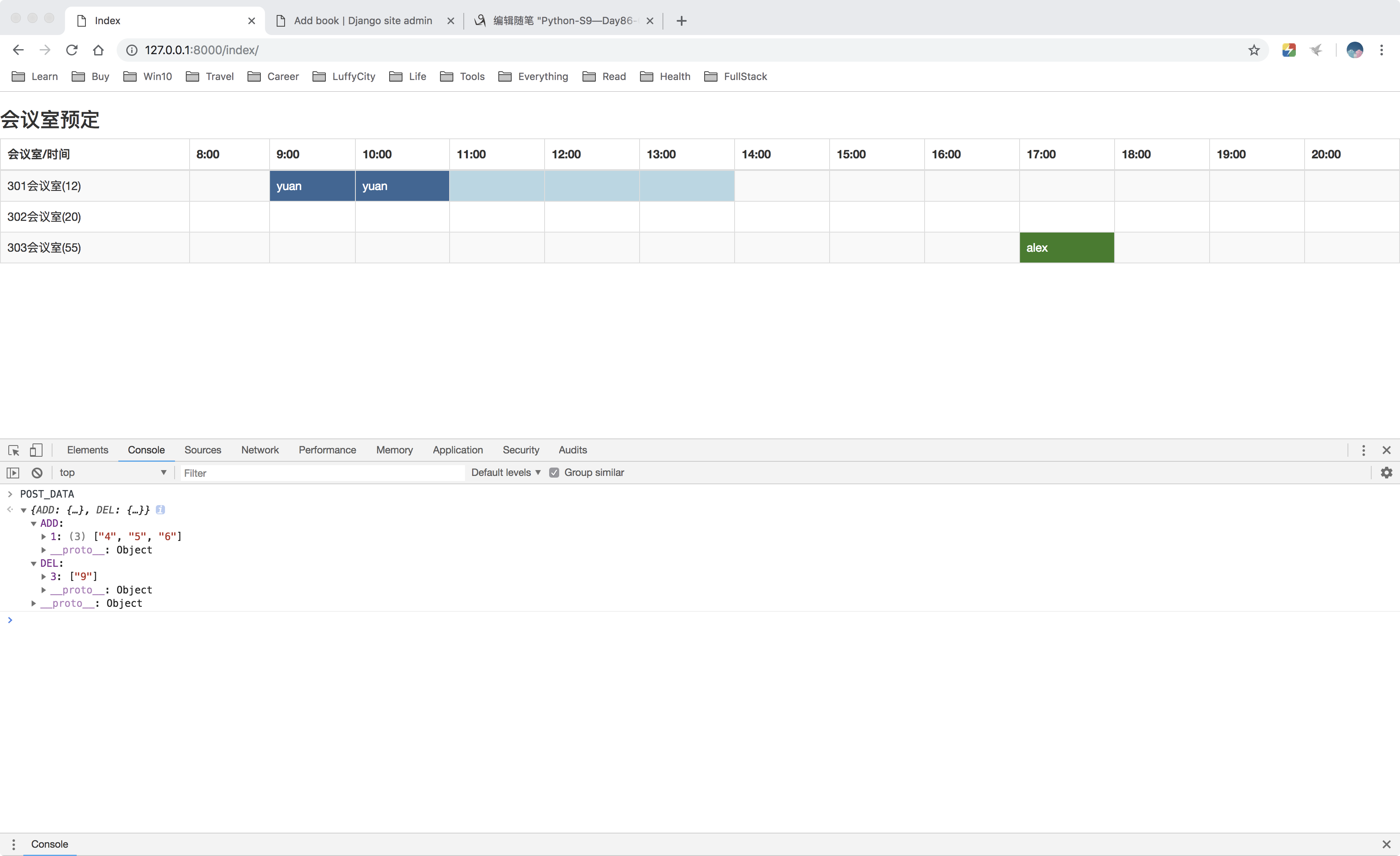
04 会议室预定4
05 会议室预定5
06 会议室预定6
Python-S9—Day86-ORM项目实战之会议室预定相关的更多相关文章
- Python爬虫开发与项目实战
Python爬虫开发与项目实战(高清版)PDF 百度网盘 链接:https://pan.baidu.com/s/1MFexF6S4No_FtC5U2GCKqQ 提取码:gtz1 复制这段内容后打开百度 ...
- Python爬虫开发与项目实战pdf电子书|网盘链接带提取码直接提取|
Python爬虫开发与项目实战从基本的爬虫原理开始讲解,通过介绍Pthyon编程语言与HTML基础知识引领读者入门,之后根据当前风起云涌的云计算.大数据热潮,重点讲述了云计算的相关内容及其在爬虫中的应 ...
- python工业互联网监控项目实战5—Collector到opcua服务
本小节演示项目是如何从连接器到获取Tank4C9服务上的设备对象的值,并通过Connector服务的url返回给UI端请求的.另外,实际项目中考虑websocket中间可能因为网络通信等原因出现中断情 ...
- python工业互联网监控项目实战4—python opcua
前面章节我们采用OPC作为设备到上位的信息交互的协议,本章我们介绍跨平台的OPC UA.OPC作为早期的工业通信规范,是基于COM/DCOM的技术实现的,用于设备和软件之间交换数据,最初,OPC标准仅 ...
- python金融反欺诈-项目实战
python信用评分卡(附代码,博主录制) https://study.163.com/course/introduction.htm?courseId=1005214003&utm_camp ...
- python工业互联网监控项目实战2—OPC
OPC(OLE for Process Control)定义:指为了给工业控制系统应用程序之间的通信建立一个接口标准,在工业控制设备与控制软件之间建立统一的数据存取规范.它给工业控制领域提供了一种标准 ...
- python数据分析美国大选项目实战(三)
项目介绍 项目地址:https://www.kaggle.com/fivethirtyeight/2016-election-polls 包含了2015年11月至2016年11月期间对于2016美国大 ...
- Python工业互联网监控项目实战3—websocket to UI
本小节继续演示如何在Django项目中采用早期websocket技术原型来实现把OPC服务端数据实时推送到UI端,让监控页面在另一种技术方式下,实时显示现场设备的工艺数据变化情况.本例我们仍然采用比较 ...
- Python轻松入门到项目实战-实用教程
本课程完全基于Python3讲解,针对广大的Python爱好者与同学录制.通过本课程的学习,可以让同学们在学习Python的过程中少走弯路.整个课程以实例教学为核心,通过对大量丰富的经典实例的讲解.让 ...
随机推荐
- PRD、MRD、BRD的含义
一.PRD的含义 英文简称,PRD(Product Requirement Document),PRD文档中文意思是:产品需求文档. PRD文档是产品项目由“概念化”阶段进入到“图纸化”阶段的最主要的 ...
- php使用GD库实现图片水印和缩略图——给图片添加图片水印
今天呢,就来学习一下在php中使用PD库来实现对图片水印的文字水印方法,不需要PS哦! 首先,准备素材 (1)准备一张图片 (2)准备一张水印(最好是透明的,即背景是白色底) (3)准备一中字体(在电 ...
- pta 编程题16 Saving James Bond - Easy Version
其它pta数据结构编程题请参见:pta 题目 主要用到了深度优先搜索. #include <iostream> using namespace std; struct Vertex { i ...
- hdu-3790 最短路径问题---dijkstra两重权值
题目链接: http://acm.hdu.edu.cn/showproblem.php?pid=3790 题目大意: 给你n个点,m条无向边,每条边都有长度d和花费p,给你起点s终点t,要求输出起点到 ...
- C语言exp()函数:e的次幂函数(以e为底的x次方值)
头文件:#include <math.h> exp()用来计算以e 为底的x 次方值,即ex 值,然后将结果返回.其原型为: double exp(double x); [返回值]返 ...
- Java自带工具包StringUtils包含方法
//导入包 import org.apache.commons.lang3.StringUtils //判断不为空 不包含空格 StringUtils.isNotEmpty(" " ...
- 20180909 解析JS Cookie的设置,获取和检索
引用: JavaScript Cookie - by runoob.com Cookie是储存在电脑文本文件中的数据,用于保存访问者的信息,并可以在下次打开页面时引用. 页面在设置/引用访问者信息时, ...
- 6- vue django restful framework 打造生鲜超市 -完成商品列表页(下)
Vue+Django REST framework实战 搭建一个前后端分离的生鲜超市网站 Django rtf 完成 商品列表页下 drf中的request和response drf对于django的 ...
- 工具之UltraEdit之正则表达式
- hihocoder 1097 最小生成树一·Prim算法
#1097 : 最小生成树一·Prim算法 时间限制:10000ms 单点时限:1000ms 内存限制:256MB 描述 最近,小Hi很喜欢玩的一款游戏模拟城市开放出了新Mod,在这个Mod中,玩家可 ...