
VS2017生成.net core项目报错:The current .NET SDK does not support targeting .NET Core 2.1. Either
今天在生成一个项目的时候,生成报错,错误如下:The current .NET SDK does not support targeting .NET Core 2.1. Either target .NET Core 1.1 or lower, or use a version of the .NET SDK that supports .NET Core 2.1."
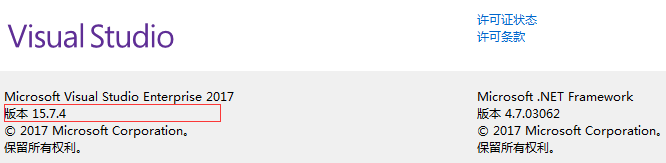
使用的最新的visual studio2017 15.7.4。
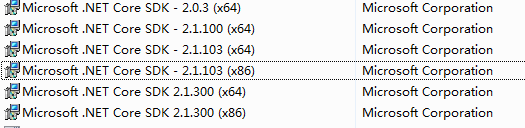
我电脑上安装了.net core 2.1.100、2.1.103、2.1.300等四个细分版本:


看到这你们是不是想说,安装的都没问题呀,为什么还会报错呢。当时我也是这样想的!!
各位在仔细看看,再仔细看看,是不是看出来什么了?
对!
对!对!
对!对!对!
不要怀疑,要相信你是最棒的,决定聪明的你一定看出来,为啥安装的都是x64的?x86的为啥一个没安装呢?
so
那就安装咯,这有啥,
又是一番折腾,安装上了2.1.103(x86)、2.1.300(x86)两个
回到visual studio2017页面,“清理解决方案”,然后F6
双手在胸前划着十字架,口中默念“阿弥陀佛”,“老天保佑,一定要成功啊”;
PS:现在想想我是脑子有病嘛,画啥十字架,不应该是双手合十,双眼微闭,口中默念“阿弥陀佛”嘛。
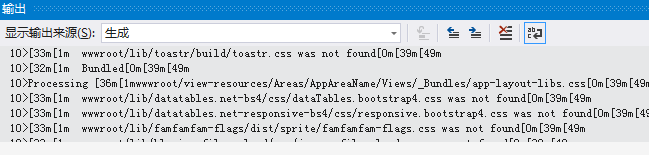
看着”输出“页面不断的翻涌着:
当看到最后的那熟悉而又亲切的画面的时候,忐忑的心终于放下啦:
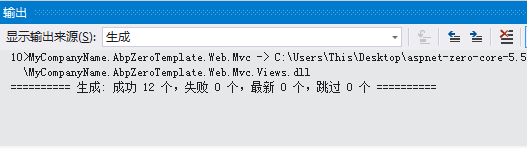
生成成功!
生成成功!
生成成功!
重要的事情说他个一、二、三、四遍。
嗯,
总结一下:
The current .NET SDK does not support targeting .NET Core 2.1. Either target .NET Core 1.1 or lower, or use a version
这是由于系统目标环境是32为的 .net core SDK ,但是电脑上只安装了64位的SDK
再遇到类似的错误只需要记得要看一下自己电脑上安装的.net core 版本是都跟系统目标版本一致,
还有就是要看系统上是否安装了对应的32位或者是64位.net core SDK 。
VS2017生成.net core项目报错:The current .NET SDK does not support targeting .NET Core 2.1. Either的更多相关文章
- The current .NET SDK does not support targeting .NET Core 3.0
编译错误 Severity Code Description Project File Line Suppression StateError NETSDK1045 The current .NET ...
- The current .NET SDK does not support targeting .NET Core 2.2
The current .NET SDK does not support targeting .NET Core 2.2 1. 奇怪的错误 最近遇到了一件奇怪的事, The current .NET ...
- The current .NET SDK does not support targeting .NET Core 2.1. Either target .NET Core 2.0 or lower, or use a version of the .NET SDK that supports .NET Core 2.1.
C:\Program Files\dotnet\sdk\2.1.4\Sdks\Microsoft.NET.Sdk\build\Microsoft.NET.TargetFrameworkInferenc ...
- 使用VS2017新建的Web项目报错:Package Microsoft.Composition 1.0.27 is not compatible with netcoreapp1.1
使用VS2017新建的Web项目报错: 看到这样的错误提示,毫无意义.赶脚这应该是VS2017的BUG,没有显示错误的位置.于是用dotnet restore手动还原,结果在控制台中终于显示了详细的错 ...
- npm run dev运行Vue项目报错:Node Sass does not yet support your current environment
导入Vue项目后,#npm run dev 报错: error in ./src/pages/hello.vue Module build failed: Error: Node Sass does ...
- 运行Java Web项目报错
运行Java Web项目报错 今天,我启动服务,发现项目报错,并且是在打开登录界面时报错. 具体错误如下: org.apache.catalina.core.Standard WrapperValue ...
- 新导入的eclipse项目报错,找不到java包,找不到web.xml文件报错。
新导入的项目可能会出现报错,特别是web项目.我这里提供一种解决方法: 1.右击项目,选择“属性” 2.选择 Resource->java build path->libraries 图中 ...
- 项目报错java.lang.ClassNotFoundException: org.common.SessionListener
现象:项目报错java.lang.ClassNotFoundException: org.common.SessionListener,并且myeclipse左侧Package Explorer中项目 ...
- 项目报错:Caused by: java.lang.ClassNotFoundException: Didn't find class "..."on path: DexPathList
项目报错: Caused by: java.lang.ClassNotFoundException: Didn't find class "com.eshore.njb.MyApplicat ...
随机推荐
- JS filter使用
filter 用于筛选数组中符合条件的所以元素,filter只能接受函数 注意:filter只返回筛选结果,不会对原来数组改变 实现方法: <html lang="en"&g ...
- UnicodeEncodeError: 'gbk' codec can't encode character '\xa0' in position 9865: illegal multibyte sequence 解决办法
解决办法 ; a=r.text.replace('\xa0',' ') 详情参见https://stackoverflow.com/questions/10993612/python-removing ...
- 《Ionic 2 实例开发》发布
Ionic 2系列教程集结成册,在百度阅读上架发布,名为<Ionic 2实例开发>(点击书名将打开地址:http://yuedu.baidu.com/ebook/ba1bca51e4189 ...
- 升级CentOS内核 - 2.6升级到3.10/最新内核
##记得切换到root用户执行升级操作. [root@localhost ~]# uname -a ##旧版 Linux localhost.localdomain 2.6.32-279.el6.i6 ...
- Linux基础环境_安装配置教程(CentOS7.2 64、JDK1.8、Tomcat8)
Linux基础环境_安装配置教程 (CentOS7.2 64.JDK1.8.Tomcat8) 安装包版本 1) VMawre-workstation版本包 地址: https://my.vmw ...
- LINQ 组合查询 和分页查询的使用
前端代码 <%@ Page Language="C#" AutoEventWireup="true" Debug="true" Cod ...
- 配置文件无法修改(以修改my-default.ini为例)
现象: 保存my-default.ini时如果提示“拒绝访问”,右击my-default.ini文件 解决办法: 属性—>安全—>修改权限
- UVA10410 TreeReconstruction 树重建 (dfs,bfs序的一些性质,以及用栈处理递归 )
题意,给你一颗树的bfs序和dfs序,结点编号小的优先历遍,问你可能的一种树形: 输出每个结点的子结点. 注意到以下事实: (1)dfs序中一个结点的子树结点一定是连续的. (2)bfs,dfs序中的 ...
- [学习笔记]Linux下mysql的基础操作
命令 #查看版本 mysql --version #进入mysql 命令 mysql -u root -p mysql -u root@localhost (没有密码的情况) #创建数据库 c ...
- 单核CPU并发与非并发测试
多线程运行程序的目的一般是提高程序运行效率并且能够提高硬件的利用率比如多核CPU,但是如果我们只有单核CPU并发运行程序会怎样呢? 我以两个环境作为对比: 环境A(我本机8c) 环境B(我的云服务器1 ...