
canvas练习单个矩形形变
<!doctype html>

<html lang="en">

<head>

    <meta charset="UTF-8">

    <title>Document</title>

    <style>

    .mydraw{display:block;border:1px solid #ccc;position:relative;margin:0 auto;}

    </style>

</head>

<body>

    <canvas class="mydraw" id="mycanvas">您的浏览器不支持canvas</canvas>

</body>

<script>

    window.onload=function(){

        var vary=new Vary("#mycanvas");

        vary.init();

    }

    function Vary(el,options){

        this.canvas=typeof el =='string' ? document.querySelector(el) : el;

        this.ctx=this.canvas.getContext("2d");

        this.options=extend({},[options,{w:1000,//canvas的宽度

            h:800,//canvas的高度

            dis:10,//控制区域的范围(单位像素)

            r_w:200,//矩形的初始宽度

            r_h:200,//矩形的初始高度

            fillStyle:"#0bac5a",

            strokeStyle:"#0bac5a",

            strokeWidth:2}]);

        this.pathes=[];//控制区域路径信息

        this.px;//鼠标点击位置

        this.py;//鼠标点击位置

        this.pos;//控制区域编号

        this.isMove=false;

        this.rec={};

        this.min=0;

    }

    Vary.prototype.down=function(_this,event){

        _this.px=event.offsetX || event.layerX,

        _this.py=event.offsetY || event.layerY;

        _this.isMove=true;

    }

    Vary.prototype.move=function(_this,event){

        var now_x=event.offsetX || event.layerX,

            now_y=event.offsetY || event.layerY;

        if(_this.isMove){

            var delta_x=now_x-_this.px,

                delta_y=now_y-_this.py,

                stat=-1;//当前的pos

            if(_this.pos==0){

                _this.rec.init(delta_x,delta_y, _this.options.w, _this.options.h, _this.options.r_w, _this.options.r_h);

            }else if(_this.pos==1){

                if(_this.options.r_w<=_this.min && _this.options.r_h>_this.min){

                    stat=2;

                }else if(_this.options.r_h<=_this.min && _this.options.r_w>_this.min){

                    stat=3;

                }else if(_this.options.r_h<=_this.min && _this.options.r_w<=_this.min){

                    stat=4;

                }else{

                    stat=1;

                }

                _this.options.r_w-=delta_x;

                _this.options.r_h-=delta_y;

                _this.rec.init(delta_x,delta_y, _this.options.w, _this.options.h, _this.options.r_w, _this.options.r_h);

            }else if(_this.pos==4){

                if(_this.options.r_w<=_this.min&&_this.options.r_h>_this.min){

                    stat=3;

                }else if(_this.options.r_h<=_this.min&&_this.options.r_w>_this.min){

                    stat=2

                }else if(_this.options.r_w<=_this.min && _this.options.r_h<=_this.min){

                    stat=1;

                }else{

                    stat=4;

                }

                _this.options.r_w+=delta_x;

                _this.options.r_h+=delta_y;

                _this.rec.init(0, 0, _this.options.w, _this.options.h, _this.options.r_w, _this.options.r_h);

            }else if(_this.pos==2){

                if(_this.options.r_w<=_this.min&&_this.options.r_h>_this.min){

                    stat=1;

                }else if(_this.options.r_h<=_this.min&&_this.options.r_w>_this.min){

                    stat=4;

                }else if(_this.options.r_h<=_this.min&&_this.options.r_w<=_this.min){

                    stat=3;

                }else{

                    stat=2;

                }

                _this.options.r_w+=delta_x;

                _this.options.r_h-=delta_y;

                _this.rec.init(0, delta_y, _this.options.w, _this.options.h, _this.options.r_w, _this.options.r_h);

            }else if(_this.pos==3){

                if(_this.options.r_w<=_this.min&&_this.options.r_h>_this.min){

                    stat=4;

                }else if(_this.options.r_h<=_this.min&&_this.options.r_w>_this.min){

                    stat=1;

                }else if(_this.options.r_w<=_this.min&&_this.options.r_h<=_this.min){

                    stat=2;

                }else{

                    stat=3;

                }

                _this.options.r_w-=delta_x;

                _this.options.r_h+=delta_y;

                _this.rec.init(delta_x, 0, _this.options.w, _this.options.h, _this.options.r_w, _this.options.r_h);

            }else if(_this.pos==5){

                _this.options.r_h<0?stat=6:stat=5;

                _this.options.r_h-=delta_y;

                _this.rec.init(0, delta_y, _this.options.w, _this.options.h, _this.options.r_w, _this.options.r_h);

            }else if(_this.pos==6){

                _this.options.r_h<0?stat=5:stat=6;

                _this.options.r_h+=delta_y;

                _this.rec.init(0, 0, _this.options.w, _this.options.h, _this.options.r_w, _this.options.r_h);

            }else if(_this.pos==7){

                _this.options.r_w<0?stat=8:stat=7;

                _this.options.r_w-=delta_x;

                _this.rec.init(delta_x,0, _this.options.w, _this.options.h, _this.options.r_w, _this.options.r_h);

            }else if(_this.pos==8){

                _this.options.r_w<0?stat=7:stat=8;

                _this.options.r_w+=delta_x;

                _this.rec.init(0,0, _this.options.w, _this.options.h, _this.options.r_w, _this.options.r_h);

            }

            changeMouse(this.canvas,stat);

            _this.rec.draw(_this.ctx,_this.options.w,_this.options.h);

            _this.px=now_x;

            _this.py=now_y;

            changePath(_this.rec.x, _this.rec.y, _this.rec.w, _this.rec.h, _this.options.dis,_this.pathes);

        }else{

            _this.pos=getPos(now_x, now_y, _this.ctx, _this.pathes);//移动的时候就不能再重新获取位置了

            changeMouse(this.canvas,_this.pos);

        }

    }

    Vary.prototype.up=function(_this){

        _this.isMove=false;

        var ww=0,hh=0;

        if(_this.rec.w<0 || _this.rec.h<0){

            if(_this.rec.w<0&&_this.rec.h>0){

                ww=_this.rec.w;hh=0;

            }else if(_this.rec.w<0&&_this.rec.h<0){

                ww=_this.rec.w;hh=_this.rec.h;

            }else if(_this.rec.w>0&&_this.rec.h<0){

                ww=0;hh=_this.rec.h;

            }

            _this.options.r_w=Math.abs(_this.options.r_w);

            _this.options.r_h=Math.abs(_this.options.r_h);

            _this.rec.init(ww, hh, _this.options.w, _this.options.h, _this.options.r_w, _this.options.r_h);

            _this.rec.draw(_this.ctx,_this.options.w,_this.options.h);

        }

        changePath(_this.rec.x, _this.rec.y, _this.rec.w, _this.rec.h, _this.options.dis,_this.pathes);

    }

    Vary.prototype.init=function(){

        this.canvas.width=this.options.w;

        this.canvas.height=this.options.h;

        this.rec=new Rect(this.options.w, this.options.h, this.options.r_w, this.options.r_h);

        this.rec.init(0, 0, this.options.w, this.options.h, this.options.r_w, this.options.r_h);

        this.rec.draw(this.ctx,this.options.w,this.options.h);

        changePath(this.rec.x,this.rec.y,this.rec.w,this.rec.h,this.options.dis,this.pathes);

        var self=this;

        this.canvas.onmousedown=function(event){

            self.down(self,event);

        }

        this.canvas.onmousemove=function(event){

            self.move(self,event);

        }

        this.canvas.onmouseout=this.canvas.onmouseup=function(){

            self.up(self);

        }

    }

    /*

    *  创建变幻矩形

     */

    var Rect=function(w,h,r_w,r_h){

        this.x=w/2-r_w/2;

        this.y=h/2-r_h/2;

        this.delta_x;

        this.delta_y;

        this.w;

        this.h;

    }

    // 初始化,变幻过程中改变宽高,起始坐标等

    Rect.prototype.init=function(delta_x,delta_y,w,h,r_w,r_h){

        if(typeof delta_x=="number" && typeof delta_y=="number" ){

            this.delta_x=delta_x;

            this.delta_y=delta_y;

            this.x=this.x+this.delta_x;

            this.y=this.y+this.delta_y;

            if(this.x<0){

                this.x=0;

            }

            if(this.y<0){

                this.y=0;

            }

            if(this.x>w-r_w){

                this.x=w-r_w;

            }

            if(this.y>h-r_h){

                this.y=h-r_h;

            }

            this.w=r_w;

            this.h=r_h;

        }else{

            alert("参数类型错误");

        }

    }

    // 绘制矩形

    Rect.prototype.draw=function(ctx,w,h){

        ctx.strokeStyle="#0bac5a"

        ctx.clearRect(0,0,w,h);

        ctx.strokeRect(this.x,this.y,this.w,this.h);

    }

    /*

     * [changePath 得到鼠标操作区域数组]

     * @param  {[number]} x      [canvas变幻矩形的起始坐标x]

     * @param  {[number]} y      [canvas变幻矩形的起始坐标y]

     * @param  {[number]} w      [canvas变幻矩形的宽度]

     * @param  {[number]} h      [canvas变幻矩形的高度]

     * @param  {[number]} dis    [鼠标操作区域的尺寸]

     * @param  {[array]} pathes [鼠标操作区域矩形坐标数组]

     */

    function changePath(x,y,w,h,dis,pathes){

        if(typeof x=="number" && typeof y=="number" && typeof w=="number" && typeof w=="number" && typeof dis=="number"){

            pathes[0]={x:x+dis,y:y+dis,w:w-2*dis,h:h-2*dis};//拖动

            pathes[1]={x:x-dis,y:y-dis,w:dis*2,h:dis*2}//改变大小---左上角

            pathes[2]={x:x+w-dis,y:y-dis,w:dis*2,h:dis*2}//改变大小---右上角

            pathes[3]={x:x-dis,y:y+h-dis,w:dis*2,h:dis*2}//改变大小---左下角

            pathes[4]={x:x+w-dis,y:y+h-dis,w:dis*2,h:dis*2}//改变大小---右下角

            pathes[5]={x:x+dis,y:y-dis,w:w-2*dis,h:dis*2}//改变大小---上

            pathes[6]={x:x+dis,y:y+h-dis,w:w-2*dis,h:dis*2}//改变大小---下

            pathes[7]={x:x-dis,y:y+dis,w:dis*2,h:h-dis*2}//改变大小---左

            pathes[8]={x:x+w-dis,y:y+dis,w:dis*2,h:h-dis*2}//改变大小---右

        }

    }

    /*

     * [getPos 获得鼠标所在区域]

     * @param  {[number]} x      [鼠标在画布上的位置x]

     * @param  {[number]} y      [鼠标在画布上的位置y]

     * @param  {[obj]} ctx    [canvas画布对象]

     * @param  {[array]} pathes [鼠标操作区域矩形坐标数组]

     * @return {[number]}        [代表鼠标位置的数字]

     */

    function getPos(x,y,ctx,pathes){

        if(typeof x=="number" && typeof y=="number"){

            var pos=-1;

            for(var i=0,ln=pathes.length;i<ln;i++){

                ctx.beginPath();

                ctx.rect(pathes[i].x,pathes[i].y,pathes[i].w,pathes[i].h);

                if(ctx.isPointInPath(x,y)){

                    pos=i;

                    break;

                }

            }

            return pos;

        }

    }

    /*

     *  [changeMouse 获取鼠标样式]

     *  @param  {[obj]} canvas [canvas Dom对象]

     * @param  {[number]} pos    [位置值]

     * @return {[string]}        [鼠标样式]

     */

    function changeMouse(canvas,pos){

        if(typeof pos == "number" && pos>=-1 && pos<9){

            var cursor="";

            switch(pos){

                case 0: cursor="move";break;

                case 1: cursor="nw-resize";break;

                case 2: cursor="ne-resize";break;

                case 3: cursor="sw-resize";break;

                case 4: cursor="se-resize";break;

                case 5: cursor="n-resize";break;

                case 6: cursor="s-resize";break;

                case 7: cursor="w-resize";break;

                case 8: cursor="e-resize";break;

                default: cursor="default";

            }

            canvas.style.cursor=cursor;

        }

    }

    /**

     * [extend 合并Json数据]

     * @param  {[Json]} des             [已有的Json]

     * @param  {[Json]} src              [Json]

     * @param  {[Json]} override    [要合并的Json]

     * @return   {[Json]}                [返回合并后的des]

     */

    function extend(des, src, override){

        if(src instanceof Array){

            for(var i = 0, len = src.length; i < len; i++)

            extend(des, src[i], override);

        }

        for( var i in src){

            if(override || !(i in des)){

                des[i] = src[i];

            }

        }

        return des;

    }

</script>

</html>
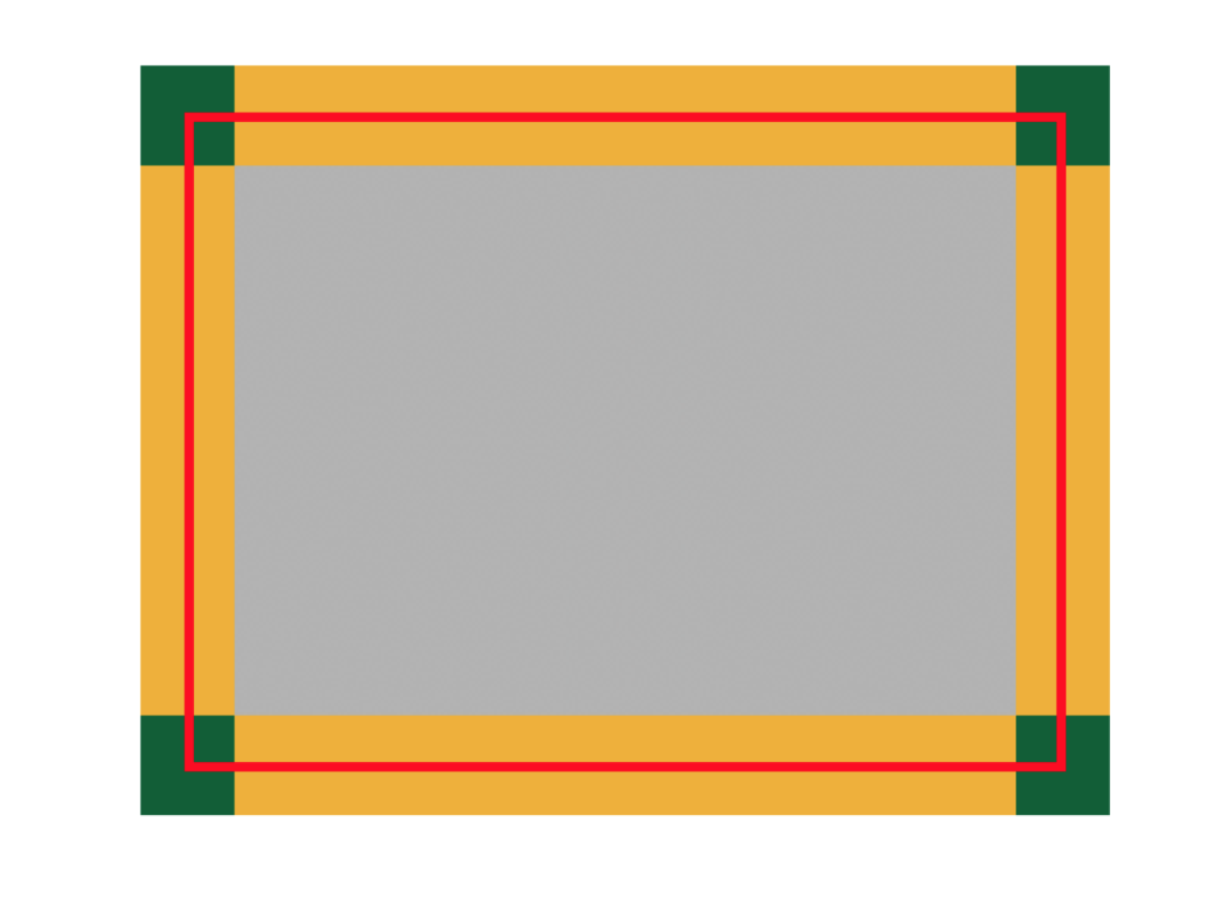
红色线以及其内部是变幻矩形的区域 绿色小方块是四个角的操作区域,可以同时改变宽高 黄色部分是通过边来单一改变矩形宽高的 将这些区域的路径数据值宽高存到pathes数组中,并且以他们的索引值作为代号 通过isPointInPath() 这个函数判断鼠标在哪个路径里面,然后进行相应的操作,包括:改变鼠标的样式,和所执行的变换操作。 相反方向改变大小的时候宽度会出现负值,拖动过程中不用理会,等mouseup的时候处理就行
canvas练习单个矩形形变的更多相关文章
- WPF使用Canvas绘制可变矩形
1.问题以及解决办法 最近因为项目需要,需要实现一个位置校对的功能,大致的需求如下:有一个图片,有一些位置信息,但是位置信息可能和实际有些偏差,需要做简单调整,后面会对这张图片进行切割等,做些处理.( ...
- HTML5 Canvas自定义圆角矩形与虚线(Rounded Rectangle and Dash Line)
HTML5 Canvas自定义圆角矩形与虚线(RoundedRectangle and Dash Line) 实现向HTML Canvas 2d context绘制对象中添加自定义的函数功能演示,如何 ...
- HTML5 在canvas绘制一个矩形
笔者:本笃庆军 原文地址:http://blog.csdn.net/qingdujun/article/details/32930501 一.绘制矩形 canvas使用原点(0,0)在左上角的坐标系统 ...
- 使用canvas绘制渐变色矩形和使用按键控制人物移动
使用canvas绘制渐变色矩形和使用按键控制人物移动 1.使用canvas绘制渐变色矩形 效果演示 相关代码: <!DOCTYPE html> <html lang="en ...
- for循环+canvas实现黑客帝国矩形阵
<!DOCTYPE html><html><head> <meta http-equiv="Content-Type" content=& ...
- [HTML5 Canvas学习]绘制矩形
1.使用strokeRect和fillRect方法绘制矩形 a.strokeRect是绘制一个不填充的矩形 b.fillRect是绘制一个填充的矩形 代码: <script> var ca ...
- 车大棒浅谈for循环+canvas实现黑客帝国矩形阵
背景: 一日在网上闲逛的之时,突然看到一个利用JQ插件实现canvas实现的电影黑客帝国的小Demo.觉得创意不错,就下载下来研究一下. 网上浏览jQuery的写法 $(document).ready ...
- Javascript高级编程学习笔记(86)—— Canvas(3)绘制矩形
绘制矩形 矩形是唯一一种可以直接在2D上下文中绘制的形状. 与矩形有关的方法包括: fillRect() strokeRect() clearRect() 上述方法都接收四个参数: 绘制矩形的 X 坐 ...
- canvas实现黑客帝国矩形阵
在博客园看到了车大棒的写了一篇关于实现黑客帝国矩形阵,觉得canvas还是有一些奇妙的地方所在,故做个笔记记录一下. 实现的效果如下: 真的是一两行关键的代码添加就能实现意想不到的效果. 由于是can ...
随机推荐
- EVB-P6UL:一识庐山真面目
前言 原创文章,转载引用务必注明链接.水平有限,如有疏漏,欢迎指正. 本文使用Markdown写成,为获得更好的阅读体验与正确的图片链接显示,请访问我的博客原文: 在爱板网上看到这个活动,昨晚确认,今 ...
- Android开发人员不得不收集的代码(转)
App相关→AppUtils.java 安装App installApp 卸载指定包名的App uninstallApp 获取当前App信息 getAppInfo 获取所有已安装App信息 getAl ...
- OLR
OLR:Oracle Local Registry 环境:11.2.0.3 RAC RHEL6.5 It contains local node specific configuration re ...
- 效率提升最重要的原则 - Doing one thing at a time
前段时间流行的时间管理方法 - url=NotLrz-4f4eCgENFAECrXNw88mSLoJ2Rc2MrkP4aes1yQvPjNQRlmdYcbz9oP9U8JoBzJeY-DSUhhInx ...
- java 获取微信 页面授权 获取用户openid
先调用微信的地址 跳转https://open.weixin.qq.com/connect/oauth2/authorize?appid=wx4b4009c4fce00e0c&redirect ...
- items" does not support runtime expression
<%@taglib prefix="c" uri="http://java.sun.com/jstl/core"%> 更改为 <%@tagl ...
- CxImage新手教程,图文并茂
作为一个游戏client程序猿,须要对图像处理有一定的知识. CxImage是C++实现的功能强大的.能处理多种文件格式的图像管理类.它可以简单高速的实现图像的导入.保存.显示和变换. 同一时候又具有 ...
- HTML5,不仅仅是看上去非常美(第二弹:打造最美3D机房)
前言 近期项目开发任务告一段落,刚好有时间整理这大半年的一些成果.使用html5时间还不久,对js的认识还不够深入.没办法,曾经一直搞java,对js的一些语言特性和概念一时还转换只是来. 上一篇第一 ...
- c++ 通过数据流方式实现文件拷贝
#include "stdafx.h"#include <iostream>#include<fstream>using namespace std;voi ...
- python 基础 1.5 python数据类型(三)--元组
一.python的数据类型 序列--元组 1.序列 1>字符串,列表,元组都是序列. 2>序列的两个特点是索引操作符和切片操作符 索引操作符:我们可以从序列中抓取一个特定项目 切片操作符: ...