
使用python将多个excel合并
最近看视频学习,老师布置了个作业,关于如何使用python将多个excel进行合并,老师写的代码我感觉比较复杂,下面是我自己改良之后较简单的方式。
实现这个功能主要有两种方法,一种是用xlwd,xlsxwriter库结合,不管是xlsx,xls都是适用的;另一种是openpyxl,这个库只对xlsx有效。
本文针对第一种方式进行讲解。
首先准备三个excel文件,目的是将三个excel的sheet进行合并:
test_excel1.xlsx
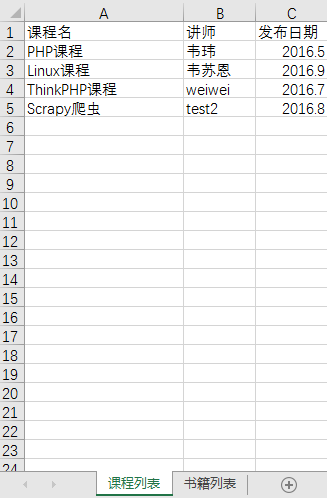
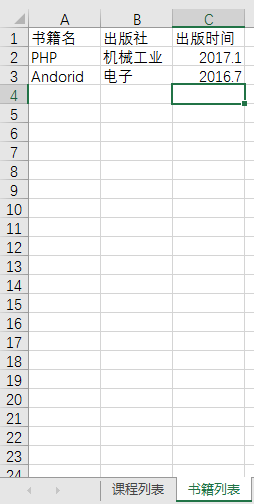
为了简化测试,另外两个excel文件test_excel2.xlsx, test_excel3.xlsx的内容跟第一个excel是一致的。
下面是代码部分
-- coding:utf-8 --
import xlrd,xlsxwriter
待合并excel
allxls=["E:\python3_hellobi_work\excel\test_excel\test_excel1.xlsx",
"E:\python3_hellobi_work\excel\test_excel\test_excel2.xlsx",
"E:\python3_hellobi_work\excel\test_excel\test_excel3.xlsx"]
目标excel
end_xls="E:\python3_hellobi_work\excel\test_excel\final_excel.xlsx"
def open_xls(file):
try:
fh=xlrd.open_workbook(file)
return fh
except Exception as e:
print("打开文件错误:"+e)
根据excel名以及第几个标签信息就可以得到具体标签的内容
def get_file_value(filename,sheetnum):
rvalue=[]
fh=open_xls(filename)
sheet=fh.sheets()[sheetnum]
row_num=sheet.nrows
for rownum in range(0,row_num):
rvalue.append(sheet.row_values(rownum))
return rvalue
获取第一个excel的sheet个数以及名字作为标准
first_file_fh=open_xls(allxls[0])
first_file_sheet=first_file_fh.sheets()
first_file_sheet_num=len(first_file_sheet)
sheet_name=[]
for sheetname in first_file_sheet:
sheet_name.append(sheetname.name)
定义一个目标excel
endxls=xlsxwriter.Workbook(end_xls)
all_sheet_value=[]
把所有内容都放到列表all_sheet_value中
for sheet_num in range(0,first_file_sheet_num):
all_sheet_value.append([])
for file_name in allxls:
print("正在读取"+file_name+"的第"+str(sheet_num+1)+"个标签...")
file_value=get_file_value(file_name,sheet_num)
all_sheet_value[sheet_num].append(file_value)
print(all_sheet_value)
num=-1
sheet_index=-1
将列表all_sheet_value的内容写入目标excel
for sheet in all_sheet_value:
sheet_index+=1
end_xls_sheet=endxls.add_worksheet(sheet_name[sheet_index])
num+=1
num1=-1
for sheet1 in sheet:
for sheet2 in sheet1:
num1+=1
num2=-1
for sheet3 in sheet2:
num2+=1
#print(num,num1,num2,sheet3)
#在第num1行的第num2列插入sheet3内容
end_xls_sheet.write(num1,num2,sheet3)
记得要关闭文件
endxls.close()
----------------------------------------------end--------------------------------------------------------------
运行代码,看看目标excel:
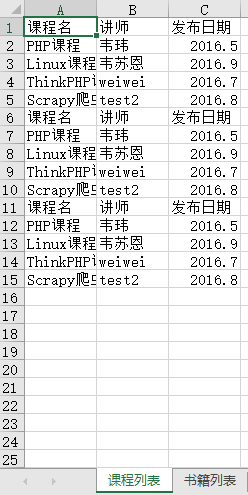
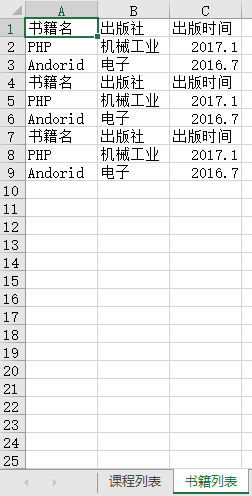
两个excel已经合并到一起了。
哈哈。写完啦~~~
使用python将多个excel合并的更多相关文章
- Python将多个excel表格合并为一个表格
Python将多个excel表格合并为一个表格 生活中经常会碰到多个excel表格汇总成一个表格的情况,比如你发放了一份表格让班级所有同学填写,而你负责将大家的结果合并成一个.诸如此类的问题有很多.除 ...
- Python使用openpyxl读写excel文件
Python使用openpyxl读写excel文件 这是一个第三方库,可以处理xlsx格式的Excel文件.pip install openpyxl安装.如果使用Aanconda,应该自带了. 读取E ...
- python 导出数据到excel 中,一个好用的导出数据到excel模块,XlsxWriter
最近公司有项目需要导出数据到excel,首先想到了,tablib,xlwt,xlrd,xlwings,win32com[还可以操作word],openpyxl,等模块但是 实际操作中tablib 写入 ...
- 【转发】Python使用openpyxl读写excel文件
Python使用openpyxl读写excel文件 这是一个第三方库,可以处理xlsx格式的Excel文件.pip install openpyxl安装.如果使用Aanconda,应该自带了. 读取E ...
- python读写word、excel、csv、json文件
http://blog.csdn.net/pipisorry/article/details/50368044 python读写word文档 (include wps)将word文档转换成txt文档 ...
- Python利用pandas处理Excel数据的应用
Python利用pandas处理Excel数据的应用 最近迷上了高效处理数据的pandas,其实这个是用来做数据分析的,如果你是做大数据分析和测试的,那么这个是非常的有用的!!但是其实我们平时在做 ...
- python将两个数组合并成一个数组的两种方法的代码
内容过程中,把写内容过程中常用的内容收藏起来,下面的资料是关于python将两个数组合并成一个数组的两种方法的内容,希望能对小伙伴们有帮助. c1 = ["Red","G ...
- python使用xlrd读取excel数据时,整数变小数的解决办法
python使用xlrd读取excel数据时,整数变小数: 解决方法: 1.有个比较简单的就是在数字和日期的单元格内容前加上一个英文的逗号即可.如果数据比较多,也可以批量加英文逗号的前缀(网上都有方法 ...
- 【python-excel】Selenium+python自动化之读取Excel数据(xlrd)
Selenium2+python自动化之读取Excel数据(xlrd) 转载地址:http://www.cnblogs.com/lingzeng86/p/6793398.html ·········· ...
随机推荐
- ubuntu16.04 配置opensips服务器并编译pjsip测试
一.版本相关 1) ubuntu版本: 16.04 2) opensips版本:2.1.2 3) pjsip版本 :2.5.5 4) ffmpeg版本:3.3.4 5) sdl版本:2.0 6) vs ...
- JAVA基础知识总结:一
一.软件开发的常识 1.什么是软件? 一系列按照特定顺序组织起来的计算机数据或者指令 常见的软件: 系统软件:Windows\Mac OS \Linux 应用软件:QQ,一系列的播放器(爱奇艺,乐视, ...
- 事件轮询中的task与microtask
event loop 网上看到的一篇文章,关于介绍task和Tasks, microtasks, queues and schedules,尝试简单翻译一下写进来吧! 原文地址:https://jak ...
- IE10和IE11中滑动条遮挡页面问题
今天在开发的过程中前端项目,在小设备上会出现滑动条,这本没什么,在其他浏览器上都很正常,但是在IE10和IE11上出现了问题,发现侧边滑动条挡住了一部分页面的内容,因为侧边有要操作的按钮,这就是一个很 ...
- Oracle 表空间扩充
Oracle 表空间扩充 一.现场环境: (1)操作系统:AIX (2)数据库:Oracle Database 10g Enterprise Edition Release 10.2.0.5.0 - ...
- java项目log4j日志打印配置
#定义输出级别和输出平台 添加DEBUG表示打印sql 语句 log4j.rootLogger=DEBUG,INFO,ERROR,stdout,R log4j.category.org.spring ...
- FTP&samba 服务简单部署
第1章 FTP服务部署 在Linux下,我们应用最广泛的FTP服务程序是 vsftpd ( TCP端口:而NMB服务是负责解析用的,类似与DNS实现的功能,NMB可以把Linux系统共享的工作组名称与 ...
- two.js之实现动画效果
一.什么是two.js? Two.js 是面向现代 Web 浏览器的一个二维绘图 API.Two.js 可以用于多个场合:SVG,Canvas 和 WebGL,旨在使平面形状和动画的创建更方便,更简洁 ...
- 浅谈Jquery中的bind(),live(),delegate(),on()绑定事件方式 [转载]
前言 因为项目中经常会有利用jquery操作dom元素的增删操作,所以会涉及到dom元素的绑定事件方式,简单的归纳一下bind,live,delegate,on的区别,以便以后查阅,也希望该文章日后能 ...
- chrome Web开放 字体格式不能显示问题
/** * Chrome 32/33 webfont issue fix. * Requires jQuery. * More info: http://blog.cloudfour.com/chro ...