
angular.js的时间指令
最后样式
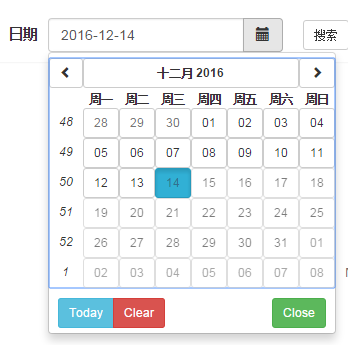
html
.input-group(style="max-width:150px")

    input.form-control(uib-datepicker-popup="{{format}}" ng-model="dt" is-open="popup1.opened" datepicker-options="dateOptions"  ng-required="true" close-text="关闭" current-text="今天" alt-input-formats="altInputFormats" clear-text='清除')

    span.input-group-btn

        span.btn.btn-default(ng-click="open()")

            i.glyphicon.glyphicon-calendar
js
angular.module("app")

    .directive('timePicker', ["$rootScope", function($rootScope) {

        // Runs during compile

        return {

            scope: {

                dt: "=model" //显示列表头部th信息,及绑定的内容

            }, // {} = isolate, true = child, false/undefined = no change

            controller: ["$scope", "$element", "$attrs", "$transclude", function($scope, $element, $attrs, $transclude) {

                // console.log($scope);

                $scope.today = function() {

                    $scope.dt = new Date();

                };

                if(!$scope.dt){

                    // $scope.today();

                }

                // $scope.inlineOptions = {

                //     customClass: getDayClass,

                //     minDate: new Date(),

                //     showWeeks: true

                // };

                $scope.dateOptions = {

                    //dateDisabled: true,

                    formatYear: 'yy',

                    //maxDate: new Date(2020, 5, 22),

                    //minDate: new Date(),

                    startingDay: 1,

                    formatDayHeader:'EEE',

                    showWeeks:false

                };

                $scope.open = function() {

                    $scope.popup1.opened = true;

                };

                $scope.setDate = function(year, month, day) {

                    $scope.dt = new Date(year, month, day);

                };

                $scope.format = 'yyyy-MM-dd';

                $scope.altInputFormats = ['M!/d!/yyyy'];

                $scope.popup1 = {

                    opened: false

                };

                $scope.popup2 = {

                    opened: false

                };

                var tomorrow = new Date();

                tomorrow.setDate(tomorrow.getDate() + 1);

                var afterTomorrow = new Date();

                afterTomorrow.setDate(tomorrow.getDate() + 1);

                $scope.events = [

                    {

                        date: tomorrow,

                        status: 'full'

                    },

                    {

                        date: afterTomorrow,

                        status: 'partially'

                    }

                ];

                function getDayClass(data) {

                    var date = data.date,

                        mode = data.mode;

                    if (mode === 'day') {

                        var dayToCheck = new Date(date).setHours(0,0,0,0);

                        for (var i = 0; i < $scope.events.length; i++) {

                            var currentDay = new Date($scope.events[i].date).setHours(0,0,0,0);

                            if (dayToCheck === currentDay) {

                                return $scope.events[i].status;

                            }

                        }

                    }

                    return '';

                }

            }],

            // require: 'ngModel', // Array = multiple requires, ? = optional, ^ = check parent elements

            restrict: 'AE', // E = Eleme    nt, A = Attribute, C = Class, M = Comment

            // template: '',

            templateUrl: 'app/dist/directive/timepicker/date.html',

            // replace: true,

            //transclude: true,

            link: function(scope, element, c, d, transclude) {

                // console.log(scope)

                //                 scope.Fn=scope.Fn&&scope.Fn(scope)||{};

            }

        };

    }]);
angular.js的时间指令的更多相关文章
- 推荐 15 个 Angular.js 应用扩展指令(参考应用)
几天前我们看到Angular 1.4.0发布了-一个以社团为驱动的发布版本涵盖了400多个GitHub的提交,增加了对特性的提升,比如动画,以及可用性. 官方新闻发布稿 覆盖了绝大部分,这同样值得放于 ...
- Angular JS学习之指令
1.Angular JS通过称为指令的新属性来扩展HTML:通过内置的指令来为应用添加功能: 2.AngularJS指令:AngularJS指令是扩展的HTML属性,带有前缀ng-: **ng-app ...
- Angular.js之自定义指令学习笔记
<!DOCTYPE html><html lang="en"><head> <meta charset="UTF-8" ...
- angular.js的ng-app 指令定义一个 AngularJS 应用程序。
<!DOCTYPE html> <html lang="en" ng-app> <head> <meta charset="UT ...
- angular.js的表格指令
html div.col-sm-12 table.table.table-bordered.table-condensed.table-hover.table-striped.dataTable.no ...
- angular.js创建自定义指令-demo3
html: <!doctype html><html ng-app="myModule"> <head> <meta charset=&q ...
- Angular JS中$timeout的用法及其与window.setTimeout的区别
$timeout的用法 angular.js的$timeout指令对window.setTimeout做了一个封装,它的返回值是一个promise对象.当定义的时间到了以后,这个promise对象就会 ...
- angular.js 中同步视图和模型数据双向绑定,$watch $digest $apply 机制
Angular.js 中的特性,双向绑定. 让视图的改变直接反应到数据中,数据的改变又实时的通知到视图,如何做到的? 这要归功于 scope 下面3个重要的方法: $watch $digest $ap ...
- 史上最全的Angular.js 的学习资源
Angular.js 的一些学习资源 基础 官方: http://docs.angularjs.org angularjs官方网站已被墙,可看 http://www.ngnice.com/: 官方zi ...
随机推荐
- BloomFilter算法
Bloom filter 是由 Howard Bloom 在 1970 年提出的二进制向量数据结构,它具有很好的空间和时间效率,被用来检测一个元素是不是集合中的一个成员.如果检测结果为是,该元素不一定 ...
- 一个只有99行代码的JS流程框架
张镇圳,腾讯Web前端高级工程师,对内部系统前端建设有多年经验,喜欢钻研捣鼓各种前端组件和框架. 最近一直在想一个问题,如何能让js代码写起来更语义化和更具有可读性. 上周末的时候突发奇想,当代码在运 ...
- Python标准模块--importlib
作者:zhbzz2007 出处:http://www.cnblogs.com/zhbzz2007 欢迎转载,也请保留这段声明.谢谢! 1 模块简介 Python提供了importlib包作为标准库的一 ...
- DOM Mutation Observer
源链接:http://www.jianshu.com/p/b5c9e4c7b1e1
- 单片机课程设计——《基于AT89S52单片机和DS1302时钟芯片的电子时钟(可蓝牙校准)》
引言 本设计以AT89S52单片机为控制核心,时钟芯片DS1302提供时钟源,配合LCD1602液晶显示模块,组成基本硬件系统,同时利用HC-05嵌入式蓝牙串口通讯模块,可在手机端进行日期.时间的校准 ...
- 使用RandomAccessFile类对文件进行读写
1. RandomAccessFile类简介 前面一篇随笔<File类遍历目录及文件>中有说到,File类只能用于表示文件或目录的名称.大小等信息,而不能用于文件内容的访问.而当需要访 ...
- position relative
position的默认值是static,(也就是说对于任意一个元素,如果没有定义它的position属性,那么它的position:static) 如果你想让这个#demo里的一个div#sub相对于 ...
- js解析器(重要!)
JavaScript有"预解析"的特性,理解预解析是很重要的,不然在实际开发中可能会遇到很多无法解析的问题,甚至导致程序bug的存在. #js预解析执行过程: 预解析:(全局作用域 ...
- OpenGL 的空间变换(上):矩阵在空间几何中的应用
在使用 OpenGL 的应用程序中,当我们指定了模型的顶点后,顶点依次会变换到不同的 OpenGL 空间中,最后才会被显示到屏幕上.在变换的过程中,通过使用矩阵,我们更高效地来完成这些变换工作. 本篇 ...
- 用js+cookie实现商城的购物车功能
页面上的添加功能主要就是两个按钮 <input name="buy" type="image" alt="第一个商品" src=&qu ...