
spring boot +mysql + mybatis + druid的整理(一)——单数据源
一,使用spring boot脚手架搭建spring boot框架生成maven项目
如下图所示:
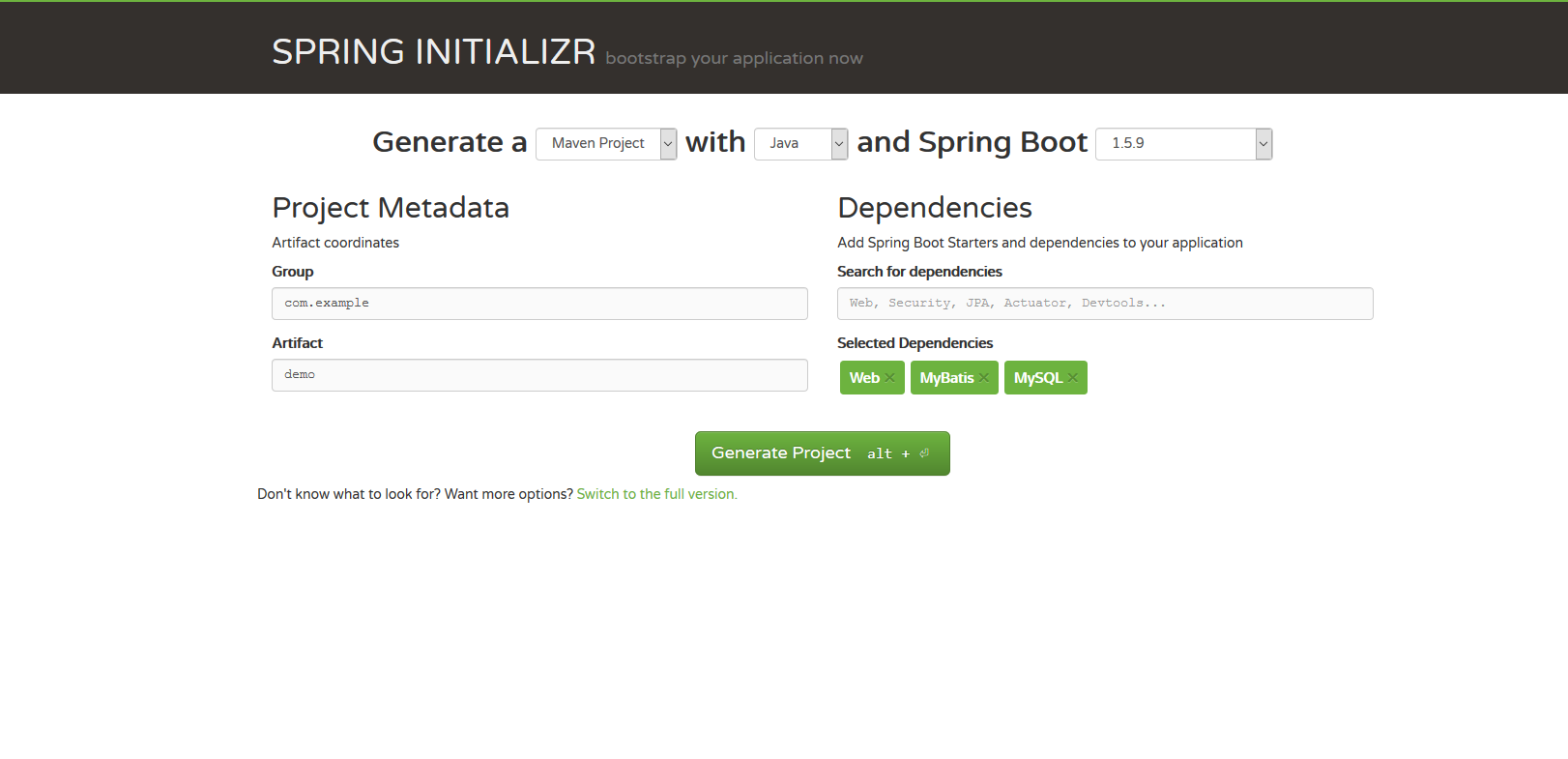
设置自定义的坐标,即左侧的Group和Artifact,右侧可以搜索添加一些依赖,搜索不到的可以在pom文件中手动添加,本文需要的依赖如下:
        <dependency>

            <groupId>org.mybatis.spring.boot</groupId>

            <artifactId>mybatis-spring-boot-starter</artifactId>

            <version>1.3.1</version>

        </dependency>

        <dependency>

            <groupId>mysql</groupId>

            <artifactId>mysql-connector-java</artifactId>

            <scope>runtime</scope>

        </dependency>

        <dependency>

            <groupId>com.alibaba</groupId>

            <artifactId>druid</artifactId>

            <version>1.0.25</version>

        </dependency>

        <!-- 分页插件 -->

        <dependency>

            <groupId>com.github.pagehelper</groupId>

            <artifactId>pagehelper</artifactId>

            <version>4.1.6</version>

        </dependency>
引入所需依赖jar包后,就可以开始集成mybatis和druid了。
二,集成druid
本文采用properties文件的形式进行配置,根据自己习惯,亦可选用yml文件进行相关配置。
1.在application.properties写入以下配置:
#主数据库的配置

#spring.datasource.name = test 多数据源时可配

#spring.datasource.type = com.alibaba.druid.pool.DruidDatasource

spring.datasource.driverClassName = com.mysql.jdbc.Driver

spring.datasource.url = jdbc:mysql://IP:port/数据库名称?useUnicode=true&characterEncoding=utf8&allowMultiQueries=true&autoReconnect=true

spring.datasource.username = ***

spring.datasource.password = ***

#连接池的补充设置

#初始化、最小、最大

spring.datasource.initialSize = 1

spring.datasource.minIdle = 1

spring.datasource.maxActive = 20

#获取连接等待超时的时间、毫秒(1m)

spring.datasource.maxWait = 60000

#检测关闭空闲连接的间隔时间、毫秒(1m),当空闲连接大于(minEvictableIdleTimeMillis),则关闭物理连接

spring.datasource.timeBetweenEvictionRunsMillis = 60000

#一个连接在池中最小的生存时间、毫秒(5m)

spring.datasource.minEvictableIdleTimeMillis = 300000

#监控统计拦截的filters,去掉后监控界面sql无法统计,'wall用于防火墙','log4j'用于日志

spring.datasource.druid.sys.filters = stat,wall,log4j

#用于检测连接是否有效的语句

spring.datasource.validationQuery=SELECT 'x'

#检测连接的超时时间、秒

spring.datasource.validationQueryTimeout = 3

#申请连接时,空闲时间大于(timeBetweenEvictionRunsMillis),则检测连接的有效性

spring.datasource.testWhileIdle = true

#申请连接时,检测连接的有效性(性能损耗)

spring.datasource.testOnBorrow = false

#归还连接时,检测连接的有效性(性能损耗)

spring.datasource.testOnReturn = false
有关druid的配置信息,可移步Druid查看,本文不再赘述。
2.编写DruidConfig,如下:
import java.util.Properties;

import javax.sql.DataSource;

import org.springframework.beans.factory.annotation.Autowired;

import org.springframework.context.annotation.Bean;

import org.springframework.context.annotation.Configuration;

import org.springframework.context.annotation.Primary;

import org.springframework.core.env.Environment;

import com.alibaba.druid.pool.DruidDataSourceFactory;

@Configuration

public class DruidConfig {

    //配置文件

    @Autowired

    private Environment env;

    @Bean

    //默认为主数据源

    @Primary

    public DataSource getDataSource() throws Exception{
     //此处不推荐使用实例化一个DruidDataSource的方式,进行数据源的配置,采用DruidDataSourceFactory的方式创建DataSource实例,原理分析可查看设计模式之工厂模式。

        Properties properties = new Properties();

        properties.put("driverClassName", env.getProperty("spring.datasource.driverClassName"));

        properties.put("url", env.getProperty("spring.datasource.url"));

        properties.put("username", env.getProperty("spring.datasource.username"));

        properties.put("password", env.getProperty("spring.datasource.password"));

        properties.put("initialSize", env.getProperty("spring.datasource.initialSize"));

        properties.put("minIdle", env.getProperty("spring.datasource.minIdle"));

        properties.put("maxActive", env.getProperty("spring.datasource.maxActive"));

        properties.put("maxWait", env.getProperty("spring.datasource.maxWait"));

        properties.put("timeBetweenEvictionRunsMillis", env.getProperty("spring.datasource.timeBetweenEvictionRunsMillis"));

        properties.put("minEvictableIdleTimeMillis", env.getProperty("spring.datasource.minEvictableIdleTimeMillis"));

        properties.put("validationQuery", env.getProperty("spring.datasource.validationQuery"));

        properties.put("filters", env.getProperty("spring.datasource.druid.sys.filters"));

        properties.put("validationQueryTimeout", env.getProperty("spring.datasource.validationQueryTimeout"));

        properties.put("testWhileIdle", env.getProperty("spring.datasource.testWhileIdle"));

        properties.put("testOnBorrow", env.getProperty("spring.datasource.testOnBorrow"));

        properties.put("testOnReturn", env.getProperty("spring.datasource.testOnReturn"));

        return DruidDataSourceFactory.createDataSource(properties);

    }

}
druid集成完毕。
三,集成mybatis
1.在application.properties中写入以下配置
# mybatis_config

# mapper.xml的文件地址

mybatis.mapperLocations=classpath:mybatis/mapper/*.xml

mybatis.typeAliasesPackage=****
2.编写MybatisConfig,如下:
import java.util.Properties;

import javax.sql.DataSource;

import org.apache.ibatis.plugin.Interceptor;

import org.apache.ibatis.session.SqlSessionFactory;

import org.mybatis.spring.SqlSessionFactoryBean;

import org.mybatis.spring.SqlSessionTemplate;

import org.mybatis.spring.annotation.MapperScan;

import org.springframework.beans.factory.annotation.Autowired;

import org.springframework.boot.autoconfigure.AutoConfigureAfter;

import org.springframework.context.annotation.Bean;

import org.springframework.context.annotation.Configuration;

import org.springframework.transaction.PlatformTransactionManager;

import org.springframework.transaction.annotation.EnableTransactionManagement;

import org.springframework.transaction.annotation.TransactionManagementConfigurer;

import org.springframework.core.env.Environment;

import org.springframework.core.io.Resource;

import org.springframework.core.io.support.PathMatchingResourcePatternResolver;

import org.springframework.jdbc.datasource.DataSourceTransactionManager;

import com.github.pagehelper.PageHelper;

@Configuration

@AutoConfigureAfter({DruidConfig.class})

//扫描dao层,basePackages 为dao层所在路径,支持通配符*,多个以,分隔

@MapperScan(basePackages = "")

@EnableTransactionManagement

public class MyBatisConfig implements TransactionManagementConfigurer{

    @Autowired

    //配置文件

    private Environment env;

    @Autowired

    //默认为配置文件中的数据源

    DataSource dataSource;

    //根据数据源创建sqlSessionFactory

    @Bean

    public SqlSessionFactoryBean sqlSessionFactoryBean() throws Exception{

        SqlSessionFactoryBean factoryBean = new SqlSessionFactoryBean();

        //指定数据源

        factoryBean.setDataSource(dataSource);

        //指定封装类所在包

        factoryBean.setTypeAliasesPackage(env.getProperty("mybatis.typeAliasesPackage"));

        //指定mapper.xml文件所在

        Resource[] resource = new PathMatchingResourcePatternResolver().getResources(env.getProperty("mybatis.mapperLocations"));

        factoryBean.setMapperLocations(resource);

        //添加分页插件

        PageHelper pageHelper = new PageHelper();

        Properties properties = new Properties();

        properties.setProperty("reasonable", "true");

        properties.setProperty("supportMethodsArguments", "true");

        properties.setProperty("returnPageInfo", "check");

        properties.setProperty("params", "count=countSql");

        pageHelper.setProperties(properties);

        factoryBean.setPlugins(new Interceptor[]{pageHelper});

        return factoryBean;

    }

    @Bean

    public SqlSessionTemplate sqlSessionTemplate(SqlSessionFactory sqlSessionFactory){

        return new SqlSessionTemplate(sqlSessionFactory);

    }

    @Bean

    @Override

    public PlatformTransactionManager annotationDrivenTransactionManager() {

        return new DataSourceTransactionManager(dataSource);

    }

}
至此,集成完毕。
spring boot +mysql + mybatis + druid的整理(一)——单数据源的更多相关文章
- 太妙了!Spring boot 整合 Mybatis Druid,还能配置监控?
Spring boot 整合 Mybatis Druid并配置监控 添加依赖 <!--druid--> <dependency> <groupId>com.alib ...
- Spring Boot系列(三):Spring Boot整合Mybatis源码解析
一.Mybatis回顾 1.MyBatis介绍 Mybatis是一个半ORM框架,它使用简单的 XML 或注解用于配置和原始映射,将接口和Java的POJOs(普通的Java 对象)映射成数据库中的记 ...
- Spring Boot 整合 Mybatis 实现 Druid 多数据源详解
摘要: 原创出处:www.bysocket.com 泥瓦匠BYSocket 希望转载,保留摘要,谢谢! “清醒时做事,糊涂时跑步,大怒时睡觉,独处时思考” 本文提纲一.多数据源的应用场景二.运行 sp ...
- Spring boot教程mybatis访问MySQL的尝试
Windows 10家庭中文版,Eclipse,Java 1.8,spring boot 2.1.0,mybatis-spring-boot-starter 1.3.2,com.github.page ...
- spring boot 整合 mybatis 以及原理
同上一篇文章一样,spring boot 整合 mybatis过程中没有看见SqlSessionFactory,sqlsession(sqlsessionTemplate),就连在spring框架整合 ...
- spring boot配置mybatis和事务管理
spring boot配置mybatis和事务管理 一.spring boot与mybatis的配置 1.首先,spring boot 配置mybatis需要的全部依赖如下: <!-- Spri ...
- Spring boot之MyBatis
文章目录1. 环境依赖2. 数据源2.1. 方案一 使用 Spring Boot 默认配置2.2. 方案二 手动创建3. 脚本初始化4. MyBatis整合4.1. 方案一 通过注解的方式4.1.1. ...
- spring boot集成mybatis(1)
Spring Boot 集成教程 Spring Boot 介绍 Spring Boot 开发环境搭建(Eclipse) Spring Boot Hello World (restful接口)例子 sp ...
- spring boot集成mybatis(2) - 使用pagehelper实现分页
Spring Boot 集成教程 Spring Boot 介绍 Spring Boot 开发环境搭建(Eclipse) Spring Boot Hello World (restful接口)例子 sp ...
随机推荐
- Vue-Methods中使用Filter
1.Vue中Filter声明方式 Vue中存在两种声明Filter过滤器的方式: 1.全局过滤器 Vue.filter('testFilter1',function(val){ console.log ...
- WebApi的多版本管理
1.多版本管理概念 什么是API的多版本问题?Android等App存在着多版本客户端共存的问题:由于早期没有内置升级机制,用户不会升级,拒绝升级等原因,造成了许多软件的旧版本App也在运行.开发新版 ...
- 数据加密,android客户端和服务器端可共用
安卓中,不管是内网还是外网,数据的传输首要考虑就是安全问题,尤其是用户信息,以及各种密码等敏感信息. 所以说,对数据的加密是很有必要的,尤其是当下物联网蓬勃发展的今天,数据安全尤为重要. 数据加密的方 ...
- Linux网络配置。Win10能ping虚拟机但虚拟机ping不通Win10,关闭Win10防火墙就好。
仅主机模式:配置VMnet1与虚拟机在同一个网段 ifconfig查看网卡名: ifconfig ens33 192.168.1.2: ifconfig查看是否配置成功: 在Windows物理机上pi ...
- iOS tableViewCell 在cell赋值、网络加载照片位置偏移大小错乱,做一个类似qq列表的tableview 更新3
更新3: 问题 加载慢!(一时间给的处理负载过大,要分散)在下载图片,判断状态后 对每个cell对图片灰置图片处理保存,影响了主线程的操作 :上拉加载时,无法上下滑动tableview 无法点击cel ...
- 每周.NET前沿技术文章摘要(2017-05-17)
汇总国外.NET社区相关文章,覆盖.NET ,ASP.NET等内容: .NET .NET Framework 4.7正式发布 链接: http://www.infoq.com/cn/news/2017 ...
- ArcGIS API for JavaScript 中的数据类型【vs】GPServer的数据类型
熟悉GPServer的同学肯定知道,GPServer在10.1的ArcMap后需要执行成功一次才能发布. 发布GPServer,可以是ArcMap的工具箱的工具,也可以是自己写的模型. 不管是ArcM ...
- Prism for WPF再探(基于Prism事件的模块间通信)
上篇博文链接 Prism for WPF初探(构建简单的模块化开发框架) 一.简单介绍: 在上一篇博文中初步搭建了Prism框架的各个模块,但那只是搭建了一个空壳,里面的内容基本是空的,在这一篇我将实 ...
- 02.将SDK获取到的ECS主机信息入库
1.通过调用阿里SDK,将获取到的ECS信息存入数据库,如果不知道SDK怎么使用,查看:01.阿里云SDK调用,获取ESC主机详细信息 2.import aliSDK应用的是01.阿里云SDK调用,获 ...
- Io 异常: The Network Adapter could not establish the connection
新接触一个项目,导入源码,在本地启动的时候后台报了一个错误: Could not discover the dialect to use. java.sql.SQLException: Io 异常: ...