
团队作业八—第二次团队冲刺(Beta版本) 第 1 天
一、每个人的工作
(1) 昨天已完成的工作
由于是才刚开始冲刺,所以没有昨天的工作
(2) 今天计划完成的工作;
对界面的优化和一些细节的完善
(3) 工作中遇到的困难;
工作中出现了意见不一的情况
(4) 每个人的贡献比

二、燃尽图

三、代码
复杂模式题目数目界面
<?xml version="1.0" encoding="utf-8"?>

<LinearLayout xmlns:android="http://schemas.android.com/apk/res/android"

    xmlns:app="http://schemas.android.com/apk/res-auto"

    xmlns:tools="http://schemas.android.com/tools"

    android:orientation="vertical" android:layout_width="match_parent"

    android:layout_height="match_parent">

    <android.support.constraint.ConstraintLayout

        android:layout_width="match_parent"

        android:layout_height="match_parent">

        <TextView

            android:id="@+id/textView2"

            android:layout_width="64dp"

            android:layout_height="20dp"

            android:text="题目数量"

            tools:layout_editor_absoluteX="75dp"

            tools:layout_editor_absoluteY="128dp" />

        <EditText

            android:id="@+id/editText2"

            android:layout_width="175dp"

            android:layout_height="26dp"

            android:ems="10"

            android:inputType="textPersonName"

            android:text=""

            tools:layout_editor_absoluteX="139dp"

            tools:layout_editor_absoluteY="128dp" />

        <Button

            android:id="@+id/button3"

            android:layout_width="wrap_content"

            android:layout_height="wrap_content"

            android:text="确定"

            tools:layout_editor_absoluteX="147dp"

            tools:layout_editor_absoluteY="230dp"

            android:onClick="onClickFz" />

    </android.support.constraint.ConstraintLayout>

</LinearLayout>
复杂模式做题界面
<?xml version="1.0" encoding="utf-8"?>

<LinearLayout xmlns:android="http://schemas.android.com/apk/res/android"

    xmlns:app="http://schemas.android.com/apk/res-auto"

    xmlns:tools="http://schemas.android.com/tools"

    android:orientation="vertical" android:layout_width="match_parent"

    android:layout_height="match_parent">

    <android.support.constraint.ConstraintLayout

        android:layout_width="match_parent"

        android:layout_height="match_parent">

        <TextView

            android:id="@+id/textView4"

            android:layout_width="wrap_content"

            android:layout_height="wrap_content"

            android:text="99"

            tools:layout_editor_absoluteX="44dp"

            tools:layout_editor_absoluteY="108dp" />

        <TextView

            android:id="@+id/textView5"

            android:layout_width="wrap_content"

            android:layout_height="wrap_content"

            android:text="+"

            tools:layout_editor_absoluteX="102dp"

            tools:layout_editor_absoluteY="108dp" />

        <TextView

            android:id="@+id/textView6"

            android:layout_width="wrap_content"

            android:layout_height="wrap_content"

            android:text="99"

            tools:layout_editor_absoluteX="163dp"

            tools:layout_editor_absoluteY="108dp" />

        <TextView

            android:id="@+id/textView7"

            android:layout_width="wrap_content"

            android:layout_height="wrap_content"

            android:text=" = "

            tools:layout_editor_absoluteX="221dp"

            tools:layout_editor_absoluteY="108dp" />

        <EditText

            android:id="@+id/editText4"

            android:layout_width="64dp"

            android:layout_height="33dp"

            android:ems="10"

            android:inputType="textPersonName"

            android:text="Name"

            tools:layout_editor_absoluteX="236dp"

            tools:layout_editor_absoluteY="100dp" />

        <Button

            android:id="@+id/button4"

            android:layout_width="wrap_content"

            android:layout_height="wrap_content"

            android:text="下一题"

            tools:layout_editor_absoluteX="131dp"

            tools:layout_editor_absoluteY="219dp" />

    </android.support.constraint.ConstraintLayout>

</LinearLayout>
结果统计界面
<?xml version="1.0" encoding="utf-8"?>

<LinearLayout xmlns:android="http://schemas.android.com/apk/res/android"

    xmlns:app="http://schemas.android.com/apk/res-auto"

    xmlns:tools="http://schemas.android.com/tools"

    android:orientation="vertical" android:layout_width="match_parent"

    android:layout_height="match_parent">

    <android.support.constraint.ConstraintLayout

        android:layout_width="match_parent"

        android:layout_height="match_parent">

        <TextView

            android:id="@+id/textView12"

            android:layout_width="wrap_content"

            android:layout_height="wrap_content"

            android:text="题目"

            tools:layout_editor_absoluteX="40dp"

            tools:layout_editor_absoluteY="24dp" />

        <TextView

            android:id="@+id/textView13"

            android:layout_width="wrap_content"

            android:layout_height="wrap_content"

            android:text="你的结果"

            tools:layout_editor_absoluteX="109dp"

            tools:layout_editor_absoluteY="24dp" />

        <TextView

            android:id="@+id/textView14"

            android:layout_width="wrap_content"

            android:layout_height="wrap_content"

            android:text="判断"

            tools:layout_editor_absoluteX="183dp"

            tools:layout_editor_absoluteY="24dp" />

        <TextView

            android:id="@+id/textView15"

            android:layout_width="wrap_content"

            android:layout_height="wrap_content"

            android:text="正确答案"

            tools:layout_editor_absoluteX="258dp"

            tools:layout_editor_absoluteY="24dp" />

        <TextView

            android:id="@+id/textView16"

            android:layout_width="wrap_content"

            android:layout_height="wrap_content"

            android:text="TextView"

            tools:layout_editor_absoluteX="28dp"

            tools:layout_editor_absoluteY="78dp" />

        <TextView

            android:id="@+id/textView17"

            android:layout_width="wrap_content"

            android:layout_height="wrap_content"

            android:text="TextView"

            tools:layout_editor_absoluteX="28dp"

            tools:layout_editor_absoluteY="125dp" />

        <TextView

            android:id="@+id/textView18"

            android:layout_width="wrap_content"

            android:layout_height="wrap_content"

            android:text="TextView"

            tools:layout_editor_absoluteX="28dp"

            tools:layout_editor_absoluteY="178dp" />

        <TextView

            android:id="@+id/textView19"

            android:layout_width="wrap_content"

            android:layout_height="wrap_content"

            android:text="TextView"

            tools:layout_editor_absoluteX="109dp"

            tools:layout_editor_absoluteY="78dp" />

        <TextView

            android:id="@+id/textView20"

            android:layout_width="wrap_content"

            android:layout_height="wrap_content"

            android:text="TextView"

            tools:layout_editor_absoluteX="176dp"

            tools:layout_editor_absoluteY="78dp" />

        <TextView

            android:id="@+id/textView21"

            android:layout_width="wrap_content"

            android:layout_height="wrap_content"

            android:text="TextView"

            tools:layout_editor_absoluteX="258dp"

            tools:layout_editor_absoluteY="78dp" />

        <TextView

            android:id="@+id/textView22"

            android:layout_width="wrap_content"

            android:layout_height="wrap_content"

            android:text="TextView"

            tools:layout_editor_absoluteX="109dp"

            tools:layout_editor_absoluteY="125dp" />

        <TextView

            android:id="@+id/textView23"

            android:layout_width="wrap_content"

            android:layout_height="wrap_content"

            android:text="TextView"

            tools:layout_editor_absoluteX="174dp"

            tools:layout_editor_absoluteY="125dp" />

        <TextView

            android:id="@+id/textView24"

            android:layout_width="wrap_content"

            android:layout_height="wrap_content"

            android:text="TextView"

            tools:layout_editor_absoluteX="258dp"

            tools:layout_editor_absoluteY="125dp" />

        <TextView

            android:id="@+id/textView25"

            android:layout_width="wrap_content"

            android:layout_height="wrap_content"

            android:text="TextView"

            tools:layout_editor_absoluteX="109dp"

            tools:layout_editor_absoluteY="178dp" />

        <TextView

            android:id="@+id/textView26"

            android:layout_width="wrap_content"

            android:layout_height="wrap_content"

            android:text="TextView"

            tools:layout_editor_absoluteX="176dp"

            tools:layout_editor_absoluteY="178dp" />

        <TextView

            android:id="@+id/textView27"

            android:layout_width="wrap_content"

            android:layout_height="wrap_content"

            android:text="TextView"

            tools:layout_editor_absoluteX="258dp"

            tools:layout_editor_absoluteY="178dp" />

        <TextView

            android:id="@+id/textView28"

            android:layout_width="wrap_content"

            android:layout_height="wrap_content"

            android:text="用时:"

            tools:layout_editor_absoluteX="77dp"

            tools:layout_editor_absoluteY="349dp" />

        <TextView

            android:id="@+id/textView29"

            android:layout_width="wrap_content"

            android:layout_height="wrap_content"

            android:text="正确率:"

            tools:layout_editor_absoluteX="77dp"

            tools:layout_editor_absoluteY="393dp" />

        <TextView

            android:id="@+id/textView30"

            android:layout_width="wrap_content"

            android:layout_height="wrap_content"

            android:text="TextView"

            tools:layout_editor_absoluteX="151dp"

            tools:layout_editor_absoluteY="349dp" />

        <TextView

            android:id="@+id/textView31"

            android:layout_width="wrap_content"

            android:layout_height="wrap_content"

            android:text="TextView"

            tools:layout_editor_absoluteX="151dp"

            tools:layout_editor_absoluteY="393dp" />

    </android.support.constraint.ConstraintLayout>

</LinearLayout>
团队源码仓库地址:https://git.coding.net/lizhiqiang0x01/APP-sizeyunsuan.git
https://git.coding.net/lizhiqiang0x01/Beta-APPsizeyunsuan.git
四、模块部分截图


五、项目进展
总体来说项目进展的都比较顺利,虽然有遇到些小问题,但只要和队友沟通交流好,都能比较圆满的解决
六、小结
团队协作中出现问题队友之间的沟通尤为重要,有个良好的沟通才能使得项目循序渐进,相信在接下来冲刺的几天我们能越做越好。
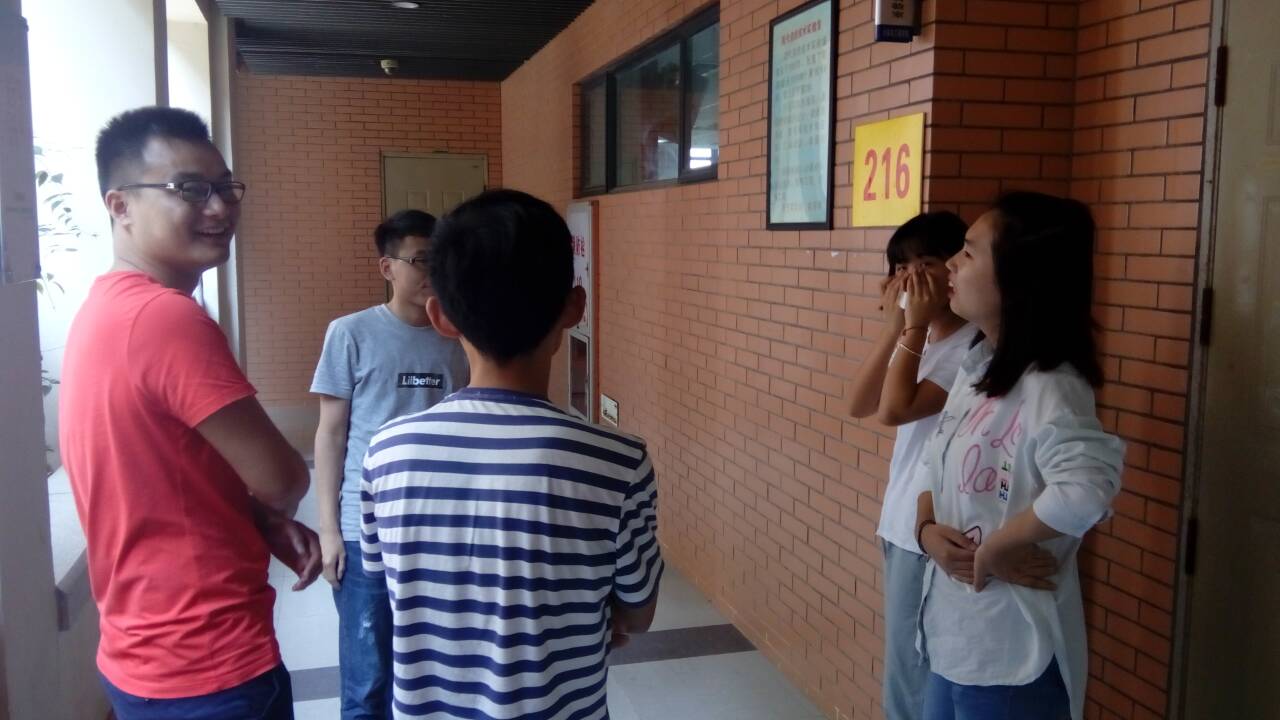
七、站立会议图片
团队作业八—第二次团队冲刺(Beta版本) 第 1 天的更多相关文章
- 团队作业7——第二次项目冲刺-Beta版本项目计划
上一个阶段的总结: 在Alpha阶段,我们小组已近完成了大部分的功能要求,小组的每一个成员都发挥了自己的用处.经过了这么久的磨合,小组的成员之间越来越默契,相信在接下来的合作中,我们的开发速度会越来越 ...
- 团队作业八——第二次团队冲刺(Beta版本)第7天&项目汇总
项目汇总 第一天:http://www.cnblogs.com/newteam6/p/6879383.html 第二天:http://www.cnblogs.com/newteam6/p/688078 ...
- 团队作业八——第二次团队冲刺(Beta版本)第6天
团队作业八--第二次团队冲刺(Beta版本)第6天 一.每个人的工作 (1) 昨天已完成的工作 简单模式逻辑代码涉及与相关功能的具体实现 (2) 今天计划完成的工作 修改完善注册登录内容界面,编辑错题 ...
- 团队作业八——第二次团队冲刺(Beta版本)第5天
团队作业八--第二次团队冲刺(Beta版本)第5天 一.每个人的工作 (1) 昨天已完成的工作 完成界面跳转界面. (2) 今天计划完成的工作 简单模式逻辑代码涉及与相关功能的具体实现 (3) 工作中 ...
- 团队作业八——第二次团队冲刺(Beta版本)第4天
团队作业八--第二次团队冲刺(Beta版本)第4天 一.每个人的工作 (1) 昨天已完成的工作 做一下用户注册的功能和登录功能. (2) 今天计划完成的工作 完成界面跳转 (3) 工作中遇到的困难 界 ...
- 团队作业八—第二次团队冲刺(Beta版本) 第 2 天
一.每个人的工作 (1) 昨天已完成的工作 昨天的工作主要是一些界面的设计,我们顺利完成了复杂模式题目数目界面.复杂模式做题界面.结果统计界面的具体代码编写,和一些细节的完善.还有日常冲刺博客的编辑. ...
- 团队作业8 ----第二次项目冲刺(Beta阶段)博客汇总
一.冲刺计划安排 团队作业8--Beta版本冲刺计划及安排 二.七天冲刺汇总 [Beta]第一次Daily Scrum Meeting [Beta]第二次Daily Scrum Meeting [Be ...
- 团队作业八——第二次团队冲刺(Beta版本)第3天
一.每个人的工作 (1) 昨天已完成的工作 对界面进行完善,并增加简单界面(包含简单界面内含的界面),简单模式与复杂模式的选择界面. (2) 今天计划完成的工作 做一下用户注册的功能和登录功能. (3 ...
- 团队作业7——第二次项目冲刺(Beta版本)
团队作业7——第二次项目冲刺-Beta版本项目计划 团队作业7——第二次项目冲刺(Beta版本)-第一篇 团队作业7——第二次项目冲刺(Beta版本)-第二篇 团队作业7——第二次项目冲刺(Beta版 ...
随机推荐
- 开机出现Oxc000000e故障的解决方法
Oxc000000e故障 故障表现:开机时不能正常地登录系统,而是直接弹出图2所示的Oxc000000e故障提示. 原因分析:由于安装或卸载某些比较特殊的软件,往往会对Win7的引导程序造成非常严重的 ...
- IOS开发之UITabBarController与UINavigationController混合使用
ios开发中UITabBarController与UINavigationController混合使用是很多app的基础页面结构,下面是简单的的页面初始化的方法,在AppDelegate.m的 - ( ...
- 马的遍历 洛谷 p1443
题目描述 有一个n*m的棋盘(1<n,m<=400),在某个点上有一个马,要求你计算出马到达棋盘上任意一个点最少要走几步 输入输出格式 输入格式: 一行四个数据,棋盘的大小和马的坐标 输出 ...
- android学习ViewPager的简单使用
使用ViewPager需要引入android.support.v4.View.ViewPager这样的jar包,谷歌公司为解决当前版本碎片化的问题,提供的兼容的包.主要目的就是解决向下兼容问题. 1, ...
- Silverlight——施工计划日报表(一)
前一段时间,客户需要一个施工计划报表,要求能够直观的看到各个计划的实施时间,而且能够修改.琢磨着,决定用Silverlight搞定好了.效果如下: 用户可以通过右键菜单的[完成]选项来标记完成,左键选 ...
- Oracle12c 在windonServer2012中安装的步骤
oracle12c在windownServer2012中安装步骤 前期工作:<这个必须要安装:而且c$的C必须大写> 第一步:控制面板>所有控制面板项>管理工具>服务& ...
- JSP 标准标签库(JSTL)(JSP Standard Tag Library)
[1] JSTL简介 > JSTL是JSP的标准标签库 > JSTL为我们提供了一些常用的标签,供我们日常开发使用(if . if...else .遍历 . 日期格式化) ...
- 【Ubuntu16】apt-get安装MariaDB
一.Mysql背景信息 Mysql在互联网早期就流行了,追求速度.简单.坚持开源.几乎支持所有操作系统.完全支持多用户.多线程,支持海量数据存储,采用MyISAM.InnoDB两大存储引擎优势互补.但 ...
- SkipList跳表基本原理
为什么选择跳表 目前经常使用的平衡数据结构有:B树,红黑树,AVL树,Splay Tree, Treep等. 想象一下,给你一张草稿纸,一只笔,一个编辑器,你能立即实现一颗红黑树,或者AVL树 出来吗 ...
- ASP.NET Core 运行原理解剖[3]:Middleware-请求管道的构成
在 ASP.NET 中,我们知道,它有一个面向切面的请求管道,有19个主要的事件构成,能够让我们进行灵活的扩展.通常是在 web.config 中通过注册 HttpModule 来实现对请求管道事件监 ...