
Asp.net Core全局异常监控和记录日志
前言
系统异常监控可以说是重中之重,系统不可能一直运行良好,开发和运维也不可能24小时盯着系统,系统抛异常后我们应当在第一时间收到异常信息。在Asp.net Core里我使用拦截器和中间件两种方式来监控异常。全局异常监控的数据最好还是写入数据库,方便查询。
配置NLog
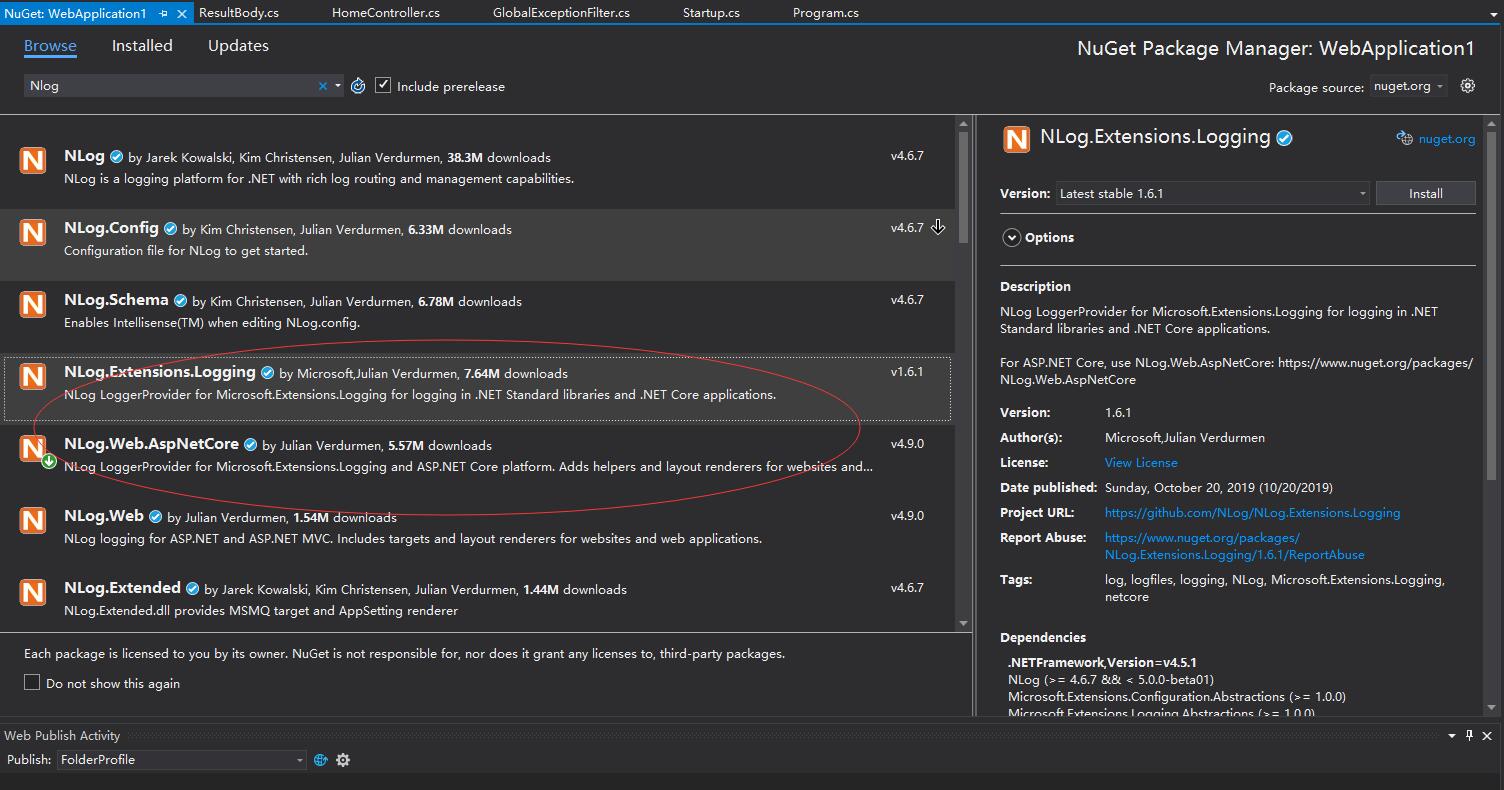
NLog配置文件
<?xml version="1.0" encoding="utf-8"?>

<nlog xmlns="http://www.nlog-project.org/schemas/NLog.xsd"

      xmlns:xsi="http://www.w3.org/2001/XMLSchema-instance"

      autoReload="true"

      internalLogLevel="info"

      internalLogFile="d:\temp\internal-nlog.txt">

  <!-- the targets to write to -->

  <targets>

    <!-- write logs to file  -->

    <target xsi:type="File" name="allfile" fileName="d:\temp\nlog-all-${shortdate}.log"

            layout="${longdate}|${event-properties:item=EventId.Id}|${uppercase:${level}}|${logger}|${message} ${exception}" />

    <!-- another file log, only own logs. Uses some ASP.NET core renderers -->

    <target xsi:type="File" name="ownFile-web" fileName="d:\temp\nlog-own-${shortdate}.log"

            layout="${longdate}|${event-properties:item=EventId.Id}|${uppercase:${level}}|${logger}|${message} ${exception}|url: ${aspnet-request-url}|action: ${aspnet-mvc-action}" />

    <!-- write to the void aka just remove -->

    <target xsi:type="Null" name="blackhole" />

  </targets>

  <!-- rules to map from logger name to target -->

  <rules>

    <!--All logs, including from Microsoft-->

    <logger name="*" minlevel="Trace" writeTo="allfile" />

    <!--Skip Microsoft logs and so log only own logs-->

    <logger name="Microsoft.*" minlevel="Trace" writeTo="blackhole" final="true" />

    <logger name="*" minlevel="Trace" writeTo="ownFile-web" />

  </rules>

</nlog>
注入NLog
在Program.cs里注入NLog依赖,添加依赖前需要导入两个命名空间Microsoft.Extensions.Logging、 NLog.Web。
public class Program

{

    public static void Main(string[] args)

    {

        CreateHostBuilder(args).Build().Run();

    }

    public static IHostBuilder CreateHostBuilder(string[] args) =>

        Host.CreateDefaultBuilder(args)

        .ConfigureWebHostDefaults(webBuilder =>

                                  {

                                      webBuilder.UseStartup<Startup>();

                                  })

        .ConfigureLogging(logging=>

                          {

                              logging.ClearProviders();

                              logging.SetMinimumLevel(Microsoft.Extensions.Logging.LogLevel.Trace);

                          })

        .UseNLog();

}
拦截器
在Asp.Mvc里最常用的拦截器,在Asp.net Core里也是支持的。先定义拦截器,再注入拦截器,这里自定义拦截器实现接口IExceptionFilter,接口会要求实现OnException方法,当系统发生未捕获的异常时就会触发这个方法。这里全局异常信息最好能放入数据库里,方便后台查询,再就是抛异常后最好能给负责人发邮件和发送报警短信,也可以直接拨打电话。
public class GlobalExceptionFilter : IExceptionFilter

{

    private IWebHostEnvironment _env;

    private ILogger<GlobalExceptionFilter> _logger;

    public GlobalExceptionFilter(IWebHostEnvironment _env,ILogger<GlobalExceptionFilter> _logger)

    {

         this._env = _env;

         this._logger = _logger;

    }

    public void OnException(ExceptionContext context)

    {

        if (context.Exception.GetType() == typeof(BusException))

        {

            //如果是自定义异常,则不做处理

        }

        else

        {

        }

         //日志入库

         //向负责人发报警邮件,异步

         //向负责人发送报警短信或者报警电话,异步

         Exception ex = context.Exception;

         //这里给系统分配标识,监控异常肯定不止一个系统。

         int sysId = 1;

         //这里获取服务器ip时,需要考虑如果是使用nginx做了负载,这里要兼容负载后的ip,

         //监控了ip方便定位到底是那台服务器出故障了

         string ip = context.HttpContext.Connection.RemoteIpAddress.ToString();

         _logger.LogError($"系统编号:{sysId},主机IP:{ip},堆栈信息:{ex.StackTrace},异常描述:{ex.Message}");

         context.Result = new JsonResult(ResultBody.error(ex.Message));

         context.ExceptionHandled = true;

     }

}
在Startup.ConfigureServices方法里注入全局异常处理拦截器。
public void ConfigureServices(IServiceCollection services)

{

    services.AddControllersWithViews();

    //注入全局异常处理

    services.AddMvc(option =>

    {

        option.Filters.Add(typeof(GlobalExceptionFilter));

    });

}
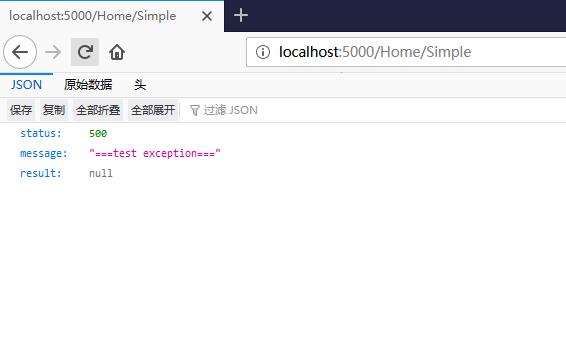
OK,定义了拦截器后,我们自己抛一个未捕获的异常试试。如图,都会返回统一的JSON返回值。
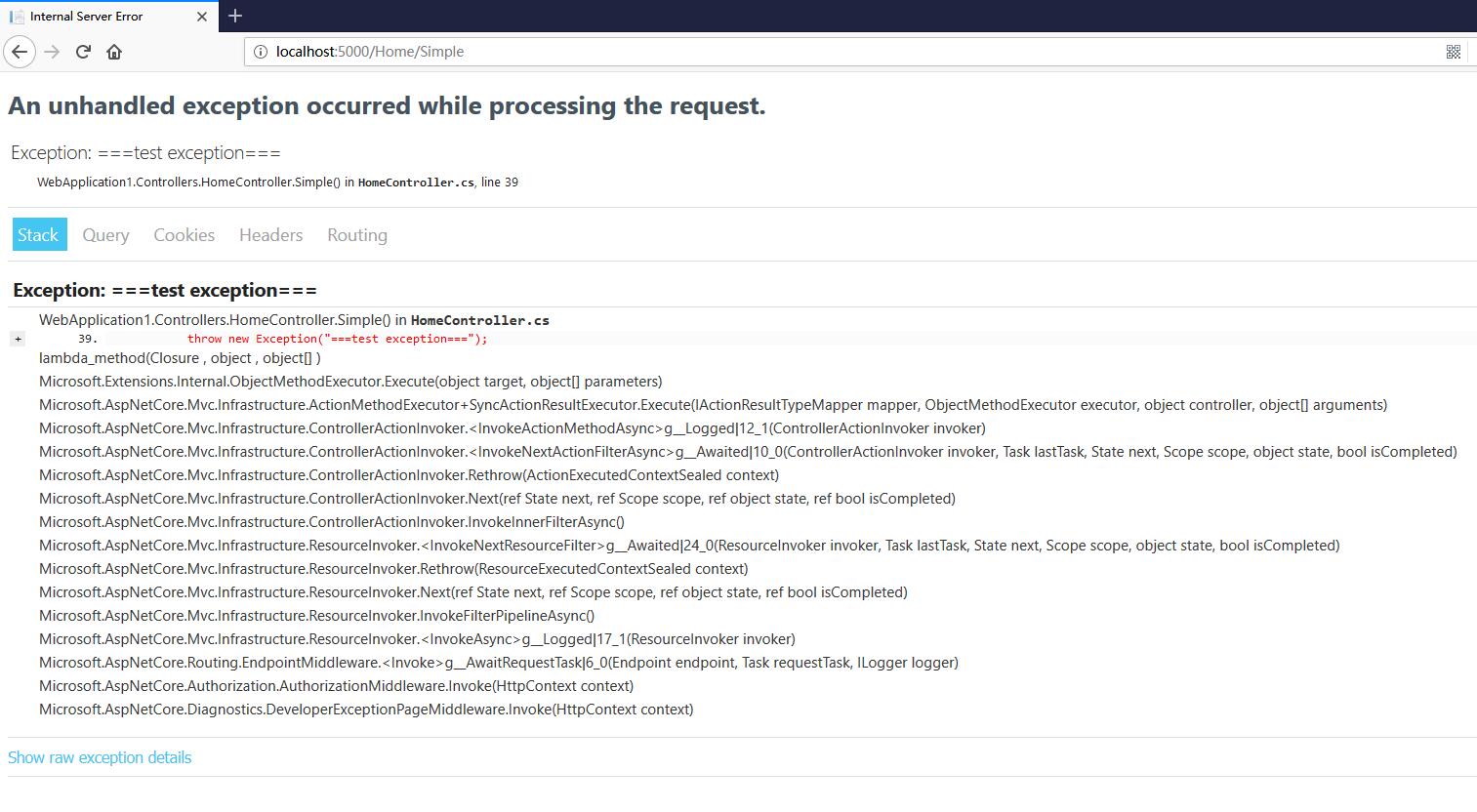
如果未使用全局异常捕获,则直接抛出如下异常
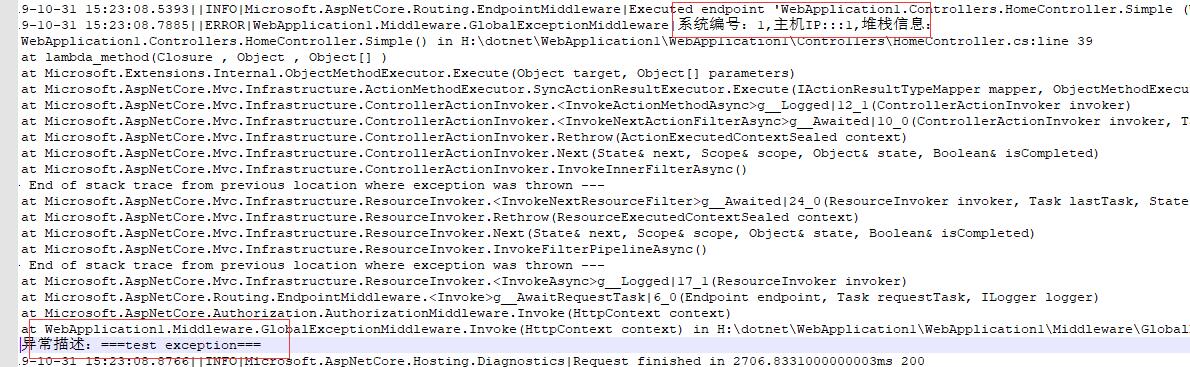
客户端抛出异常后,可查看磁盘写入日志,这里看到我关注的系统编号,主机ip,堆栈信息和异常描述信息。
中间件
定义中间件,定义中间件时先导入日志命名空间Microsoft.Extensions.Logging。
public class GlobalExceptionMiddleware

{

    private readonly RequestDelegate next;

    private ILogger<GlobalExceptionMiddleware> logger;

    public GlobalExceptionMiddleware(RequestDelegate next, ILogger<GlobalExceptionMiddleware> logger)

    {

        this.next = next;

        this.logger = logger;

    }

    public async Task Invoke(HttpContext context)

    {

        try

        {

            await next.Invoke(context);

        }

        catch (Exception ex)

        {

            await HandleExceptionAsync(context, ex);

        }

    }

    private async Task HandleExceptionAsync(HttpContext context, Exception e)

    {

        if (e.GetType() == typeof(BusException))

        {

            //如果是自定义异常,则不做处理

        }

        else

        {

        }

        //记日志

        int sysId = 1;

        string ip = context.Connection.RemoteIpAddress.ToString();

        logger.LogError($"系统编号:{sysId},主机IP:{ip},堆栈信息:{e.StackTrace},异常描述:{e.Message}");

        string result = System.Text.Json.JsonSerializer.Serialize(ResultBody.error(e.Message));

        await context.Response.WriteAsync(result);

    }

}
在Startup.Configure方法里注册中间件。
public void Configure(IApplicationBuilder app, IWebHostEnvironment env,ILoggerFactory loggerFactory)

{

    if (env.IsDevelopment())

    {

        app.UseDeveloperExceptionPage();

    }

    else

    {

        app.UseExceptionHandler("/Home/Error");

    }

    //注册异常处理中间件

    app.UseMiddleware<GlobalExceptionMiddleware>();

    app.UseStaticFiles();

    app.UseRouting();

    app.UseAuthorization();

    app.UseEndpoints(endpoints =>

                     {

                         endpoints.MapControllerRoute(

                             name: "default",

                             pattern: "{controller=Home}/{action=Index}/{id?}");

                     });

}
中间件这里处理异常最后向客户端响应写入了一个字符串,这是个拦截器处理方式不同的地方。当然对客户端或者前端来说还是JSON对象更直观些。
参考链接
https://www.cnblogs.com/suizhikuo/p/8822352.html
https://www.cnblogs.com/viter/p/10013195.html
https://www.jianshu.com/p/cab597211136
Asp.net Core全局异常监控和记录日志的更多相关文章
- asp.net core全局异常过滤并监控系统BUG将异常信息记录到日志
添加: using Dw.Util.Helper; using Microsoft.AspNetCore.Mvc.Filters; using System; using System.Collect ...
- 使用 NLog 给 Asp.Net Core 做请求监控
为了减少由于单个请求挂掉而拖垮整站的情况发生,给所有请求做统计是一个不错的解决方法,通过观察哪些请求的耗时比较长,我们就可以找到对应的接口.代码.数据表,做有针对性的优化可以提高效率.在 asp.ne ...
- Asp.Net Core 发布异常 502.5 [The Application process failed to Start]
出现这个问题大部分时间都是因为发布时,少打包了一些文件.. 只打包了.Net Core的运行时库,没有打包Asp.Net Core 运行时.. 需要在打包指导文件中加入以下节点 <Propert ...
- ASP.NET MVC 全局异常
先新建一个过滤器ExceptionHandleErrorAttribute.cs 内容如下: using System; using System.Net; using System.Web; usi ...
- Asp.Net Core 全局模型验证
public class ActionFilter : IActionFilter { /// <summary> /// action 执行之前 /// </summary> ...
- c# winform捕获全局异常,并记录日志
using System; using System.Collections.Generic; using System.Linq; using System.Windows.Forms; using ...
- asp.net mvc全局异常捕获
通过重写OnException方法形式实现. 1.自定义异常记录类并继承HandleErrorAttribute类. public class HandlerErrorAttribute : Hand ...
- ASP.NET Core 中间件自定义全局异常处理
目录 背景 ASP.NET Core过滤器(Filter) ASP.NET Core 中间件(Middleware) 自定义全局异常处理 .Net Core中使用ExceptionFilter .Ne ...
- 我的asp.net core目录
推荐 Asp.NETCore轻松学系列阅读指引目录(asp.net core 2.2) 官方文档翻译 http://www.cnblogs.com/dotNETCoreSG/p/aspnetcore- ...
随机推荐
- svn报错Item is not readable svn解决方案
解决: 配置目录权限时如: [/]tangtx=rwyangcx=rwweishq=rw 结果组用户分别在根目录下可以正常show log,而在其子目录中show log都会提示 Item is no ...
- git 查看分支
1.查看本地分支 git branch 2.查看所有分支 git branch -a 2.查看所有分支及对应版本信息 git branch -va
- 自定义属性--JavaScript
1 - 获取属性值 element.属性 获取属性值 element.getAttribute('属性') 区别: element.属性 --获取内置属性(元素本身自带的属性) element.get ...
- Oracle 存储过程判断语句正确写法和时间查询方法
判断语句:if 条件 then if 条件 then ************; elsif 条件 then ************; elsif 条件 then ***** ...
- POJ 3069——Saruman's Army(贪心)
链接:http://poj.org/problem?id=3069 题解 #include<iostream> #include<algorithm> using namesp ...
- 58同城AES签名接口分析
背景:需要获取58同城上面发布的职位信息,其中的包括职位的招聘要求,薪资福利,公司的信息,招聘者的联系方式.(中级爬虫的难度系数) 职位详情页分析 某个职位详情页的链接 https://qy.m.58 ...
- 快学Scala 第十一课 (类继承)
类继承: class People { } class Emp extends People{ } 和Java一样,final的类不能被继承.final的字段和方法不能被override. 在Scal ...
- Android_布局
<该文章参考各大博客以及书籍总结而来,如有问题欢迎指出^ ^> 一.五大传统布局+新布局 线性布局——LinearLayout 相对布局——RelativeLayout 帧布局——Fram ...
- 线程安全-JUC
在多线程开发中,我们常遇到的问题就是并发数据,怎么保证线程安全.怎么保证数据不重复. 1. volatile volatile是一个java关键字,常用于在多线程中共享变量 volatile原理 每个 ...
- PHP7源码之array_flip函数分析
以下源码基于 PHP 7.3.8 array array_flip ( array $array ) (PHP 4, PHP 5, PHP 7) array_flip - 交换数组中的键和值 arra ...