
Nginx访问日志、日志切割、静态文件不记录日志和过期时间
6月8日任务
12.10 Nginx访问日志
12.11 Nginx日志切割
12.12 静态文件不记录日志和过期时间
12.10 Nginx访问日志
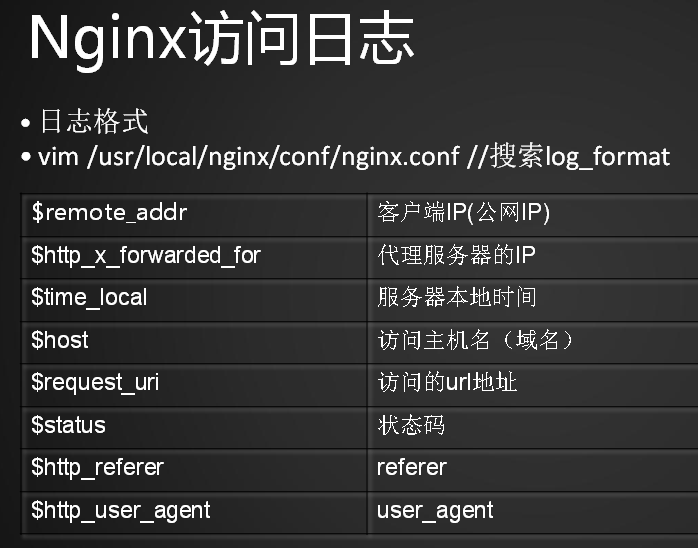
除了在主配置文件nginx.conf里定义日志格式外,还需要在虚拟主机配置文件中增加
[root@jimmylinux-001 vhost]# vim test.com.conf

重新加载配置文件后测试
[root@jimmylinux- vhost]# /usr/local/nginx/sbin/nginx -t

nginx: the configuration file /usr/local/nginx/conf/nginx.conf syntax is ok

nginx: configuration file /usr/local/nginx/conf/nginx.conf test is successful

[root@jimmylinux- vhost]# /usr/local/nginx/sbin/nginx -s reload
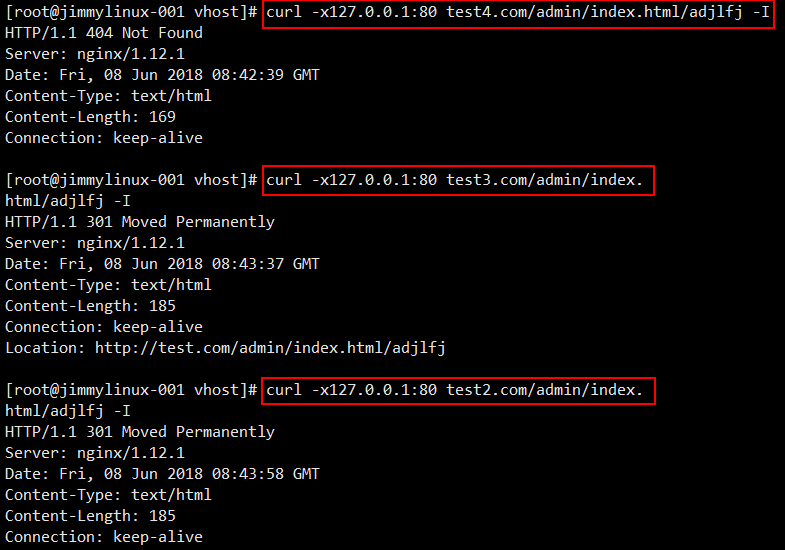

12.11 Nginx日志切割
Nginx不像Apache有自带的日志切割工具,所以需要借助于系统的日志切割工具或者自己写日志切割脚本。
1、创建一个shell脚本
[root@jimmylinux- vhost]# vim /usr/local/sbin/nginx_log_rotate.sh

写入以下内容

#! /bin/bash

d=`date -d "-1 day" +%Y%m%d`

logdir="/tmp/"

nginx_pid="/usr/local/nginx/logs/nginx.pid"

#! /bin/bash

d=`date -d "-1 day" +%Y%m%d`

logdir="/tmp/"

nginx_pid="/usr/local/nginx/logs/nginx.pid"

cd $logdir

for log in `ls *.log`

do

    mv $log $log-$d

done

/bin/kill -HUP `cat $nginx_pid`
[root@jimmylinux- vhost]# sh -x /usr/local/sbin/nginx_log_rotate.sh  sh运行脚本,-x表示查看执行脚本的过程。

++ date -d '-1 day' +%Y%m%d

+ d=

+ logdir=/tmp/

+ nginx_pid=/usr/local/nginx/logs/nginx.pid

+ cd /tmp/

++ ls test.com.log

+ for log in '`ls *.log`'

+ mv test.com.log test.com.log-

++ cat /usr/local/nginx/logs/nginx.pid

+ /bin/kill -HUP
以上就是日志切割的脚本,长此以往每天都会生成一个日志,除了每天切割之外还需要做一个清理,可以执行如下命令清理。
[root@jimmylinux- vhost]# find /tmp/ -name *.log-* -type f -mtime + |xargs rm

rm: 缺少操作数    因为没有满足条件的文件,所以会报错提示“缺少操作数”

Try 'rm --help' for more information.
2、加一个任务计划
[root@jimmylinux- vhost]# crontab -e  加一个任务计划

  * * * /usr/local/sbin/nginx_log_rotate.sh  每天的凌晨0点开始执行

12.12 静态文件不记录日志和过期时间
在Apache配置的时候介绍了静态文件可以设置不记录日志的,那么在Nginx里面同样也可以把一些静态文件忽略掉,不记录日志。
1、编辑配置文件test.com.conf
[root@jimmylinux- vhost]# vim test.com.conf

添加以下内容

location ~ .*\.(gif|jpg|jpeg|png|bmp|swf)$  匹配URL里面的关键词,括号里面的|是或者,.\是脱义的意思。

    {

          expires      7d;  过期时间7天

          access_log off;

    }

location ~ .*\.(js|css)$

    {

          expires      12h;

          access_log off;

    }
2、重新加载配置文件后模拟一个图片
[root@jimmylinux- vhost]# /usr/local/nginx/sbin/nginx -t

nginx: the configuration file /usr/local/nginx/conf/nginx.conf syntax is ok

nginx: configuration file /usr/local/nginx/conf/nginx.conf test is successful

[root@jimmylinux- vhost]# /usr/local/nginx/sbin/nginx -s reload
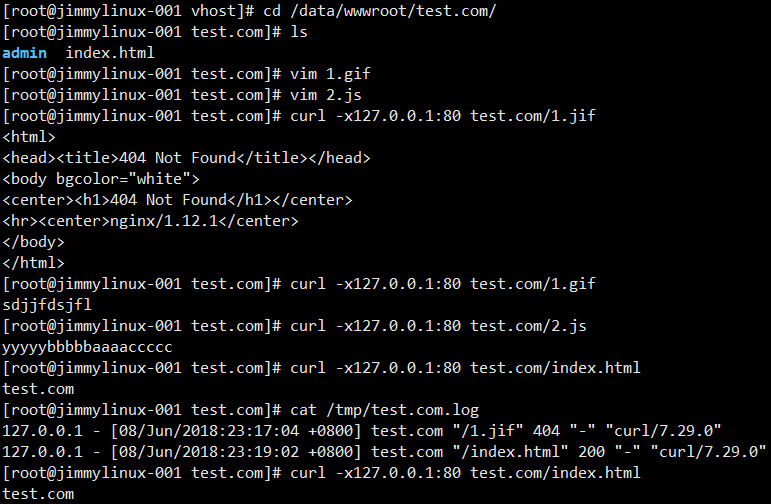
[root@jimmylinux- vhost]# cd /data/wwwroot/test.com/

[root@jimmylinux- test.com]# ls

admin  index.html

[root@jimmylinux- test.com]# vim .gif  新建一个1.gif文件

[root@jimmylinux- test.com]# vim .js  新建一个2.js文件

[root@jimmylinux- test.com]# curl -x127.0.0.: test.com/.jif

<html>

<head><title> Not Found</title></head>

<body bgcolor="white">

<center><h1> Not Found</h1></center>

<hr><center>nginx/1.12.</center>

</body>

</html>

[root@jimmylinux- test.com]# curl -x127.0.0.: test.com/.gif

sdjjfdsjfl

[root@jimmylinux- test.com]# curl -x127.0.0.: test.com/.js

yyyyybbbbbaaaaccccc

[root@jimmylinux- test.com]# curl -x127.0.0.: test.com/index.html

test.com

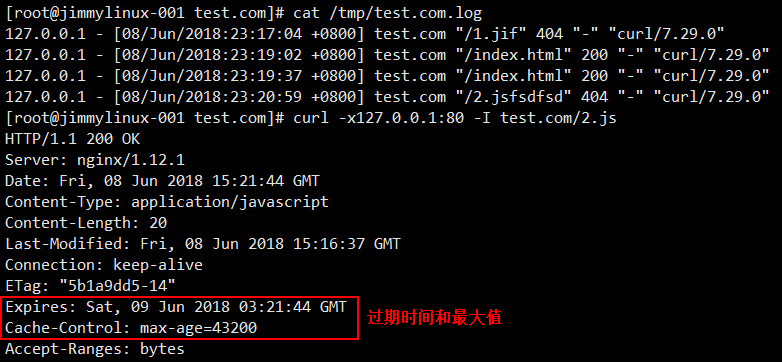
[root@jimmylinux- test.com]# cat /tmp/test.com.log

127.0.0.1 - [/Jun/::: +] test.com "/1.jif"  "-" "curl/7.29.0"

127.0.0.1 - [/Jun/::: +] test.com "/index.html"  "-" "curl/7.29.0"

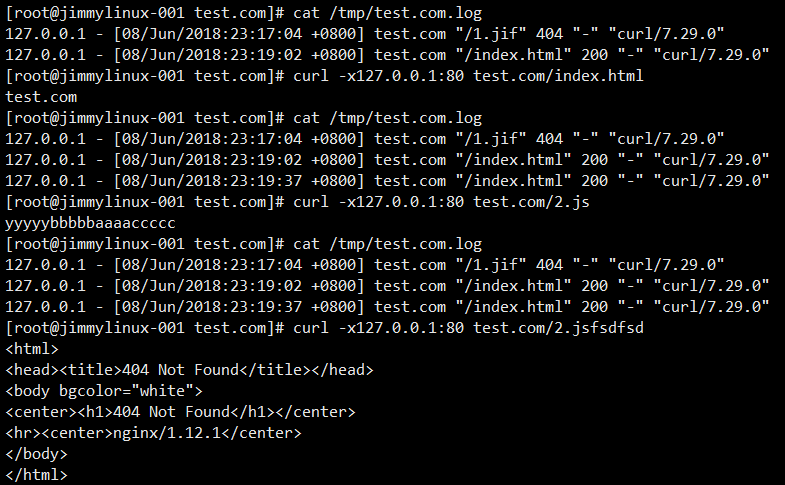
[root@jimmylinux- test.com]# curl -x127.0.0.: test.com/index.html

test.com

[root@jimmylinux- test.com]# cat /tmp/test.com.log

127.0.0.1 - [/Jun/::: +] test.com "/1.jif"  "-" "curl/7.29.0"

127.0.0.1 - [/Jun/::: +] test.com "/index.html"  "-" "curl/7.29.0"

127.0.0.1 - [/Jun/::: +] test.com "/index.html"  "-" "curl/7.29.0"

[root@jimmylinux- test.com]# curl -x127.0.0.: test.com/.js

yyyyybbbbbaaaaccccc

[root@jimmylinux- test.com]# cat /tmp/test.com.log

127.0.0.1 - [/Jun/::: +] test.com "/1.jif"  "-" "curl/7.29.0"

127.0.0.1 - [/Jun/::: +] test.com "/index.html"  "-" "curl/7.29.0"

127.0.0.1 - [/Jun/::: +] test.com "/index.html"  "-" "curl/7.29.0"

[root@jimmylinux- test.com]# curl -x127.0.0.: test.com/.jsfsdfsd

<html>

<head><title> Not Found</title></head>

<body bgcolor="white">

<center><h1> Not Found</h1></center>

<hr><center>nginx/1.12.</center>

</body>

</html>


[root@jimmylinux- test.com]# cat /tmp/test.com.log

127.0.0.1 - [/Jun/::: +] test.com "/1.jif"  "-" "curl/7.29.0"

127.0.0.1 - [/Jun/::: +] test.com "/index.html"  "-" "curl/7.29.0"

127.0.0.1 - [/Jun/::: +] test.com "/index.html"  "-" "curl/7.29.0"

127.0.0.1 - [/Jun/::: +] test.com "/2.jsfsdfsd"  "-" "curl/7.29.0"


[root@jimmylinux- test.com]# curl -x127.0.0.: -I test.com/.js

HTTP/1.1  OK

Server: nginx/1.12.

Date: Fri,  Jun  :: GMT

Content-Type: application/javascript

Content-Length:

Last-Modified: Fri,  Jun  :: GMT

Connection: keep-alive

ETag: "5b1a9dd5-14"

Expires: Sat,  Jun  :: GMT  过期时间

Cache-Control: max-age=43200            过期最大值

Accept-Ranges: bytes

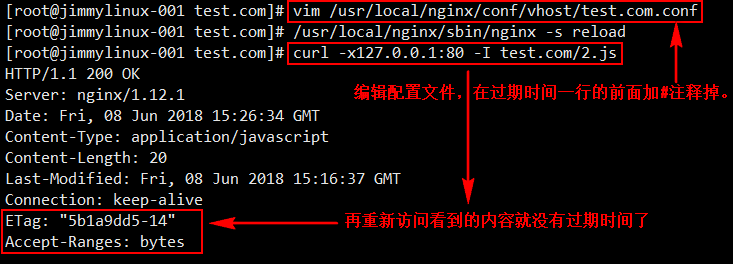
[root@jimmylinux- test.com]# vim /usr/local/nginx/conf/vhost/test.com.conf  编辑配置文件,把过期时间加#注释掉。


[root@jimmylinux- test.com]# /usr/local/nginx/sbin/nginx -s reload  重新加载配置文件

[root@jimmylinux- test.com]# curl -x127.0.0.: -I test.com/.js  重新再访问

HTTP/1.1  OK

Server: nginx/1.12.

Date: Fri,  Jun  :: GMT

Content-Type: application/javascript

Content-Length:

Last-Modified: Fri,  Jun  :: GMT

Connection: keep-alive

ETag: "5b1a9dd5-14"                      这个时候就没有过期时间了

Accept-Ranges: bytes
Nginx访问日志、日志切割、静态文件不记录日志和过期时间的更多相关文章
- Nginx访问日志 Nginx日志切割 静态文件不记录日志和过期时间
- Nginx访问日志、 Nginx日志切割、静态文件不记录日志和过期时间
1.Nginx访问日志 配制访问日志:默认定义格式: log_format combined_realip '$remote_addr $http_x_forwarded_for [$time_loc ...
- Linux centosVMware Nginx访问日志、Nginx日志切割、静态文件不记录日志和过期时间
一.Nginx访问日志 vim /usr/local/nginx/conf/nginx.conf //搜索log_format 日至格式 改为davery格式 $remote_addr 客户端IP ...
- nginx日志、nginx日志切割、静态文件不记录日志和过期时间
2019独角兽企业重金招聘Python工程师标准>>> 12.10 Nginx访问日志 日志格式 vim /usr/local/nginx/conf/nginx.conf //搜索l ...
- Linux centos7 VMware Apache访问日志不记录静态文件、访问日志切割、静态元素过期时间
一.Apache访问日志不记录静态文件 网站大多元素为静态文件,如图片.css.js等,这些元素可以不用记录 vim /usr/local/apache2.4/conf/extra/httpd-vho ...
- Nginx对于图片,js等静态文件的缓存设置
以下是自学it网--中级班上课笔记 网址:www.zixue.it Nginx对于图片,js等静态文件的缓存设置 注:这个缓存是指针对浏览器所做的缓存,不是指服务器端的数据缓存. 主要知识点: loc ...
- Apache配置 5.访问日志不记录静态文件
介绍:项目中的CSS.图片.js都是静态文件.一般会将静态文件放到一个单独的目录中,以方便管理. 1. 配置 # vim /usr/local/apache2.4/conf/extra/httpd-v ...
- nginx与tomcat 组合 实现静态文件和jsp组合访问
主要修改nginx的配置文件: 设置代理 location /{proxy_pass http://47.94.158.2:8080;proxy_redirect off;proxy_set_head ...
- 使用nginx缓存服务器上的静态文件
一.nginx缓存的优点 如图所示,nginx缓存,可以在一定程度上,减少源服务器的处理请求压力. 因为静态文件(比如css,js, 图片)中,很多都是不经常更新的.nginx使用proxy_cach ...
随机推荐
- Python中xml和dict格式转换
在做接口自动化的时候,请求数据之前都是JSON格式的,Python有自带的包来解决.最近在做APP的接口,遇到XML格式的请求数据,费了很大劲来解决,解决方式是:接口文档拿到的是XML,在线转化为js ...
- MIT线性代数:21.特征值和特征向量
- 基于node的前端项目代码包发布至nexus
目录 目录... 3 1. 前言... 1 2. 配置... 1 2.1. 配置angular.json文件... 1 2.2. 配置package.json文件... 1 2.3. 复制git地址. ...
- [Usaco 2012 Feb]Cow coupons牛券:反悔型贪心
Description Farmer John needs new cows! There are N cows for sale (1 <= N <= 50,000), ...
- NOIP模拟测试6
看题目就知道这是一个悲伤的故事... 但还有更悲伤的 考崩了,难以描述. T1把数据范围看成2^12,我TM也是够了... T2思路接近正解,但不知道想了个神魔东西跑了N遍dijstra T3最狗了, ...
- 如何在vue-cli项目中结合mockjs模拟假数据
1.前言 在如今前后端分离的开发方式已被广泛采用的今天,前端同学和后端同学各自独立开发,后端提供数据接口,前端调用接口获取数据渲染页面.但是在实际开发中,后端开发由于逻辑相对复杂接口迟迟提供不到位,而 ...
- Hibernate的多对多关系
1.表的关系: 分别有三个表:课程表.学生表.分数表.课程和学生的关系是多对多的,因为一个学生对应多个课程,而一个课程被多个学生选修.如果用一对多.多对一的观点来看待课程和学生的关系显然是不对的,因为 ...
- Java设计模式(20):命令模式
本文源码:GitHub·点这里 || GitEE·点这里 一.生活场景 1.场景描述 智能电脑的品牌越来越多,由此诞生了一款电脑控制的APP,万能遥控器,用户在使用遥控器的时候,可以切换为自家电视的品 ...
- redis 底层数据结构
简单动态字符串SDS 包含字符串长度,剩余可用长度,字符数组 用于Redis中所有的string存储 字典(map) 数组+链表形式,跟hashMap很像 链地址法解决hash冲突 rehash使用新 ...
- 过滤条件的时候用between和<>的区别
无论是sqlsever还是oracle都支持between函数, 2个函数的基本语法是 WHERE A BETWEEN 1 AND 2/ WHERE A >=1 AND A <=2 ,be ...