
ABAP动态自建表维护程序Dynamin Process
以前经常会遇到批量上传或修改数据到自建表的需求,所以在想是否可以做一个动态的程序,所有的自建表都可以用这个动态程序来维护。
于是就打算试着写动态的程序。
程序的要求:动态显示自建表ALV
动态下载Excel模板
根据这个Excel模板批量上传数据
可新增修改删除数据。
首先给一个屏幕输入表名,而且要求是Z开头的自建表,因为如果允许标准表修改,准备跑路吧。
下面是定义的变量和屏幕,ALV用OO来实现,也定义类
data: g_table_name    type string,"表名

      g_table_name_zh type string,"表中文描述

      p_ename         type rlgrap-filename."Excel文件路径名

data: gt_fieldcat type lvc_t_fcat,

      gs_layout   type lvc_s_layo.

data: gt_fieldcat_excel type lvc_t_fcat."上传用的ALV

*ALV

data: g_container type ref to cl_gui_docking_container,

      g_alv_grid  type ref to cl_gui_alv_grid.

data: it_exclud_button type ui_functions."删除的按钮

**********************************************Upload Excel ALV上传用

data: g_custom_container type ref to cl_gui_custom_container,

      g_alv_grid_excel   type ref to cl_gui_alv_grid.

constants: g_custom_container_name type char20 value 'G_CUSTOM_CONTAINER'.

data: gt_fieldcat_upload type lvc_t_fcat,

      gs_layout_upload   type lvc_s_layo.

data: gt_row  type lvc_t_row,"选择行

      gt_roid type lvc_t_roid.

data: g_row_count type i."总行数

*******************************************************************

"data: g_is_show_button."是否显示批量上传按钮

data: ok_code type sy-ucomm.

data: dyn_table        type ref to data,

      dyn_table_excel  type ref to data,

      dyn_table_upload type ref to data,

      dyn_wa_upload    type ref to data.

field-symbols: <dyn_table>        type standard table,

               <dyn_table_excel>  type standard table,

               <dyn_table_upload> type standard table,

               <dyn_wa>,

               <dyn_wa_upload>,

               <fs_fcat>          type                 lvc_s_fcat.

***********************OLE

data: application type ole2_object,

      workbook    type ole2_object,

      sheet       type ole2_object,

      cell1       type ole2_object,

      cell2       type ole2_object,

      cell        type ole2_object,

      border      type ole2_object,

      merge       type ole2_object,

      column      type ole2_object,

      entirecol   type ole2_object,

      range       type ole2_object,

      row         type ole2_object,

      color       type ole2_object.

data: begin of wa_excel,

        lines(),

      end of wa_excel,

      it_excel like table of wa_excel.

data: g_separator,"水平分隔符

      g_rc        type i.

**************************************

***********************定义ALV事件类

class lcl_event_receiver definition deferred.

class lcl_event_receiver definition.

  public section.

    methods:

      handle_toolbar

                    for event toolbar of cl_gui_alv_grid

        importing e_object e_interactive,

      handle_user_command

                    for event user_command of cl_gui_alv_grid

        importing e_ucomm,

      handle_after_refresh

         for event  after_refresh of cl_gui_alv_grid.

endclass.

class lcl_event_receiver implementation.

  method handle_toolbar.

    perform delete_old_toolbar using e_object e_interactive.

    perform build_toolbar using e_object e_interactive.

  endmethod.

  method handle_user_command.

    perform user_command using e_ucomm.

  endmethod.

  method handle_after_refresh.

    perform user_command using 'HAREF'."刷新之后的事件

  endmethod.

endclass.

data: event_receiver type ref to lcl_event_receiver.

**************************************

*&---------------------------------------------------------------------*

*& Selection Screen

*&---------------------------------------------------------------------*

selection-screen begin of block b1 with frame title t1.

parameters p_tname type tabname obligatory

                                default 'SPFLI'

                                visible length .

selection-screen end of block b1.

SPFLI 和 SFLIGHT是系统定义练习用的表。
判断表名
form check_table_name .

  if p_tname+() <> 'Z' and

     p_tname <> 'SPFLI'  and

     p_tname <> 'SFLIGHT'.

    message '只可输入自建表表名' type 'S'.

    stop.

  endif.

  data: l_exists.

  call function 'DEV_CHECK_TABLE_EXISTS'

    exporting

      i_tabname = p_tname

    importing

      e_exists  = l_exists.

  if l_exists eq ''.

    message '表名不存在' type 'S'.

    stop.

  endif.

  "获取表的中文描述

  select single ddtext from dd02t into g_table_name_zh

    where tabname = p_tname

      and ddlanguage = sy-langu.

endform.
获取表数据
form get_table_data .

  select * from (p_tname) into corresponding fields of table <dyn_table>.

endform.
动态创建Fieldcatlog
form create_fieldcat .

  data: structure_name type dd02l-tabname,

        ls_fieldcat    type lvc_s_fcat.

  structure_name = p_tname.

  call function 'LVC_FIELDCATALOG_MERGE'

    exporting

      i_structure_name = structure_name

    changing

      ct_fieldcat      = gt_fieldcat.

  "如果内表字段定义是用数据类型,reptext可能为空,给reptext赋值,scrtext_l为Excel输出标题使用

  loop at gt_fieldcat assigning <fs_fcat>.

    if <fs_fcat>-reptext is initial.

      if <fs_fcat>-scrtext_s is not initial.

        <fs_fcat>-scrtext_l = <fs_fcat>-reptext = <fs_fcat>-scrtext_s.

      else.

        "获取字段的描述

        select single ddtext from dd03t into <fs_fcat>-reptext

          where tabname    = p_tname

            and fieldname  = <fs_fcat>-fieldname

            and ddlanguage = sy-langu.

        <fs_fcat>-scrtext_l = <fs_fcat>-reptext.

      endif.

    endif.

    <fs_fcat>-edit = 'X'.

  endloop.

  "创建上传用的字段目录

  ls_fieldcat-fieldname = 'LIGHT'.

  ls_fieldcat-coltext = '状态'.

  ls_fieldcat-col_pos = .

  append ls_fieldcat to gt_fieldcat_upload.

  clear ls_fieldcat.

  ls_fieldcat-fieldname = 'MSG'.

  ls_fieldcat-coltext = '信息'.

  ls_fieldcat-col_pos = .

  append ls_fieldcat to gt_fieldcat_upload.

  append lines of gt_fieldcat to gt_fieldcat_upload.

  loop at gt_fieldcat_upload assigning <fs_fcat>.

    <fs_fcat>-edit = ''.

  endloop.

endform.
动态创建内表
form create_dynamic_table .

  "创建第一个内表

  call method cl_alv_table_create=>create_dynamic_table

    exporting

      it_fieldcatalog = gt_fieldcat

    importing

      ep_table        = dyn_table.

  assign dyn_table->* to <dyn_table>.

  "上传用的内表

  call method cl_alv_table_create=>create_dynamic_table

    exporting

      it_fieldcatalog = gt_fieldcat_upload

    importing

      ep_table        = dyn_table_upload.

  assign dyn_table_upload->* to <dyn_table_upload>.

  create data dyn_wa_upload like line of <dyn_table_upload>.

  assign dyn_wa_upload->*  to <dyn_wa_upload>.

endform.
创建OOALV
form alv_pbo .

  if g_alv_grid is initial.

    create object g_container

      exporting

        repid     = sy-repid

        dynnr     = sy-dynnr

        side      = cl_gui_docking_container=>dock_at_top

        extension = .

    create object g_alv_grid

      exporting

        i_parent = g_container.

    create object event_receiver.

    set handler event_receiver->handle_toolbar       for g_alv_grid.

    set handler event_receiver->handle_user_command  for g_alv_grid.

    set handler event_receiver->handle_after_refresh for g_alv_grid.

    call method g_alv_grid->set_table_for_first_display

      exporting

*       i_buffer_active               =

*       i_bypassing_buffer            =

*       i_consistency_check           =

*       i_structure_name              =

*       is_variant                    =

        i_save                        = 'A'

        i_default                     = 'X'

        is_layout                     = gs_layout

*       is_print                      =

*       it_special_groups             =

        it_toolbar_excluding          = it_exclud_button

*       it_hyperlink                  =

*       it_alv_graphics               =

*       it_except_qinfo               =

*       ir_salv_adapter               =

      changing

        it_outtab                     = <dyn_table>

        it_fieldcatalog               = gt_fieldcat

*       it_sort                       =

*       it_filter                     =

      exceptions

        invalid_parameter_combination =

        program_error                 =

        too_many_lines                =

        others                        = .

    call method g_alv_grid->set_ready_for_input

      exporting

        i_ready_for_input = .

  else.

    perform refresh_alv.

  endif.

endform.
定义OOALV按钮
form build_toolbar using p_object type ref to cl_alv_event_toolbar_set

                          p_interactive.

  data: ls_button type          stb_button,

        lt_button type table of stb_button.

  define %%add_button.

    clear ls_button.

    ls_button-function = &.

    ls_button-icon = &.

    ls_button-quickinfo = &.

    ls_button-text = &.

    append ls_button to p_object->mt_toolbar.

  end-of-definition.

  define %%add_shu_xian.

    clear ls_button.

    ls_button-butn_type = ."竖线

    append ls_button to p_object->mt_toolbar.

  end-of-definition.

  if g_alv_grid->is_ready_for_input( ) = .

    %%add_shu_xian.

    %%add_button 'REFRESH' icon_refresh '刷新数据' '刷新数据'.

    %%add_shu_xian.

    %%add_button 'UPLOAD'  icon_import  '批量导入' '批量导入'.

    %%add_shu_xian.

    %%add_button 'CREATE'   icon_create      '可新增多行'     '新增'.

    %%add_button 'MODIFY'   icon_change_text '可更改一行'     '更改'.

*  %%add_button 'EDIT'     icon_change_text      '编辑'     '编辑'.

    %%add_button 'DELETE'   icon_delete           '删除'     '删除'.

  elseif g_alv_grid->is_ready_for_input( ) = .

    %%add_shu_xian.

    %%add_button 'SAVE_DATA' icon_system_save  '保存' '保存'.

    %%add_button 'CANCEL'    icon_system_undo  '取消' '取消'.

  endif.

endform.
按钮动作
form user_command  using p_ucomm.

  ok_code = p_ucomm.

  case p_ucomm.

    when 'REFRESH'."刷新数据

      perform refresh_alv.

      call method g_alv_grid->set_ready_for_input

        exporting

          i_ready_for_input = .

    when 'UPLOAD'."上传Excel

      perform upload_excel.

    when 'CREATE'.

      perform set_alv_create.

    when 'DELETE'."删除

      data: lt_rows type lvc_t_row,

            lt_no   type lvc_t_roid,

            l_code.

      "获取所选行

      call method g_alv_grid->get_selected_rows

        importing

          et_index_rows = lt_rows

          et_row_no     = lt_no.

      if lines( lt_rows ) = .

        message '请选择至少一个记录行' type 'S'.

        exit.

      endif.

      call function 'POPUP_TO_CONFIRM_STEP'

        exporting

          textline1      = '确定?'

          textline2      = '确定要删除吗?'

          titel          = '删除'

          cancel_display = ''

        importing

          answer         = l_code.

      check l_code eq 'J'.

      loop at lt_rows assigning field-symbol(<fs_row>).

        read table <dyn_table> assigning <dyn_wa> index <fs_row>-index.

        if sy-subrc eq .

          delete (p_tname) from <dyn_wa>.

          if sy-subrc eq .

            commit work.

            message '删除成功' type 'S'.

            perform refresh_alv.

          else.

            rollback work.

            message '删除失败' type 'S'.

          endif.

        endif.

      endloop.

    when 'SAVE_DATA'.

      perform save_table_data.

    when 'MODIFY'.

      perform modify_table_data.

    when 'CANCEL'.

      perform refresh_alv.

  endcase.

endform.
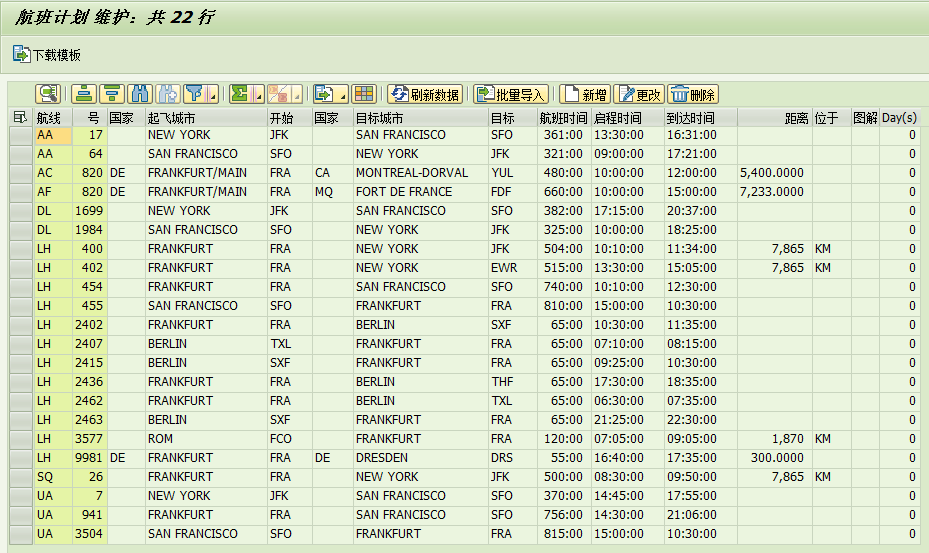
效果如图
动态下载模板
form download_template_by_ole .

  data: sheet_name() type c,"工作表名称

        col            type i.           "列数

  sheet_name = g_table_name_zh.

  col = lines( gt_fieldcat ) - ."不输出Client

  create object application 'Excel.Application'. "创建Excel

  set property of application 'Visible' = .        "设置显示

  call method of application 'WorkBooks' = workbook."获取工作簿对象

  call method of workbook 'Add'. "创建工作簿

  call method of application 'WorkSheets' = sheet   "获取第一个工作表(默认有3个)

    exporting

      # = .

  call method of sheet 'Activate'.

  set property of sheet 'Name' = sheet_name."命名工作表

  g_separator = cl_abap_char_utilities=>horizontal_tab."获取水平分隔符

  "拼接列标题

  loop at gt_fieldcat assigning <fs_fcat> where fieldname ne 'MANDT'.

    if <fs_fcat>-scrtext_l is initial.

      <fs_fcat>-scrtext_l = <fs_fcat>-coltext.

    endif.

    concatenate wa_excel-lines <fs_fcat>-scrtext_l into wa_excel-lines separated by g_separator.

  endloop.

  shift wa_excel-lines left deleting leading g_separator."去除第一个水平分隔符

  append wa_excel to it_excel.

  "输出到剪切板

  call method cl_gui_frontend_services=>clipboard_export

    importing

      data                 = it_excel

    changing

      rc                   = g_rc

    exceptions

      cntl_error           =

      error_no_gui         =

      not_supported_by_gui =

      others               = .

  call method of sheet 'Cells' = cell"设置单元格位置

    exporting

      # =

      # = .

  call method of cell 'Select'."选择单元格

  call method of sheet 'Paste'."粘贴剪切板的内容

  "设置所有列为文本格式

  call method of sheet 'Columns' = column.

  call method of column 'AutoFit'.

  set property of column 'NumberFormatLocal' = '@'.

  """"""""""""""""""""画边框、背景颜色

  call method of sheet 'Cells' = cell1

    exporting

      # =

      # = .

  call method of sheet 'Cells' = cell2

    exporting

      # =

      # = col.

  call method of sheet 'Range' = cell

    exporting

      # = cell1

      # = cell2.

  "设置上下左右边框

  perform set_border using ''.

  perform set_border using ''.

  perform set_border using ''.

  perform set_border using ''.

  call method of cell 'Interior' = color.

  set property of color 'Color' = ."绿色

  set property of color 'Pattern' = ''.  "底纹

  """""""""""""""""""""""""""""""""""""""""""

  set property of application 'Visible' = .

  set property of application 'ScreenUpdating' = ."屏幕刷新

  free object: application, workbook, sheet, cell, cell1, cell2, range, border.

  clear: it_excel[], wa_excel.

endform.
其实就是根据字段目录输出,效果如图

批量上传的代码,上传是需要注意日期和时间类型,Excel转换会变成数字,所以Excel列的格式都为文本:
form read_excel.

  clear gt_fieldcat_excel[].

  free: g_custom_container.

  data: lt_raw    type truxs_t_text_data,

        number    type string value '',

        index     type i,

        new_index type i,

        new_field type string,

        ls_fcat   type lvc_s_fcat.

  data: fields_string     type string,

        fields_string_new type string.

  "根据内表创建Excel的字段目录

  loop at gt_fieldcat assigning <fs_fcat> where fieldname ne 'MANDT'.

    add  to number.

    new_field = 'COL' && number.

    ls_fcat-fieldname = new_field.

    ls_fcat-datatype = 'STRG'.

    append ls_fcat to gt_fieldcat_excel.

    clear ls_fcat.

    "拼接所有的字段名,用于判断上传的Excel是否符合内表的字段

    concatenate fields_string <fs_fcat>-scrtext_l into fields_string separated by space.

  endloop.

  condense fields_string.

  if <dyn_table_excel> is not assigned.

    "动态创建Excel数据的内表

    call method cl_alv_table_create=>create_dynamic_table

      exporting

        it_fieldcatalog           = gt_fieldcat_excel

      importing

        ep_table                  = dyn_table_excel

      exceptions

        generate_subpool_dir_full =

        others                    = .

    assign dyn_table_excel->* to <dyn_table_excel>.

  else.

    clear: <dyn_table_excel>, <dyn_table_upload>.

  endif.

  "读取Excel

  call function 'TEXT_CONVERT_XLS_TO_SAP'

    exporting

      i_line_header        = ''

      i_tab_raw_data       = lt_raw

      i_filename           = p_ename

    tables

      i_tab_converted_data = <dyn_table_excel>

    exceptions

      conversion_failed    =

      others               = .

  "判断上传的Excel是否跟模板相同

  field-symbols: <dyn_field_name>,

                 <dyn_field_name_upload>.

  read table <dyn_table_excel> assigning field-symbol(<wa_excel>) index .

  "拼接上传的Excel列标题

  do number times.

    add  to index.

    assign component index of structure <wa_excel> to <dyn_field_name>.

    concatenate fields_string_new <dyn_field_name> into fields_string_new separated by space.

  enddo.

  condense fields_string_new.

  "判断文件是否符合上传要求.

  if fields_string ne fields_string_new.

    message '上传文件里面的列标题跟内表的字段描述不一致,请使用模板上传!' type 'S' display like 'E'.

    exit.

  endif.

  "删除标题行

  delete <dyn_table_excel> index .

  index = .

  "把动态的Excel数据 写入到 动态的新内表中

  new_index = ."前3位不用赋值:灯、信息、集团

  data r_date type sy-datum.

  data r_time type sy-uzeit.

  "data r_mask type

  loop at <dyn_table_excel> assigning <wa_excel>.

    do number times.

      add  to index.

      add  to new_index.

      assign component index of structure <wa_excel> to <dyn_field_name>.

      assign component new_index of structure <dyn_wa_upload> to <dyn_field_name_upload>.

      "判断字段是否有转换例程

*      describe field <dyn_field_name_upload> edit mask data(r_mask).

*      if r_mask is not initial.

*        write <dyn_field_name> to <dyn_field_name_upload> using edit mask r_mask .

*        clear r_mask.

*      endif.

      "判断数据类型,日期时间格式需要转换

      describe field <dyn_field_name_upload> type data(field_type).

      if field_type = 'D'.

        perform convert_date using <dyn_field_name> changing r_date.

        <dyn_field_name_upload> = r_date.

        clear r_date.

      elseif field_type = 'T'.

        perform convert_time using <dyn_field_name> changing r_time.

        <dyn_field_name_upload> = r_time.

        clear r_time.

      elseif field_type = 'P' or field_type = 'I'.

        "金额千位有逗号,需要删除掉

        replace ',' in <dyn_field_name> with ''.

        <dyn_field_name_upload> = <dyn_field_name>.

      else.

        <dyn_field_name_upload> = <dyn_field_name>.

      endif.

    enddo.

    append <dyn_wa_upload> to <dyn_table_upload>.

    index = .

    new_index = .

  endloop.

  perform create_excel_alv.

endform.
根据上传的数据显示第二个OOALV
form create_excel_alv .

  if g_alv_grid_excel is initial.

    create object g_custom_container

      exporting

        container_name = g_custom_container_name

        repid          = sy-repid

        dynnr          = sy-dynnr.

    create object g_alv_grid_excel

      exporting

        i_parent = g_custom_container.

    call method g_alv_grid_excel->set_table_for_first_display

      exporting

        is_layout       = gs_layout_upload

      changing

        it_outtab       = <dyn_table_upload>

        it_fieldcatalog = gt_fieldcat_upload.

  else.

    perform refresh_upload_alv.

  endif.

endform.

保存上传的数据到自建表
form save_data .

  data: new_dyn_wa type ref to data.

  field-symbols: <new_dyn_wa>,

                 <new_dyn_field>.

  create data new_dyn_wa like line of <dyn_table>.

  assign new_dyn_wa->* to <new_dyn_wa>.

  "上传的数据复制到新的结构中再执行Modify

  loop at <dyn_table_upload> assigning field-symbol(<dyn_table_wa>).

    move-corresponding <dyn_table_wa> to <new_dyn_wa>.

    modify (p_tname) from <new_dyn_wa>.

    if sy-subrc eq .

      commit work.

      assign component  of structure <dyn_table_wa> to <new_dyn_field>."更新状态灯

      <new_dyn_field> = .

      assign component  of structure <dyn_table_wa> to <new_dyn_field>."更新信息

      <new_dyn_field> = '保存成功'.

    else.

      rollback work.

      assign component  of structure <dyn_table_wa> to <new_dyn_field>.

      <new_dyn_field> = .

      assign component  of structure <dyn_table_wa> to <new_dyn_field>.

      <new_dyn_field> = '保存失败'.

    endif.

  endloop.

  perform refresh_upload_alv.

endform.
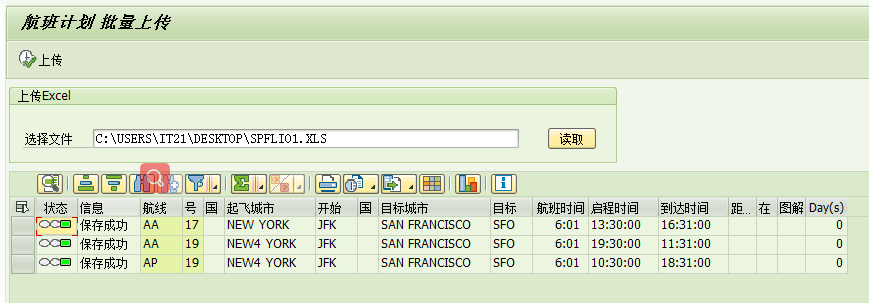
点击上传
新增一条或多条数据
form set_alv_create .

  clear: <dyn_table>.

  perform get_selected_rows."根据选择行数,显示新增的行数

  if lines( gt_row ) > .

    do g_row_count times.

      append initial line to <dyn_table>.

    enddo.

  else.

    append initial line to <dyn_table>.

  endif.

  call method g_alv_grid->set_ready_for_input

    exporting

      i_ready_for_input = .

  call method g_alv_grid->refresh_table_display.

  call method cl_gui_cfw=>dispatch.

endform.

保存数据
form save_table_data .

  data: l_index type i.

  "先清空空行

  loop at <dyn_table> assigning <dyn_wa>.

    l_index = sy-tabix.

    if <dyn_wa> is initial.

      delete <dyn_table> index l_index.

    endif.

  endloop.

  if lines( <dyn_table> ) <= .

    message '没有数据可以保存' type 'S'. exit.

  endif.

  modify (p_tname) from table <dyn_table>.

  if sy-subrc eq .

    commit work.

    perform refresh_alv.

    message '保存成功' type 'S'.

  else.

    rollback work.

    message '保存失败,请检查数据是否有误' type 'S'.

  endif.

endform.
最后就是修改单条数据,这里以后可以优化为多条
form modify_table_data .

  data: l_index type i.

  perform get_selected_rows.

  if lines( gt_row ) > .

    "只获取第一条记录用作修改,此功能待优化为可多条修改

    read table gt_row assigning field-symbol(<wa_row>) index .

    loop at <dyn_table> assigning <dyn_wa>.

      l_index = sy-tabix.

      if l_index <> <wa_row>-index.

        delete <dyn_table> index l_index.

        <wa_row>-index = <wa_row>-index - .

      endif.

    endloop.

  else.

    message '请选择一个记录行' type 'S'. exit.

  endif.

  call method g_alv_grid->refresh_table_display.

  call method g_alv_grid->set_ready_for_input

    exporting

      i_ready_for_input = .

  call method cl_gui_cfw=>dispatch.

endform.
form build_toolbar using p_object type ref to cl_alv_event_toolbar_set
p_interactive.
data: ls_button type stb_button,
lt_button type table of stb_button.
define %%add_button.
clear ls_button.
ls_button-function = &1.
ls_button-icon = &2.
ls_button-quickinfo = &3.
ls_button-text = &4.
append ls_button to p_object->mt_toolbar.
end-of-definition.
define %%add_shu_xian.
clear ls_button.
ls_button-butn_type = 3."竖线
append ls_button to p_object->mt_toolbar.
end-of-definition.
if g_alv_grid->is_ready_for_input( ) = 0.
%%add_shu_xian.
%%add_button 'REFRESH' icon_refresh '刷新数据' '刷新数据'.
%%add_shu_xian.
%%add_button 'UPLOAD' icon_import '批量导入' '批量导入'.
%%add_shu_xian.
%%add_button 'CREATE' icon_create '可新增多行' '新增'.
%%add_button 'MODIFY' icon_change_text '可更改一行' '更改'.
* %%add_button 'EDIT' icon_change_text '编辑' '编辑'.
%%add_button 'DELETE' icon_delete '删除' '删除'.
elseif g_alv_grid->is_ready_for_input( ) = 1.
%%add_shu_xian.
%%add_button 'SAVE_DATA' icon_system_save '保存' '保存'.
%%add_button 'CANCEL' icon_system_undo '取消' '取消'.
endif.
endform.
form set_alv_create .
clear: <dyn_table>.
perform get_selected_rows."根据选择行数,显示新增的行数
if lines( gt_row ) > 1.
do g_row_count times.
append initial line to <dyn_table>.
enddo.
else.
append initial line to <dyn_table>.
endif.
call method g_alv_grid->set_ready_for_input
exporting
i_ready_for_input = 1.
call method g_alv_grid->refresh_table_display.
call method cl_gui_cfw=>dispatch.
endform.
个人感觉这个程序并不难,各位可以写一下,或许会比我的更好更实用,或者有什么更好的建议可以留言、加wx交流。
作者:明光烁亮
出处:http://www.cnblogs.com/hezhongxun/
微信号:HEme922 欢迎加好友一起交流SAP!可以加入SAP开发交流群,共同分享经验!
本文版权归作者和博客园共有,欢迎转载,但未经作者同意必须保留此段声明,且在文章页面明显位置给出原文连接,否则保留追究法律责任的权利。
ABAP动态自建表维护程序Dynamin Process的更多相关文章
- ABAP 动态生成内表的几种方法
最近要写个程序,既有更新的,也有删除的,需要涉及到很多系统表,如果一个表一个表进行更新或者删除太慢了,于是就想通过创建动态内表来实现这些功能,在网上找了一些资料,经过多次尝试,终于测试成功了.网上讲述 ...
- ABAP 动态备份自建表数据到新表(自建表有数据的情况下要改字段长度或者其他)
当abaper开发好一个程序给用户使用一段时间后,发现某个字段的长度需要修改,但数据库表中已经存在很多数据,冒然直接改表字段可能会导致数据丢失,这种问题的后果可能非常严重. 所以我想到先复制出一个新表 ...
- Oracle 存储过程动态建表
动态sql,顾名思义就是动态执行的sql,也就是说在没执行之前是动态的拼接的. 任务 传入参数:新建的表名hd+当前的年和月,例如hd_201105表结构是:字段1:id ,类型是number,可以自 ...
- 【ITOO 2】.NET 动态建库建表:使用SQL字符串拼接方式
导读:在最近接手的项目(高效云平台)中,有一个需求是要当企业用户注册时,给其动态的新建一个库和表.刚开始接手的时候,是一点头绪都没有,然后查了一些资料,也问了问上一版本的师哥师姐,终于有了点头绪.目前 ...
- 【ITOO 3】.NET 动态建库建表:实用EF框架提供的codeFirst实现动态建库
导读:在上篇博客中,介绍了使用SQL字符拼接的方式,实现动态建库建表的方法.这样做虽然也能够实现效果,但是,太麻烦,而且,如果改动表结构,字段的话,会对代码修改很多.但是EF给我们提供了一种代码先行的 ...
- Mybatis动态建表
在网上查了很多,都说Mybatis不支持动态建表,心凉了一节.还好找到这么一篇,找到了希望:http://www.zzzyk.com/show/ec5660d9cf1071b3.htm 经过在mysq ...
- MongoDB动态建表方案(官方原生驱动)
MongoDB动态建表方案(官方原生驱动) 需求前提:表名动态,表结构静态,库固定 1.导入相关依赖 <dependency> <groupId>org.mongodb< ...
- Vertica 安装,建库,新建测试用户并授予权限,建表,入库
测试环境:RHEL 6.4 + Vertica 6.1.3-7 需求:搭建Vertica数据库3节点的测试环境,建立测试用户,建表,测试数据入库. 1.各节点关闭防火墙和SELinux,配置主机名,I ...
- SQL SERVER 生成建表脚本
/****** Object: StoredProcedure [dbo].[GET_TableScript_MSSQL] Script Date: 06/15/2012 11:59:00 ***** ...
随机推荐
- PlayJava Day017
今日所学: /* 2019.08.19开始学习,此为补档. */ 1.数组变量 a.数组变量是数组的管理者而非数组本身 b.数组必须创建出来然后交给数组变量来管理 c.数组变量之间的赋值是管理权限的赋 ...
- web渗透测试
信息收集 网络搜索 目录遍历:site:域名 intitle:index.of 配置文件泄露:site:域名 ext:xml | ext:conf | ext:cnf | ext:reg | ext: ...
- 【转载】Android Context 到底是什么?
什么是Context? 一个Context意味着一个场景,一个场景就是我们和软件进行交互的一个过程.比如当你使用微信的时候,场景包括聊天界面.通讯录.朋友圈,以及背后的一些数据. 那么从程序的角度来看 ...
- 数据结构笔记2(c++)_跨函数使用内存的问题
预备知识 1.所有的指针变量只占4个子节 用第一个字节的地址表示整个变量的地址 //1.cpp 所有的指针变量只占4个子节 用第一个字节的地址表示整个变量的地址 # include <stdi ...
- Python—图形界面开发
https://blog.csdn.net/kun_dl/category_7418837.html https://www.runoob.com/python/python-gui-tkinter. ...
- 第二章 简单的HTTP协议
第二章 简单的HTTP协议 针对HTTP协议结构进行讲解 1.通过请求和响应的交换来达成通信目的 应用HTTP协议时,必定是一端担任客户端角色,另一端担任服务器端角色. [请求报文]是由请求方法.UR ...
- WPF Datagrid 控制 第一行和第一列之间的空白
原文:WPF Datagrid 控制 第一行和第一列之间的空白 这个位置就是 这里 我们更改 DataGridControltemplate 模板 看树形结构 里面是一个BUtton 功能是全选 能找 ...
- SpringBatch介绍
SpringBatch 是一个大数据量的并行处理框架.通常用于数据的离线迁移,和数据处理,⽀持事务.并发.流程.监控.纵向和横向扩展,提供统⼀的接⼝管理和任务管理;SpringBatch是Spring ...
- Codeforces Round #598 (Div. 3) D. Binary String Minimizing 贪心
D. Binary String Minimizing You are given a binary string of length n (i. e. a string consisting of ...
- 大话设计模式Python实现-解释器模式
解释器模式(Interpreter Pattern):给定一个语言,定义它的文法的一种表示,并定义一个解释器,这个解释器使用该表示来解释语言中的句子. 下面是一个解释器模式的demo: #!/usr/ ...