
python自动登录代码
公司有很多管理平台,账号有禁用机制,每个月至少登录一次,否则禁用。导致有时候想登录某个平台的时候,发现账号已经被禁用了,还得走流程解禁。因此用python实现了一下自动登录,每天定时任务运行一次。ps:只需要账号密码即可登录
主要是使用 selenium 包的 webdriver ,然后需要下载一下 对应浏览器的驱动,我使用的是chrome 对应版本:版本 78.0.3904.108(正式版本) (64 位) ,版本在浏览器菜单-设置-关于chrome 就可以看到
注意点:
1、使用的python 版本是3.7
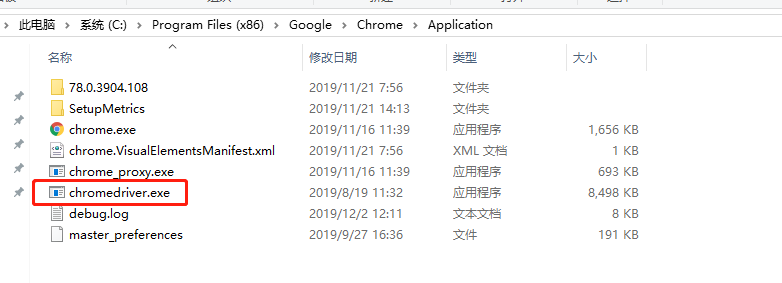
2、我用的chrome,所以需要下载 chromedriver ,下载地址:http://chromedriver.storage.googleapis.com/index.html ,下载下来以后放到 chrome 安装目录下,还要配置环境变量,Path下面新增环境变量: 如下图:

3、配置完后,重启电脑生效(不知道是不是都需要重启。。。)
具体python 代码如下:
from selenium import webdriver;
from selenium.webdriver.chrome.options import Options;
import time;
import utils; def autologin(url, username, password, country, accountadmin):
print("======= auto login begin ", country, "=========")
chrome_options = Options()
chrome_options.add_argument('--headless')
chrome_options.add_argument('--no-sandbox')
chrome_options.add_argument('--disable-dev-shm-usage')
chrome_options.add_argument('--disable-gpu')
driver = webdriver.Chrome(options=chrome_options)
try:
# 登录xxx.com
driver.get(url) # 等10秒,浏览器打开和网页跳转需要时间
time.sleep(5)
print(" send username and password ") # 取ID为txtLoginCode的网页元素(用户名输入元素)
elem_user = driver.find_element_by_id('username')
# 清空输入
elem_user.clear()
# 键入用户名
elem_user.send_keys(username)
# 取ID为txtPwd的网页元素(密码输入元素)
elem_pass = driver.find_element_by_id('password')
# 清空输入
elem_pass.clear()
# 键入密码
elem_pass.send_keys(password)
# 取ID为btnLogin的登录按钮
elem_login = driver.find_element_by_name('submit')
# 点击登录按钮
elem_login.click()
print(" submit ") time.sleep(5)
# 登陆成功找一个页面上的标识,如果有这个元素 说明登陆成功,如果没有,则登陆失败
elems = driver.find_element_by_class_name('easyui-layout');
return '<tr style=" height:50px;"><td>' + country + ' </td><td>' + url + ' </td><td>' + ' ok </td><td>' + accountadmin + '</td></tr>';
except Exception as error:
print(error)
# 如果没有标识,则会报异常,说明登陆失败, 失败原因在 id 为"msg"的 div里面
errormsg = driver.find_element_by_id("msg");
return '<tr style=" height:50px;"><td>' + country + ' </td><td>' + url + ' </td><td>' + " <span style='color:red'>login fail with error: " + errormsg.get_attribute('innerHTML')+ "<span></td><td>" + accountadmin + "</td></tr>";
finally:
print("======= auto login end ", country, "=========");
print(''); start = time.time() result = "<table>"
result += autologin("https://www.123*****.com/login", "zhanglifeng", "password", '俄罗斯', "");
result += autologin("https://www.abc*****.com/login/", "zhanglifeng", "password", '越南', "");
result += "</table>" end = time.time()
timelog = "%.2f" % (end - start);
result += "<br /><br /> 自动登录运行时间 " + timelog + "秒"; # 发送自动登陆结果到邮箱
utils.sendEmail('自动登录', result, ['zhanglifeng@***.com.cn']);
exit(0)
python自动登录代码的更多相关文章
- Python自动生成代码工具
项目中有一个需求,对一个基类而言,拥有一个比较方法和拷贝方法,某些地方需要频繁地对这两个方法进行调用.对于所有子类而言,需要重写这两个方法,并在其中维护类内一些成员变量.例如有一个变量m_iMyVal ...
- java 自动登录代码
javaBean的代码 package bean; import java.io.Serializable; public class Admin implements Serial ...
- 吴裕雄--天生自然PYTHON学习笔记:python自动登录网站
打开 www. 5 l eta . com 网站,如果己经通过某用户名进行了登录,那么先退出登录 . 登录该网站 的步骤一般如下 : ( 1 )单击右上角的“登录”按钮. ( 2 )先输入账号. ( ...
- Python 自动登录网站(处理Cookie)
http://digiter.iteye.com/blog/1300884 Python代码 def login(): cj = cookielib.CookieJar() ope ...
- Python 自动登录哔哩哔哩(2captcha打码平台)
前言 研究爬虫的各位小伙伴都知道,需要登录才能获取信息的网站,是比较难爬的,原因就是在于,现在各大网站为了反爬,都加入了图片验证码,滑动验证码之类的干扰 本篇就针对哔哩哔哩的滑动验证码进行讲解和破解 ...
- 5、Selenium+Python自动登录163邮箱发送邮件
1.Selenium实现自动化,需要定位元素,以下查看163邮箱的登录元素 (1)登录(定位到登录框,登录框是一个iframe,如果没有定位到iframe,是无法定位到账号框与密码框) 定位到邮箱框( ...
- 转载——Python模拟登录代码
''' Created on 2014-2-20 @author: Vincent ''' import urllib.parse import gzip import json import re ...
- Python模拟登录代码
注:访问http://127.0.0.1:8080/user/6,总是会要求必须有登录权限,也就是,若未登录,访问该页面,会跳转到登陆页面. 全自动模拟登录 半自动模拟登录:
- python 自动登录网页
语言:python 浏览器:chrome 工具:chrome控制台 #!/usr/bin/python # coding: GBK import urllib,urllib2,httplib,cook ...
随机推荐
- maven中servlet报错:不识别此servlet问题的解决办法
原因 使用maven集成的tomcat插件的时候,tomcat的lib中,自带servlet-api和jsp. 如果maven中再次导入了这两个jar,会造成jar包冲突现象. 解决办法 我们只是想编 ...
- 使用 Polly 实现复杂策略(超时重试)
一.背景 第一次接触 Polly 还是在做某个微服务系统的时候,那时只会使用单一的超时策略与重试策略,更加高级的特性就没有再进行学习了.最近开为某个客户开发 PC 端的上位机的时候,客户有个需求,在发 ...
- Vue-element-admin实现菜单根据用户权限动态加载
之前有一些网友对我那个IT部门信息管理系统(http://caijt.com/it)的前端感兴趣,我已经开源到github(https://github.com/Caijt/itsys-ui) 上面有 ...
- git命令教程
git教程笔记 Git是什么? Git是一个分布式版本控制系统 版本控制方式 集中式版本控制:从版本库中先取得最新的版本,改完之后再上传到版本库中,需要联网 分布式版本控制:每个合作者电脑上都有一个版 ...
- 剑指offer笔记面试题9----用两个栈实现队列
题目:用两个栈实现一个队列.队列的声明如下,请实现它的两个函数appendTail和deleteHead,分别完成在尾部插入节点和在队列头部删除节点的功能. 测试用例: 往空的队列里添加.删除元素. ...
- ALV字段设置更改后,展示不同步的问题
案例: 一个需要用户交互的ALV,比如某字段设置为输入长度20,不区分大小写.用户要求输入长度改为50,且要求区分大小写. 处理方式: 如果本来ALV字段设置时,采用的是ref_table和ref_f ...
- JS 简介
JS 简介 JavaScript 是世界上最流行的编程语言. 这门语言可用于 HTML 和 web,更可广泛用于服务器.PC.笔记本电脑.平板电脑和智能手机等设备. avaScript 是脚本语言 J ...
- OC深浅复制
浅复制:指针的复制 深复制:内容的复制 主要有两个关键字 copy 和mutablecopy 对于基本类型 判断深浅方法 1.只要=右边从创建到赋值,至少包含一个NSMutable便会重新生成一个对 ...
- TypeScript 学习笔记(四)
函数: 1.函数是一组一起执行一个任务的语句 2.我们可以把一段可复用的代码放到一起组成函数,从而提高效率 3.函数声明(通过关键字 function 来声明)告诉编译器函数的名称.返回类型和参数 4 ...
- 执行 Run manage.py Task 报 AttributeError: 'Command' object has no attribute 'usage'?
这个问题,是python与Pycharm不兼容导致,解决办法将Pycharm升级最新版本