
手写 Spring
手写 Spring MVC
不多说,简历装 X 必备。不过练好还是需要求一定的思维能力。
一、整体思路
思路要熟练背下来
1)配置阶段
- 配置 web.xml: XDispatchServlet
- 设定 init-param: contextConfigLocation = classpath:application.xml
- 设定 url-pattern: /*
- 配置 Annotation: @XController @XService @XAutowired @XRequestMapping
2)初始化阶段
- IOC:
- 调用 init() 方法: 加载配置文件
- IOC 容器初始化: Map<String, Object>
- 扫描相关的类: scan-package="com.xiaopengwei"
- 创建实例化并保存到容器: 同过反射机制将类实例化放入 IOC 容器中
- DI:
- 进行 DI 操作: 扫描 IOC 容器中的实例,给没有赋值的属性自动赋值
- MVC:
- 初始化 HandlerMapping: 将一个 URL 和一个 Method 进行一对一的关联映射 Map<String, Method>
3)运行阶段
- 调用 doGet() / doPost() 方法: Web 容器调用 doGet() / doPost() 方法,获得 request/response 对象
- 匹配 HandleMapping: 从 request 对象中获得用户输入的 url,找到其对应的 Method
- 反射调用 method.invoker(): 利用反射调用方法并返回结果
- response.getWrite().write(): 将返回结果输出到浏览器
二、源代码
项目结构:

源代码:
(1)在 pom.xml 引入一个 jar 包
<dependency>

    <groupId>javax.servlet</groupId>

    <artifactId>javax.servlet-api</artifactId>

    <version>3.1.0</version>

</dependency>
(2)web.xml 文件:
<!DOCTYPE web-app PUBLIC

        "-//Sun Microsystems, Inc.//DTD Web Application 2.3//EN"

        "http://java.sun.com/dtd/web-app_2_3.dtd" >

<web-app>

    <display-name>Archetype Created Web Application</display-name>

    <servlet>

        <servlet-name>xmvc</servlet-name>

        <servlet-class>com.xiaopengwei.xspring.servlet.XDispatchServlet</servlet-class>

        <init-param>

            <param-name>contextConfigLocation</param-name>

            <!--you can't use classpath*: -->

            <param-value>application.properties</param-value>

        </init-param>

    </servlet>

    <servlet-mapping>

        <servlet-name>xmvc</servlet-name>

        <url-pattern>/*</url-pattern>

    </servlet-mapping>

</web-app>
(3)application.properties 文件:
scan-package=com.xiaopengwei
(4)自定义注解 XAutowired:
package com.xiaopengwei.xspring.annotation;

import java.lang.annotation.*;

/**

 * <p>

 *

 * @author XiaoPengwei

 * @since 2019-07-19

 */

@Target({ElementType.FIELD})

@Retention(RetentionPolicy.RUNTIME)

@Documented

public @interface XAutowired {

    String value() default "";

}
(5)自定义注解 XController:
package com.xiaopengwei.xspring.annotation;

import java.lang.annotation.*;

/**

 * <p>

 *

 * @author XiaoPengwei

 * @since 2019-07-19

 */

@Target({ElementType.TYPE})

@Retention(RetentionPolicy.RUNTIME)

@Documented

public @interface XController {

    String value() default "";

}
(6)自定义注解 XRequestMapping:
package com.xiaopengwei.xspring.annotation;

import java.lang.annotation.*;

/**

 * <p>

 *

 * @author XiaoPengwei

 * @since 2019-07-19

 */

@Target({ElementType.TYPE, ElementType.METHOD})

@Retention(RetentionPolicy.RUNTIME)

@Documented

public @interface XRequestMapping {

    String value() default "";

}
(7)自定义注解 XService:
package com.xiaopengwei.xspring.annotation;

import java.lang.annotation.*;

/**

 * <p>

 *

 * @author XiaoPengwei

 * @since 2019-07-19

 */

@Target({ElementType.TYPE})

@Retention(RetentionPolicy.RUNTIME)

@Documented

public @interface XService {

    String value() default "";

}
(8)核心 XDispatchServlet:
package com.xiaopengwei.xspring.servlet;

import com.xiaopengwei.xspring.annotation.XAutowired;

import com.xiaopengwei.xspring.annotation.XController;

import com.xiaopengwei.xspring.annotation.XRequestMapping;

import com.xiaopengwei.xspring.annotation.XService;

import javax.servlet.ServletConfig;

import javax.servlet.ServletException;

import javax.servlet.http.HttpServlet;

import javax.servlet.http.HttpServletRequest;

import javax.servlet.http.HttpServletResponse;

import java.io.File;

import java.io.IOException;

import java.io.InputStream;

import java.lang.reflect.Field;

import java.lang.reflect.InvocationTargetException;

import java.lang.reflect.Method;

import java.net.URL;

import java.util.*;

/**

 * <p>

 * XSpring

 *

 * @author XiaoPengwei

 * @since 2019-07-19

 */

public class XDispatchServlet extends HttpServlet {

    /**

     * 属性配置文件

     */

    private Properties contextConfig = new Properties();

    private List<String> classNameList = new ArrayList<>();

    /**

     * IOC 容器

     */

    Map<String, Object> iocMap = new HashMap<String, Object>();

    Map<String, Method> handlerMapping = new HashMap<String, Method>();

    @Override

    protected void doGet(HttpServletRequest req, HttpServletResponse resp) throws ServletException, IOException {

        this.doPost(req, resp);

    }

    @Override

    protected void doPost(HttpServletRequest req, HttpServletResponse resp) throws ServletException, IOException {

        //7、运行阶段

        try {

            doDispatch(req, resp);

        } catch (Exception e) {

            e.printStackTrace();

            resp.getWriter().write("500 Exception Detail:\n" + Arrays.toString(e.getStackTrace()));

        }

    }

    /**

     * 7、运行阶段,进行拦截,匹配

     *

     * @param req  请求

     * @param resp 响应

     */

    private void doDispatch(HttpServletRequest req, HttpServletResponse resp) throws InvocationTargetException, IllegalAccessException {

        String url = req.getRequestURI();

        String contextPath = req.getContextPath();

        url = url.replaceAll(contextPath, "").replaceAll("/+", "/");

        System.out.println("[INFO-7] request url-->" + url);

        if (!this.handlerMapping.containsKey(url)) {

            try {

                resp.getWriter().write("404 NOT FOUND!!");

                return;

            } catch (IOException e) {

                e.printStackTrace();

            }

        }

        Method method = this.handlerMapping.get(url);

        System.out.println("[INFO-7] method-->" + method);

        String beanName = toLowerFirstCase(method.getDeclaringClass().getSimpleName());

        System.out.println("[INFO-7] iocMap.get(beanName)->" + iocMap.get(beanName));

        // 第一个参数是获取方法,后面是参数,多个参数直接加,按顺序对应

        method.invoke(iocMap.get(beanName), req, resp);

        System.out.println("[INFO-7] method.invoke put {" + iocMap.get(beanName) + "}.");

    }

    @Override

    public void init(ServletConfig servletConfig) throws ServletException {

        //1、加载配置文件

        doLoadConfig(servletConfig.getInitParameter("contextConfigLocation"));

        //2、扫描相关的类

        doScanner(contextConfig.getProperty("scan-package"));

        //3、初始化 IOC 容器,将所有相关的类实例保存到 IOC 容器中

        doInstance();

        //4、依赖注入

        doAutowired();

        //5、初始化 HandlerMapping

        initHandlerMapping();

        System.out.println("XSpring FrameWork is init.");

        //6、打印数据

        doTestPrintData();

    }

    /**

     * 6、打印数据

     */

    private void doTestPrintData() {

        System.out.println("[INFO-6]----data------------------------");

        System.out.println("contextConfig.propertyNames()-->" + contextConfig.propertyNames());

        System.out.println("[classNameList]-->");

        for (String str : classNameList) {

            System.out.println(str);

        }

        System.out.println("[iocMap]-->");

        for (Map.Entry<String, Object> entry : iocMap.entrySet()) {

            System.out.println(entry);

        }

        System.out.println("[handlerMapping]-->");

        for (Map.Entry<String, Method> entry : handlerMapping.entrySet()) {

            System.out.println(entry);

        }

        System.out.println("[INFO-6]----done-----------------------");

        System.out.println("====启动成功====");

        System.out.println("测试地址:http://localhost:8080/test/query?username=xiaopengwei");

        System.out.println("测试地址:http://localhost:8080/test/listClassName");

    }

    /**

     * 5、初始化 HandlerMapping

     */

    private void initHandlerMapping() {

        if (iocMap.isEmpty()) {

            return;

        }

        for (Map.Entry<String, Object> entry : iocMap.entrySet()) {

            Class<?> clazz = entry.getValue().getClass();

            if (!clazz.isAnnotationPresent(XController.class)) {

                continue;

            }

            String baseUrl = "";

            if (clazz.isAnnotationPresent(XRequestMapping.class)) {

                XRequestMapping xRequestMapping = clazz.getAnnotation(XRequestMapping.class);

                baseUrl = xRequestMapping.value();

            }

            for (Method method : clazz.getMethods()) {

                if (!method.isAnnotationPresent(XRequestMapping.class)) {

                    continue;

                }

                XRequestMapping xRequestMapping = method.getAnnotation(XRequestMapping.class);

                String url = ("/" + baseUrl + "/" + xRequestMapping.value()).replaceAll("/+", "/");

                handlerMapping.put(url, method);

                System.out.println("[INFO-5] handlerMapping put {" + url + "} - {" + method + "}.");

            }

        }

    }

    /**

     * 4、依赖注入

     */

    private void doAutowired() {

        if (iocMap.isEmpty()) {

            return;

        }

        for (Map.Entry<String, Object> entry : iocMap.entrySet()) {

            Field[] fields = entry.getValue().getClass().getDeclaredFields();

            for (Field field : fields) {

                if (!field.isAnnotationPresent(XAutowired.class)) {

                    continue;

                }

                System.out.println("[INFO-4] Existence XAutowired.");

                // 获取注解对应的类

                XAutowired xAutowired = field.getAnnotation(XAutowired.class);

                String beanName = xAutowired.value().trim();

                // 获取 XAutowired 注解的值

                if ("".equals(beanName)) {

                    System.out.println("[INFO] xAutowired.value() is null");

                    beanName = field.getType().getName();

                }

                // 只要加了注解,都要加载,不管是 private 还是 protect

                field.setAccessible(true);

                try {

                    field.set(entry.getValue(), iocMap.get(beanName));

                    System.out.println("[INFO-4] field set {" + entry.getValue() + "} - {" + iocMap.get(beanName) + "}.");

                } catch (IllegalAccessException e) {

                    e.printStackTrace();

                }

            }

        }

    }

    /**

     * 3、初始化 IOC 容器,将所有相关的类实例保存到 IOC 容器中

     */

    private void doInstance() {

        if (classNameList.isEmpty()) {

            return;

        }

        try {

            for (String className : classNameList) {

                Class<?> clazz = Class.forName(className);

                if (clazz.isAnnotationPresent(XController.class)) {

                    String beanName = toLowerFirstCase(clazz.getSimpleName());

                    Object instance = clazz.newInstance();

                    // 保存在 ioc 容器

                    iocMap.put(beanName, instance);

                    System.out.println("[INFO-3] {" + beanName + "} has been saved in iocMap.");

                } else if (clazz.isAnnotationPresent(XService.class)) {

                    String beanName = toLowerFirstCase(clazz.getSimpleName());

                    // 如果注解包含自定义名称

                    XService xService = clazz.getAnnotation(XService.class);

                    if (!"".equals(xService.value())) {

                        beanName = xService.value();

                    }

                    Object instance = clazz.newInstance();

                    iocMap.put(beanName, instance);

                    System.out.println("[INFO-3] {" + beanName + "} has been saved in iocMap.");

                    // 找类的接口

                    for (Class<?> i : clazz.getInterfaces()) {

                        if (iocMap.containsKey(i.getName())) {

                            throw new Exception("The Bean Name Is Exist.");

                        }

                        iocMap.put(i.getName(), instance);

                        System.out.println("[INFO-3] {" + i.getName() + "} has been saved in iocMap.");

                    }

                }

            }

        } catch (Exception e) {

            e.printStackTrace();

        }

    }

    /**

     * 获取类的首字母小写的名称

     *

     * @param className ClassName

     * @return java.lang.String

     */

    private String toLowerFirstCase(String className) {

        char[] charArray = className.toCharArray();

        charArray[0] += 32;

        return String.valueOf(charArray);

    }

    /**

     * 2、扫描相关的类

     *

     * @param scanPackage properties --> scan-package

     */

    private void doScanner(String scanPackage) {

        // package's . ==> /

        URL resourcePath = this.getClass().getClassLoader().getResource("/" + scanPackage.replaceAll("\\.", "/"));

        if (resourcePath == null) {

            return;

        }

        File classPath = new File(resourcePath.getFile());

        for (File file : classPath.listFiles()) {

            if (file.isDirectory()) {

                System.out.println("[INFO-2] {" + file.getName() + "} is a directory.");

                // 子目录递归

                doScanner(scanPackage + "." + file.getName());

            } else {

                if (!file.getName().endsWith(".class")) {

                    System.out.println("[INFO-2] {" + file.getName() + "} is not a class file.");

                    continue;

                }

                String className = (scanPackage + "." + file.getName()).replace(".class", "");

                // 保存在内容

                classNameList.add(className);

                System.out.println("[INFO-2] {" + className + "} has been saved in classNameList.");

            }

        }

    }

    /**

     * 1、加载配置文件

     *

     * @param contextConfigLocation web.xml --> servlet/init-param

     */

    private void doLoadConfig(String contextConfigLocation) {

        InputStream inputStream = this.getClass().getClassLoader().getResourceAsStream(contextConfigLocation);

        try {

            // 保存在内存

            contextConfig.load(inputStream);

            System.out.println("[INFO-1] property file has been saved in contextConfig.");

        } catch (IOException e) {

            e.printStackTrace();

        } finally {

            if (null != inputStream) {

                try {

                    inputStream.close();

                } catch (IOException e) {

                    e.printStackTrace();

                }

            }

        }

    }

}
(9)示例:TestController:
package com.xiaopengwei.demo.xcontroller;

import com.xiaopengwei.demo.xservice.ITestXService;

import com.xiaopengwei.xspring.annotation.XAutowired;

import com.xiaopengwei.xspring.annotation.XController;

import com.xiaopengwei.xspring.annotation.XRequestMapping;

import javax.servlet.http.HttpServletRequest;

import javax.servlet.http.HttpServletResponse;

import java.io.IOException;

import java.util.List;

/**

 * <p>

 * 前置控制器

 *

 * @author XiaoPengwei

 * @since 2019-07-19

 */

@XController

@XRequestMapping("/test")

public class TestController {

    @XAutowired

    ITestXService testXService;

    /**

     * 测试方法 /test/query

     *

     * @param req  请求体

     * @param resp 响应体

     */

    @XRequestMapping("/query")

    public void query(HttpServletRequest req, HttpServletResponse resp) {

        if (req.getParameter("username") == null) {

           try {

                resp.getWriter().write("param username is null");

            } catch (IOException e) {

                e.printStackTrace();

            }

        } else {

            String paramName = req.getParameter("username");

            try {

                resp.getWriter().write("param username is " + paramName);

            } catch (IOException e) {

                e.printStackTrace();

            }

            System.out.println("[INFO-req] New request param username-->" + paramName);

        }

    }

    /**

     * 测试方法 /test/listClassName

     *

     * @param req  请求体

     * @param resp 响应体

     */

    @XRequestMapping("/listClassName")

    public void listClassName(HttpServletRequest req, HttpServletResponse resp) {

        String str = testXService.listClassName();

        System.out.println("testXService----------=-=-=>" + str);

        try {

            resp.getWriter().write(str);

        } catch (IOException e) {

            e.printStackTrace();

        }

    }

}
(10)示例接口:ITestXService:
package com.xiaopengwei.demo.xservice;

/**

 * <p>

 * 接口

 *

 * @author XiaoPengwei

 * @since 2019-07-19

 */

public interface ITestXService {

    String listClassName();

}
(11)示例实现类 TestXServiceImpl:
package com.xiaopengwei.demo.xservice.impl;

import com.xiaopengwei.demo.xservice.ITestXService;

import com.xiaopengwei.xspring.annotation.XService;

import javax.servlet.http.HttpServletRequest;

import javax.servlet.http.HttpServletResponse;

import java.util.ArrayList;

import java.util.List;

/**

 * <p>

 * 业务实现类

 *

 * @author XiaoPengwei

 * @since 2019-07-19

 */

@XService

public class TestXServiceImpl implements ITestXService {

    @Override

    public String listClassName() {

        // 假装来自数据库

        return "123456TestXServiceImpl";

    }

}
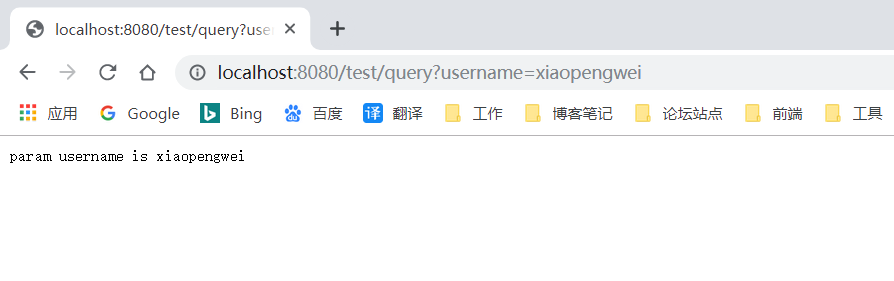
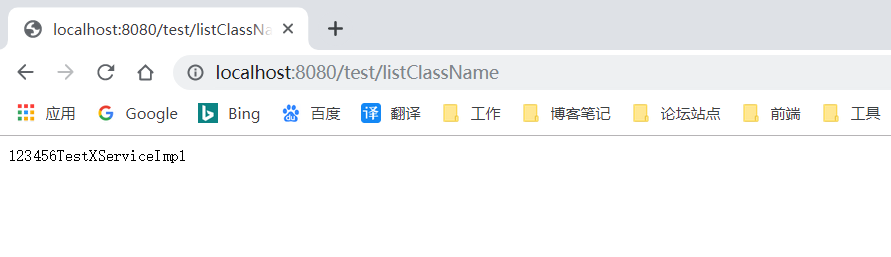
(12)测试:
配置 Tomcat 后,访问:
http://localhost:8080/test/query?username=xiaopengwei
和
http://localhost:8080/test/listClassName
手写 Spring的更多相关文章
- 一个老程序员是如何手写Spring MVC的
人见人爱的Spring已然不仅仅只是一个框架了.如今,Spring已然成为了一个生态.但深入了解Spring的却寥寥无几.这里,我带大家一起来看看,我是如何手写Spring的.我将结合对Spring十 ...
- 【Spring】手写Spring MVC
Spring MVC原理 Spring的MVC框架主要由DispatcherServlet.处理器映射.处理器(控制器).视图解析器.视图组成. 完整的Spring MVC处理 流程如下: Sprin ...
- 我是这样手写 Spring 的(麻雀虽小五脏俱全)
人见人爱的 Spring 已然不仅仅只是一个框架了.如今,Spring 已然成为了一个生态.但深入了解 Spring 的却寥寥无几.这里,我带大家一起来看看,我是如何手写 Spring 的.我将结合对 ...
- 《四 spring源码》利用TransactionManager手写spring的aop
事务控制分类 编程式事务控制 自己手动控制事务,就叫做编程式事务控制. Jdbc代码: Conn.setAutoCommite(false); // 设置手动控制事务 Hibern ...
- 手写Spring框架,加深对Spring工作机制的理解!
在我们的日常工作中,经常会用到Spring.Spring Boot.Spring Cloud.Struts.Mybatis.Hibernate等开源框架,有了这些框架的诞生,平时的开发工作量也是变得越 ...
- 手写Spring+demo+思路
我在学习Spring的时候,感觉Spring是很难的,通过学习后,发现Spring没有那么难,只有你去学习了,你才会发现,你才会进步 1.手写Spring思路: 分为配置.初始化.运行三个阶段如下图 ...
- 我是这样手写Spring的,麻雀虽小五脏俱全
人见人爱的Spring已然不仅仅只是一个框架了.如今,Spring已然成为了一个生态.但深入了解Spring的却寥寥无几.这里,我带大家一起来看看,我是如何手写Spring的.我将结合对Spring十 ...
- Spring事务原理分析--手写Spring事务
一.基本概念和原理 1.Spring事务 基于AOP环绕通知和异常通知的 2.Spring事务分为编程式事务.声明事务.编程事务包括注解方式和扫包方式(xml) Spring事务底层使用编程事务(自己 ...
- 手写Spring MVC
闲及无聊 又打开了CSDN开始看一看有什么先进的可以学习的相关帖子,这时看到了一位大神写的简历装X必备,手写Spring MVC. 我想这个东西还是有一点意思的 就拜读了一下大佬的博客 通读了一遍相关 ...
随机推荐
- mysql 更改root密码
mysql 更改root密码,有很多种,网上也有很多记录,这里只是做个记录,以后可以看看,只记录两种自己常用的方法. 1.改表法,登录到数据库,切换到:mysql数据库,update user set ...
- Windows10 使用Virtual Box一启动虚拟机就蓝屏(错误代码SYSTEM_SERVICE_EXCEPTION)解决方案
原文:Windows10 使用Virtual Box一启动虚拟机就蓝屏(错误代码SYSTEM_SERVICE_EXCEPTION)解决方案 一打开虚拟机电脑就立马蓝屏重启,新建虚拟机也没用,然后就开始 ...
- qt技巧--使用html导出表格替代excel
曾经为qt不能直接导出excel而困扰,后来经过深入了解,得知qt支持xml国际语言,html是xml的一种.html是做网页的,相信大家比较熟悉.所以使用html的<table ...
- 多玩YY语音的面试题:C++中如何在main()函数之前执行操作?
多玩YY语音的面试题:C++中如何在main()函数之前执行操作? 第一反应main()函数是所有函数执行的开始.但是问题是main()函数执行之前如何执行呢? 联想到MFC里面的 C**App类的t ...
- [转载] ASP.NET MVC (一)——深入理解ASP.NET MVC
个人认为写得比较透彻得Asp.net mvc 文章,所以转载过来,原文链接在最后: ASP.NET vs MVC vs WebForms 许多ASP.NET开发人员开始接触MVC认为MVC与ASP.N ...
- SharePoint js操作原生的New/Edit表单
列表的表单,有个类似的需求:在New需隐藏特定字段,Edit时显示. 默认是New/Edit表单的字段是一样,就算在Content type 是隐藏也是同时影响两个表单. 如何做到仅仅在New时隐 ...
- SpringMVC使用MultipartFile文件上传,多文件上传,带参数上传
一.配置SpringMVC 二.单文件与多文件上传 三.多文件上传 四.带参数上传 一.配置SpringMVC 在spring.xml中配置: <!-- springmvc文件上传需要配置的节点 ...
- php生成html静态文件
现在的动态网站存在很多性能上的弊端,seo优化会存在一定的瓶颈,现在将动态的网站代码转换为html静态文件,是浏览器通过html间接的读取动态网站源文件,这对其网站加载速度还是seo优化有着举足轻重的 ...
- 分享五个404页面模板 超好看的404页面你的网站离不了 seo优化404
一个完整的网站离不开一个好的404页面,404页面不光是让你的网站美观,它对SEO的作用也很大,你想一下如果用户打开你的网站,输入一个不存在的风址,如果没有404直接就报错了,有了404就能打开一个美 ...
- F4帮助
在INITIALIZATION之后添加 AT SELECTION-SCREEN ON VALUE-REQUEST FOR s_month-low 事件,s_month-low为要添加的搜索帮助. 下面 ...