
spring 5.x 系列第5篇 —— 整合 mybatis + druid 连接池 (xml配置方式)
源码Gitub地址:https://github.com/heibaiying/spring-samples-for-all
项目目录结构
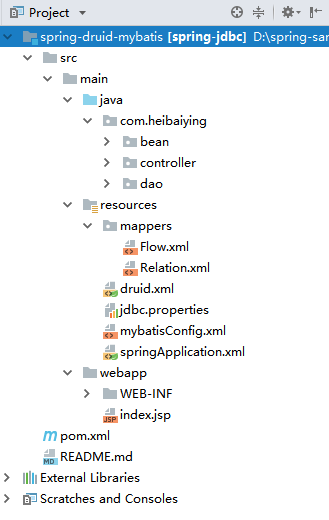
1、创建maven工程,除了Spring基本依赖外,还需要导入mybatis和druid的相关依赖
<!--jdbc 相关依赖包-->
<dependency>
    <groupId>org.springframework</groupId>
    <artifactId>spring-jdbc</artifactId>
    <version>${spring-base-version}</version>
</dependency>
<dependency>
    <groupId>mysql</groupId>
    <artifactId>mysql-connector-java</artifactId>
    <version>8.0.13</version>
</dependency>
<dependency>
    <groupId>com.oracle</groupId>
    <artifactId>ojdbc6</artifactId>
    <version>11.2.0.3.0</version>
</dependency>
<!--mybatis 依赖包-->
<dependency>
    <groupId>org.mybatis</groupId>
    <artifactId>mybatis-spring</artifactId>
    <version>1.3.2</version>
</dependency>
<dependency>
    <groupId>org.mybatis</groupId>
    <artifactId>mybatis</artifactId>
    <version>3.4.6</version>
</dependency>
<!--druid 依赖-->
<dependency>
    <groupId>com.alibaba</groupId>
    <artifactId>druid</artifactId>
    <version>1.1.12</version>
</dependency>
2、在web.xml 中配置spring前端控制器、druid监控台servlet和filter
<?xml version="1.0" encoding="UTF-8"?>
<web-app xmlns="http://xmlns.jcp.org/xml/ns/javaee"
         xmlns:xsi="http://www.w3.org/2001/XMLSchema-instance"
         xsi:schemaLocation="http://xmlns.jcp.org/xml/ns/javaee
		 http://xmlns.jcp.org/xml/ns/javaee/web-app_3_1.xsd"
         version="3.1">

    <!--配置spring前端控制器-->
    <servlet>
        <servlet-name>springMvc</servlet-name>
        <servlet-class>org.springframework.web.servlet.DispatcherServlet</servlet-class>
        <init-param>
            <param-name>contextConfigLocation</param-name>
            <param-value>classpath:springApplication.xml</param-value>
        </init-param>
        <load-on-startup>1</load-on-startup>
    </servlet>

    <servlet-mapping>
        <servlet-name>springMvc</servlet-name>
        <url-pattern>/</url-pattern>
    </servlet-mapping>

    <!-- 配置 Druid 监控信息显示页面 访问地址 <a href="http://localhost:8080/druid/index.html"> -->
    <servlet>
        <servlet-name>DruidStatView</servlet-name>
        <servlet-class>com.alibaba.druid.support.http.StatViewServlet</servlet-class>
        <init-param>
            <!-- 允许清空统计数据 -->
            <param-name>resetEnable</param-name>
            <param-value>true</param-value>
        </init-param>
        <init-param>
            <!-- 用户名 -->
            <param-name>loginUsername</param-name>
            <param-value>druid</param-value>
        </init-param>
        <init-param>
            <!-- 密码 -->
            <param-name>loginPassword</param-name>
            <param-value>druid</param-value>
        </init-param>
    </servlet>
    <servlet-mapping>
        <servlet-name>DruidStatView</servlet-name>
        <url-pattern>/druid/*</url-pattern>
    </servlet-mapping>

    <!--配置WebStatFilter用于采集web-jdbc关联监控的数据-->
    <filter>
        <filter-name>DruidWebStatFilter</filter-name>
        <filter-class>com.alibaba.druid.support.http.WebStatFilter</filter-class>
        <init-param>
            <param-name>exclusions</param-name>
            <param-value>*.js,*.gif,*.jpg,*.png,*.css,*.ico,/druid/*</param-value>
        </init-param>
    </filter>
    <filter-mapping>
        <filter-name>DruidWebStatFilter</filter-name>
        <url-pattern>/*</url-pattern>
    </filter-mapping>

</web-app>
3、在resources文件夹下新建数据库配置文件jdbc.properties
# mysql 数据库配置
mysql.url=jdbc:mysql://localhost:3306/mysql
mysql.username=root
mysql.password=root

# oracle 数据库配置
oracle.url=jdbc:oracle:thin:@//IP地址:端口号/数据库实例名
oracle.username=用户名
oracle.password=密码
4、在resources文件夹下创建springApplication.xml 配置文件和druid.xml配置文件
<?xml version="1.0" encoding="UTF-8"?>
<beans xmlns="http://www.springframework.org/schema/beans"
       xmlns:xsi="http://www.w3.org/2001/XMLSchema-instance"
       xmlns:context="http://www.springframework.org/schema/context" xmlns:tx="http://www.springframework.org/schema/tx"
       xmlns:mvc="http://www.springframework.org/schema/mvc"
       xsi:schemaLocation="http://www.springframework.org/schema/beans http://www.springframework.org/schema/beans/spring-beans.xsd
        http://www.springframework.org/schema/context http://www.springframework.org/schema/context/spring-context-4.1.xsd http://www.springframework.org/schema/tx http://www.springframework.org/schema/tx/spring-tx.xsd http://www.springframework.org/schema/mvc http://www.springframework.org/schema/mvc/spring-mvc.xsd">

    <!-- 开启注解包扫描-->
    <context:component-scan base-package="com.heibaiying.*"/>

    <!--使用默认的Servlet来响应静态文件 -->
    <mvc:default-servlet-handler/>

    <!-- 开启注解驱动-->
    <mvc:annotation-driven/>

    <!--引入druid.xml配置 由于druid 的可配置项比较多,所以可以单独拆分为一个配置文件-->
    <import resource="druid.xml"/>

    <!--配置 mybatis 会话工厂 -->
    <bean id="sqlSessionFactory" class="org.mybatis.spring.SqlSessionFactoryBean">
        <property name="dataSource" ref="dataSource"/>
        <!--指定mapper文件所在的位置-->
        <property name="mapperLocations" value="classpath*:/mappers/**/*.xml"/>
        <property name="configLocation" value="classpath:mybatisConfig.xml"/>
    </bean>

    <!--扫描注册接口 -->
    <!--作用:从接口的基础包开始递归搜索,并将它们注册为 MapperFactoryBean(只有至少一种方法的接口才会被注册;, 具体类将被忽略)-->
    <bean class="org.mybatis.spring.mapper.MapperScannerConfigurer">
        <!--指定会话工厂 -->
        <property name="sqlSessionFactoryBeanName" value="sqlSessionFactory"/>
        <!-- 指定mybatis接口所在的包 -->
        <property name="basePackage" value="com.heibaiying.dao"/>
    </bean>

    <!--定义事务管理器-->
    <bean id="transactionManager"
          class="org.springframework.jdbc.datasource.DataSourceTransactionManager">
        <property name="dataSource" ref="dataSource"/>
    </bean>

    <!-- 开启事务注解@Transactional支持 -->
    <tx:annotation-driven/>

</beans>
<?xml version="1.0" encoding="UTF-8"?>
<beans xmlns="http://www.springframework.org/schema/beans"
       xmlns:xsi="http://www.w3.org/2001/XMLSchema-instance"
       xmlns:context="http://www.springframework.org/schema/context"
       xsi:schemaLocation="http://www.springframework.org/schema/beans http://www.springframework.org/schema/beans/spring-beans.xsd
        http://www.springframework.org/schema/context http://www.springframework.org/schema/context/spring-context-4.1.xsd">

    <!--指定配置文件的位置-->
    <context:property-placeholder location="classpath:jdbc.properties"/>

    <!--配置druid数据源 关于更多的配置项 可以参考官方文档 <a href="https://github.com/alibaba/druid/wiki/DruidDataSource%E9%85%8D%E7%BD%AE%E5%B1%9E%E6%80%A7%E5%88%97%E8%A1%A8" > -->
    <bean id="dataSource" class="com.alibaba.druid.pool.DruidDataSource" init-method="init" destroy-method="close">
        <!-- 基本属性 url、user、password -->
        <property name="url" value="${mysql.url}"/>
        <property name="username" value="${mysql.username}"/>
        <property name="password" value="${mysql.password}"/>

        <!-- 配置初始化大小、最小、最大连连接数量 -->
        <property name="initialSize" value="5"/>
        <property name="minIdle" value="10"/>
        <property name="maxActive" value="20"/>

        <!-- 配置获取连接等待超时的时间 -->
        <property name="maxWait" value="60000"/>

        <!-- 配置间隔多久才进行一次检测,检测需要关闭的空闲连接,单位是毫秒 -->
        <property name="timeBetweenEvictionRunsMillis" value="2000"/>

        <!-- 配置一个连接在池中最小生存的时间,单位是毫秒 -->
        <property name="minEvictableIdleTimeMillis" value="600000"/>
        <!-- 配置一个连接在池中最大生存的时间,单位是毫秒 -->
        <property name="maxEvictableIdleTimeMillis" value="900000"/>

        <!--validationQuery 用来检测连接是否有效的sql,要求是一个查询语句,常用select 'x'。
            但是在 oracle 数据库下需要写成 select 'x' from dual 不然实例化数据源的时候就会失败,
            这是由于oracle 和 mysql 语法间的差异造成的-->
        <property name="validationQuery" value="select 'x'"/>
        <!--建议配置为true,不影响性能,并且保证安全性。申请连接的时候检测,
        如果空闲时间大于timeBetweenEvictionRunsMillis,执行validationQuery检测连接是否有效。-->
        <property name="testWhileIdle" value="true"/>
        <!--申请连接时执行validationQuery检测连接是否有效,做了这个配置会降低性能。-->
        <property name="testOnBorrow" value="false"/>
        <!--归还连接时执行validationQuery检测连接是否有效,做了这个配置会降低性能。-->
        <property name="testOnReturn" value="false"/>

        <!--连接池中的minIdle数量以内的连接,空闲时间超过minEvictableIdleTimeMillis,则会执行keepAlive操作。-->
        <property name="keepAlive" value="true"/>
        <property name="phyMaxUseCount" value="100000"/>

        <!-- 配置监控统计拦截的filters Druid连接池的监控信息主要是通过StatFilter 采集的,
        采集的信息非常全面,包括SQL执行、并发、慢查、执行时间区间分布等-->
        <property name="filters" value="stat"/>
    </bean>

</beans>
5、新建mybtais 配置文件,按需要进行额外配置,更多settings配置项可以参考官方文档
<?xml version="1.0" encoding="UTF-8" ?>
<!DOCTYPE configuration
        PUBLIC "-//mybatis.org//DTD Config 3.0//EN"
        "http://mybatis.org/dtd/mybatis-3-config.dtd">

<!-- mybatis 配置文件 -->
<configuration>
    <settings>
        <!-- 开启驼峰命名 -->
        <setting name="mapUnderscoreToCamelCase" value="true"/>
        <!-- 打印查询sql -->
        <setting name="logImpl" value="STDOUT_LOGGING"/>
    </settings>

</configuration>

<!--更多settings配置项可以参考官方文档: <a href="http://www.mybatis.org/mybatis-3/zh/configuration.html"/>-->
6、新建查询接口及其对应的mapper文件
public interface MysqlDao {

    List<Relation> get();
}
<!DOCTYPE mapper
        PUBLIC "-//mybatis.org//DTD Mapper 3.0//EN"
        "http://mybatis.org/dtd/mybatis-3-mapper.dtd">

<mapper namespace="com.heibaiying.dao.MysqlDao">

    <select id="queryById" resultType="com.heibaiying.bean.Relation">
        SELECT help_keyword_id AS id,name
        FROM HELP_KEYWORD
        WHERE HELP_KEYWORD_ID = #{id}
    </select>

</mapper>
public interface OracleDao {

    List<Flow> queryById(long id);
}
<!DOCTYPE mapper
        PUBLIC "-//mybatis.org//DTD Mapper 3.0//EN"
        "http://mybatis.org/dtd/mybatis-3-mapper.dtd">

<mapper namespace="com.heibaiying.dao.OracleDao">

    <select id="queryById" resultType="com.heibaiying.bean.Flow">
        select * from APEX_030200.WWV_FLOW_CALS where ID = #{id}
    </select>

</mapper>
7.新建测试controller进行测试
package com.heibaiying.controller;

import com.heibaiying.bean.Relation;
import com.heibaiying.dao.MysqlDao;
import org.springframework.beans.factory.annotation.Autowired;
import org.springframework.web.bind.annotation.GetMapping;
import org.springframework.web.bind.annotation.PathVariable;
import org.springframework.web.bind.annotation.RestController;

import java.util.List;

/**
 * @author : heibaiying
 * @description :
 */

@RestController
public class MysqlController {

    @Autowired
    private MysqlDao mysqlDao;

    @GetMapping("relation/{id}")
    public String get(@PathVariable(name = "id") String id) {
        return mysqlDao.queryById(id).get(0).toString();
    }
}
package com.heibaiying.controller;

import com.heibaiying.dao.OracleDao;
import org.springframework.beans.factory.annotation.Autowired;
import org.springframework.web.bind.annotation.GetMapping;
import org.springframework.web.bind.annotation.PathVariable;
import org.springframework.web.bind.annotation.RestController;

/**
 * @author : heibaiying
 * @description :
 */

@RestController
public class OracleController {

    @Autowired
    private OracleDao oracleDao;

    @GetMapping("flow/{id}")
    public String get(@PathVariable(name = "id") Long id) {
        return oracleDao.queryById(id).get(0).toString();
    }
}
8、druid 监控页面访问地址http://localhost:8080/druid/index.html
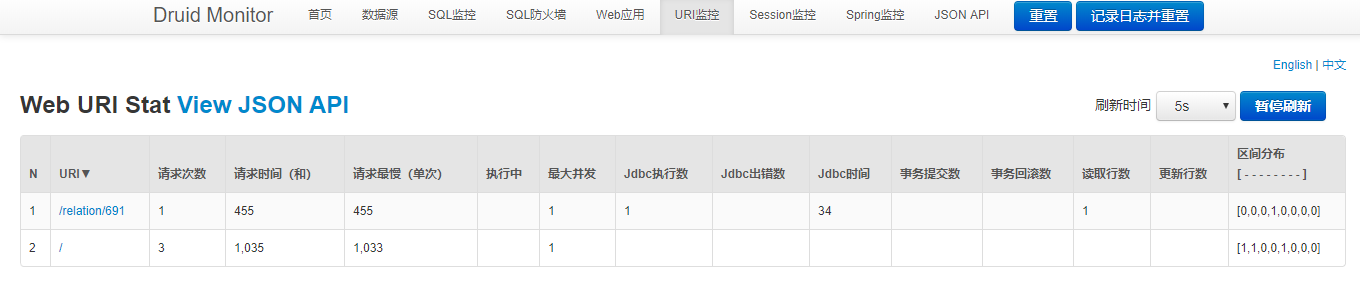
附:源码Gitub地址:https://github.com/heibaiying/spring-samples-for-all
spring 5.x 系列第5篇 —— 整合 mybatis + druid 连接池 (xml配置方式)的更多相关文章
- spring 5.x 系列第6篇 —— 整合 mybatis + druid 连接池 (代码配置方式)
源码Gitub地址:https://github.com/heibaiying/spring-samples-for-all 项目目录结构 1.创建maven工程,除了Spring基本依赖外,还需要导 ...
- 太妙了!Spring boot 整合 Mybatis Druid,还能配置监控?
Spring boot 整合 Mybatis Druid并配置监控 添加依赖 <!--druid--> <dependency> <groupId>com.alib ...
- spring+mybatis+c3p0数据库连接池或druid连接池使用配置整理
在系统性能优化的时候,或者说在进行代码开发的时候,多数人应该都知道一个很基本的原则,那就是保证功能正常良好的情况下,要尽量减少对数据库的操作. 据我所知,原因大概有这样两个: 一个是,一般情况下系统服 ...
- SpringBoot整合Mybatis使用注解或XML的方式开发
2018-6-4 补充mybatis-spring-boot注解的使用 1.导包 只需要再导入mysql+mybatis两个包 <dependency> <groupId>or ...
- spring 5.x 系列第12篇 —— 整合memcached (代码配置方式)
文章目录 一.说明 1.1 XMemcached客户端说明 1.2 项目结构说明 1.3 依赖说明 二.spring 整合 memcached 2.1 单机配置 2.2 集群配置 2.3 存储基本类型 ...
- spring 5.x 系列第11篇 —— 整合memcached (xml配置方式)
文章目录 一.说明 1.1 XMemcached客户端说明 1.2 项目结构说明 1.3 依赖说明 二.spring 整合 memcached 2.1 单机配置 2.2 集群配置 2.3 存储基本类型 ...
- spring 5.x 系列第8篇 —— 整合Redis客户端 Jedis和Redisson (代码配置方式)
文章目录 一.说明 1.1 Redis 客户端说明 1.2 Redis可视化软件 1.3 项目结构说明 1.3 依赖说明 二.spring 整合 jedis 2.1 新建基本配置文件和其映射类 2.2 ...
- spring 5.x 系列第7篇 —— 整合Redis客户端 Jedis和Redisson (xml配置方式)
文章目录 一.说明 1.1 Redis 客户端说明 1.2 Redis可视化软件 1.3 项目结构说明 1.3 依赖说明 二.spring 整合 jedis 2.1 新建基本配置文件 2.2 单机配置 ...
- Spring Boot入门系列(十七)整合Mybatis,创建自定义mapper 实现多表关联查询!
之前讲了Springboot整合Mybatis,介绍了如何自动生成pojo实体类.mapper类和对应的mapper.xml 文件,并实现最基本的增删改查功能.mybatis 插件自动生成的mappe ...
随机推荐
- 真的懂了:TCP协议中的三次握手和四次挥手(关闭连接时, 当收到对方的FIN报文时, 仅仅表示对方不在发送数据了, 但是还能接收数据, 己方也未必全部数据都发送对方了。相当于一开始还没接上话不要紧,后来接上话以后得让人把话讲完)
一.TCP报文格式 下面是TCP报文格式图: (1) 序号, Seq(Sequence number), 占32位,用来标识从TCP源端向目的端发送的字节流,发起方发送数据时对此进行标记. (2) 确 ...
- Qt 的几个核心机制总结之 布局(QWidget可以设置setSizePolicy,而QSizePolicy有Fixed,minimum,maximum,preferred,expanding,ignore等7个属性,还可以横竖分开)
1.Qt布局的作用 Qt的布局是通过布局管理器来实现的,布局管理器负责在父类窗口部件区域构建子窗口部件,使得放置在窗体中的每个窗口部件都有一个适合的大小和位置,并且能够随着应用程序本身的变化而变化从而 ...
- DDD实战6 WebAPI
1.在Products解决方案文件夹下面新建一个项目 .net Core/Asp.net Core Web应用程序 取名Product.WebApi/选择Web Api core2.0版本 不进行身 ...
- WPF中取得预定义颜色
原文:WPF中取得预定义颜色 使用XAML代码取得.net预定义颜色:<Page xmlns="http://schemas.microsoft.com/winfx/2006/x ...
- 对XAML进行编辑的辅助类(XamlHelper)
原文:对XAML进行编辑的辅助类(XamlHelper) // XamlHelper.cs// --------------------------------------------// 对XAML ...
- OpenGL+VS2012编译环境配置
OpenGL库主体分为三部分,分别是 gl(OpenGL核心库) glu(Utility Library,OpenGL实用库) glut(Utility Toolkit,OpenGL实用工具库) gl ...
- oracle备份和升级数据库
同oracle用户登录数据库驻留server.例如,主文件夹/home./oracle.运行以下命令来执行备份操作. sqlplus /nolog connect /as sysdba sql> ...
- 将RDL报表转换成RDLC报表的函数
原文:将RDL报表转换成RDLC报表的函数 近日研究RDLC报表,发现其不能与RDL报表兼容,尤其是将RDL报表转换成RDLC报表.网上的资料贴出的的转换方式复杂且不切实际,遂决定深入研究.经研究发现 ...
- [原译]实现IEnumerable接口&理解yield关键字
原文:[原译]实现IEnumerable接口&理解yield关键字 著作权声明:本文由http://leaver.me 翻译,欢迎转载分享.请尊重作者劳动,转载时保留该声明和作者博客链接,谢谢 ...
- Codejock.Xtreme.Toolkit.Pro.v15.3.1 下载 与 VS2015补丁使用方法
Codejock.Xtreme.Toolkit.Pro.v15.3.1 下载 与 VS2015补丁使用方法 打算放在CSDN进行下载的,上传完成后发现资源分设置的1分,本打算赚点下载分的.在页面上没有 ...