
Egret白鹭开发小游戏之自定义load加载界面
刚接触不久就遇到困难------自定义loading。想和其他获取图片方式一样获取加载界面的图片,结果发现资源还没加载就需要图片,在网上百度了许多,都没有找到正确的方式,通过自己的摸索,终于,,,我成功了。。。
下面介绍一下主要思想:
首先,我们需要使用异步加载的方式,在加载界面之前加载loading界面需要的素材,然后再loadingUI中就可以大胆使用它了。
其次,我们经常碰到的问题是自定义进度条不显示问题。那是因为你没有在Main中把它加载舞台上。
最后,看看具体实现方法吧。
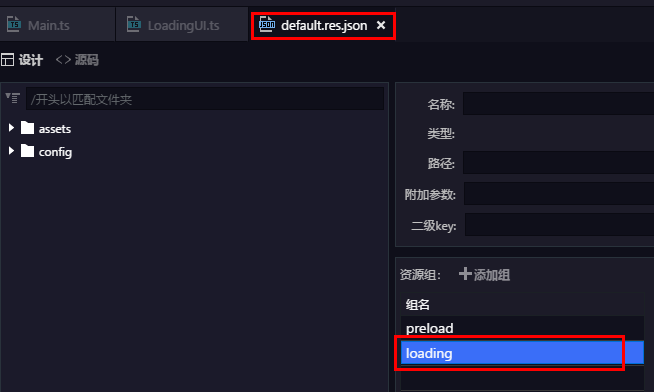
1.新建load界面需要的资源组loading
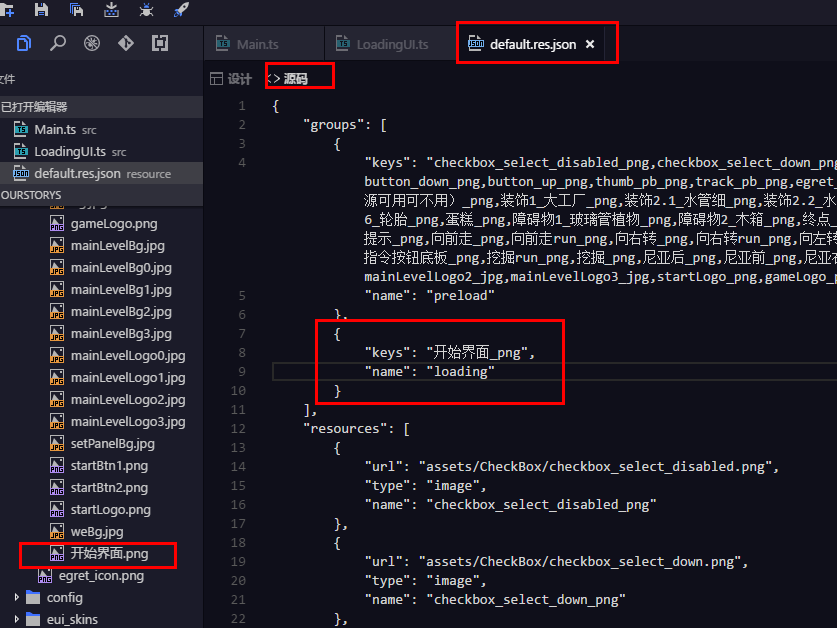
2.添加load界面需要的图片,并加入配置表相应位置
3.main中添加代码:
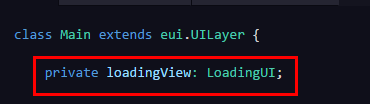
private loadingView: LoadingUI;
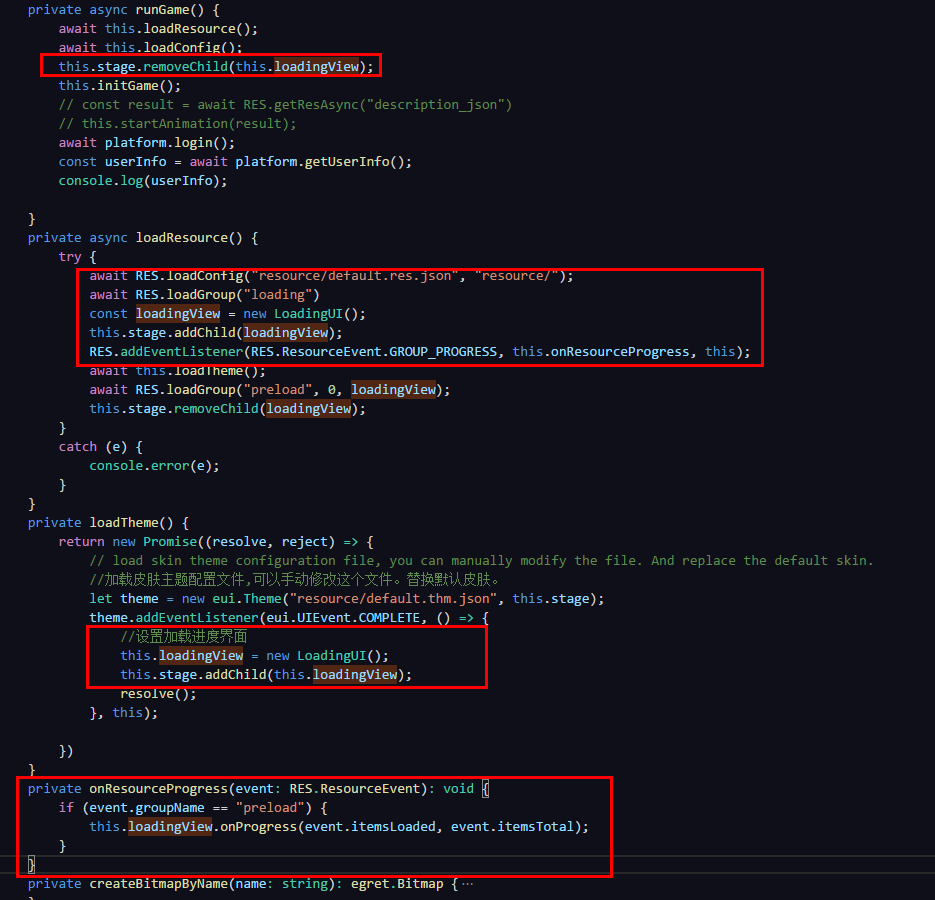
    private async runGame() {

        await this.loadResource();

        await this.loadConfig();

        this.stage.removeChild(this.loadingView);

        this.initGame();

        // const result = await RES.getResAsync("description_json")

        // this.startAnimation(result);

        await platform.login();

        const userInfo = await platform.getUserInfo();

        console.log(userInfo);

    }

    private async loadResource() {

        try {

            await RES.loadConfig("resource/default.res.json", "resource/");

            await RES.loadGroup("loading")

            const loadingView = new LoadingUI();

            this.stage.addChild(loadingView);

            RES.addEventListener(RES.ResourceEvent.GROUP_PROGRESS, this.onResourceProgress, this);

            await this.loadTheme();

            await RES.loadGroup("preload", , loadingView);

            this.stage.removeChild(loadingView);

        }

        catch (e) {

            console.error(e);

        }

    }

    private loadTheme() {

        return new Promise((resolve, reject) => {

            // load skin theme configuration file, you can manually modify the file. And replace the default skin.

            //加载皮肤主题配置文件,可以手动修改这个文件。替换默认皮肤。

            let theme = new eui.Theme("resource/default.thm.json", this.stage);

            theme.addEventListener(eui.UIEvent.COMPLETE, () => {

                //设置加载进度界面

                this.loadingView = new LoadingUI();

                this.stage.addChild(this.loadingView);

                resolve();

            }, this);

        })

    }

    private onResourceProgress(event: RES.ResourceEvent): void {

        if (event.groupName == "preload") {

            this.loadingView.onProgress(event.itemsLoaded, event.itemsTotal);

        }

    }
4.在LoadingUI中修改代码为:
class LoadingUI extends egret.Sprite implements RES.PromiseTaskReporter {

    public constructor() {

        super();

        if (!this.pBar) {

            this.createView();

        }

    }

    private pBar: eui.ProgressBar;

    private bg:egret.Bitmap;

    private async createView(){

        this.bg=new egret.Bitmap();

        this.bg.texture=RES.getRes("开始界面_png");

        // this.bg.width=this.stage.stageWidth;

        // this.bg.height=this.stage.stageHeight;

        this.addChild(this.bg);

        this.pBar = new eui.ProgressBar();

        this.pBar.x = ;

        this.pBar.y = ;

        this.pBar.width = ;

        this.pBar.height = ;

        this.pBar.maximum = ;

        this.pBar.minimum = ;

        this.pBar.value = ;

        this.addChild(this.pBar);

    }

    private createBitmapByName(name: string): egret.Bitmap {

        var result: egret.Bitmap = new egret.Bitmap();

        var texture: egret.Texture = RES.getRes(name);

        result.texture = texture;

        return result;

    }

    public onProgress(current: number, total: number): void {

        if (this.pBar.labelDisplay != null || this.pBar.labelDisplay != undefined) {

            // egret.log("加载进度条~~~~~");

            this.pBar.labelDisplay.textColor = 0xff0000;

            this.pBar.value = current;

        }

    }

}
至此,自定义加载界面完成,当然,你还可以根据自己喜爱添加,修改加载界面布局
Egret白鹭开发小游戏之自定义load加载界面的更多相关文章
- 从零到一:用Phaser.js写意地开发小游戏(Chapter 3 - 加载游戏资源)
回顾 上一节我们搭建了游戏的骨架,添加了四个游戏场景,分别是加载.开始.游戏.结束.那么这一节我们来介绍加载这个场景,顺带丰富一下各个场景的基本内容. Phaser.Loader Phaser框架自带 ...
- Egret白鹭开发小游戏中容易犯的错
在游戏开发过程中遇到问题,请首先查阅:http://developer.egret.com/cn/github/egret-docs/Engine2D/minigame/minigameFAQ/ind ...
- 我的Android进阶之旅------>Android疯狂连连看游戏的实现之加载界面图片和实现游戏Activity(四)
正如在<我的Android进阶之旅------>Android疯狂连连看游戏的实现之状态数据模型(三)>一文中看到的,在AbstractBoard的代码中,当程序需要创建N个Piec ...
- Egret白鹭H5小游戏开发入门(二)
前言: 昨天的文章中简单的介绍了Egret白鹭引擎从安装到基本的使用配置等问题,今天着重介绍H5小游戏开发的起步阶段,如Wing面板的使用,素材的处理,类的说明,开始布局等等. 整体概况: 根据上一篇 ...
- Egret白鹭H5小游戏开发入门(三)
前言: 在上一篇文章中着重介绍了H5小游戏开发的起步阶段,如Wing面板的使用,素材的处理,类的说明等等,那么今天主要是涉及到场景的创建,loading的修改等等的代码编写. 对于这一节,我在讲解的过 ...
- Egret白鹭H5小游戏开发入门(一)
前言: 好久没更新博客了,以前很多都不会,所以常常写博客总结,倒是现在有点点经验了就懒了.在过去的几个月里,在canvas游戏框架方面,撸过了CreateJS,玩得了Egret,又学过PIXI.js. ...
- 使用cocos2d-x v3.1开发小游戏(基本框架)
小游戏的组成 欢迎界面 在游戏资源未全部加载完之前就需要载入,避免进入游戏会有一段黑屏时间. 可以用来展示游戏名称或者开发者logo. 开始菜单界面 一般用于显示游戏名称和关卡选择(或者称游戏难度选择 ...
- Unity3D研究院之异步加载游戏场景与异步加载游戏资源进度条
Unity3D研究院之异步加载游戏场景与异步加载游戏资源进度条 异步任务相信大家应该不会陌生,那么本章内容MOMO将带领大家学习Unity中的一些异步任务.在同步加载游戏场景的时候通常会使用方法 Ap ...
- 一步一步开发Game服务器(三)加载脚本和服务器热更新(二)完整版
上一篇文章我介绍了如果动态加载dll文件来更新程序 一步一步开发Game服务器(三)加载脚本和服务器热更新 可是在使用过程中,也许有很多会发现,动态加载dll其实不方便,应为需要预先编译代码为dll文 ...
随机推荐
- Windows环境下main()函数传入参数
最近几天在写一个模仿windows自带的ping程序,也从网上找过一些源码,但大都需要向主函数main中传入参数,这里简单总结一下向主函数中传参的方法. 方法一:项目->属性->调试-&g ...
- stack函数怎么用嘞?↓↓↓
c++ stl栈stack的头文件书写格式为: #include 实例化形式如下: stack StackName; 其中成员函数如下: 1.检验堆栈是否为空 empty() 堆栈为空则返回真 形式如 ...
- java - 如何使一个类不能被继承
使用final关键字: 使用私有构造器: public final class InitTest{ private InitTest(){} }
- django第四次(转自刘江)
我们都知道对于ManyToMany字段,Django采用的是第三张中间表的方式.通过这第三张表,来关联ManyToMany的双方.下面我们根据一个具体的例子,详细解说中间表的使用. 一.默认中间表 首 ...
- GitLab与Git的结合
作为一名刚入职的大数据初级开发工程师,来到公司后发现代码是部署在GItLab上,之前一直认为代码可以放在码云.github上面,然后就很迷惑就对GitLab进行了了解,将git 和gitlab结合起来 ...
- ubuntu清理系统垃圾与备份
虽然linux下不会有windows下的那么多垃圾和磁盘碎片!但还是会留下一些用不着的临时文件或是多次升级后的N个旧的内核! 1,非常有用的清理命令: sudo apt-get autoclean s ...
- codeforces 318 A.Even Odds B.Sereja and Array
A.Even Odds 给你n和k, 把从1到n先排奇数后排偶数排成一个新的序列,输出第k个位置的数. 比如 10 3 拍好后就是 1 3 5 7 9 2 4 6 8 10 第3个数是5. // ...
- [ PyQt入门教程 ] PyQt5基本控件使用:消息弹出、用户输入、文件对话框
本文主要介绍PyQt界面实现中常用的消息弹出对话框.提供用户输入的输入框.打开文件获取文件/目录路径的文件对话框.学习这三种控件前,先想一下它们使用的主要场景: 1.消息弹出对话框.程序遇到问题需要退 ...
- 一个项目的SpringCloud微服务改造过程
SSO是公司一个已经存在了若干年的项目,后端采用SpringMVC.MyBatis,数据库使用MySQL,前端展示使用Freemark.今年,我们对该项目进行了一次革命性的改进,改造成SpringCl ...
- 逆向破解之160个CrackMe —— 004-005
CrackMe —— 004 160 CrackMe 是比较适合新手学习逆向破解的CrackMe的一个集合一共160个待逆向破解的程序 CrackMe:它们都是一些公开给别人尝试破解的小程序,制作 c ...