
JSP+java上传图片到服务器,并将地址保存至MYSQL + JSP网页显示服务器的图片
这两天遇到个需求——用户头像修改功能。
查了好多资料,不是代码不全,就是某些高端框架,卡了好久,今已实现,分享给大家,如果有更好的方法,非常感谢可以在下方评论区写出
一、整体项目架构

二、web.xml配置文件
<?xml version="1.0" encoding="UTF-8"?>

<web-app xmlns:xsi="http://www.w3.org/2001/XMLSchema-instance"  xmlns:web="http://java.sun.com/xml/ns/javaee" xmlns="http://java.sun.com/xml/ns/javaee" xsi:schemaLocation="http://java.sun.com/xml/ns/javaee http://java.sun.com/xml/ns/javaee/web-app_2_5.xsd" id="WebApp_ID" version="2.5">

  <servlet>

    <display-name>UploadServlet</display-name>

    <servlet-name>UploadServlet</servlet-name>

    <servlet-class>com.runoob.test.UploadServlet</servlet-class>

  </servlet>

  <servlet-mapping>

    <servlet-name>UploadServlet</servlet-name>

    <url-pattern>/lianxi/UploadServlet</url-pattern>

  </servlet-mapping>

  <servlet>

    <display-name>getImg</display-name>

    <servlet-name>getImg</servlet-name>

    <servlet-class>com.runoob.test.getImg</servlet-class>

  </servlet>

  <servlet-mapping>

    <servlet-name>getImg</servlet-name>

    <url-pattern>/lianxi/getImg</url-pattern>

  </servlet-mapping>

</web-app>
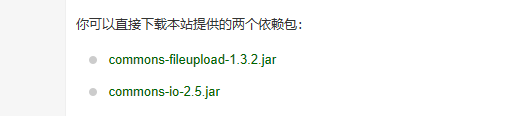
三、jar包
四、JSP文件
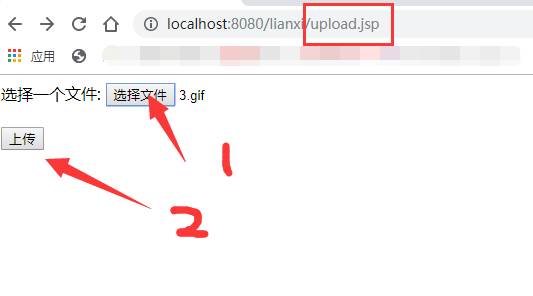
上传表单——upload.jsp
<%@ page language="java" contentType="text/html; charset=UTF-8"

    pageEncoding="UTF-8"%>

<!DOCTYPE html PUBLIC "-//W3C//DTD HTML 4.01 Transitional//EN" "http://www.w3.org/TR/html4/loose.dtd">

<html>

<head>

<meta http-equiv="Content-Type" content="text/html; charset=UTF-8">

<title>Insert title here</title>

</head>

<body>

<form method="post" action="/lianxi/UploadServlet" enctype="multipart/form-data">

    选择一个文件:

    <input type="file" name="uploadFile" />

    <br/><br/>

    <input type="submit" value="上传" />

</form>

</body>

</html>
上传完成后的消息提示页面 + 往session中写入图片所在的存储地址————message.jsp
【可以修改为直接存到数据库中,然后同步添加至session ——方便后期直接读取图片地址,,,由于代码简单且繁杂,不属于核心,故直接用session代替,,,有需要的可以私信】
<%@ page language="java" contentType="text/html; charset=UTF-8"

    pageEncoding="UTF-8"%>

<!DOCTYPE html PUBLIC "-//W3C//DTD HTML 4.01 Transitional//EN"

    "http://www.w3.org/TR/html4/loose.dtd">

<html>

<head>

<meta http-equiv="Content-Type" content="text/html; charset=UTF-8">

<title>文件上传结果</title>

</head>

<%

request.setCharacterEncoding("UTF-8");

String logopath =(String) request.getAttribute("logopath");

session.setAttribute("headlogo",logopath);

session.setMaxInactiveInterval(2*60);

%>

<body>

    <center>

        <h2>${message}</h2>

    </center>

    <a href="img.jsp">查看图片</a>

</body>

</html>
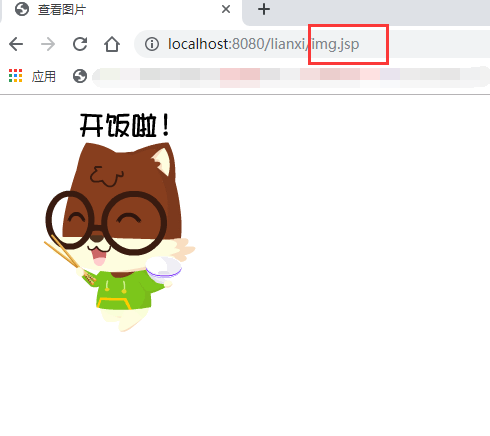
查看图片页面————img.jsp
<%@ page language="java" contentType="text/html; charset=UTF-8"

    pageEncoding="UTF-8"%>

<!DOCTYPE html PUBLIC "-//W3C//DTD HTML 4.01 Transitional//EN" "http://www.w3.org/TR/html4/loose.dtd">

<html>

<head>

<meta http-equiv="Content-Type" content="text/html; charset=UTF-8">

<title>查看图片</title>

</head>

<body>

<%

String imgPath = (String) session.getAttribute("headlogo");

%>

</body>

<img src="/lianxi/getImg?path=<%=imgPath %>">

</html>
五、servlet文件+字符串工具类
处理上传的servlet——UploadServlet.java
package com.runoob.test;

import java.io.File;

import java.io.FileInputStream;

import java.io.IOException;

import java.io.OutputStream;

import java.io.PrintWriter;

import java.util.List;

import javax.servlet.ServletException;

import javax.servlet.annotation.WebServlet;

import javax.servlet.http.HttpServlet;

import javax.servlet.http.HttpServletRequest;

import javax.servlet.http.HttpServletResponse;

import org.apache.commons.fileupload.FileItem;

import org.apache.commons.fileupload.disk.DiskFileItemFactory;

import org.apache.commons.fileupload.servlet.ServletFileUpload;

import com.runoob.test.tool;

/**

 * Servlet implementation class UploadServlet

 */

@WebServlet("/UploadServlet")

public class UploadServlet extends HttpServlet {

    private static final long serialVersionUID = 1L;

    // 上传文件存储目录

    private static final String UPLOAD_DIRECTORY = "upload";

    // 上传配置

    private static final int MEMORY_THRESHOLD   = 1024 * 1024 * 3;  // 3MB

    private static final int MAX_FILE_SIZE      = 1024 * 1024 * 40; // 40MB

    private static final int MAX_REQUEST_SIZE   = 1024 * 1024 * 50; // 50MB

    /**

     * 上传数据及保存文件

     */

    protected void doPost(HttpServletRequest request,

        HttpServletResponse response) throws ServletException, IOException {

        // 检测是否为多媒体上传

        if (!ServletFileUpload.isMultipartContent(request)) {

            // 如果不是则停止

            PrintWriter writer = response.getWriter();

            writer.println("Error: 表单必须包含 enctype=multipart/form-data");

            writer.flush();

            return;

        }

        // 配置上传参数

        DiskFileItemFactory factory = new DiskFileItemFactory();

        // 设置内存临界值 - 超过后将产生临时文件并存储于临时目录中

        factory.setSizeThreshold(MEMORY_THRESHOLD);

        // 设置临时存储目录

        factory.setRepository(new File(System.getProperty("java.io.tmpdir")));

        ServletFileUpload upload = new ServletFileUpload(factory);

        // 设置最大文件上传值

        upload.setFileSizeMax(MAX_FILE_SIZE);

        // 设置最大请求值 (包含文件和表单数据)

        upload.setSizeMax(MAX_REQUEST_SIZE);

        // 中文处理

        upload.setHeaderEncoding("UTF-8");

        // 构造临时路径来存储上传的文件

        // 这个路径相对当前应用的目录

        String uploadPath = getServletContext().getRealPath("/") + File.separator + UPLOAD_DIRECTORY;

        // 如果目录不存在则创建

        File uploadDir = new File(uploadPath);

        if (!uploadDir.exists()) {

            uploadDir.mkdir();

        }

        try {

            // 解析请求的内容提取文件数据

            @SuppressWarnings("unchecked")

            List<FileItem> formItems = upload.parseRequest(request);

            if (formItems != null && formItems.size() > 0) {

                // 迭代表单数据

                for (FileItem item : formItems) {

                    // 处理不在表单中的字段

                    if (!item.isFormField()) {

                        String fileName = new File(item.getName()).getName();

                        String filePath = uploadPath + File.separator + fileName;

                        File storeFile = new File(filePath);

                        // 在控制台输出文件的上传路径

                        System.out.println(filePath);                  //原始路径

                        /*                对存储的路径    调用字符串工具  修改*/

                       tool tl = new tool();

                       filePath = tl.removeGang(filePath);

                        System.out.println(filePath);

                        // 保存文件到硬盘

                        item.write(storeFile);

                        request.setAttribute("message",

                            "文件上传成功!");

                        request.setAttribute("logopath",filePath );

                    }

                }

            }

        } catch (Exception ex) {

            request.setAttribute("message",

                    "错误信息: " + ex.getMessage());

        }

        // 跳转到 message.jsp

        getServletContext().getRequestDispatcher("/message.jsp").forward(

                request, response);

    }

    }
字符串工具类——tool.java
package com.runoob.test;

public class tool {

    public String removeGang(String xx) {

        xx = xx.replaceAll("\\\\", "/");    //为什么这么写?可以看下UploadServlet.java 上传图片的存储路径:xxx\xxxx\xxxxx\xxx\xx   为了将该图片从服务器中读取出来,需要通过url地址来访问,然鹅“\“是非法url编码,需要变为”/"

        System.out.println(xx);

        return xx;

    }

}

输出图片————getImg.java
package com.runoob.test;

import java.io.File;

import java.io.FileInputStream;

import java.io.IOException;

import java.io.OutputStream;

import javax.servlet.ServletException;

import javax.servlet.annotation.WebServlet;

import javax.servlet.http.HttpServlet;

import javax.servlet.http.HttpServletRequest;

import javax.servlet.http.HttpServletResponse;

/**

 * Servlet implementation class getImg

 */

@WebServlet("/getImg")

public class getImg extends HttpServlet {

    private static final long serialVersionUID = 1L;

    /**

     * @see HttpServlet#HttpServlet()

     */

    public getImg() {

        super();

        // TODO Auto-generated constructor stub

    }

    /**

     * @see HttpServlet#doGet(HttpServletRequest request, HttpServletResponse response)

     */

    protected void doGet(HttpServletRequest request, HttpServletResponse response) throws ServletException, IOException {

        // TODO Auto-generated method stub

               String pathName = request.getParameter("path");

            File imgFile = new File(pathName);

            FileInputStream fin = null;

            OutputStream output = null;

            try {

                output = response.getOutputStream();

                fin = new FileInputStream(imgFile);

                byte[] arr = new byte[1024*10];

                int n;

                while((n = fin.read(arr)) != -1) {

                    output.write(arr,0,n);

                }

                output.flush();

                System.out.println("图像输出完毕");

                }catch(IOException e) {

                    e.printStackTrace();

                }

                try {

                    output.close();

                }catch(IOException e) {

                    e.printStackTrace();

                }

            }

    /**

     * @see HttpServlet#doPost(HttpServletRequest request, HttpServletResponse response)

     */

    protected void doPost(HttpServletRequest request, HttpServletResponse response) throws ServletException, IOException {

        // TODO Auto-generated method stub

        doGet(request, response);

    }

}
然后就可以直接 <img src="/lainxi/getImg?path=存储路径" class=”CSS类">
如img.jsp
原理后期补充,先赶火车......
演示:

JSP+java上传图片到服务器,并将地址保存至MYSQL + JSP网页显示服务器的图片的更多相关文章
- Springboot+Vue实现将图片和表单一起提交到后端,同时将图片地址保存到数据库、再次将存储的图片展示到前端vue页面
文章目录 1.实现的效果 2.Vue前端 3.图片上传 4.字段变量根据自己的字段名自行设置(这里不给出了,哈哈哈) 5.method方法 5.1.图片显示在选择框中,同时返回后端存储的地址 5.2查 ...
- JSP Java服务器页面
大家好!好久不见!今日我们开始学习JSP了,一些记录基础性的知识在这里与大家分享. 先说下URL(Uniform Resource Locator 统一资源定位符). URL包括传输协议(http:/ ...
- Java里面获取当前服务器的IP地址
public static void main(String[] args) { try { InetAddress address = InetAddress.getLocalHost();//获取 ...
- Java 获取当前项目所在服务器的 IP 地址
java中获取当前服务器地址主要使用到InetAddress这个类 public static void main(String[] args) { try { //用 getLocalHost() ...
- JSP - (Java Server Pages) - Java服务器界面
JSP简介: 在HTML中嵌入Java脚本代码,由应用服务器中的JSP引擎来编译和执行嵌入的Java脚本代码,然后将生成的整个页面信息返回给客户端: 一个JSP页面包含:静态内容(HTML静态文本), ...
- Java Web项目获取客户端和服务器的IP地址
在JSP里,获取客户端的IP地址的方法是:request.getRemoteAddr(),这种方法在大部分情况下都是有效的.但是在通过了Apache,Squid等反向代理软件就不能获取到客户端的真实I ...
- Java根据HttpServletRequest请求获取服务器的IP地址
以下总结了两种根据HttpServletRequest请求获取发出请求浏览器客户端所在服务器的IP地址方法: 代码: import javax.servlet.http.HttpServletRequ ...
- Jsp (Java Server Pages)相关知识九大内置对象和四大作用域
一.初识JSP Jsp页面的组成:静态内容.指令.表达式.小脚本.声明.标准动作.注释等元素构成 Url:统一资源定位符 Url组成:协议.主机名(包括端口号).路径 1.注释的方式: 1.HTML注 ...
- JSP(Java Servlet Page)
一.简介 HTML HTML擅长显示一个静态的网页,但是不能调用Java程序. Servlet Servlet擅长调用Java程序和后台进行交互,但是它不擅长显示一个完整的HTML页面. 我们希望创建 ...
随机推荐
- Liferay6.1 配置友好的URL映射
说明:以下内容和官方文档相差不大,如果您英文较好,建议直接去读官方文档,地址是:https://dev.liferay.com/develop/tutorials/-/knowledge_base/6 ...
- lodop+art-template实现web端漂亮的小票样式打印
一. 现状 由于之前采用Lodop打印控件(商业版付费,可以使用免费版 但是会有水印)去打印小票,是一行一行的打印,但是不满足UI给到复杂布局的小票样式,所以得重新考虑如何来实现. 二. 介绍 art ...
- ABP开发框架前后端开发系列---(11)菜单的动态管理
在前面随笔<ABP开发框架前后端开发系列---(9)ABP框架的权限控制管理>中介绍了基于ABP框架服务构建的Winform客户端,客户端通过Web API调用的方式进行获取数据,从而实现 ...
- Spring源码阅读-IoC容器解析
目录 Spring IoC容器 ApplicationContext设计解析 BeanFactory ListableBeanFactory HierarchicalBeanFactory Messa ...
- 分析RESTful API安全性及如何采取保护措施
本文中讨论了API安全性和采用安全措施的重要性,如身份验证,API密钥,访问控制和输入验证. API设计的第一步是撰写接口文档 根据TechTarget(海外IT专业媒体)的定义,RESTful AP ...
- sails连接monogodb数据库
1.全局安装:cnpm install -g sails 2.命令窗口进入项目位置 新建项目:sails new sails_cqwu --fast,选择2(快速建立sails项目) 3.cd进入sa ...
- spring源码深度解析— IOC 之 容器的基本实现
概述 上一篇我们搭建完Spring源码阅读环境,spring源码深度解析—Spring的整体架构和环境搭建 这篇我们开始真正的阅读Spring的源码,分析spring的源码之前我们先来简单回顾下spr ...
- 系统学习 Java IO (四)----文件的读写和随机访问 FileInputStream/FileOutputStream & RandomAccessFile
目录:系统学习 Java IO---- 目录,概览 文件输入流 FileInputStream 这是一个简单的FileInputStream示例: InputStream input = new Fi ...
- Spring Framework 组件注册 之 FactoryBean
Spring Framework 组件注册 之 FactoryBean 前言 前两篇文章介绍了如何使用@Component,@Import注解来向spring容器中注册组件(javaBean),本文将 ...
- gRPC入坑记
概要 由于gRPC主要是谷歌开发的,由于一些已知的原因,gRPC跑demo还是不那么顺利的.单独写这一篇,主要是gRPC安装过程中的坑太多了,记录下来让大家少走弯路. 主要的坑: 如果使用PHP.Py ...