
利用Spring Boot+zxing,生成二维码还能这么简单
在网站开发中,经常会遇到要生成二维码的情况,比如要使用微信支付、网页登录等,本文分享一个Spring Boot生成二维码的例子,这里用到了google的zxing工具类。
本文目录
一、二维码简介二、编写代码生成二维码1.引入jar包2.编写工具类3.编写控制层代码4.运行并查看效果
一、二维码简介
二维码又称为QR Code,QR全称是Quick Response,是一个近几年来移动设备上超流行的一种编码方式。
二维码是用某种特定的几何图形按一定规律在平面(二维方向上)分布的黑白相间的图形记录数据符号信息的。
主要应用场景如下:
- 信息获取(名片、地图、WIFI密码、资料)
- 网站跳转(跳转到微博、手机网站、网站)
- 广告推送(用户扫码,直接浏览商家推送的视频、音频广告)
- 手机电商(用户扫码、手机直接购物下单)
- 防伪溯源(用户扫码、即可查看生产地;同时后台可以获取最终消费地)
- 优惠促销(用户扫码,下载电子优惠券,抽奖)
- 会员管理(用户手机上获取电子会员信息、VIP服务)
- 手机支付(扫描商品二维码,通过银行或第三方支付提供的手机端通道完成支付)
- 账号登录(扫描二维码进行各个网站或软件的登录)
二、编写代码生成二维码
1.引入jar包
pom.xml中引入zxing的jar包。
<!-- 二维码支持包 -->
<dependency>
    <groupId>com.google.zxing</groupId>
    <artifactId>core</artifactId>
    <version>3.2.0</version>
</dependency>
<dependency>
    <groupId>com.google.zxing</groupId>
    <artifactId>javase</artifactId>
    <version>3.2.0</version>
</dependency>
2.编写工具类
QRCodeUtil.java代码如下:
/**
 * QRCodeUtil 生成二维码工具类
 */
public class QRCodeUtil {

    private static final String CHARSET = "utf-8";
    private static final String FORMAT_NAME = "JPG";
    // 二维码尺寸
    private static final int QRCODE_SIZE = 300;
    // LOGO宽度
    private static final int WIDTH = 60;
    // LOGO高度
    private static final int HEIGHT = 60;

    private static BufferedImage createImage(String content, String imgPath, boolean needCompress) throws Exception {
        Hashtable hints = new Hashtable();
        hints.put(EncodeHintType.ERROR_CORRECTION, ErrorCorrectionLevel.H);
        hints.put(EncodeHintType.CHARACTER_SET, CHARSET);
        hints.put(EncodeHintType.MARGIN, 1);
        BitMatrix bitMatrix = new MultiFormatWriter().encode(content, BarcodeFormat.QR_CODE, QRCODE_SIZE, QRCODE_SIZE,
                hints);
        int width = bitMatrix.getWidth();
        int height = bitMatrix.getHeight();
        BufferedImage image = new BufferedImage(width, height, BufferedImage.TYPE_INT_RGB);
        for (int x = 0; x < width; x++) {
            for (int y = 0; y < height; y++) {
                image.setRGB(x, y, bitMatrix.get(x, y) ? 0xFF000000 : 0xFFFFFFFF);
            }
        }
        if (imgPath == null || "".equals(imgPath)) {
            return image;
        }
        // 插入图片
        QRCodeUtil.insertImage(image, imgPath, needCompress);
        return image;
    }

    private static void insertImage(BufferedImage source, String imgPath, boolean needCompress) throws Exception {
        File file = new File(imgPath);
        if (!file.exists()) {
            System.err.println("" + imgPath + "   该文件不存在!");
            return;
        }
        Image src = ImageIO.read(new File(imgPath));
        int width = src.getWidth(null);
        int height = src.getHeight(null);
        if (needCompress) { // 压缩LOGO
            if (width > WIDTH) {
                width = WIDTH;
            }
            if (height > HEIGHT) {
                height = HEIGHT;
            }
            Image image = src.getScaledInstance(width, height, Image.SCALE_SMOOTH);
            BufferedImage tag = new BufferedImage(width, height, BufferedImage.TYPE_INT_RGB);
            Graphics g = tag.getGraphics();
            g.drawImage(image, 0, 0, null); // 绘制缩小后的图
            g.dispose();
            src = image;
        }
        // 插入LOGO
        Graphics2D graph = source.createGraphics();
        int x = (QRCODE_SIZE - width) / 2;
        int y = (QRCODE_SIZE - height) / 2;
        graph.drawImage(src, x, y, width, height, null);
        Shape shape = new RoundRectangle2D.Float(x, y, width, width, 6, 6);
        graph.setStroke(new BasicStroke(3f));
        graph.draw(shape);
        graph.dispose();
    }

    public static void encode(String content, String imgPath, String destPath, boolean needCompress) throws Exception {
        BufferedImage image = QRCodeUtil.createImage(content, imgPath, needCompress);
        mkdirs(destPath);
        ImageIO.write(image, FORMAT_NAME, new File(destPath));
    }

    public static BufferedImage encode(String content, String imgPath, boolean needCompress) throws Exception {
        BufferedImage image = QRCodeUtil.createImage(content, imgPath, needCompress);
        return image;
    }

    public static void mkdirs(String destPath) {
        File file = new File(destPath);
        // 当文件夹不存在时,mkdirs会自动创建多层目录,区别于mkdir.(mkdir如果父目录不存在则会抛出异常)
        if (!file.exists() && !file.isDirectory()) {
            file.mkdirs();
        }
    }

    public static void encode(String content, String imgPath, OutputStream output, boolean needCompress)
            throws Exception {
        BufferedImage image = QRCodeUtil.createImage(content, imgPath, needCompress);
        ImageIO.write(image, FORMAT_NAME, output);
    }

    public static void encode(String content, OutputStream output) throws Exception {
        QRCodeUtil.encode(content, null, output, false);
    }
}
3.编写控制层代码
QrCodeController.java代码如下:
    /**
     * 根据 url 生成 普通二维码
     */
    @RequestMapping(value = "/createCommonQRCode")
    public void createCommonQRCode(HttpServletResponse response, String url) throws Exception {
        ServletOutputStream stream = null;
        try {
            stream = response.getOutputStream();
            //使用工具类生成二维码
            QRCodeUtil.encode(url, stream);
        } catch (Exception e) {
            e.getStackTrace();
        } finally {
            if (stream != null) {
                stream.flush();
                stream.close();
            }
        }
    }

    /**
     * 根据 url 生成 带有logo二维码
     */
    @RequestMapping(value = "/createLogoQRCode")
    public void createLogoQRCode(HttpServletResponse response, String url) throws Exception {
        ServletOutputStream stream = null;
        try {
            stream = response.getOutputStream();
            String logoPath = Thread.currentThread().getContextClassLoader().getResource("").getPath()
                    + "templates" + File.separator + "logo.jpg";
            //使用工具类生成二维码
            QRCodeUtil.encode(url, logoPath, stream, true);
        } catch (Exception e) {
            e.getStackTrace();
        } finally {
            if (stream != null) {
                stream.flush();
                stream.close();
            }
        }
    }
4.运行并查看效果
本项目中提供了生成普通二维码和带有logo二维码的两个接口,启动项目,我们来演示下生成下http://www.baidu.com这个url的二维码;
- 生成普通二维码
本地浏览器打开http://localhost:8080/createCommonQRCode?url=http://www.baidu.com,生成的二维码截图如下:
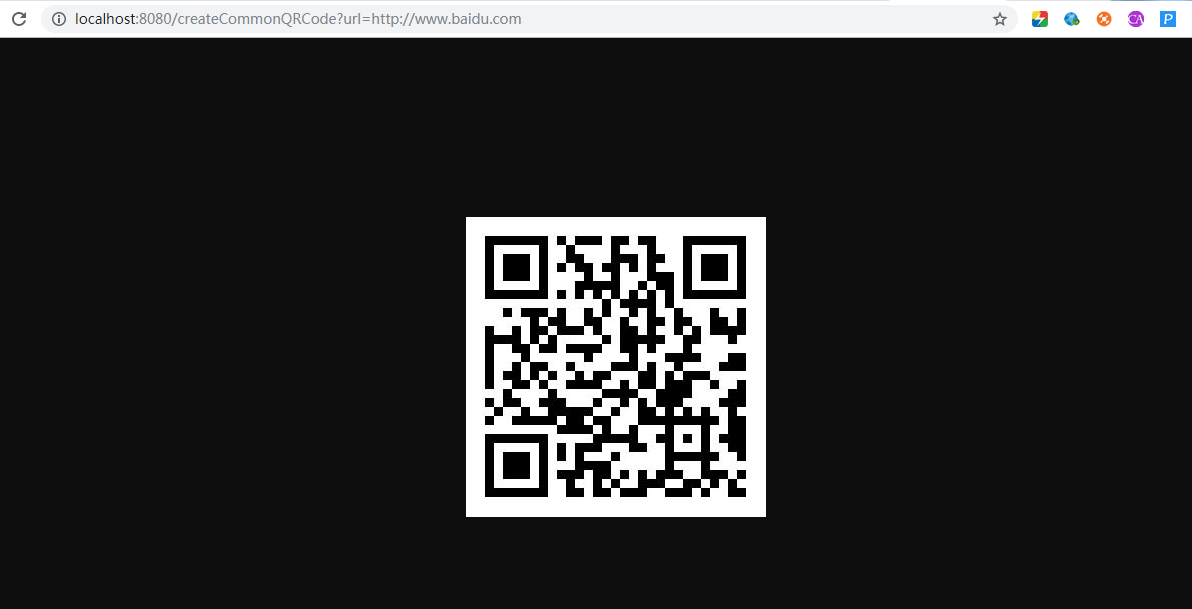
生成百度的普通二维码
- 生成带logo的二维码
本地浏览器打开http://localhost:8080/createLogoQRCode?url=http://www.baidu.com,生成的二维码截图如下:
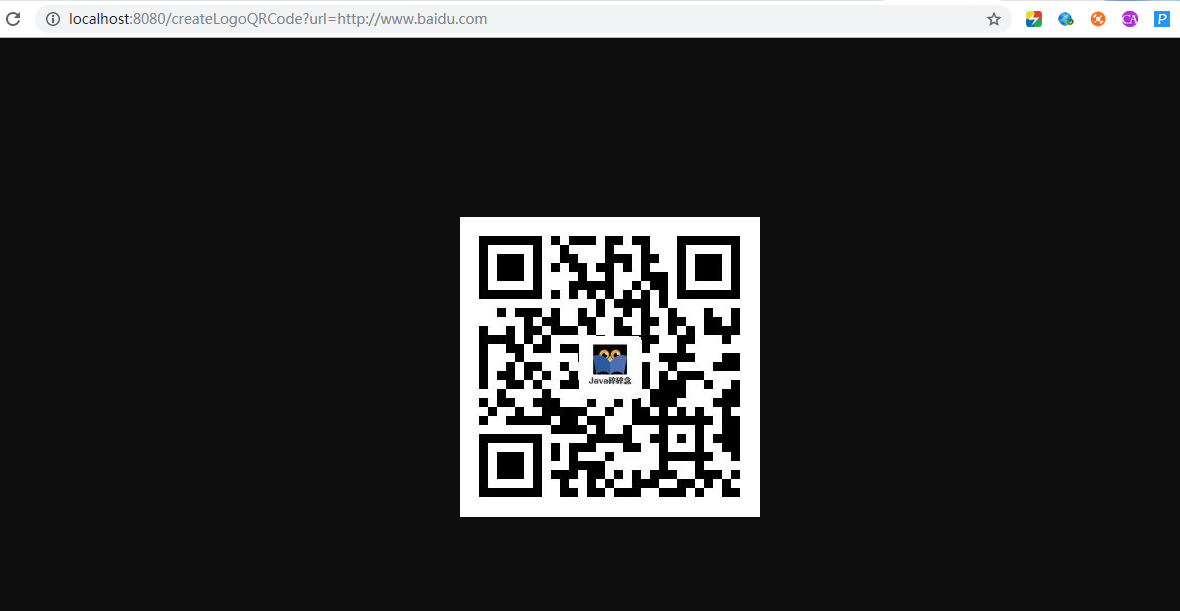
生成百度的带logo二维码
到此Spring Boot 2.X中利用ZXing生成二维码功能全部实现,有问题欢迎留言沟通哦!
完整源码地址: https://github.com/suisui2019/springboot-study
推荐阅读
1.从技术的角度分析下为什么不要在网上发“原图”
2.Spring Boot 2.X 如何快速整合jpa?
3.Spring Boot之Profile--快速搞定多环境使用与切换
4.Spring Boot 2.X整合Spring-cache,让你的网站速度飞起来
5.利用Spring Boot+WxJava实现网站集成微信登录功能
限时领取免费Java相关资料,涵盖了Java、Redis、MongoDB、MySQL、Zookeeper、Spring Cloud、Dubbo/Kafka、Hadoop、Hbase、Flink等高并发分布式、大数据、机器学习等技术。
关注下方公众号即可免费领取:

利用Spring Boot+zxing,生成二维码还能这么简单的更多相关文章
- java二维码之利用谷歌的zxing生成二维码,解析二维码
生成二维码 @RequestMapping("/123") public void test(HttpServletRequest request,HttpServletRespo ...
- spring boot高性能实现二维码扫码登录(中)——Redis版
前言 本打算用CountDownLatch来实现,但有个问题我没有考虑,就是当用户APP没有扫二维码的时候,线程会阻塞5分钟,这反而造成性能的下降.好吧,现在回归传统方式:前端ajax每隔1秒或2秒发 ...
- spring boot高性能实现二维码扫码登录(下)——订阅与发布机制版
前言 基于之前两篇(<spring boot高性能实现二维码扫码登录(上)——单服务器版>和<spring boot高性能实现二维码扫码登录(中)——Redis版>)的基础, ...
- (转)ZXing生成二维码和带logo的二维码,模仿微信生成二维码效果
场景:移动支付需要对二维码的生成与部署有所了解,掌握目前主流的二维码生成技术. 1 ZXing 生成二维码 首先说下,QRCode是日本人开发的,ZXing是google开发,barcode4j也是老 ...
- zxing生成二维码设置边框颜色
真是研究了很久很久,满满的泪啊 zxing生成二维码,默认是可以增加空白边框的,但是并没有可以设置边框颜色的属性. 其中增加空白边框的属性的一句话是: Map hints = new HashMap( ...
- java学习-zxing生成二维码矩阵的简单例子
这个例子需要使用google的开源项目zxing的核心jar包 core-3.2.0.jar 可以百度搜索下载jar文件,也可使用maven添加依赖 <dependency> <gr ...
- 利用PHP QR Code生成二维码(带logo)
转自:http://www.cnblogs.com/txw1958/p/phpqrcode.html HP QR Code是一个PHP二维码生成类库,利用它可以轻松生成二维码,官网提供了下载和多个演示 ...
- 通过zxing生成二维码
二维码现在随处可见,在日常的开发中,也会经常涉及到二维码的生成,特别是开发一些活动或者推广方面的功能时,二维码甚至成为必备功能点.本文介绍通过 google 的 zxing 包生成带 logo 的二维 ...
- 使用google zxing生成二维码图片
生成二维码工具类: 1 import java.awt.geom.AffineTransform; 2 import java.awt.image.AffineTransformOp; 3 impor ...
随机推荐
- Centos7 安装Homestead环境
问题1, ==> homestead-7: Waiting for machine to boot. This may take a few minutes... homestead-7: SS ...
- Python3发送邮件功能
Python3实现邮件发送功能 import smtplib from email.mime.text import MIMEText # 导入模块 class SendEmail: def send ...
- 语音控制单片机工作【百度语音识别,串口发送数据到单片机】【pyqt源码+软件】!!
前些天闲着没事,就做了个语音识别结合串口发送指令的软件,用的是pyqt写的,软件打开后对着笔记本的话筒说话, 他就能识别返回文字结果,然后匹配语音中的关键词,如果有关键词就发送关键词对应的命令,比如语 ...
- Redis进阶应用:Redis+Lua脚本实现复合操作
一.引言 Redis是高性能的key-value数据库,在很大程度克服了memcached这类key/value存储的不足,在部分场景下,是对关系数据库的良好补充.得益于超高性能和丰富的数据结构,Re ...
- 关于input[type='checkbox']全选的问题
今天在做一个全选功能的时候,发现了一个问题,就是如果我在选择全选之前,我就已经选择了一个input,然后我再去选择全选并且以后再取消全选的时候,这个我之前选择的input始终处于选择状态,但是他的ch ...
- Quartz CronTrigger定时器表达式大全
CronTrigger是基于Calendar-like调度的.当你需要在除星期六和星期天外的每天上午10点半执行作业时,那么应该使用CronTrigger.正如它的名字所暗示的那样,CronTrigg ...
- 4如何用PHP给MySQL数据库添加记录
首先连接数据库(依旧用第二篇的方法) 假设数据库表里只有id,name,email三列 添加以下代码 $inputemail=写你要的email;$inputname=写你要的name;//先设定你要 ...
- AQS之CountDownLatch、Semaphore、CyclicBarrier
CountDownLatch A synchronization aid that allows one or more threads to wait until a set of operatio ...
- axios异步提交表单数据的不同形式
踩坑Axios提交form表单几种格式 前后端分离的开发前后端, 前端使用的vue,后端的安全模块使用的SpringSecurity,使用postman测试后端的权限接口时发现都正常,但是使用vue+ ...
- map的实现和柯里化(Currying)
版权申明:本文为博主窗户(Colin Cai)原创,欢迎转帖.如要转贴,必须注明原文网址 http://www.cnblogs.com/Colin-Cai/p/11329874.html 作者:窗户 ...