
MVC(实战一)
一、创建MVC项目
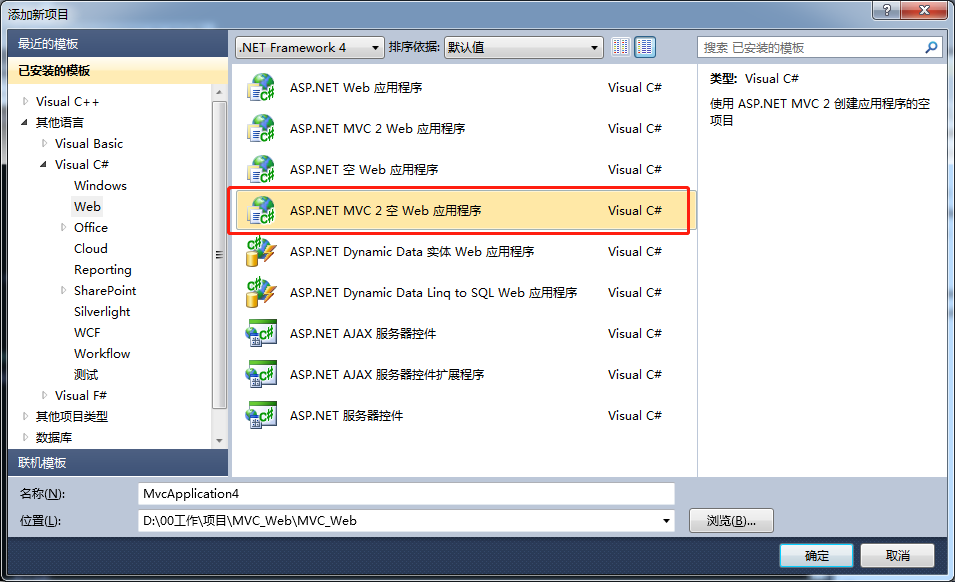
二、界面分布

Content:是存放css文件等,暂时先不考虑。
Controllers:重要, 控制层,控制界面显示和界面逻辑的,其实真正业务逻辑层,建议分层出去。
Models:重要,界面展示Model,
Script:暂不考虑
Views:重要,界面层。
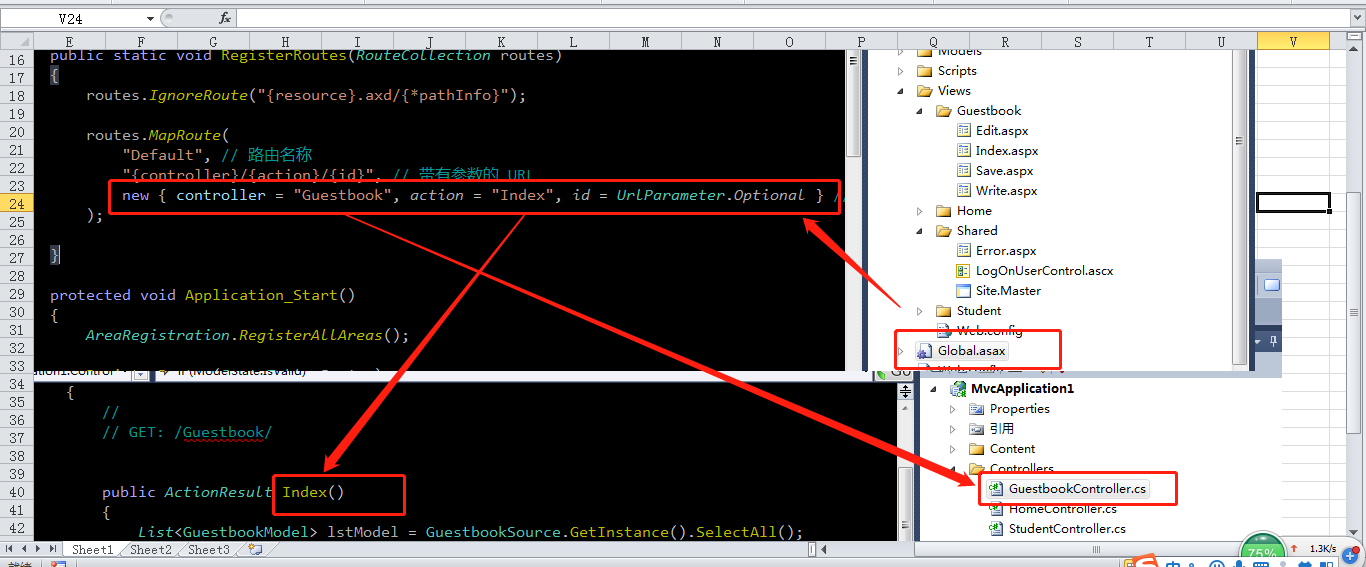
Global.asax:全局文件,配置资源加载 和 初始启动页。
Web.config:系统全局配置文件。
三、创建新功能
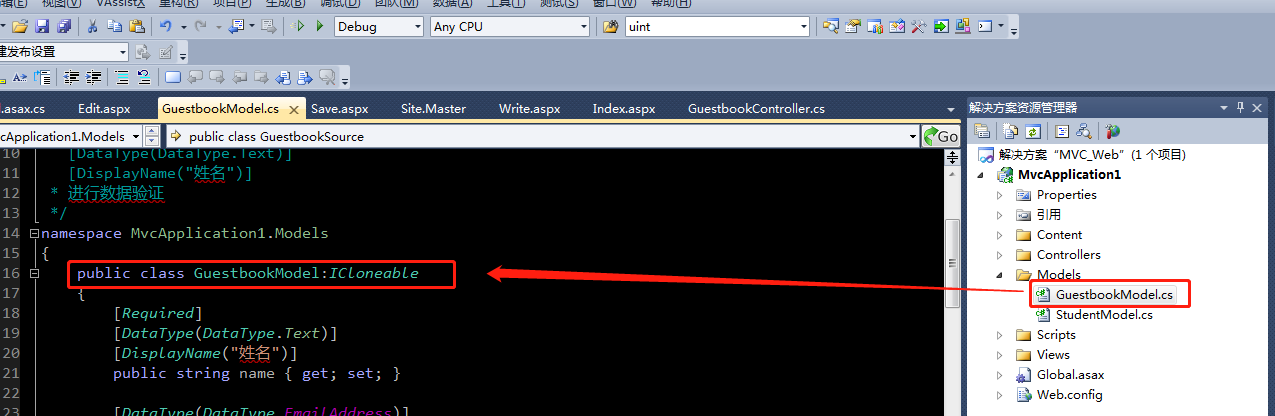
1、创建Model类
 using System;

 using System.Collections.Generic;

 using System.Linq;

 using System.Web;

 using System.ComponentModel.DataAnnotations;

 using System.ComponentModel;

 /*

  * [Required]

    [DataType(DataType.Text)]

    [DisplayName("姓名")]

  * 进行数据验证

  */

 namespace MvcApplication1.Models

 {

     public class GuestbookModel:ICloneable

     {

         [Required]

         [DataType(DataType.Text)]

         [DisplayName("姓名")]

         public string name { get; set; }

         [DataType(DataType.EmailAddress)]

         [DisplayName("邮箱")]

         public string Email { get; set; }

         [Required]

         [DataType(DataType.MultilineText)]

         [DisplayName("内容")]

         public string content { get; set; }

         public object  Clone()

         {

              return this.MemberwiseClone();

         }

    }

     public class GuestbookSource

     {

         private static GuestbookSource m_Source = null;

         private static List<GuestbookModel> m_LstModel = null;

         private GuestbookSource()

         {

             m_LstModel = new List<GuestbookModel>();

         }

         public static GuestbookSource GetInstance()

         {

             if (m_Source == null)

                 m_Source = new GuestbookSource();

             return m_Source;

         }

         public bool Add(GuestbookModel model)

         {

             if(!m_LstModel.Contains(model))

             m_LstModel.Add(model);

             return true;

         }

         public bool Delete(GuestbookModel model)

         {

             if(m_LstModel.Contains(model))

             m_LstModel.Remove(model);

             return true;

         }

         public bool Delete(string name)

         {

             return Delete(m_LstModel.FirstOrDefault(a => a.name == name));

         }

         public List<GuestbookModel> SelectAll()

         {

             List<GuestbookModel> lst = new List<GuestbookModel>();

             foreach (GuestbookModel m in m_LstModel)

                 lst.Add((GuestbookModel)m.Clone());

             return lst;

         }

         public GuestbookModel Find(string name)

         {

             return m_LstModel.FirstOrDefault(a=>a.name.Equals(name));

         }

     }

 }
示例代码
这个Model类,需要将的地方,只有一个,就是 属性上的说明
using System.ComponentModel.DataAnnotations;
using System.ComponentModel;
[Required] 表示 name 属性 是必填的
[DataType(DataType.Text)] 表示 name属性 的数据类型
[DisplayName("姓名")] 表示 name属性 显示的注释
public string name { get; set; }
注释:GuestbookSource 是模拟缓存数据,跟逻辑没有关系。
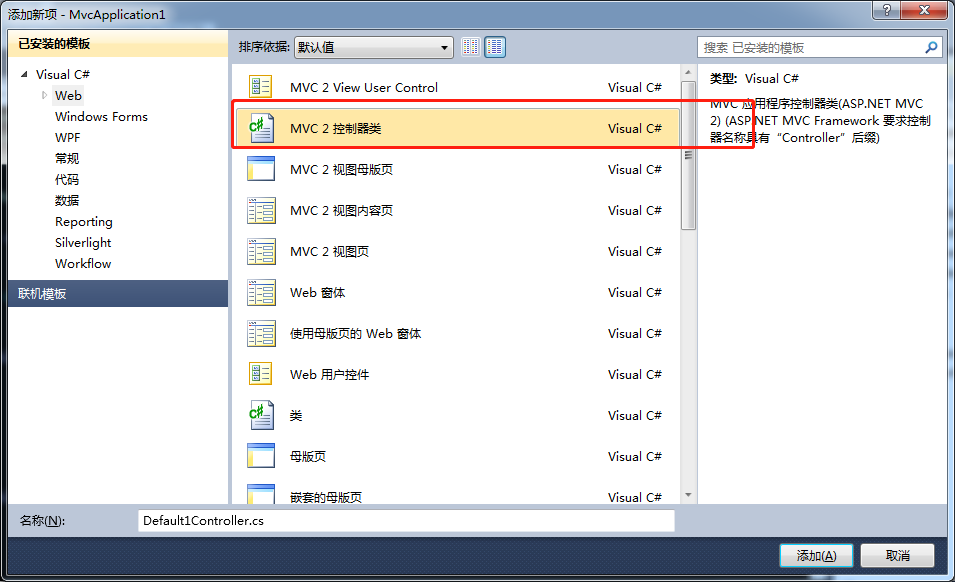
2、创建Controller 类 GuestbookController ,
注意:
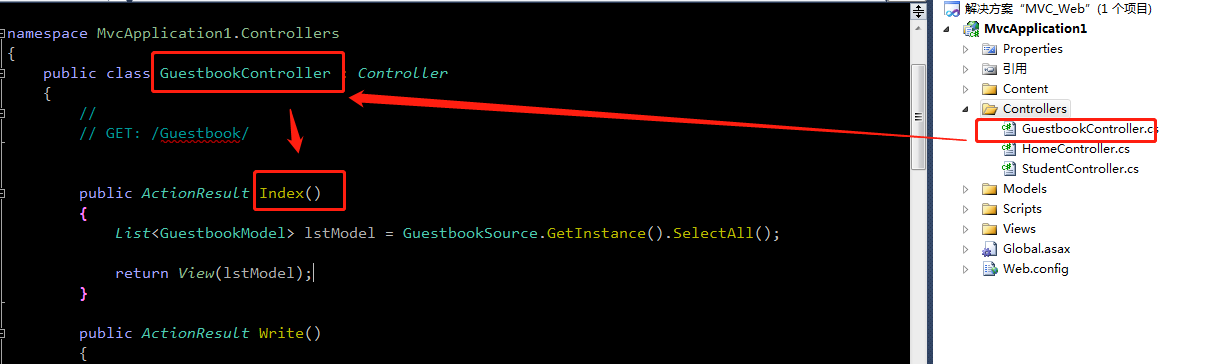
1) 类名,必须以Controller结尾,并必须继承Controller(对初学者,先理解到这个地方)
2)创建Index Action,获取数据源。然后将获取到的数据,传入到View(结果集)
 using System;

 using System.Collections.Generic;

 using System.Linq;

 using System.Web;

 using System.Web.Mvc;

 using MvcApplication1.Models;

 namespace MvcApplication1.Controllers

 {

     public class GuestbookController : Controller

     {

         //

         // GET: /Guestbook/

         public ActionResult Index()

         {

             List<GuestbookModel> lstModel = GuestbookSource.GetInstance().SelectAll();

             return View(lstModel);

         }

         public ActionResult Write()

         {

             return View();

         }

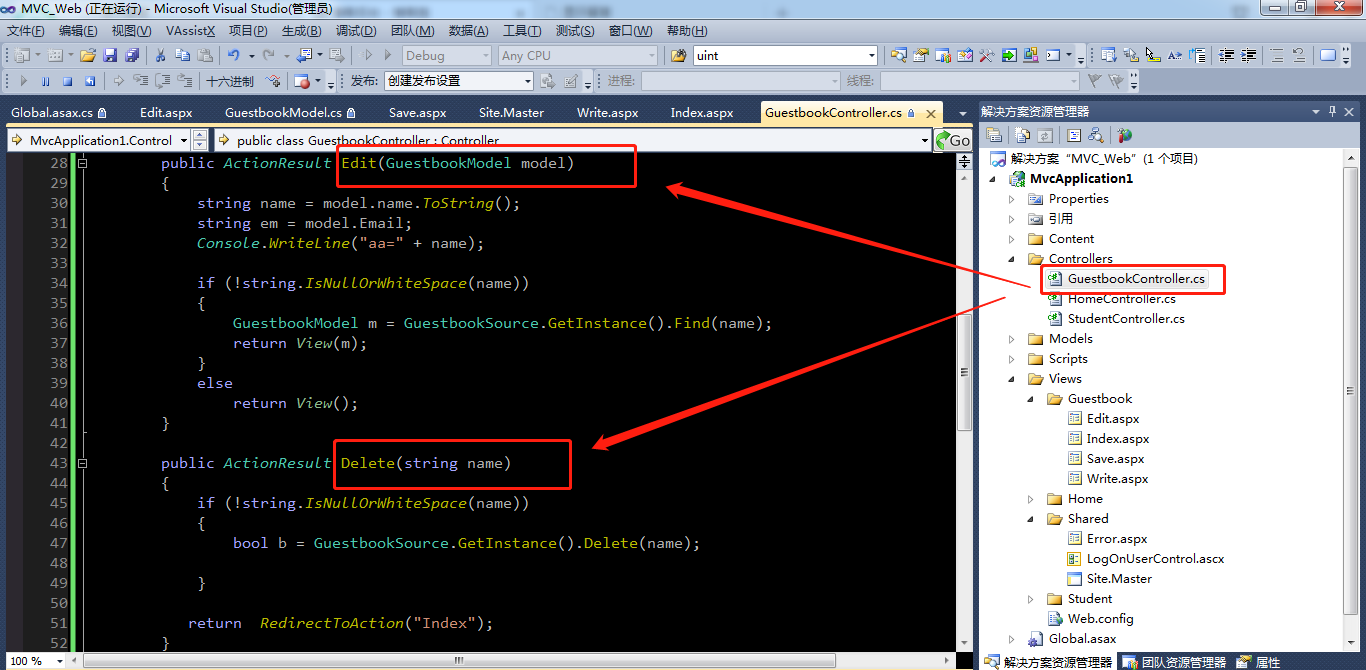
         public ActionResult Edit(GuestbookModel model)

         {

             string name = model.name.ToString();

             string em = model.Email;

             Console.WriteLine("aa=" + name);

             if (!string.IsNullOrWhiteSpace(name))

             {

                 GuestbookModel m = GuestbookSource.GetInstance().Find(name);

                 return View(m);

             }

             else

                 return View();

         }

         public ActionResult Delete(string name)

         {

             if (!string.IsNullOrWhiteSpace(name))

             {

                 bool b = GuestbookSource.GetInstance().Delete(name);

             }

            return  RedirectToAction("Index");

         }

         [HttpPost]

         public ActionResult Save(GuestbookModel model)

         {

             //ModelState.IsValid 表示验证通过。

             if (ModelState.IsValid)

             {

                 GuestbookSource.GetInstance().Add(model);

                 //执行完毕后,执行Index的方法

                 return RedirectToAction("Index");

             }

             else

                 return RedirectToAction("Write");

         }

     }

 }
Controller
3、创建View
右键Controller类中的 Index()方法,选择 添加View


添加后,在Views中增加如下视图
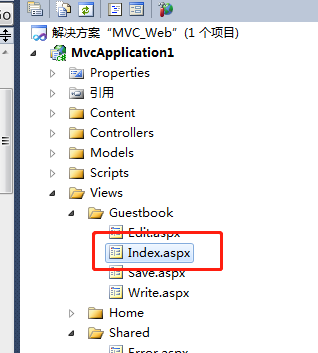
切记,方法名和View保持一致,这是最好的编程习惯
4、在View显示结果信息
 <%@ Page Title="" Language="C#" MasterPageFile="~/Views/Shared/Site.Master" Inherits="System.Web.Mvc.ViewPage<IEnumerable<MvcApplication1.Models.GuestbookModel>>" %>

 <asp:Content ID="Content1" ContentPlaceHolderID="TitleContent" runat="server">

     显示留言

 </asp:Content>

 <asp:Content ID="Content2" ContentPlaceHolderID="MainContent" runat="server">

     <h2>显示留言</h2>

     <table>

         <tr>

             <th>姓名:</th>

             <th>Email:</th>

             <th>内容:</th>

         </tr>

     <% foreach (var item in Model) { %>

         <tr>

             <td>

             <%: item.name %>

             </td>

              <td>

             <%: item.Email %>

             </td>

              <td>

             <%: item.content %>

             </td>

             <td>

                 <%: Html.ActionLink("Edit", "Edit", new MvcApplication1.Models.GuestbookModel(){ name = item.name, Email = item.Email })%> |

                 <%: Html.ActionLink("Details", "Details", new {  id=item.name })%> |

                 <%: Html.ActionLink("Delete", "Delete", new { name=item.name })%>

             </td>

         </tr>

     <% } %>

     </table>

     <p>

         <%: Html.ActionLink("留下足迹", "Write") %>

     </p>

 </asp:Content>
View显示列表

5、前端校验
在模板页中,增加javascript引用。
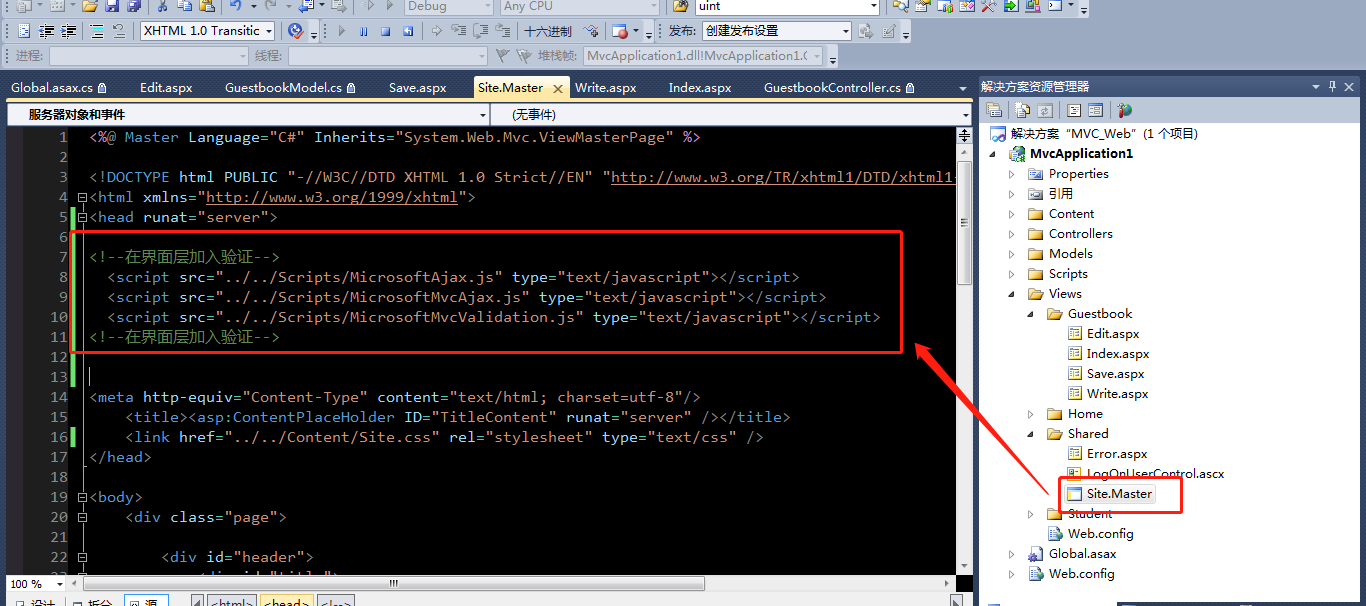
<!--在界面层加入验证-->

  <script src="../../Scripts/MicrosoftAjax.js" type="text/javascript"></script>

  <script src="../../Scripts/MicrosoftMvcAjax.js" type="text/javascript"></script>

  <script src="../../Scripts/MicrosoftMvcValidation.js" type="text/javascript"></script>

<!--在界面层加入验证-->
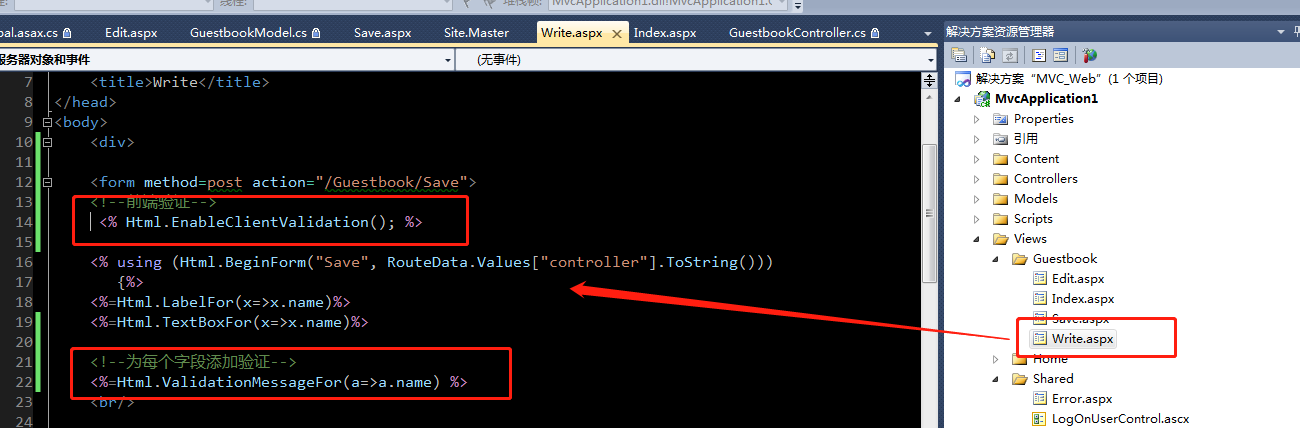
 <%@ Page Language="C#" Inherits="System.Web.Mvc.ViewPage<MvcApplication1.Models.GuestbookModel>" %>

 <!DOCTYPE html PUBLIC "-//W3C//DTD XHTML 1.0 Transitional//EN" "http://www.w3.org/TR/xhtml1/DTD/xhtml1-transitional.dtd">

 <html xmlns="http://www.w3.org/1999/xhtml" >

 <head runat="server">

     <title>Write</title>

 </head>

 <body>

     <div>

     <form method=post action="/Guestbook/Save">

     <!--前端验证-->

      <% Html.EnableClientValidation(); %>

     <% using (Html.BeginForm("Save", RouteData.Values["controller"].ToString()))

        {%>

     <%=Html.LabelFor(x=>x.name)%>

     <%=Html.TextBoxFor(x=>x.name)%>

     <!--为每个字段添加验证-->

     <%=Html.ValidationMessageFor(a=>a.name) %>

     <br/>

     <%=Html.LabelFor(x=>x.Email)%>

     <%=Html.TextBoxFor(x=>x.Email)%>

     <%=Html.ValidationMessageFor(a=>a.Email) %>

     <br/>

     <%=Html.LabelFor(x=>x.content)%>

     <%=Html.TextAreaFor(x=>x.content)%>

     <%=Html.ValidationMessageFor(a=>a.content) %>

     <br/>

     <input type=submit />

     </form>

     <% } %>

     </div>

 </body>

 </html>
Write
6、编辑
7、设置 项目首页
MVC(实战一)的更多相关文章
- iOS开发——实战篇Swift篇&UItableView结合网络请求,多线程,数据解析,MVC实战
UItableView结合网络请求,多线程,数据解析,MVC实战 学了这么久的swift都没有做过什么东西,今天就以自己的一个小小的联系,讲一下,怎么使用swift在实战中应用MVC,并且结合后面的高 ...
- AspNetCore - MVC实战系列(一)
本章开篇先简单介绍下最近两周自己利用业余时间做的一个图片收集网站,当然这个是靠用户自己上传来收集不是去抓某些个网站的图片,那样没意义,这里我取名为“爱留图”:该网站的简单介绍大家可以参考下上篇的内容爱 ...
- spring mvc 实战化项目之三板斧
laravel实战化项目之三板斧 spring mvc 实战化项目之三板斧 asp.net mvc 实战化项目之三板斧 接上文希望从一张表(tb_role_info 用户角色表)的CRUD展开spri ...
- asp.net mvc 实战化项目之三板斧
laravel实战化项目之三板斧 spring mvc 实战化项目之三板斧 asp.net mvc 实战化项目之三板斧 接上文希望从一张表(tb_role_info 用户角色表)的CRUD展开asp. ...
- MVC实战之排球计分软件(深入了解面向对象编程)
在此篇博客之前,我已经写了一个实战系列的博客,虽然不太成熟但是相对比较实用,在这篇博客我将继续使用mvc编程此软件. 此篇博客会在一定的时间内完成,此次完成的软件的一个需求是提供给运动员的使用.我将在 ...
- 《asp.net mvc实战》笔记
对于大部分复杂的项目来说,可能不会在Models文件夹中放置你的模型.一般来说,最好的方法是将你的领域模型放在独立的项目中.这样其他应用程序可以在使用该项目而不必依赖于你的MVC应用程序.我们建议你只 ...
- 【转】spring3 MVC实战,手工搭建Spring3项目demo
更新:这几天对spring3的理解又进了一步,今天抽空把这篇文章中的错误和不当之处做了修改. 最近的项目在用Spring3,涉及到了基于注解的MVC,事务管理,与hibernate的整合开发等内容,我 ...
- MVC实战之排球计分(八)——软件制作总结
此系列博客目的是制作一款排球计分程序.这系列博客将讲述此软件的 各个功能的设计与实现.到这篇博客,此系列博客就算是结束了. 在最后的这篇博客里 我们来做一些总结. 一,制作此程序,我们使用的是MVC框 ...
- MVC实战之排球计分(七)——软件的具体实现与测试
在前面的几篇博客中咱们已经写过了软件的大概实现,在这篇博客中将讲述此软件的具体实现与测试. 1,新建一个项目,命名为:Volleyball,选择基本模板.如图: 点击确定.创建项目. 2,右键单击mo ...
- MVC实战之排球计分(六)—— 使用EF框架,创建Controller,生成数据库。
在上篇博客我们写到,此软件的数据库连接我们使用的是EF框架,code first模式下, 通过模型类,在创建controller的时候直接生成数据库,完成数据库的连接,与操作. 在使用EF框架之前,我 ...
随机推荐
- 这3步简单搭建Python http服务器 你肯定不会吧?
前言 本文的文字及图片来源于网络,仅供学习.交流使用,不具有任何商业用途,版权归原作者所有,如有问题请及时联系我们以作处理. 作者:stark张宇 趁着周末的闲暇时光看看Python是什么鬼 给疲倦的 ...
- 初步了解JVM第一篇
大家都知道,Java中JVM的重要性,学习了JVM你对Java的运行机制.编译过程和如何对Java程序进行调优相信都会有一个很好的认知. 废话不多说,直接带大家来初步认识一下JVM. 什么是JVM? ...
- mongodb验证
mongodb默认是不需要用户名和密码就可以增删查改的.要设置成需要用户名和密码访问,步骤如下: 通过下面的命令启动mongodb服务器 mongod 启动之后再登录,执行下面命令: use test ...
- DWVA-关于SQL注入的漏洞详解
low等级 代码如下: <?php if( isset( $_REQUEST[ 'Submit' ] ) ) { // Get input $id = $_REQUEST[ 'id' ]; // ...
- 基于 .NET Core 的简单文件服务器
Netnr.FileServer 基于 .NET Core 的简单文件服务器,数据库为SQLite 源码 https://github.com/netnr/blog https://gitee.com ...
- 【玩转SpringBoot】翻身做主人,一统web服务器
寄人篱下的日子 一直以来受传统影响,我们的web工程总是打成war包,然后放入tomcat的webapps目录下面. 如下图01: 当tomcat启动时,会去解压war包,然后运行web工程.这大家都 ...
- Nginx优化之一
一.Nginx安全优化 1.1:隐藏nginx版本信息 官方配置参数说明:http://nginx.org/en/docs/http/ngx_http_core_module.html#server_ ...
- python连接数据库使用SQLAlchemy
参考python核心编程 ORM(Object Relational Mapper),如果你是一个更愿意操作Python对象而不是SQL查询的程序员,并且仍然希望使用关系型数据库作为你的后端,那么你可 ...
- ASP.NET CORE 使用Consul实现服务治理与健康检查(1)——概念篇
背景 笔者所在的公司正在进行微服务改造,这其中服务治理组件是必不可少的组件之一,在一番讨论之后,最终决定放弃 Zookeeper 而采用 Consul 作为服务治理框架基础组件.主要原因是 Consu ...
- Reproduction CVE_2019_0708
Xx_introduction Please protection,respect,love,"China's Internet Security Act"! For learni ...