
更改Dynamics 365 Customer Engagement本地部署的高级配置
我是微软Dynamics 365 & Power Platform方面的工程师罗勇,也是2015年7月到2018年6月连续三年Dynamics CRM/Business Solutions方面的微软最有价值专家(Microsoft MVP),欢迎关注我的微信公众号 MSFTDynamics365erLuoYong ,回复346或者20190718可方便获取本文,同时可以在第一间得到我发布的最新博文信息,follow me!
在实施项目的时候,Dynamics 365数据量比较多,展示的图表(chart)显示这个错误,
这个错误的意思就是聚合的记录超过了高级配置AggregateQueryRecordLimit字段的值,操作终止。
这个高级配置项目AggregateQueryRecordLimit在哪儿?它不像组织属性那样在组织数据库中,如 更改组织属性-以更改maxrecordsforexporttoexcel为例 ,而是在 MSCRM_CONFIG 数据库的 [dbo].[DeploymentProperties] 表中,有哪些项目呢,我这里以我自己的本地部署的Dynamics 365 Customer Engagement 版本 1612 (9.0.3.7) (DB 9.0.3.7) (本地) 为了,通过如下SQL查出来。
SELECT [ColumnName]

      ,[BigIntColumn]

      ,[IntColumn]

      ,[SmallIntColumn]

      ,[TinyIntColumn]

      ,[BitColumn]

      ,[FloatColumn]

      ,[DateTimeColumn]

      ,[SmallDateTimeColumn]

      ,[NVarCharColumn]

  FROM [MSCRM_CONFIG].[dbo].[DeploymentProperties]

  ORDER BY [ColumnName]
我这里截图出来部分结果如下:
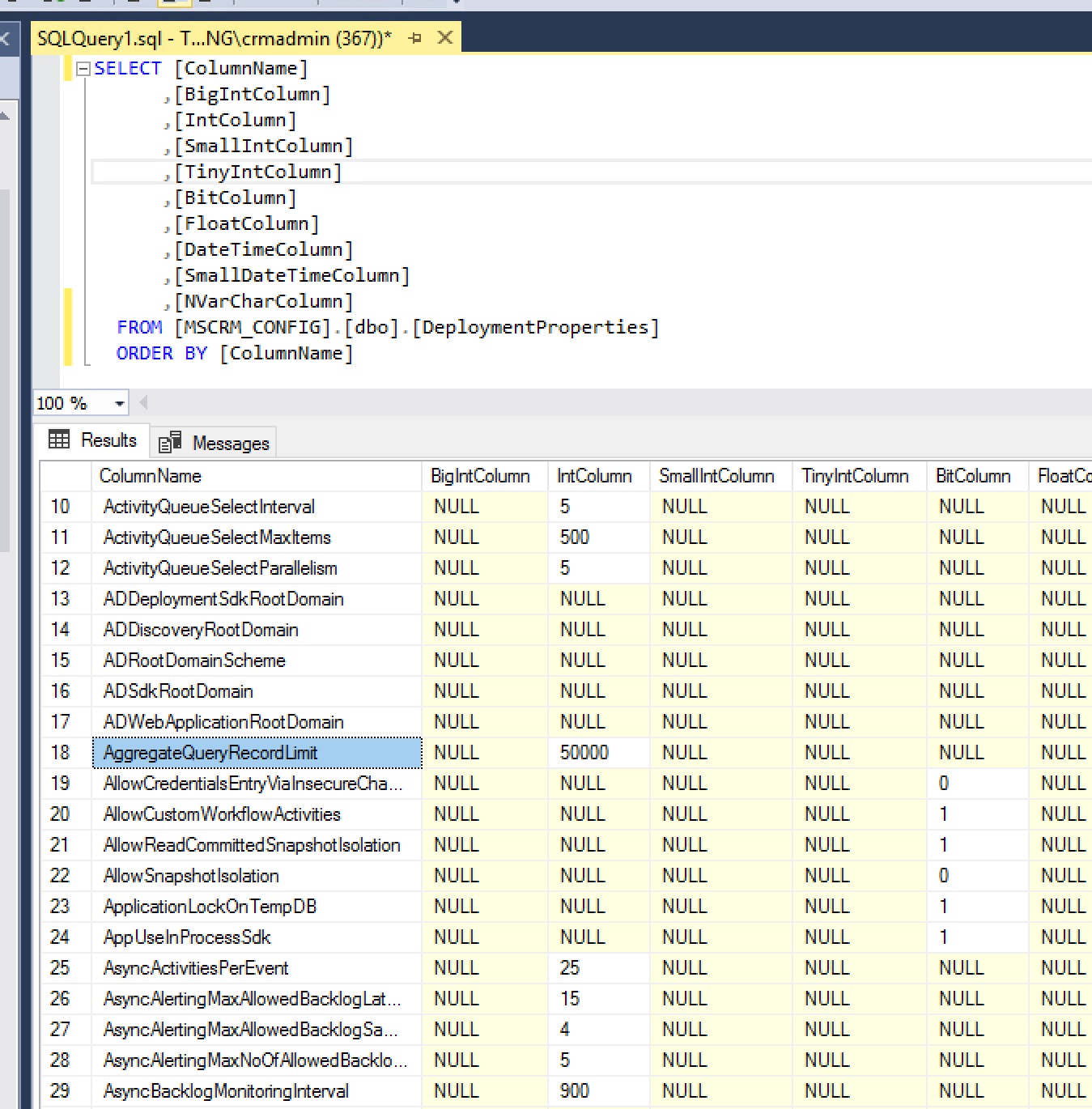
如何更改呢?根据文档 Use Advanced Configuration Settings (ConfigDB) 可以用 RetrieveAdvancedSettingsRequest 消息来查找,然后使用 UpdateAdvancedSettingsRequest 消息来更新。若是用这两个消息来处理,程序需要引用 Microsoft.CrmSdk.Deployment ,我这里亲自测试有效的代码如下:
            DeploymentServiceClient deploySvc = Microsoft.Xrm.Sdk.Deployment.Proxy.ProxyClientHelper.CreateClient(new Uri("https://demo.luoyong.me/XRMDeployment/2011/Deployment.svc"));

            deploySvc.ClientCredentials.Windows.ClientCredential = new NetworkCredential("crmadmin", "Paseewxw", "luoyong.me");

            ConfigurationEntity entity = new ConfigurationEntity();

            entity.LogicalName = "Deployment";

            entity.Attributes = new Microsoft.Xrm.Sdk.Deployment.AttributeCollection();

            entity.Attributes.Add(new KeyValuePair<string, object>("AggregateQueryRecordLimit", ));

            UpdateAdvancedSettingsRequest request = new UpdateAdvancedSettingsRequest();

            request.Entity = entity;

            deploySvc.Execute(request);
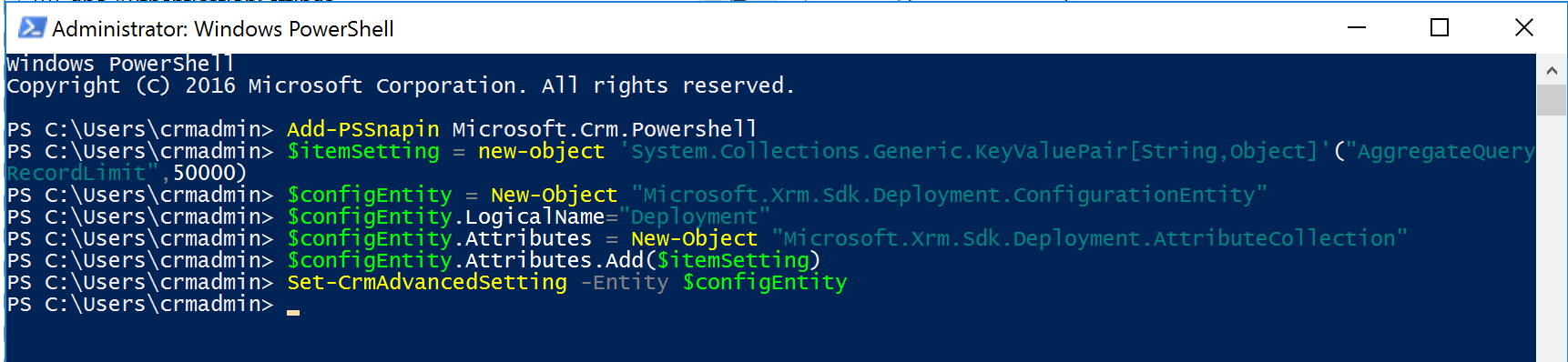
更方便的是使用PowerShell命令来更新,我这里根据 Simon Jenkinson 的文章 Microsoft Dynamics CRM 2013 Change Deployment Settings via PowerShell 稍作更改可以使用如下代码:
$itemSetting = new-object 'System.Collections.Generic.KeyValuePair[String,Object]'("AggregateQueryRecordLimit",50000)

$configEntity = New-Object "Microsoft.Xrm.Sdk.Deployment.ConfigurationEntity"

$configEntity.LogicalName="Deployment"

$configEntity.Attributes = New-Object "Microsoft.Xrm.Sdk.Deployment.AttributeCollection"

$configEntity.Attributes.Add($itemSetting)

Set-CrmAdvancedSetting -Entity $configEntity
最后一个方法不推荐使用,但是也可行,就是用SQL来更新,记得更新后需要对CRM的Web 站点对应的应用程序池执行Recycle,当然也可以用执行 IISRESET代替Recycle。
  UPDATE [MSCRM_CONFIG].[dbo].[DeploymentProperties]

  SET IntColumn = 50000

  where ColumnName = 'AggregateQueryRecordLimit'
更改Dynamics 365 Customer Engagement本地部署的高级配置的更多相关文章
- 利用Azure虚拟机安装Dynamics 365 Customer Engagement之五:安装SQL Server
我是微软Dynamics 365 & Power Platform方面的工程师罗勇,也是2015年7月到2018年6月连续三年Dynamics CRM/Business Solutions方面 ...
- Dynamics 365 Customer Engagement中插件的调试
微软动态CRM专家罗勇 ,回复319或者20190319可方便获取本文,同时可以在第一间得到我发布的最新博文信息,follow me!我的网站是 www.luoyong.me . 本文主要根据官方的教 ...
- Dynamics 365 Customer Engagement安装FAQ
微软动态CRM专家罗勇 ,回复310或者20190308可方便获取本文,同时可以在第一间得到我发布的最新博文信息,follow me!我的网站是 www.luoyong.me . 本文参考了包括但不限 ...
- Dynamics 365 Customer Engagement的标准导入不支持并行导入了吗?
我是微软Dynamics 365 & Power Platform方面的工程师罗勇,也是2015年7月到2018年6月连续三年Dynamics CRM/Business Solutions方面 ...
- 配置基于服务器认证的Dynamics 365 Customer Engagement和SharePoint Online集成
我是微软Dynamics 365 & Power Platform方面的工程师罗勇,也是2015年7月到2018年6月连续三年Dynamics CRM/Business Solutions方面 ...
- Dynamics 365 Customer Engagement V9.X新引入的自动编号属性介绍
我是微软Dynamics 365 & Power Platform方面的工程师罗勇,也是2015年7月到2018年6月连续三年Dynamics CRM/Business Solutions方面 ...
- 利用Azure虚拟机安装Dynamics 365 Customer Engagement之四:组织单位服务安装账号设置
我是微软Dynamics 365 & Power Platform方面的工程师罗勇,也是2015年7月到2018年6月连续三年Dynamics CRM/Business Solutions方面 ...
- 利用Azure虚拟机安装Dynamics 365 Customer Engagement之二:创建域控虚拟机
我是微软Dynamics 365 & Power Platform方面的工程师罗勇,也是2015年7月到2018年6月连续三年Dynamics CRM/Business Solutions方面 ...
- 利用Azure虚拟机安装Dynamics 365 Customer Engagement之一:准备工作
我是微软Dynamics 365 & Power Platform方面的工程师罗勇,也是2015年7月到2018年6月连续三年Dynamics CRM/Business Solutions方面 ...
随机推荐
- [NACOS HTTP-GET] The maximum number of tolerable server reconnection errors has been reached
错误的意思是:已达到可容忍的服务器重连接错误的最大数目.有两个解决思路:一个将这个值设置的更大:然后是排查自己连接服务哪儿出了问题.先说在哪儿设置这个值:在拉取nacos服务的注解配置中,添加一个属性 ...
- ubuntu下仅仅获取网卡一的ip地址 && shell中字符串拼接
问题描述: ubuntu下仅仅获取网卡一的ip地址 问题背景: eth0,eth1,eth2……代表网卡一,网卡二,网卡三…… lo代表127.0.0.1,即localhost | 问题描述: 已知字 ...
- .NETCore 访问国产达梦数据库
前言 武汉达梦数据库有限公司成立于2000年,为中国电子信息产业集团(CEC)旗下基础软件企业,专业从事数据库管理系统的研发.销售与服务,同时可为用户提供大数据平台架构咨询.数据技术方案规划.产品部署 ...
- js练习-两个栈实现队列
目录 题 解 题 现在有个Q队列和栈A,栈B,栈只有两个方法,push()和pop(), 队列也只有两个方法,push()和pull(),队列的进和出都只能通过A和B的push和pop实现. // 大 ...
- POJ1458 Subsquence
A subsequence of a given sequence is the given sequence with some elements (possible none) left out. ...
- UVA-10391 Compoud Words
You are to find all the two-word compound words in a dictionary. A two-word compound word is a word ...
- io流函数略解(java_input流)[二]
背景 在写这篇随笔之前,已经写了io流函数略解(java_File)(一),主要是总结了File的一些操作,以及一些源码介绍. 在Io实际应用中,实际上运用在如果会操作File,实际上很难写出一点能实 ...
- 可扩展的Java线程池执行器
分享一下最近优锐课学习笔记. Java线程池执行程序偏向于排队而不是产生新线程.从好的方面来说,我们有两种解决方法. 理想情况下,对任何线程池执行程序而言,期望如下: 预先创建了一组初始线程(核心线程 ...
- 【JS】374- 重学 this 关键字
为什么要学习this关键字 1. 面试会问啊!总有一些面试官喜欢问你一段不可能这么写的代码.看一道经典且古老的面试题(学完本文后,文末会有一道更复杂的面试题等着你哦!) 代码如下: let a = 5 ...
- 【Taro】363- 玩转 Taro 跨端之 flex 布局篇
Taro 是一套遵循 React 语法规范的跨平台开发解决方案,但是目前当我们使用 Taro 的时候,在不同平台上的开发体验还有不一致的地方,所以我们也都期待有一套跨平台统一的解决方案,能够以最小差异 ...