
使用POI导出百万级数据到excel的解决方案
1.HSSFWorkbook 和SXSSFWorkbook区别
HSSFWorkbook:是操作Excel2003以前(包括2003)的版本,扩展名是.xls,一张表最大支持65536行数据,256列,也就是说一个sheet页,最多导出6w多条数据
XSSFWorkbook:是操作Excel2007-2010的版本,扩展名是.xlsx对于不同版本的EXCEL文档要使用不同的工具类,如果使用错了,
会提示如下错误信息。
org.apache.poi.openxml4j.exceptions.InvalidOperationException
org.apache.poi.poifs.filesystem.OfficeXmlFileException
它的一张表最大支持1048576行,16384列,关于两者介绍,对下面导出百万数据很重要,不要使用错了!
2.使用SXSSFWorkbook对象,导出百万数据
SXSSFWorkbook使用方法和 HSSFWorkbook差不多,如果你之前和我一样用的HSSFWorkbook,现在想要修改,则只需要将HSSFWorkbook改成SXSSFWorkbook即可,下面有我介绍,具体使用也可参考API。
因项目业务,需要导出百万级数据到excel,在研究了各种方案后,最终确定了用POI的SXSSFWorkbook。
SXSSFWorkbook是POI3.8以上新增的,excel2007后每个sheet支持104万行数据。
3.如何将百万数据分成多个sheet页,导出到excel
导出百万数据到excel,很简单,只需要将原来的HSSFWorkbook修改成SXSSFWorkbook,或者直接使用SXSSFWorkbook对象,它是直接用来导出大数据用的,官方文档有介绍,但是如果有300w条数据,一下导入一个excel的sheet页中,想想打开excel也需要一段时间吧,慢的话有可能导致程序无法加载,或者直接结束进程的情况发生
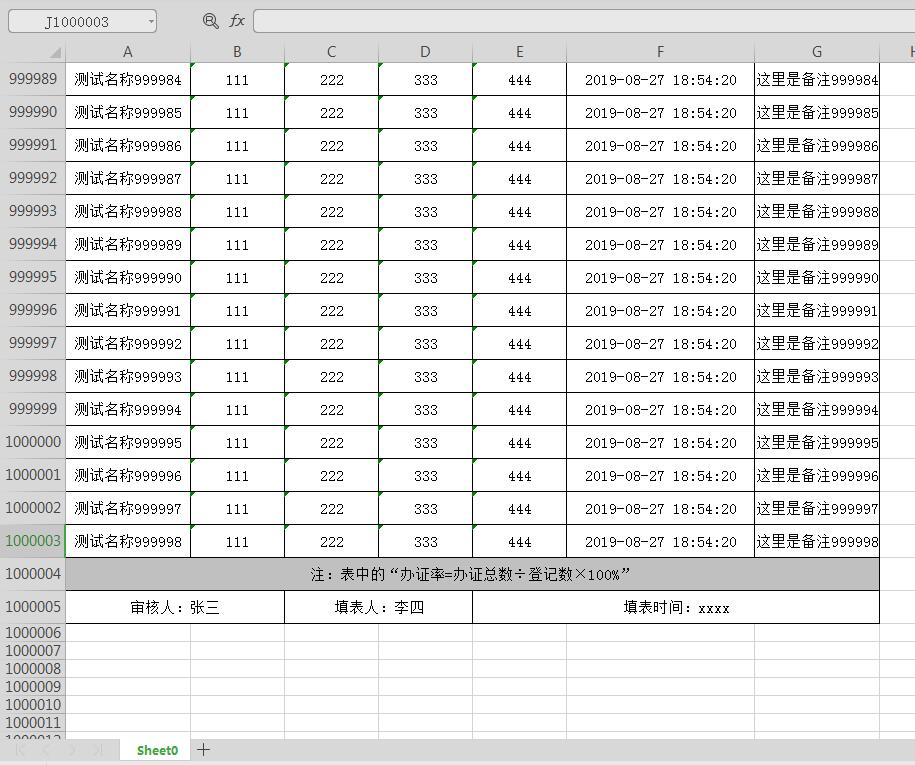
4.先看导出后的效果
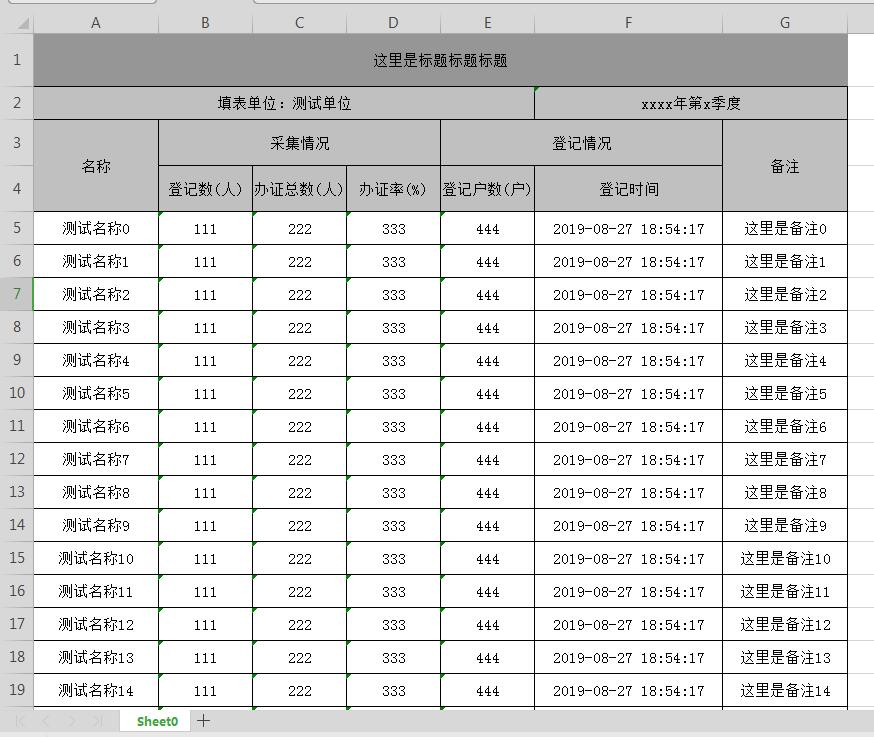
由于百万数据太长了,这里只截取尾部效果图
5.下面是Java代码部分
/**

     * 使用 SXSSFWorkbook 对象实现excel导出

     * (一般是导出百万级数据的excel)

     */

    public void exportBigDataExcel() {

        long  startTime = System.currentTimeMillis();    //开始时间

        System.out.println("start execute time: " + startTime);

        // 1.创建工作簿

        // 阈值,内存中的对象数量最大值,超过这个值会生成一个临时文件存放到硬盘中

        SXSSFWorkbook wb = new SXSSFWorkbook(1000);

        //2.在Workbook中添加一个sheet,对应Excel文件中的sheet

        Sheet sheet = wb.createSheet();

        //3.设置样式以及字体样式

        CellStyle titleCellStyle = createTitleCellStyle(wb);

        CellStyle headCellStyle = createHeadCellStyle(wb);

        CellStyle cellStyle = createCellStyle(wb);

        //4.创建标题、表头,内容和合并单元格等操作

        int rowNum = 0;// 行号

        // 创建第一行,索引从0开始

        Row row0 = sheet.createRow(rowNum++);

        row0.setHeight((short) 800);// 设置行高

        String title = "这里是标题标题标题";

        Cell c00 = row0.createCell(0);

        c00.setCellValue(title);

        c00.setCellStyle(titleCellStyle);

        // 合并单元格,参数依次为起始行,结束行,起始列,结束列 (索引0开始)

        sheet.addMergedRegion(new CellRangeAddress(0, 0, 0, 6));//标题合并单元格操作,6为总列数

        // 第二行

        Row row1 = sheet.createRow(rowNum++);

        row1.setHeight((short) 500);

        String[] row_first = {"填表单位:", "", "", "", "", " xxxx年第x季度 ", ""};

        for (int i = 0; i < row_first.length; i++) {

            Cell tempCell = row1.createCell(i);

            tempCell.setCellStyle(headCellStyle);

            if (i == 0) {

                tempCell.setCellValue(row_first[i] + "测试单位");

            } else if (i == 5) {

                tempCell.setCellStyle(headCellStyle);

                tempCell.setCellValue(row_first[i]);

            } else {

                tempCell.setCellValue(row_first[i]);

            }

        }

        // 合并

        sheet.addMergedRegion(new CellRangeAddress(1, 1, 0, 4));

        sheet.addMergedRegion(new CellRangeAddress(1, 1, 5, 6));

        //第三行

        Row row2 = sheet.createRow(rowNum++);

        row2.setHeight((short) 700);

        String[] row_second = {"名称", "采集情况", "", "", "登记情况", "", "备注"};

        for (int i = 0; i < row_second.length; i++) {

            Cell tempCell = row2.createCell(i);

            tempCell.setCellValue(row_second[i]);

            tempCell.setCellStyle(headCellStyle);

        }

        // 合并

        sheet.addMergedRegion(new CellRangeAddress(2, 3, 0, 0));//名称

        sheet.addMergedRegion(new CellRangeAddress(2, 2, 1, 3));//人数情况

        sheet.addMergedRegion(new CellRangeAddress(2, 2, 4, 5));//登记情况

        sheet.addMergedRegion(new CellRangeAddress(2, 3, 6, 6));//备注

        //第三行

        Row row3 = sheet.createRow(rowNum++);

        row3.setHeight((short) 700);

        String[] row_third = {"", "登记数(人)", "办证总数(人)", "办证率(%)", "登记户数(户)", "登记时间", ""};

        for (int i = 0; i < row_third.length; i++) {

            Cell tempCell = row3.createCell(i);

            tempCell.setCellValue(row_third[i]);

            tempCell.setCellStyle(headCellStyle);

        }

        // 数据处理(创建100万条测试数据)

        List<Map<String, Object>> dataList = new ArrayList<Map<String, Object>>();

        for (int i = 0; i < 999999; i++) {

            Map<String,Object> map = new HashMap<String,Object>();

            map.put("name", "测试名称" + i);

            map.put("r1", "111");

            map.put("r2", "222");

            map.put("r3", "333");

            map.put("r4", "444");

            map.put("addTime", new DateTime());

            map.put("r6", "这里是备注"+i);

            dataList.add(map);

        }

        for (Map<String, Object> excelData : dataList) {

            Row tempRow = sheet.createRow(rowNum++);

            tempRow.setHeight((short) 500);

            // 循环单元格填入数据

            for (int j = 0; j < 7; j++) {

                Cell tempCell = tempRow.createCell(j);

                tempCell.setCellStyle(cellStyle);

                String tempValue;

                if (j == 0) {

                    // 乡镇、街道名称

                    tempValue = excelData.get("name").toString();

                } else if (j == 1) {

                    // 登记数(人)

                    tempValue = excelData.get("r1").toString();

                } else if (j == 2) {

                    // 办证总数(人)

                    tempValue = excelData.get("r2").toString();

                } else if (j == 3) {

                    // 办证率(%)

                    tempValue = excelData.get("r3").toString();

                } else if (j == 4) {

                    // 登记户数(户)

                    tempValue = excelData.get("r4").toString();

                } else if (j == 5) {

                    // 登记日期

                    tempValue = excelData.get("addTime").toString();

                } else {

                    // 备注

                    tempValue = excelData.get("r6").toString();

                }

                tempCell.setCellValue(tempValue);

//                sheet.autoSizeColumn(j);// 根据内容自动调整列宽,

            }

        }

        //设置列宽,必须在单元格设值以后进行

        sheet.setColumnWidth(0, 4000);//名称

        sheet.setColumnWidth(1, 3000);//登记数(人)

        sheet.setColumnWidth(2, 3000);//办证总数(人)

        sheet.setColumnWidth(3, 3000);//办证率(%)

        sheet.setColumnWidth(4, 3000);//登记户数(户)

        sheet.setColumnWidth(5, 6000);//登记时间

        sheet.setColumnWidth(6, 4000);//备注

        // 注释行

        Row remark = sheet.createRow(rowNum++);

        remark.setHeight((short) 500);

        String[] row_remark = {"注:表中的“办证率=办证总数÷登记数×100%”", "", "", "", "", "", ""};

        for (int i = 0; i < row_remark.length; i++) {

            Cell tempCell = remark.createCell(i);

            if (i == 0) {

                tempCell.setCellStyle(headCellStyle);

            } else {

                tempCell.setCellStyle(cellStyle);

            }

            tempCell.setCellValue(row_remark[i]);

        }

        int remarkRowNum = dataList.size() + 4;

        sheet.addMergedRegion(new CellRangeAddress(remarkRowNum, remarkRowNum, 0, 6));//注释行合并单元格

        // 尾行

        Row foot = sheet.createRow(rowNum++);

        foot.setHeight((short) 500);

        String[] row_foot = {"审核人:", "", "填表人:", "", "填表时间:", "", ""};

        for (int i = 0; i < row_foot.length; i++) {

            Cell tempCell = foot.createCell(i);

            tempCell.setCellStyle(cellStyle);

            if (i == 0) {

                tempCell.setCellValue(row_foot[i] + "张三");

            } else if (i == 2) {

                tempCell.setCellValue(row_foot[i] + "李四");

            } else if (i == 4) {

                tempCell.setCellValue(row_foot[i] + "xxxx");

            } else {

                tempCell.setCellValue(row_foot[i]);

            }

        }

        int footRowNum = dataList.size() + 5;

        // 注

        sheet.addMergedRegion(new CellRangeAddress(footRowNum, footRowNum, 0, 1));

        sheet.addMergedRegion(new CellRangeAddress(footRowNum, footRowNum, 2, 3));

        sheet.addMergedRegion(new CellRangeAddress(footRowNum, footRowNum, 4, 6));

        long finishedTime = System.currentTimeMillis();    //处理完成时间

        System.out.println("finished execute  time: " + (finishedTime - startTime)/1000 + "m");

        //导出

        HttpServletResponse response = this.getResponse();

        String fileName = "报表文件名称.xlsx";

        try {

            fileName = new String(fileName.getBytes("UTF-8"), "ISO-8859-1");

            response.setHeader("Content-disposition", "attachment;filename=\"" + fileName + "\"");

            OutputStream stream = response.getOutputStream();

            if (null != wb && null != stream) {

                wb.write(stream);// 将数据写出去

                wb.close();

                stream.close();

                long stopTime = System.currentTimeMillis();        //写文件时间

                System.out.println("write xlsx file time: " + (stopTime - startTime)/1000 + "m");

            }

        } catch (Exception e) {

            e.printStackTrace();

        }

    }
CellStyle标题,表头,内容样式代码:
private static CellStyle createTitleCellStyle(Workbook workbook) {

        CellStyle cellStyle = workbook.createCellStyle();

        cellStyle.setAlignment(HorizontalAlignment.CENTER);

        cellStyle.setVerticalAlignment(VerticalAlignment.CENTER);

        cellStyle.setBorderBottom(BorderStyle.THIN);

        cellStyle.setBottomBorderColor(IndexedColors.BLACK.index);

        cellStyle.setBorderLeft(BorderStyle.THIN);

        cellStyle.setLeftBorderColor(IndexedColors.BLACK.index);

        cellStyle.setBorderRight(BorderStyle.THIN);

        cellStyle.setRightBorderColor(IndexedColors.BLACK.index);

        cellStyle.setBorderTop(BorderStyle.THIN);

        cellStyle.setTopBorderColor(IndexedColors.BLACK.index);

        cellStyle.setFillForegroundColor(IndexedColors.GREY_40_PERCENT.index);

        cellStyle.setFillPattern(FillPatternType.SOLID_FOREGROUND);

        return cellStyle;

    }
private static CellStyle createHeadCellStyle(Workbook workbook) {

        CellStyle cellStyle = workbook.createCellStyle();

        cellStyle.setAlignment(HorizontalAlignment.CENTER);

        cellStyle.setVerticalAlignment(VerticalAlignment.CENTER);

        cellStyle.setBorderBottom(BorderStyle.THIN);

        cellStyle.setBottomBorderColor(IndexedColors.BLACK.index);

        cellStyle.setBorderLeft(BorderStyle.THIN);

        cellStyle.setLeftBorderColor(IndexedColors.BLACK.index);

        cellStyle.setBorderRight(BorderStyle.THIN);

        cellStyle.setRightBorderColor(IndexedColors.BLACK.index);

        cellStyle.setBorderTop(BorderStyle.THIN);

        cellStyle.setTopBorderColor(IndexedColors.BLACK.index);

        cellStyle.setFillForegroundColor(IndexedColors.GREY_25_PERCENT.index);

        cellStyle.setFillPattern(FillPatternType.SOLID_FOREGROUND);

        return cellStyle;

    }
    private static CellStyle createCellStyle(Workbook workbook) {

        CellStyle cellStyle = workbook.createCellStyle();

        cellStyle.setAlignment(HorizontalAlignment.CENTER);

        cellStyle.setVerticalAlignment(VerticalAlignment.CENTER);

        cellStyle.setBorderBottom(BorderStyle.THIN);

        cellStyle.setBottomBorderColor(IndexedColors.BLACK.index);

        cellStyle.setBorderLeft(BorderStyle.THIN);

        cellStyle.setLeftBorderColor(IndexedColors.BLACK.index);

        cellStyle.setBorderRight(BorderStyle.THIN);

        cellStyle.setRightBorderColor(IndexedColors.BLACK.index);

        cellStyle.setBorderTop(BorderStyle.THIN);

        cellStyle.setTopBorderColor(IndexedColors.BLACK.index);

        return cellStyle;

    }
完毕!good luck!
使用POI导出百万级数据到excel的解决方案的更多相关文章
- java 分页导出百万级数据到excel
最近修改了一个导出员工培训课程的历史记录(一年数据),导出功能本来就有的,不过前台做了时间限制(只能选择一个月时间内的),还有一些必选条件, 导出的数据非常有局限性.心想:为什么要做出这么多条件限制呢 ...
- java 使用POI导出百万级数据
先看结果吧,这只是测试其中有很多因数影响了性能. 表总数为:7千多万,测试导出100万 表字段有17个字段 最终excel大小有60多兆 总耗时:126165毫秒 差不多2分多钟 其核心简单来说就是分 ...
- 问问题_Java一次导出百万条数据生成excel(web操作)
需求:在web页面操作,一次导出百万条数据并生成excel 分析: 1.异步生成Excel,非实时,完成后使用某种方式通知用户 2.生成多个excel文件,并打包成zip文件,因为一个excel容纳不 ...
- php - 从数据库导出百万级数据(CSV文件)
将数据库连接信息.查询条件.标题信息替换为真实数据即可使用. <?php set_time_limit(0); ini_set('memory_limit', '128M'); $fileNam ...
- php 连接oracle 导出百万级数据
1,我们一般做导出的思路就是,根据我们想要的数据,全部查询出来,然后导出来,这个对数据量很大的时候会很慢,这里我提出来的思想就是分页和缓冲实现动态输出. 2.普通的我就不说了,下面我说一下分页和内存刷 ...
- JAVA使用POI如何导出百万级别数据(转)
https://blog.csdn.net/happyljw/article/details/52809244 用过POI的人都知道,在POI以前的版本中并不支持大数据量的处理,如果数据量过多还会 ...
- JAVA使用POI如何导出百万级别数据
用过POI的人都知道,在POI以前的版本中并不支持大数据量的处理,如果数据量过多还会常报OOM错误,这时候调整JVM的配置参数也不是一个好对策(注:jdk在32位系统中支持的内存不能超过2个G,而在6 ...
- JAVA使用POI如何导出百万级别数据(转载)
用过POI的人都知道,在POI以前的版本中并不支持大数据量的处理,如果数据量过多还会常报OOM错误,这时候调整JVM的配置参数也不是一个好对策(注:jdk在32位系统中支持的内存不能超过2个G,而在6 ...
- MYSQL百万级数据,如何优化
MYSQL百万级数据,如何优化 首先,数据量大的时候,应尽量避免全表扫描,应考虑在 where 及 order by 涉及的列上建立索引,建索引可以大大加快数据的检索速度.但是,有些情况索引是 ...
随机推荐
- luogu P1901 发射站
题目描述 某地有 N 个能量发射站排成一行,每个发射站 i 都有不相同的高度 Hi,并能向两边(当 然两端的只能向一边)同时发射能量值为 Vi 的能量,并且发出的能量只被两边最近的且比 它高的发射站接 ...
- 数据挖掘算法(三)--logistic回归
数据挖掘算法学习笔记汇总 数据挖掘算法(一)–K近邻算法 (KNN) 数据挖掘算法(二)–决策树 数据挖掘算法(三)–logistic回归 在介绍logistic回归之前先复习几个基础知识点,有助于后 ...
- 数据库MySQL的安装与卸载
安装 MySQL 卸载 MySQL: 停止 MySQL 服务 开始-->所有应用-->Windows 管理工具-->服务,将 MySQL 服务停止. 卸载 mysql server ...
- ZOJ 2112 Dynamic Rankings(树状数组+主席树)
The Company Dynamic Rankings has developed a new kind of computer that is no longer satisfied with t ...
- django上传并显示图片
环境 python 3.5 django 1.10.6 步骤 创建名为 testupload的项目 django-admin startproject testupload 在项目testupload ...
- Orleans在.net core的开发
Goods 服务 启动 using System; using System.Collections.Generic; using System.Linq; using System.Net; usi ...
- 测底稳定NIOS开发之一:将nios产生的编程文件转换成jic (连载)
将nios产生的编程文件转换成jic 前言: 基于某种原因,自从开始fpga开发和nios项目开发中,均为正常使用EDS IDE自带的flash programmer 进行成功的下载固化epcs程序. ...
- scikit-learn与数据预处理
.caret, .dropup > .btn > .caret { border-top-color: #000 !important; } .label { border: 1px so ...
- vue 点击修改样式
1.页面加载默认一个初始的isact,让第二个div.f具有一个on的类:在点击的时候,传入一个值给data.isact <template> <nav class="cl ...
- CentOS 7.4搭建LAMP,LAMP:Linux、Apache、MySQL、PHP
CentOS 7.4搭建LAMP,LAMP:Linux.Apache.MySQL.PHP. 目录: 第一部分 准备工作 第二部分 安装Apache服务 第三部分 安装MySQL服务 第四部分 搭建PH ...